 |
 A quick look at the HB-1A QRP transceiver
 23 December 2010 | by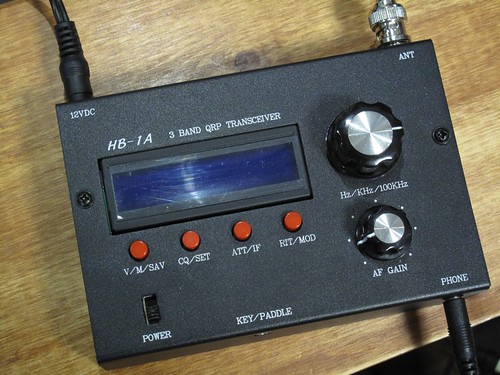
Last Summer Gerry, VA3GLT, and myself attended the first Maplecon QRP convention. At this event Gerry was lucky enough to win one of two HB-1A transceivers that had been kindly donated to the event by Youkits who were in attendance.
Gerry received the transceiver in the post and I recently got to see the rig when he can around to my shack with it. We connected it up and I had a quick investigation of its capabilities.
This is a small form QRP transceiver of the field portable type like the Elecraft KX1, Hendricks PFR 3, the ATS series by KD1JV and the new dual band Ten Tec QRP rigs (which are effectively the same as the HB-1A but only offer 2 bands). The HB-1A covers the 40m, 30m and 20m bands and although it is a CW only rig it does allow listening to SSB. We powered Gerry’s radio from my 13.8V power supply and measure 5W output on 40m and 30m and about 3.75W on 20m. The receive seemed sensitive and comparable to the KX1 and when the audio was routed through some powered computer speakers (there is ony a headphone jack, no speaker in the radio) the audio was good to listen to. The CW filter bandwidth was adjustable from 900Hz to 400Hz.
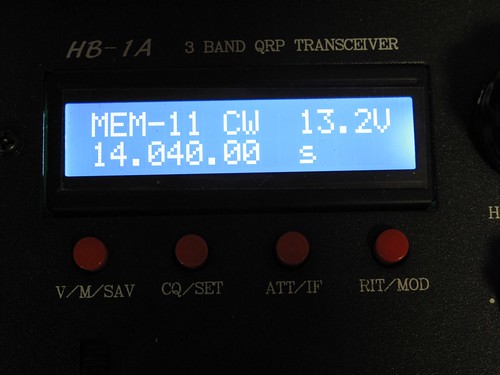
The display was very nice, being a blue LCD as the photograph below shows. The main tuning dial had a positive ‘click’ as it was turned.
This certainly is not intended to be a review, but I was pleased with what I saw of the performance of the HB-1A and I know Gerry is very happy with it. It is a good addition to the ultra-portable group of transceivers that are out there on the market and worthy of consideration.
I did not make an audio recording when looking at the HB-1A but below is a video showing the performance by JE1TRV. If you watch carefully you will see him adjust the filter bandwidth.
If you want to listen to my recorded interview with Yimin, the founder of Youkits then go to this post.


Alan Steele, VA3STL, is a regular contributor to AmateurRadio.com and writes from Ottawa, Ontario. Contact him at [email protected].
Installing APRSISCE/32
I have just added a new article, Installing APRSISCE/32, to my website G4ILO’s Shack. It is a pictorial tutorial showing how to install the APRS client written by KJ4ERJ and get it running.
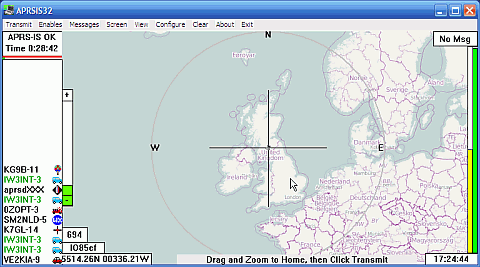
Over the next couple of months I hope to add several more tutorials covering different aspects of using the program and connecting it to a radio, in the hope that they will encourage more people to get on to APRS or at least use the information that it can provide.

Julian Moss, G4ILO, is a regular contributor to AmateurRadio.com and writes from Cumbria, England. Contact him at [email protected].
Seasonal greetings


Julian Moss, G4ILO, is a regular contributor to AmateurRadio.com and writes from Cumbria, England. Contact him at [email protected].
Handiham World for 22 December 2010
Welcome to Handiham World!
As we cruise into the final weeks of the year, we need to remind our readers & listeners that we survive only because of your generosity. Non-profit programs like Handihams look for a significant part of our support at year’s end. I hope you will take a few minutes to find the return envelope in your Handiham World print edition and help us out with anything you can. If you don’t have an envelope, you can call Nancy at 1-866-426-3442 to donate by credit card, or choose the donate online option at Courage Center’s website. The instructions on how to designate your gift specifically to the Handiham program or donate by mail are in your weekly e-letter and on the Handiham website.
Thank you for your support!
Ah, yes. Computers. We love them and we hate them. The ham shack computer is so full of promise; it can do logging, rig control, callsign look up, digital modes, QSL cards, EchoLink, remote base operation, and then switch gears and become the family’s web browser and email hub. It may even turn into a gaming console when it is not running the ham station.
That’s when everything is working, of course. As computer users, we have all experienced the frustration of a locked-up machine, an unresponsive application, or a blue screen of death or its equivalent. You Mac and Linux users out there have had similar problems, so don’t sit there smirking!
Today’s topic is computers, mostly as related to ham radio, of course. We’ll have a few of the usual weekly features as well.
Patrick Tice, WA0TDA
Handiham System Manager
[email protected]

Multitasking – How much is okay?
We have all heard the term “multitasking”, which seems to be in the popular media spotlight these days. When you multitask, you supposedly do several things at once. Multitasking is supposed to save time and make you more efficient. This is not always the case, as has been often-noted when people who are supposed to be paying attention to a critical task like driving a car are also trying to put on lipstick, send a text message on a cell phone, or (for that matter) find a frequency on their amateur radio transceiver. The results can be disastrous!
On the other hand, sometimes multitasking makes sense. When I am out taking a brisk walk in the park for my daily exercise, I can also take the dog along so that he gets his walk. In addition, I can take along an iPod and listen to the ARRL Audio News and Amateur Radio NEWSLINE. This kind of multitasking works well because the resources demanded for each task do not overlap too much. For example, I don’t need to use a lot of brain power to put one foot in front of the other while taking a walk in the park. Instead, that brain power can be used to think about what I am hearing about amateur radio news on the iPod. Occasionally, the dog will need to stop and a small amount of brainpower will be redirected to that interruption. The important thing to remember about multitasking is that each task will require specific resources. Sometimes the resources needed for one task will be the same ones needed for a second task, so it will be necessary to use the resources first for task one then for task two, perhaps switching back and forth between the two different tasks as a way of sharing resources.
Computers work the same way. In a single-processor computer, even though you may be performing multiple tasks, the processor is really only doing one thing at a time. Sharing the resource of processor power can be done by switching between tasks rapidly so that it seems as if the computer really is multitasking. Some computers have multiple core processors, which allows them to run parallel processes for true multitasking. What I am getting to with this talk about multitasking is that it is possible for us to ask too much of our personal computers. You may have found out (as I have) that some software programs simply don’t play well with others. You may find yourself having to close one software program before you can use another one. Hardware resources in any single computer are limited as well. If you are using your personal computer for rig control, you are probably tying up a serial port. If you are using your computer for EchoLink operation, you are tying up soundcard resources. You may find it difficult to switch between EchoLink operation and voice dictation using the same soundcard. After using one sound-enabled application, you may find out that the level settings for the next sound application you want to use are completely off base, requiring you to make a trip to the Windows mixer to reset everything. If the ham shack computer is also the family computer, you may run into the problem of who gets to use the computer when you want to get on the air.
The personal computer is really good at multitasking, but there may come a time when you have to decide to set up a dedicated ham shack machine. The advantages are many and include not having to draw straws to see who gets the computer during the big contest weekend, having only ham radio related software that you really need installed on the ham shack machine, and the ability to dedicate hardware settings and connections to ham radio rig control and VoIP applications like EchoLink. You can even set your web browser settings so that frequently used ham radio websites come up right away in tabs. There is also great advantage in returning to the ham shack, sitting down, and finding the computer in more or less the same state that you left it in the last time you used it. Yes, you are still asking the ham shack computer to be a multitasker of sorts but instead of having to do everything that the entire family might demand of it, your ham shack computer can now do targeted multitasking related to amateur radio use and applications. With the price of personal computers falling, it seems reasonable to go the route of a dedicated computer for your ham radio hobby.
“That is all well and good”, you say, “but even my ham shack computer doesn’t seem to have enough hardware resources like sound card inputs to handle all of the different amateur radio applications.”
Ah, yes. That is a common complaint. These days it is not unusual for the ham shack computer to be used in digital modes operation, EchoLink, and remote base operation using Skype. How are all of these sound applications supposed to work on a single machine?
One solution is to add USB sound devices. Each USB sound device functions independently from the computer’s internal sound card circuitry. For example, if you use the computer’s existing sound card for PSK-31 operation, you may find it more convenient to have a USB headset microphone for use with EchoLink. Since each functions independently, the mixer settings should remain at their proper settings once set up for each application. You can buy USB headsets for as little as $30 on sale, and you can get a pretty good one any time for under $60. The time saved in not having to fiddle around with mixer settings or plug and unplug cables into the soundcard every time you change modes of operation on your ham shack computer is well worth the small expense and effort to get a USB headset installed. Incidentally, if you have a need for a second USB sound system, whether it is a desk microphone, a webcam with USB microphone, or a second USB headset, you can generally simply plug it in to a second USB port and set it up for still another application. This would enable you to have separate sound systems for PSK-31, EchoLink, and Skype. If you are going to ask the computer to multitask on sound operations, this is a great way to cut down on potential conflicts and save yourself a lot of time and grief.
Before we leave the subject of multitasking, I want to share a tip for our readers and listeners who drive a car and operate a mobile ham radio station. All I have in my car is a 2 m mobile rig, but it has a huge potential to distract me from my main task, which should be paying attention to my driving. I find that I can talk on the radio all right while driving and of course everyone understands if you tell them that you need to pay attention to your driving while at a busy intersection or if traffic and weather conditions are deteriorating. The main distraction with mobile operation involves changing channels on the 2 m radio and taking your eyes off the road. I have solved this problem by setting up the radio’s memory channels so that I can navigate through them without taking my eyes off the road. One trick familiar to many blind Handiham members who can operate just about any 2 m radio with memories is to set up the local National Weather Service in channel space one. Since the National Weather Service is always on the air, you can just twist the memory channel knob until you find their broadcast and then click the tuning knob clockwise or counterclockwise a given number of clicks, counting clicks to the channel you want to use. Even if there is nothing on that repeater channel, by counting clicks from the known National Weather Service channel you now are assured that you are on the correct repeater. Another thing I figured out was to set up repeaters in memory slots that track logically by geography. For example, I start with my local repeater, then I travel west on the interstate and soon find that I need to switch to a second repeater and then finally a third repeater as I continue going west. On my radio, the local repeater can be found before I even leave the driveway. After that, I have the radio set up so that one counterclockwise click of the memory channel knob takes me to the next repeater to the west. Another counterclockwise click takes me to the third repeater, again as I proceed in a westbound direction. On the return trip I reversed the process and my memory channel clicks take me clockwise as I drive to the east. Sometimes these simple solutions in setting up our radios can minimize dangerous multitasking while driving.
I don’t want to say that multitasking is always good or always bad. We all multitask to some extent, and we ask our ham shack computers to do it all the time. The trick is to think things through and plan to set up your station and your equipment so that multitasking works for you! (Read more on the Handiham dot org website.)

Pat Tice, WA0TDA, is the manager of HANDI-HAM and a regular contributor to AmateurRadio.com. Contact him at [email protected].
LHS Show Notes #054
Announcements:
- Merry Christmas and Happy Holidays to all.
- Bill, KA9WKA, joins the podcast this evening.
Topics:
- Richard reviews a new ham radio podcast, wAVEGUIDES pODCAST, hAM rADIO…wITH a tWIST!!!, by Pete Landry, VE2XPL.
- We then discuss various podcasts:
- Richard test drives GNOME Shell and Unity after hearing about them on the Going Linux and Mintcast podcasts. It seems Ubuntu 11.04 will ship with Unity as the default desktop manager. He installed GNOME Shell on his eMachines test computer running Ubuntu 10.10. You launch GNOME Shell with command “gnome-shell –replace”. After a reboot, your default desktop manager will return.
- Neither Russ nor Bill have played with either one, but that doesn’t stop us from discussing them at length.
- Russ discusses Android applications for hams:
- Callsign DB
- Ham (Solar/Band conditions and QRZ lookups)
- HamSatDroid satellite tracking
- IRLP Finder
- DX Cluster for Android
- Amateur Radio Call Log
- Echolink
- Ham Radio Apps for your Android
Feedback:
- Richard, KR4EY, writes that Morse code is not dead! And 30m is his favorite band.
- Burt, K1OIK, says Richard looks awful cute with that pink bow in his hair. (We’re still wondering about that one.)
Contact Info:
- Contact Richard at [email protected], Russ at [email protected], or both at the same time at [email protected].
- Listen to the live stream every other Tuesday at 8:00pm Central time. Check the LHS web site for dates.
- Leave us a voice mail at 417-200-4811, or record an introduction to the podcast.
- Sign up for the LHS mailing list.
- Sign up for the MAGNetcon mailing list.
- Thanks to Dave from Gamma Leonis for the theme music.
Music:
- “Fat Blue Christmas Swing Medley” by Fatblueman from “A Fat Blue Christmas”
- “Kiyoshi Kono Yoru (Silent Night)” by Fatblueman from “A Fat Blue Christmas”
Russ Woodman, K5TUX, co-hosts the Linux in the Ham Shack podcast which is available for download in both MP3 and OGG audio format. Contact him at [email protected].
Changes to 2m gear
I have had a bit of a change round in the shack recently. Since getting the Kenwood TM-D710 which is used for 2m FM which is the vast majority of my VHF activity, the Icom IC-910H has really been under-utilized. 70cm is a dead band here and there isn’t too much 2m SSB activity. Besides, I never really liked the Icom. So I decided to swap it for an old Spectrum Communications transverter that I have and sell it in the new year.
The Kenwood has been moved into the “second rig” operating position. And the desk mic I used with the Icom is now attached to the Kenwood. I had some CAT5 UTP network cables which are terminated in the same type of plug Kenwood uses for a mic connector, so I cut one in half and made up a cable for the desk mic. Despite being unshielded (UTP stands for Unshielded Twisted Pair) there doesn’t seem to be any RFI even at 50W. And the reports I have had so far suggest that it sounds good.
The Spectrum transverter runs about 20W output. This is less than I would like for SSB. My plan was to set the transverter drive so the peak output was 5W and use it to drive a 50W linear amp that I have. But when I set the power to 5W, as soon as I put the cover on the case it dropped to 1.5W. So I thought that perhaps the whole thing needs realignment.
Unfortunately it did not go well. The transverter, which I bought umpteenth-hand in a private sale some time ago, had obviously suffered the depredations of the ham-fisted twiddler. Two of the ferrite tuning cores in the Toko coils were cracked and could neither be adjusted nor removed so they could be replaced. Despite this, the transverter receives pretty well.
However, while trying to realign the transmit side to solve the problem of changing power output when the case cover goes on, I noticed that there was often power out when the key was up. There was clearly some instability present. Although I could adjust the trimmers so there was no unwanted output, I could not eliminate the changing output as the case cover is put on. I do not have the test equipment (a spectrum analyzer) to be sure that the output is clean and I started to have doubts about the whole thing.
I did not want to risk wiping out the neighbour’s TV reception whenever I use 2m SSB. So I decided to scrap the transverter and order an XV144 internal transverter module for my K3. It is on its way, and hopefully will arrive in the UK before the increase in VAT takes effect.

Julian Moss, G4ILO, is a regular contributor to AmateurRadio.com and writes from Cumbria, England. Contact him at [email protected].
Earthquake in Cumbria
I started up my APRS gateway this morning and noticed an unusual symbol on the screen. I clicked on it and discovered that WE7U had posted an object to mark the epicentre of a minor earthquake measuring 3.6 on the Richter scale that occurred about 20 miles to the south of here at around 2300z last night.
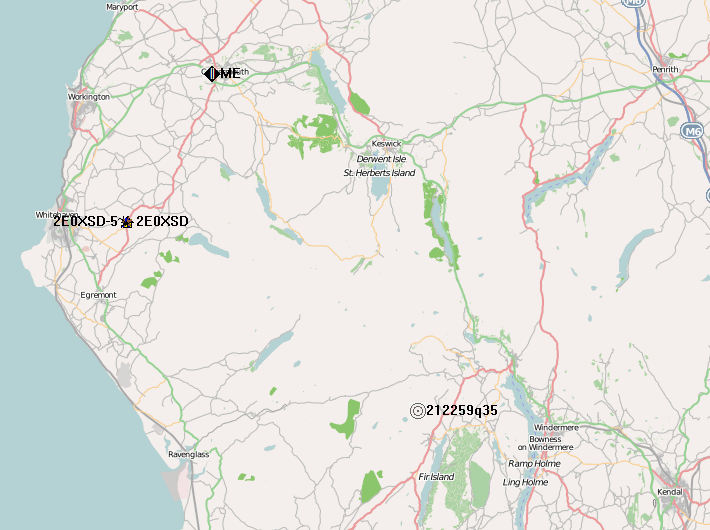
It was felt in nearby Workington and even across the water in Dumfries and Galloway with some people describing it as “scary”. We were completely unaware of it. But now I know what happened, I recall that just after we had gone to bed I heard a noise from the attic like someone was up there and stood heavily on the rafters. I said to Olga “did you hear that?” and she said she thought it was a heavy vehicle passing on the A66. So that was how the earth moved for us.

Julian Moss, G4ILO, is a regular contributor to AmateurRadio.com and writes from Cumbria, England. Contact him at [email protected].
 Ham Radio Deluxe |
 W5SWL Electronics |
 Ham Radio Prep |
 KB3IFH QSL Cards  Hip Ham Shirts  HamRadioAuctions HamRadioAuctions Reliance Antennas Reliance Antennas Enigma Shop Enigma Shop |  morseDX  Ni4L Antennas  R&L Electronics R&L Electronics antennas.us antennas.us QRV QRV |
- Matt W1MST, Managing Editor
