 |
 The Hepburn tropo site was right!
 7 February 2011 | by
 In my last post, I said that the Hepburn tropo site was pointing towards good VHF/UHF conditions from the south-west of the UK towards Spain by last weekend. When I got on to 432MHz SSB, late yesterday morning, I heard one or two people talking about good conditions to the south. I had a quick chat with Mike, G8CUL operating at the Harwell club as G3PIA and he mentioned that there had been a Spanish contest earlier on and that some contacts had been made. Unfortunately by the time I got on, if conditions were still there, there was no activity.
I enjoyed making a few contacts in the 432MHz AFS contest over reasonable distances; G4ZTR and G1OGY/P both in Essex, G4ODA in Lincolnshire and G0HFX/P in Devon being some of the more distant ones. Good to work Pete, 2E0SQL trying out his new system too. Before heading over the Cotswolds to see Mum, I had a couple of quick 70MHz QSOs; G8FAK near Milton Keynes and G3NPI at Buckingham.
I’d pretty much given up/forgotten about the tropo when we came back in the evening until I saw a post from Ken, G0PPM on Facebook saying that he was hearing a French station on 145MHz FM. Thought it was worth a listen, so I popped upstairs to see if I could hear anything.
The Swiss beacon, HB9HB was coming through nicely, but CQ calls in that direction on both 144 and 432MHz didn’t result in any QSOs. However, just as I was about to give up, I heard a weakish call on 144.300 – I could tell it was a French station and the signals came up a little as I turned my beam to the south and I was able to get the callsign as F1MOZ. That triggered something in the memory banks – and a quick Google confirmed that he was located in IN93. Signals weren’t great on my little 5element, but I was delighted (and faintly surprised) when he came back and gave me a report!
Driving to work this morning, I was still hearing some tropo and there was a French repeater coming through on 145.650. I listened for a while and it turned out to be F5ZNN, located to the east of Paris.

Tim Kirby, G4VXE, is a regular contributor to AmateurRadio.com and writes from Oxfordshire, England. Contact him at [email protected].
USB technology du jour
Getting a radio to communicate reliably with a computer proves to be a difficult task for some people. The trouble seems to be caused by USB to serial adapters that corrupt the data when used with certain software or at certain speeds. Whenever these problems are discussed in amateur forums inevitably the question of why radio manufacturers don’t build USB interfaces into their radios (as Icom and Kenwood have started to do) is raised. I think this is a very short sighted view that really does nothing to solve the problem.
To begin, let’s deal with the argument that goes “why force users to buy a serial to USB adapter when serial ports have been obsolete for years.” Users have to use something to connect the radio to the computer and the only physical difference between a serial to USB adapter and a serial cable is that one end of the former is a bit fatter to accommodate the USB electronics. There is little difference in cost between the two cables. Furthermore, just because PCs don’t come with serial ports doesn’t mean that they are obsolete. My shack PC has four – soon hopefully to be increased to six if I can get it to accept the two port board I removed when I upgraded to four as an addition – and installing them is easily within the capabilities of any radio amateur. If you use a laptop you don’t have that choice, true enough, but why force a change on everybody because some people choose shack PCs that have limited expandability?
But the main reason why I think building USB into the radio isn’t the solution is that it doesn’t address the problem. It’s USB – either the hardware or its drivers – that is causing the connectivity problems in the first place. If an external adapter cable is used, users can try a different type if the one they have is not working correctly. If the USB hardware is built into the radio then they are stuck with it and reliant on finding a software solution. That might be a matter of getting the manufacturer to fix its drivers, which is not so easy.
Another reason why building USB into the radio is a bad idea is that it limits choices for users. If you want to connect your radio anything other than a PC, something like a MicroHam controller or a remote control over internet device for example, then you’re stuffed if you’ve got a USB port. Some owners of Kenwood’s new TH-D72 APRS handheld have already found that Kenwood’s decision to provide a USB rather than a serial interface to the radio’s internal TNC means they can’t use Bluetooth to link it to APRS software on another mobile device.
Whenever I argue that switching to USB is a bad thing someone always counters the argument by saying USB can provide a wide bandwidth connection that can handle other things such as audio. As somebody who has sometimes had three USB sound devices attached to my PC I can certainly see how a one cable interface between rig and computer might seem attractive, especially to those who believe that sound card modes need something like a RigBlaster. And I would agree that a fast interface would be a nice thing to have if it was one that was a true universal standard like, say, Ethernet.
But if we are talking about USB, most of my arguments still apply. Built-in USB limits choices. An analogue audio input and output lets you interface audio with other things such as digital voice recorders, TNCs and VOIP devices for remote control over the internet. We’re hams, we’re supposed to be able to handle technical stuff, do we really need plug and play interfaces for our radios?
USB is a technology du jour. It keeps changing, whereas RS-232 and analogue audio are permanent standards. USB 1.0 devices seem still to work with USB 2.0 but now USB 3.0 is starting to appear and it remains to be seen how backwards compatible that will be with older USB devices. Who knows what the computers of 10 or 15 years time will be equipped with? It may not be USB anything but something completely different.
Finally there is the fact that USB depends on software to work: drivers that are operating system dependent. Most serial to USB hardware is at least supported by operating systems other than Windows “out of the box.” I don’t have the experience to know whether that is true for USB interfaces that carry audio or other information. Is anyone using their IC-7600 or TS-590 under Mac OS or Linux?
Even if the manufacturer-supplied drivers work for Windows today, will they work on the latest version of Windows in 10 or 15 years time? If not, will the manufacturer of the radio provide new drivers once the radio is an obsolete model? I’ll bet a perfect but unusable as no longer supported scanner that they won’t. I’m equally sure that I’ll still be able to interface my K3’s RS-232 serial port and analogue line input/output to whatever computing hardware and operating system I’m using then.

Julian Moss, G4ILO, is a regular contributor to AmateurRadio.com and writes from Cumbria, England. Contact him at [email protected].
FUNcube Dongle – sold out in 49 seconds
The latest batch of 135 of Howard Long G6LVB’s FUNcube Dongle Pros sold out a few hours ago in less than a minute!
The FUNcube Dongle Pro is a tiny SDR receiver for the frequency range 64 to 1,700MHz. It’s the “ground segment” of the AMSAT-UK FUNcube satellite project.

FUNcube Dongle Pro
The best source of information about what to do with the FUNcube dongle and how to get hold of one is the Yahoogroup. Howard is active on the list and the main website and is quick to join the discussion and respond to all manner of queries.
The FUNcube Yahoogroup page explains the background and aim to the project:
AMSAT-UK’s FUNcube is an educational single cubesat project with the goal of enthusing and educating young people about radio, space, physics and electronics.
It will support the educational Science, Technology, Engineering and Maths (STEM) initiatives and provide an additional resource for the GB4FUN Mobile Communications Centre.
The target audience consists of primary and secondary school pupils and FUNcube will feature a 145 MHz telemetry beacon that will provide a strong signal for the pupils to receive.
… FUNcube will carry a UHF to VHF linear transponder that will have up to 1 watt and which can be used by Radio Amateurs worldwide for SSB and CW communications.
Measuring just 10 x 10 x 10 cm, and with a mass of less than 1kg, it will be the smallest ever satellite to carry a linear transponder and the choice of frequencies will enable Radio Amateurs to use their existing VO-52, DO-64, HO68 and similar stations.
Howard seems to be producing and selling the Dongles at an amazing rate. But on the basis of this recent post “What do 500 dongles look like?“ there are at least another 360-odd on the production line.
Stephen Rapley, VK2RH, is a regular contributor to AmateurRadio.com and writes from New South Wales, Australia. Contact him at [email protected].
Free Online Ham Radio Course
Do you know someone who is getting ready to take their Technician class license exam? Have them check out KE4GKP’s free online video study guide:
http://www.amateurradio.com/courses/technician/
35 free video lessons (6 hours total)
Andy goes over each question and answer from the Element 2 Technician Class question pool. It’s like having a tutor to walk you through the whole thing. I think it’s one of the very best resources available on the Internet. It’s clear that he spent many hours creating the videos. Together with KB6NU’s The No-Nonsense Technician Class License Study Guide (PDF, 411 KB), Andy’s video series is the best free ham radio course available online.
What do you think? What resources do you recommend for someone studying for their Technician ticket?
Matt Thomas, W1MST, is the managing editor of AmateurRadio.com. Contact him at [email protected].
PIC TNC problem
I have been playing around some more with the WB8WGA PIC TNC that I built. While it was quite fun to see what it managed to decode and have it working as a digipeater, I eventually wanted to get it talking to some real software. UI-View is supposed to be able to work with TNCs in Converse mode, so that was going to be the easiest thing to try. But in order to do that I needed to solve the problem of the firmware expecting a linefeed to terminate a command.
That problem turned out to be fairly easy to solve, though I ran into some problems by trying to make some other changes. The trouble with working with microcontrollers, at least when using assembler, is not just that they don’t have much memory but it isn’t an a seamless block and you have to take care of memory management. Consequently I found that adding one line of code could make the difference between the program compiling and getting an error on the lines of “you are writing to a location that has already been written to.” I’m a high level language kind of guy who expects the compiler to take care of all this for me. I suspect that major modifications to the code like adding KISS support is going to be beyond me.
Anyway, I managed to get it so that UI-View could make its various settings and put the TNC into Converse mode. I had to get rid of the message that comes up on entering Converse mode because it often clashed with UI-View sending a beacon. I then set some IS to RF gating options to generate a lot of traffic and found that the TNC kept going back into command mode. This appeared to be due to the timeout timer that throws you back into command mode if you start to type something and don’t hit Enter. This was a pretty annoying feature, quite apart from interfering with reliable operation, so I had to take that out, too.
It seemed like the TNC was ready to go. But although it would transmit beacons from UI-View perfectly well, the program would not display any received stations. I could see the decoded packets in UI-View’s Terminal window, but they never appeared on the map anywhere. I did some searching and found one complaint about this in the Fox Delta Yahoo! group (the Fox Delta Mini TNC is apparently based on the same firmware) but no solution.
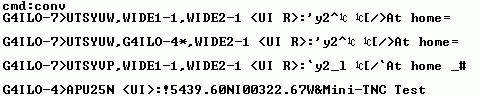
There did not seem to be anything wrong with the packets and I spent a couple of hours trying various things to see if I could establish what the problem was. Eventually I hooked UI-View up to my Kenwood TM-D710 in packet mode and watched what happened. Packets were received and displayed as expected. So then I connected a terminal program to try to see what the received packets looked like. (This is Windows HyperTerminal with a special Terminal-Hex font that shows the hex value of non-printable characters.)
This is what the output from the Kenwood TNC looked like:
and this is the output from the PIC TNC:
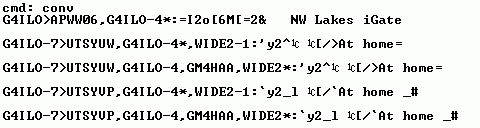
As you can see, the only difference (apart from the fact that the PIC TNC is displaying the packets as it digipeated them while the Kenwood heard both the original and the digipeated versions) is the text UI or UI R in angle brackets before the colon that marks the start of the payload part of the packet. It doesn’t look like something significant enough to make UI-View ignore the packet. It isn’t something that appears in the raw packets listings at aprs.fi. I don’t know what it means or how to generate it in the output from my TNC. So I’m stumped at the moment and am hoping that someone who knows the answer will read this and point me in the direction of a solution.

Julian Moss, G4ILO, is a regular contributor to AmateurRadio.com and writes from Cumbria, England. Contact him at [email protected].
Learning electronics with the aid of the Internet

You have to learn electronics by building circuits. However, it can be very intimidating to get started and once you have some familiarity you may need further guidance, especially in the art of circuit design. Last week I watched three excellent tutorial videos which show there are some who are putting excellent material on the Web to help others further their learning of electronics. Here are the three.
First video covers some basic, but necessary understanding of multimeters and their use. Essential knowledge for beginners. This is by Colin Cunningham of Makezine.com and part of his ongoing electronics video posts at Make magazine’s website.

The next one steps it up quite a lot in detail but it is Dave Jones of the EEVblog showing how a component can be selected by a designer for a circuit, in this case for a DC-DC booster. It a long video, but shows how to use online catalogues, conduct parametric searches as well as the essential examination of component datasheets. Well worth watching carefully.
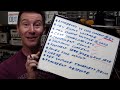
FInally, what looks like a new video podcast series from component supplier Element 14 and Jeri Ellsworth. In this video Jeri designs a circuit for some music playing installation art, that is triggered by motion detected by a PIR. This is a great tutorial video and I look forward to seeing more of these. The link to the video is here.
The latest good news seems to be that today it was announced that Jeri is joining Element14′s “Ask an Expert” panel.


Alan Steele, VA3STL, is a regular contributor to AmateurRadio.com and writes from Ottawa, Ontario. Contact him at [email protected].
Handiham World for 2 February 2011
Welcome to Handiham World!
Squawk! Polly want a cracker!

That’s what a parrot says, at least in the cartoons, right? Parrots are great imitators when it comes to hearing something and quickly learning to repeat it. That’s why we say someone is “parroting” when they simply repeat what they have heard. Believe me, if someone is accused of parroting when they are speaking, it is not a compliment. It means that the speaker is repeating what was heard without really thinking about what they are saying.
I hear plenty of parroting on the air. My pet peeve is one I heard again this week: “Of course EchoLink isn’t real ham radio.”
Excuse me? Do the people who keep repeating this over and over again like parrots really know what they are saying? Have they thought it through? I submit that they haven’t, and would like to back up the bus a bit here and ask them to answer these simple questions:
 | Is an amateur radio license required for the legal use of EchoLink? |
| Could you get into trouble because you violated FCC rules when using EchoLink? |
| Does a voice transmission on EchoLink use the public airwaves? |
Yes, yes, and yes.
Oh, sure, it is possible to have a computer to computer conversation on EchoLink, but it can quickly segue into an on the air conversation when another station joins on a connected repeater or simplex node. But those are the easy questions. Now, here’s a hard one that I want to ask the “EchoLink isn’t real ham radio” parrots:
| Why isn’t EchoLink “real” ham radio? |
Take your time, EchoLink detractors. Think about it. I’m pretty sure there isn’t a really simple answer to parrot back to THAT one.
If the answer is that you don’t actually go on the air with EchoLink, well, that’s not true. You can, and do. If it’s because a computer is involved, does that mean that SSTV and RTTY are not real radio? Those modes use computers as integral parts of the station. If it’s because EchoLink doesn’t fit a narrow, preconceived notion of what constitutes ham radio, well, THAT I would believe. Which brings me to the next question, also not an easy one:
| So what IS “real” ham radio? |
This is not easy to answer. If you say that it is only about sitting in front of an HF radio connected to a beam antenna and working DX without using a computer or the Internet, you are going to get objections from operators who control their radios with Ham Radio Deluxe and who check that application’s built-in DX spotting feature. If you try to limit real ham radio to a particular mode, you will certainly hear from others who have enjoyed radio for years and who never used that mode. Anyone who operates a radio at a distant location by the use of an Internet remote base control point would also beg to differ.
The way I look at it, ham radio is like a big tent where there is room for lots of different interests and ways to have fun. In fact, I would suggest that even builders and experimenters who prefer designing and building their own gear are “real” radio amateurs even if they seldom get on the air. There is really no point in telling someone else who enjoys a different activity that what they like doing is somehow less valid or real than what someone else does. That’s why I try really, really hard to think about what I say before I say it. Remember, once it goes out over the air, it is impossible to keep others from hearing it!
Besides, thinking before you speak could actually make you seem pretty wise. I think I’ll leave the mindless repetition to the parrots and just get on the air and encourage others to enjoy ham radio in its many different facets. Get on, have fun.
Patrick Tice, WA0TDA
Handiham System Manager
[email protected]
Skype study hall
Last week we mentioned that we have an ongoing need for some kind of forum in which technical assistance or study assistance can be offered to our members. One idea that crossed my mind was to run a Skype conference with up to 10 participants. This would allow a number of people to discuss some topic of interest in a small group setting in a more private forum than one could find on EchoLink, for example.
I have completed a page in the members only section of the Handiham website to guide users. It is found by going to the member section, then the “Audio this week” link, and then the “Handiham Skype Conference” link.
Running out of entertaining club projects?
Did you drive your mom nuts when you were a kid and the weather outside was rotten and you were bored?
“MOM, there’s NOTHING to do.”
Yeah, me too. It might have been a rainy day or maybe the snow was piling up outside but it was too windy or cold to actually go out to play in it. Good old Mom could always think of something to distract us brats. Games and projects were high on her list.
Well, one great idea that my local ham radio club is trying this week is a group activity where participants diagnose malfunctioning amateur radio gear. On the “test bench” (which will really just be a table in the public library meeting room) will be not one, but two – TWO – malfunctioning manual antenna tuners. There will be a few small hand tools and test instruments available to help diagnose and (hopefully) repair the two “patients”.
This kind of activity would really be fun at Radio Camp this summer, wouldn’t it? I would love to get this kind of activity set up in a small group environment so that we could put our heads together and try to figure out some basic fixes for radios or accessories. Meanwhile, a great big “way to go” to the Stillwater, Minnesota Amateur Radio Association for coming up with this mid-winter project to keep us kiddies from being bored!

Pat Tice, WA0TDA, is the manager of HANDI-HAM and a regular contributor to AmateurRadio.com. Contact him at [email protected].
 Ham Radio Deluxe |
 W5SWL Electronics |
 Ham Radio Prep |
 KB3IFH QSL Cards  Hip Ham Shirts  HamRadioAuctions HamRadioAuctions Reliance Antennas Reliance Antennas Enigma Shop Enigma Shop |  morseDX  Ni4L Antennas  R&L Electronics R&L Electronics antennas.us antennas.us QRV QRV |
- Matt W1MST, Managing Editor
