 |
 Motorola Millstone
 20 August 2011 | by
 This weekend I had planned to write about my Android smartphone, a Motorola Milestone 2, which I bought in early July soon after I came out of hospital. It was a fantastic phone with a big, clear screen and a really usable slide-out keyboard. It became my main method of electronic communication. The Android user interface is great – far, far superior to Windows Mobile. It is well integrated with Gmail as you would expect and it has an excellent web browser that can display almost any website, unlike the IE browser in Windows Mobile which is just a piece of s***. I was also intending to write about an Android APRS application called U2APRS. Unfortunately, last night my Milestone turned into a brick.
The one thing I hadn’t got round to doing was install a good app to read the various blogs that I follow. Blogger Dashboard is one of the few sites that doesn’t work well in the Android browser. I decided to install Feedly, found that I liked it, and spent some time going through all the blogs marking all the posts as read. Having done that I was trying to figure out how to get back to the list of blogs now that there were no new posts when the screen froze and refused to respond to touch input.
Thinking that this was just a software crash, I pulled the battery. But when the phone started up again the screen still refused to respond to finger movements. And now I couldn’t get past the lock. This situation persisted after several attempts.
Time to go online. A Google search revealed that problems with the Motorola Milestone 2 touch screen were not uncommon and that the only diagnostic to try was to perform a factory reset to make sure that the trouble was not due to a software glitch. This would, of course, remove all my apps and settings. But there was no alternative. Except that the instructions for performing a hard reset – press and hold the Camera button while powering up the phone – didn’t work. Every time, the phone booted into its normal screen, which was still locked.
After wasting quite a lot of time making several attempts at this I found another forum post that suggested holding the X key on the keyboard whilst powering on the phone. This got me a step nearer to where I was trying to be – a screen with a warning triangle and an Android icon on it – but the instructions to bring up the menu – press and hold the Volume Up button and then the Camera button – did nothing. Again, a lot of time was wasted trying this several times, including different permutations of pressing and holding, and trying both of the Volume buttons since I couldn’t be sure which was Up and which was Down, to no avail. Deep frustration was setting in.
Olga found a forum post which suggested that pressing the keyboard Search button from the Android warning screen would bring up the reset menu. That didn’t work either. Then she found another one that said to use the the @ key. At last, the menu! I was finally able to format the system and wipe all my apps and data. When the phone rebooted it entered the initial configuration sequence, asking what language I wanted it to use. Which I was unable to select because the touch screen still didn’t work.
So my Milestone is currently as much use as a lump of rock. I’m missing it already. It will probably take several days to send it for repair and have it returned, which I can’t even start to do until Monday. But I’d rather do without a phone than go back to Windows Mobile, which may be a very good platform for running apps but is absolutely loathsome as a telephone and is totally useless for Gmail.
Deep frustration. Not to mention irritation over the valuable time I’ll have to spend reinstalling and reconfiguring everything once it’s back. And to add to my annoyance I’ve lost U2APRS because the developer JA7UDE’s web site has been offline for the last couple of weeks for reasons unknown and there is no longer any way to obtain it.
I’m not a happy bunny.

Julian Moss, G4ILO, is a regular contributor to AmateurRadio.com and writes from Cumbria, England. Contact him at [email protected].
Elecraft K3 Assembled in 7 Minutes [VIDEO]
So after oversleeping this morning, I managed to find a nice video that I can share with all of you. It’s nothing groundbreaking. It’s just a time lapse video of a gentleman putting together an Elecraft K3 from unboxing to finish. Pretty interesting to see the process. I have yet to build from a kit, but this is pretty cool. So watch it and enjoy. In the mean time, I’m going to go have a snooze or something. But here ya go.
Rich Gattie, KB2MOB, is a regular contributor to AmateurRadio.com and writes from New York, USA. Contact him at [email protected].
The WSPR Boss
I ordered a GymBoss workout timer – not as a keep-fit aid but as a timer controller for the VCXO-AXE WSPR transmitter.
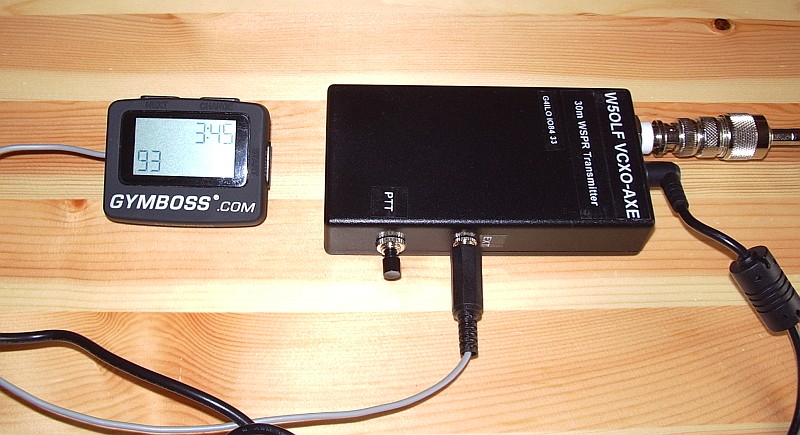
W5OLF doesn’t provide a lot of detail on how to modify the GymBoss but it isn’t difficult – especially if you don’t have fuzzy vision, shaky hands and fingers the size of Cumberland sausages. As I have all of those things I experienced an initial panic as I thought I was more likely to break the GymBoss than successfully modify it. Consequently I neglected to take any pictures of the process as I just wanted to get the job done without additional distractions.
Two screws secure the base of the GymBoss. Lift this away carefully as it is secured to the PCB by two short, flimsy and not particularly well soldered wires from the battery compartment. Once the base is clear you can remove two more smaller screws which hold the PCB to the front panel. At this point the pushbuttons will fall out – hopefully you will have made a note of exactly how they were installed so you can put it back together without too much difficulty.
The LCD display rests on the back of the PCB and can be hinged clear to reveal the bottom of the board. The beeper which has to be removed has two connections. The easiest way to remove it I found was just to grasp it between finger and thumb whilst applying the soldering iron to each of the two pins in turn, pushing the board away a bit at a time with another finger until it was clear.
I then soldered a thin screened cable to the two holes that had been used by the beeper. Using my ohmmeter I identified one hole that was at ground potential, so the braid was soldered to that one. I made a small hole in the case near to the “reboot” switch hole to allow the cable to exit. Then I carefully reassembled the GymBoss.
I attached the beeper to the end of the screened cable to check that the GymBoss still worked. To my relief, it did. I then attached a plug to match up with the socket I had already installed for P2 when I built the VCXO-AXE. The braid goes to the ground connection and the beeper signal to the Start pin. I then checked the transmitter with my power meter / dummy load to ensure that the GymBoss was turning it on at the interval I had chosen.
The timer works well and has maintained adequate accuracy for the 12 hours or so it has been running so far. It will start up to 99 transmit cycles at any interval you specify, so you can’t have it run indefinitely if you leave it unattended.
As of right now I am running a transmit cycle every 8 minutes using 2 watts into a home-made loaded whip antenna inside the shack using the central heating system as a ground. This has received plenty of spots from Europe and a few overnight from W3HH in the USA which I would not have been able to obtain if I had to key the transmitter manually.
Although manual keying is simple and fine for occasional use, I’m in no doubt that the timer makes the WCXO-AXE much more useful.

Julian Moss, G4ILO, is a regular contributor to AmateurRadio.com and writes from Cumbria, England. Contact him at [email protected].
File: Batteries, What Not To Name Them

Do you ever look at a product and wonder if someone was asleep at the switch when they named it?
Trust Fire? For batteries? REALLY?
Believe it or not, they actually get great reviews:
Matt Thomas, W1MST, is the managing editor of AmateurRadio.com. Contact him at [email protected].
TWiT.TV Special Event Station W6KB On The Air Aug 20 and 21
With the new opening of the TWiT Brickhouse studios, Leo Laporte, W6TWT is going to be hosting a special event station to celebrate the opening of the new studio, with the help a few area Hams.

Photo Courtesy of Leo Laporte – W6TWT
The Redwood Empire DX Association, who have been helpful in getting the new Amateur Radio station setup in the TWiT studios, will getting part of the special event station where visitors will be able to see the new studio and the classic Collins AM Broadcast station that will be on display and available for Hams to use 10am to 7pm on Saturday and 10am to 3pm on Sunday. The news release says each day, so I am assuming this is only for the special event. But I do remember Leo saying something about the station being available for other times, during an episode of Ham Nation. I’m sire someone will clarify this info.
The special event will use the call sign W6KB, but no word on specific frequencies to watch for the station, just that it will be on 40 and 20 meters in the afternoon and evenings. If any new info comes out, I would think it’ll show up on either Leo’s Ham Radio page or on the thread discussing this on QRZ.com.
Anyone who does make a contact with the station, can QSL direct to W6TWT, P.O. Box 1018 in Petaluma, CA. 94953 .
Wish I could work these, but I still don’t have HF and will be out of the loop for a couple days because of my other job in broadcast radio. But hey, I get to hang out with some real kick ass bands this weekend. So it’s not a total wash.
73.
Rich also writes a Tech blog and posts stories every Tuesday and Thursday on Q103, The Rock of Albany’s website, as well as Amateur Radio stories every Monday thru Friday here on AmiZed Studios.
Rich Gattie, KB2MOB, is a regular contributor to AmateurRadio.com and writes from New York, USA. Contact him at [email protected].
5V noise generator
An increasing number of electronic devices can be powered or charged from a USB socket. To charge them independently of the computer they usually come with a small switched mode wall-wart. Finding enough wall sockets for these broadband noise generators – in addition to all the wall-warts that already exist in the ham shack – can be a challenge. It would be nice if ham radio power supplies had a few 5V DC outputs.
When I started using my HTC Touch Pro smartphone as an APRS iGate I wanted to avoid using the HTC charger as I knew it created a few warblies on some of the HF bands. I wondered if I could power the phone from the shack supply instead. In the junk box I found a car charger for an old satnav that had the same mini-USB plug and fitted the cigar lighter type socket on my Diamond GSV3000 power supply. That seemed to do the job very well and didn’t appear to generate any RF noise (though the noise level here is now so high that the incremental difference made by one more switched mode device is hard to detect.) The only annoying thing about it was that it sticks rather a long way out of the front panel of the GSV3000, which is a bit of a nuisance on my narrow operating desk.
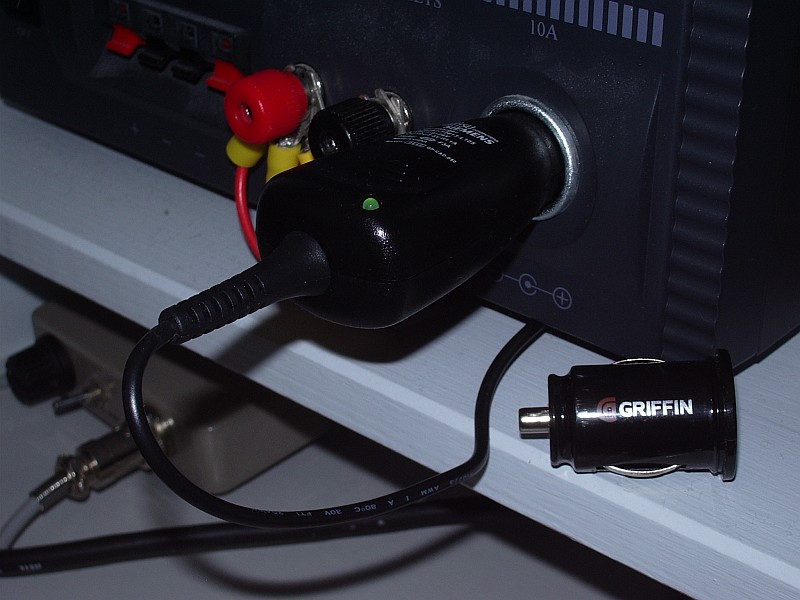
My next thought was that it would be nice to have more than one 5V outlet, perhaps in USB format, to occasionally charge other devices without requiring the computer to be on or plugging in another wall wart. Browsing eBay I saw a Griffin Dual Power USB Car Charger. This would give me two 5V USB outlets. And it was also designed to be flush with the top of the cigar lighter socket so it would look like an integral part of the GSV3000 once installed.
When it arrived I was quickly disappointed. As soon as I plugged a USB cable into one of the outlets, even with no load attached, broadband HF noise jumped up about 3 S-points. The device also got surprisingly hot even though nothing was drawing any current from it. I guess I should have anticipated that a device that size would use some kind of switching regulator and that this might result in noise. For the typical user wanting to power or charge two USB devices from their car, the noise is unlikely to be a problem. So I guess this particular solution to eliminating wall-warts is a non-starter.

Julian Moss, G4ILO, is a regular contributor to AmateurRadio.com and writes from Cumbria, England. Contact him at [email protected].
Fascinating signals: AA1TJ/QRPp
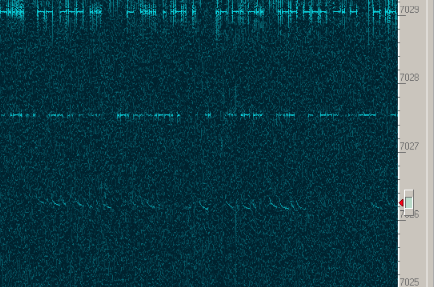
Last night, as I have been doing lately in both the evenings and mornings, I was trawling the bands with a SoftRock (a dual-band v6.0 built for 40 and 80 meters—my first SoftRock) and Rocky. Without fail, the waterfall enables me to see something interesting, which brings me to the point that I really need to integrate these receivers into my station. But, I digress. The really tantalizing, fascinating signals are the weak ones, especially when they are weak and unusual.
The subject weak and unusual signal is shown in the figure headlining this post. Rocky’s cursor shows the approximate bandwidth of the CW filter (250 Hz, if I recall correctly) and the center frequency (7026.25 MHz). I tuned it in and caught a CQ from “AA1T…” Recalling that I head read about Mike, AA1TJ‘s, Das DereLicht transmitter built mostly from parts scavenged from a dead CFL, I suspected it was him. After a moment the QSB came up and I caught the ‘J.’ Thanks to the fact that the SDR is not fully integrated into the station, I scrambled to plug my 15-year-old Small Wonder SW-40 in and get it online. Mid-scramble, Sarah handed Evan off to me for a diaper change, but I did manage to snap the screenshot above. By the time I returned to the shack awhile later to close things down, AA1TJ had disappeared.
Through the (ubiquitous) magic of the Internet, I sent Mike an apologetic e-mail QSL, which yielded a nice response. It turns out that he was trying a 40-meter version of the first transistor transmitter described in the amateur literature. The design for 146 MHz by K2AH appears in March 1953 QST. If you are an ARRL member, pull up those old QSTs in the archives and read about it. K2AH is on the cover of February 1953 QST with the same transmitter. Mike figures he was making 20 mW, or 20650 miles/Watt on the path from his station to mine. The more remarkable thing is that he was using a 1956-era point-contact transistor (the same type as in the K2AH article). Fascinating stuff! Hopefully, we’ll connect for a real over-the-air QSO sometime soon.
Thanks, Mike, for making my day by doing something interesting and sharing it on the air!
Ethan Miller, K8GU, is a regular contributor to AmateurRadio.com and writes from Maryland, USA. Contact him at [email protected].
 Ham Radio Deluxe |
 W5SWL Electronics |
 Ham Radio Prep |
 KB3IFH QSL Cards  Hip Ham Shirts  HamRadioAuctions HamRadioAuctions Reliance Antennas Reliance Antennas Enigma Shop Enigma Shop |  morseDX  Ni4L Antennas  R&L Electronics R&L Electronics antennas.us antennas.us QRV QRV |
- Matt W1MST, Managing Editor
