 |
 Antenna-Day #1, in My Son’s Words
 12 October 2011 | by
 As my son’s homeschool teacher I’m giving him plenty of writing assignments this year. Yesterday I asked him to write an essay, and I told him he could write it on anything he wanted. Here’s what he wrote:
Helping Dad Build His Antenna
by Antonio Mitchell, Tuesday, October 11, 2011My dad has been meaning to build his antenna for his radio for a while. We (my dad and I) finally got motivated and had some free time as well to build the antenna. We began yesterday to build it. Some complications slowed us down.
Yesterday, we went to Wilmar. The first stop was Walmart. When we were in Walmart I got my glasses back. After that we began our search for parts at Menards. It took us a while to find some parts. The whole trip to Wilmar, shopping, and going home took quite a few hours. My dad had to meet with a church member. While he was gone he got a piece of metal cut for the tripod legs.
When he came home several hours later my mom and I were raking leaves. He began to put together a jig to help hold the poles together. We began to drill holes into the poles. It took both of us to do it. The bit finally broke. After supper my dad worked on making a balun. He also made a new shopping list of parts. It will be a great joy to see the antenna up on our roof.


Todd Mitchell, NØIP, is a regular contributor to AmateurRadio.com and writes from Minnesota, USA. He can be contacted at [email protected].
Handiham World for 12 October 2011
Welcome to Handiham World.


Pat Tice, WA0TDA, is the manager of HANDI-HAM and a regular contributor to AmateurRadio.com. Contact him at [email protected].
Playing a little HF again
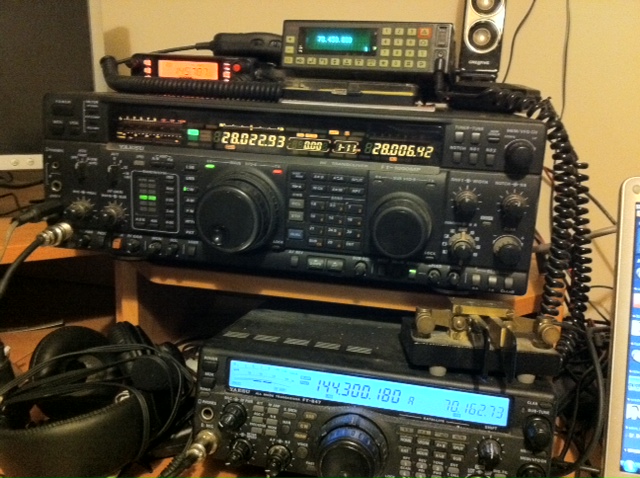

Tim Kirby, G4VXE, is a regular contributor to AmateurRadio.com and writes from Oxfordshire, England. Contact him at [email protected].
Recycling a post….Are Toroids getting you all wound up…..
When I decided a few years ago to venture into a new area of amateur radio.....kit building. I did some research on the internet to see what I was up against. Having never built a kit and not really having any electronics background I did not want to get in over my head. So it was a simple kit to begin with but at the same time something I would use and not just become a home to dust bunnies. I decided on the Elecraft KX1 kit as it would I hoped turn out to be a functioning radio. One I could put to use in portable operation again this was another area of amateur radio I had yet to discover. So I practiced my soldering, put together some tools and one thing that kept waking me up at nights....(not really) was the TOROID WINDING!!!!!!! There is lots on the internet on how to go about winding a toroid. With the KX1 kit I found myself trying the different methods and at times having to rewind some toroids many times. A few weekends ago during slow times in the ARCI contest I decided to do some toroid winding for my on going KPA100 100 watt option for my K2 Elecraft radio.
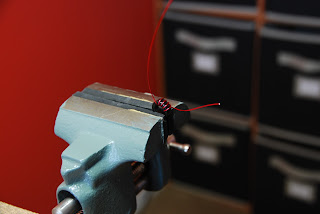 |
| I added Soft rubber to jaws of the vise |
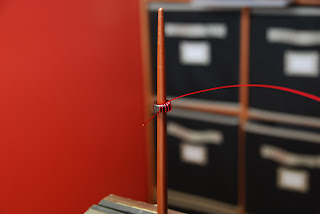 |
| Chopstick method |
I just want to share some of the ideas I tried during my trial and error periods of toroid winding. Also the process I go through from start to finish. As with most any kit I have worked with you are given a recommended length of wire to cut and I have found at least with the Elecraft kits the total wire given is always more than enough to wind all the toroids. Now comes the fun part the winding, there was three methods I tried. The first was putting the toroid core in a vise and winding the wire through the core. I found this to be somewhat awkward for me, some may find it works for them but I was opening and
closing the vise and moving the core around more than winding the toroid. Using the vise seemed to take a very long time. But having said that if your hand is not steady the vise is a very good alternative. The vise did great to just hold the toroid for the later step of stripping the leads...more about that later. The next idea that came across my path was the use of a chopstick, I included a picture of what I am taking about and we all know how a picture is worth a thousand words.
Using the chopstick I was able to form the turns of the wire nicely around the inside of the toroid. At the same time space the turns out so the toroid looked very balanced. I used this method with building my KX1 and as I wound each turn I inserted the chopstick and inspected the toroid. As I progressed to my next kit (Elecraft K2) I used the chopsticks for eating and not winding toroids. As it turned out this too was a method that just seem to complicate the winding process. As I gained confidence winding toroids I just put on my magnifying head set and wound them by hand!!! This proved to be the road for me in regards to gettin r done with the infamous toroid. See the link at the bottom of post to see how winding a toroid by hand is done. Once the toroid is wound you have to remove the coating of insulation on the wire. In this regard I read of sanding it off, using a lighter or flame of some type to bun it off or a hot solder blob. I tried the sandpaper method but I found it to be a little hard on the toroid windings and sometimes the sandpaper got to close to the turns of wire and removed some insulation there as well. I gave the open flame a go but found I was just heating up the wire and really did not have any control over removing the insulation and heat required to remove the insulation.
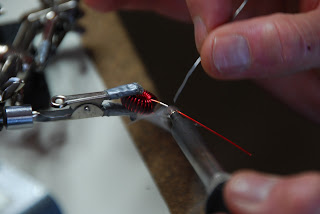 |
| Tinning leads |
SOME TIPS I FOUND HELPFUL
1. I always recount the number of turns just before the last turn is done. I find sometimes more turns are needed or I lost count and I have the correct turns already.
2. Just before placing the toroid into the circuit board one lead is cut shorter than the other. I find this makes placement of the leads into the board holes easier.
3. I ALWAYS use an ohm meter to check that my tinning job worked and the insulation is stripped.
4. Once the toroid is soldered in place before cutting the leads flush with the board I double check again with the ohm meter for continuity.
With practice I found the toroid winding can go smooth and it can be pleasurable as well.
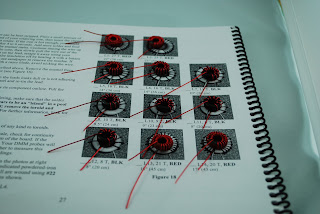 |
| 1 hour and 20 minutes of toroid wind. |
The vise method Once you are at the web page click on the upper left link "Toroid winding"

Mike Weir, VE9KK, is a regular contributor to AmateurRadio.com and writes from New Brunswick, Canada. Contact him at [email protected].
LHS Episode #068: Hell Sheep
 And finally the podcast is caught up. All the back episodes have been edited and released and now Russ is taking a break, breathing a little easier and hiding from the hell sheep. In this episode, the hosts talk about the new release of Ubuntu (formal review coming later), the KDE desktop, doing noise cancellation with Audacity and much more. They address feedback from listeners and encourage everyone to support the show by calling in some voice comments, making a donation, becoming a member or purchasing show-related merchandise. Sorry for the advertisement, but sometimes it just has to be done. Thank you for being a listener. Peace, love, ham radio and Linux. Good times.
73 de The LHS Guys
Russ Woodman, K5TUX, co-hosts the Linux in the Ham Shack podcast which is available for download in both MP3 and OGG audio format. Contact him at [email protected].
Learning Morse code with a smartphone app?
 Does anyone out there have any suggestions for an Android or iOS smartphone app to help learn Morse code and improve speed and accuracy? I’ve been poking around the App Store and Android Market. There are MANY choices and I’m hoping someone will be able to save me a little time and frustration.
Something’s come over me lately. I’ve had this renewed interest in learning Morse code. Well, not really “learning” — more like “re-learning.” I had to learn the code when I became licensed twenty years ago, but like most things I studied at the time, I promptly forgot it after the test was over. What a shame, really. I honestly viewed it as an antiquated, useless requirement. I never imagined that I’d ever want to use it.
I’m looking for a new challenge. For me, I think that challenge is QRP CW. I love this hobby. There are so many aspects that it literally can take a lifetime to explore them all.
Matt Thomas, W1MST, is the managing editor of AmateurRadio.com. Contact him at [email protected].
Where is The USB on Modern Rigs?
I don’t know if anyone has ever asked this question before, so I will ask. And if someone did and there is an answer, could you direct me to it. And if there isn’t, maybe someone from one of the modern Amateur Radio manufactures can answer it. Why isn’t there USB on modern rigs? What’s the catch to getting it added?

A standard USB port on a computer
I mean, with USB, you could make it much easier to setup the frequencies in the memory or the radio. It’s faster through put then serial, so you could get a lot more data from the rig. It would be a simpler setup for interfacing it by just plugging it in and making APIs available for software developers to write code that will talk to it. Apple revolutionized the MP3 and smart phone markets by making it easier to interface your devices with your computer. They’ve moved on from USB to WiFi and cloud based service now. While a modern rig is still using serial ports.
When I talked about a “Smart Rig” back when Google bought Motorola, I was hoping someone may seize in that and go to the next step. But I also understand, many companies don’t share plans for upcoming products with the public. But could you give us a hint? A small clue that something, anything is going to be available at some point? I love my FT-847, but it if used a USB interface that I could hook up to my Mac, I would be in heaven. And a USB accessible rig, makes for much less clutter. Radios are getting smaller and smaller, and adding a USB based interface or even a soundcard capable to allowing you to do APRS, PSK31, etc… is that too much to ask for?
I know there will be folks that say, “West Mountain Radio” makes interfaces, why do you need USB? Simple, I like clutter to be kept a minimum myself, and the ease of one connection to troubleshoot is also nicer. Not to say West Mountain doesn’t make great products, because they do, sans the Mac support. But think of how easy you could explain how to do a digital mode if all you said was, “Yep! I just plug it in the USB port and put in all my favorite frequencies in the radio. Then I start up the software for the mode I want to run and I’m off!” compared to, “Well, you’ll need a serial to USB interface, and drivers have to be installed, then a serial cable and make sure it’s a null modem cable too…” Have I lost anyone yet? Because I need a compass right now.
Hopefully you see where I am going with this. I would have thought after the 15+ years that USB has been around, someone would have came up with a rig with USB to interface it to your computer, giving you the tools to write your own code for your computer. Windows, Linux and Mac, not to maybe mention, Amiga or MorphOS or AROS. So I ask, why don’t modern rigs have USB ports? I’d love to hear your thoughts.
73.
Rich also writes a Tech blog and posts stories every Tuesday and Thursday on Q103, Albany’s #1 Rock Station website, as well as Amateur Radio stories every Monday thru Friday on AmiZed Studios and hosts a podcast called The Kim & Rich Show with his fiance’ Kim Dunne.
Rich Gattie, KB2MOB, is a regular contributor to AmateurRadio.com and writes from New York, USA. Contact him at [email protected].
 Ham Radio Deluxe |
 W5SWL Electronics |
 Ham Radio Prep |
 KB3IFH QSL Cards  Hip Ham Shirts  HamRadioAuctions HamRadioAuctions Reliance Antennas Reliance Antennas Enigma Shop Enigma Shop |  morseDX  Ni4L Antennas  R&L Electronics R&L Electronics antennas.us antennas.us QRV QRV |
- Matt W1MST, Managing Editor
