 |
 Ham Radio Makes Debut on Tim Allen’s TV Show
 5 January 2012 | by
 I’ve only seen one or two episodes of Tim Allen’s new TV Show, Last Man Standing. They looked OK, but they didn’t grab me to where I put it on my must see list. But I will be looking forward to an upcoming episode of the show, that does feature Ham Radio. All of this is according to en article on Southgate’s website.

Tim Allen and Nancy Travis star in ABC's Last Man Standing. Photo Courtesy of ABC.com
Tim’s character, Mike Baxter, who’s callsign is KA0XTT, can be seen using his radio in an upcoming episode says Last Man Standing Producer John Amodeo, NN6JA, having a QSO. He says it was all done on the stage. The radios and antennas are inside the sound stage which acts as a large Faraday cage, basically keeping the QSO, radio to radio.
From the Southgate Article:
“We had two Amateur Extra class staff members complete a QSO on 10 meters and we recorded it,” Amodeo explained. “Unfortunately, we were set up on a stage that is basically a Faraday cage. The very QRP signal made it radio-to-radio. We varied the Receiver Incremental Tuning to give it a little extra SSB sound, but I don’t think the signal made it much past the stage walls. The recording will be on the show. We thought our ham viewers would get a kick out of it. Non-hams will think it’s just distorted.”
He went on to share what equipment was in the shack. An ICOM IC-9100 HF/6 meter/2 meter transceiver and an IC-92AD handheld transceiver, both provided to the show courtesy of ICOM America, as well as a Comet CHV-5X HF dipole and GP-1 antenna for 2 meters and 70 cm (courtesy of NCG/Comet). In an episode that aired on January 3rd, you can see DXCC and Worked All States awards on the wall as well as issues of QST and the 2011 ARRL Handbook. Obviously, the producers are adding a lot of details we would notice, but the average viewr wouldn’t. I wonder if Tim Allen would be curious taking a test for his license? I may need to do a new “Celebrity Ham Radio List”. Who would be on YOUR list?
The episode Mike Baxter has a QSO in will air on January 17th. So set your DVR and be ready.
73.
[adrotate group=”2″]
Rich Gattie, KB2MOB, is a regular contributor to AmateurRadio.com and writes from New York, USA. Contact him at [email protected].
Handiham World for 04 January 2012
Welcome to Handiham World!

- Lack of organization. Any activity that involves a group of participants meeting at specific times for some stated purpose requires some organization. To understand this concept, let’s consider a simple job like mowing your lawn. You would be correct to assume that you can do this job yourself, so no formal organization is required. On the other hand, suppose you must mow a golf course. Now you need a formal organization, because the job is too large and complicated for one person. The head groundskeeper will be in charge, doling out job assignments to a crew. A net can also need formal organization, depending on its size and purpose. When you don’t have job assignments or other necessary organization, it can make a mess of the net.
- Failure to commit. This is a problem in every club, and can sure be a problem when it comes to net participation. You need a critical mass of committed participants to make a net happen. Not enough commitment equals dead net.
- Distractions & competition from other activities. This is a problem for every club, bowling group, TV network, newspaper, and amateur radio net. There is competition on every front from something else, no matter what you are trying to organize, and that in turn makes it hard to get participants to commit to the net.
- Crowded bands. Now that the solar cycle is yielding more favorable HF propagation conditions, the most popular HF bands are more crowded than ever. It can be difficult to find a clear frequency on which to gather for your net.
- Poor HF propagation. Ha, ha, this is also an excuse for a failing net, because just as good propagation can result in crowded bands, bad propagation can result in empty bands. You have to hear them if you want to work them, goes the old saying.
- QRM. This annoyance has been around as long as anyone can remember, but it can kill a net if the net participants don’t know how to manage it. Who wants to listen to all that noise and interference?
- Poor net control technique. Oh, man – don’t get me started. A net control station that cannot control the net is a real turn-off for many would be participants.
- Bad marketing. If no one knows about the net, it is unlikely to grow and prosper. You can’t leave it to chance that people will simply run across the net by tuning around the bands, although that sometimes does happen.
- Lack of flexibility. Everyone knows that people have lots going on in their lives and that they cannot make every net session. HF conditions change all the time. Sometimes there may be another QSO on the net frequency. If the net does not have flexibility built into it, these problems can turn into a failed net.
- Not having a plan. What if the frequency is already in use? What if the scheduled Net Control Station does not show up? What if the band is dead? If there is no plan to deal with such things, the net can fold like a tent in the wind!
[email protected]
Handiham Manager

Pat Tice, WA0TDA, is the manager of HANDI-HAM and a regular contributor to AmateurRadio.com. Contact him at [email protected].
First spin of the propeller
A new toy dropped through the letterbox today. It is a Gadget Gangster Propeller Platform USB demo board for experimenting with the Parallax Propeller microcontroller. If you haven’t heard of the Parallax Propeller before then it is an inexpensive micro chip that contains eight processors called cogs (as in gear wheels) that can run independently in parallel. It’s quite a bit different from the Microchip PIC or Atmel devices which have a single processor architecture similar to an ordinary computer.
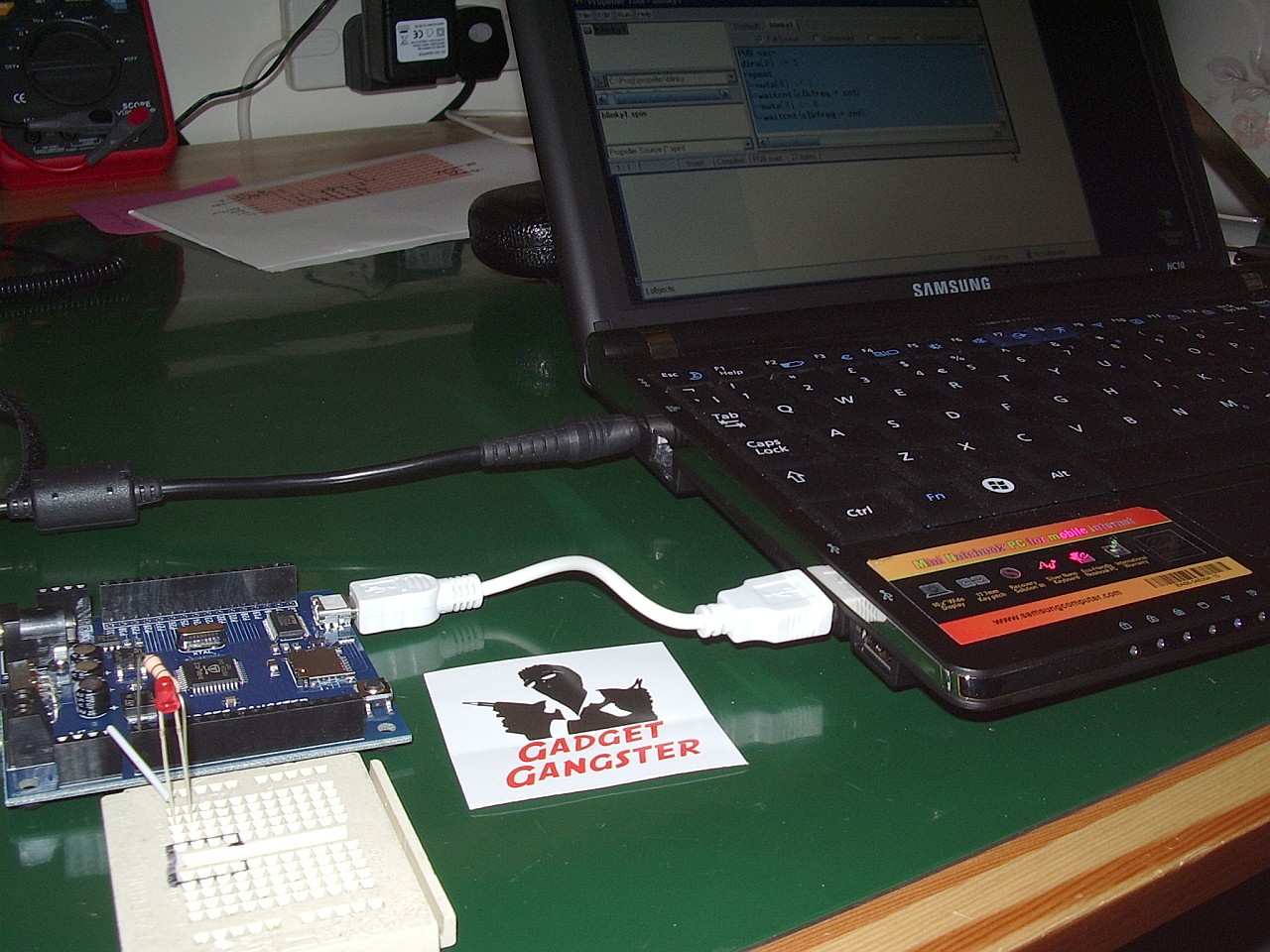
I sent off for the board just after Christmas, after reading about it in Eldon Brown WA0UWH’s blog. Eldon posted code showing how the board could be used as a QRSS beacon. I was quite excited by the idea of a device that with simple programs even I could understand could be made to emit RF.
I sent off for the board on 27th December choosing the low cost untracked USPS air mail shipping option and it arrived today, 4 January – much quicker than expected. What’s more, there were no nasty customs charges! Gadget Gangster still has a special offer of $10 off for the board, so if you fancy getting one of these to play with now is the time to do something about it.
I was very impressed at the speed with which Gadget Gangster processed my order. What you get, though, is just the board. You will need to provide a power supply (7.5 – 12V with a 2.1mm barrel connector, centre positive) and a USB cable with a mini-USB jack at one end. These seem to breed in my junk box so that was not a problem. You will also find useful a small breadboard and some hookup wire to attach components to the board and test your programs.
I installed the Propeller Tool – a free download from the Parallax website, connected the board to my Samsung NC10 netbook. I then tried the Blinky Light tutorial from the Gadget Gangster site. It didn’t work – until I connected the LED the correct way round (stupid newbie error!)
Over the next few days I’ll be working through the tutorials to get the hang of the system. Then I’ll take a look at Eldon’s QRSS beacon code and adapt it to send my own call. I’d like to make a WSPR beacon. I don’t know yet if that will be possible, but I’m looking forward to playing with this Propeller chip and using it in some radio-related project. Watch this space!

Julian Moss, G4ILO, is a regular contributor to AmateurRadio.com and writes from Cumbria, England. Contact him at [email protected].
Amateur Radio Kid’s Day is January 8th
Now is the time all over the world where Hams open up their stations to let kids in to experience Ham Radio. January 8th is the magical day and it’s sure to be fun for all involved. For those new to the hobby, it’s not another contest, but just a fun time.

Photo Couretsy of ARRL.org
The American Radio Relay League has a website dedicated to Kid’s Day, as does the IARU Region 1. It’s all about having Kid’s participate by calling CQ Kid’s Day and exchanging Name, age, location and favorite color. And you’re encouraged to work stations again when the operator changes. Operations take place at 1800 UTC through 2359 UTC. The ARRL shows that operation is on the following frequencies:
10 Meters: 28.350 to 28.400 MHz
12 Meters: 24.960 to 24.980 MHz
15 Meters: 21.360 to 21.400 MHz
17 Meters: 18.140 to 18.145 MHz
20 Meters: 14.270 to 14.300 MHz
40 Meters: 7.270 to 7.290 MHz
80 Meters: 3.740 to 3.940 MHzYou can also use your favorite favorite repeater (with permission of the repeater’s sponsor). Be sure to observe third-party restrictions when making DX QSOs.
The ARRL has a colorful certificate that all kids are eligible to receive just by participating. But beware, some kids can be mic shy. So encourage them in a fun way.And remember to also post your photos and stories for all to see. If your club doesn’t have a Facebook page, this may be the best time to start one.
73.
[adrotate group=”2″]
Rich Gattie, KB2MOB, is a regular contributor to AmateurRadio.com and writes from New York, USA. Contact him at [email protected].
Fun on 10m and a call from the past
I checked WSPRnet.org this morning and found quite a lot of activity on 10m so I fired up the K2 and joined the fun with a 1 watt signal. By late afternoon I’d had well over 40 unique call / spotter combinations including good reports from FR1, VK6, VE and the USA.
At lunch time I switched to the K3 (which has a mic attached) to make some SSB QSOs. This was not especially productive. Several US stations running high power to multi-element beams were huge signals over here, but they had huge numbers of European stations calling them and my 100W to an attic dipole had trouble being heard over them. Actually I was only using 80W as I found going up to 100W on 10m caused my homebrew digimodes interface to disconnect itself from the computer. When I was heard, I received good reports from N2JF and NU1O. Perhaps I’d have made more contacts if I’d called CQ.
During my WSPR session I saw that my signal had been spotted by a callsign that rang a bell: G4HBA. A quick look at qrz.com confirmed that my memory was correct: G4HBA was Roger who had also been G8KRT some 35 years ago. During the long hot summer of 1976 when I was G8ILO and only allowed to use 2m and up I was home from university and using an Icom IC-202. Roger was portable from near his place of work in south east Essex and working strings of Continental stations during the endless tropo openings. As I had no antenna at the parental QTH I drove out to find him and on several days I joined Roger and made some contacts under my own call.
One evening I drove out to the site and Roger was not there, so I went to the top of the hill and started operating using my IC-202 and a small beam I made that was supported by the car door. After about half an hour it was getting dark and I noticed torches moving about and closing in on the car. Suddenly I was surrounded by police in uniform! Apparently my car interior light had been spotted from several miles away (as I was on top of a hill) and as I was right next to a radar station someone had wondered what I was up to. That was the end of my operating from that particular site, but I will always remember the amazing VHF propagation of that summer and regret that I never experience such conditions on 2m here.

Julian Moss, G4ILO, is a regular contributor to AmateurRadio.com and writes from Cumbria, England. Contact him at [email protected].
N7TFP Demonstrates How to Set SSB Gain
Happy New Year to all! I’m back after a week’s vacation for the holidays and feeling very rested. Tyler, N7TFP on the other hand, has been busy, busy, busy. I don’t know about the holidays, but the videos he’s been cranking out are great! Here’s another one for you!I have been saying this with the last couple videos that getting back to basics are great for the veterans on the air, and these are great tutorials for those just joining or recently joined the hobby. In this one, Tyler shows how to set the proper mic gain on your SSB tranceiver. Without any more fanfare, heeeeeeeere’s TYLER!
73.
[adrotate group=”2″]
Rich Gattie, KB2MOB, is a regular contributor to AmateurRadio.com and writes from New York, USA. Contact him at [email protected].
Minimum-Loss Matching Pad
In my last post I promised to write about the minimum-loss matching pad that I’m using to couple my signal generator to the device I’m testing. The source impedance of the generator is 600 ohms and the output is intended to be terminated in a 600 ohm load, but the device I’m testing is only 228 ohms. The way to match this with the lowest loss is with a transformer, but it is inconvenient and unnecessary to come up with a transformer for every mismatch this piece of test-equipment will face.
Thanks to advice from the ham who is guiding me in this project, I’m using a minimum-loss matching pad, also known as an “L-pad,” to match these two impedances. (I’d tell you who this fine fellow is, but to keep you in suspense about my project I’ll wait until my final write-up. If I name him now, the cat will be out of the bag!) This quick, cheap, and easy match requires only two resistors:

Courtesy of http://www.microwaves101.com/encyclopedia/attenuatorL-pad.cfm#minloss
To calculate the value of the resistors and to calculate the loss of the matching pad, use these formulas (A spreadsheet that uses these formulas is available through this webpage.):

In my case R1=472, R2=290, and the loss is -9.25 dB. That loss is pretty significant, but it is acceptable for this application. Remember this is a minimum-loss matching pad, not a no-loss matching pad. Using what resistors I had on hand to come as close as I could to the required values, I soldered this pad on a generic PC board from Radio Shack that I cut in half using my Dremel tool with a cutting wheel:


For more on this topic, I commend to you this webpage on “Impedance and Impedance Matching.”


Todd Mitchell, NØIP, is a regular contributor to AmateurRadio.com and writes from Minnesota, USA. He can be contacted at [email protected].
 Ham Radio Deluxe |
 W5SWL Electronics |
 Ham Radio Prep |
 KB3IFH QSL Cards  Hip Ham Shirts  HamRadioAuctions HamRadioAuctions Reliance Antennas Reliance Antennas Enigma Shop Enigma Shop |  morseDX  Ni4L Antennas  R&L Electronics R&L Electronics antennas.us antennas.us QRV QRV |
- Matt W1MST, Managing Editor
