 |
 2012 Challenge – QSO A Day–Month Two Update
 1 March 2012 | by
 Just as I did last month, I want to briefly provide an update on my 2012 Challenge. My 2012 challenge is a QSO a day for each day in the calendar year. I’m officially two months in and still successful.
I wouldn’t say this is proving to be a difficult project. But I do have a lot going on both in the hobby of amateur radio and outside. As I’ve recently discussed in my blog, I’m kicking the new basement ham shack, podcast studio, home office and just general man-cave project into high gear. After working for 8 hours hanging sheetrock, I really just want to crash…but I also want to get that contact in. In one example, the contact was a new DX entity of Canary Island. So I suppose it was very much worth it and I’ve gotta admit the excitement caused the aching bones to feel better.
My QSO count for the month of February was significantly lower than in January by almost half. While I chased a few special event stations, I didn’t do any contesting during the month and that shows in my totals. But of course the 2012 challenge is a QSO a Day.
The breakdown is as follows:
| Mode | Number QSO’s |
| JT65 | 76 |
| PSK | 4 |
| SSB | 31 |
Additional notes of interest:
DX Stations Worked – 3
New DX Entities – 1
Total QSO’s for 2012 – 316
Total consecutive QSO days – 60
Days left in 2012 – 306
Until next time…
73 de KD0BIK
Jerry Taylor, KD0BIK, is a regular contributor to AmateurRadio.com and writes from Colorado, USA. He is the host of the Practical Amateur Radio Podcast. Contact him at [email protected].
UK amateurs can now apply for special callsigns for the Queen’s Diamond Jubilee and the Olympics
I’ve just applied for the Notice of Variation to allow me to change my callsign during the period of the Queen’s Diamond Jubilee where it will become GQ4VXE and then during the Olympics when it will become GO4VXE
Should be fun!
The process is simple. As long as you have your OFCOM Lifetime Licence Number! I didn’t and had to scrabble around on the OFCOM site to get that. Once I had it, I had the online forms filled in and the NOVs in the form of PDF documents emailled back to me immediately.
You can apply here

Tim Kirby, G4VXE, is a regular contributor to AmateurRadio.com and writes from Oxfordshire, England. Contact him at [email protected].
Viewing digital photos on air

Reading this post from 2E0HTS Simon did give me some interest in SSTV again. Although I didn’t want to do SSTV the traditional way as the images are low quality when QRM is coming in. I heard about digital SSTV modes and discovered now that it is actually not SSTV anymore. The pictures are send digitally and so you receive them they way they were made. This is really a nice mode for someone that has photography as a hobby. So, I had some spare time today to make this digital TV or photoshow happen. I installed Easypal the most used digital SSTV program around. And started on 20m receive, I actually received something but after half a hour still didn’t see any picture. Later on I tried some TX to see if one of the online receivers could get my picture. But unfortenately my signal has not been received, till I saw another received picture online from I6IBE. He did seem to receive my picture and send one in return, but still it didn’t appear on my screen. I don’t know why? But at last I did receive some pictures on 20m mostly from Russian stations. In the evening I switched to 80m 3733KHz LSB and found a crowded frequency and lots of pictures were received. I also discovered most of these stations are using amplifiers and only a almost perfect signal can be decoded. It’s not like analog SSTV were you see noise in the picture when QRM is fading in and out. If you get QRM with digital SSTV you simply miss some bits and you don’t see the picture. There is a possebility to fix the missing parts, but from what I’ve been experiencing so far it’s seldom been used. Conclusion: it was a nice experiment although I didn’t have the time to completely figure out all possebilities of Easypal. For someone with less time for the hobby it’s nice to receive only if you like all kind of pictures. But to make QSOs you really need a lot of time. After all I had a couple of hours radio fun.
 |
| Tnx report Ivo, unortenately didn’t receive you myself… |
Bas, PE4BAS, is a regular contributor to AmateurRadio.com and writes from Groningen, Netherlands. Contact him at [email protected].
Handiham World for 29 February 2012
Welcome to Handiham World.
Ice! Are you ready?

Photo: Ice and snow cling to the dipole at the WA0TDA station in Minnesota. The 450 Ohm feedline and the antenna wire are carrying a coating of heavy ice, as are the nearby tree branches.

Photo: Iced birch tree branches pull the antenna wire down.
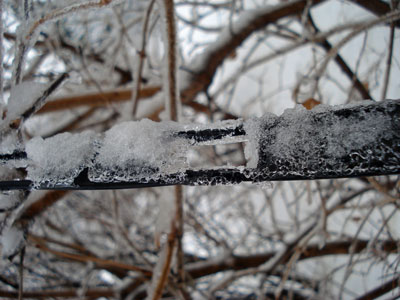
Photo: Heavy ice coats the 450 Ohm ladder line in this close-up.
Here it comes: The annual Spring severe weather season is here in North America. Tornadic winds hit in the southern Midwest states of Missouri and Kansas last night, while the same huge weather system brought Minnesota freezing rain and snow. The transition from winter to summer often means that we will be visited by bad weather that can take down antennas and put stations off the air at the very time their communications capability may be needed. This storm was well-forecast because it was being watched even as it approached the west coast from the Pacific. Computer modeling lends a new degree of confidence in such forecasts, so it is perhaps a bit easier than ever to be ready.
The problem for any given amateur radio operator is that forecasts cannot predict exact weather circumstances in a small geographic area. In this particular storm, heavy snow fell north and west of my location but we only got about 3 inches worth. Our snow was preceded by rain – freezing rain – which coalesced around antenna wires and tree branches. When the snow came, it added to the mass already collecting on the branches and wires. This was a prescription for power outages because tree branches would inevitably begin to break under the weight of the ice and fall across power lines. The power lines themselves, if in the clear, seldom collect enough ice to fall on their own. Sure enough, this morning almost 15,000 customers were without power here in the Twin Cities. Since the storm was more severe in the northwest part of the urban area, that was the place with the most power outages. Even so, in my town there were over 400 customers without power. Our power never failed or even flickered, probably partly because of just plain luck and good switching at the power company to keep failed power lines from bringing down the entire system. One thing I looked for specifically when purchasing my property was underground power lines. I have lived in too many neighborhoods where tree branches fell across lines and cut the power in almost every severe storm.
So what can you do to keep your own antenna systems from failing under the weight of snow and ice?
Wire antennas should be installed so that they have some “give” to them. That means that if the wire should be stressed by the extra weight of ice, the antenna will be able to bend with the weight enough to avoid outright failure. There are various methods of making a wire antenna a bit more flexible. The obvious one is to make sure that when the antenna is installed that the wire is not pulled up tight. Sometimes ingenious methods can be designed to allow an antenna anchored in a tree to move freely as the tree moves in the wind. Usually unless the tree is exceptionally flexible it will be enough to simply allow enough slack in the antenna wire to make for reasonable movement.
Rigid metal antennas are another story. Most amateur radio beam antennas are made of aluminum tubing. Some types of aluminum tubing are “aircraft grade” and may flex more than standard tubing before breaking. No matter what kind of aluminum tubing is used, it is not immune to severe damage from ice loading. If the weight of the ice itself bending the aluminum doesn’t break it directly, wind that comes up after the ice is coated onto the elements may very well finish the job and bring the entire structure down in pieces. I am not sure that there is any practical way to prevent this kind of damage in a beam antenna system, but perhaps someone with experience can weigh in on the matter and let us know. Few amateur radio operators have tilt over towers that can perhaps be used to bring the whole antenna down close to the ground with the elements 90° to the surface of the earth so that water will run off of them. But what happens to the horizontal portion of the tower that will then be collecting ice? It’s hard to figure out how to prevent ice damage on a beam antenna system, so keep your insurance paid up.
An antenna that is coated with ice and snow will not necessarily tune correctly. When I tried using the LDG auto tuner this morning to tune my 200 foot wire antenna on a frequency that had been previously “memorized” by the tuner, it behaved exactly as if it were visiting that 75 m frequency for the very first time. The tuner cranked away for a while before finally settling on what had to be a very different combination of capacitance and inductance to allow for a reasonable standing wave ratio. Once the ice melts off the wire, the auto tuner will have to search again for a new combination as things return to normal. One thing to consider is that not all automatic tuners will be able to match an antenna that is heavily loaded with ice and snow. The operator must be aware of this and be careful not to operate with a high standing wave ratio.
The antenna wire itself is not the only thing affected by ice and snow. If you are using open wire feed line as I am, you can expect ice loading on the feed line to contribute to changes in how the antenna behaves on the air. If you use coaxial cable, your only real concern is weight of the ice on the cable itself. Any place feed line comes into the house it should have a “drip loop” so that water can drip off the bottom of the loop of feed line as the ice melts. This prevents the water from following the cable through the wall of the house and into the ham shack.
Your antenna system will be more robust if you use good quality materials to construct it in the first place. Good antenna wire may be more expensive initially, but it will be more likely to stay up under ice loading than some bargain wire. As the old saying goes, “a chain is only as strong as its weakest link”. In terms of a wire antenna system, this means that a cheap insulator could easily be a failure point no matter what kind of expensive wire and feed line you use. Needless to say, you should always take the time to secure wires properly to center and end insulators so that it will not work loose under pressure as ice pulls on the wire.
Following a weather event such as high wind or icing, you should plan to inspect your antenna systems for any possible damage or tree limbs that might’ve fallen against the antenna wire. Any kind of antenna system should always be located well away from power lines so that a failure in either the power line or the antenna will not make one of them come in contact with the other.
Tomorrow it will be March, and that is the month that I usually think of as being the start of this severe weather transition season. Maybe it’s time to take a look at that go-kit and make sure that you are ready.
For Handiham World, I’m…
Patrick Tice, [email protected]
Handiham Manager

Pat Tice, WA0TDA, is the manager of HANDI-HAM and a regular contributor to AmateurRadio.com. Contact him at [email protected].
Episode Renumbering
In case anyone has seen weird behavior in the RSS feeds or on the Web sites, let me explain: I have renumbered episodes after #018. Back then I recorded a couple of updates from OSCON 2010 and called them Episode #018A and Episode #019A. Not long after that, the discrepancy in numbering started to eat at me. Now a couple of years later, I have decided to do something about it. All of the episodes have been renumbered, meaning that we’re a couple of episodes ahead of where we were. This will probably cause a little bit of confusion in the short term but overall I am happy that it is done. Nothing else has changed, just the numbering scheme. Thank you for your patience while we go through this brief transition period.
73 de Russ, Linux in the Ham Shack
Russ Woodman, K5TUX, co-hosts the Linux in the Ham Shack podcast which is available for download in both MP3 and OGG audio format. Contact him at [email protected].
Raspberry Pi (almost) available
Yesterday I had an email from Raspberry Pi saying that today there would be an announcement about the the keenly awaited device. Today I took a look at their website and found out that they are almost ready to ship the low cost ARM based devices that run a Linux called Fedora. the specs are available at both RS and Farnells, two component suppliers here in the UK.
In case you couldn’t wait to click through then blow are the specifications lifted straight from the RS website. From what I can gather there will be two variants, one called model A and the other called model B aptly enough. The difference being the addition of LAN and some other undisclosed features on the Model B.

The Raspberry Pi is a credit-card sized computer board that plugs into a TV and a keyboard. It’s a miniature ARM-based PC which can be used for many of the things that a desktop PC does, like spreadsheets, word-processing and games. It also plays High-Definition video.
Features
- Broadcom BCM2835 700MHz ARM1176JZFS processor with FPU and Videocore 4 GPU
- GPU provides Open GL ES 2.0, hardware-accelerated OpenVG, and 1080p30 H.264 high-profile decode
- GPU is capable of 1Gpixel/s, 1.5Gtexel/s or 24GFLOPs with texture filtering and DMA infrastructure
- 256MB RAM
- Boots from SD card, running the Fedora version of Linux
- 10/100 BaseT Ethernet socket
- HDMI socket
- USB 2.0 socket
- RCA video socket
- SD card socket
- Powered from microUSB socket
- 3.5mm audio out jack
- Header footprint for camera connection
- Size: 85.6 x 53.98 x 17mm
Price £21.60
All this for just £21.60! I sound like an advert but if the blurb matches the ability to programme the little blighter (easily) then this must be a concern for the Arduino crowd. Before we all get too excited though the RS website allows you to register interest and you’ll be getting one each at first.
Alex Hill, G7KSE, is a regular contributor to AmateurRadio.com and writes from Cumbria, UK. Contact him at [email protected].
903-MHz cavity filter tune-up
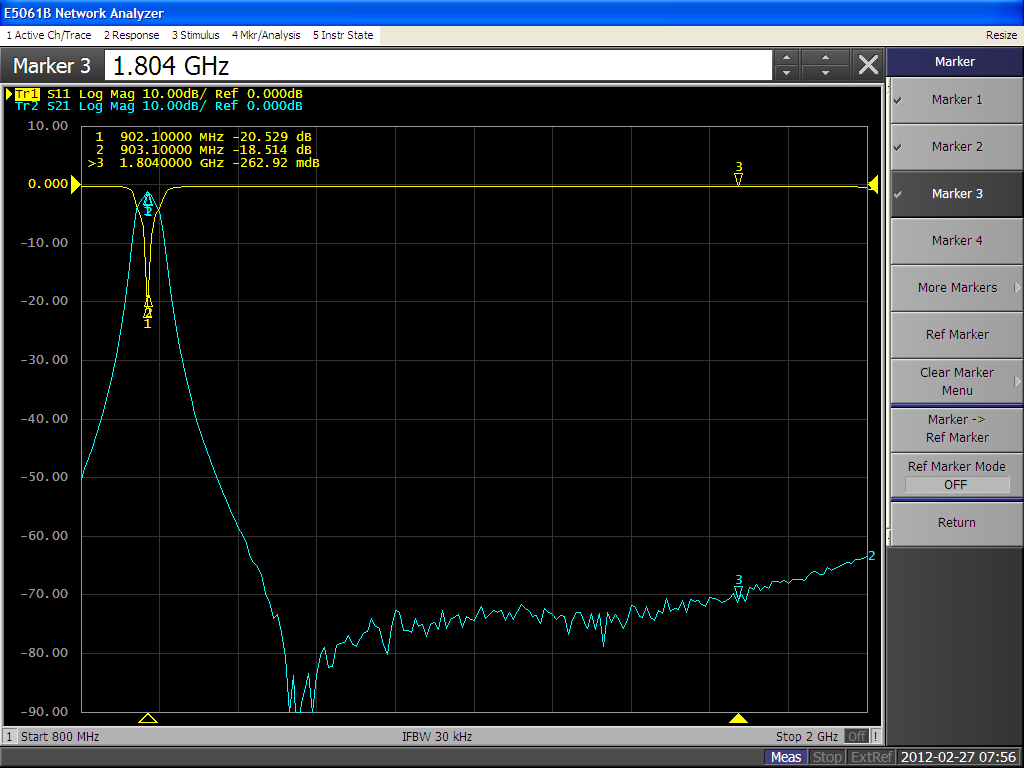
For reasons that will become clear in a future post or series of posts, we’ve been busy lately—don’t worry, it’s a good thing. I did manage to sneak away from my regular (usually desk-bound analysis) work into the lab and tune-up an eBay-special cavity filter for 903 MHz with our new network analyzer. It’s really amazing how you can dial these things in if you have the right tools. This one is a 3-cavity filter about 10x8x3 cm.
Passband insertion loss is about 1.2 dB. Harmonic rejection at 1.8 GHz is 70 dB down. I’ll take it.
I also have some eBay-special helical filters that were advertised to be for 432 MHz. So, I need to cobble up some carrier boards to try them out. Another day, another project.
Ethan Miller, K8GU, is a regular contributor to AmateurRadio.com and writes from Maryland, USA. Contact him at [email protected].
 Ham Radio Deluxe |
 W5SWL Electronics |
 Ham Radio Prep |
 KB3IFH QSL Cards  Hip Ham Shirts  HamRadioAuctions HamRadioAuctions Reliance Antennas Reliance Antennas Enigma Shop Enigma Shop |  morseDX  Ni4L Antennas  R&L Electronics R&L Electronics antennas.us antennas.us QRV QRV |
- Matt W1MST, Managing Editor
