 |
 A kit builders "magic" tool
 24 March 2012 | by
I really enjoy kit building I find it to be a nice pass time when the propagation is not co-operative and the bands are slow. With kit building it's a learning curve starting out with basic kits and moving up to kits that
contain SMT components....I have yet to dive into that pond. There sure is a reward when you have spent time
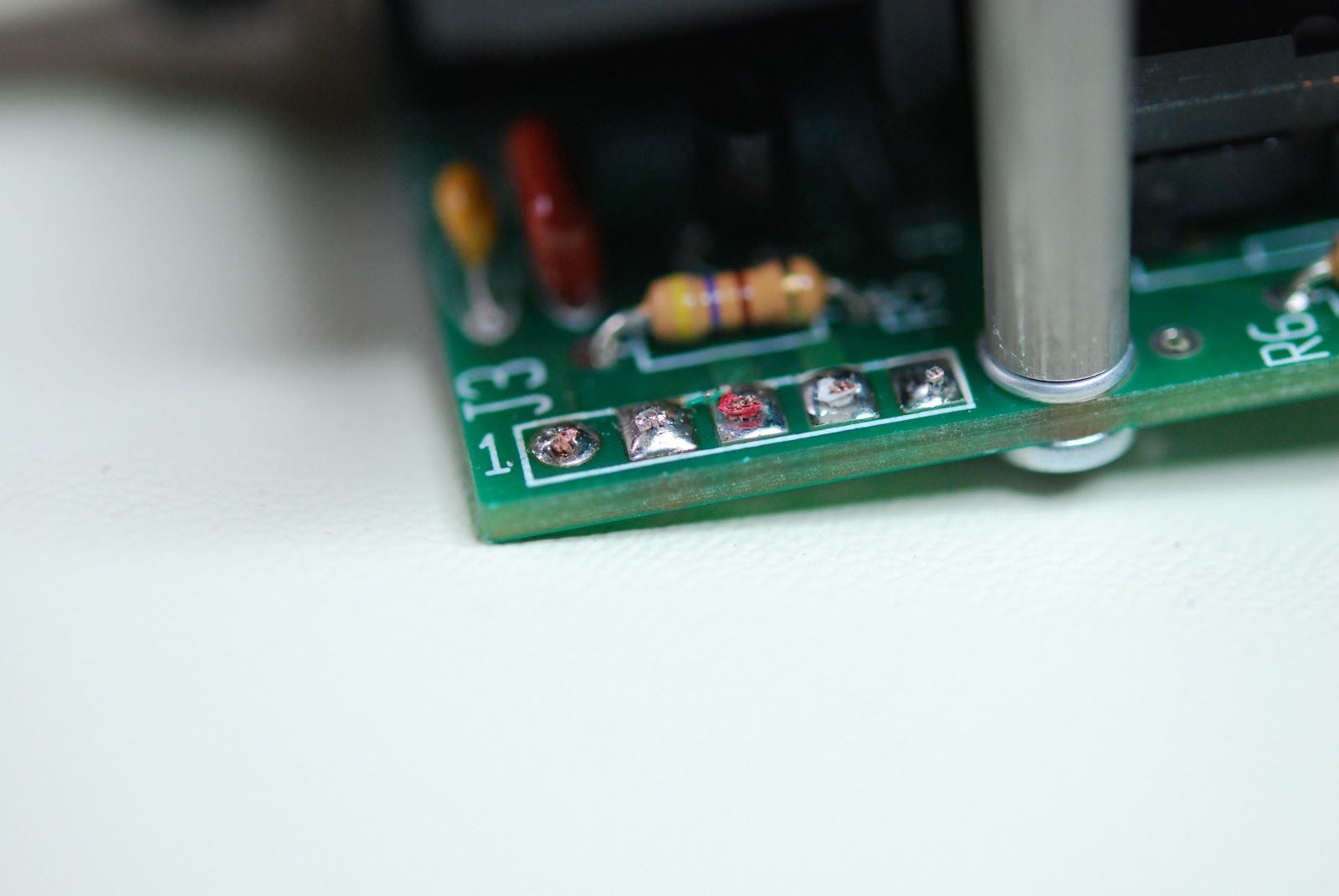 |
| Replacing a cable |
Recently I had to open up my Elecraft K2 to add an internal antenna tuner and battery. I had not had the top off the K2 for some time.....I was amazed at all the components to which I thought..."I actually put all this together" For those of you who build kits like me you have run into times when things just don't go as planned. I have soldered components in the wrong place. There has been solder run onto two pads instead of the one the solder was intended for and so on. I would bet there are a lot of kit builders out there who have their own stories. As kit builders we all have our "tools" from soldering stations to multimeter's
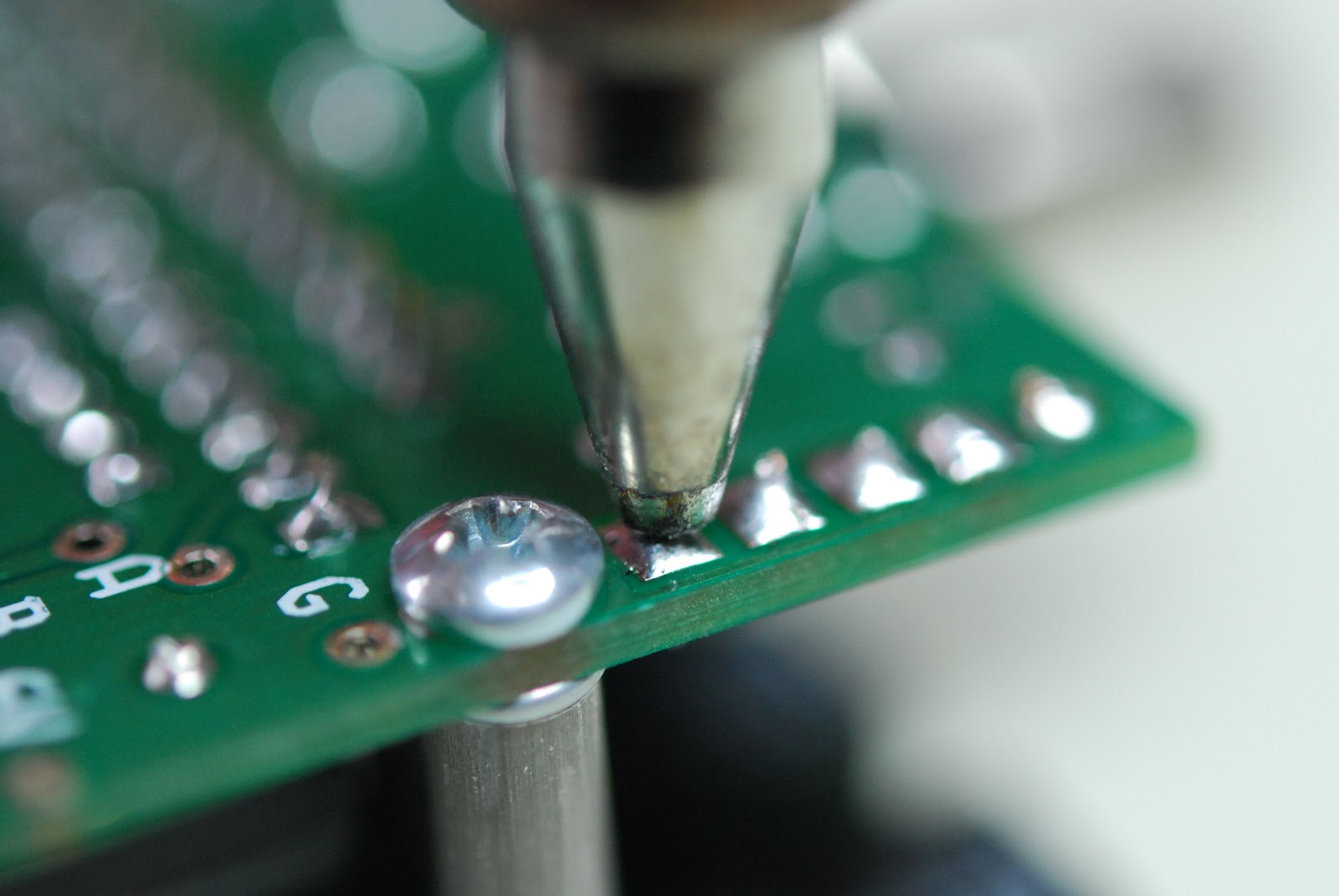 |
| Hakko at work |
 |
| The finished product |

Mike Weir, VE9KK, is a regular contributor to AmateurRadio.com and writes from New Brunswick, Canada. Contact him at [email protected].
A hint of changing conditions and a trip to White Horse Hill
As I was driving home last night, I was looking around on 28MHz SSB as I usually do. In addition to the ‘usual’ South Americans that I’ve been hearing for a few weeks there were a couple of fairly weak French stations. This interested me as I suspected I was hearing them via Es propagation. If that’s true, then with any luck we will start to hear more Es on 28MHz and then hear it rising in frequency towards 50MHz and beyond.
This afternoon, in celebration of the gorgeous weather, Julie and I decided to go up White Horse Hill, which is about 10 miles to the south of where we live. Although it was a little misty up there, we had a great time walking, listening to the skylarks, watching the buzzards and picking out some of the local villages. I took my Icom E-92 handheld and had a tune around on 145 and 433MHz. I was particularly pleased to have a nice 145MHz simplex contact with Mike 2E0YYY/P who was on the Long Mynd in Shropshire. I suppose the distance between us was around 80-90 miles.

Tim Kirby, G4VXE, is a regular contributor to AmateurRadio.com and writes from Oxfordshire, England. Contact him at [email protected].
Four State QRP Group hits a home run!
This sounds like a great kit at a fantastic price, for what you’ll be getting!
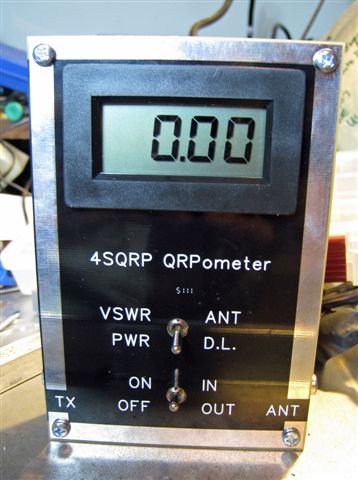
Dubbed the QRPometer during development, this useful accessory is a highly accurate and easy to use power and swr indicating meter. Unusual in any pwer meter, the range of accurate power measurement extends down to a low 100 milliwatts. It has a large digital display and boasts an accuracy level that few, if any, similar meters on the market can match. A unique design feature is that 2 circuit boards are included in the kit, they form the front and back of the enclosure. The boards are shiny black so there is no need to buy, build, or paint an enclosure.
This kit was conceived to fill a need within the hobby for an inexpensive, highly accurate VSWR and RF power meter for QRP power levels. The QRPometer uses simple analog signal-processing circuitry to provide a set of essential measurement features not previously available in a single unit. High quality, double sided, printed circuit board construction is used, with solder mask and silk screened component reference designators. All components are through-hole for easy assembly. NO toroids are required. All controls and jacks are PCB mounted, and a single, four conductor ribbon cable is the only wiring necessary. The QRPometer can be constructed by beginners as well as experienced builders. Construction time is approximately 3 hours, depending on experience level. The only equipment required for calibration of the QRPometer is a digital voltmeter, and a QRP transmitter.
First time builders please note: This kit is not difficult to build. All parts are thru hole parts, there are NO SMT parts. The parts are wide spaced on the board making installation easy, and all connectors are board mounted which eliminates point to point wiring. Also note that there are No TOROIDS to wind – none.
Specifications and Design Features
Power Range: 100 mW to 10 Watts
Accuracy: Power, 2% Typical
VSWR, 5% Typical
Large Digital Display The digits are .52″ in height.
Sensitivity: Direct readout on 3 1/2 digit LCD display. Minimum resolution 10 mW.
Enclosure: Silk Screened PC boards create the enclosure, no need to purchase one.
No Toroids: There are no toroids in this kit.
The price? Only $50.00 (US). Wow!
For all the details; and to order ……… http://www.wa0itp.com/qrpom.html
Please note that I am not a member of the 4 State QRP Group and have no “interest” in this kit, other than seeing great stuff get into the hands of my fellow QRPers!
72 de Larry W2LJ

Larry Makoski, W2LJ, is a regular contributor to AmateurRadio.com and writes from New Jersey, USA. Contact him at [email protected].
SKYWARN Training, and a Word of Advice About Amber Lights
 Over the last 30 years I’ve attended quite a few SKYWARN Storm Spotter training sessions, and I’ve always found the time well-spent. When I lived in the Twin Cities, Metro SKYWARN was simply part of being an amateur radio operator — there, SKYWARN is primarily a ham radio operation, and I got involved when I was a teenager. Later as a police officer I attended SKYWARN training in that capacity, but it was obvious that cops and firefighters weren’t nearly as effective as the ham radio operators who formed the well-oiled machine of Metro SKYWARN.
It’s a bit different out here in rural Minnesota. While some parts of rural Minnesota are connected via a hub-and-spoke repeater system to KØMPX — located right in the Chanhassen office of the NWS — such is not yet the case here in Granite Falls. Out here the well-oiled machine of storm spotters is the local fire department. Until we get the local repeater EchoLinked to KØMPX, ham radio operators must rely upon their cell phones to call in storm reports (unless of course they’re firefighters, who have their own radio net).

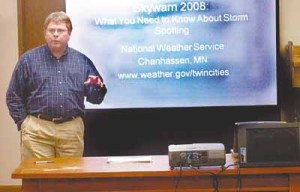
Todd Krause, KBØSGH, Warning Coordination Meteorologist with the National Weather Service, giving SKYWARN training in 2008. (Photo obtained from www.nujournal.com).
In any case SKYWARN training does come to our small town, thanks to the tireless efforts of Mr. Todd Krause, KBØSGH, a true gentleman and an excellent teacher. He’s on the road quite a bit in the spring of each year, putting on storm spotter classes all over Minnesota. Our class was two days ago, from 7:00-9:00 P.M., and the room was packed!
If you haven’t attended a SKYWARN class, or if it’s been a while since you have, I encourage you to find a training session near you (click here) and attend. This is the time of the year when these classes are offered, but we’re nearing the end of this year’s schedule — you’ll want to act quickly. In my experience you’ll need to attend this training more than once to really get the hang of it. It’s easy to identify the features of a storm by looking at pictures in the classroom, with the instructor right there to help you, but it’s much more difficult to do so out in the field. This class will help you distinguish between what really matters and what merely looks scary as you look up into the sky. More than once I’ve been with untrained people who freak out because of a scary-looking cloud, e.g. a rapidly rotating shelf cloud, and I’ve been able to calm them down by explaining what’s really happening.
One word of advice — if you do get into SKYWARN spotting, don’t go nuts decking out your car with amber lights and cheesy stickers/decals, okay? Even untrained observers know that stuff is for your ego, not for your storm spotting. They’re not impressed; they’re rolling their eyes. I don’t want to embarrass anybody in particular so I won’t provide any links, but a little Googling will show you how silly some storm spotters can be. I just saw one a few weeks ago with a bunch of amber lights on the rear deck of his car along with SKYWARN stickers and other home-made stickers proclaiming to the world that he is a Very Important Person as an Officially Certified Storm Spotter. Truly cringe-worthy! If you have this stuff, would you mind removing it? Maybe one SKYWARN sticker isn’t such a bad idea, but the other stuff is an embarrassment to the rest of us.
When I was a police officer I had all sorts of insignia and lights on my patrol car, but guess how much of it helped me when storm-spotting (with my 2m HT in my hand)? None of it. Ever. Flashing lights (including amber ones) can snarl traffic and even cause accidents if you use them, whether you’re driving or pulled over. Unless they’re absolutely necessary, they shouldn’t be used at all — and when it comes to storm-spotting, they’re almost never necessary. If you’re going to do your storm spotting from your car, drive the speed limit, obey all traffic laws, find a good vantage point where you can park safely, and you won’t even need the four-way flashers that came with your car.


Todd Mitchell, NØIP, is a regular contributor to AmateurRadio.com and writes from Minnesota, USA. He can be contacted at [email protected].
Review: The World’s Most-Awesome Suitcase
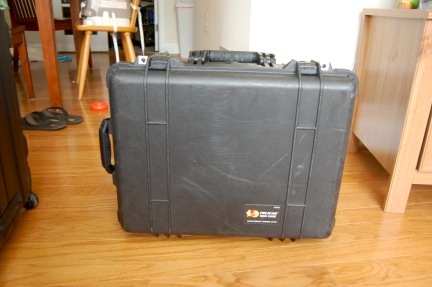
Air travel is hard on luggage. Just yesterday, I was sitting on the tarmac at Washington National (DCA) as we waited for our arrival gate to become available. The ground crew were loading baggage into the departing aircraft and did not elevate the loading elevator quite enough. Several suitcases and a Pack ‘n Play (the technical, brand-inspecific term for these things is a “playard”…who knew?!) toppled blissfully off the end of the elevator and landed in a pile beneath the aircraft. That’s just the stuff you see…
Until recently, I managed to travel carry-on only most of the time, something that preserved the life of my inexpensive soft suitcase far beyond expectation. However, the proliferation of checked bag fees has caused thrifty passengers to stuff as much stuff as possible into their carry-ons, making the overhead bins a nightmare. My employer is willing to pay for the first checked bag when I travel for work, which is 90% of cases or more, so thrift is slightly less motivating for me. I suspect that checked-bag fees have also increased the size of the average piece of luggage, making it perilous for my small soft-sided bag. So, like U.S. drivers of 10 years ago who preferred gas guzzling SUVs for their “safety,” I decided to fight back with a hard-sided suitcase.
After a trip to Europe in 2008 in which one of our soft-sided suitcases was essentially destroyed, Sarah was on board with this idea. I proposed a Pelican case at the time, but she thought it was ugly and “looks like a toolbox.” Since it’s a well-known fact that women drive household purchasing decisions, it should be no surprise that we ended up with a set of highly-rated, yet inexpensive hard sided suitcases. After one or two domestic trips, one of these developed a crack. The trip to Greenland in January of this year was impetus for me to take matters into my own hands: I bought a Pelican 1560 (empty with no foam) and the 1569 lid organizer.
The genius of the 1560 is that you can’t load it to more than 23 kg with “normal” contents. Although, Sarah—and airline, security, and customs employees the world over—would argue that very little that goes into my bags is indeed “normal.” It’s only a little more expensive than a department-store suitcase and definitely cheaper than most of the high-end brands. And, of course, it’s indestructible…and it floats. What’s not to like about that? There is one downside—it is almost always loaded to near 20 kg, so it’s heavy. But, until the airlines force us to pay by the kg, I have my suitcase for life.
Upon return from our latest trip yesterday, the two larger hard-sided suitcases had big cracks in them. “I think all of our suitcases should be Pelican cases,” Sarah remarked as we left the airport.
Ethan Miller, K8GU, is a regular contributor to AmateurRadio.com and writes from Maryland, USA. Contact him at [email protected].
A Portable Vertical Antenna
With the loss of my preferred frequent flyer status, airlines tightening their checked luggage allowances, and the addition of another traveler to the family, I’ve been contemplating a new portable antenna that is easier to pack than my usual DK9SQ mast and dipoles. I don’t do high-priced reduced-size antennas if at all possible since portable installations usually have other efficiency-reducing problems. Multi-element antennas take up additional space and have feeding and installation complications that are unnecessary for the casual DX operator. So, that leaves us to choose between a vertical and a dipole.
A few words about efficiency: Dipoles have a distinct efficiency advantage over verticals in almost every practical installation for 40 meters and up, except when the vertical is physically placed in or over salt water. Radiation efficiency tends to be dominated by near-field conditions, pattern is dominated by stuff that’s farther away. This is why vertical dipoles work so well for long-haul DX when placed within a few wavelengths of salt water. They don’t need the near-field efficiency enhancement as much as base-fed verticals, but they still leverage salt water for developing their far-field radiation pattern, especially at low angles required for long-haul communication.
I’m a casual DX operator, not a DXpeditioner, so I never operate on 160 or 80 meters. That is, considering the discussion above, why I have been using dipoles with the DK9SQ. But, verticals have a distinct advantage over dipoles in the sense that they are self-supporting. I decided to build a vertical because: 1) my next DX trip would include time near a beach and 2) I wanted to be able to bring my own support as I had with the DK9SQ.
My remaining requirements were now simple:
- A vertical antenna that requires no additional supports. Guying is OK.
- The antenna must be full-size (quarter wavelength) on 40 meters and above.
- Experience has shown that multi-band operation is desirable, but instant band switching is not necessary.
- The longest piece must fit inside my suitcase (20 in / 50.8 cm maximum length).
- Field assembly and repair with only a Leatherman tool.
- Minimum cost, minimum weight, minimum volume, minimum installation time.
And this is what I came up with:
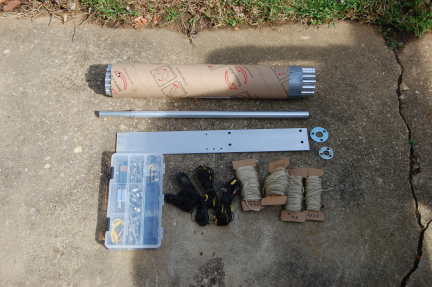
There are 21 aluminum sections, most with a “swaged” (actually, a poor-man’s swage to be described in a moment) end and a slit end. They are shown here bundled perfectly inside a section of cardboard shipping tube. An 18 x 2.5 x 0.125-inch aluminum plate serves as the base. I used DX Engineering resin support blocks to insulate vertical from the base. A point could be fashioned on the bottom of the base and a foot plate attached to push into soft soil, but that has not been done.
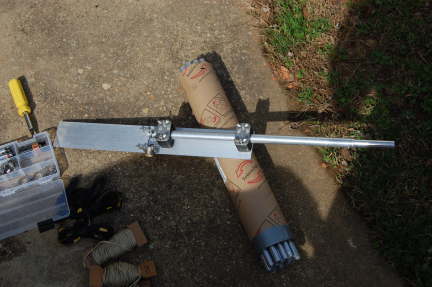
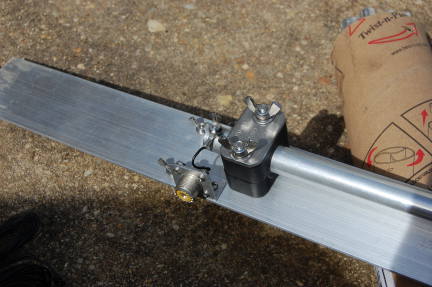
Most sections fit together using overlapping joiner pieces that I previously referred to as “poor-man’s swaging.” I’m not sure that it’s actually a savings over paying a local shop to swage the ends for you when time is considered in addition to material, but I cut telescoping pieces six inches long and fastened them three inches deep in one end of a 17-inch section of tubing with two offset and orthogonally-placed aluminum pop rivets for a total length of 20 inches. This geometry not only fits in my suitcase, but results in a very small amount of wasted material as well.
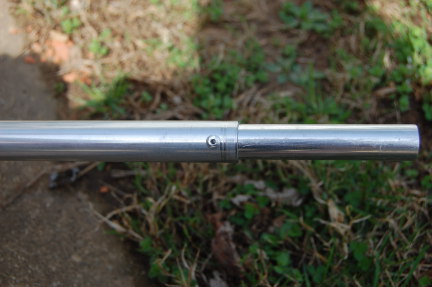
The other end of each piece is slit about 2 inches and they mate with an all-stainless steel hose clamp. The first 10 feet of the antenna are 0.75-inch 6063-T832 tubing followed by telescoping sizes down to 0.375-inch at the very top. The transition pieces are a full 20 inches long and are slit on both ends. The full-size antenna will stand in a light breeze, but guying is a good idea. Guy rings are fashioned out of flat washers drilled in three places.
Tune-up is easy…the more radials you use, the less critical their length. After about 8 or 10, you’re in the clear here. I never attached enough to prevent them from affecting the tuning. If you only plan to have a couple of radials, go ahead and cut them to 1/4 wavelength (even though ground proximity will detune them). Then, set the length of the antenna using the required number of 17-inch sections (the 234/f formula is surprisingly close) with the last section being a variable length for fine tuning.
I’ve intentionally left out most of the details of the antenna itself because I don’t expect anyone duplicate it exactly. But, here are a few notes for anyone considering building one themselves:
- There are lots of parts vendors out there. McMaster-Carr and DX Engineering will get you there in one order from each. There is a surprising amount of overlap in their inventories. Get the hose clamps from McMaster…even if you get stainless-stainless (stainless band, stainless screw), they are about 1/3 of the DXE price. On the other hand, the resin support blocks are cheaper from DXE.
- I carry a compact antenna analyzer (Autek Research VA-1) with me. Field tune-up is a snap and it runs on a single transistor battery. It’s about 1/4 the size and weight of an MFJ-259 and good enough for amateur work. Oh, and I bought mine used for a fraction of the MFJ.
- A tubing cutter is fine if you only have a half-dozen or so cuts. But, if you have a chop saw or need an excuse to buy a chop saw, it will make cutting the tubing far easier. My hands were raw for a few days after cutting the tubing by hand. I’m sure the antenna performs better on account of it, though.
- Find a friend with a metal-cutting bandsaw to slit the ends of your tubes. I went through a half pack (McMaster mega-size pack) of cut-off wheels for my rotary tool doing my slits.
- McMaster only sells the aluminum plate in 36-inch pieces. If you don’t have the aforementioned chop saw, an angle grinder with a cut-off disk does a surprisingly good job.
- I pack a combination-screwdriver that has hex drivers that fit the hose clamps and #6 nuts. Even though the antenna can be erected with only a Leatherman tool doesn’t mean it has to be.
- The small parts box shown in the top picture holds all of the parts for the antenna—it was 2 USD at Home Depot.
- The final and most critical component is a clip-lead that can be used to attach various nearby metal structures to your ground plane. I have used it to make a temporary radial out of excess tubing sections on 12 meters as well.
That’s it. The antenna goes up in a few minutes, especially if not used at full length. I used it successfully last week as OA5/K8GU, which will be detailed in a future post.
Ethan Miller, K8GU, is a regular contributor to AmateurRadio.com and writes from Maryland, USA. Contact him at [email protected].
LHS Episode #078: Kubuntu is Bloodthirsty
 In this episode of Linux in the Ham Shack, our intrepid hosts put aside idle banter, childish meandering and silly stories in favor of true content, both ham radio and Linux related. All right, that doesn’t happen even a little bit. Instead, Richard has a lot of fun telling you all the trouble he has with Linux Mint Debian Edition, all the while mentioning a bunch of other operating systems he’s tried recently including Ubuntu, Kubuntu, Crunchbang among others–letting you know what’s wrong with all of them.
Then there’s some discussion of svxlink, an Echolink client and server application for native Linux environments, Allstar Link, Open Media Vault, contest loggers and a whole bunch of other stuff besides. Ahh, perhaps there is some content here after all. Hope everyone enjoys this episode and can perhaps contribute a dollar or two towards the Hamvention fund. It’s coming up soon and we hope to see you all there.
73 de The LHS Guys
Russ Woodman, K5TUX, co-hosts the Linux in the Ham Shack podcast which is available for download in both MP3 and OGG audio format. Contact him at [email protected].
 Ham Radio Deluxe |
 W5SWL Electronics |
 Ham Radio Prep |
 KB3IFH QSL Cards  Hip Ham Shirts  HamRadioAuctions HamRadioAuctions Reliance Antennas Reliance Antennas Enigma Shop Enigma Shop |  morseDX  Ni4L Antennas  R&L Electronics R&L Electronics antennas.us antennas.us QRV QRV |
- Matt W1MST, Managing Editor
