 |
 QST Digital Edition beta
 22 April 2012 | by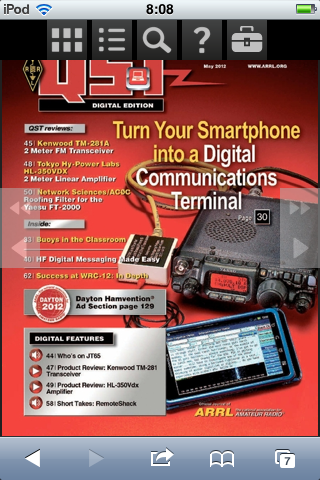
The other day I received, like some unknown number of others, an invitation to try the QST Digital Edition beta for the May 2012 issue. I am not a hard-core mobile/digital media user. But, Sarah is a librarian who has specialized in management and procurement of electronic journals and books. So, she gave me the low-down on what to look for. And, over the years, I’ve given her what-for about eBooks because, as I like to say, “I am willing to risk a single print copy of something by taking it places I wouldn’t risk taking an electronic reader.” That sums up the perspective I took when reviewing e-QST.
You can read about the Digital Edition on ARRL’s FAQ here. The desktop version requires Flash to use in-browser or Adobe Air and an enormous download to go stand-alone, neither of which really warmed my heart. But, it does work in the web browser of a mobile device. I have a 2nd generation iPod Touch running iOS 4 and it worked great in Safari. I now have a bit of insight as to why people might love their iPads (which I have always viewed as a more-expensive, less-convenient version of the iPod Touch or iPhone). There appear to be only two levels of zoom: fit page width and zoomed-in. No matter how good your eyesight, you need to be zoomed in to read because the characters don’t render legibly otherwise. I think iPad’s larger screen might make reading it easier.
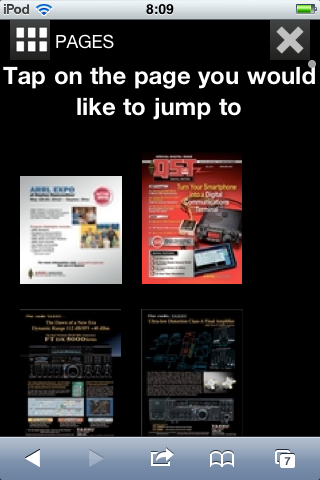
Browsing page thumbnails was OK, but it’s difficult to actually know what you’re looking at before you select the page. It also would be nice if the pages were numbered in thumbnail view.
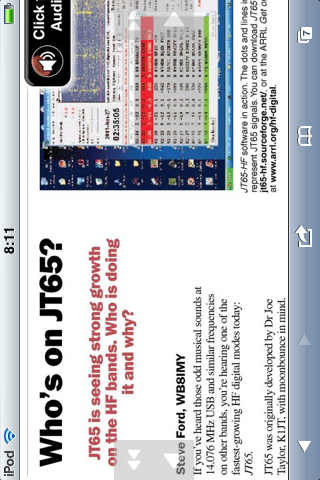
One of the big advantages of the Digital Edition is that you can do things you can’t do with the print version, like including audio of JT65. Granted, I think almost anyone who’s active on HF CW or digital knows what JT65 sounds like, but it’s a basic demonstration of the kinds of things that will be possible in the new format.
Given that I’m usually done with one month’s issue by the time the next one comes out, the Digital Edition is alright for basic browsing and reading. It’s much faster to skim the print issue, at least with my barebones 768 kbps DSL connection and the higher visual bandwidth of print (read Tufte’s essay The Cognitive Style of PowerPoint for more on this and other interesting reasons to hate slide decks). The mobile version also requires you to be connected to the Internet to browse. It turns out that an entire issue is on the order of 350 MB to download stand-alone on a computer. This makes it difficult to take places where I often want to read QST (on airplanes, for instance)… It is possible to print from the desktop version (I tried it using 32-bit Windows XP and Firefox), although it seems to be slower than the mobile version (not entirely unexpected).
Another thing that’s a bit different is that if you download the offline content to your desktop, you still need to authenticate to open it. It’s not clear whether this continues if you drop your ARRL membership. It is a bit different than owning boxes of back issues…even if you drop your membership, you still have the magazines. I don’t think this is a huge concern for most hams, who probably wouldn’t be interested in old QSTs if they dropped the membership.
In summary, I like the concept of the Digital Edition, but I wish I could carry off-line issues around on my mobile device. ARRL hints at this in the FAQ, so I am hopeful.
Ethan Miller, K8GU, is a regular contributor to AmateurRadio.com and writes from Maryland, USA. Contact him at [email protected].
Logs and QSL cards
Since I logged my first HF QSO back in 2005 I have been using one type or another of software logging. I have also enjoyed exchanging QSL cards but never developed a good system at keeping them organized. Jumping from one logging program to the next, managing the “sent” and “received” QSL card fields have been hit or miss. A good portion of my contacts were uploaded to eQSL. Some were pushed out to LoTW. But I am not at all certain that either accurately reflects all my logged contacts. Compounding the problem has been multiple moves and military facilitated DXpeditions to Iraq and Korea. So what I am left with is a filing cabinet drawer full of QSL cards and a hard drive full of various log files.
It would be nice to get this mess sorted out.
I taking a three-step approach to establish order out of chaos.
(1) Gather all my software based log files. Use a file format compatible with fldigi and convert all the log files accordingly… with the end result of one consolidated log.
(2) Organize all QSL cards by date. I have a few boxes that QSL cards fit in nicely as well as tabbed dividers. This will allow me to fairly easily crosscheck the cards I have against the digital log.

(3) Stick with fldigi as my logging program. Update the QSL card “sent” and “receive” fields as I mail out cards or receive them. File received cards by date of contact.
(BONUS) I am pretty sure I achieved DXCC back in 2007, but have never been able to sit down and pull out the 100 cards I need. With a consolidated log and QSL cards organized by date, I will be able to easily find my 100 cards.
Scott Hedberg, NØZB, is a regular contributor to AmateurRadio.com and writes from Kansas, USA. Contact him at [email protected].
ICQ Podcast S05 E09 – Cam Hams DXperdition (22 April 2012)
Series Five Episode Nine of the ICQ Podcast has been released. News Stories include :-
- Radio Scouting IRLP Calling Channel
- WUST Award
- RSGB Training and Education Committee
- New frequencies for Polish Radio Amateurs
- ESPN Worldwide Amateur Radio Club
- Ham radio operator needed in Canberra
- GB2CRF - Falklands 30th Anniversary
- The 145.500 MHz FM Calling channel
- 50 to 52 MHz available in Portugal from April 26
- Amateurs must protect new radars in 23 cm band
- Spectacular explosion on the Sun
- England completed by G4MD and G4OIG
Your feedback and Martin M1MRB is joined by Hams from the Cambridgeshire Amateur Radio Group to discuss their upcoming Dxperdition.
Colin Butler, M6BOY, is the host of the ICQ Podcast, a weekly radio show about Amateur Radio. Contact him at [email protected].
Battery Evolution
As mentioned in one of my last posts, the lithium ion battery that I had acquired from eBay arrived. There was a “return receipt, signature confirmation” slip in the mail box and I went and picked it up from the Post Office this morning.
Batteries sure are getting lighter and smaller!
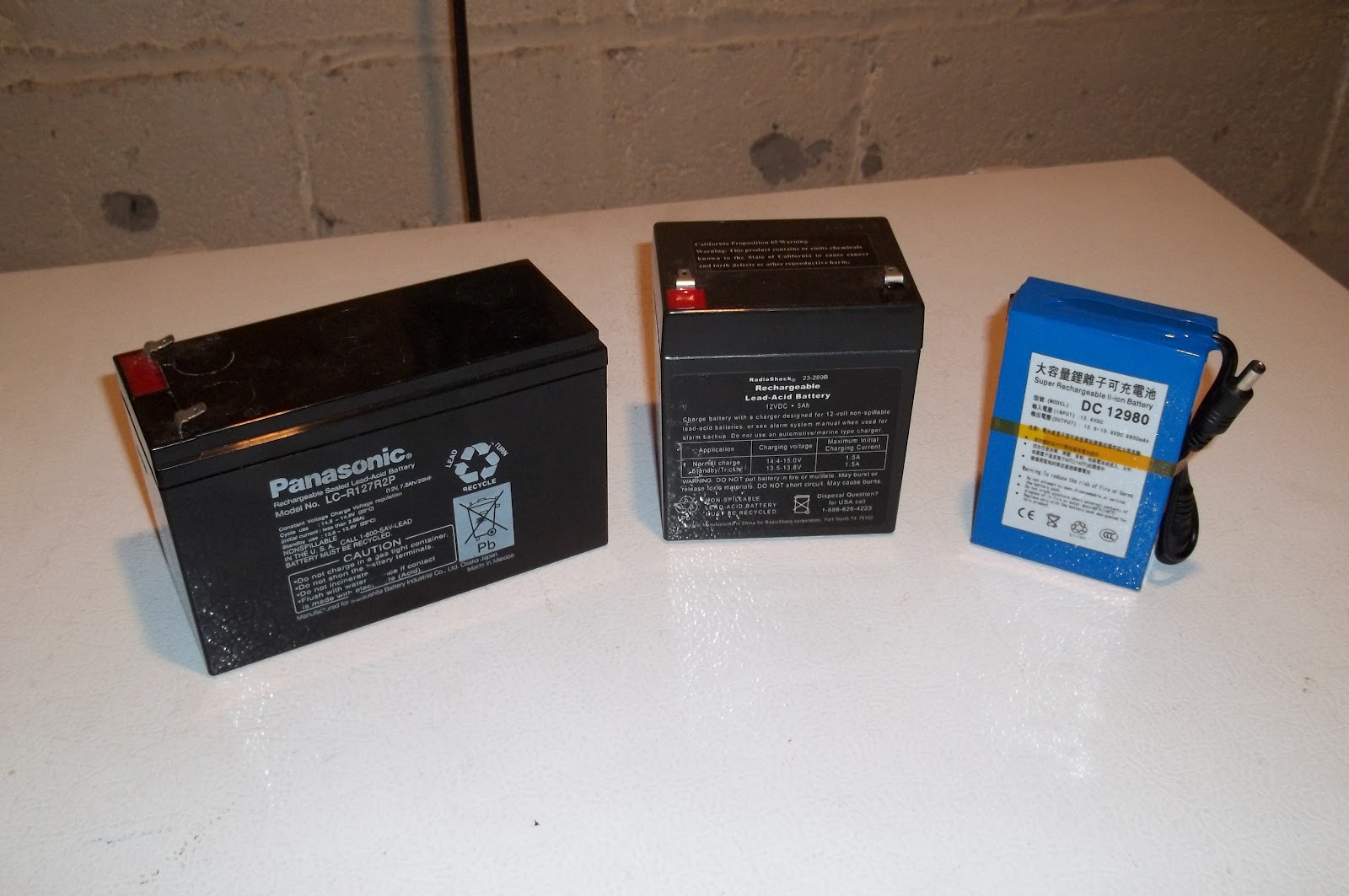
The battery to the left is the very first sealed lead acid battery that I’ve ever used for portable field operations. I’ve had this guy for about eight years now. It’s a 7.2Ah battery, probably about 5 pounds (a tad more than 2 kilos)- about the weight of a bag of sugar (roughly). It came out of an emergency EXIT light that was in the building that I used to work at. I saved it from the dumpster and there was (and still is) absolutely nothing wrong with it. Only drawback for field operations is the weight.
The middle battery is the one I’ve been using for about the last three years. It’s rated at 5Ah and is roughly half the weight of the big battery (approx. 2.5 pounds or about 1 kilo).
“Little Boy Blue” to the extreme right is the lithium ion battery. 9.8Ah and I would say, the same size as a pack of cigarettes. It weighs less than a pound (less than 1/2 a kilo). It came with a wall wart (not pictured) for charging, it has both male and female 3.5mm connectors for output; and it has a little switch on the left hand side with a tiny red LED indicator to let you know you have turned the battery “on”.
More capacity in a smaller, lighter package. How cool is that?
72 de Larry W2LJ
QRP – When you care to send the very least!

Larry Makoski, W2LJ, is a regular contributor to AmateurRadio.com and writes from New Jersey, USA. Contact him at [email protected].
Third-party Kenwood accessories
Ebay is a good place to buy accessories like speaker/mics and headsets for your radios. A few years ago I used it to buy a speaker/mic for my Kenwood TH-F7E. After I sold that radio I used the speaker/mic with my TH-D72. When I tried it with my old TH-205E however I found that PTT didn’t work. I soon established that the reason was the genuine Kenwood accessories used a monophonic 2.5mm plug with only two contacts, tip and sleeve, for mic audio and PTT. The third-party accessories from eBay used a stereo 2.5mm plug with tip, ring and sleeve, but there was no connection to the ring. It looked as if the plug in the radio was trying to make contact in the area of the ring. This obviously was OK for newer Kenwood radios but with the 205E there was no ground connection for the PTT.
 |
| Ring and sleeve of the 2.5mm plug should be connected |
My first thought was to open up the speaker mic, find the wire connected to the ring and connect it to ground. However I soon found that the cable of my speaker/mic had no wire connected to the ring at all. My only option was to try to bridge the two contacts together using solder. This I did, and the speaker/mic then worked with the TH-205E.
The Wouxun KG-699E and the Baofeng UV-3R+ also claim to use accessories with a Kenwood-compatible plug but just like the 205E I found that PTT did not work. I have just performed the same modification to the plugs on a “Kenwood-compatible” headset/boom mic and also one of the earpiece/mics that came with the Baofeng and Wouxun so that they would all work with all four radios. It is easy to do, but you need to take care as it’s easy to melt the plastic parts of the plug and you could easily ruin it if too much heat is used.
Using a sharp craft knife cut away a small section of the black plastic insulation between the ring and the sleeve of the 2.5mm plug to reveal an inner metal sleeve. Open this up a bit more using the edge of a jeweller’s file. Then make a solder bridge between the ring and sleeve. You need to apply heat using the edge of the soldering iron bit to the inner sleeve in order that the solder will bridge the gap. Apply the soldering iron for as short a time as possible to avoid melting the plastic insulation and destroying the plug. I used Blu-Tac to hold the plug in a steady position whilst soldering.
After you have bridged the contacts use a jeweller’s file to remove any excess solder from the plug. You should also smooth the plastic insulation between the plug contacts which may have melted and bulged a bit. The plug should be completely smooth between the contacts, the solder bridge and the insulation. It should plug easily into the socket on the radio. If it needs a firm push then try a bit more filing until it goes in easily. You don’t want the plug to get stuck in the radio nor for it to damage the socket contacts if force is needed to insert or remove it.
I accept no responsibility for damaged plugs or radios as a result of trying this modification. However I have done three of them now with success each time so it is possible with care. Now my “Kenwood-compatible” accessories will work with old and new Kenwoods as well as the Baofeng and the Wouxun.

Julian Moss, G4ILO, is a regular contributor to AmateurRadio.com and writes from Cumbria, England. Contact him at [email protected].
Lyrids meteor shower
This weekend is the peak of the Lyrids meteor shower. I had a quick listen on both 50 and 144MHz this morning before breakfast. On 50MHz, I heard my radio neighbour Neil, G4BRK calling CQ JT6M on 50.230. Listened for a few moments and was interested to hear SM4KYN with a few bursts. Not bad as I was just using the vertical antenna. On 144MHz, I looked on 144.370 FSK441 and heard a really excellent burst from EB3DYS. I did call EB3DYS for a couple of periods but heard nothing more after that.

Tim Kirby, G4VXE, is a regular contributor to AmateurRadio.com and writes from Oxfordshire, England. Contact him at [email protected].
D-STAR: New DCS reflectors and DV-RPTR boards
When I was playing around with D-STAR last weekend, I thought the REF001C and REF005A reflectors seemed a bit quiet. I wondered whether people had got fed up and moved on. I didn’t worry too much as I had some nice QSOs.
During the week, I noticed a tweet from the Bromley Repeater Group saying that they had connected up MB6SS, one of their nodes so that they could access the new DCS reflectors. I’d seen a comment about DCS reflectors when I had installed the new version of Win-DV, but hadn’t had a chance to investigate.
A quick Google provided some useful information and I found the following from Kurt DJ0ABR, ‘The main difference (and the advantage) of DCS compared to old reflectors is, that is does not more use the Header-Voice separation. The separate transmission of headers and voice packets makes sense on RF due to the limited bandwidth. But it causes many routing problems in old reflectors. DCS uses a new format and transmits (over the internet) the routing information with every single voice packet. This makes routing much more reliable. Protocol wise there is no header packet, instead each AMBE packet includes a header which adds a lot of resilience and allows you to pick up a QSO mid over. Operation wise: The main differences are that DCS reflectors use channels A to Z and they have names, DCS001 A is world wide, and is permanently linked to the A channels on all other DCS reflectors. A nice touch. The new client code is implemented already in Jonathans gateways, in the Control Center and in a couple of Icom clients. DCS was invented and developed in February by DG1HT, Torsten. I am helping him in debugging and testing. DCS001 runs at a gigabit intenet node in a high school and is currently designed for up to 700 simultaneous QSOs.’
Very interesting. So I did a little research and found that DCS005B was the main UK reflector, though I can see that they are some regional reflectors, for example DCS005W for Wales and the West and DCS005L for the London area. In practice, the new reflectors work well and seem to provide better audio quality than the old-style ‘REF’ reflectors. It’s also nice that you can pick up a QSO half way through an over rather than having to wait for the start of the next transmission.
Activity on the new reflectors can be seen at http://xreflector.net/neu3/ Also, have a look at the DV-RPTR boards which should provide a cheap route for more people to get involved with D-STAR with their existing equipment. This all seems like a positive step in the evolution of D-STAR and pleasing that it is progressing in a more open direction.

Tim Kirby, G4VXE, is a regular contributor to AmateurRadio.com and writes from Oxfordshire, England. Contact him at [email protected].
 Ham Radio Deluxe |
 W5SWL Electronics |
 Ham Radio Prep |
 KB3IFH QSL Cards  Hip Ham Shirts  HamRadioAuctions HamRadioAuctions Reliance Antennas Reliance Antennas Enigma Shop Enigma Shop |  morseDX  Ni4L Antennas  R&L Electronics R&L Electronics antennas.us antennas.us QRV QRV |
- Matt W1MST, Managing Editor
