 |
 Thanks postie
 6 June 2012 | by
 I’d almost forgot that I had an order in for one of these. But my royal weekend was topped off nicely a royal (mail) delivery of 1 Raspberry Pi.
I had a few plans for one of these when I first heard about it but first off I’ll spend a bit of time getting to know the linux distro and I’ll assume there is a way of running something like WSPR without too much trouble as it has a native Debian (.deb) version. First off though will be trying to get a video signal out to my rather old monitor that doesn’t have a HDMI input.
In the mean time I think I’ll have a google about to see what anyone else has done. Always a good start to learn from others.

Alex Hill, G7KSE, is a regular contributor to AmateurRadio.com and writes from Cumbria, UK. Contact him at [email protected].
Is the Baofeng UV-3R Mark II really modifiable to 220 Mhz?
The answer is yes, and no. Using the software utility available here you can stretch the coverage of your UV-3R Mark II. This

UV-3R Mark II
only works on the Mark II (dual watch display) and the new Plus model. There are two options for changing the coverage. You can stretch up from VHF or down from UHF. Only the UHF option seems to work. Now, before you run off and do this, let me pass a few warnings. First of all, the UV-3R is NOT designed to do this, so transmitting at full power on a band your radio was not designed to work on has the potential to fry something. Second of all, most users have put the output power between 1 and 16 milliwatts (yes, milli), and my tests concur with this. It does receive OK on 220, but not as well as it does on 2M or 440. The procedure can be a little complicated, but there is plenty of help at the UV-3R Yahoo Group.
So, does it really work? During my morning commute, my train passes south of my club’s main repeater site. Now this is on a rather high building, in one of the highest points on western Long Island, and is pretty much line-of-site for a 4-5 mile stretch of my train ride. I tested to see if I could key up our 220 machine, and it seems that the effective range was about 4 miles this morning. Now that was just keying the repeater up. I’ll have to check to see if I can actually be HEARD on it. For listening to the 2 or 3 220 repeaters near my office though, it works fine. Also, keep in mind that this was all done with the stock antenna, which is most likely far from optimal at 220 Mhz.
Once again, I can’t stress enough that if you don’t want to risk breaking your radio permanently, don’t try this. So far, my little radio has suffered no ill-effects, but your mileage may vary.
-Neil W2NDG
Neil Goldstein, W2NDG, is a regular contributor to AmateurRadio.com and writes from New York, USA. Contact him at [email protected].
I am not a robot

For the last few months I have been getting more and more irritated by the captcha word verification required to comment on certain blogs. The captchas Blogger used to use were perfectly adequate, in my opinion. But Blogger insists on “improving” its user interface. If it ain’t broke, don’t fix it I say.
The latest two-part captchas Blogger uses seem designed to keep out the good guys and allow in the bad. The statement “Please prove you’re not a robot” seems ironic, as only a robot could decipher the letters. This morning, on a blog I won’t mention, I had to refresh the captcha three times before getting one that contained only recognizable letters.
Of course if Blogger’s captchas were annoying me they were also annoying you, my readers. So I decided to disable word verification on both G4ILO’s Blog and One Foot in the Grave. At the same time, I have enabled moderation for comments to posts more than 2 days old. Most of the valid comments are made within that time period anyway. If a comment is made later than that then a further small delay until I approve it will hardly be noticed. Hopefully this will result in an increase in valid comments and fewer spammy ones. But if I find too many spammers are taking advantage of the two day window of opportunity I’ll turn moderation on for all comments. If any internet lowlifes are reading this, don’t even think about it.
For the benefit of anyone who arrives here looking for a way to turn off word verification, here’s how. First, make sure you are using the old Blogger interface (I’d switched back to it already as I could never find anything in the new one.) Then, under Manage Blogs, click on Settings for your blog. Then click on Comments in the row of tabs along the top. The settings you need are on that page.

Julian Moss, G4ILO, is a regular contributor to AmateurRadio.com and writes from Cumbria, England. Contact him at [email protected].
FOBB 2012 News
Today I received the following e-mail from Bill W4ZV:
“Hi Larry, FYI on the WRO live blog Richard KI6SN just confirmed that he will be doing FOBB this year and promises results within 2 weeks. Said he would be making an announcement on QRP-L next week. Great news! 73, Bill W4ZV”
End
OK – that’s all the news I have. I have not received any answers to my inquiries about FOBB, so I would suggest you keep your eyes peeled on QRP-L for the next couple of weeks. I do not know if FOBB numbers will be issued; or who will be doing the issuing.
This is a great event, and I’m glad to see that it’s not going the way of the Dodo.
72 de Larry W2LJ
QRP – When you care to send the very least!

Larry Makoski, W2LJ, is a regular contributor to AmateurRadio.com and writes from New Jersey, USA. Contact him at [email protected].
A Book of Ideas For New Hams
 Noted amateur radio author and blogger Dan Romanchik, KB6NU, has released a new Kindle e-book titled 21 Things to Do After You Get Your Amateur Radio License.
Romanchik said that many people rush headlong into the hobby only to stall out. “The main reason that I wrote this book is that it was frustrating to me that so many people get their Tech licenses and then never do anything with them,” he said. “They never really get involved in the hobby for whatever reason. I am hoping that if they read this book — and actually try some of the things that I suggest — they will be inspired to really get into ham radio.”
If you have a Kindle or the Kindle app for iOS/Android, you can download his book for $2.99 from Amazon. There are also Nook and PDF versions available on his website. Don’t forget to check out his blog at http://www.kb6nu.com (and while you’re there, check out his No-Nonsense Study Guides!)
Matt Thomas, W1MST, is the managing editor of AmateurRadio.com. Contact him at [email protected].
The Johnson 275W Matchbox Antenna Tuner
I had purchased a Johnson Matchbox from an estate a while back & decided that while I was home with the flu I would open it up and check on its condition.
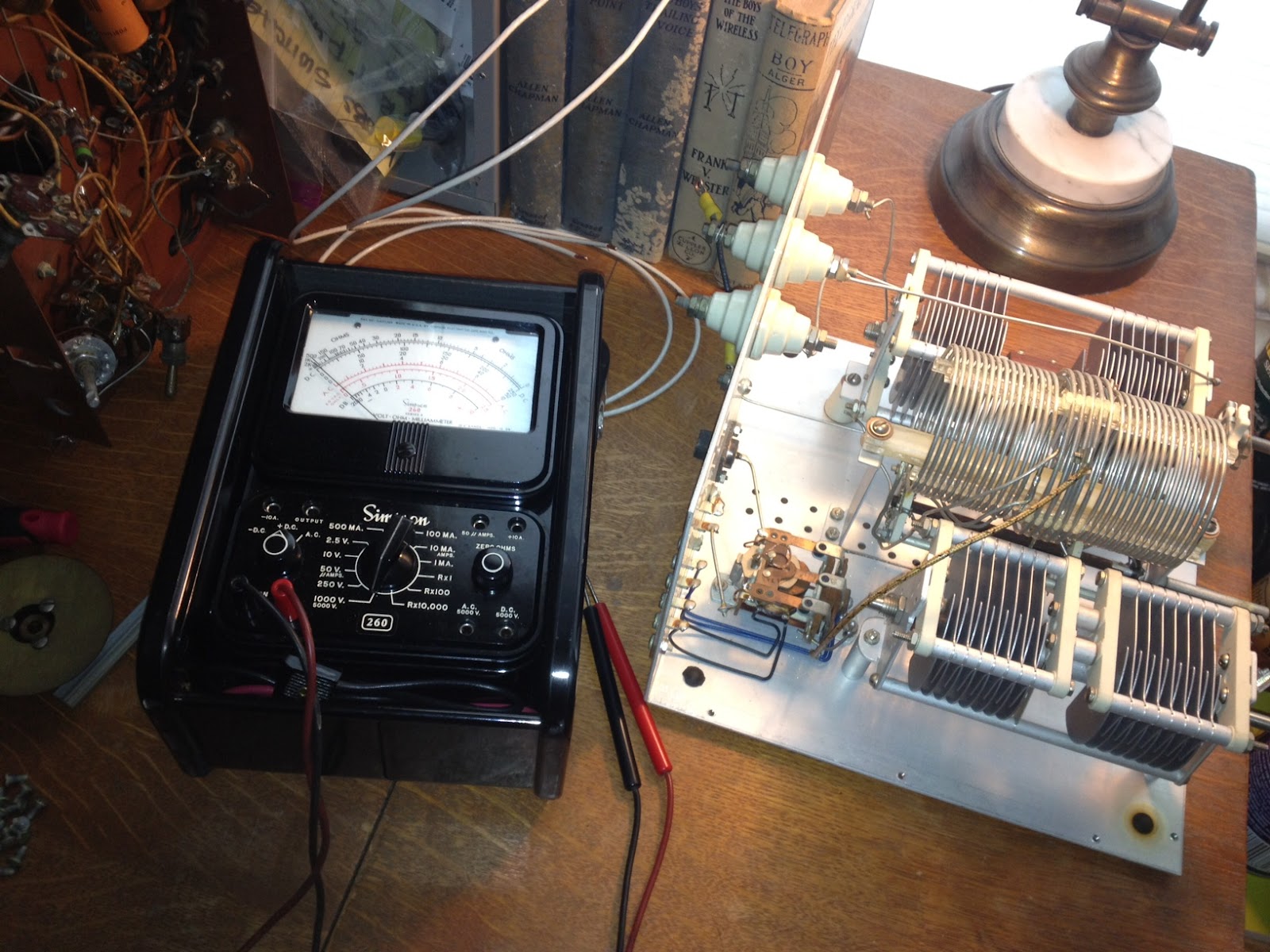 The Johnson Matchbox is found most commonly in two versions, the smaller “275W” unit and the larger Kilowatt Matchbox. Why did I use quotation marks around 275W? Well, these units were manufactured back in the good old days when men were men and transmitting voice meant using AM, not single side band. The conservative rating of 275W of AM translates into roughly 800W of peak SSB (Not really but close enough so you get the idea)
Unlike many who own a Matchbox I was hoping to keep it 100% original and that it would contain all its original components, including the antenna change-over relay and wiring for the high-impedance receiver antenna connections. I plan to use this Johnson Matchbox with a Heathkit AT-1 transmitter and Hallicrafters SX-25 receiver so the inclusion of an antenna change over relay and 300 Ohm receiver connections will make life MUCH easier. Something I didn’t realize until I had the unit apart (There are a LOT of screws holding this thing together) is that there is also a receiver control contact on the relay to break HT and mute the receiver during transmit which will work with my SX-25.
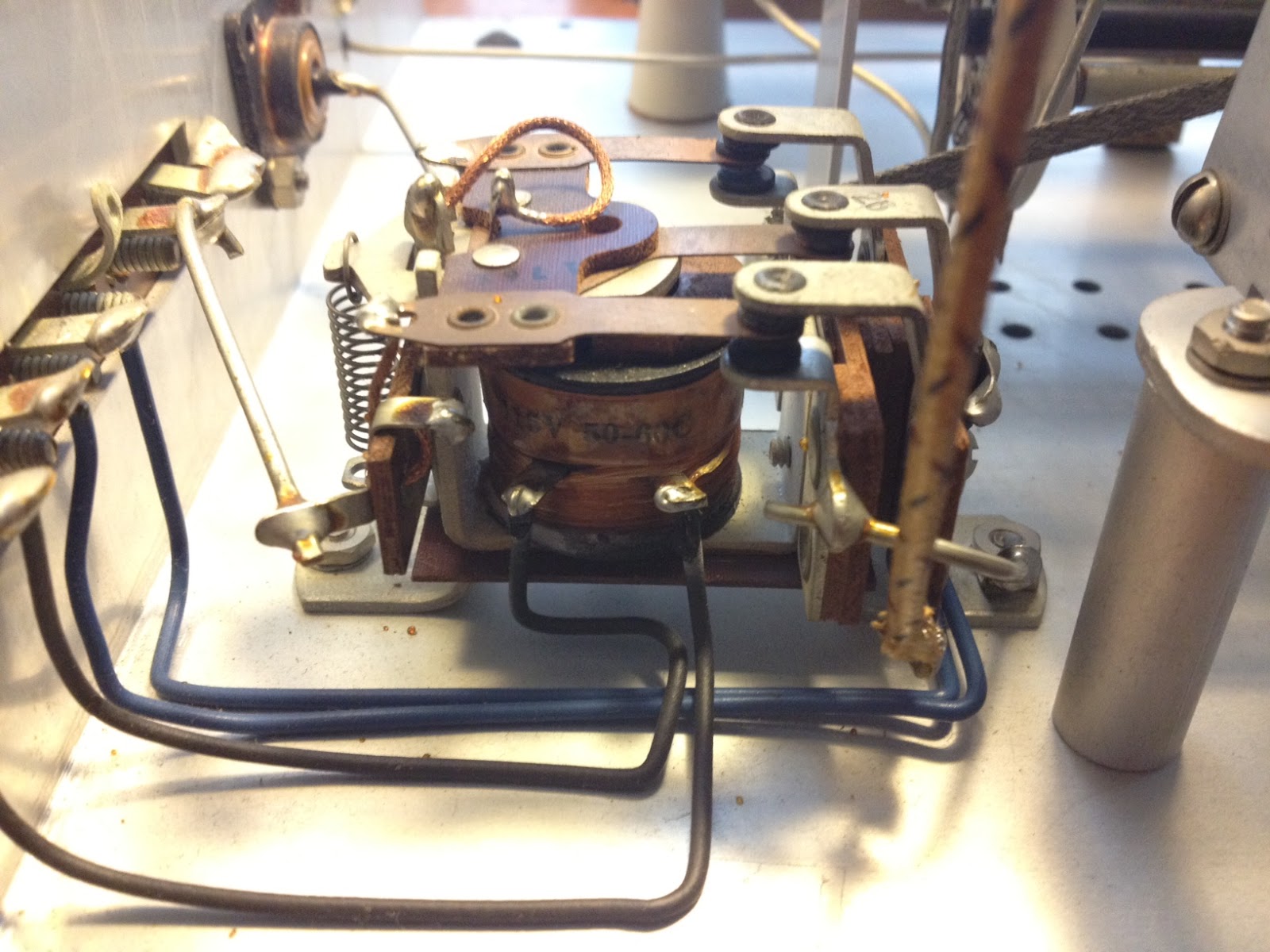 An initial inspection showed that the only modification was a small piece of plastic wedged into the relay contacts that held the relay in the transmit position. It was easily removed and the relay coil and contacts tested for continuity. The contacts seem a bit dirty which, from the little I have read online, seems to be a common problem.
Once the relay contacts and band-switch are cleaned I will button the unit back up and connect it to the loop antenna I have recently run around the eaves of the house. The loop has been a huge improvement to the long-wire and magnetic antennas I have run in the past, at least as far as reception goes … but that is a topic for another post.
Owen Morgan, KF5CZO, is a regular contributor to AmateurRadio.com and writes from Texas, USA. Contact him at [email protected].
Soft66LC4 SDR – initial impressions
I received a Soft66LC4 SDR receiver for evaluation. The review of this radio will be in 3 parts, initial impressions, usage test, and full technical test. Here are my initial impressions.
The Soft66LC4 is the newest SDR receiver from Kazunori Miura JA7TDO. There have been several revisions of this inexpensive

Soft66LC4
SDR over the last couple of years. The evaluation unit came in about a week from Japan in a plain envelope with no documentation or software. You are expected to refer back to JA7DTO’s website for help. Although the setup is a bit complicated, it wasn’t too bad for me since I deal with a lot of control software that uses USB-to-serial connectivity. I was pleasantly surprised to find out that my Dell laptop’s internal sound card can process at 192khz, giving me a full 192khz of visible bandwidth.
The Soft66 is a bit larger than an Altoids tin. JA7TDO’s eBay store states that you have to finish the case yourself and drill holes, but it seems that he is doing this for you now. There is an SMA antenna connector, a mini USB port, and an indicator light on one end. On the other end is a 3.5mm audio jack, and a hole for access to an adjustment pot for RF gain. I found that my sample needed a slightly longer mini USB plug as the first one I tried did not stay in well.
Driver installation can be quite complicated but I intend to help him with this by writing up some easy-to-follow instructions. One issue that exists with this SDR for now, but will probably be resolved soon, is that there isn’t a way to control the SDR with WinRAD yet. You have to use the separate control application which makes the process a bit clunky. I believe that once more of these newer LC4 models are out there there will be support for WinRAD and other SDR Applications, as there were for the previous Soft66 radios.
Initial usage tests at my location were favorable, considering my lack of a decent antenna (about 10M of wire in a tree outside my window), and excessive RFI at my location. I hope to get out to a more remote site to perform the detailed usage review in a more interference-free environment. Coverage is from 500 khz to 70 Mhz. For now, the control app does not warn you if you enter a frequency outside that range, but simply crashes. Luckily, this does not lockup the controller, and you simply need to relaunch the application. I was able to receive MW AM stations, CW, SSB, data, and AM on the amateur bands, and plenty of SW BC. I did not try WinRAD’s DRM feature yet.
I’ll try to get this set up for remote access if possible, but for now, with no way to control it other than with the supplied application, I will hold off. Special thanks to Kazunori Miura for supplying the test sample so quickly, and to my friend WA2CDL, who offered to perform the technical testing.
On JA7TDO’s eBay store these radios sell for $108 plus shipping, and are fully assembled. Well worth the money as long as the proper DLL files are made available for using it with WinRAD. A more extensive test will follow.
eBay store link: http://stores.ebay.com/HAMShopJapan?_rdc=1
Soft66 page: http://zao.jp/radio/soft66lc/
–Neil W2NDG
Neil Goldstein, W2NDG, is a regular contributor to AmateurRadio.com and writes from New York, USA. Contact him at [email protected].
 Ham Radio Deluxe |
 W5SWL Electronics |
 Ham Radio Prep |
 KB3IFH QSL Cards  Hip Ham Shirts  HamRadioAuctions HamRadioAuctions Reliance Antennas Reliance Antennas Enigma Shop Enigma Shop |  morseDX  Ni4L Antennas  R&L Electronics R&L Electronics antennas.us antennas.us QRV QRV |
- Matt W1MST, Managing Editor
