 |
 A good deal(er)
 10 August 2012 | by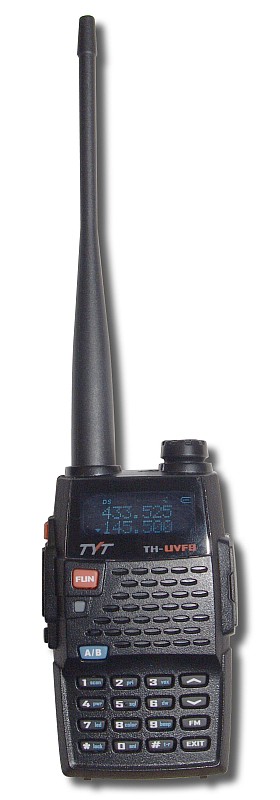
If you are a UK amateur and you like Chinese radios you’d probably never think of buying them from anywhere other than direct from China or Hong Kong, most likely using eBay. Ham radio dealers in Britain are widely regarded (rightly or wrongly) as rip-off merchants who work out the price by replacing the dollar with a pound sign and then adding on a bit more for good measure. Their pleas that the UK price includes VAT and the cost of providing a warranty usually fall on deaf ears.
In one of the discussion groups someone mentioned buying a radio from a British firm called Sinotel UK. I went to their web site and saw that they carried several models of hand-helds from China, including a new one I hadn’t seen before: a TYT UVF9 (pictured right.) But what particularly caught my attention was their prices, which were little more than what I have been paying buying on eBay. Their cheapest model, the Vero Telecom UV-X4 (similar to the Baofeng UV-3R) was just £29.99 (yes, a brand new dual band radio for 30 quid.) A UV-5R eas £34.99. The radio that had caught my eye, the TYT UVF9, was £47.99. It would cost me $68.50 from 409shop and I’d have to wait a couple of weeks for it.
I am not associated with Sinotel UK and have not even bought anything from them but if I want yet another Chinese handy to add to my collection I probably will.

Julian Moss, G4ILO, is a regular contributor to AmateurRadio.com and writes from Cumbria, England. Contact him at [email protected].
Experiments with Chirp – sending an audio URL….
In amateur radio terms, Chirp is an ambigious term! In this context, we’re not talking about your CW transmitter warbling up and down the band and we’re not talking about a neat package for programming your handheld.
Two or three weeks ago, Rory Cellan Jones presented an item on the BBC about an application called Chirp that runs on smartphones. It provides the ability to transfer files between devices using audio.
Let’s say I’ve a picture or a URL on my phone that I want to send you. I start the Chirp application on my phone, as do you. I select the photo that I want to send you and press the button. First of all, the application quickly uploads the picture to the Chirp server. Once it’s done that, it sends a series of tones which your phone ‘hears’. The tones act as like an audio QR code and provide your phone with a URL with which it can access the picture that I uploaded.
Julie and I have been using Chirp to transmit photos between our iPhones and iPads – it’s easier than emailling photos back and forth.
The other evening I was talking to David M0TFY on GB3WH and we were talking about Chirp and we wondered whether it would work on the air. After all, how often do you want to send someone a URL or an email address over the air? If you’re like me, pretty frequently! Something like Chirp would work well.
Our experiment of using Chirp using our iPhones miked into the radio across GB3WH failed. However, I’ve a feeling that if we tried simplex we might be more successful – my suspicion was that some of the tones that Chirp uses were not being passed by the audio circuitry of the repeater.
Even if the Chirp application doesn’t work over the air (which I think it probably should) – it might be an interesting project for someone to write something that would use tones that would pass over the air readily and robustly to send URLs or eMails…
The Chirp application is free and runs on iPhones. You can read about it here or download it from the App Store.

Tim Kirby, G4VXE, is a regular contributor to AmateurRadio.com and writes from Oxfordshire, England. Contact him at [email protected].
TechDay 2012 – Your Start in Amateur Radio
 Come join us on Saturday, September 15th, 2012 (9:00 AM to 2:00 PM) at the Tri-Lakes Monument Fire Administration Complex at 166 Second St. in beautiful Monument, CO for a half day workshop aimed primarily at the new Technician Licensees to help them get started in ham radio. While you’re here you’ll learn what it takes to be a ham radio operator, brush up on your DXing skills, test your own ham radio equipment, check out some sweet mobile radio installations, and ask an Elmer “What’s so cool about 10 meters?”
Getting started in ham radio has never been so much fun!
Presentations
9:30 am – Youth DXpedition to Costa Rica
by Anna Veal WØANT
10:30 am – Mountaintop Operating
by Steve Galchutt WGØAT
11:30 am – Home Station Setup
by Anna Veal WØANT
12:30 pm – Getting On the Air
by Brandon Hippe KDØPWF
1:30 pm – Radio Equipment 101
by Shel KFØUR
* Each presentation is approximately 15 minutes with 5 minutes of Q&A at the end. Events subject to change
Booths – Open 9AM to 2PM
Get Your Radio Programmed with Local Repeater Freqs by RT Systems
hosted by Kyle Hippe KYØHIP & Cole Turner WØCOL
Check Your Radio Performance
hosted by Bob Witte KØNR
See an HF Station
hosted by Dan Scott WØRO & Stu Turner WØSTU
Ask Any Question – The Elmer Booth
hosted by Paul Swanson AAØK & Shel KFØUR
Understand Mobile Installations
hosted by James Bucknall KDØMFO & Ethan Bucknall KDØMFP
Getting Your Ham Radio License
hosted by Brandon Hippe KDØPWF & Eric Hippe NØHIP
Ham Radio & Public Service
hosted by Randy Meadows KNØTPC
Sponsors
Tech Day 2012 is proudly sponsored by the WØTLM Amateur Radio Club and the Pikes Peak Radio Amateur Association.
Get the one page flyer in pdf format here.
Direct any questions to Bob KØNR
Bob Witte, KØNR, is a regular contributor to AmateurRadio.com and writes from Colorado, USA. Contact him at [email protected].
APF made all the difference
in the 20 Meter Fox hunt tonight.
I worked Dave AB9CA first. His signal strength was a bit different tonight as he is not home in Alabama, but is vacationing in Wisconsin. Completing Fox duty while on vacation – now THAT’S dedication!
Paul AA4XX was another matter. I could barely hear him when I did finally find him. The K3’s APF (Audio Peak Filter) made all the difference in the world. At ESP levels when I first heard him, turning on the APF feature insured that when I finally worked him, I was able to hear him answer me back! It took a barely audible signal and boosted it to a 449 to my poor old ears.
Thanks Elecraft, for a real neat (and usable) feature!
72 de Larry W2LJ
QRP – When you care to send the very least!

Larry Makoski, W2LJ, is a regular contributor to AmateurRadio.com and writes from New Jersey, USA. Contact him at [email protected].
Ham Nation 59

http://dts.podtrac.com/redirect.mp4/twit.cachefly.net/video/hn/hn0059/hn0059_h264m_1280x720_1872.mp4
http://dts.podtrac.com/redirect.mp4/twit.cachefly.net/video/hn/hn0059/hn0059_h264m_864x480_500.mp4
http://dts.podtrac.com/redirect.mp4/twit.cachefly.net/video/hn/hn0059/hn0059_h264b_640x368_256.mp4
http://www.podtrac.com/pts/redirect.mp3/twit.cachefly.net/hn0059.mp3
Hosts: Bob Heil (K9EID), Gordon West (WB6NOA), and George Thomas (W5JDX)
How Bill (K5LN) keeps the Nets goin’, 10Ghz antenna testing, capacitors explained, and more.
Guests: Don Wilbanks (AE5DW), Ray Novack and Cheryl Lasek (K9BIK).
Download or subscribe to this show at http://twit.tv/hn.
Submit your own video to Ham Nation! See the Video Guidelines, http://www.frozen-in-time.com/guide/
We invite you to read, add to, and amend our show notes at wiki.twit.tv.
Thanks to Joe Walsh who wrote and plays the Ham Nation theme.
Thanks to Cachefly for the bandwidth for this show.
Running time: 1:11:02
Dr. Bob Heil, K9EID, is the founder of Heil Sound and host of TWiT.tv's Ham Nation which streams live each Tuesday at 6:00pm PT (9:00pm ET) at http://live.twit.tv. Contact him at [email protected].
“Sending Radio Messages” – 1943
Here’s an interesting piece of radio history.
Jonathan Hardy, KB1KIX, is a regular contributor to AmateurRadio.com and writes from Connecticut, USA. Contact him at [email protected].
KH6 – Hawaii Bound
 My current assignment at Fort Leavenworth has me traveling quite a bit. My intent has been to bring a rig with me and have some casual QSOs while on the road. My success has been mixed. I would mostly attribute this to either a lack of planning on my part or being in a stuck in a hotel room with zero antenna opportunities.
One of the most inspiring ham radio blogs I ever ran across was the 100 Pound Dxpedition. I enjoyed how Scott, NE1RD, covered his adventures of conducting portable operations… documenting what worked and what did not. His last post on that paticular blog was back in 2007, but I still use the site as a reference. Scott’s praise for the Buddipole led me in using the Buddipole during my recent tour in Korea. Another tip from Scott I am going to try out is using a hardside golf bag case to transport my Buddipole to Hawaii.
 Now for a rig… I think the Elecraft KX3 would be ideal for a Hawaii trip. With 10 watts output and an internal battery, I can’t think of better rig to take to the beach. But the wait time for the KX3 is still quite a while. I have both an Elecraft KX1 and a Yaesu FT-817ND. The KX1 would be great due to its small size and ease of use. But it is limited to only CW and I would like to do some PSK in addition to CW.
I pulled out my FT-817 and conducted an inventory:
- – West Mountain Radio RIGblaster Plug n Play connects directly to the DIN socket on the back of the rig.
– CAT cable that connects from the RIGblaster to the rig’s ACC socket which enables rig control.
– PowerPole 12v adapter.
– Palm Paddle.
– Elecraft T1 Auto-tuner.
– Nifty manual for the FT-817.
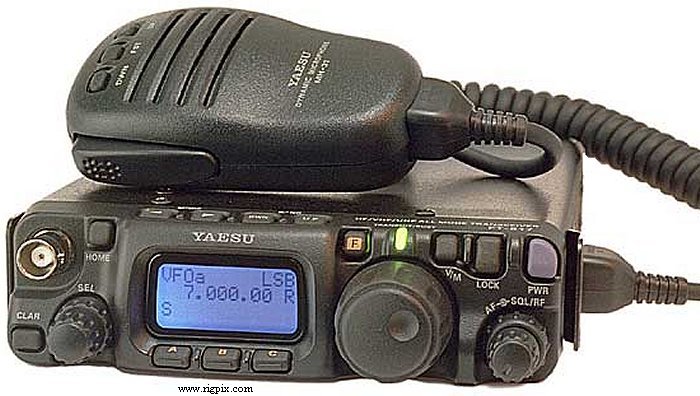
My FT-817 has quite a few of the optional bells and whistles from W4RT:
- – DSP module
– Kranker Knob – probably the most useful of any of the options
– One Board Filter (300 Hz)
– Speech compressor built into the MH-31 handmike
– Why all the options? The FT-817 was the center piece of my 2009 Field Day setup and I was attempting to get the most I could out of the pint-sized rig.
I also splurged on two recent upgrades:
- – Peg Leg tilt stand – I think this will be helpful as one of my significant dislikes of the FT-817 is the small display which is hard to see.
– Magnets for the Palm Paddle – this is critically important as the Palm Paddle by itself is not heavy enough. The magnets allow the Palm Paddles to firmly stick to the top of the FT-817.
For PSK, rig control, and logging I have my Dell Mini netbook. I had not used the netbook in a while, so I started it up to see how it was working. I initally purchased it back in 2009 baselined with Ubuntu and have kept Ubuntu installed on it since then. After booting it up. I updated the distribution to 10.04 LTS and installed fldigi. The RIGblaster easily interfaced with the netbook via a USB connection and the headphone/microphone jacks.
I configured fldigi to work with the RIGblaster to include rig control using Hamlib:
- – Audio: PortAudio using the netbook’s hardware soundcard for both Capture and Playback
– Rig: Hamlib; Device /dev/ttyUSB0; Baud rate 38400; Stopbits 2; PTT via Hamlib command checked
… clicked on the Initialize button and I was good to go.
Setting up the macros on flidigi is pretty straightforward with the default macros only needing slight tweaking for my personal preferemces.
Once I fired everything up all I had to do was switch to 14.070 MHz, switch the mode to DIG, and drop the input level a bit. With the narrow yellow PSK streams cascading down the waterfall, I picked one that was calling CQ and answered. Transmit worked and my home antenna provided a nice low SWR, no need for the tuner. My macros worked and the QSO was concluded successfully. All with 5 watts.
I plugged in the Palm Paddle, switched to 7.115 MHz, listened and heard nothing, then used the paddles to send QRL? a few times. SWR still looked decent. After a few CQ calls, I got an answer followed by a short QSO. Great – both PSK and CW were working FB.
Now the question is: do I want to bring my small Tokyo Hy-Power HL-100B amplifier that will raise the output to 100 watts? If I bring the amp, I will have to bring a power supply and a different tuner. I am thinking I need to be able to use two different configurations:
- (A) Beach and Buddipole: using the barefoot FT-817, running everything on batteries.
(B) Lanai Portable: used from the hotel room, with amp and assoicated power supply.
Now it is time to go through my Buddipole bags and figure out what I need to pack.
Looks like I will be there during the Hawaii QSO Party!

Scott Hedberg, NØZB, is a regular contributor to AmateurRadio.com and writes from Kansas, USA. Contact him at [email protected].
 Ham Radio Deluxe |
 W5SWL Electronics |
 Ham Radio Prep |
 KB3IFH QSL Cards  Hip Ham Shirts  HamRadioAuctions HamRadioAuctions Reliance Antennas Reliance Antennas Enigma Shop Enigma Shop |  morseDX  Ni4L Antennas  R&L Electronics R&L Electronics antennas.us antennas.us QRV QRV |
- Matt W1MST, Managing Editor
