 |
 Show Notes #105
 22 May 2013 | by
 Episode #105 Audio (Listen Now):
Introduction:
- Our thoughts go out to the victims of the Boston Marathon bombing. We hope that the perpetrators or caught quickly and dealt with appropriately.
Announcements:
- The Tin Foil Hat show, a new member of the Black Sparrow Media network, is currently on hiatus. The podcaster, CafeNinja, is busy with life issues and will return to podcast as soon as he is able.
- Development of the LHS mobile application is likely to cease, though the application in its current form will be available for the forseeable future. If you have an iPod, iPad, iPhone or Android device, get the app FOR FREE in the relevant app stores.
Topics:
- Happy (Belated) Earth Day – 4/22/2013
- Potential US Border Crossing Fee that will affect Canadians entering the United States if implemented.
- Interview with George Zafiropoulos, KJ6NU, of Sierra Radio Systems and Nick, N3WG, of Pignology
- http://www.sierraradio.net
- http://pignology.net
- The hosts discuss several topics with the guests, including:
- Building ham projects with new embedded Linux boards (Raspberry Pi, BeagleBone)
- Remote station control hardware (rig control, audio, environment control)
- The role of embedded Linux vs. traditional microcontrollers
- Creating iOS and Android apps to talk to an embedded Linux system.
- A JavaScript exploit can usurp browsers with a bit of simple code. It can alter the destination of links on the fly. Later versions of certain browsers have fixed the issue but Chrome may be affected for some time because Google actually uses this “trick” as part of their suite of functions.
Feedback:
- New Twitter follower: @LinuxLeech. Thanks!
- New yearly subscriber to the show: Brian S. Thank you!
- No listener feedback this week. See the contact info below to let us know how you feel about anything you like.
Contact Info:
- Contact Russ at [email protected] or [email protected].
- Listen to the live stream every other Tuesday at 8:00pm Central time.
- Check the LHS web site for dates.
- Leave us a voice mail at 1-909-LHS-SHOW (547-7469), or record an introduction to the podcast.
- Sign up for the LHS mailing list.
- LHS merchandise is available at the Merch link on Web site. Check out the Badgerwear or buy one of the other LHS-branded items at PrintFection or Cafe Press. Thanks!
- Thanks to Dave from Gamma Leonis for the theme music.
Music:
- “Carpe Diem” by Antarhes from the album Silaelin, courtesy of Jamendo.
- “Pain of Life” by Drunken Souls from the album On Verra Plus Tard, courtesy of Jamendo.
Russ Woodman, K5TUX, co-hosts the Linux in the Ham Shack podcast which is available for download in both MP3 and OGG audio format. Contact him at [email protected].
Lunchtime was grand
Summer arrived with a vengeance in Central New Jersey. Temperatures in the 80s (29C) with the higher humidity and stickiness that accompanies it. But it made for a great opportunity to head out to the park for some QRPing during lunch break. Besides the warmth, the skies were sunny and clear, with just a few white puffy clouds floating by.
Wanting to set up the fastest today in order to get the maximum operating time, I decided to go with the Buddistick on the magmount on top of the Jeep. From the time I put the Jeep in park and turn off the ignition, I can be on the air in well under five minutes. Today was no exception. The Buddistick is exceptionally easy to set up when using the top of the Jeep as a ground plane. It goes together as magmount, two 11 inch arms, coil, and whip. The whip gets extended all the way and the one coil setting works well for both 20 and 17 Meters. The KX3’s autotuner gets a 1:1 match without breaking a sweat.
First up was Pertti OG2W in Finland on 17 Meters. He was by far the loudest signal on the band and was a relatively easy catch even with 5 Watts. From there, I went on over to 20 Meters and called CQ near the 14.060 MHz QRP watering hole. To my delight, I was answered by fellow blogger, Greg N4KGL. Greg was also using a KX3, but had his going to an Alex Loop. Greg lives down in Panama City, Florida and started out at 559. There was some QSB and at times the APF function on the KX3 was a big help. Towards the end of our QSO, Greg was approaching 579. He was on lunch break also, and had to get going just as I did.
But as we all know, QRPing in the great outdoors can really be addicting, so I hopped on back over to 17 Meters for one last, quick listen. Before I tore the station down and headed back to work, I was able snag Bob WP2XX down in the US Virgin Islands.
Three lunchtime QSOs – two DX contacts and a rag chew really made my day. An added bonus was watching the RC Model airplane pilots doing their thing while I operated. These guys are really good and I was treated to barrel rolls, Immelmans and vertical climbs as I worked the world with my radio.
I think tomorrow is supposed to have more of the same weather.
72 de Larry W2LJ
QRP – When you care to send the very least!
Larry Makoski, W2LJ, is a regular contributor to AmateurRadio.com and writes from New Jersey, USA. Contact him at [email protected].
Backpacking Your Radio
R = # of Radios
C = # of Containers
H = # of Hams
R x C x H = the number of ways to pack a portable radio.
Translation = a lot of ways to pack a radio
So here is my solution for carrying an ATS4B and an MTR to the top of the mountain, complete with power supply, ear phones and key.
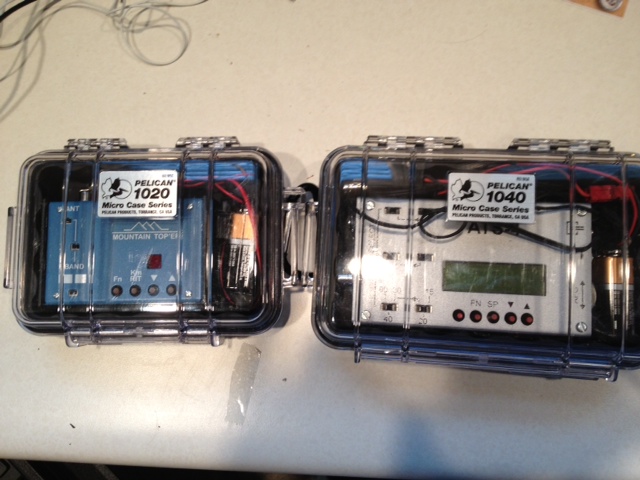
Mike Crownover, AD5A, is a regular contributor to AmateurRadio.com and writes from Texas, USA. Contact him at [email protected].
QRP
is a microcosm of Amateur Radio in general. There are niches within the niche. QRP means different things to different people. In my estimation, (and I’m sure I’m way off base and nowhere near complete) the major categories are:
Competitors. Just like their QRO brethren, these guys exist solely for the contests and/or DX. You see their calls in the contest score tallies of CQ, QST and even QQ. Otherwise, with a few exceptions, you never seem to work these guys for a ragchew, or ever hear from them on the QRP e-mail reflectors. Some have the big towers with the yagis and they spend every last ounce of effort and money squeezing the very last iota of capability out of their equipment and themselves. These folks are very hard core.
Organizers. Folks like Paul NA5N, Rem K6BBQ, Rich KI6SN, Marshall N1FN, Jerry N9AW, Dale WC7S, among others. These guys come up with neat and fun concepts for events that we all have fun in ….. like the ARS Spartan Sprints, the Run For the Bacon, the NAQCC Sprints, QRP To The Field, the QRP Fox Hunts, Freeze Your Butt Off, Flight Of the Bumblebees, Sweat Your Butt Off, the Zombie Shuffle, etc, etc, etc. And of course, QRP-ARCI who organizes so many fun events like the Spring and Fall QSO Parties, the Hoot Owl Sprint, and so many more.
Builders and Tinkerers. These are the true homebrewers. Designers like Steve KD1JV, Mike AA1TJ or Jason NT7S, Rev Dobbs G3RJV, Doug W1FB (SK), Hans G0UPL, who seemingly can come up with great and ingenious designs (effortlessly) while brushing their teeth in the morning; and then share with the rest of us. Some guys are like Dave AA7EE or Tony W2GUM (SK). These guys build, and while they may not necessarily build their own designs all the time, their construction projects are things of beauty. Then there are guys like Dale WC7S and Don W3FPR who seem to eternally cruise the e-mail reflectors, always on the lookout to answer the questions of befuddled troubleshooters (like me!), or to perhaps assist someone with the building or finishing of their kits.
Entrepreneurs. On a commercial level, we are so lucky to have guys like Eric WA6HHQ, Wayne N6KR, Doug KI6DS, Diz W8DIZ, Rex W1REX and Dave K1SWL, Bill N8ET (who recently had a stroke, but was at Dayton this year, from what I understand) and others who have come up with companies that keep us in a never ending supply of QRP goodies.
Antenna experts. These people spend their time designing, homebrewing, or just tinkering with …..antennas. There is probably a little bit of this category in each of us – but these guys …… well, this is their “thing”. Several call signs that I can think off the top of my head that fit into this category – Steve AA5TB, Bud W3FF, Dale W4OP, Bill WA8MEA, L.B. Cebik W4RNL (SK), Alex PY1AHD, among others.
Experimenters. These guys think out of the box, and come up with new ideas for new things, or perhaps lead the way making use of new technologies, modes, etc. or perhaps they write software for QRPers. They’re a lot like the builders and designers in one sense, yet different in another. In this group I would put people like George N2APB, Joe N2CX, Joe K1JT, Julian G4ILO and so many others.
Outdoorsmen. Steve WG0AT, Guy N7UN, Jim W1PID, Martin VA3SIE, Bud W3FF, Ed WA3WSJ, Rem K6BBQ, Dennis K1YPP and all the SOTA folks. These are the folks who exist for taking their equipment outdoors and seeing how far they push themselves and their equipment. These are the guys we sit around and ask for “just one more story”. These are the guys we love to watch on YouTube or read of their exploits on their blogs.
Teachers. These folks are great examples for all the rest of us, they are particularly concerned with passing on the hobby and its tradition to the future generations. All the folks listed above are teachers, but the guys that (in my mind) especially fit this category are the guys who like to “spread the word”. Those who come especially to mind are John K3WWP and Dan KB6NU and Rich W2VU, Joe K0NEB, Cam N6GA, among others.
The rest of us – The “Ham and Eggers”, if you will, or if you read the comic strips in the newspapers, perhaps the “Pluggers”. We’re the day-to-day guys on the bands, the ones who do it all, the guys who do the rag chewing, the guys who work some DX when we get the opportunity, the guys who complain and moan on the e-mail reflectors, the guys who hunt the Foxes, the guys who buy, build and sell all that QRP stuff out there. The rank and file, the great huddled masses who go about their lives, probably unrecognized for the most part, but for without whom, there would be no QRP. Hopefully, because of efforts of the people named in the above categories (and there are so many more that I haven’t included due to advanced Senior-itis) there’s a bit of each of those categories in all of us. Perhaps you find yourself fitting into multiple categories.
A note to my readers – the names and calls mentioned above are mainly North American QRPers. This is because these are the names and calls that I am most familiar with. Personally, I know my knowledge is sadly lacking and that there is a treasure trove of QRPers out there, throughout the whole world who deserve to be added to the list of names I mentioned above. I wish I knew more about them. If you have some names that stand out in your minds, please add them to the comments section. Or even better, I’d love to hear about them and their accomplishments, and perhaps even run future blog posts about them (I sense a new series developing here ….. “Profiles in QRP”) – Polish QRPers, Russian QRPers, Thai QRPers, Italian QRPers, Aussie QRPers, Brazilian QRPers, QRPers from around the world. Send me an e-mail!
72 de Larry W2LJ
QRP – When you care to send the very least!
Larry Makoski, W2LJ, is a regular contributor to AmateurRadio.com and writes from New Jersey, USA. Contact him at [email protected].
6m season
Guess what? Its sunny and there’s Es to be had about. After several months of not really touching the radio at home because of the various commitments I made to a certain cycle sportive I took a week off work and decided to catch up on the family and my hobby. After a nice long weekend away with the kids in Centre Parcs (If you don’t have kids then it’ll be hell on earth, otherwise I can recommend it, especially the security at Sherwood after our friends bike was pinched. The Muppet got nicked at the gate and is now at her majesty’s pleasure)

Back to radio though…A few quick fire contacts on 6m soon had me back in the swing although an attempt at FSK was a step too far today. Still nice to work a few stations and to see the sun out. The Powabeam is doing the business on a Moonraker mast. Not an ideal set up but useful.
Alex Hill, G7KSE, is a regular contributor to AmateurRadio.com and writes from Cumbria, UK. Contact him at [email protected].
Amateur Radio Kit Roundup (radiokitguide.com) Update

YouKits TJ2B
Some post-Dayton additions have been made to the RadioKitGuide. Rather than continue to paste the entire thing here I will link to it and list the changes only.
Changes in Hendricks (2 new kits!), YouKits (1 new kit!), TenTec (New QRP rig coming soon), Four States QRP (1 kit retired, 1 coming soon), CR Kits (1 new kit!).
You can see the guide here: RadioKitGuide.com
Neil Goldstein, W2NDG, is a regular contributor to AmateurRadio.com and writes from New York, USA. Contact him at [email protected].
Dayton 2013 Recap
Some good planning on Sarah’s part yielded a bridal shower for her sister scheduled on the same weekend as the Hamvention. Huge win.
- Speaking of huge wins, there was no sewer back up this year.
- Like the last time I attended in 2011, I’m pleased to see more younger (than me) hams in attendance. A high-ranking ARRL official noted to me the “energy and enthusiasm” present in this generation of young hams that was not present 15 years ago (this year marks my 20th year as a ham, but I didn’t mention that). Attendance was still thin compared to my first visit in the mid 1990s.
- Deals. I stimulated the economy by purchasing a small CDE rotor for my VHF activities, an HP server power supply for a future solid state amplifier project (>55 amps at 50 volts), a couple of 900-MHz antennas, and some miscellaneous small parts. I sold some junk to partially cover that expense.
- People. Ran into a lot of old friends and made some new ones. This is really why I go to Dayton, well, that and the junk. K8MFO tells me there are Bureau cards coming. W8AV has 930s for me to work on. W2NAF had people for me to meet. AD8P was able to win himself a pizza from an unnamed W5 in the “SB-200 challenge” of correctly differentiating an SB-200 from an SB-220 at a distance of 20 feet—a tribute to the W5′s failure to distinguish the two until after the sale last year.
- W2NAF has written an article about our trip to Adak (NA-039) that was published in the June 2013 issue of CQ. It has a lot more background detail than what I wrote on the blog. Check it out. I picked up a copy of that and the May 2013 issue which has the 2012 CQ WW CW results in it.
- Products. I just don’t care that much about new products. The Ten-Tec Rebel that several people have already discussed is a cool idea. I know that Ten-Tec took some flak for not opening up the Orion SDR core when they produced it. But, let’s be realistic, people. Hams would have bricked those suckers in a heartbeat. A sandbox “open source” radio is a step in the right direction, but I question what a ham can really customize that matters without screwing it up. Maybe I’m just not visionary enough. Almost 10 years ago now, I interned in the R&D lab at a large consumer appliance manufacturer as an undergraduate my supervisor was always saying, “How can we make this attractive to the [hardware] hackers?”
- Guns. The Hamvention web site was very specific that the Trotwood Police Department would be actively enforcing Hara Arena as a non-gun zone. Seriously? It’s a ham radio convention. Bill Goodman is there at least once a month the rest of the year. Do hams bring their go-kits to gun shows? They must. Inquiring minds want to know…
- Suites. I did not do the contester suite thing. Was thinking of going on Friday night but fell asleep in my in-laws’ living room. This is a recurring problem when I visit so no one bothered to awaken me.
Was the trip worthwhile? I think so.
Ethan Miller, K8GU, is a regular contributor to AmateurRadio.com and writes from Maryland, USA. Contact him at [email protected].
 Ham Radio Deluxe |
 W5SWL Electronics |
 Ham Radio Prep |
 KB3IFH QSL Cards  Hip Ham Shirts  QRV QRV Reliance Antennas Reliance Antennas |  morseDX  Ni4L Antennas  R&L Electronics R&L Electronics antennas.us antennas.us |
- Matt W1MST, Managing Editor
