 |
 Kit build came to an abrupt stop
 27 April 2013 | by
 |
| Wire sponge |
Mike Weir, VE9KK, is a regular contributor to AmateurRadio.com and writes from New Brunswick, Canada. Contact him at [email protected].
SCSmail using Robust Packet
After my post about using Winlink on HF using a Robust Packet Radio (RPR) TNC Helge DF8LS emailed to say he was trying out another method for email over HF: SCSmail. It sounded interesting so I thought I would have a go too. The software is a free download from the SCS website, but it won’t be any use without an SCS TNC – either the Tracker like I’ve got or one of the even more expensive Pactor jobs.
To install SCSmail all you do is create a folder for it, copy the downloaded EXE file into it and run the EXE. It will create some empty folders as temporary receptacles for your mail. Next you need to set the program up. This is accomplished by entering the name and login credentials of your POP3 and SMTP servers at your ISP or mail provider. You also provide the details of where to find your TNC (what com port and so on) and can also set up CAT control for setting the transceiver frequency. I used the Kenwood setting which worked fine with the Elecraft K2 to which my TNC is connected.
 |
| SCSmail mail client configuration |
SCSmail can be configured either as a client or a server. A client is what you will use to send and receive mail and is what I set up. A server is what your client connects to via radio. I used a server set up by (I guess) SCS.
The setup is:
your email client (such as Outlook Express) -> SCSmail client -> SCS TNC -> your radio transceiver —> the ionosphere —> server transceiver -> SCS TNC -> SCSmail server —> the internet -> your ISP mail server
One advantage of SCSmail is that you can use your own familiar email client (such as Outlook Express) instead of an unfamiliar one like RMS Express. You can also use your own email address instead of having to use a special one @winlink.org. But you pay a price in speed for this.
To reconfigure your mail client to use SCSmail you simply change the addresses of the incoming and outgoing mail servers (usually something like mail.yourisp.com) to localhost. You can then send and receive mail just as you would normally. This is obviously an advantage if you are setting up an HF mail system for people who don’t want to learn a new way of doing things.
 |
| Receiving mail using SCSmail |
What happens is the client logs in to your ISP mail server via the radio link to the remote SCSmail server. The first time, it downloads and deletes all the mail from the ISP server so it is a good idea to make sure your inbox is empty before you start. SCSmail supports a list of servers that you can connect to, but none is provided with the program. There is only one server you can use with Robust Packet Radio and that is DB0UAL-9 which uses 3.610 and 14.102 MHz. Having entered the server’s call and set your transceiver to one of those frequencies you click on Connect HF-Server. Then you set Outlook Express to send and receive mail and wait until the client disconnects.
I connected instantly to the server on 20m using 10 watts to my attic dipole. But compared to Winlink’s RMS Express SCSmail is slow. This is probably the penalty for using protocols designed for use on the wired internet over a wireless HF link. Winlink and RMS Express are optimised for HF use. RMS Express creates efficient small text mode emails whereas Outlook Express creates messages that can contain lots of fancy formatting and unnecessary header lines which increase the time to send and receive.
It all worked (or mostly did: the test emails I sent myself and Helge still haven’t turned up.) If I owned a boat or a log cabin miles from the nearest telecoms provider I might find SCSmail a useful facility to have. Even though I haven’t, it was still an interesting thing to try out.
Julian Moss, G4ILO, is a regular contributor to AmateurRadio.com and writes from Cumbria, England. Contact him at [email protected].
The X1M Arrives!
I finally received my assembled Xiegu X1M today. I unpacked it and started tuning around before going out to dinner with the XYL, but after I got home I picked

Xiegu X1M
up the mic and tried it out. Attached to an Emtech ZM2 tuner, and about 50-odd feet of random wire in the trees here, I checked in to the Brothers Net on 7192kHz. Not bad for 5 watts, and a less-than-ideal antenna. We’re off to a good start. More to follow.
Neil Goldstein, W2NDG, is a regular contributor to AmateurRadio.com and writes from New York, USA. Contact him at [email protected].
Show Notes #103
Episode #103 Audio (Listen Now):
Introduction:
- Pete, VE2XPL from the wAVE gUIDES podcast joins as the quasi-permanent co-host for LHS.
Announcements:
- The Dayton Hamvention is happening from May 17-19, 2013. LHS will be in the Hara Arena. Please help by donating to the cause.
- RARSfest is happening May 30, 2013 in Raliegh, NC. LHS will NOT have an ambassador at the show this year.
- CQ World Wide WPX Contest is happening March 30-31, 2013 (0000Z-2359Z) for SSB and May 25-26,2013 (0000Z-2359Z) for CW. All the normal HF bands are involved in the contest. The WPX contest is based on an award offered by CQ Magazine for working all prefixes. The contest draws thousands of entries from around the world. http://www.cqwpx.com/
- Ohio Linux Fest Call For Papers is now open: “Ohio LinuxFest is looking for talks for our 2013 event, which will be held September 13-15, 2013, in Columbus Ohio. We are looking for a variety of talks at all levels, from Beginners through Intermediate to Advanced. Any topic related to free and open source software, or to open hardware, is fair game for a talk. If you have something to say, we’d love to offer you a an opportunity to say it. Just go to http://www.ohiolinux.org/cfp and fill out the submission form.”
Topics:
- The future of VoIP
- http://venturebeat.com/2013/03/22/fcc-regulation-voip-whats-next
- http://venturebeat.com/2013/03/21/voip-wiretapping-laws
- EchoLink, AllStar Link and IRLP are VoIP services
- https://allstarlink.org
- http://echolink.org
- http://irlp.net
- Tucnak
- Multiplatform VHF/HF contest logging program. Includes all features for Multi station: networking, ON4KST chat, CW/SSB keying, radio control and more
- New version 3.17 released on March 25, 2013
- Authored by Ladislav, OK1ZIA
- http://tucnak.nagano.cz/wiki/Main_Page
- http://tucnak.nagano.cz/download.php (Download link)
- Also packaged for Debian (with repos!)
- Svxlink
- Linux EchoLink server with qtel EchoLink client
- New version 13.03 released on March 9, 2013
- Authored by Tobias, SM0SVX
- http://svxlink.sourceforge.net
- Qle
- QSO Logger and Log Editor for Linux
- No package support for Debian or RH based systems
- Perl and sqlite on the back end
- New version 0.0.35 released on March 1, 2013
- Authored by Wilbert, ZL2BSJ
- http://home.kpn.nl/w.knol18/qle/qle.html
Feedback:
- E-mail from Brad A. talking about iOS vs Maemo and the corporate/community Ubuntu status according to him.
- LHS Yearly Membership by Rubens K. Thank you!
- Gary, KE2YK, has promoted us yet again on his blog. Therefore we will promote him back.
- http://ke2yk.wordpress.com
- http://ke2yk.wordpress.com/2013/03/23/1311
Contact Info:
- Contact Russ at [email protected] or [email protected].
- Listen to the live stream every other Tuesday at 8:00pm Central time. Check the LHS web site for dates.
- Leave us a voice mail at 1-909-LHS-SHOW (1-909-547-7469), or record an introduction to the podcast.
- Sign up for the LHS mailing list.
- LHS merchandise is available at the Merch link on Web site.
- Check out the Badgerwear or buy one of the other LHS-branded items at PrintFection.com/lhs or Cafe Press. Thanks.
- Thanks to Dave from Gamma Leonis for the theme music.
Music:
- “14 Ghosts II” by Nine Inch Nails from the album Ghosts I-IV.
- “Discipline” by Nine Inch Nails from the album The Slip.
Russ Woodman, K5TUX, co-hosts the Linux in the Ham Shack podcast which is available for download in both MP3 and OGG audio format. Contact him at [email protected].
New Radio
Well, I finally broke down and bought a new rig this week. You may recall I was debating between a Yaesu 950, Kenwood TS-590, Elecraft K3, and Ten Tec Eagle. I ended up buying a Kenwood TS-590. What led to my decision, you ask?

The simplicity of the Ten Tec Eagle is nice and refreshing, but I just couldn’t bear spending over $1,800 for such a simple rig. It bugged me that the MARS mod wasn’t readily available. This is one of my idiosyncrasies; any rig that I have must be able to transmit on whatever bands its capable of transmitting on, and I abhor hardware limited by software. And for over a kilobuck, can’t Ten Tec spring for a second antenna connector?
Volumes have been written about the Elecraft K3, and any review below a 5 out of 5 gets dirty looks from the studio audience. Yes, it’s a great rig, and initially it looks like a great deal until you start adding on the add-ons you really need to operate this rig. Right off the bat it’s $2,100 for a 100 watt rig. If you’re like me you’ll want a CW filter, a tighter phone filter, perhaps one to listen to and operate AM, and the general coverage filter band pass unit, and you’re looking at another $580. Also, the chassis of the K3 is below what I would consider for a rig in this price class. It’s not badly designed, but it’s really time Elecraft puts the big boy pants on and makes a die cast chassis. I know someone will quip that the Yaesu 950 and Kenwood TS-590 receivers aren’t as good as the K3. You’re absolutely correct. Is that extra few dB of IMD performance or receiver sensitivity really worth an extra $500 – $1K?
I was torn between the Yaesu 950 and Kenwood TS-590. Two things tipped the scales in Kenwood’s favor. A read several reviews about the Yaesu’s multiple roofing filters being not that useful, however they made it a major part of the user interface on the front panel. The other mention was Yaesu’s menuing system. Having three Yaesu products currently I’m quite familiar with Yaesu’s menus, however I can’t say I really like them.
A few reviews of the Kenwood TS-590 indicated better performance on CW than the 950. Admittedly I wanted to give Kenwood another try after their HF “design drought” of eight years, my fond memories of Kenwood back in the 80s and 90s, and the 850 I have has given me lots of great service for 14 years. I was a bit nervous about the TS-590 having operated a TS-570 years ago at Field Day and being disappointed in the receiver, however Kenwood literature, which was quite extensive, indicated that the 590 was designed anew from the ground up.
The TS-590 so far hasn’t disappointed me. I was able to figure out nearly all of the functions in the first 15 minutes without cracking open the manual. Power, mic gain, and VOX settings are easily accessed with single keystrokes and don’t require menu navigation. The menu is accessed via a button aptly labeled MENU. The knobs have a quality feel to them and the front interface is consistent and well laid out. What don’t I like? Two items: the number keypad on the left side has the bands (1.8, 3.5, 7, 10, etc.) as the primary marking on the buttons and the number (1, 2, 3, 4…) are secondary, which gets confusing when doing direct frequency entry. The second item is the CW QSK. Much like my TS-850, it makes more relay noise than I would like, however it sounds good in the headphones.
The manual is very well laid out, and doesn’t have the Japanglish commonly found in older Kenwood manuals. The rig achieves a nice balance between simplicity and complexity, not being overly flashy and offering a straightforward and useful display. The free software controls every aspect of the rig, down to the AF and RF gain and power, and it’s a rather well designed and intuitive application. New firmware can be uploaded to the rig as it becomes available. I especially like the filter controls which are on one knob. In CW mode it acts in shift and width mode, and in phone it changes to lo cut / high cut, which makes a lot of sense.
Overall, I’m pleased with my decision, and hats off to Kenwood for a nice little rig. Sorry Yaesu, but let me know when you have an FT-817 replacement out and we’ll talk. :-)

Anthony, K3NG, is a regular contributor to AmateurRadio.com.
Almost there, but not just yet.
OK – so here’s the deal. I mentioned that I wanted to come up with a drive-on support that will allow me to use my Jackite pole as a support for wire antennas for portable non-hike type ops. What I used to use, when I had my Buddipole, was a 4 foot plank of oak. I bought a threaded piece of 2″ pipe and a pipe flange. I secured the pipe flange into the plank with screws. When I got to a suitable spot, I would drive onto the plank, screw the pipe into the flange and drop the painter’s pole that I was using as a mast into the pipe. Viola’ – instant Buddipole support!
The problem is the Jackite pole is a way bigger diameter than the painter’s pole – 2 3/4″ in diameter compared to less that 2″ in diameter for the painter’s pole. The biggest diameter iron pipe that Home Depot had in small, pre-cut, pre-threaded pieces was 2″. Not gonna work.
So I took my 4 foot plank of oak and cut it into two, more or less equal sized pieces.
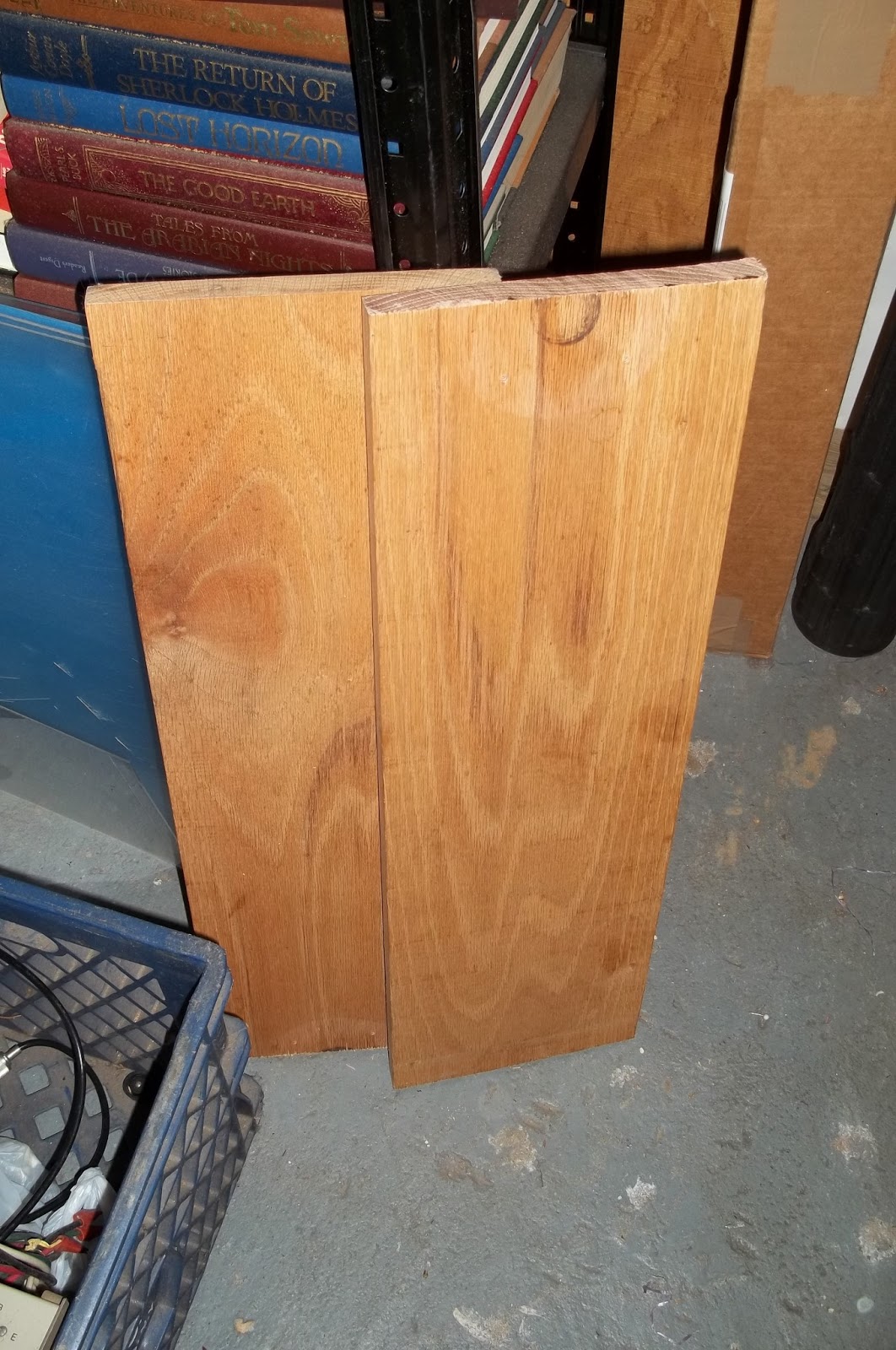
Then using hinges, I reverted it back into a single 4 foot plank. Seems silly doesn’t it, at first hearing?
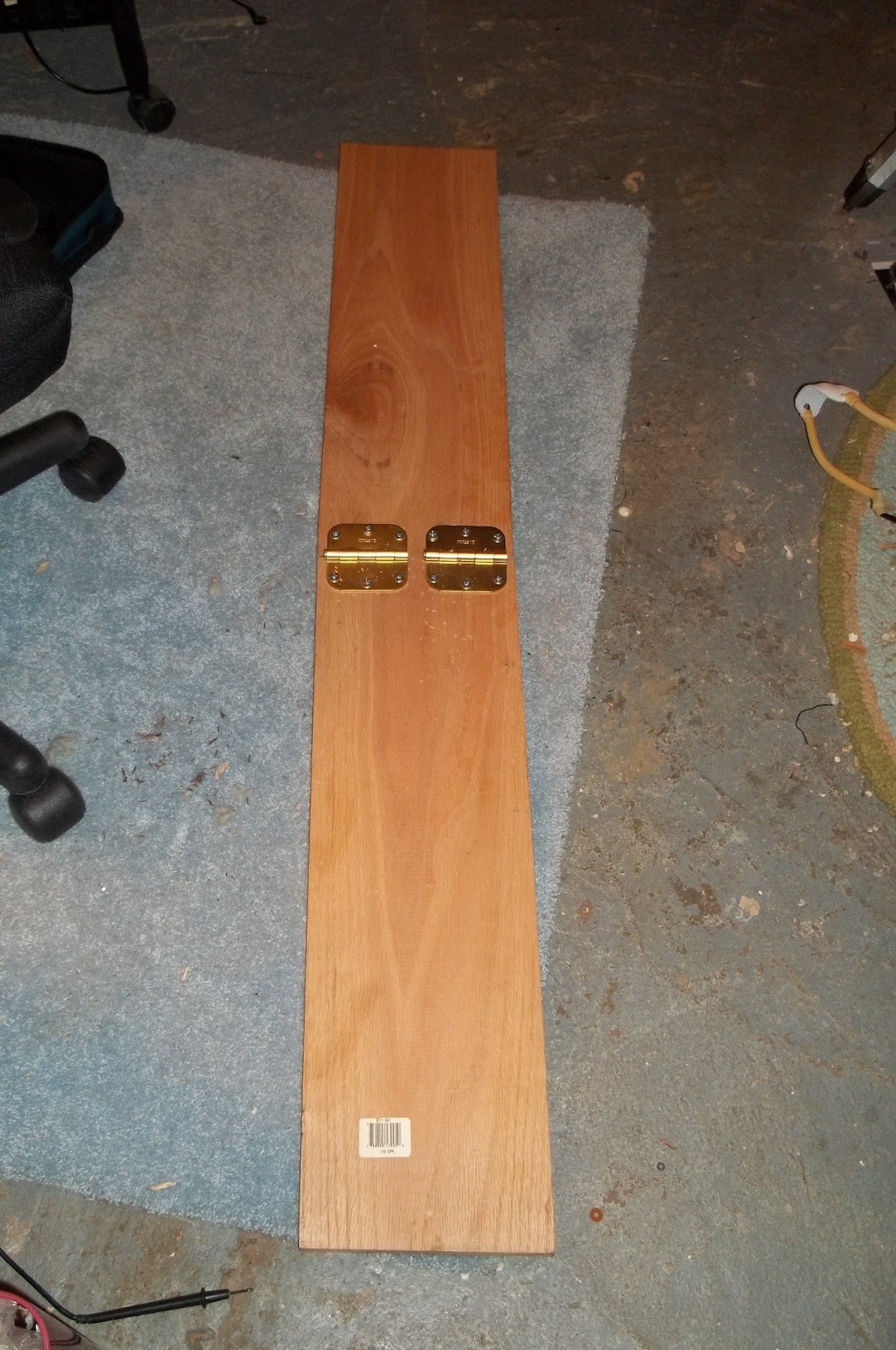
Ahhhhh …. but there’s a method to my madness, because now I have a vertical section as well as a horizontal section.
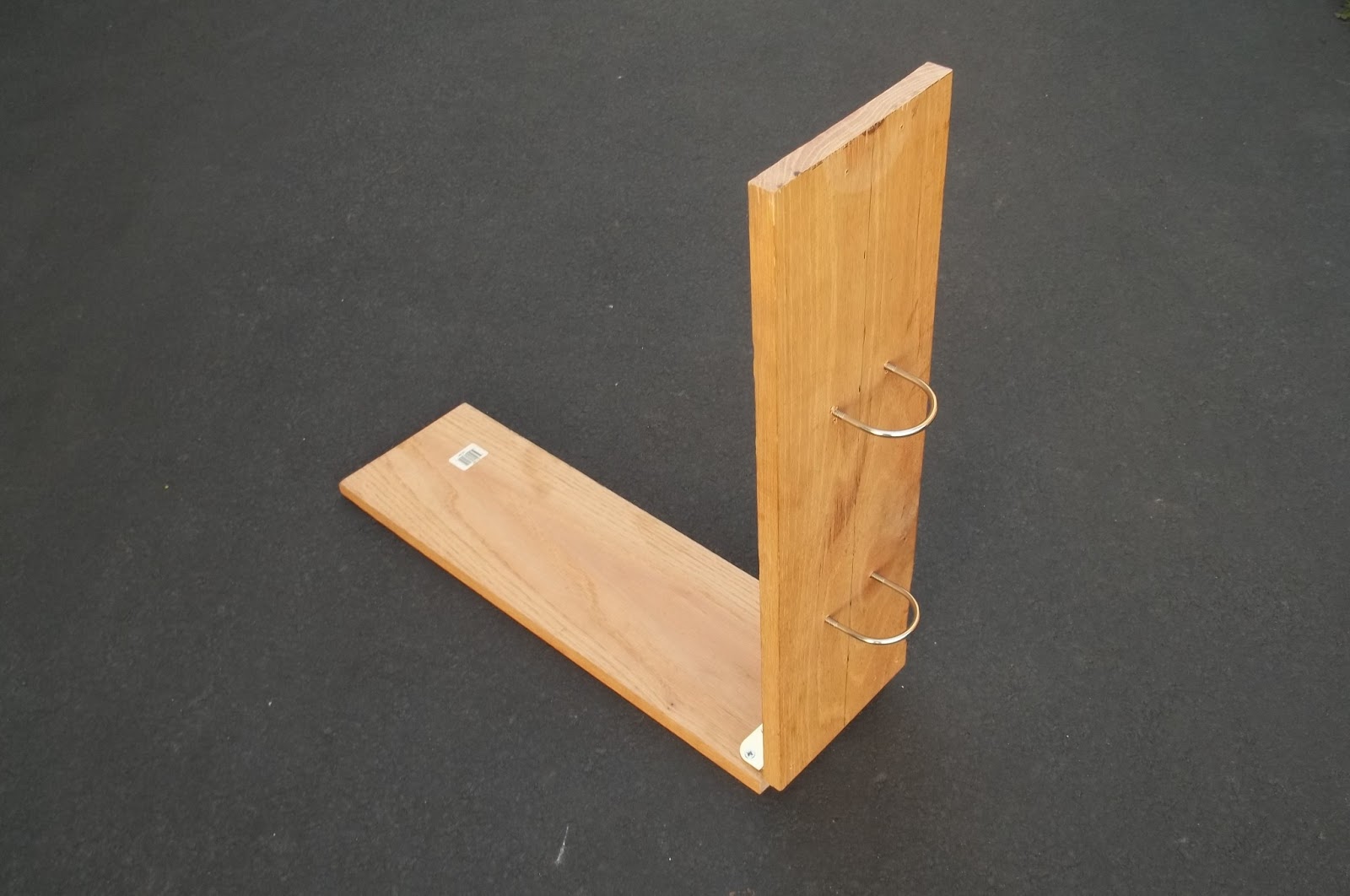
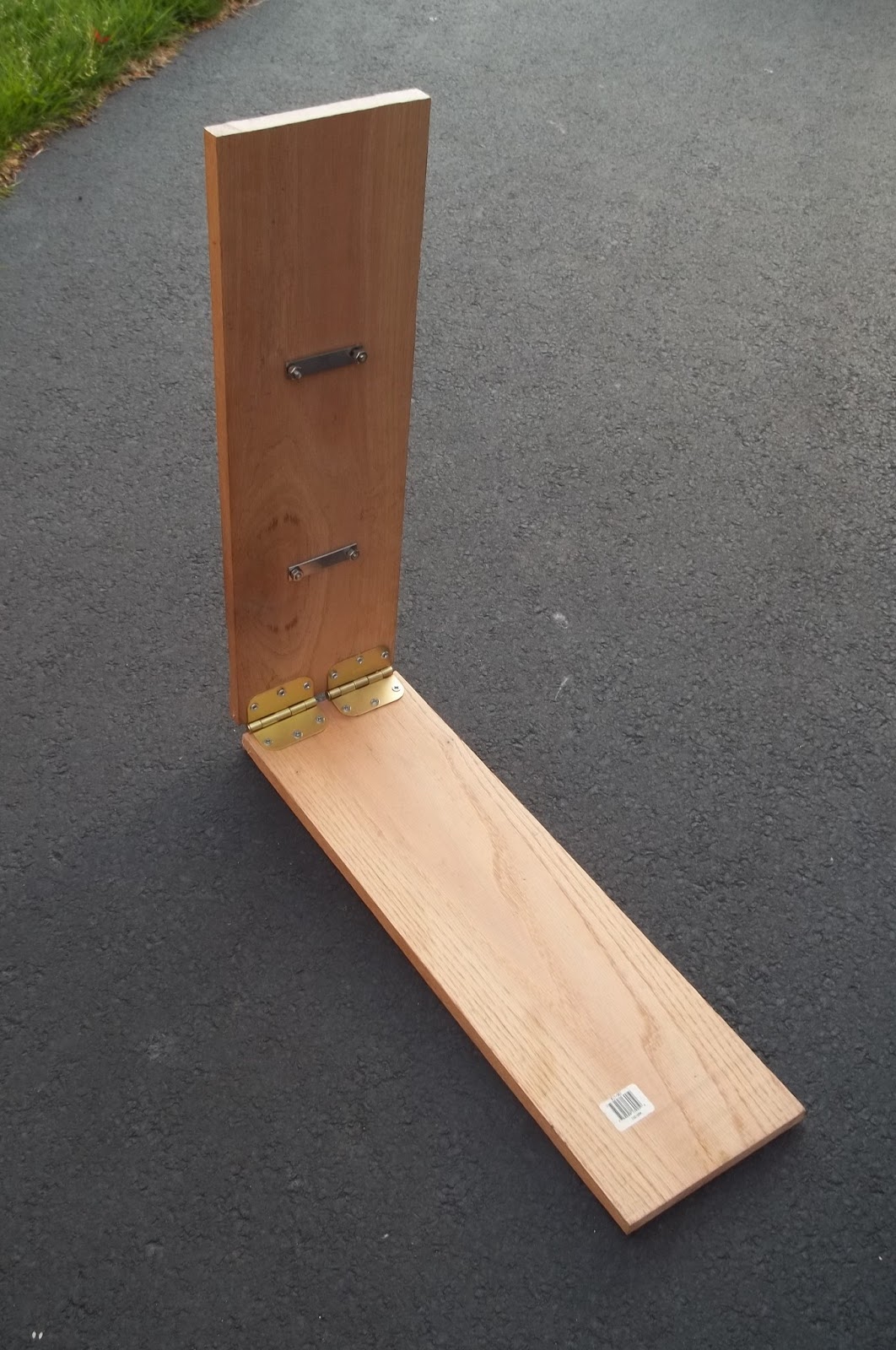
I added two “U” bolts to hold the Jackite pole. And here’s what it looks like “in action”.
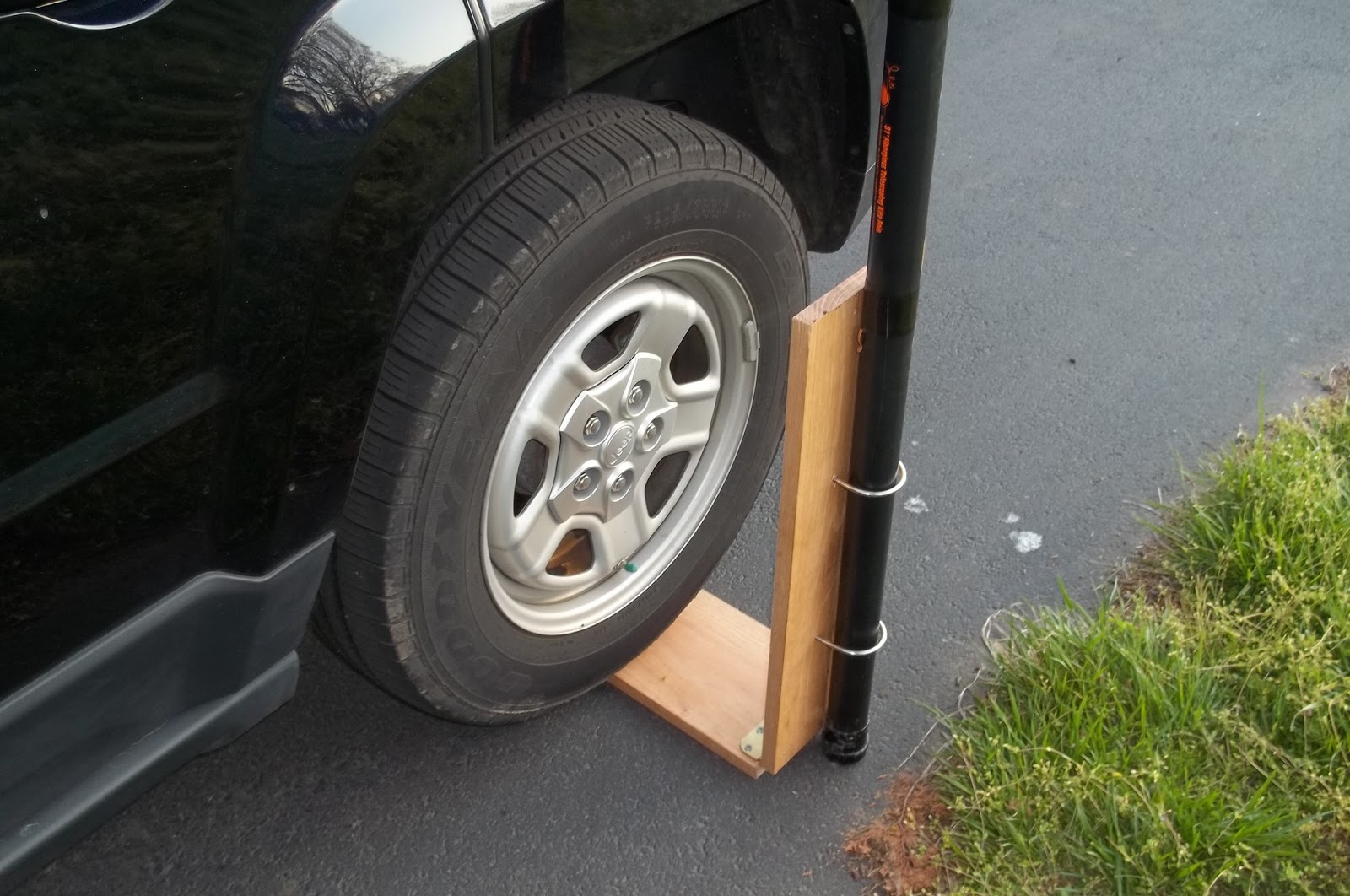
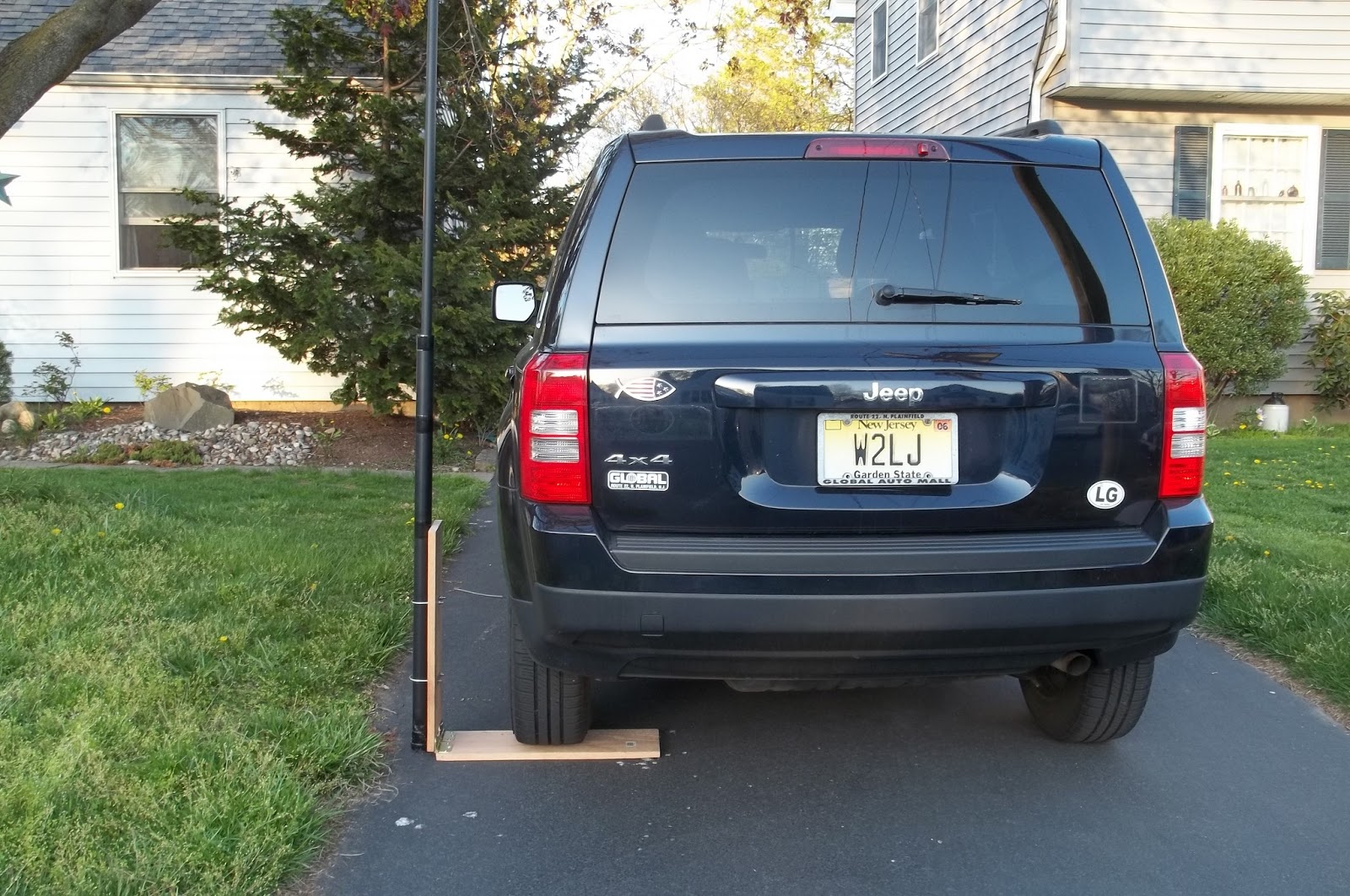
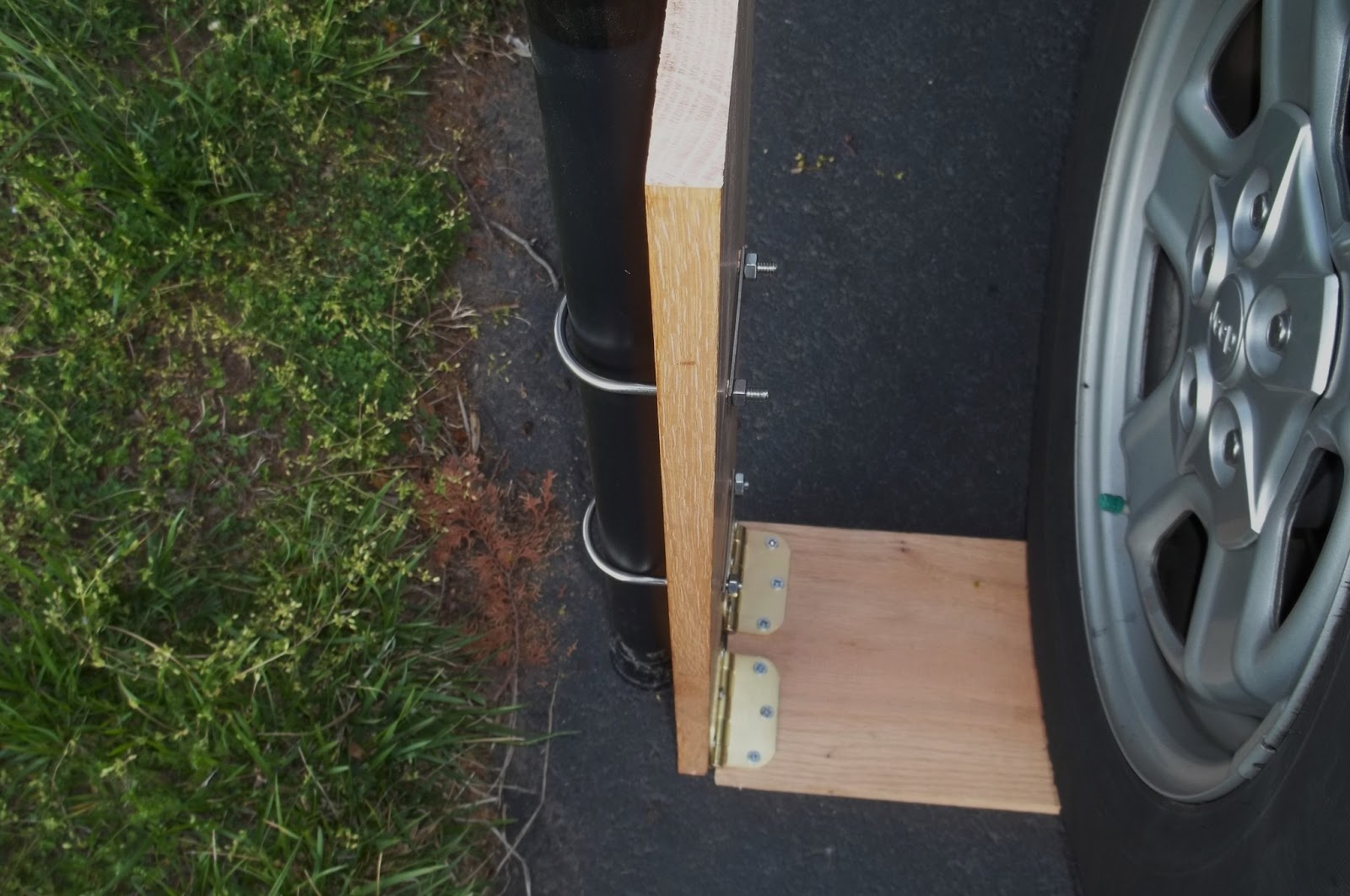
Two things remain to be done. First, I want to replace the hex nuts on the “U” bolts with wing nuts. This will make it easier to tighten and loosen in the field. Secondly, I need some sort of “support strut” between the horizontal and vertical components. I am not sure what to use. A strut like you would find in an old style attache case or an equipment case would be ideal; but I don’t know where you’d even go about buying case parts. The only other thing that I can think of is buying a piece of aluminum stock and fashioning my own custom “strut”. Anchor it on one member with a screw and allow it to swing, and cut or file a “hook” into the other end and let that come to rest on a screw inserted into the other member.
I don’t want to take a chance that a gust of wind could catch this and then either blow it back onto the Jeep or even worse, out to the side (taking radios and equipment with it!).
The easy answer is to just screw a shelf bracket in place. But that would make this thing a permanent “L”. Right now it folds down onto itself, forming a nice 2 foot long piece that fits in the back of the Jeep quite nicely, not taking up a lot of space. I definitely want this to fold for easy storage, but yet be strong and stable enough when deployed so that there will be no worries.
Any ideas?
72 de Larry W2LJ
QRP – When you care to send the very least!
Larry Makoski, W2LJ, is a regular contributor to AmateurRadio.com and writes from New Jersey, USA. Contact him at [email protected].
JT9 and the FT817
It occurred to me the other evening that it might be fun to get the FT817 going on JT9. Many of my QSOs using the FT847 have been made using 5 watts or so, really there shouldn’t be much difference.
It was a case of ordering an interface lead from my G4ZLP interface unit to the data socket on the FT817 which was a modest amount.
After the lead arrived today, I connected it up and the rig would switch to transmit, but the tones were not transmitted. I soon found that I had to change menu 26 on the 817 to User-U from the default. Also in menu 38 on the rig, I turned off the filtering.
That was all that was required. I tried a test transmission from the FT817 and monitored it on the 847 – it sounded good. I’ve already some JT9 QSOs in the log and the 5W signal has been heard in North America.
JT9 and the FT817 ought to be a very good combination indeed.
Tim Kirby, G4VXE, is a regular contributor to AmateurRadio.com and writes from Oxfordshire, England. Contact him at [email protected].
 Ham Radio Deluxe |
 W5SWL Electronics |
 Ham Radio Prep |
 KB3IFH QSL Cards  Hip Ham Shirts  HamRadioAuctions HamRadioAuctions Reliance Antennas Reliance Antennas Enigma Shop Enigma Shop |  morseDX  Ni4L Antennas  R&L Electronics R&L Electronics antennas.us antennas.us QRV QRV |
- Matt W1MST, Managing Editor
