Archive for the ‘Uncategorized’ Category
 Handiham World repost for 01 March 2012
 March 1st, 2012 |
  Author:
 Welcome to Handiham World.
Ice! Are you ready?

Photo: Ice and snow cling to the dipole at the WA0TDA station in Minnesota. The 450 Ohm feedline and the antenna wire are carrying a coating of heavy ice, as are the nearby tree branches.

Photo: Iced birch tree branches pull the antenna wire down.
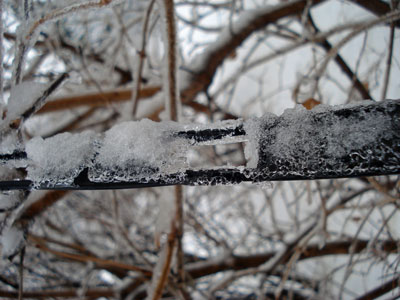
Photo: Heavy ice coats the 450 Ohm ladder line in this close-up.
Here it comes: The annual Spring severe weather season is here in North America. Tornadic winds hit in the southern Midwest states of Missouri and Kansas last night, while the same huge weather system brought Minnesota freezing rain and snow. The transition from winter to summer often means that we will be visited by bad weather that can take down antennas and put stations off the air at the very time their communications capability may be needed. This storm was well-forecast because it was being watched even as it approached the west coast from the Pacific. Computer modeling lends a new degree of confidence in such forecasts, so it is perhaps a bit easier than ever to be ready.
The problem for any given amateur radio operator is that forecasts cannot predict exact weather circumstances in a small geographic area. In this particular storm, heavy snow fell north and west of my location but we only got about 3 inches worth. Our snow was preceded by rain – freezing rain – which coalesced around antenna wires and tree branches. When the snow came, it added to the mass already collecting on the branches and wires. This was a prescription for power outages because tree branches would inevitably begin to break under the weight of the ice and fall across power lines. The power lines themselves, if in the clear, seldom collect enough ice to fall on their own. Sure enough, this morning almost 15,000 customers were without power here in the Twin Cities. Since the storm was more severe in the northwest part of the urban area, that was the place with the most power outages. Even so, in my town there were over 400 customers without power. Our power never failed or even flickered, probably partly because of just plain luck and good switching at the power company to keep failed power lines from bringing down the entire system. One thing I looked for specifically when purchasing my property was underground power lines. I have lived in too many neighborhoods where tree branches fell across lines and cut the power in almost every severe storm.
So what can you do to keep your own antenna systems from failing under the weight of snow and ice?
Wire antennas should be installed so that they have some “give” to them. That means that if the wire should be stressed by the extra weight of ice, the antenna will be able to bend with the weight enough to avoid outright failure. There are various methods of making a wire antenna a bit more flexible. The obvious one is to make sure that when the antenna is installed that the wire is not pulled up tight. Sometimes ingenious methods can be designed to allow an antenna anchored in a tree to move freely as the tree moves in the wind. Usually unless the tree is exceptionally flexible it will be enough to simply allow enough slack in the antenna wire to make for reasonable movement.
Rigid metal antennas are another story. Most amateur radio beam antennas are made of aluminum tubing. Some types of aluminum tubing are “aircraft grade” and may flex more than standard tubing before breaking. No matter what kind of aluminum tubing is used, it is not immune to severe damage from ice loading. If the weight of the ice itself bending the aluminum doesn’t break it directly, wind that comes up after the ice is coated onto the elements may very well finish the job and bring the entire structure down in pieces. I am not sure that there is any practical way to prevent this kind of damage in a beam antenna system, but perhaps someone with experience can weigh in on the matter and let us know. Few amateur radio operators have tilt over towers that can perhaps be used to bring the whole antenna down close to the ground with the elements 90° to the surface of the earth so that water will run off of them. But what happens to the horizontal portion of the tower that will then be collecting ice? It’s hard to figure out how to prevent ice damage on a beam antenna system, so keep your insurance paid up.
An antenna that is coated with ice and snow will not necessarily tune correctly. When I tried using the LDG auto tuner this morning to tune my 200 foot wire antenna on a frequency that had been previously “memorized” by the tuner, it behaved exactly as if it were visiting that 75 m frequency for the very first time. The tuner cranked away for a while before finally settling on what had to be a very different combination of capacitance and inductance to allow for a reasonable standing wave ratio. Once the ice melts off the wire, the auto tuner will have to search again for a new combination as things return to normal. One thing to consider is that not all automatic tuners will be able to match an antenna that is heavily loaded with ice and snow. The operator must be aware of this and be careful not to operate with a high standing wave ratio.
The antenna wire itself is not the only thing affected by ice and snow. If you are using open wire feed line as I am, you can expect ice loading on the feed line to contribute to changes in how the antenna behaves on the air. If you use coaxial cable, your only real concern is weight of the ice on the cable itself. Any place feed line comes into the house it should have a “drip loop” so that water can drip off the bottom of the loop of feed line as the ice melts. This prevents the water from following the cable through the wall of the house and into the ham shack.
Your antenna system will be more robust if you use good quality materials to construct it in the first place. Good antenna wire may be more expensive initially, but it will be more likely to stay up under ice loading than some bargain wire. As the old saying goes, “a chain is only as strong as its weakest link”. In terms of a wire antenna system, this means that a cheap insulator could easily be a failure point no matter what kind of expensive wire and feed line you use. Needless to say, you should always take the time to secure wires properly to center and end insulators so that it will not work loose under pressure as ice pulls on the wire.
Following a weather event such as high wind or icing, you should plan to inspect your antenna systems for any possible damage or tree limbs that might’ve fallen against the antenna wire. Any kind of antenna system should always be located well away from power lines so that a failure in either the power line or the antenna will not make one of them come in contact with the other.
Tomorrow it will be March, and that is the month that I usually think of as being the start of this severe weather transition season. Maybe it’s time to take a look at that go-kit and make sure that you are ready.
For Handiham World, I’m…
Patrick Tice, [email protected]
Handiham Manager

Viewing digital photos on air

Reading this post from 2E0HTS Simon did give me some interest in SSTV again. Although I didn’t want to do SSTV the traditional way as the images are low quality when QRM is coming in. I heard about digital SSTV modes and discovered now that it is actually not SSTV anymore. The pictures are send digitally and so you receive them they way they were made. This is really a nice mode for someone that has photography as a hobby. So, I had some spare time today to make this digital TV or photoshow happen. I installed Easypal the most used digital SSTV program around. And started on 20m receive, I actually received something but after half a hour still didn’t see any picture. Later on I tried some TX to see if one of the online receivers could get my picture. But unfortenately my signal has not been received, till I saw another received picture online from I6IBE. He did seem to receive my picture and send one in return, but still it didn’t appear on my screen. I don’t know why? But at last I did receive some pictures on 20m mostly from Russian stations. In the evening I switched to 80m 3733KHz LSB and found a crowded frequency and lots of pictures were received. I also discovered most of these stations are using amplifiers and only a almost perfect signal can be decoded. It’s not like analog SSTV were you see noise in the picture when QRM is fading in and out. If you get QRM with digital SSTV you simply miss some bits and you don’t see the picture. There is a possebility to fix the missing parts, but from what I’ve been experiencing so far it’s seldom been used. Conclusion: it was a nice experiment although I didn’t have the time to completely figure out all possebilities of Easypal. For someone with less time for the hobby it’s nice to receive only if you like all kind of pictures. But to make QSOs you really need a lot of time. After all I had a couple of hours radio fun.
 |
| Tnx report Ivo, unortenately didn’t receive you myself… |
Seventeen Prefixes
I didn’t make a single QSO on Saturday. We had to go to my principle’s wedding in Taizhong and when we came home the radio only made a lot of noise with very few signals around. The K-index was 4 if I remember correctly, so that explains it a bit. Instead I heated up the old Weller and I finished another part of my audio filter. A Saturday night well spent.
Sunday was a different story. I hadn’t planned on participating in the ARRL contest, but there were so many signals on 15 meters from the States that it was impossible not to log some new prefixes for the FISTS 25th Anniversary Prefixes award. I spent an hour in the morning and logged 13 stations.
There was no FEA net at 0800, so I logged E73W (new country for me) and then took down the Cobweb. It was making too much noise in the wind and I need to get the wire tension fixed anyway. I put up the 10 meter vertical again and what a difference that makes! The higher bands were suffering from local noise but 40 meters was brimming with stations and even with the attenuator switched on they were still booming in. Nothing like a good vertical for 40 meters. 80 meters and 160 meters only yielded Asian stations, so back to 40 and in the course of the evening I spent – altogether – an hour logging another 11 stations from North America. In the end I counted the following 16 new prefixes for my award:
K0, KV0 / N2 / K5 / AA6, K6, KA6, N6, W6 / K7, N7, NJ7, NK7, VE7, WA7 / N9. All of them from the Western part of NA.
Add to that the E73 prefix and I didn’t do so bad at all this weekend: my score went up almost 7%. More important: my CW skills improved again, especially the rapid taking of call signs. I know there are “apps” for practising Morse code, but the best practice is still on air. Only 152 prefixes to go.
Factory Fresh, or Bag-O-Parts Which is is for you?

Elecraft KX3
Elecraft said they hope to start shipping at the end of February or the beginning of March when I talked to them on the phone today.
I’m at the tail end of the line too, I just ordered on today!
While we’re waiting for that big day when the Kx3 arrives, I was wondering how many ordered the Kx3 assembled by the factory or in Kit form?
Just curious! I ordered mine ‘Factory Fresh’!
de AA1IK
Ernest Gregoire
73
Johnny Cash Birthday Special Event Station
The Northeast Arkansas Radio Club is sponsoring a special event station in honor of Johnny Cash’s birthday.
All licensed amateur operators are welcome to contact N5C on Sunday, February 26, 2012 from 12:00pm CST (1800 UTC) to 8:00pm CST (0200 Feb. 27, 2012 UTC).
Stations making a confirmed contact with N5C will receive a commemorative certificate.
They are planning on operating at least one station in Johnny’s boyhood hometown of Dyess Colony, AR. Stations making contact with the Dyess Colony station will receive a special designation on their certificate.
Planned operating frequencies will be: 3.835, 7.260, 14.260 and 28.330 mHz (+/-3 kHz).
“He ‘walked the line,’ now let us ‘talk the line!'”
PACC 2012 story

What can I tell. This contest was enervating. My XYL was not too happy with 24 hours of contesting. And I have to admit I wasn’t that much of use to her and my little daughter with only contesting in my mind. But I have to thank her that once in a year she let me go for a whole weekend to do my most important radio contest of the year. Luckely they were away to my mother-in-law at Saturday so I had no distractions. Propagation was bad on Saturday, it was improving Sunday. But of course Sunday I had some distractions, you can not totally ignore family live of course. Anyway I guess I missed some multipliers like VK, I actually didn’t hear VK on any band but know that there was some activity. No interesting DX this time like last year, you got to have some luck with that of course. I made a note from some calls and names from felow bloggers and readers so I could greet them with their names. But at the end I only worked PA1HHO Pleun, I actually made a short but nice QSO with him on 80m so he tested his new “Rode” mike and let me hear the original mike so I could tell the difference. I made a 40m QSO with him as well. After all a interesting contest and I improved my score from last year, actually broke the 600 QSO barrier. Side effect after the contest, extreme tiredness and a headache.

WD40
Two days ago we still had 10 degrees Celsius and rain. Sunday saw 24 degrees and sun. So what better to do than cleaning the Spiderbeam pole. WD40 sure made it shine again.














