Archive for the ‘radio’ Category
 Hermes HPSDR comes to MX0WRC
 July 3rd, 2012 |
  Author:
 Last night was club night. Its a good chance to catch up in person with the local hams and exchange bits of useful information. Normally how to fix the things I have broken, which seems to be quite a few things at present including 3 bikes, but that’s another story.
Kevin, M0KHZ came along with the view of giving us an understanding of where the Hermes High Performance Software Defined Radio (HPSDR) is. He started with a brief history which explained for us lesser mortals how the project got started and how the project team got to where they are today.
The prototype that was on display at Dayton and Friedrichshafen was fired up and Kevin showed us how the rig could be controlled over wifi and the potential of Hermes to take SDR to the next level and then further. Even though Kevin was tight lipped I got the impression that this was not the end of development
The detail is way over my head and the likelihood of me understanding these concepts fully is fairly slim but it doesn’t stop me wanting to get my paws on one. Needless to say I have approached the local financier / XYL who was less than interested so there’s more ground work needed there. The impression I got was that although there is a fairly full ‘expression of interest’ list at HamSDR (you’ll need to log in to add your name to the list) the commit to buy list isn’t yet up and orders are not likely to be taken until September. Plenty of time to save up.
SDR doesn’t fill everyone with the same excitement as it does me but its fair to say that whatever your stance you can’t fault this small project team for their dedication and know how as well as doing this not for commercial gain.
K8GU/5 Field Day 1B1Op Battery

I found myself in Santa Fe, NM, for Field Day this year to attend a conference. As I have shared before, I have mixed feelings about Field Day, but this was a genuinely good time. I first checked ARRL’s Field Day finder map and the local club’s web site for activity. Zilch. So, I remembered staying at the Fort Marcy Hotel Suites on several previous visits to Santa Fe. These condos are up on a hill overlooking town. Across the street is Hillside Park, with a couple of scraggly trees that might be suitable for antennas.
Instead of bringing the “usual” portable station, I brought a Small Wonder Labs SW-40, a K1EL K12 memory keyer (assembled especially for this trip), Palm Mini paddles, a 40-meter dipole, and a AA battery pack. The whole station took up less space in my luggage than my notebook computer and set up in 15 minutes. I got the dipole center about 4-5 meters off the ground and the ends sloped down to about 2-3 meters high…just enough to allow cars and small trucks to pass under them in the parking lot. Apologies for the photographs…they were taken with my cell phone (which is a regular old “dumb” phone).
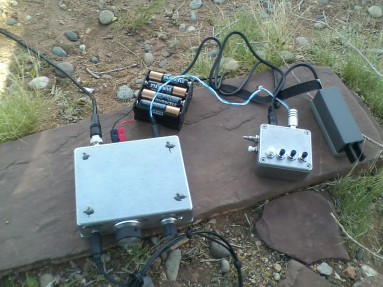
The SW-40 did not appear to be transmitting correctly when I first hooked everything up. So, I pulled the cover off (packing a Leatherman tool is another good reason to check a bag) and wiggled some wires around until it fired up. Not an auspicious sign.
But, I did manage to operate for about an hour and make 12 or 15 QSOs. They’re logged in a notebook, but I haven’t looked at it since making the contacts. Virtually every QSO was a struggle. Low power (1.5 watts), wrong band (20 meters would have been better), a low antenna, and the fact that I hadn’t used the SW-40 for any QSOs in over 10 years, conspired to make thing difficult. Most operators pulled me right out once I was in the clear and zero beat (which I think was a serious challenge with the slightly drifty and definitely touchy SW-40).
My final QSO was with my old radio club from my college days, W8FT. The operator was my good friend Bill, AD8P, who worked hard to pull me out once he got my call right. After I packed up, I noticed that I had a missed call on my phone…sure enough it was from Bill. So, I gave him a call and we talked for a couple of minutes. “When he answered the phone, he said, `New Mexico?!?! I told Kelsey (N8ET) that’s what I had copied.’” We had a nice chat as I hiked back down the hillside into town and he pulled into his driveway after his FD shift.

I don’t think I’ve ever been so delighted with a Field Day effort of so few QSOs (except maybe my first Field Day, which was much more work for about twice the number of QSOs). Including the walk from my hotel to the park, setup, tear-down, and operating, I think the whole exercise took about 3 hours, and was tremendously FUN.
What can you do?
When your PSU gives in, a replacement part costs an arm and a leg and 6m is up?
Not a lot it seems. My ft817 was hearing a lot of eastern and western European stations but with 5w max and a home made antenna you’re not going to get far despite some patient operators on the other end.
Still it was worth a go and thanks to DL5EL for letting me have more than my fair share of attempts.
6 and 10 again
Martin, G3USF, has been busy collating the outstanding short form 6 and 10 reports and they are available in the usual place. Just a quick reminder that these short form reports are a way for Martin to give more current information based on the reports from Costas, SV1DH, which come in first. The ‘final’ edition of the report will be uploaded once all the remaining data has been collated and formed into the report.
I hope you enjoy them and find them useful. Let me know if you have any problems or comments.
The unfortunate & epic saga of the perfect military radio
 |
| The long awaited but ultimately unwanted GMR radio |
As my day job starts to include more long term projects & project management I was particularly intrigued by an article in arstechnica.com. The article is, “How to blow $6 billion on a tech project“, although the title may be more inflammatory than technically accurate.
The article covers the 15 year development of an advanced & unified military radio communications system that suffered from multiple issues including scope-creep & a rapidly changing underlying technology.
If you are involved with a group that is working to develop a product or service you’ll really get something from this article. If you interested in radio systems, military or otherwise, you’ll find this interesting as well.
Its hard to image the frustration people suffer when contributing to a project that is mismanaged unless you have been there yourself. I hate to think of the wasted effort that resulted when people found out How to blow $6 billion on a tech project
Live MUF by G7RAU
Whilst I was scanning the 6m band during my white noise listening experience (or UKSMG 50Mhz Summer Es contest) I started a little googling and came across a tool that I hadn’t used before. From the website description it calls itself a ‘DX cluster (DXC is its name by those in the know) telnet client which attempts to resolve propagation modes from spots and also attempts to calculate sporadic e possibilities purely based on incoming data from the cluster’
It uses a great circle map and a the ON4KST telnet client as well all from the comfort of a single simple desktop. A little screenshot is below for reference based on my settings and a bit of ‘personalisation’

The software seems to be developed for those with an interest in 2m really but works well for 6m as well as I found out to my surprise on Friday evening when I was hit by a wall of QSO’s from all round me. Live MUF showed a whole range of spots almost like a cloud on the screen moving from the south east of the great circle map up to just below me on the south coast where the yellow patches in some cases had turned red.
Whilst I am increasingly sceptical of propagation prediction tools I think as this is based on actual data it has saved me quite a bit of time and heartache having this running in the shack telling me if I am likely to be lucky enough to be involved in any QSO’s.
If this is your thing and you’ve already come across it then this won’t be news to you, but if like me you’re gun is more like a 99p water pistol (And I’m talking about it in a radio sense before we get carried away) then give it a try. As far as I can tell there is no installation as such it just runs an executable file and so could be used portable from a USB drive if you desire. There is also a web based version for those who might like to take a look when away from the shack. Have a look here (ps the site seems to be down at the moment but hopefully not for long).
KiCAD for clankies
If you fancy designing yourself a PCB for a project then you’ve got quite a few choices. For a long time Eagle has been the standard. It offers just about everything that the novice and expert needs to create a professional looking board that blurs the lines between hobby and business. It has been acquired by AutoDesk, the people behind the hugely impressive Inventor 3D CAD package. Loved by clankies like me.
 But what about open source software? Well KiCAD is the ‘other’ standard, with a slightly different workflow it still roughly follows what must be normal. That is, design a schematic and then tackle laying out the PCB.
I’ve not designed anything in Eagle for a long time and so have largely forgotten how to do it. So, thought that now I’ve switched almost entirely to Linux that I’d give KiCAD a go. Download through your favourite method and take my advice, download and print off the ‘Getting Started’ pdf.
The plan was to copy an existing layout first and see if I could make the PCB. I can report that I have achieved what I set out what to do. So, without boring you to death about the in’s and out’s of the software, here’s what I learnt….
- KiCAD has moved on. A lot – It is a simple and quick way to produce a hobby project. I understand as well that a big update is on the way.
- Workflow is different to Eagle – Schematic – Netlist – PCB rather that Schematic – PCB. This additional step is actually beneficial as it lets you make sure that the component can be sized separately from determining its functionality.
- AutoDesk still has a fantastic set of suite of applications and no doubt it will produce a superb link between electrical and mechanical that will be hard to beat. Commercially this will be hard to beat. The hobbyist will reap the benefits in time.
- KiCAD is fundamentally fit for purpose and definitely is not second best. What is clear is that the two suites follow different paths. There are a bunch of other pieces of software that fit the bill but most hobbyists have heard of both of these.
- RTM – Did I say Read The Manual? I’m going to say it again, read up. This isn’t a 5 minute investment and planning will pay off.
- If you’re keen on open source software then crack on. No need look elsewhere.
I’m going to continue with this project and no doubt learn new stuff. Today I learnt that importing .dxf files for the creation of PCB shapes is simple. A really quick way of getting the Altoids tin shaped PCB I need.