Archive for the ‘ham radio’ Category
 Don’t Get Stuck On 2 Meters
 December 23rd, 2011 |
  Author:
 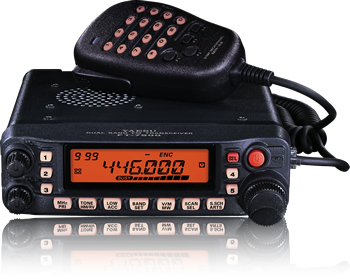 When I first got started in amateur radio (many years ago), one of the engineers that I was working with at a summer job told me “Don’t get stuck on 2 Meter FM”. At the time I was a college student and felt lucky enough to have 1) found time to pass my Novice exam, including Morse Code test, 2) found time to travel 150 miles to the regional FCC office and pass my Technician exam, and 3) scraped up enough money to buy a basic 2 Meter FM mobile rig. I was in Technician ham heaven, playing around on 2 Meter FM, both simplex and repeaters. Oh, and we had this cool thing called autopatch that let you make actual phone calls from your car. I really wasn’t worried about getting “stuck on two”.
Even though my discussions with this Old Fart Experienced Radio Amateur revealed that he didn’t see 2 Meter FM as Real Ham Radio, I could see that he had a point. Two meter FM is only small part of the ham radio universe and it would be easy to just hang out there and miss out on a lot of other things. I was reminded of this recently by K3NG’s post: Things I Wish I Knew When I Was A Young Radio Artisan. I agree with most of his comments with the exception of this one:
Don’t get your start on 2 meter repeaters.
This took me back to the comments from the Experienced Radio Amateur from years ago. I get the point — starting out on 2 Meter FM and Repeaters can give you a limited view of ham radio — but I see it as the perfect platform for getting started. Here’s what is working in my area with new Techs: get them started with a dualband FM rig (usually an HT) so they have some on-the-air success. This also puts them in touch with the local ham community, where we not-so-subtlely expose them to other bands, modes and activities. They hear the other guys talking on the repeater about working DX on 10 Meters and start thinking about how to pursue that as a Tech. From there, it just expands out to all kinds of bands and modes.
Just for the record, I guess I did follow the advice of the Experienced Radio Amateur and managed to not “get stuck on two” (i.e., I’ve worked all of the bands from 80M to 10 GHz, earning WAS, WAC, DXCC and VUCC.)
73, Bob K0NR
Breaking News…Grinches ALMOST Stole My Favorite SDR Site
BREAKING NEWS! Mack has rebooted and W4AX.com is back online. It is a huge blessing and thanks again to Mack and the host of others who serve all of us! YAHOOO>>> Grinches lose! W4AX.COM is online again! Belay my last!
A few years ago, we did not know the term, Software Defined Radio but now it has become one of many new technologies that we hams are learning to adapt to our needs. As an antenna restricted condo dweller, I’ve found it most helpful for being able to listen to the bands at various times through the day.

W4AX.com during IARU CW contest
Yesterday I learned my favorite site, W4AX.com is shut down due to abuse by non-hams and other constraints. A big thanks to Mack, W4AX and others who are the unsung heros that provide services like these and have allowed access to others over the years. The Reverse Beacon Network is another great service and we often forget the time and expense that our fellow hams have put into keeping them going. As a blogger with multiple sites, I understand the challenges and resources it takes all too well.
I’ll miss being able to check the bands 24 x 7 on my favorite site, but perhaps it will prompt me and others to set up our own SDR site and share it with others. I salute those who like Mack paved the way for new technology to provide access to so many hams. Sorry that the burden got too heavy to keep it going, but know your work was appreciated by many. I’ll be sure to let others who are working behind the scenes know that they are appreciated too.
Blessings gang of pioneers and Happy Holidays to you all!
72,
Kelly K4UPG
Handiham World for 21 December 2011
Welcome to Handiham World!

- Get on the club Internet mailing list and immediately complain about the newsletter, the editor, and the overall lack of quality in “this day and age”?
OR…
- Notify the newsletter editor politely about the error and offer to help get the word out about the correct date for the event?
[email protected]
Handiham Manager

1Hz-2MHz Function Generator Kit
 After building the “Accurate LC Meter Kit” from Electronics-DIY.com, I turned to their “1Hz – 2MHz XR2206 Function Generator Kit”. All parts necessary to complete the kit were included, though not exactly as pictured on their webpage — two of the WIMA capacitors had been replaced with substitutes and there was no IC socket. All components were through-hole; soldering the kit together went quickly and easily.
If you build one of these kits you’ll need to provide your own power source as well as your own pin-connectors (if you choose to use the pins provided). As with the LC Meter, I used a size M coaxial DC power jack to accept a plug from one of the wall-wart power supplies I have around here. I didn’t bother to install a power switch in either unit since I won’t be using them very often; I won’t leave them plugged in between uses.
The fellow at the local Radio Shack gave me some pin-connectors for free, clipping them off of some battery packs that were in a box for recycling, though he only had two-pin connectors. Since one of the pin-sets has three pins, I just soldered a piece of hookup-wire to the third pin. If I had to do it all over again, I wouldn’t bother with these pins — I’d just solder hookup wire right to the PCB. By the way, if you ever try soldering to a pin make sure you clip a heat-sink to the pin before heating it up. The plastic base of those pins melts pretty quickly!
I chose a plastic project box from Radio Shack to house this function generator. Using a Dremel tool with an engraving cutter (at the lowest speed — 5,000 RPM), I put three notches in one side of the box for the potentiometers, a notch on one end for the two switches, and ground down all four stanchions on the floor of the box since otherwise the potentiometers would have extended too high to allow the lid to fit. That Dremel tool sure is handy! A few knobs from Radio Shack finished off the project.
The two outboard switches allow you to select between three waveforms — sine, triangle, and square. I don’t have an oscilloscope so I can’t tell you how the waveforms look, but I can at least tell you that the sine wave sounded pure when I hooked my headphones up to the output with a matching pad. I am pleased to report that the signal generated by this function generator is very stable. Four DIP switches on the PCB allow you to select between four frequency-ranges, and two potentiometers allow you to tune within the selected range. One of these two potentiometers provides coarse tuning, and the other provides fine tuning. The third potentiometer controls the amplitude of the signal generated (note: amplitude decreases as you turn this potentiometer clockwise).
If you build this kit you’ll want to hook it up to a frequency counter. Two pads on the PCB are provided for this purpose. I have a piece of coax hanging out of the back of the box for connection to my own frequency counter — not that you have to use coax, but it was handy for terminating with a BNC connector. (If I were really classy I would have put this coax through its own hole in the project box, but hey, this is a piece of test equipment — I just ran it through the big hole I made for the RCA connector.) When I hooked up my frequency counter I noticed that the published ranges for each DIP switch were just rough approximations, but I was pleased to see that this frequency generator covered the entire published range and more — up to about 2.4 MHz, if I recall correctly.
Here is a slideshow of photographs I took of the completed function generator:
The source impedance of the generator is 600 ohms and the output is intended to be terminated in a 600-ohm load. In my next post, I hope to discuss the construction of a minimum-loss matching pad to hook it up to a piece of equipment that has a different input impedance.


Contest Point Giving for Christmas
The weather was too nice to sit inside. In the low 70′s with a very slight breeze so after church and a short nap I headed out to try my hand at giving out points in the QRP ARCI Homebrew Sprint. My startup was delayed by curious folks in the lakeside park wondering what in the world I was doing and how I got that string and wire so high up in the nice tall pine trees!

Next to the Lake in the Sun
I checked 40m first with an inverted L end fed half wave and my trusty Stuner (KI6S Stu’s kit) and decided to change to 20m after not hearing much activity. 20m was decent and there were a few of the big gun qrp contest regulars shooting it out. N4BP, K4BAI, K0ZK and a few other were running stations while the little guys like me were mostly doing Search and Pounce. Hey it is fun even if you cannot run a frequency, right?
Sun went down about 1745 local and the mosquitos were quick to find the hole in my hat and attack. This time I remembered the repellant and after a few bites I took time to spray my hat and hair and the backs of my hands. The temperature dropped fast and my hands got a bit stiff pounding out the morse code on my J-47 straight key. 50 degrees is cold for a Florida evening. The darkness also brought out the raccoon family and it was fun to shine my flashlight on them and watch them stand on their hind legs and stare into the night wondering what the funny guy was doing in the dark.

Sun is almost outta sight
40m came to life after sunset and I finished with a respectable 20 contacts for about 3 hours of operation and was able to give some Christmas contacts to the needy fellow contesters who were chasing another certificate. What a great way to spend the afternoon… by the lake in the sun and outdoors playing radio.
Accurate LC Meter Kit
Update (3/7/12): Yesterday I prompted [email protected] for a reply, mentioning the number of pageviews this post has received. I received a prompt and polite response. I learned that I was mistaken in expecting the meter to read capacitors 1 uF or higher, since the published range of the meter is only 0.1pF-900nF. There was no explanation of why I am having problems with inductors that are within the published range of the meter. However, I was quite favorably impressed by an offer to test and fix the kit at no extra charge! I shall take them up on this offer and keep you updated.
Update (2/8/12): I am having trouble with this LC Meter. It gives me the same reading for all capacitors 1 uF or higher, and the same reading for all inductors higher than about 70 mH (this last value is just a guess): 838.8 nF and 83.88 mH, respectively. As you can see the digits are the same. It seems to work for really small capacitors and inductors, but anything bigger and these are the only readings I get. I emailed [email protected] on 1/8/12 about this, but as of 2/8/12 I have received no reply. Unless and until I learn the problem is due to some error of my own in constructing this kit, I recommend against purchasing it.
 Yesterday evening I finished building the “Special Edition Accurate LC Meter Kit with Blue Backlight LCD”, available from Electronics-DIY.com for $69.95. I have no experience with such devices; a more experienced fellow told me he was impressed by its specifications, so I ordered the kit. Soldering it up was a snap. The main printed circuit-board is all through-hole construction, and the LCD-board that mounts over the top of it requires nothing but a connector.
If you want to build one of these you may want to order this version of the kit instead of the one I purchased: Accurate LC Meter Kit with Green Backlight LCD, for $59.95. My kit’s “Blue Backlight LCD” turned out to be green anyway, and I think the two kits have the same circuit, save an adjustable potentiometer on mine that controls the contrast of the LCD (which I just set to maximum anyway). Certainly the cheap case that comes with the kit I ordered is not worth the extra $10 — to use it you have to carve out a bunch of stuff (to make room for the circuit-boards), including two of the four stanchions that attach to the lid. After going to all that trouble (I used a Dremel tool) you are left with a case that requires adhesive tape to hold down one side of the lid!
The instructions that came with the kit were pretty sketchy, mostly limited to how you need to carve up the case (by the way, the measurements were wrong, so ignore them). The only thing that got me into trouble was the voltage regulator, which gets in the way of the LCD-board (and protrudes too high to seat the lid of the supplied case) if you solder it in the way you normally would (which I did!). By bending the voltage regulator out at angle I managed to get the LCD-board mounted, but the lid still won’t seat properly. Learn from my mistake, and bend the leads of the voltage regulator into a Z so that they lay flat on the board and allow the voltage regulator to sit just off the edge of the board. (Of course, this only matters if you try to use the case provided.)
You’ll need to supply your own power to this unit. There isn’t enough room in the case for a 9V battery, so I purchased a DC socket. You’ll also need to supply your own connectors for testing inductors and capacitors; the photograph on the Electronics-DIY.com website shows them in the case, but they aren’t supplied. I used banana-plug sockets. You’ll also need to supply your own pin-connectors if you use the supplied pins on the circuit-board, and you’ll need your own stand-offs if you want to support the LCD-board (only two of the four screw-holes match up with the lower PCB, but that’s probably good enough).
There is no way to select the units displayed on the screen, e.g. pF vs. nF. But the dearth of selector switches is actually one of the nice things about this unit. There is no need to select a range of capacitances or inductances. The only thing you have to do is plug it in, hit the reset button whenever you want to calibrate it, and stick in a capacitor to get a reading. If you want to test an inductor, you simply press one button to select inductance-mode, then attach your inductor. It just works — and it works with precision.
Here is a slideshow of some snapshots that I took with my cell-phone. They didn’t turn out very well, but they’re good enough to give you an idea of what it looks like. Notice that I used black electrical tape to mask the edges around the LCD. That’s because the opening I made was downright ugly. Next time I’ll try using a cutting wheel on my Dremel tool instead of a grinding tip!


Handiham World for 14 December 2011
Welcome to Handiham World!
[email protected]
Handiham Manager














