Author Archive
 Radio time or fun in the sun time
 August 3rd, 2025 |
  Author:
 |
This weekend was the North American QSO CW party, and the on time is 12 hours, and I put in about 1/4 of that. The issue was that it was a great day outside, and the sunshine and great weather was calling my name. The exchange in this contest is your name and state or province. This not being a big international contest, the CW speed varied from a slow 25 to a nice 36 wpm. I had no issues with the radio....well, having said that, now and then I have N1MM+ contest software hang after sending CW. It can get very frustrating, and I have finally narrowed it down to the Silicon Labs software needed for the Icom to communicate with the PC. It has been documented that even milliwatts of power can cause N1MM+ to hang. When you're calling CQ contest at 34-38 wpm, a hiccup like this can get very frustrating. I have good quality ferrite chokes in place, great grounding, but one issue is that my antenna is a bit close to the shack. The stray RF is hit and miss, and then when the ground outside is wet from a heavy rain, there is never an issue. (antenna is the Hustler 4BTV vertical). Now, having said that, during the NAQP I had some hang issues, but then for no reason it all of a sudden just stopped and never happened again during the contest. Anyway, I digress.....during my run, my best QSO per hour was 97 and I love that as it is GREAT for the keyboarding skill, ICR (instant character recognition) and brain training. What I really like is one op comes back to you at 25 wpm, and then the next is 36 wpm. It's great to have this shift, and it really improves your CW contest skill. The other thing is that during these times, the page up and page down keys get lots of exercise. These keys increase and decrease the CW speed. If someone comes back to my CQ at 25 or less, I hit the page down to match the speed. This op may have seen me spotted on a cluster, so my call is known, but the exchange may not populate at his end. It's polite and also less repeats, and in no way do I want to come off as a high-speed op who, if you can't match me, then I move on. Above is the final score for a very part-time effort........BUT anytime in front of the radio is a great time.
Out with the old in with the new.
 |
| And so it begins |
The coax going out to my Hustler 4BTV antenna has been with me for a very long time. I would say it is at least 14 years old or more. I felt now that the summer is here and I have some spare time on my hands, it was time to change it out. I did not want to wait for it to start failing, as you know, would be either during a contest in which I was doing better than I ever have or in the dead of winter. This coaxial cable is RG-8X, and it has been performing great without any issues. I will be replacing it with brand-new RG-213 coax, which is slightly larger in diameter and more efficient than the RG-8X. Now, my run is only 40 feet, but RG-213 seemed more robust.
The old coax RG-8X is underground about 3 feet deep and was placed in a flexible plastic conduit that is used for running electrical wire in a concrete slab during construction. The plan was to cut off the PL 259 on the RG-8X, attach a string to it and pull the RG-8X out of the tubing, leaving the string to be used to pull the RG-213 back through the pipe. Being an electrician and pulling my fair share of cables in metal conduit, metal flex and plastic flex piping, there are some very important things to remember. This is a short run, so a string was fine, but most often it is a fiberglass fish tape.
 |
| Secure at one pulling medium at one end |
Anyway....next is to make sure whatever you use to pull the cable, that it is not going to come off as you're pulling. It has happened to me, and it is a sinking feeling, and you have to start all over again. Next, when you are pulling something like thick RG-213, make sure you do not fasten the puling rope to the outside of the coax and then tape it up and start pulling. Because with the pulling rope on one side of the wire or coax cable being pulled, it has a tendency to face downward and rub along the pipe or in my case, the ribbed plastic piping. This will cause the coax to constantly get jammed, and when you are alone, that means going to the other end to pull it back and back to the pulling end....and back and forth. In the case of coax, strip it down to the center conductor and attach the pull string, fish cable or wire to that. This will allow the cable being pulled to stay in the center of the pipe. Finally, if you are using a string as your pulling medium or wire, make sure you absolutely secure the opposite end to something. I have not secured it from time to time, and what happens is that you "think" you have enough string to make it through the pipe. You then go to the other end and start pulling the old coax out, then you remove the string, fasten it to the center conductor of the new coax to be pulled back. You then venture to the other end to pull on the string, and it's GONE! It turns out it was not long enough. As you pulled the old cable out it's now in the pipe, and good luck getting another string fish line through you better have a fiberglass flexible fish. To stop this from happening secure the string at the opposite end, then as you pull, and things come to a sudden stop, you can go to the other end, see that the string has reached its limit, and you can add more.
Let's talk about putting the good old PL-259 on the coax. I am sure all of us have done this at one time or another, but first, ALWAYS put the barrel on the coax, the part of the PL-259 that threads the PL-259 in place when you connect to the radio. I have in the past done a great job at soldering, and then to realize the threaded barrel is not on the coax!
 |
| Make sure it on and in right direction |
Here is how I solder a PL-259 to RG-213, and I have to say this was not my idea, but I watched a YouTube video by VA2PV, and he had a great process, which I followed and will share with you. If you would also like to see his YouTube video on it, click HERE to see it.
First thing, as mentioned earlier, I place the threaded barrel on the coax
Oh, and another side note, make sure it is right side up, as yup, I have placed it on the wrong side in the past, and it was upside down! Once the barrel is on the coax, put your PL-257 beside the coax with the tip at the top edge of the coax. Now, make note of where the small threaded section on the PL-259 is in relation to the coax. It is at this spot that you will be removing only the outer plastic from the RG-213. I use a razor knife with a brand-new blade to do this. Go slow and carefully, not to cut or nick the braid. I have seen tools to do this, but I just do not do enough connectors to justify the piece.
 |
| Jacket removed at threaded section |
With the braid now exposed, your next step will be to solder all or for sure most of it.
 |
| Braid soldered |
Get your connector again and lay it beside the soldered braid section again, lining up the tip of the PL-259 with the top of the RG-213. Make note of where the plastic section starts that insulates the center conductor from the shell. Using your razor knife again, cut into the tinned braid to remove the braid and the center plastic, exposing the center conductor. Again, be careful not to nick the center conductor. If done correctly, you will have a nice, clean break between the braid, the plastic insulator and the center conductor.
 |
| Braid and plastic removed |
At this point, I will solder tin to the center conductor so it does not come apart while inserting the PL-259.
It's now time to put the PL-259 body on the coax, and with RG-213, there is no reducer to worry about, as the PL-259 will screw onto the coax. Before you begin this, what I do is I place the PL-259 body beside the prepared coax. I line it up as if it were installed on the coax. I do this so it shows me where the PL-259 will stop on the coax when it is fully seated. At this spot, I place a piece of electrical tape so I know where to stop. I have heard stories where the op keeps turning the PL-259 body onto the coax, and suddenly the plastic insulator between the center conductor and body dislodges from the main body.
 |
| Stop mark when installing PL-259 |
With the PL-259 fully seated, it is time to again check to make sure you put the threaded part of the connector on the coax and that it is right side up. Then you can solder the braid and center conductor. For this, I have my Weller soldering station on high with the largest tip.
 |
| PL-259 on and ready to be soldered |
After the braid is soldered, let the PL-259 cool down and check for shorts (Between the braid and the center conductor). Then, solder the center conductor again, wait for it to cool and check again for a shorts.
 |
| Checking |
If the PL-259 is outdoors, put on some self-amalgamating tape and some Scotch Super 33+ as it has a great temperature range to it.


IARU weekend contest 2025

Map of IARU contacts
This weekend, I took part in the IARU contest and entered the CW category. The solar conditions made the contest a challenge with G1 and G2 conditions along with a bouncing ball Bz. This made QSB an issue, along with very few DX contacts in the log. I pulled the plug for a while on Saturday, when on 20m, my signal was almost being treated as ground wave from the propagation gods. I did get on early Sunday morning Conditions on 40m were not too bad. I stayed with it until the end of the contest, which was 9 am local time on Sunday. On Sunday, I was able to make it to ZW5B and ZL6HQ on 40m, who both were booming in.

Final score
Overall The conditions made this contest a part-time effort, as I am not going to sit in the chair and endlessly call CQ contest. I hope that soon the Genvyshev gap (if that is what we are having) comes to an end soon. I am missing the great conditions we were having. What is the Genvyshev, you ask? Well, it is explained very well by fellow blogger Bas PE4BAS here
Radiation pattern after adding radials.
The other day, I battled the heat and installed more radials for my Hustler 4BTV. I have an extra 14-gauge wire left over from when I first installed the radials, and for some time, I was planning to install the remainder, but never got around to it. Well, it is now done, and I am about 15 radials richer, bringing the total to close to 40. After the install, I was wondering if my radiation pattern has changed at all? I connected my WSPR transmitter over the period of 24 hours. For some reason, when I set it up, it was only sending signals out on 20 and 40m. I found out I neglected to save the settings, and the 20m and 40m setup was from the last time I used it. So I only have at this time data for those two bands.
Below are the patterns before the radial additions.


After the radials upgrade


Can you see the issue?
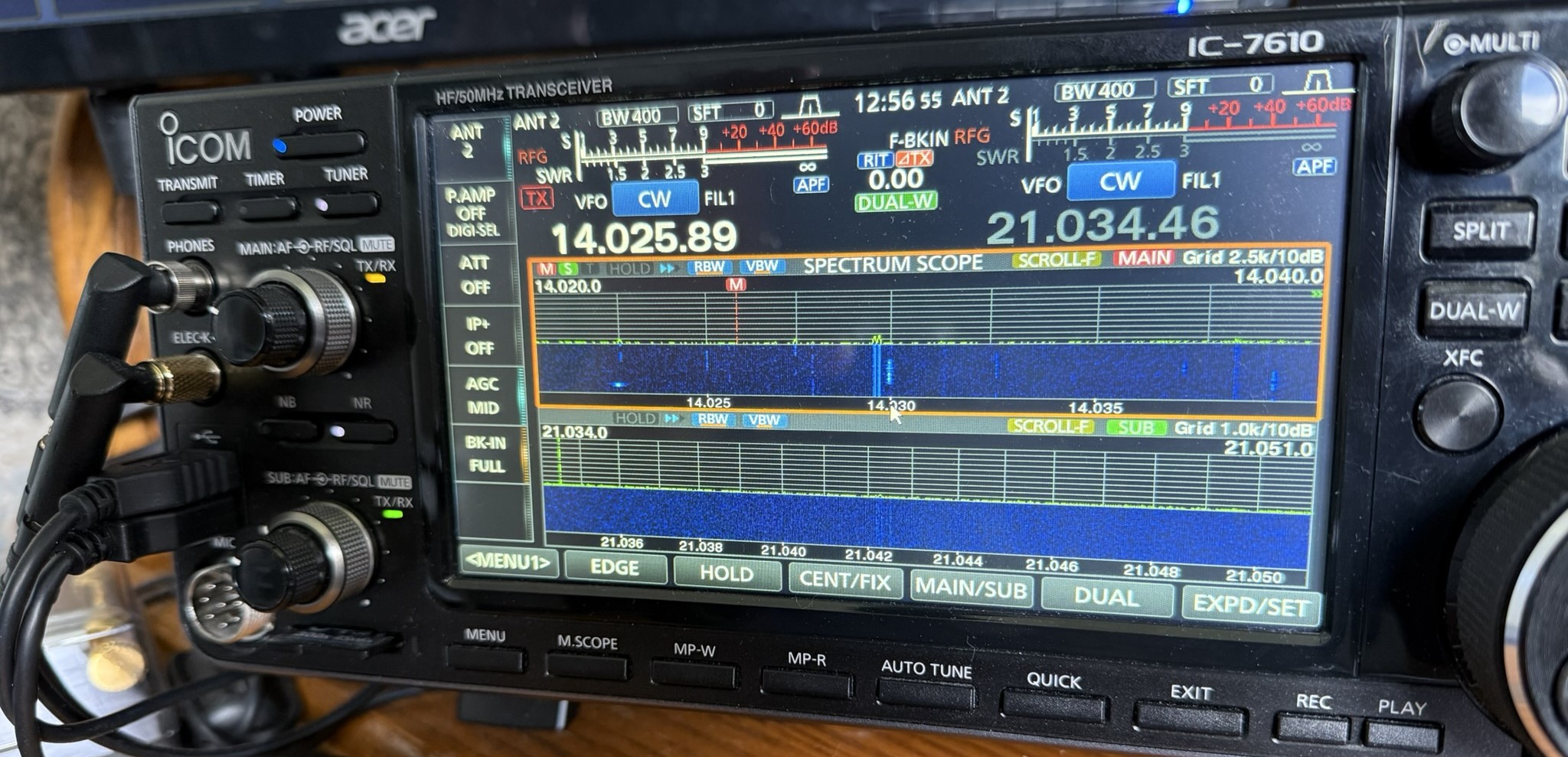
Have a look at the above picture and see if you can see an issue? I operate SO2V in contests now, and this shot was taken during the RAC Canada Day contest on July 1. Operating SO2V is new to me, and I am still getting used to things. If you are familiar with the Icom 7610, you may see the issue in the picture.
Now that you have looked at the picture, let me tell you what I did.....Since I am new to SO2V, I have been trying to get used to VFO A sound in my left ear and VFO B in my right ear. At this time, I had been listening and operating on 15m but just had 20m up on the screen with no audio. Things started to pick up on 20m and drop off on 15m. I then pressed a key on my keyboard (Pause key), and this put me back on 20m and set up N1MM+ to log contacts on 20m.
The odd thing was I was calling CQ contest on 20m for about 5 minutes and no answers. I could hear a noise floor, but I was not getting any replies to my CQ. Then it clicked, I looked at the radio and forgot to take VFO A off mute! The orange light you see in the picture on the main VFO AF/RF control means the audio is muted for the main VFO. I was hearing VFO B in my right ear but I did not click into that. Who knows how many ops called me, but I just could not hear them as the audio was muted. Live and learn, I guess.
Hustler 4BTV cleaning event.
My Hustler 4BTV has now been up for 5 years and is serving me very well, I might add. I felt it was time to take it down and clean it. I know, as Murphy would have it timed that something went wrong and it would be the middle of winter on a very cold and windy day. The items I used were a wire brush to get inside the tubing to clean, 99% alcohol for cleaning and a roll of 3M 33+ tape. This tape has a good temperature range. Finally, a Scotch Brite pad....which I never ended up using. I had read online that it was great for cleaning the aluminum tubing....found out not so much. It has been retired to the kitchen for pots and pans.

My plan was to take each section apart and clean it, and then back together again. I did not want to get too far ahead of myself by taking the whole antenna apart. Before taking a measure section of tubing apart, I measured it and also marked the tubing with a Sharpie marking pen. I wanted to take a measurement and mark it down just in case I removed the Sharpie mark while cleaning. Oh, speaking of cleaning, I thought the wire brushes would be great for cleaning the inside of the tubing, BUT....the 4BTV tubing is 1 1/4 diameter, and I used the 1 1/4 wire brush. The brush went into the tubing just fine, but the bristles refused to go in the opposite direction to bring the brush out! It did take me some time, but I did get the brush out and lesson learned. I used the 1-inch brush instead, which did a great job. All the traps looked great and were still nice and clean. The lower section of the tubing support needed some cleaning, as well as the section of tubing. Overall, for being up 5 years in the ocean air, the antenna looked great. The spider arm required the most cleaning, and I did find a broken spider arm. I do have replacements that I needed to drill a hole in, as I figured some time ago, the spider arms are the weak point of the antenna.
 |
| Top of spider arm |
 |
| Bottom of spider arm |
.JPEG) |
| Example of clean trap |
 |
| Damaged spider arm |
 |
| Inside tubing |
 |
| Base section before cleaning |
Read the rest of this entry »
ARRL Field Day 2025
This weekend was the running of the ARRL Field Day event. For some they get out into the elements and set up an emergency-type station. Both individuals and clubs take part all over Canada and the U.S. There is a category for home stations on mains power....that was my preferred setup. This year the solar conditions were a bit of a challenge which involved considerable fading. I find that during ARRL Field Day when calling CQ FD I had to really listen for stations. There were many QRP stations, those using minimal antenna setup and then the good old poor solar conditions. I found many stations coming back to me just at the noise floor. I entered CW only at 100 watts from my home station and to the noise floor stations who were running who knows what I could be booming into them. I wanted to make every effort to make the contact. It was a good workout of skill. Below is the final score I did pull the plug a bit early as I found myself just calling CQ FD without any responses.