Author Archive
 Amazing weekend on the radio!
 February 21st, 2022 |
  Author:
  | |
| A busy time on 40m |
This past weekend was the running of the ARRL International DX CW contest. If you are not a CW buff then there is also an ARRL International DX SSB contest March 5-6. These contests are great to log some very nice DX stations. I had a few interesting one-offs in this contest but more on that later. If you are a frequent reader of my blog you will know I have graduated from search and pounce contesting to holding my own and calling CQ contest or running as it's called.
In this contest, DX stations are only allowed (to gain points) to contact stations in North America and likewise, North American stations can only contact DX stations. With this in mind, I knew that it would be interesting for me to be on the calling (running) CQ contest end of things. The contest is 48 hours in length and as always I have high hopes of getting into the action at the start, Friday at 8 pm. Well as always it's Friday and I just want to relax and take it easy. So as always I started Saturday morning and I was not disappointed the bands were very very busy with DX.
Before beginning the contest I opened up my go-to CW practice program G4FON contest trainer. I find it to be very helpful to get my ears warmed to fast speed CW before going live! I spent about 15 minutes with G4FON and then it was off to the races. I started out sending CQ CONTEST at 31 WPM but found most stations coming back to me came back at around 24-30 WPM. I then slowed things down a bit as I don't want to be sent at speeds where no one wants to answer me.
Saturday morning and afternoon went well and here is one of those "one-offs" I was mentioning earlier. On Saturday EA3OH spotted me on a cluster....all of a sudden all hell broke loose!! I called CQ CONTEST DE VE9KK and 10-15 stations (most all at once) were calling me. I had NEVER had this happen and I can understand what rare DX stations go through. If this was not a contest I would have worked split but as they say, it's not a perfect world. Once the first 3 seconds of what I called a CW mess finished then one of two stations would toss out their call. This would allow me to work with them and I continued to work this way. Sometimes a few stations waited and I could only get 2 or 3 letters of their call. I would send out those letters followed by ?. This worked very well but I assumed some stations just moved on and came back later.
I was spotted about 4 different times and to be honest I felt overwhelmed and I started at times to make silly mistakes. Hitting incorrect keys so wrong call letters were sent, not hitting a correct key on my contest program so instead of my exchange being sent I sent TU (thank you). I could just imagine the look on the face of the station I was contacting. At one point I called Julie my wife into the room and with headphones removed I gave her a listen of the "pack.
When I was spotted my hourly worked station count went to around 80-90 per hour. To be honest, those times were exhausting and at times my nerves got the best of me. I now fully understand one of the "how to's" to trying to work a popular station. Don't drop your call as soon as the station signs their call. He will only hear what I did....a CW mess. Wait until things clear, about 3 or so seconds and then drop your call in. This was how I heard stations calls or part of the calls.
Here in New Brunswick, our COVID restrictions had just been lifted to the least restrictive level. This meant going to a restaurant was almost back to normal. Julie wanted to celebrate by us going out for dinner. That gave me a nice break from the contest BUT it's time for another "one-off". Once we arrived home from our dinner out almost right away I started to feel ill. YUP bad food from the restaurant, I was sick all Saturday night and Sunday until late afternoon. This cut into my contest time and evening in the afternoon while on the radio I was not feeling the greatest.
Since we are on the subject of "one-offs" here we go again. I was on 40m (7.027) early Sunday evening and a station came back to me but it was not your standard exchange. I heard "PSE QSY UR ON CHAN 816 PSE QSY TU" I thought WHAT....so I sent "? ?" and the same message was sent. No worries I sent "SRI" and two short DIT's. After the contest, I did some online searches and came up with nothing. Does anyone know what this op was talking about I would be interested to know?
 | |||
| The final score |
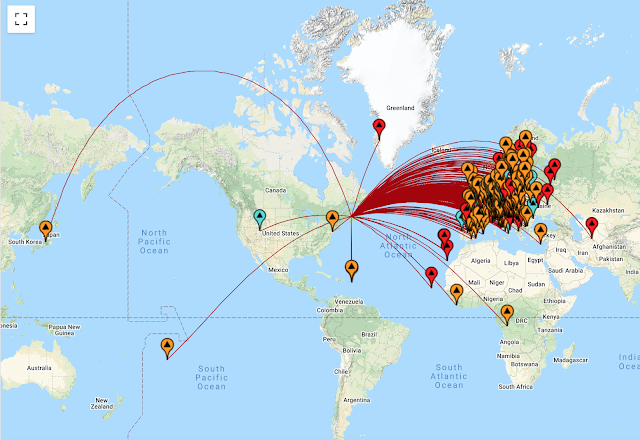
Because this was a contest with emphasis on DX I was pleased to have made some nice DX contacts such as:
- Turkmenistan is number 23 on the DXCC list
- Congo
- Japan
- South Cook island
- Liberia
There is a nice piece of software that takes your ADIF file and shows you many visual options adventure radio.
Below is just one option the program gives you to view your ADIF file. All the contacts I made in the contest.
Snow and End-fed antenna don’t mix well.
 |
| Some snow removed from side to have access |
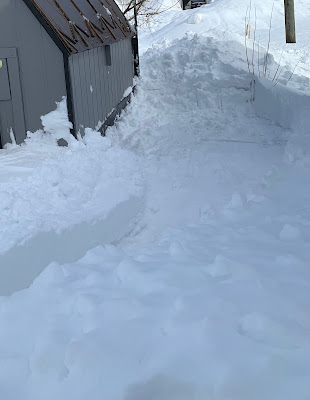
This year we have been getting our share of the snow as it seems each week they are forecasting storms with up to 60cm or snow. As a result the snow has been piling up around the property including the shed. The shed is where one end of my End-fed antenna is secured too. The wind seems to blow in a way that causes the snow to drift along one side of the shed. I began to have some SWR issues with the End-fed antenna nothing the antenna tuner was not able to deal with but I wanted to check out why. It seemed the snow drift now well over 9 feet high was getting very close to the End-fed wire and affecting the SWR.
The solution was easy, it was time to get the snowblower out to the shed and blow the snow far far away. With that done the End-fed antenna was happy and so am I. Seems I have to keep an eye on the shed regarding drifting snow. With just a small bit of shovelling here and there this issue will not be a problem again.
 |
| All done. |
This brought another question to mind.....I was thinking of getting a vertical antenna maybe the Hustler 4BVT. But I am now looking at this again as I see this being a high maintenance antenna when the winter comes trying to keep the snow away for the base.
Snow and End-fed antenna don’t mix well.
|
| Some snow removed from side to have access |
This year we have been getting our share of the snow as it seems each week they are forecasting storms with up to 60cm or snow. As a result the snow has been piling up around the property including the shed. The shed is where one end of my End-fed antenna is secured too. The wind seems to blow in a way that causes the snow to drift along one side of the shed. I began to have some SWR issues with the End-fed antenna nothing the antenna tuner was not able to deal with but I wanted to check out why. It seemed the snow drift now well over 9 feet high was getting very close to the End-fed wire and affecting the SWR.
The solution was easy, it was time to get the snowblower out to the shed and blow the snow far far away. With that done the End-fed antenna was happy and so am I. Seems I have to keep an eye on the shed regarding drifting snow. With just a small bit of shovelling here and there this issue will not be a problem again.
|
| All done. |
This brought another question to mind.....I was thinking of getting a vertical antenna maybe the Hustler 4BVT. But I am now looking at this again as I see this being a high maintenance antenna when the winter comes trying to keep the snow away for the base.
Ever have things go bonkers just at the wrong time?
As I have blogged in the past I have been taking part in the CWops mini weekly contests. It gives me some nice practice for an hour. Things have been going very well using N1MM+ contest software. Until my last CWops contest. N1MM+ uses macros to send your call and the contest exchange, you just push the key for the designated macro and you are off to the races. Well up until my last contest this was how it was working....then not so much.
I pressed the key to send my exchange, the Icom 7610 went into transmit and N1MM+ sent "Mike NB" (my name and province) BUT this time the radio got locked in a transmit loop and sent the exchange over and over. The only way to stop it was to turn the power off on the radio. I was not sure if it was a software glitch with N1MM or what. I continued and the issue did not come back...well for a little while that is. This time I sent my call sign and it was locked in a transmit loop!
When these anomalies happen I always try to look back at what I had changed since the last time it was working just fine. The first thing that came to mind was just before the contest I updated N1MM, so I loaded a previous version. (always keep them in a desktop folder for the just in case moment) I then went back into the contest and within short time it happened again with a transmit loop.
There were no other changes that were made so instead of using the macros in N1MM I sent using my Key....old-style contesting. Doing this I had no issues at all so then I used my wireless keyboard. There was no issues using that so next, I used my old USB keyboard. and no issues with that.
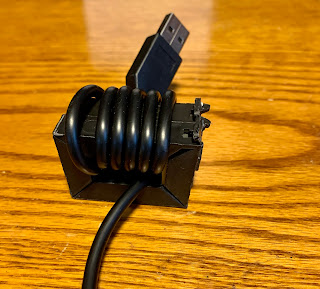
Things are narrowing down to my Lenovo pro 2 keyboard as the issue. Since the issue only happens during transmit I am guessing it's an RF issue with the keyboard. I had some spare rf chokes and I placed them at the USB connector end of the keyboard and that did the trick. Funny thing I had been using this keyboard for over 2 weeks in contests without issue. But that is how RF works and I am glad that I am still able to use my Lenovo keyboard and have no more issues.
Ever have things go bonkers just at the wrong time?
As I have blogged in the past I have been taking part in the CWops mini weekly contests. It gives me some nice practice for an hour. Things have been going very well using N1MM+ contest software. Until my last CWops contest. N1MM+ uses macros to send your call and the contest exchange, you just push the key for the designated macro and you are off to the races. Well up until my last contest this was how it was working....then not so much.
I pressed the key to send my exchange, the Icom 7610 went into transmit and N1MM+ sent "Mike NB" (my name and province) BUT this time the radio got locked in a transmit loop and sent the exchange over and over. The only way to stop it was to turn the power off on the radio. I was not sure if it was a software glitch with N1MM or what. I continued and the issue did not come back...well for a little while that is. This time I sent my call sign and it was locked in a transmit loop!
When these anomalies happen I always try to look back at what I had changed since the last time it was working just fine. The first thing that came to mind was just before the contest I updated N1MM, so I loaded a previous version. (always keep them in a desktop folder for the just in case moment) I then went back into the contest and within short time it happened again with a transmit loop.
There were no other changes that were made so instead of using the macros in N1MM I sent using my Key....old-style contesting. Doing this I had no issues at all so then I used my wireless keyboard. There was no issues using that so next, I used my old USB keyboard. and no issues with that.
Things are narrowing down to my Lenovo pro 2 keyboard as the issue. Since the issue only happens during transmit I am guessing it's an RF issue with the keyboard. I had some spare rf chokes and I placed them at the USB connector end of the keyboard and that did the trick. Funny thing I had been using this keyboard for over 2 weeks in contests without issue. But that is how RF works and I am glad that I am still able to use my Lenovo keyboard and have no more issues.
There was life on the CW portion of the bands from 19:00-20:00 UTC!
 | ||||
| 20m at 19:10 during the CWops 1 hour contest |
With the increase in sunspots and rising flux comes some solar flares and the Kp-index will have it's ups and downs. This afternoon the Kp index up was up to 5 and 6 and that does not my Mike the ham a happy person. Now having said that right in the middle of the high Kp index the bands at 19:00 UTC came alive! It was the weekly running of the CWops test, a one hour contest. Before the contest 20m was dead and at 1900 UTC life was brought to the band. Stations from Canada, U.S and Europe warmed up 20 meters to a nice glow. It's great mini contests like these happen as it shows some action on the bands.
Another great CW contest is the K1USN SST CW contest this contest happens on Fridays at 20:00-21:00 UTC and Monday 00:00-01:00 ( which for most of us is still Sunday evening) This contest is not one of speed but slower. You will find operators sending from 10 wpm to 20 wpm and if you are not sending at 10 wpm then speed is slowed to match your speed. These are nice contests that only asks for 1 hour a week and it can get your feet wet with contesting.
There was life on the CW portion of the bands from 19:00-20:00 UTC!
| ||||
| 20m at 19:10 during the CWops 1 hour contest |
With the increase in sunspots and rising flux comes some solar flares and the Kp-index will have it's ups and downs. This afternoon the Kp index up was up to 5 and 6 and that does not my Mike the ham a happy person. Now having said that right in the middle of the high Kp index the bands at 19:00 UTC came alive! It was the weekly running of the CWops test, a one hour contest. Before the contest 20m was dead and at 1900 UTC life was brought to the band. Stations from Canada, U.S and Europe warmed up 20 meters to a nice glow. It's great mini contests like these happen as it shows some action on the bands.
Another great CW contest is the K1USN SST CW contest this contest happens on Fridays at 20:00-21:00 UTC and Monday 00:00-01:00 ( which for most of us is still Sunday evening) This contest is not one of speed but slower. You will find operators sending from 10 wpm to 20 wpm and if you are not sending at 10 wpm then speed is slowed to match your speed. These are nice contests that only asks for 1 hour a week and it can get your feet wet with contesting.













