Author Archive
 LHS Episode #062: The Sound of Linux
 July 20th, 2011 |
  Author:
  Okay, so we managed to take a two month hiatus and we didn’t even know it was going to happen. Happen it did, though. Because of that, Episode #062 and #063 will have some dated information but most of it has been edited out and the stuff contained within that will be timeless has been left in.
I (Russ) will admit to shirking my duties to some degree. Many things are going on in my life right now and I just didn’t want to deal with editing or recording of late. Richard has also had his share of life problems and we’ve both been out of pocket a few times between Episode #061 and now. I suspect our absence is coming to an end and regular production of LHS will soon resume.
Thanks to everyone for hanging in there with us. We now return you to your irregularly scheduled podcast.
73 de The LHS Guys
Ambassador Program
Linux in the Ham Shack would like to be involved in more community events and we need your help to do it. Please check out our new Ambassador Program and let us know if you’re willing to participate. Help us make the world a better place for free software and amateur radio.
73 de The LHS Guys
LHS Show Notes #061
Promo:
- The 3rd annual Southeast Linuxfest is scheduled for June 10-12, 2011 in Spartanburg, SC.
Announcements:
- LHS will be at the Dayton Hamvention, May 20-22, 2011, booth 131 in the North Hall. Russ and Cheryl will be there. Stop and say hello.
- LHS will also be at the Southeast Linuxfest, June 10-12, 2011, in Spartanburg, SC. Russ will be giving a talk on Saturday, and Russ and Cheryl will be at the LHS booth.
Feedback
- Dan writes in about a Linux discussion he had at his radio club on March 8, and he mentioned LHS. Dan is also recording his own podcast, “Every Day Linux Use”. Good luck with that, Dan, and let us know where to find the podcast when it’s released.
- B.B., KC5PIY, writes about an article in the February 2011 issue of Linux Magazine discussing the OpenHatch project. B.B. shares his thoughts about how OpenHatch may apply to the podcast and amateur radio. Russ and Richard respond. Unfortunately, when this was recorded, the OpenHatch website was down. (From the OpenHatch website: “OpenHatch is an open source community aiming to help newcomers find their way into free software projects.”)
- Rick, K9AO, sent some detailed instructions for building SVXlink, an open source Echolink client, under Linux, and we’re including it in it’s entirety here. As you may recall from episode 56, Russ had problems with compiling the program.Hi Russ,
I thought I’d send along the method that I have used to successfully build SVXlink under Mandriva 2010.2 and Ubuntu 10.10. I built the source on Ubuntu 10.10 late last year, so don’t have access to that machine at the moment. I built SVXlink from the latest SVN checkout on this Mandriva box, but this method also works fine for the release tarball.I don’t know if you generally use SVN projects, but I’m thinking that you likely do if you are as interested in helping to shape the development of actively developed projects.
I create a directory called SVN in my home directory, and then do the SVN checkouts from there. Using the SVN checkout command below will create a subdirectory in the folder that you run it in, and then you can do the install from there. You likely are already familiar with this.
Here are the specifics:
——————–
Get the source:
svn co https://svxlink.svn.sourceforge.net/svnroot/svxlink svxlink
cd to the below directory:
Build the source branch in /svxlink/trunk/src
From there:
make realclean
make
su to root
make install
——————–If there are any missing deps, these will show up as the compile progresses. As you already know I am sure, you need the devel packages to match the deps to build from source.
You will see errors, or what looks like errors as the build progresses after a realclean command. But if all of the needed libs and devels are there, the build process will create the necessary configs and then build the app. If you are concerned that the app might not have built correctly, doing another make will have the terminal scroll through the build process rapidly and then complete. If you get that far, do the root install. Then qtel from the terminal will bring up the client.
There are a number of branches of the source code for SVXlink in development. I recommend the above main trunk first.
There haven’t been any changes in the Qtel client for a while, so if all you are after is the client part of SVXlink there is no advantage to using cutting-edge SVN. There has been quite a bit of development going on in the server part, so experimenting with the SVN and joining the SVXlink devel list might be a good idea.
Hope that helps, and keep up the good work.
Rick, K9AO
Contact Info:
- Contact Richard at [email protected], Russ at [email protected], or both at the same time at [email protected].
- Listen to the live stream every other Tuesday at 8:00pm Central time. Check the LHS web site for dates.
- Leave us a voice mail at 417-200-4811, or record an introduction to the podcast.
- Sign up for the LHS mailing list.
- Sign up for the MAGNetcon mailing list.
- LHS merchandise is available at the SHOP! link on Web site. Check out the Badgerwear or buy one of the other LHS-branded items at PrintFection.com/lhs or Cafe Press. Thanks!
- Thanks to Dave from Gamma Leonis for the theme music.
Music:
- To be added.
LHS Show Notes #060
Promo:
- The 3rd annual Southeast Linuxfest is scheduled for June 10-12, 2011 in Spartanburg, SC.
Topic 1: JT65
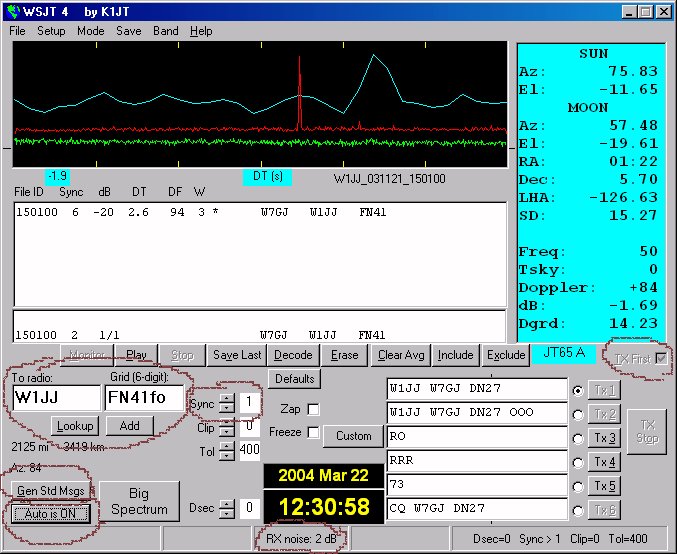
- Richard enjoys the digital modes. Recently, he came across a signal he could not immediately identify, and found it was JT65.
- JT65 is one of the suite of programs in the WSJT package written by Joe, K1JT, and was originally developed for weak signal Earth-Moon-Earth (EME) contacts.
- It’s easier to install than WSPR (Weak Signal Propagation Reporter); simply download, extract, and go.
- Because the software is designed to achieve a weak signal contact, information is sent repeatedly. If everything is working well, a simple contact will take about 7 minutes.
- Like WSPR, stations transmit on a two-minute interval, so the computer clock must be accurate.
- One station will “transmit on the ones” meaning he is transmitting on the odd number minutes. Each transmission is usually about 50 seconds. Then, the other station sends on the even minutes.
- Typical contacts are callsign, signal report, and location.
- Signals sound a bit like weather fax, usually a bit above the PSK area on 20m.
- Richard was able to make 10 contacts in 15 minutes with 5 watts into his G5RV at 30 feet, on the 10m band, no less. He then made 5 contacts in 30 minutes on 15m, one of which was to South America.
- WSJT and WSPR are both developed by Joe, K1JT, a physicist and amateur radio operator.
- WSJT and WSPR can be found at http://www.physics.princeton.edu/pulsar/K1JT/index.html.
- One of the best websites Richard found for learning to use JT65 on HF is “The Complete Bozo’s Guide to HF JT65A by Andy, K3UK”. It hasn’t been updated in a while, but is still a good resource.
- The manual included with the program is very good, too.
- Richard recommends using the second set of messages provided in the program, rather than the default set, as the default does not include a signal report.
- Richard has prepared an “Intro to JT65″ video, available at the RF Podcast website.
Topic 2: Codec2
- Bruce, VE9QRP, back in January, suggested we talk about Codec2.
- From the Codec2 website:
“Codec2 is an Open Source and patent-free audio codec, currently in alpha testing. It provides good voice rendition at 2550 bits per second, and we expect that its bandwidth will be reduced with continuing development. Its voice quality and latency are an improvement over Speex, when Speex is run at a similarly low bandwidth rate. The original motivation for its development was to provide a completely open codec to replace AMBE+, MELP, and other proprietary codecs for use in Amateur (“Ham”) Radio communications. However, the codec is potentially useful for commercial two-way radio, telephony, and other applications.” - Russ plays some audio samples, and our hosts discuss how this might be used in ham radio applications.
- The resulting file is in a .wav container and thus can be played by any program that plays .wav files. While the result is adequate for voice, it’s not suitable for music.
- More links:
- History of the project
- More background and some how-to information from the author.
- A PowerPoint presentation by the author.
Feedback:
- We received donations from Dan W., Matt M., Andrew H., and Paul G. Thank you!
- LHS will be at the Dayton Hamvention, in the North Hall, booth 131. We hope to see you there!
- Jim, N2ENN, linked to us on his blog site. Thanks, Jim.
- The Panhandle ARES group linked to LHS on their website. Thanks, guys.
- regexorcist of The Daemon and Penguin Oggcast linked to LHS. Thank you.
- Gary, KE2YK, has syndicated the LHS RSS feed on his eHamStore.net site. Thanks, Gary.
- Burt, K1OIK, thought the clip art of the foo dog (episode 55) looked like Russ.
- B.B., sent a long email, which we’ll discuss in an upcoming episode.
- Danny asked about the podcast that Gene has about Apple. That’s the Tech Night Owl Live program with Gene Steinberg.
- Dave, KI6ZHD, just found the LHS podcast website. Dave has written some documentation for various Linux topics and is a recent ham. His distro of choice is CentOS. He has been documenting his adventures at his blog and thought our listeners might be interested. He asked if we talked about TrustedQSL on Linux, and we did in episodes 43 and 46.
- Leif, KC8RWR, commented about dual-booting a computer with Windows if Linux has already been installed. He suggests using gparted to shrink the Linux partition, creating a Windows partition in the free space, and then installing Windows. Of course, it’s best to just use a spare computer or another hard drive. (We talked about all this in episode 56.)
- Richard points out that version 1.0 of CQRLog has been released.
- Jim, N2ENN, just installed straight Debianand offers a few hints:
- Extra repositories: In the system/administration tab, there’s a package called software sources. Check them all and click close.
- Flash vs gnash: don’t worry about gnash. Once the nonfree repositories are selected, open the Synaptic package manager and install flashplugin-nonfree, or from a terminal, type “apt-get install flashplugin-nonfree”.
- Regarding codecs: all the codecs are already installed, or should be. If not, again in Synaptic, tick good, bad and ugly plugin modules, along with the base plugin.
- Russ received this from a radio club: Steve, N1NXU, wrote that he had a Tripp-Lite power supply that needed repair and he asked them for a schematic. They declined to provide one, so he recommends Astron power supplies, as schematics are included. These are available a most of the ham radio stores.
- John, KF6EFG, attended Indiana LinuxFest and asked Russ for a copy of his presentation from that event. Look for that information on the LHS website in the near future.
Announcements:
- Some listeners have requested a calendar of upcoming LHS events. So, if you have a calendar program that uses ICS calendar feeds, go to the LHS site and on the right side, look for the ‘Follow Us’ heading. Click at the third icon that looks like a calendar. Or, to see the information in your browser, click this https://zmx.bcef.info/service/user/[email protected]/LHS-Podcast.html.
- Again, LHS will be at the Dayton Hamvention on May 20-22. We’ll be giving away a computer, so drop by the booth and say hello. Please donate at the website to help defray the costs. Thanks.
Contact Info:
- Contact Richard at [email protected], Russ at [email protected], or both at the same time at [email protected].
- Listen to the live stream every other Tuesday at 8:00pm Central time. Check the LHS web site for dates.
- Leave us a voice mail at 417-200-4811, or record an introduction to the podcast.
- Sign up for the LHS mailing list.
- Sign up for the MAGNetcon mailing list.
- LHS merchandise is available at the SHOP! link on Web site. Check out the Badgerwear or buy one of the other LHS-branded items at PrintFection.com/lhs or Cafe Press. Thanks!
- Thanks to Dave from Gamma Leonis for the theme music.
Music:
- To be added.
LHS Episode #061: I Am Cornholio
 One final notice before Hamvention is here. We’d sure like to visit with all of our listeners out in Dayton if you can make it. Hopefully we’ll be able to turn a bunch more ham radio enthusiasts onto the benefits of Linux while we’re there.
In this episode, your fearless hosts tackle some of the hard questions concerning Open Source, namely: 1) Can anyone in free software agree on a set of standards for documentation and development in order to help newer users join the community, and 2) If it is possible, would anyone want to do it? When we’re all done philosophizing, send us your thoughts. We want to know what YOU think.
LHS Episode #060: apt-get install make-pr0n-work
 Hello, faithful listeners and newcomers alike. A couple of big events are coming up. The first is the Dayton Hamvention, this weekend from May 20th through the 22nd. The other is the Southeast Linux Fest, from June 10th through the 12th. Linux in the Ham Shack will have a presence at both events and we hope to see everyone there. We will be having raffles for “quite good” prizes so you don’t want to miss that either.
In this episode of our show, we catch up on almost all of our (very old) feedback and even manage to discuss a couple of items which may interest ham radio and Linux enthusiasts alike: JT65, a weak-signal digital mode, and codec2, a new audio codec designed for low bandwidth, telephone quality, error correction and to be free of patents or encumbrances of any kind. Enjoy.
LHS Show Notes #059
Introduction:
- Apologies for the delays in releasing new episodes.
- This episode is an interview with Jonathan Nadeau of Frostbite Systems and a user of the Linux screen-reading program, Orca.
Interview:
- Orca is a screen reading program integrated with the Gnome desktop. It’s available for most Linux distributions.
- Russ and Jonathan discuss how a sight-impaired individual might install Linux. There are a couple of Linux distributions that have screen-reader support during the installation: Talking Arch Linux and Vinux.
- Speakup is another accessibility tool, but one that speaks the command line.
- Vinux is an Ubuntu-based Linux distribution with Orca built-in, allowing a sight-impaired individual to install it from the CD. Vinux is the distribtion Frostbite Systems normally installs for it’s sight-impaired customers.
- Slackware has a Speakup kernel, and more distributions are including the Speakup module as well. Several distributions can be installed using Speakup. Some instructions are available at the Speakup site.
- Russ mentioned the Quick Learning Techies Show (QLTS) that also occasionally discusses accessibility issues.
- Jonathan discusses the pros and cons of Vinux, as well as his concerns about it being Ubuntu-based.
- Richard asks Jonathan for more details about how Vinux talks a new user through the install.
- If the application is GTK-based, it will likely work with Orca; if it’s QT-based, it probably won’t work with Orca.
- Ted’s software (WA0EIR), including PSK31LX, works via ssh, so the programs are controllable from the command line and would work with the Speakup module.
- Meanwhile, Russ attempts to install Orca during the show.
- Jonathan mentions another podcast he does, This Week in Fedora, and says there is an amateur radio Fedora spin. (I could not find a link to a specific spin of Fedora for amateur radio, but there is a Special Interest Group. -Ed.)
- Frostbite Systems sells desktops and laptops with Linux pre-installed. Customers can choose from Debian, Fedora, Linux Mint, OpenSuse, Ubuntu and Vinux. A portion of each sale is donated back to the distribution chosen.
- Russ asks Jonathan about the hardware he uses in Frostbite systems. All of the laptops/notebooks have all-Intel hardware, while some desktops have nVidia video cards. All are completely Linux-compatible.
- Russ then examines the specifications of some of the Frostbite computers.
- Jonathan also produces several podcasts through Frostbite Media:
- Frostcast: interviews with project leaders of various GNU/Linux and Free/Open Source projects.
- This week in Fedora: interviews with people involved with the Fedora project.
- This week in Debian: interviews with people within the Debian community.
- Orcacast is on hiatus, but should resume in the not too distant future.
Contact Info:
- Contact Richard at [email protected], Russ at [email protected], or both at the same time at [email protected].
- Listen to the live stream every other Tuesday at 8:00pm Central time. Check the LHS web site for dates.
- Leave us a voice mail at 417-200-4811, or record an introduction to the podcast.
- Sign up for the LHS mailing list.
- Sign up for the MAGNetcon mailing list.
- LHS merchandise is available at the SHOP! link on Web site. Check out the Badgerwear or buy one of the other LHS-branded items at PrintFection.com/lhs or Cafe Press. Thanks!
- Thanks to Dave from Gamma Leonis for the theme music.
Outtakes:













