Author Archive
 LHS Episode #066: His Name is Ted
 September 20th, 2011 |
  Author:
  It’s no mystery that we at Linux in the Ham Shack are big fans of the application known as fldigi. We’ve even had the author of the program, W1HKJ, on the program to talk about it. We consider it one of the best Linux-native programs for ham radio ever written. That being said, one of our longtime listeners has also written some small, efficient and easy to use ham radio programs for operating PSK, logging, learning and transmitting CW and more. His name is Ted, WA0EIR. We’ve mentioned Ted in the past, but this time we decided to take a real gander at his applications. There’s plenty of Linux and ham radio goodness sandwiching the main segment as well so no one will go away disappointed. Thanks for listening, and keep fighting the good fight!
73 de The LHS Guys
LHS Show Notes #064
Introduction:
- Apologies for being late with this episode.
Announcements:
- LHS had planned on attending the Ohio LinuxFest on September 9-11 in Columbus,OH, and the Huntsville, AL hamfest Aug 21-22, but it’s just too expensive. To address that, LHS has started the LHS Ambassadors program where listeners of the show act as representatives for LHS at events. If you’re interested, please contact us at [email protected]
- When you make a donation to LHS, you can choose to appear on the Sponsors page on the LHS website.
- Linux Format magazine, the producers of the Tux Radar podcast, recently reviewed various Linux-related podcasts, and LHS wasn’t even mentioned! Ouch!
- Richard announces the demise of Resonant Frequency: The Amateur Radio Podcast. Richard is looking for a place to post the articles and other content. The podcast episodes are saved at the Internet Archive, and the videos will remain on YouTube.
Topics:
- WinLink and AX.25
- Richard describes his trials and tribulations getting a WinLink packet gateway working under Ubuntu Linux.
- For the most part, Richard followed the instructions provided by Charles, K4GBB: How to install RMS Gate.
- Richard and Russ describe the steps in the Howto and possible pitfalls. Richard notes that you’ll probably want to run the commands as the root user, either by logging in as root or using sudo.
- (Note, near the end of Section 4 of the Howto, it appears the author left out the “wget” in the command to retrieve the script. On the page it reads:
Get Script – Bernard has written a little Housekeeping script...
http://f6bvp.free.fr/logiciels/ax25/rc.init.script && ...
- I think that command should be:
wget http://f6bvp.free.fr/logiciels/ax25/rc.init.script && ...
Note that I’ve shortened the lines with ellipses here. -Ed.)
- Other useful links:
Feedback:
- Andy, KB1OIQ, tells us of his Ham Radio Linux CD, based on Ubuntu Linux 10.10, and includes many ham radio programs.
- Rich, KD0BJT, of the LowSWR podcast, is working on a ham radio-related Linux distribution, too.
Contact Info:
- Contact Richard at [email protected], Russ at [email protected], or both at the same time at [email protected].
- Listen to the live stream every other Tuesday at 8:00pm Central time. Check the LHS web site for dates.
- Leave us a voice mail at 1-909-LHS-SHOW (1-909-547-7469), or record an introduction to the podcast.
- Sign up for the LHS mailing list.
- Sign up for the MAGNetcon mailing list.
- LHS merchandise is available at the Merch link on Web site. Check out the Badgerwear or buy one of the other LHS-branded items at PrintFection.com/lhs or Cafe Press. Thanks!
- Thanks to Dave from Gamma Leonis for the theme music.
Music:
- “Mendes” by Assembly Line Gods from the album “Control: Volume 1.”
- “Pound of Flesh” by Assembly Line Gods from the album “Control: Volume 1.”
Please note that the music in this episode is neither Creative Commons nor podsafe. To support the artist, please visit Assembly Line Gods on Facebook, iTunes or at http://www.assemblylinegods.com.
LHS Episode #065: Bottoms Up
 In today’s long-awaited episode of LHS, we tackle a topic from a few episodes back, that of Open Hatch, the Open Source collaboration project. In another segment, Richard explores what it’s like to go through the process of getting your first amateur radio license. Among these topics we also mention the ICQ Podcast from the UK, Windows 7, AT&T Uverse, wget and a bunch of other topics of interest to ham radio and Linux operators alike. If you like our episodes, or even if you don’t, please send us along some feedback via the web or via our call-in hotline. Thanks for listening!
73 de The LHS Guys
LHS Episode #064: Winlink and AX.25
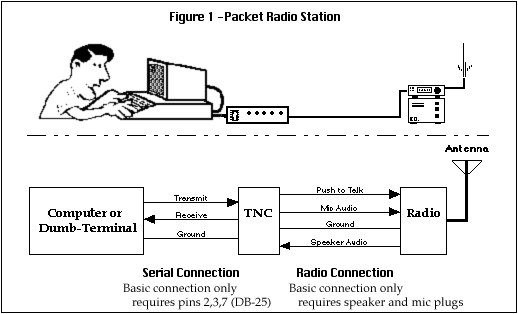 Welcome to Episode #062 of Linux in the Ham Shack. Today Richard has decided he’s going to talk a bit (OK, a lot) about Winlink, AX.25 and packet radio under Linux. In the meantime, I get to discuss some useful Linux utilities like modprobe, wget and the SysV init script system. So get comfortable in your easy chair, put on your headphones and relax for a deep dive into packet radio with Linux. Captain Nemo has nothing on us.
73 de The LHS Guys
LHS Show Notes #063
Promo:
- Ohio LinuxFest will be held September 9-11, 2011 at the Greater Columbus Convention Center in Columbus, OH.
- Linux in the Ham Shack promo from the Low SWR guys. Thanks!
Announcements:
- Our best wishes for a speedy recovery to MadamMoo!
- Our regular hosts are joined by Torsten, XE2/K5TOR.
Topics:
- Firefox 4 has been out a while, and version 5 beta is available at the time of recording. Our hosts discuss. The first thing Russ noted, was the increase in speed! Look for versions 6 and 7 before the end of the year. (As I write this, version 6 has been released. -Ed.)
- Kudos to The Linux Link Tech Show (TLLTS) and their interest in amateur radio. One of the hosts, Joel, aka “gorkon”, W3RAZ, has recorded a couple podcasts for Hacker Public Radio: Episode #738 is an introduction to amateur radio, and Episode #756 explains the basics of radio. Another TLLTS host, Allan, is N3MAW.
- Leo LaPorte of This Week in Tech has started a podcast about amateur radio. (It’s Ham Nation with Bob Heil, K9EID, and Gordon West, WB6NOA, under the TWiT banner and with Leo’s support and occasional participation. By the time you read this, Leo has his license and is now W6TWT. -Ed.)
- Russ describes the Linux from Scratch project that provides instructions for building your own custom Linux system, entirely from source code. Russ plans on providing more details of his experience with Linux from Scratch on a future episode of the QSK Netcast.
- Our hosts tried Ubuntu 11.04, Natty Narwhal, and discuss it, good and bad.
- Russ also tried Fedora 15, and liked the default desktop environment.
- Richard likes PCLinuxOS, and SUSE Linux.
- Linux Mint gets a mention, too.
- In future LHS episodes, look for information about svxlink, an EchoLink client for Linux, and codec2, an Open Source and patent-free audio codec.
- Torsten has had problems installing CQRLog on a 64-bit machine. Russ recommends installing the ia32-libs package to provide the needed 32-bit libraries. In Debian-based distributions, you can install that package with the command “apt-get install ia32-libs”. More information about running 32-bit programs on a 64-bit machine with Debian-based Linux is here.
Contact Info:
- Contact Richard at [email protected], Russ at [email protected], or both at the same time at [email protected].
- Listen to the live stream every other Tuesday at 8:00pm Central time. Check the LHS web site for dates.
- Leave us a voice mail at 1-909-LHS-SHOW (1-909-547-7469), or record an introduction to the podcast.
- Sign up for the LHS mailing list.
- Sign up for the MAGNetcon mailing list.
- LHS merchandise is available at the Merch link on Web site. Check out the Badgerwear or buy one of the other LHS-branded items at PrintFection.com/lhs or Cafe Press. Thanks!
- Thanks to Dave from Gamma Leonis for the theme music.
Music:
- “Vacancy” by Assembly Line Gods, from their album Control (Volume 1).
- The music in Episode #063 is provided with kind permission by Assembly Line Gods from their recent EP release, Control (Volume 1). The track is called “Vacancy.” Follow ALG on Twitter and Facebook and buy their new tracks at iTunes. Thanks, guys!
LHS Episode #063: South of the Border
 Hello, new and faithful listeners. Welcome to the sixty-first-eth installment of Linux in the Ham Shack. If anyone has been paying attention lately, a lot of podcasters are packing up their gear and moving on to other things. Many more have moved into much more irregular release cycles. We on the other hand are coming back stronger than ever. New releases are on the way. We’ll be back to every two weeks starting with Episode #062 and we’re hitting our stride again. We may not be the best or most listened to podcast out there but at least we still are a podcast. So thanks for tuning in, as always, and please let your ham radio and Linux enthusiast friends know about us. Linux in the Ham Shack lives on. ¡Vámonos!
LHS Show Notes #062
Introduction:
- Introductions, chit chat, a bit about the Dayton Hamvention, Texas Linuxfest, and the Belton hamfest.
- LHS will be at several events this summer:
- SouthEast LinuxFest (SELF), June 10-12 in Spartanburg, SC. (Yes, I know, by the time you hear this episode, it’s come and gone.)
- Huntsville Hamfest August 20-21 in Huntsville, AL.
- Ohio Linuxfest September 9-11 in Columbus, OH.
- Stop by and say hello to Russ and Cheryl!
- Richard may be attending the Texoma Hamarama October 21-22 in Ardmore, OK.
- Russ tells us about the sewer failure at Dayton. Only two restrooms in Hara were working Saturday afternoon. Apparently it was fixed by Saturday evening.
Topic: PulseAudio
- Richard’s son is trying to start his own computer repair business and recently he received a call from Misha who wanted him to fix a sound issue on her Sony Vaio, which dual-boots Windows 7 and Ubuntu 11.04. Sound worked fine in Windows, but not in Ubuntu, and she preferred using Ubuntu. After working with the machine for a while, he figured out that PulseAudio was the problem, and replacing it with ALSA fixed it.
- While researching the problem, Richard discovered PulseAudio problems exist on more than just the Sony Vaio. He also found PulseAudio problems with Ubuntu, Fedora, Open Suse 11 or higher, Arch Linux, Zen, and Sabayon, and with both Gnome and KDE desktops.
- Two sites in particular were helpful:
- Russ and Richard discuss Linux audio problems, and the current state of PulseAudio, particularly with WINE. Russ notes that he’s had no sound problems under Linux Mint.
- Russ describes various ways to troubleshoot PulseAudio issues on Linux.
- In Gnome, right-click on the speaker icon and select sound preferences. From here you can examine the hardware, choose a sound profile, configure your inputs and outputs, and see which applications are using PulseAudio.
- There are a variety of utilities useful for debugging PulseAudio problems:
- paman (PulseAudio Manager Utility). Install it with the command “apt-get install paman”. It tells you a lot of information about PulseAudio, including “sinks” and “sources”. You can also use it to set volume levels with greater control than with the desktop audio manager.
- paprefs (PulseAudio Preferences Panel) Install it with the command “apt-get install paprefs”. Allows you to perform advanced functions such as connecting PulseAudio servers together, send sound from one server to another, create virtual sound devices, etc.
- pavucontrol (PulseAudio Volume Control) Install it with the command “apt-get install pavucontrol”. Allows you to see every application that accesses PulseAudio, set volume levels per channel, and other configuration settings.
- pavumeter (PulseAudio VU Meter) Install it with the command “apt-get install pavumeter”. Creates a VU Meter window that displays your audio levels.
- padsp, pamon Install with the command “apt-get install pulseaudio-utils”. pamon will allow you to capture the bytes of audio data. padsp allows you to pipe the audio from an application that does not normally support PulseAudio, into PulseAudio.
- Remember, you can use the “man” command for help on any of these commands. For example, in a terminal type “man padsp” for help on the padsp utility.
- Check out Ted’s sound card programs for ham radio. They are all now PulseAudio compatible.
Contact Info:
- Contact Richard at [email protected], Russ at [email protected], or both at the same time at [email protected].
- Listen to the live stream every other Tuesday at 8:00pm Central time. Check the LHS web site for dates.
- Leave us a voice mail at 417-200-4811, or record an introduction to the podcast.
- Sign up for the LHS mailing list.
- Sign up for the MAGNetcon mailing list.
- LHS merchandise is available at the SHOP! link on Web site. Check out the Badgerwear or buy one of the other LHS-branded items at PrintFection.com/lhs or Cafe Press. Thanks!
- Thanks to Dave from Gamma Leonis for the theme music.













