Author Archive
 On the cliffs in West Cumbria
 October 11th, 2010 |
  Author:
 Cumbria is famous as the county of the English Lake District but it has more to offer than mountain walks. I don’t agree with Alfred Wainwright who said he could not see the point of walking round a mountain when you could climb to the top of it. There are many beautiful walks in the valleys and round the lakes which my wife (and my knees) much prefer over climbing and descending even if they don’t offer much scope for making radio contacts. Less well known, but just as spectacular, are parts of the coastline. One of our favourite outings is to park in the village of Sandwith and go for a walk along the cliffs. This is where we went last Sunday.
 |
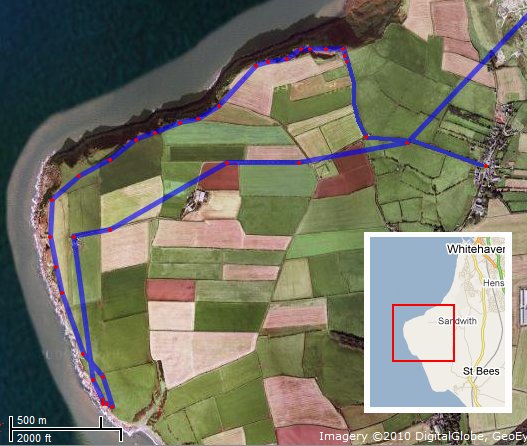
| Map of the walk (from aprs.fi Google Maps) |
The map of the walk shows the path that was tracked on Google Maps APRS, with some additions by me where my position was not tracked.
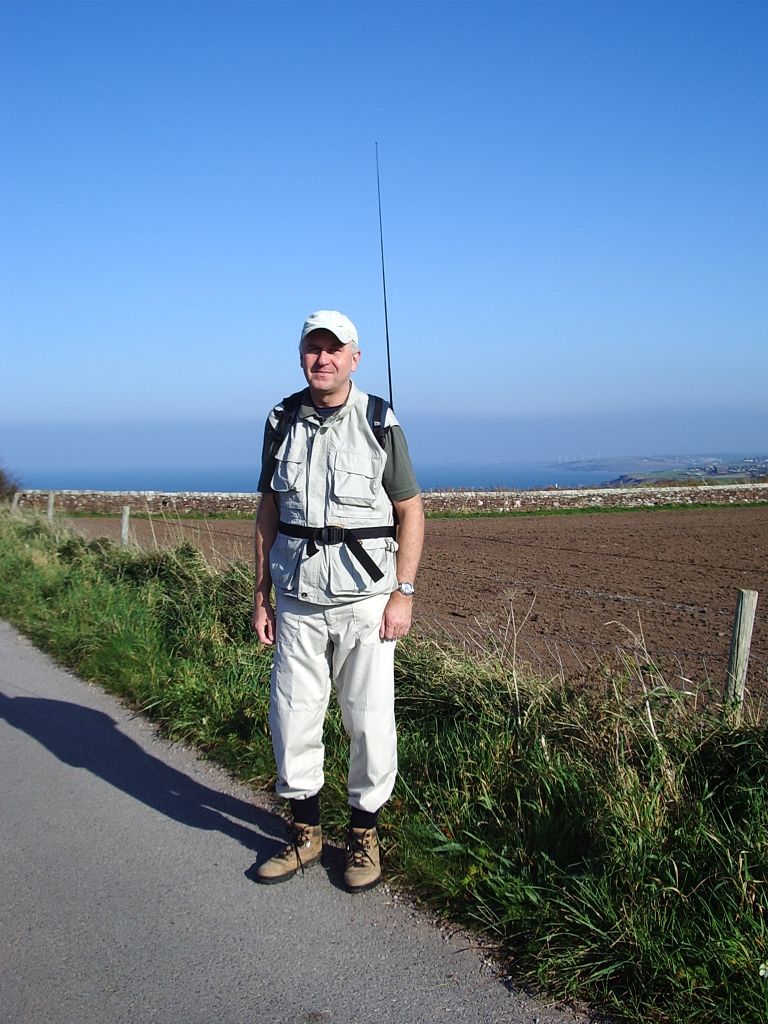
I was using my VX-8GR with the 5/8 telescopic whip in my rucksack, as shown in the picture on the right. I operate pedestrian portable like this when I don’t expect to encounter too many people who will give me strange looks or think I am a dork. The radio sits in a little mesh pocket on the side of the rucksack which was probably meant to carry a water bottle. The antenna is supported by pushing it through a string loop attached to one of the zips of the main pocket of the rucksack. It is quite stable and does not flex the spring or the mounting at all.
I don’t know what the SWR is like. Possibly it isn’t that good as the radio does not have me holding it to provide a ground plane. Perhaps I should try clipping a 19 inch “tail” to the outer ring of the BNC connector as a counterpoise? But even without it, it worked well. Most of my position beacons were received by MM1BHO across the water in Scotland so I was able to see the track after the walk. I also received some interesting APRS DX, of which more later.
But back to the walk. The weather was glorious, as you can see from the pictures. The temperature was around 20 degrees Celsius with only a slight breeze. The view from the cliffs was spectacular and always reminds me a bit of Cornwall. To think that people pay money to come on holiday to places like this!

We walked for about an hour along the cliffs, stopping now and again to watch some birds through binoculars or just take in the view. This is an important area for wildlife and the Royal Society for the Protection of Birds (RSPB) has set up several places where you can watch them with safety on the edge of the cliffs.
You can walk right along these cliffs as far as St. Bees, where there are people and cafes and ice cream kiosks. But we usually stop at Fleswick Bay, a beach backed by the high cliffs that is always quiet and secluded even in the height of the season because it isn’t possible to reach it by car, it can only be accessed by footpaths. We call it our private beach because we often have it to ourselves.

This Sunday we didn’t go down to the beach because we saw from the clifftops that the tide was in and the sea was right up to the foot of the cliffs. So we had our picnic lunch in one of the RSPB birdwatching areas instead. I made a couple of FM contacts using the VX-8GR, including one with another portable station on a 2,500ft mountain top in Wales. Then we started the walk back.
On the way back I heard the VX-8GR braaping away constantly such as I hadn’t heard since we were in Prague. On my return home I scrolled through the station list and observed that for a couple of minutes between 12:28 and 12:30 UTC I had received beacons from several DX stations including F4EQD-1 and OZ2DXE-2. These beacons had actually been digipeated by a station in south west England but that was still an amazing distance to receive signals on a VHF handheld, even if I didn’t hear them direct.
The glorious weather had also produced fantastic tropospheric propagation which was enjoyed by people in most parts of Europe. I wished I had climbed to the top of a mountain as I would certainly have heard more there than I did down on the west coast and perhaps have worked some real handheld VHF DX. But you can’t predict propagation and it was still a wonderful day’s walk.

Denmark on 2m!
I have just worked OZ1HXM on 2m SSB, using 100W to a SuperMoxon antenna in the attic of a house on the west coast of England with a lot of mountains between here and Denmark. The fact that he was using 200W to a pair of 10 element Yagis must have helped a bit!
This is my first European DX on 2m and I am thrilled to bits. I can only imagine what the band must be like for people with a decent VHF take-off. OZ1HXM is the only station I can currently hear on the band so there doesn’t seem to be much chance of working anyone else.

No more sunspots after 2016?
I have just updated the smoothed sunspot number data file for VOAProp with the latest predicted values up to the year 2020. It’s one of those jobs I still do even though I long ago lost interest in the program, having come to the conclusion that the most interesting thing about HF radio propagation is its unpredictability.
Although NOAA updates its sunspot number predictions every month, I only update the data file every few months as the changes are too insignificant to make any difference to the VOAProp output. Since the last time I updated the file NOAA scientists seem to think that the maximum of the next cycle will occur a little later and be a tad higher than previously predicted, with a maximum SSN of 84.6 in the middle of 2013. They also don’t expect the next minimum at the end of 2019 to be as low as the last one.
This view is not shared by solar astronomers Matthew Penn and William Livingston of the National Solar Observatory in Arizona. They have been studying the magnetic strength of sunspots since 1990 and have observed that in that time it has fallen by nearly a third. If the trend continues, the astronomers believe, then by 2016 it will have fallen to the level below which the formation of sunspots is believed to be impossible. Though this prediction seems far fetched, it becomes a little more believable when writing about it on a day when there are once again no sunspots.
A period with almost no sunspots has occurred before, and not so long ago either, between 1645 and 1715, known as the Maunder Minimum. This period was also known as the Little Ice Age due to the fact that lower than average temperatures occurred in Europe. Time to sell our radios and invest in heating appliances, perhaps?
If nothing else, this example should show us that healthy scepticism, not credulity, is the sensible response to any scientific prediction. If you don’t care for what one bunch of boffins say, don’t worry, another bunch will be along in a few months claiming to prove just the opposite. It’s about time the global warming alarmists woke up to this.

Back on track, via the scenic route
The FoxTrak APRS tracker board is finished, and works, but I took the long way round getting there. Building the board was by far the easiest part of the project. Setting up and testing it was a trial of patience, ingenuity and lateral thinking.
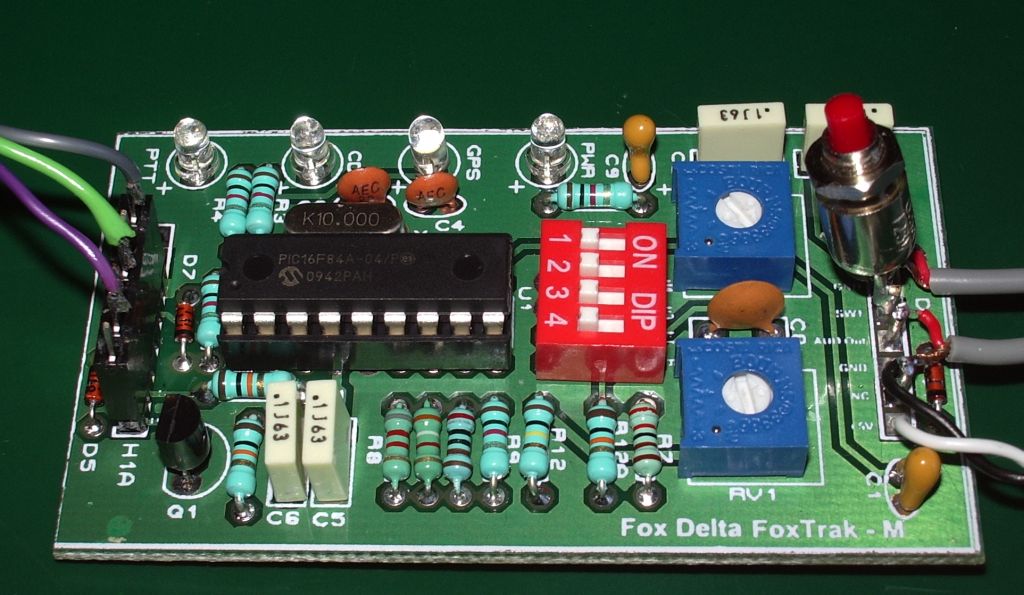
After building the tracker it has to be programmed with your call and a few other options by connecting it to a computer and running some configuration software. The documentation was not specific and I was not sure if I could just connect it to a serial port. The tracker is just a 16F84A PIC which works at TTL logic levels, but a PC serial port produces RS-232 at +/- 12V. What’s more, the FoxTrak website mentions a null modem adapter with MAX232 chip which is a TTL to RS-232 level converter, suggesting this might be required. However I had a USB to TTL serial adapter module that I bought some time ago for another project so I decided I should be able to use that. I did, and the configuration software was unable to detect the tracker.
After thinking about it for a few hours I decided to take a chance and use a normal serial connection. I used a Prolific USB to RS-232 serial adapter. That worked, and I was able to program my settings into the tracker.
The next step was to calibrate the tones produced by the tracker. 1200baud packet uses mark and space tones of 1200 and 2200Hz. Due to some hardware limitation of the 16F84A PIC, the tones are actually spaced about 1050Hz apart and the calibration software uses a default setting that puts them as near equally spaced over a centre frequency of 1700Hz as possible so the error in the generated tone frequency is shared equally between mark and space. To generate constant tones so you can measure them using a frequency counter you must connect to the tracker using a terminal program and send Esc T 0 or Esc T 1. I tried this using Windows HyperTerminal and nothing happened.
I now wasted quite a lot of time as I didn’t know what was supposed to happen. I didn’t know whether the PTT LED would illuminate when the test tone was produced so I didn’t know whether the absence of a tone was because the PIC hadn’t received the command to send it or some other reason. Eventually I decided that perhaps HyperTerminal wasn’t talking to the tracker so I tried another terminal program called RealTerm. This time Esc T 0 immediately produced a nice waveform on my oscilloscope which also counted the frequency for me and told me the tones were within 1Hz of the documented frequency for the default calibration value. Good, or so I thought.
Now I wanted to feed the audio output into a radio and see if my Kenwood TM-D710 would decode the packets it produced. I had wired a push-to-make switch in the “Transmit Now” position but what I didn’t know was whether the tracker would transmit a packet when it had no GPS data. I don’t have a GPS I can use with it at the moment, but even if I had, I would have trouble getting a fix inside the shack due to the high electrical interference levels.
The tracker wouldn’t transmit anything without a valid GPS fix, but it occurred to me that it must be possible to write a program that pretends to be a GPS and outputs NMEA packets to a serial port in order to test GPS applications. I didn’t want to write such a program, but other people had the same idea and Google found me several GPS emulators. Unfortunately the so called “free downloads” required a fee of $30 to $40 to use them. Blow that, I’d rather spend that money on a real GPS receiver.
An enquiry on the APRS Yahoo! group and another few hours wait and I was pointed in the direction of two free GPS simulators: gpsfeed+ and NMEA Generator. With these I was able to send fake GPS positions to the tracker board. The GPS light came on, as did the PTT light whenever a position was sent. At last!
Around this point I wanted to change a couple of the settings I had programmed in to the tracker. I re-ran the configuration software and found that when I tried to write the new settings back to the PIC it failed with a mismatch error. Reading back the settings they were now corrupt. I could not seem to clear the problem and wondered if I had blown something up.
I tried another USB to serial converter, one with an FTDI chipset which is normally more reliable in transceiver control applications. That could not even detect the tracker board. Oh dear! As a last hope I tried the Prolific adapter again and, having in the process switched both the computer and the tracker off and on again it worked this time. It seems that if you are going to configure the tracker it’s best to do it first before trying anything else. I was glad to have found a solution and that it was still working but I had wasted quite a lot of time getting to that point.
The next problem was getting the packets transmitted by the radio. I tried the Motorola GP300 first of all but for some reason it went into transmit as soon as I inserted the 2.5mm jack into the socket. So I tried the Kenwoods. Both the TH-F7E and its grandparent the TH-205E use the same type of connections. But on those I could not get PTT to work at all. I could really have done with some diagrams of how to wire up the tracker to these radios. I was, however, able to transmit some audio by manually pressing the radio PTT and then pressing the Transmit Now button on the tracker to send a packet. From this I was able to determine that no matter what audio level I used the TM-D710 would not decode the packets from the tracker.
I tried what must have been an infinite number of different level settings without success. Yet the tracker packets sounded exactly the same as ones I was receiving off-air which were being decoded. I remembered that I had the VX-8GR which also has a packet TNC so I decided to see if that could receive them. The Yaesu decoded the tracker packets over a wide range of audio level settings, even when the transmission was undermodulated. So what didn’t the Kenwood like about them?
I decided to set up AGW Packet Engine to decode packets via my FT-817 which was conveniently connected up to a sound card. That decoded nothing either. Clearly something was wrong with the AFSK output from the FoxTrak board. Even though my VX-8GR could decode it, it was going to be of no use to me if its packets would not be decoded by my gateway.
Finally, on the basis that there was nothing left to try, I decided to try different calibration settings to vary the tone frequencies. After another fight with the serial adapters I programmed in a calibration value of 36 which should result in a mark tone of 1200Hz and a space of 2250Hz and was rewarded by beeps from the TM-D710 indicating that packets were being decoded. They were also appearing in the monitor log of the AGW Packet Engine. The VX-8GR was still decoding them, too. Success at last!
I am relieved that it works after all this effort. Now all that remains to be done is to acquire a serial GPS, figure out the radio PTT connections and box the FoxTrak up with a suitable battery pack to make it into a usable unit. That will take a while, since some of the bits and pieces (including the GPS) will be coming from China.
It is interesting that the calibration setting which resulted in the best decoding is one farthest from the default, which does not place the mark and space tones so that the difference between the actual and the correct tone frequencies is equally spaced between them. A few months ago I heard a mobile drive through the area beaconing on APRS and none of its packets were decoded. I wonder how many people build or buy these trackers – either the FoxTrak or the original TinyTrak which it is a clone of – and leave the settings to default not realizing that they are unintelligible to many radios?

Home-brew USB digimodes interface
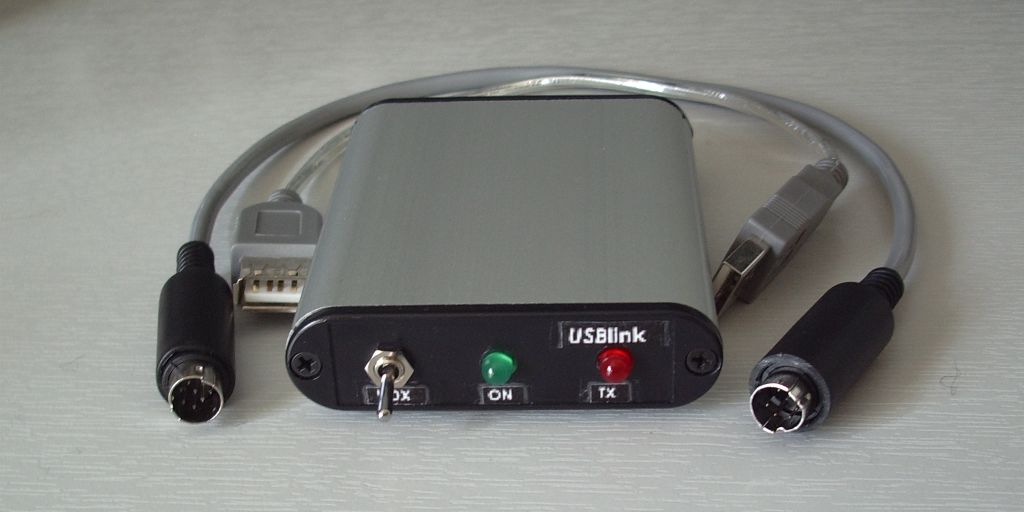
My home made USB digital modes interface “SignaLink clone” has been completed. It has been in use for several days and is currently in use with my K2 for 30m APRS.
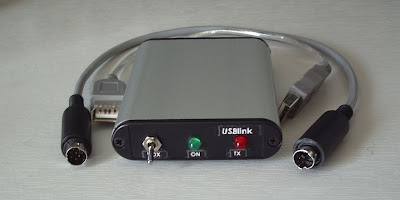 |
| USBlink interface with cables for FT-817 |
I have written up the project on the G4ILO’s Shack website. See home-brew USB digital modes interface.

One thing leads to another
Yesterday I began assembling the Foxtrak-M APRS tracker kit. After installing all the resistors I began adding the capacitors and found that I only been given 4 0.1uF capacitors instead of the 5 needed. I noticed that this was actually a mistake in the packing list, which stated 4 of these parts, so I turned to the computer to send an email to Dinesh so he could correct the mistake in future kits.
Whilst I was logged in to my Google account I checked the blogs I am following and read an interesting entry from PE4BAS about trying PSKMail. I noticed he had a gadget in the right hand column that said he was on the air around 18.100MHz (that’s cool, I must try to set up something like that in KComm.) From the frequency I guessed Bas was on PSK31 so I switched on the K3 to see if I could spot him. I couldn’t, but I did see some DX including a Japanese station.
This was on my 80/40/20/15/10/6m dipole, which my K3 ATU managed to tune to a 1.0:1 match. I decided to see how well I could hear the DX on the magnetic loop so I shut down the K2 which was running HF APRS and groped around the back to disconnect the loop, plug it into the K3 and tune it up on 17m. What a difference resonance makes! The DX signals were noticeably stronger on the magnetic loop than the dipole, stronger enough to surely make a difference given that signal strengths were marginal in any case.
Using 40W to the attic mounted magnetic loop I worked FG5LA (Guadeloupe) and then, after several tries and witnessing some of the kind of bad mannered operating that makes me think it might be best to stay off the radio at weekends, JI1FGX/DU9. KComm said this was not a valid call, so after the contact I fired up the Lazarus development system and had another attempt at rewriting KComm’s callsign validation routine. KComm still thinks the contact is with Japan not the Philippines so that is something I still have to look at.
I could of course have tried to work these DX stations using the K2 and 5W but I doubt if I would have been successful. This made me think that it would be handy if there was an easier way to switch the magnetic loop between the K2 and the K3 than groping round the back of the rigs and unscrewing the plugs. In my junk box I had one of those die-cast coaxial switches that are intended to switch one radio between two antennas. In theory I could use it to switch one antenna between two radios, but would there be sufficient isolation on the disconnected port that I wouldn’t blow up the K2’s front end while running 100W from the K3?
To find out I connected the antenna switch between the K3 and the magnetic loop controller and connected my QRP wattmeter to the other input. While transmitting a 40W carrier I observed no movement at all on the QRP wattmeter on its 1W FSD scale so I think the isolation between the two ports is good enough. I got the drill and fixed the switch to the wall so I can now change the magnetic loop between the K2 and the K3 at the turn of a switch.
And that was Sunday’s ham radio activity in the G4ILO shack!

qsl.net gone phishing?
OpenDNS is a free domain name server (DNS). Most of you will know what that is, but for those who don’t, a DNS is a server that converts web addresses like blog.g4ilo.com into numeric IP addresses like 123.234.345 so the web browser can find the right web site. Most people use the DNS provided by their internet service provider (ISP) and don’t think twice about it. However, the DNS provided by many ISPs is slow and unreliable. It was because of that that I started searching for a free alternative and discovered OpenDNS.

An added benefit of OpenDNS is that it provides content filtering. This can be a useful safeguard if you have children who use the computer as it can prevent them accessing various dubious sites. It can also protect you from visiting phishing sites – websites that pretend to be the login pages of various online banks or email services so they can steal your passwords. It does this by converting the addresses of known phishing sites to the IP address of a warning page instead. The web is a pretty dangerous place these days and any extra level of protection is a good thing as far as I am concerned.
However, this afternoon I tried to access a ham radio site at qsl.net, and was informed that this was a phishing site and had been blocked. In fact the whole of qsl.net has been blocked to users of OpenDNS. I have contacted them using the link provided to tell them that qsl.net is a free web host for ham radio hobby sites. I’m assuming, of course, that qsl.net hasn’t been blocked because it is hosting malware.