Posts Tagged ‘Software’
 Sound card packet modem
 August 18th, 2010 |
  Author:
 Last night I spent a couple of hours trying a program that had been mentioned by Chris, G4HYG in the Cross Country Wireless Yahoo group called AX25-SCS. It is a sound card modem for 300baud and 1200baud packet which was written by Frank Perkins, WB5IPM for use with a now unsupported APRS program called APRS-SCS (nothing to do with the SCS that makes TNC hardware.) Chris claimed it works better than AGW Packet Engine at decoding HF APRS. It is also freeware. I had never heard of this program before despite quite a bit of time spent searching for packet sound card software. You can get it from the TAPR website, installation is simply a matter of unzipping it into a folder, and there is a .pdf file that tells you almost all you need to know to run it.
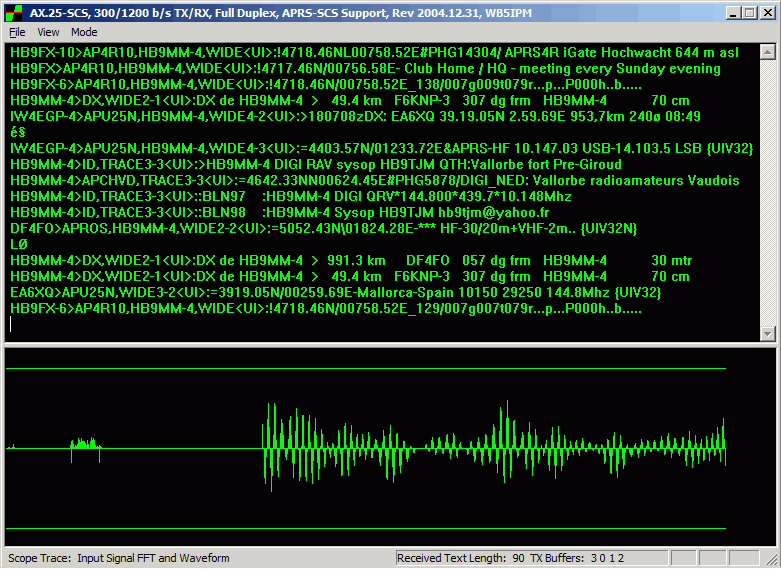
One of the things the documentation doesn’t tell you is that AX25-SCS uses the default Windows sound card. For testing, I had to make the sound card used by my Elecraft K3 the default. This is not convenient, as it robs my computer of the ability to play sound through the speakers (and risks broadcasting Windows sounds and web audio over the airwaves) so sadly I am unable to make permanent use of it.
The documentation also doesn’t advise you to select “Cancel APRS-SCS support” when you first run it. If you don’t, nothing will appear in the window until an APRS client connects to it, making you think that the program just isn’t working.
For HF use you need to select 300baud from the menu, as 1200baud is the default. You also need to select Enable SCS TX to allow transmission. It would be a bit of an annoyance that you have to do this every time you start the program as the settings are not remembered.
Once the receiver is tuned in – AX25-SCS uses the KAM standard 1600 / 1800Hz tones for HF – and the sound levels adjusted so that packets are being decoded, you can close and then restart the program this time choosing “Enable APRS-SCS support” from the initial dialog. After that, start APRSIS32 and create a KISS TNC RF port at address 127.0.0.1 port 4000. When APRSIS32 connects, the display should appear on the AX25-SCS window as it did before and this time any packets received should be displayed in APRSIS32 as well. Beacons and messages sent from APRSIS32 should result in audio being generated by the sound card modem for transmission.
For transmit, APRS-SCS requires the transceiver to use VOX. This is not a problem with my K3 which supports VOX via the rear audio connections and which allows the delay to be adjusted down to a very short interval, but it would make the program unusable with other transceivers like the FT-817 which don’t.
I tried running APRS-SCS and AGWPE Pro in parallel to see which was the better decoder but it was difficult to do a fair trial as APRS-SCS needs a lower level of audio input so the signal level was either too high for one program or too low for the other. As far as I could tell, APRS-SCS appeared more tolerant of off-frequency signals but less sensitive to weak ones than AGWPE Pro. This is also the verdict of Chris, G4HYG.
I would be willing to give APRS-SCS more of a try, but the inability to specify which sound card to use makes that impractical. It’s a pity that APRS-SCS is not open source so that someone could fix that and the other minor niggles, because it is a nice program that is quite easy to set up and use with APRSIS32.

APRS for Blackberry
Hot off the press. An APRS client for Blackberry smartphones is being developed. More information about it can be found here.

New digital mode for LF
A new narrow band digital mode optimized for MF and LF (160m and down) has just been released. Developed by Con, ZL2AFP the new mode is called CMSK.

CMSK uses Minimum Shift Keying (MSK). This is similar to Phase Shift Keying (PSK) but the frequency is shifted smoothly, achieving a 180 degree phase shift within one bit period, with the result that no amplitude variations occur, so the transmit amplifier need not be linear.
The mode has been designed specifically for use on the lower frequencies which provide good phase stability on received signals and low Doppler shift but can suffer from a high level of impulse interference. Four variants are available, ranging from CMSK8 which has a 12.5Hz bandwidth and supports a typing speed of 3.75wpm to CMSK125 which requires 200Hz and gives a typing speed of 60wpm. The default mode is CMSK63 which uses a 100Hz bandwidth and supports typing at up to 30wpm.
The software can be downloaded from Murray Greenman ZL1BPU’s website.

Making HF APRS MOR robust
I was surfing around looking at information about robust digital modes, as you do, and stumbled across something called the WINMOR Sound Card TNC. WINMOR is a free, open and documented protocol intended for reliable HF data communications. Originally developed as a low cost alternative to Pactor for emergency communications systems such as Winlink, it has been made available as a virtual TNC for other developers to incorporate in their products. I started to wonder if this is the solution people are looking for to make APRS over HF more reliable, rather than trying to use digital modes such as PSK63 or GMSK that weren’t designed for this type of application, as is being tried by G4HYG in APRS Messenger.

The documentation for the software is somewhat over my head, but from what I can deduce the Sound Card TNC (shown above) does not provide an interface like a regular packet TNC. However there is a module called BPQ32 that appears (from the description) to implement a TNC-like interface. I’ve probably misunderstood something – in which case hopefully someone will point this out to me – but it doesn’t seem beyond the bounds of possibility to connect an APRS client like APRSISCE to this TNC and then you would be able to send APRS using the reliable WINMOR protocol with forward error correction (FEC).
The only problem would be finding a place to operate, since SCS’s proprietary Robust Packet protocol seems to have already established itself below the FSK300 APRS channel on 30m.

Up the Amazon
The September issue of PC Pro (a British computer magazine) arrived today. Featured on the front cover was an article exposing the rip-off prices charged by music download sites. Madonna’s Celebration (which I presume is a popular music album) would set you back £11.18 at MSN Music or £11.99 at Spotify but would cost you only £2.98 from Amazon.
Included with the magazine was a DVD which contained a free copy of Paragon System Backup 2010. As I didn’t have any backup software for 64-bit Windows I thought this was fortuitous, so I decided to install it. But after handing over my email address in exchange for a free registration code it failed to install. The developers had used the ridiculously overpriced, overcomplicated and error-prone InstallShield (programmers will know what I mean) to create the setup wizard and only a few seconds into the install it threw up an error message about being unable to initialize the Javascript runtime and died.
I tried the obvious things like checking that Java was installed, running the installer in administrator mode, and even Googling the error message and trying the suggested remedy of registering the Javascript DLL, all to no avail. So I decided that I was not going to rely on backup software from a company that could not even produce an installer that would run on a brand-new computer, and consigned Paragon to the Recycle Bin (both literally and virtually.)
I spent a couple more hours downloading, being unimpressed by and then uninstalling a number of other free backup programs. I even discovered that there was a backup program included with Windows, but for some reason the version that comes with Windows 7 Home Premium has been hobbled by only being able to back up to writeable DVDs or removeable hard drives, not my network attached backup server. After being advised that the backup would take 6 or 7 DVDs I decided against it.
In the end I decided to stump up for a copy of Acronis, which most people seem to regard as hands-down the best backup software you can get. It can create disk images from which you can restore even if Windows won’t run and it has a continuous backup option that backs up your files while you work so you can revert back if you mess up a file. It even has a “Try and Decide” sandbox that lets you safely try out software you aren’t sure about to see if it will do anything nasty to your hard drive.
The Acronis website informed me that this paragon (small p) of backup software would cost £39.95. After checking some reviews, in my usual lazy fashion I typed “acronis trueimage” into the Google search box to find my way back to the website, and Google helpfully included three “shopping results” in its list of related sites. Included there was an offer of Acronis TrueImage Home 2010 from Amazon for £17.99.
Eh? I can buy online and pay £40 for an electronically delivered product the manufacturing and delivery costs of which are near zero, or I can have a physical product that has been mastered onto CD and put into a printed box, possibly with a manual, which has then been driven to a warehouse and stored waiting for me to buy, after which it will be put into a cardboard mailer and sent through the post to be delivered to my door, for less than half the price (with SuperSaver free delivery.) Sorry, I don’t see the logic in that, but thanks very much Google and Amazon.

New APRS client for Linux
Linux users now have an alternative APRS client to Xastir. It’s called APRSIS32 for Win32. I have discovered that Lynn KD4ERJ’s Windows APRS client runs almost perfectly under the Linux OS using wine, the Windows compatibility layer.
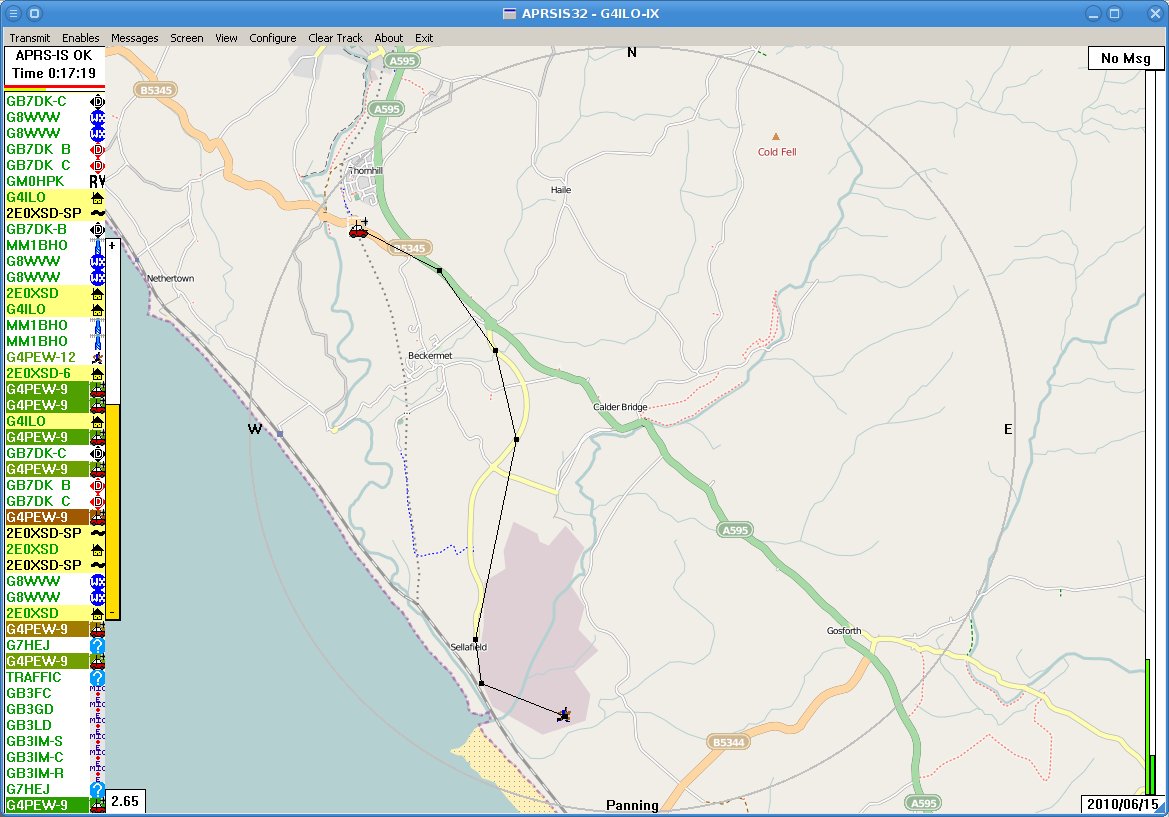 It’s pretty easy to get APRSIS32 going. Just download the Win32 version from the APRSISCE Yahoo group, save it into a folder somewhere under .wine/drive_C and run it. The program will start downloading maps so you can zoom in and set your home location. The only problem is, you can’t see them. By default the maps are displayed semi-transparent and it appears that wine doesn’t support transparency. So you will need to keep hitting the right arrow key which increases the opacity until the maps are 100% opaque, when they should appear. Check the APRSISCE/32 documentation wiki for more information.
There are a few screen redraw issues and the automatic updater always seems to fail, but these are minor issues. APRSIS32 uses code common with the APRSISCE version that runs on Windows CE mobile phones. These use a pretty small subset of the features available to current Windows software so by happy accident the program avoids doing things that wine doesn’t support which prevent more complex programs like Ham Radio Deluxe from working.
I haven’t tried the program with a GPS or a TNC as I don’t have them, but since these are just standard serial connections which are certainly possible under wine that is unlikely to be a problem. Lynn seems pretty keen to tackle the problems that I have discovered. In the meantime, the program still seems to work pretty well, so if you use Linux and are interested in APRS why not give APRSIS32 a try?

Free grid mapping software for all you VHF’ers (and up!) – WorkedGrids from Bertrand Zauhar, VE2ZAZ
 Every now and then, a little gem comes along, something that just works right.
I recently stumbled on a piece of software called “WorkedGrids” by Bertrand Zauhar, VE2ZAZ. This software, of course, is geared towards those of you in the VHF and up crowd. Satellite, VHF/UHF/Microwave sidebanders and such. Bertrand describes it as:
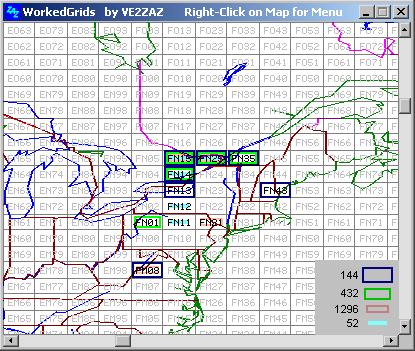
WorkedGrids is a Windows application that displays a map showing the amateur radio grid squares contacted and logged in using a third-party logging program. WorkedGrids uses colors to display information on a per-band basis. Up to four bands can be displayed concurrently.
As you can see by the image on your right, there are plenty of color coded grid squares telling you how you worked a station. Swell stuff really! Being a “1 call”, I thought it was neat that the image he uses on his site was centered right on my area. Some of those spots are indeed hard to work, but I digress…….
The beauty of this software is it’s not “logging” software, it’s really QSO mapping software. You use your logging program of choice. If it doesn’t have a similar feature, you can export your log and then load it into this program and Voila! All set.
System requirements:
Operating System: Any 32-bit version of Windows from Windows 95 to Windows Vista. Most likely 64-bit versions of XP and Vista as well, but untested so far.
Minimum CPU Hardware: Pentium-Class CPU, preferably Pentium-II or faster for quicker map refresh.
Display: 640×480 or higher resolution, 256 colors or more.
Disk usage: 1MB
Typical RAM usage: < 10MB, varies as a function of Map window size.
So why not give this gem a try? You can find it at:













