Posts Tagged ‘couragecenter’
 Handiham World for 22 December 2010
 December 23rd, 2010 |
  Author:
 Welcome to Handiham World!
As we cruise into the final weeks of the year, we need to remind our readers & listeners that we survive only because of your generosity. Non-profit programs like Handihams look for a significant part of our support at year’s end. I hope you will take a few minutes to find the return envelope in your Handiham World print edition and help us out with anything you can. If you don’t have an envelope, you can call Nancy at 1-866-426-3442 to donate by credit card, or choose the donate online option at Courage Center’s website. The instructions on how to designate your gift specifically to the Handiham program or donate by mail are in your weekly e-letter and on the Handiham website.
Thank you for your support!
Ah, yes. Computers. We love them and we hate them. The ham shack computer is so full of promise; it can do logging, rig control, callsign look up, digital modes, QSL cards, EchoLink, remote base operation, and then switch gears and become the family’s web browser and email hub. It may even turn into a gaming console when it is not running the ham station.
That’s when everything is working, of course. As computer users, we have all experienced the frustration of a locked-up machine, an unresponsive application, or a blue screen of death or its equivalent. You Mac and Linux users out there have had similar problems, so don’t sit there smirking!
Today’s topic is computers, mostly as related to ham radio, of course. We’ll have a few of the usual weekly features as well.
Patrick Tice, WA0TDA
Handiham System Manager
[email protected]

Multitasking – How much is okay?
We have all heard the term “multitasking”, which seems to be in the popular media spotlight these days. When you multitask, you supposedly do several things at once. Multitasking is supposed to save time and make you more efficient. This is not always the case, as has been often-noted when people who are supposed to be paying attention to a critical task like driving a car are also trying to put on lipstick, send a text message on a cell phone, or (for that matter) find a frequency on their amateur radio transceiver. The results can be disastrous!
On the other hand, sometimes multitasking makes sense. When I am out taking a brisk walk in the park for my daily exercise, I can also take the dog along so that he gets his walk. In addition, I can take along an iPod and listen to the ARRL Audio News and Amateur Radio NEWSLINE. This kind of multitasking works well because the resources demanded for each task do not overlap too much. For example, I don’t need to use a lot of brain power to put one foot in front of the other while taking a walk in the park. Instead, that brain power can be used to think about what I am hearing about amateur radio news on the iPod. Occasionally, the dog will need to stop and a small amount of brainpower will be redirected to that interruption. The important thing to remember about multitasking is that each task will require specific resources. Sometimes the resources needed for one task will be the same ones needed for a second task, so it will be necessary to use the resources first for task one then for task two, perhaps switching back and forth between the two different tasks as a way of sharing resources.
Computers work the same way. In a single-processor computer, even though you may be performing multiple tasks, the processor is really only doing one thing at a time. Sharing the resource of processor power can be done by switching between tasks rapidly so that it seems as if the computer really is multitasking. Some computers have multiple core processors, which allows them to run parallel processes for true multitasking. What I am getting to with this talk about multitasking is that it is possible for us to ask too much of our personal computers. You may have found out (as I have) that some software programs simply don’t play well with others. You may find yourself having to close one software program before you can use another one. Hardware resources in any single computer are limited as well. If you are using your personal computer for rig control, you are probably tying up a serial port. If you are using your computer for EchoLink operation, you are tying up soundcard resources. You may find it difficult to switch between EchoLink operation and voice dictation using the same soundcard. After using one sound-enabled application, you may find out that the level settings for the next sound application you want to use are completely off base, requiring you to make a trip to the Windows mixer to reset everything. If the ham shack computer is also the family computer, you may run into the problem of who gets to use the computer when you want to get on the air.
The personal computer is really good at multitasking, but there may come a time when you have to decide to set up a dedicated ham shack machine. The advantages are many and include not having to draw straws to see who gets the computer during the big contest weekend, having only ham radio related software that you really need installed on the ham shack machine, and the ability to dedicate hardware settings and connections to ham radio rig control and VoIP applications like EchoLink. You can even set your web browser settings so that frequently used ham radio websites come up right away in tabs. There is also great advantage in returning to the ham shack, sitting down, and finding the computer in more or less the same state that you left it in the last time you used it. Yes, you are still asking the ham shack computer to be a multitasker of sorts but instead of having to do everything that the entire family might demand of it, your ham shack computer can now do targeted multitasking related to amateur radio use and applications. With the price of personal computers falling, it seems reasonable to go the route of a dedicated computer for your ham radio hobby.
“That is all well and good”, you say, “but even my ham shack computer doesn’t seem to have enough hardware resources like sound card inputs to handle all of the different amateur radio applications.”
Ah, yes. That is a common complaint. These days it is not unusual for the ham shack computer to be used in digital modes operation, EchoLink, and remote base operation using Skype. How are all of these sound applications supposed to work on a single machine?
One solution is to add USB sound devices. Each USB sound device functions independently from the computer’s internal sound card circuitry. For example, if you use the computer’s existing sound card for PSK-31 operation, you may find it more convenient to have a USB headset microphone for use with EchoLink. Since each functions independently, the mixer settings should remain at their proper settings once set up for each application. You can buy USB headsets for as little as $30 on sale, and you can get a pretty good one any time for under $60. The time saved in not having to fiddle around with mixer settings or plug and unplug cables into the soundcard every time you change modes of operation on your ham shack computer is well worth the small expense and effort to get a USB headset installed. Incidentally, if you have a need for a second USB sound system, whether it is a desk microphone, a webcam with USB microphone, or a second USB headset, you can generally simply plug it in to a second USB port and set it up for still another application. This would enable you to have separate sound systems for PSK-31, EchoLink, and Skype. If you are going to ask the computer to multitask on sound operations, this is a great way to cut down on potential conflicts and save yourself a lot of time and grief.
Before we leave the subject of multitasking, I want to share a tip for our readers and listeners who drive a car and operate a mobile ham radio station. All I have in my car is a 2 m mobile rig, but it has a huge potential to distract me from my main task, which should be paying attention to my driving. I find that I can talk on the radio all right while driving and of course everyone understands if you tell them that you need to pay attention to your driving while at a busy intersection or if traffic and weather conditions are deteriorating. The main distraction with mobile operation involves changing channels on the 2 m radio and taking your eyes off the road. I have solved this problem by setting up the radio’s memory channels so that I can navigate through them without taking my eyes off the road. One trick familiar to many blind Handiham members who can operate just about any 2 m radio with memories is to set up the local National Weather Service in channel space one. Since the National Weather Service is always on the air, you can just twist the memory channel knob until you find their broadcast and then click the tuning knob clockwise or counterclockwise a given number of clicks, counting clicks to the channel you want to use. Even if there is nothing on that repeater channel, by counting clicks from the known National Weather Service channel you now are assured that you are on the correct repeater. Another thing I figured out was to set up repeaters in memory slots that track logically by geography. For example, I start with my local repeater, then I travel west on the interstate and soon find that I need to switch to a second repeater and then finally a third repeater as I continue going west. On my radio, the local repeater can be found before I even leave the driveway. After that, I have the radio set up so that one counterclockwise click of the memory channel knob takes me to the next repeater to the west. Another counterclockwise click takes me to the third repeater, again as I proceed in a westbound direction. On the return trip I reversed the process and my memory channel clicks take me clockwise as I drive to the east. Sometimes these simple solutions in setting up our radios can minimize dangerous multitasking while driving.
I don’t want to say that multitasking is always good or always bad. We all multitask to some extent, and we ask our ham shack computers to do it all the time. The trick is to think things through and plan to set up your station and your equipment so that multitasking works for you! (Read more on the Handiham dot org website.)

Handiham World for 15 December 2010
Welcome to Handiham World!
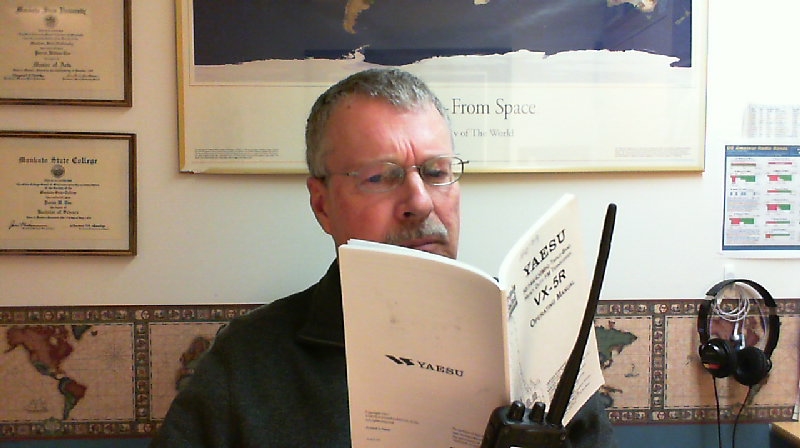
Last week we asked: How do you use equipment manuals, and what can be done to make learning about a radio easier? Let me know so that we can figure out where to go with this next new frontier.
As you might expect, we got some interesting and insightful responses. I will condense the main ideas down to just two different methods of making a manual accessible.
- A popular suggestion was to create the manual in HTML with links from topics listed in the contents directly to the relevant section of the manual. So, for example, if you wanted to read about how to set a memory channel, you would find “setting memory channels” in the contents, then follow that link directly to the part of the manual main text that has the instruction on setting memories. One example of why HTML is good was sent by Gerry, WB6IVF. He said: ” I think that HTML is the best because you can create links that are accessible by the tab key, and you can use the arrows to move with in a line and spell something or transcribe something to Braille character by character. So in other words, if a document looked to a blind person like a web page, I think we would find it easy to get around. Daisy is good, but it isn’t easy for everyone to use yet.”
Another writer favored HTML, but added that a special description of the front and rear panels of the radio should be written so that blind readers would not have to ask someone sighted to map out the location of controls for them from the print diagrams.
- Some of you have Kurzweil scanners and are able to scan the print manual, or alternatively to download the manual from a company website and use the embedded text in the PDF version. Getting the information into the linear system used by screenreaders is still somewhat problematic as some items like sidebars and captions can get out of context. However, the availability of embedded text PDF manuals is still a great advancement from the paper-only days! A description of the panels is still needed, however.
I was surprised at this request for HTML functionality, but it really does make a lot of sense. While DAISY does provide for at least a similar way to navigate through a book, it is still a learning process that is new to many users. DAISY is built upon XML, and as such is similar to web-based documents. The question in coming months and perhaps years is whether the standard for DAISY will be so well-accepted that it will be preferable to website-like manuals designed in plain old HTML. We could try converting a text to HTML and give it a test run, but the question will then be what to do with users who do not have computers but who have the government-issued NLS DAISY players.
Time will tell, of course. I am going to put on my prognosticator’s hat and predict that cassette tapes will really take a hit in 2011. I’ve always hated the way it’s so hard to find a particular part of an audio instruction manual in a tape. Another problem was the way adequate control layouts were not always added by the volunteers who read the manuals. This year Sony discontinued the venerable Walkman portable cassette player, and of course the National Library Service discontinued support for the old 4-track production system. RFB&D also moved forward, leaving cassette tapes behind. At Handihams, we still get a few requests for tapes, but in 2011 these will all be “special order”, as they are no longer in stock and have to be produced on an as-needed basis.
The new methods of producing manuals will be HTML and DAISY. We hope that these can be augmented with users teaching via audio how to find one’s way around the radio and adjust the settings, as well as to use the radio’s basic functions. Actual users with experience doing these “quick start” guides can really be helpful, not as a substitute for the manuals, but as an added reference.

Handiham World for 08 December 2010
Welcome to Handiham World!
How do you learn to operate a new radio? Or look up something about a radio you’ve already owned for years?
One of the most popular services that the Handiham System used to offer was audio tape versions of equipment manuals on cassette tape. We have a few of the old manuals still available in that aging format, but let’s face it – most people would rather forget how awful finding anything in an audio tape reference book can be. Sometimes the manuals were long, and that meant multiple tapes. Which one had the part about setting the memories? And even then, which track would it be on?
We now take the approach of recruiting a blind user who can teach the radio from a blind perspective. An audio file (or series of files) can be a lot more helpful to another blind user, since learning from a blind teacher pretty much eliminates all the usual dumb mistakes sighted people like me make when we are trying to get a point across.
Thankfully, the radio manufacturers are making equipment support documents like instruction manuals available in accessible PDF via website downloads. The accessible PDF isn’t perfect, but it does contain embedded text that can be searched. This puts the blind (or sighted) operator in the driver’s seat when it comes to finding the part of the manual that one wants.
The next frontier is to figure out how to make these manuals into a somewhat easier to navigate DAISY format. As we contemplate what our blind and sighted Handiham members really want, I thought it would make the most sense to simply ask:
So here’s my question to you: How do you use equipment manuals, and what can be done to make learning about a radio easier? Let me know so that we can figure out where to go with this next new frontier.

Handiham World for 01 December 2010
Welcome to Handiham World!
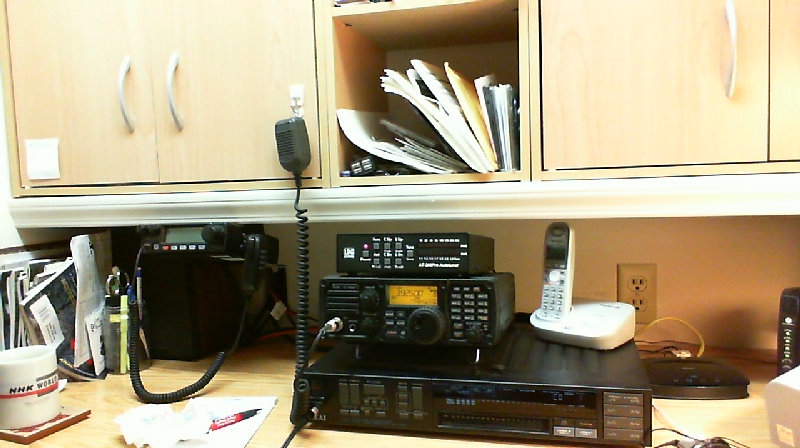 Yes, this morning’s web cam photo reveals that the WA0TDA ham shack is still not as tidy as it might be.
The magazines on the left are ones I use for researching equipment and recording for our blind members, the IC-7200 is in the center and an LDG AT-200PRO tuner sits on top of the rig and takes care of touching up the SWR on the Windom and vertical antennas. Mounted below the cabinet to the left of the Icom is a Yaesu FT-2800M, a 2 meter radio that’s just plain reliable and easy to use. If you have sharp eyes, you might be able to make out the NHK World coffee mug my son Will, KC0LJL, brought back from Tokyo for me. The IC-706M2G is out of sight below the edge of the desk. Tidying up the ham shack is always something that needs doing, but is generally scheduled for “tomorrow”. Now that the new year is so close, I can make it a new year’s resolution. That’s called creative procrastination!
December already.
It hardly seems possible that we are nearly at the end of 2010. When I think back on all of the things I had planned to do this year, it seems that many of them are still on the “to do” list, especially the work I knew needed to be done to bring my ham shack up to par. The one big thing I did manage was acquiring and installing the new ICOM IC-7200 transceiver, a vast improvement over my aging and cranky Yaesu FT-747GX. The main ham shack computer was also replaced and both ham shack computers were outfitted with Windows 7, bringing much-needed updates to the operating systems. Left undone were all but the most essential antenna maintenance, and this leaves me with antennas that really should be upgraded or replaced altogether. Well, it’s 15°F with a stiff wind and snow out there in the backyard right now, so the chances of getting the motivation to do antenna work seem pretty slim. I miss having my EchoLink node operational, but have simply not had the time to set it up and put it on the air. The node had been working just fine, but when I replaced the ham shack computer that ran the node, I ran into some configuration problems with the new machine and with many other things clamoring for my attention, the node simply had to go silent. On the positive side I was able to configure Ham Radio Deluxe to control two rigs at the same time to simplify logging. Now that I have written all of this stuff down, maybe I didn’t do so badly this year after all.
Meanwhile, back at the office…

2010 has been a challenging year economically for nonprofit programs like ours. Still, when I think back to what we accomplished during 2010, we managed pretty well. We completed the office move to Camp Courage, which was no small accomplishment. Thanks to help from volunteers, we were able to get an excellent wire antenna strung up so that remote base station W0ZSW could be on the air from Camp Courage. Remote base station W0EQO was maintained in working order throughout the year and remains an excellent resource at Courage North. We managed to run a successful Minnesota Radio Camp at Camp Courage, the first radio camp in many years to return to that location after a long run of successful sessions at Courage North. We maintained and even expanded the online audio offerings available to our members any time from the Handiham website. Again, thanks to volunteer assistance, we were able to maintain the audio cassette tape availability to our members who still do not have access to computers. We were able to publish the Handiham World Weekly E-Letter all year long with very few interruptions in all of its various formats including the weekly podcast. A summer print edition of Handiham World with a giving envelope was also published and distributed.
In your mailbox soon…
Now, as we approach the end of the year, a new print edition of Handiham World will soon be arriving in your mailbox. It has Handiham news, but it also contains that all-important giving envelope. Please consider using the giving envelope to send your tax-deductible gift in support of the Handiham System again this year. As I said, it has been a challenging year for nonprofits. Our parent organization, Courage Center, has worked hard to be as efficient as possible, and all of us have had to work very hard to provide a high standard of service. That includes the Handiham program, which has seen its share of belt-tightening over the past year. If you support what we do it really is critical to step up to the plate at this time of year and use that giving envelope.
We really appreciate it, and thank all of our members, volunteers, and supporters.
Patrick Tice, WA0TDA
Handiham System Manager

Handiham World for 24 November 2010
Happy Thanksgiving!

Don’t forget that the Handiham Internet remote base stations are available for members to use throughout the upcoming holiday week.
The Handiham office will be closed Thursday, November 25, and Friday, November 26 for an extended Thanksgiving holiday. We will reopen on Monday, November 29. Wednesday, November 24 we close early.
Even though this is a holiday week, the Handiham nets will go on as usual at their regularly-scheduled times. If a net control station is not available, we will have a roundtable conversation on the frequency. Sometimes I think that there is even more amateur radio activity on holidays, simply because those folks who might ordinarily be at work will instead have an opportunity to head for the ham shack and get on the air. Of course if you have guests at your home, you need to be polite and see to their needs first. Hey, maybe they would like to see your radio equipment and learn about amateur radio!
Earlier this week I spoke with a Handiham member who was asking if we still have a 20 m net. Well, the 20 m net is listed on many websites as still being active, but it has really fallen out of use during the lengthy sunspot minimum. Now that we are coming into a period of higher solar activity, we will start the 20 m net again. The net time is Monday morning at 9:30 AM United States Central Standard Time. Our net always stands down if the Salvation Army Net is on the frequency. The 20 m frequency is 14.265 MHz. Please join us on Monday morning and let’s see if there is interest in continuing this net or if we should take a look at a different time and frequency. To summarize:
Things to remember about the Handiham 20 meter net:
We meet on 14.265 MHz SSB Net time is Monday at 9:30 AM Central Standard Time Net control station needed; volunteers welcome! Everyone is welcome – you don’t need to be Handiham Radio Club member. We always stand down for the Salvation Army Net if they happen to be on the frequency.
I have to admit that I am not all that thrilled with a Monday morning net on 20 m. The band is probably not going to be open to the West Coast all that well, and in the early days when the net time and frequency was originally chosen, it was truly the bad old days for people with disabilities and they were usually stuck at home during the day without jobs. Today is different and many people with disabilities, including Handiham members, have regular employment and are thus not available for a daytime net. Nonetheless, we will soldier on and try the daytime net again and see what happens. In the for-what-it’s-worth department, the daytime EchoLink net does actually offer the possibility of people to check in via computer from their place of employment, hopefully during break time! So I do think that we have daytime activity covered pretty well. It is still the evening 75 m net that needs testing, and we will begin doing that tonight at 8 PM, just one half hour after the Wednesday evening EchoLink net begins. That will give the EchoLink net control station a chance to announce that the 75 m net will be starting at 8 PM United States Central Standard Time. Let’s plan to be on 3.715 MHz, plus or minus QRM. I do need to remind you that this frequency is in the Advanced Class portion of the 75 m band. You must have at least an Advanced Class license to transmit on 3.715 MHz, although anyone, licensed or not, is free to listen on that frequency. As we go ahead and develop this net, we can always change the times and frequencies if that should prove necessary. If there is no net control station available at any given net time, we can just have a friendly roundtable on the frequency. Please feel free to use the Internet remote base stations to check in or to listen, especially if skip conditions for your part of the country (or world) do not favor 75 m. Remember that the EchoLink feature is available for listening.
I’m not going to make any promises about when I will be able to participate in nets this week, although I’m certainly going to try to get on the air as much as I can. We are going to have a house full of guests that will include extended family, and my son Will, KC0LJL, is driving back home from university with three Japanese exchange students who will stay with us over the extended Thanksgiving holiday. You can bet that it’s going to be pretty busy around my QTH, but you never know when you might be able to introduce a new person to amateur radio, especially if they can get on the air and talk to someone from their home country!
So, from the staff, volunteers, members, and supporters of the Handihams, we wish you a wonderful Thanksgiving holiday, and we hope to hear you on the air!
Patrick Tice, WA0TDA
Handiham System Manager

Handiham World for 17 November 2010
Dr. Tom Linde, KZ0T, Silent Key

Dr. Tom Linde, KZ0T, long time Handiham member and volunteer, became a silent key on Monday 15 November 2010 at 1:30 AM. Tom died peacefully in his sleep at home with family members at his side.
As you might expect, Tom and I met each other through amateur radio. I’m not sure when Tom was first licensed, but his accomplishments in amateur radio were pretty amazing and included working all states on 6 meters, something I haven’t done and many of us will never do in our entire amateur radio careers. Yet Tom, whose speech was compromised by his disability, managed to train himself to speak the necessary amateur radio jargon and call signs clearly so that he could accomplish this feat. He made use of Morse code and always enjoyed the competitive and also the social aspects of amateur radio. When I started with the Handiham staff at Courage Center in 1992, it wasn’t long before Sister Alverna O’Laughlin, WA0SGJ, told me about “Dr. Tom”. He had been in Handihams since the late 1970s, and had made a name for himself on the amateur radio bands.
When I first met Dr. Tom, I had to listen up when he spoke. His CP made it difficult for him to form the words clearly, but he was never offended if I asked him to repeat something or say it in a different way so that I would understand. His accomplishments outside amateur radio included earning his PhD in psychology and having a full working life as a professional psychologist. Family was always important to Tom, and he raised his family in the heartland of Iowa with his wife Ann, who preceded him in death nine years ago.
I quickly learned from Tom that he was interested in helping others through the Handiham program. As a volunteer, he assisted at our radio camp sessions, teaching in operating skills so that he could share his experience with other Handiham members who had disabilities. He was also pretty darned good at inspiring those Handiham members who had trouble dealing with their disabilities. After all, as a psychologist he had heard every excuse in the book why the glass was half empty instead of half full, and he knew better from his own life experience. It was hard to complain that you couldn’t do something when Dr. Tom showed you by example that it could indeed be done and that even a severe disability would not stop you from reaching your goals.
Dr. Tom taught at a number of radio camps in both California and Minnesota. He joined the Stillwater Amateur Radio Association where he made many friends, and was active on the air, even trying new things like wheelchair mobile HF operation.
One of the most interesting things I have ever seen was not actually part of amateur radio at all. It was when Dr. Tom conducted the Minnesota Symphony Orchestra. Lyle Koehler, K0LR, built a robotic conducting system so that the members of the orchestra could see and follow flashing lights as Dr. Tom directed them. Tom was truly a renaissance man who loved music and art and would frequently catch you off guard with his wry and cerebral sense of humor. He published a book about his life that will carry on inspiring others to overcome their disabilities and accomplish their goals. “I Am Not What I Am: A Psychologist’s Memoir: Notes On Controlling and Managing Personal Misfortune” is available through Amazon.com in print and in spoken word audio from the Handiham system for our blind members. The ISBN-13 designation is: 978-1420867633. I strongly recommend this inspiring book.
His son Peter, N0EDI, in a touching tribute, remembers his father in his 80 years of life as all of these things:
A Son,
A Brother,
A Husband,
A Father,
A Grandfather,
A Student,
An Extra Class Ham Radio Operator,
A Ph.D. Psychologist,
A Published Author,
An Artist,
A Music Lover,
A Guest Conductor of the Minnesota Symphony Orchestra,
A Traveler,
A Teacher,
A man who pushed the boundaries of CP farther than anyone thought possible,
Ultimately, he was My Dad, without whom I would not be the person I am today.
Memorial services are currently being planned for Rapid City, SD and Sheboygan, WI. Tom, a generous spirit giving even in death, requested that his body be donated to help medical science. There will be a headstone in Knoxville, IA, next to his Wife (Ann) and youngest son (Matt), who preceded him in death.
We will miss the kind wisdom and positive outlook that KZ0T brought to Handihams and to the airwaves. I count myself privileged to have been his friend.
Patrick Tice, WA0TDA
Handiham System Manager

Handiham World for 10 November 2010
Welcome once again to my humble QTH:
Retirement!

To many of my friends, retirement means being more active than ever and being involved in more things than while they were in the work force. Some of my other friends just sit around all day with nothing to do except watch TV, listen to the radio, or read. For me it has been a little of both. I am hunting for another job just for something to do to keep active with people on a more daily basis. Also, I have been meeting with several of the people I went to high school and grade school with so very long ago. We are planning a 70 year, weeklong, Birthday Bash because we will all turn 70 at the same time, plus or minus a couple months. Many will be flying in from all over the world. Once a month we have a lunch for those who happen to be in town at that time.
Because of my interest in Amateur Radio Since 1956, when I first became licensed, I have never been lacking any friends and have always had something to keep my interest. There is always new technology to keep up with. In fact, I have attended several local ham radio events and do a considerable amount of listening both on and off the ham bands. I also check out many of the ham radio web sites to see what is new and what various clubs are doing. Of course I have been checking out the Handiham web pages too. I have been out to the new offices and visited with Pat and Nancy a few times too. Pat & I have worked on a couple Handiham projects as well.
Which brings me to this: Although my rigs consist of a Yaesu FT-100 & VX7R , a Kenwood TS-50 with the automatic antenna tuner, an Icom IC-T7H HT, I also have and use a couple of HT scanners , a Bearcat R4020 and a Radio Shack Pro-96, which I use to listen to many things both on and off the ham bands. They scan pretty fast so I do not miss very much and I catch most of the VHF/UHF nets and things going on. Many times I am listening to the Handiham net on the scanner and go to jump in only to notice that there is no push to talk switch on the scanner.
One subject of interest to me is the question of a 75/80 meter Handiham net and where on the band to have it.
My suggestion was, half kidding, to have a slow speed Handiham CW net on 75 meters.
How about it? What do you think?
I would volunteer to be ONE of the net controls if we have some others that would help.
I know, I know… The requirement for CW has been dropped. But here is the funny thing about that. More and more people are learning the code just for the fun of it. And, some people cheat using computers to translate the code so they don’t even need to know it. If you think about it, there is plenty of room in the CW part of the band for a net and the range would be greater using CW than on SSB so people from outer areas would have a better chance of checking in.
And, Yes! I know Handihams has a Slow Speed CW net on 7112 Friday Mornings. However Paul, the net control, is on the East Coast and as many times as I have tried to check in from Minnesota no one has heard me. Another slow speed Handiham CW net for those of us on “THIS” side of the Appalachian Mountains might be what is needed.
What do you think? Please send your ideas , suggestions, wishes to be a volunteer CW net control, etc. to Pat at [email protected] and he will pass on the information to me.
So, until next time…
73 es DX de K0HLA Avery














