 |
 Mountain to mountain QSO.
 24 July 2013 | by
 My lunchtime QRP session had that ominous look, like it was going to end up being a bust. The bands were nowhere near as hearty and robust as they were the past few days. 15 Meters had one strong signal, HA9RT booming in. I’ve worked Jozsef several times in the past, and even though he was coming in like gangbusters, I figured I’d let him get some new stations in his log.
20 Meters was a ghost town and 17 Meters seemed to be the liveliest of the three bands. Still, there wasn’t much activity and the signals I was hearing weren’t the strongest. I didn’t feel like going back into the building, so I decided to call CQ on 17 Meters.
Much to my surprise, I was answered by George KX0R who was the first place finisher in last year’s NJQRP Skeeter Hunt. George had a nice 579 signal into New Jersey. He was using an ATS3B at 5 Watts into an inverted “L” on a mountain in Colorado. Bald Mountain, SOTA peak W0/FR174, to be exact. 9,190 feet above sea level to be even more exact.
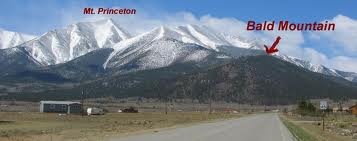
If you really, really, really, REALLY want to stretch the truth ….. you could say we had a mountain to mountain QSO. But that would be stretching the truth almost to the point of breaking it!
Warren, the town where I work, is located on the second ridge of the Watchung Mountains here in New Jersey. My height above sea level there is all of about 500 feet or so. Not much, by mountain standards, but since most of New Jersey is coastal plain and Piedmont, 500 feet is pretty high up there for a relatively flat state.

Now, according to geologists, if we went back in time, say about 200 million years or so, the Watchungs were about as tall as the present day Rockies or even the Alps. Just goes to show what time, rain, ice and wind can do to you, eh? So in essence, compared to the Rockies, and even the farther western Appalachians, the Watchungs are more or less just “hills”. But they’re our hills and the original settlers of New Jersey called them mountains, so who are we to argue?
72 de Larry W2LJ
QRP – When you care to send the very least!
Larry Makoski, W2LJ, is a regular contributor to AmateurRadio.com and writes from New Jersey, USA. Contact him at [email protected].
Handiham World for 24 July 2013
Pat Tice, WA0TDA, is the manager of HANDI-HAM and a regular contributor to AmateurRadio.com. Contact him at [email protected].
Visitors Book gone!
They say that to err is human, to really foul things up you need a computer. And I have been fouling a lot of things up recently. The latest thing that I fouled up is the G4ILO’s Shack visitors book.
On the site I also have a contact log. This runs from a backup of my KComm (MixW format) log file. KComm automatically backs up my log to the web server, in order to create an off-site backup of my log. As a bonus, I have a PHP script that reads this backup file and displays the contents in a human-readable format.
What I stupidly did, when re-configuring KComm after my computer troubles a couple of weeks ago, was put the guest book file name log.dat for the backup file name, instead of what it should have been: g4ilo.log. So when KComm uploaded my contact log backup it overwrote the guest book data file instead. I only discovered this after wondering why the contact log on the site wasn’t updating.
I looked back in the site backups maintained by the hosting service but they only go back a couple of weeks. I must have made the error before then. All I have managed to salvage is the most recent 3 entries. I’m rather upset about that, because the guest book contained comments made over many years from the early days of the site, which I had painstakingly preserved over various versions of guest book script.
At least I didn’t lose my contact log going back to 2001. That would have been a disaster!
Julian Moss, G4ILO, is a regular contributor to AmateurRadio.com and writes from Cumbria, England. Contact him at [email protected].
Readymade antenna adapters for RTLSDR dongles
I’d made up a cheap and cheerful antenna adapter using a spare connector for the RTLSDR dongle, but I hadn’t been overwhelmed with its performance. I suspect it was a bit lossy!
When I was reading up on something the other day, I discovered that the antenna socket on the RTLSDR dongle is an MCX connector, of which, I confess, I had not heard previously. In the course of my investigations, I discovered that MCX male to SO-239 adapters are available readily (and pretty reasonably priced) on Amazon
The adapter arrived yesterday and I hooked the RTLSDR up to the 50/144/432MHz collinear. I ran up SDR# and it worked well. Happily there was a 50MHz Es opening going on at the time and I heard several LA stations on CW and SSB. On 144 and 432MHz, the performance was definitely better than my rather lossy arrangement. Airband too was working much better than when I’d tried it before and several transmissions were easily identified on the display.
A small but worthwhile investment.
Tim Kirby, G4VXE, is a regular contributor to AmateurRadio.com and writes from Oxfordshire, England. Contact him at [email protected].
K3 vs KX3 on 6m
There was a good opening on 6m this morning which lasted until early afternoon. I’d just been reading some list traffic on how good the KX3 receiver is so I thought I would plug it in to the antenna and see what I could do. After all, Six is the magic band, who needs 100 watts?

Listening on the two receivers was like night and day. On the KX3 the band sounded much more lively. Stations that were only peaking an S7 on the K3 were S9 plus.
On the KX3 with just 10 watts, just because a station was loud it didn’t mean I could work them. I got some 59 reports but with several stations they didn’t hear me even if I had no competition. The loudest stations had a lot of callers and they just didn’t hear me over the crowd. You wouldn’t think 9dB would make all that much difference but it does!
I’ve seen comments about the K3 being deaf on 6m, or even 10m, but I had never really bothered about it until now. If I can hear them on the K3 I can usually work them even though I generally limit the power to 80 watts.
But I ended up a bit dissatisfied with the K3’s receive performance on one of my favourite bands. The simple solution – fit a preamp between RX IN and RX OUT – isn’t an option for me as I need those ports to plumb in the MFJ noise cancelling device. It’s a pity no-one has come up with a mod to boost the K3’s fairly useless internal preamp on 50MHz.
Julian Moss, G4ILO, is a regular contributor to AmateurRadio.com and writes from Cumbria, England. Contact him at [email protected].
Lighter, Easier to Pack, Telescoping Pole
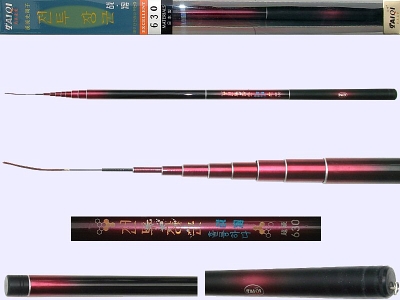
I found, through KT5X, a supplier of Japanese made carbon fiber, telescoping fishing poles. It telescopes to 21 feet, weighs 7 oz. and collapses down to 25 inches. Brilliant. Now, these are a little pricey, from $75 -$120, but if you are carrying it for a few miles, the price amortizes nicely:-).
Mike Crownover, AD5A, is a regular contributor to AmateurRadio.com and writes from Texas, USA. Contact him at [email protected].
LHS Episode #110: GIMP’n
 July has been a bit of a rough month for Linux in the Ham Shack. Pete, our illustrious Canadian cohort, takes an extended break with his family during this time, leaving him little room for podcasting. That is to say, none at all. In the meantime, Russ has been dealing with a series of health problems which has kept him away from the microphone and editing computer. Despite this, Episode #110 is finally done and coming to you now. In this episode, the guys chat a bit about Canada Day and the 4th of July (two holidays now long past for this year). Then there's stuff about Field Day, The GIMP, Manjaro Linux and more. And yes, there IS a winner of the illustrious Beaglebone Black. If you weren't around for the live drawing, now you can find out who won. Thanks for keeping the faith, dear listeners. We'll be back on track soon. Promise.
73 de The LHS Guys
Russ Woodman, K5TUX, co-hosts the Linux in the Ham Shack podcast which is available for download in both MP3 and OGG audio format. Contact him at [email protected].
 Ham Radio Deluxe |
 W5SWL Electronics |
 Ham Radio Prep |
 KB3IFH QSL Cards  Hip Ham Shirts  HamRadioAuctions HamRadioAuctions Reliance Antennas Reliance Antennas Enigma Shop Enigma Shop |  morseDX  Ni4L Antennas  R&L Electronics R&L Electronics antennas.us antennas.us QRV QRV |
- Matt W1MST, Managing Editor
