 |
 Clever K3 macro trick
 28 December 2013 | by
Tonight I sat down to fiddle with the macros of my Elecraft K3. As I already use M1-M4 for CW memories, I only had the PF1 and PF2 buttons available.
It was the blog post “K-3 Rotating Macros” of W8TN that made me aware of a clever trick for using a macro to reprogram itself. This gives the possibility to have two rather than one function in the PF2 button. My need is for a button that can toggle between the typical pile-up functions Split+1 and Cleanup. In addition I have another macro that toggles speakers on and off.
The two first macros resemble those of W8TN, but are not quite the same:
- Split+1: SWT13;SWT13;FT1;UPB4;RT0;XT0;SWT11;BW0045;SWT11; MN110;SWT12;SWH47;SWT14;
- 0 Split: FT0;RT0;XT0;LN0;SB0;SQ000;DV0;LK0; MN110;SWT11;SWH47;SWT14;
The Split macro in memory 1 means:
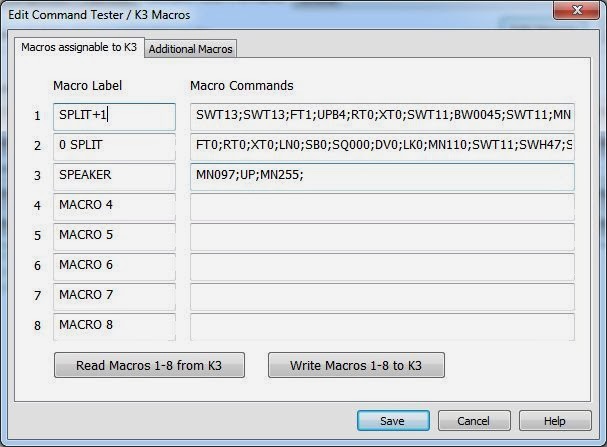
- SWT13; taps A>B once to copy VFO A frequency to VFO B
- SWT13; taps A>B again to copy all other settings to VFO B
- FT1; enters Split mode.
- UPB4; moves VFO B up according to setting 4, which is 1 kHz
- RT0; turns RIT off
- XT0; turns XIT off
- SWT11; taps A/B to go to VFO B
- BW0045; sets bandwidth B to 0.45 kHz
- SWT11; taps A/B to go to VFO A
- MN110; enters Config, Function, Macro
- SWT12; taps the (2) button to choose Macro 2
- SWH47; holds the PF2 button to assign it to PF2
- SWT14; taps the Menu button
Entries 10-13 are the reprogramming steps where the PF2 button is reassigned to the cleanup macro in memory slot 2. The contents of that macro is:
- FT0; turns Split off
- RT0; turns RIT off
- XT0; turns XIT off
- LN0; unlinks the VFOs
- SB0; turns subreceiver off
- SQ000; turns squelch off
- DV0; turns diversity mode off
- LK0; unlocks VFO A
- MN110; enters Config, Function, Macro
- SWT11; taps the (1) button to choose Macro 1
- SWH47; holds the PF2 button to assign it to PF2
- SWT14; taps the Menu button
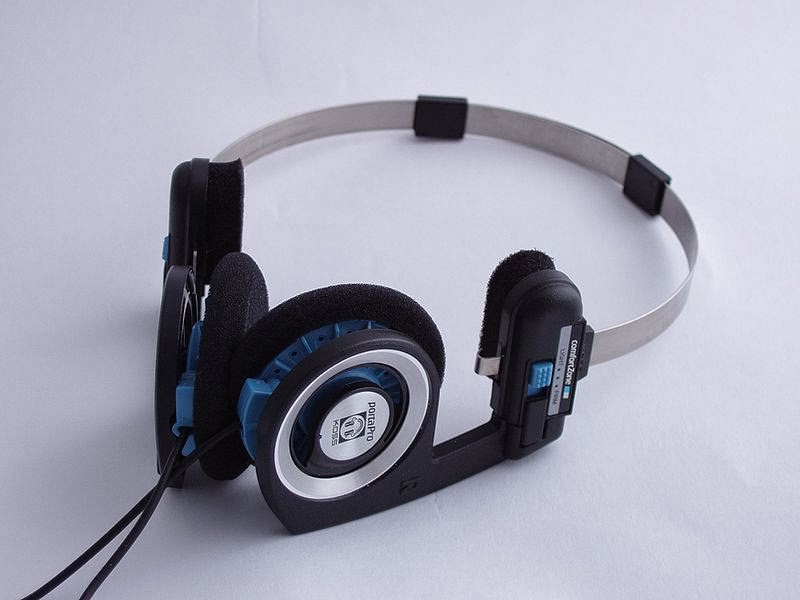 |
| Picture of Koss PortaPro from Wikipedia (Malcolm Tyrrell) |

Since I often toggle between speakers and my Koss PortaPro headphones (connected to the back of the K3), I liked what I just found on the Elecraft list where the command for speakers on/off was reposted. I have assigned that to the PF1 button which is also the RIT (Receiver Incremental Tuning) reminding me that this affects reception.
Macro 3 is MN097;UP;MN255; meaning:
- MN097; Access Menu, Speaker+phone
- UP; Change parameter
- MN255; Access Menu, Exit
After the macros have been loaded into the K3 with the K3 Utility Program, the macros are assigned to the PF1 and PF2 buttons by first entering Config, Macro 3, and then hold PF1, and then Config, Macro 1, and then hold PF2.
Sverre Holm, LA3ZA, is a regular contributor to AmateurRadio.com and writes from Norway. Contact him at [email protected].
More fun with the Funcube Dongle Pro Plus (Skimmers, Spacewalks, 50MHz ES and more)
This morning, I decided to try the Funcube Dongle Pro Plus on HF. I connected it up to the Butternut vertical and tuned to 14MHz. First impressions were very good, with plenty of signals coming through with good quality.
Zipping around the signals on CW, I wondered whether I could get a Skimmer going. The Skimmer decodes the CW from an SDR (or other receiver) and shows the text on the screen. CW Skimmer software was developed by VE3NEA a few years back and it has changed CW contesting for ever, I understand. Happily we don’t need to worry about that here!
I downloaded the trial version of the software and installed it. When I looked at the setup, there was no mention of a Funcube Dongle, so I decided to try it as a Softrock receiver as suggested on this web page. I also grabbed the FCD Frequency utility which allows you to control the frequency of the dongle. I set it up to run on 28MHz and set it going – sure enough it worked!
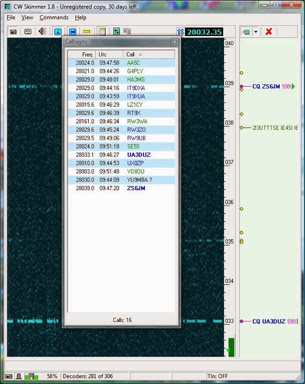
Even more impressive was when I set the Skimmer going on 7MHz, with Ws and JAs coming through (good band at this time of year, if you’re so minded, 7MHz). There were a few false decodes, which looked like Skimmer had done its best to resolve something that wasn’t really a CW signal, out of band, into CW! Fun though.
I have no particular need for a Skimmer on HF, although perhaps it might be fun on 28MHz, but certainly I can see it would be good during an Es opening on 50MHz.
I had hoped to be trying to receive the packet digi signals from the ISS today, but the digi was still switched off, with the astronauts engaged in a spacewalk to fix the errant pump. This proved a mixed blessing – as both Peter MI0VAX and Andrew M6GTG mentioned they’d been listening to the EVA comms from the astronauts on 143.625MHz, so I decided to try that.
Once the ISS was in range of Moscow, a huge signal, doppler shifting, appeared around 143.625MHz and it was easily possible to hear the astronauts talking in Russian. The FCD was connected to the V2000 vertical for this.
I noticed that the VO-52 satellite was making a fairly low pass during the late afternoon. I was curious to see if I transmitted a CW signal, using my terrestrial 70cms antenna, whether I would be able to hear myself coming back through the VO-52 transponder on 145MHz, using the FCD and the vertical antenna.
I haven’t quite figured out the doppler shift and where to transmit and where to listen, but after a bit of fiddling and faffing, I was indeed able to hear my CW coming back through the satellite. I tried a hasty CQ, but no luck this time… but it is the first time I have heard myself on VO-52. I will do better I am quite sure!
Feeling quite happy with all of that, I was just about to pack up in the shack, come downstairs and be sociable, when I noticed a tweet saying that there was some 50MHz Es about. I had missed an opening yesterday, so was keen to see if I could pick something up today.
I tuned the FCD to 50MHz and could immediately see LY1R coming through with a nice signal, so moved the antenna onto the FT847 and worked him after a couple of calls followed by OK1DOL. Things seemed to quieten down, so I popped the antenna back on the FCD for the benefit of the panoramic display.
This was very handy and I spotted several signals which I might have missed, had I just been on the FT847, so there was some rapid switching of the antenna between the FT847 and the FCD as I worked people, including DL1AX and DL3RBH on CW. I missed an SP5 on CW, who dived into the noise before I could work him.
All in all though, a very nice winter Es opening and I was delighted to find that the FCD worked so well on the band – the panoramic display proved so useful for spotting signals across the band.
Several times today, I have thought – why didn’t I get one of these FCDs before! Thank you again, Santa!
Tim Kirby, G4VXE, is a regular contributor to AmateurRadio.com and writes from Oxfordshire, England. Contact him at [email protected].
Adios to CQ VHF
 Another “dead trees” publication is coming to an end. CQ VHF Magazine is ceasing publication, with some content being rolled into a new online publication.
From the ARRL web site:
CQ Communications Inc has announced plans to realign its publications lineup and to launch a new online supplement to its flagship magazine, CQ Amateur Radio.
“The hobby radio market is changing,” said CQ Communications President and Publisher Dick Ross, K2MGA, “and we are changing what we do and how we do it in order to continue providing leadership to all segments of the radio hobby.”
Effective with the February 2014 issue of CQ, said Ross, content from the magazine’s three sister publications — Popular Communications, CQ VHF and WorldRadio Online — will be incorporated into CQ’s digital edition as a supplement to be called CQ Plus. The print editions of Popular Communications and CQ VHF will be phased out, and WorldRadio Online will no longer exist as a separate online publication. Current Popular Communications, CQ VHF and WorldRadio Online subscribers will be converted to CQ subscribers and receive CQ Plus at no additional charge. Details will be posted on each magazine’s website.
As the name implies, CQ VHF was focused on amateur radio activities above 50 MHz, which was well aligned with my interests. I’ve been writing the FM column for CQ VHF magazine since the summer of 2005 (wow, has it really been eight years?). I have really enjoyed this opportunity and found the four-times-a-year schedule to be just about right for me as an author.
All good things come to an end and it was not a surprise that CQ VHF would cease publication. Clearly, print media is struggling in most markets and a niche publication like CQ VHF was feeling the pressure. My thanks go to Joe Lynch N6CL for his leadership as editor and also to my fellow authors for the great content they produced over many years. I am going to miss having the magazine around but it is time to move on.
73, Bob K0NR
Update Jan 2, 2014: See this information at cq-vhf.com
Bob Witte, KØNR, is a regular contributor to AmateurRadio.com and writes from Colorado, USA. Contact him at [email protected].
Amateur Radio Newsline Report 1898 December 27 2013
- Two astro-hams repair the ISS in Christmas Eve spacewalk
- Ham radio takes a big step forward in Kosovo
- NZART issues a correction on 6 meter privileges
- ARRL files comments on its own Symbol Rate petition
- How high altitude balloon mission are tracked
First impressions of the Funcube Dongle Pro Plus
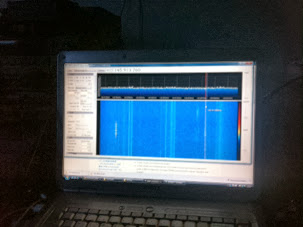
Reading around before Christmas, I thought that the FCD+ could be very useful – partly for satellite work as a simple receiver and for general listening.
Christmas Day was busy and enjoyable and it was this morning before I could have a look at getting it going. Installation really couldn’t have been simpler – just a case of plugging in and letting Windows find and install the drivers.
I already had a copy of SDRSharp on my machine and ran that up and changed the input device to be the Funcube Dongle Pro Plus. By default, the configuration in SDRSharp has a frequency correction of 120ppm, which throws frequency accuracy a bit! Simply remove this and restart SDRSharp and accuracy will be bang on.
I fiddled around a little and had a couple of lockup issues – so I decided to download and install the latest SDRSharp nightly build. This seemed to cure the lockup problems – or at least, in several hours of playing around, it hasn’t happened again, despite the laptop that it is running on, not being particularly recent.
Experience so far is very positive indeed. I am amazed at the sensitivity of the dongle. It is on a par with the other receivers I have here, if not slightly better. I was hearing GB3VHF very easily on the FCD+ plugged into the V2000 vertical. So far I have tried it on 50, 60, 70, 144 and 432MHz with good success. I have listened on 1296.200MHz, but nothing so far!
I have listened to a couple of passes of the VO-52 satellite using nothing more than the V2000 verical and results have been great, hearing a number of stations very easily; LX2LA, IK8ZLD, SP9TTI, 9A2UV, GM4CFS (all from memory). So it maybe that a viable garden portable setup will be the PC and dongle for the receive side and the FT817 for transmit. Maybe I will wait for the weather to get a bit better before I try that!
I have also used the VB-Cable software (rather like Virtual Audio Cable, but free) to feed data out of SDRSharp and into UZ7HO Soundcard Modem (which was reasonably successful although I didn’t feel I was decoding quite all the packets that I should have done) and also into WSJT.
Using WSJT, I decoded the JT65B from GB3VHF, received off the V2000 vertical. This was particularly impressive, as the signals were not huge at the time. I will have to try something weaker. Doesn’t GB3NGI transmit JT65B as well?
All in all, I am very impressed indeed. The FCD Pro+ is a wonderful addition to my shack – I can see it will be very much used.
Thank you, Santa!
Tim Kirby, G4VXE, is a regular contributor to AmateurRadio.com and writes from Oxfordshire, England. Contact him at [email protected].
Receiving 10GHz EME signals with an RTLSDR
Via the ever interesting RTLSDR blog, I was fascinated to read that Rein, W6SZ had used an RTLSDR receiver, a satellite LNB and an 18 inch dish to receive the DL0SHF 10GHz EME tests.
I really need to bump my LNB project up the list, I think.
See the article here
Very cool indeed!
Tim Kirby, G4VXE, is a regular contributor to AmateurRadio.com and writes from Oxfordshire, England. Contact him at [email protected].
Merry Christmas!

Larry Makoski, W2LJ, is a regular contributor to AmateurRadio.com and writes from New Jersey, USA. Contact him at [email protected].
 Ham Radio Deluxe |
 W5SWL Electronics |
 Ham Radio Prep |
 KB3IFH QSL Cards  Hip Ham Shirts  HamRadioAuctions HamRadioAuctions Reliance Antennas Reliance Antennas Enigma Shop Enigma Shop |  morseDX  Ni4L Antennas  R&L Electronics R&L Electronics antennas.us antennas.us QRV QRV |
- Matt W1MST, Managing Editor
