 |
 Five Summits in Three Days
 22 February 2014 | by
 To feed my addiction I made a trip to my QTH in Santa Fe, NM. I arrived there on my birthday February 13th. I had been planning this trip for more than a month and was worried about how the weather would be since the long weekend in Santa Fe would be my only chance to activate summits for a while. The weather forecast was for highs in '60's. Perfect.
. I had a different strategy for this trip, since none of the hikes would be more than a mile one way, I carried my FT-817 and an Elecraft T-1 tuner with plans to get on the WARC bands since the ARRL DX-CW contest would be going on the weekend. The FT-817 is fresh from getting modified with the W4RT on-board filter for both SSB and CW and the DSP as well.
DAY 1
So on Friday the 14th, I met up with Fred, KT5X aka WS0TA. We had two summits on the agenda, Peak 7119, W5N/PW-037 and Glorieta Mesa, W5N/PW-032. The day was windy, but the temps were comfortable. While the climbs were short, they were very steep to both summits. There were probably easier ways up, but what the heck, we were looking for adventure.
Propagation was good on the first summit, Peak 7119, I worked 5 EU stations, OH9XX, DJ5AV, EA2LU, ON4LI and G4OBK. My antenna was an LNR Trail Friendly 40-20-10 EFHW strung over as high a limb as my pole could reach and then to my carbon fiber fishing pole and down to the rig, an inverted L configuration. the antenna tuned great on the WARC bands. Fred and I employed a strategy that maximized available bands. I started on 12m and worked my way down to 20m while Fred started on 20m and move down to 30m and 40m. So as a team we made the summit available in several bands. I made 20 QSO's; 11 on 12m, 3 on 17m, 5 on 20m and 1 on 30m. I did have a couple of S2S's, one with N6JZT and another with N7CW, both with huge signals. Thanks guys.
The Glorieta Mesa expedition was executed in a very similar manner, same radio, same antenna configuration, except this time I made 25 QSO's on the following bands; 10 on 12m, 5 on 15m, 2 on 17m and 8 on 20m. The only DX was DJ5AV on 15m.
It was a good day, 45 QSO's, two nice hikes and 20 SOTA points.
DAY 2
Fred was unable to go on Saturday, so my buddy Jeff from Red River, NM was visiting, so he set out with me for the days activities. Again, there were two summits on the agenda, Peak 8409, W5N/PW-027 and Peak 9420, W5N/PW-020.
Peak 8409 is a relatively easy summit, with only about a 75 vertical feet ascent required to get into the activation zone. I used an AlexLoop on this summit as I wanted to get set up quickly. Propagation must have been in the process of warming up. I only made 9 QSO's 8 on 12 meters and 1 on 30 meters. The stations I heard were loud, but there weren't many of them. I never was spotted on RBN. I tried to self spot on SMS but put a slant bar in the summit reference which is the incorrect format. I didn't figure this out until later. So, I had to pack up to make the scheduled time on Peak 9420, so Jeff and I made our way down the hill to the car and were on the way to the next summit.
Peak 9420 is an excellent SOTA Summit. It climbs 800 feet over a distance of about one mile, which is relatively steep, but the hike is only a mile to the summit and it has a nice trail with lots of switchbacks to take some of the sting out of the hill. I'm in relatively good shape and it took me 23 minutes to get to the top. The weather was cooler and the wind was blowing at a stiff clip. There was some snow on the ground at the top, but not too much. It was too windy right on top, so I moved down a little to get out of the wind. I used my FT-817 with the Elecraft T1 tuner and the EFHW. I netted 31 QSO's , 11 on 12m, 9 on 20m and 11 30m. During my run on 30m, I heard a faint but copiable signal and a slow but sure fist calling. It is K7NIT, Rachel, calling for an S2S, followed soon thereafter by K7ATN. Thanks guys. Another fun thing happened, after my first run on 12 meters I didn't work either W4DOW or AE4FZ both of which are well up the standings on the 12 meter challenge. I worked AE4FZ on 20m so I knew he was out there. So after the pile-ups died down I went back to 12m and threw out the bait. Like two big trout after a fly, very quickly after calling CQ I worked both W4DOW and AE4FZ. I knew then it was okay to QRT.
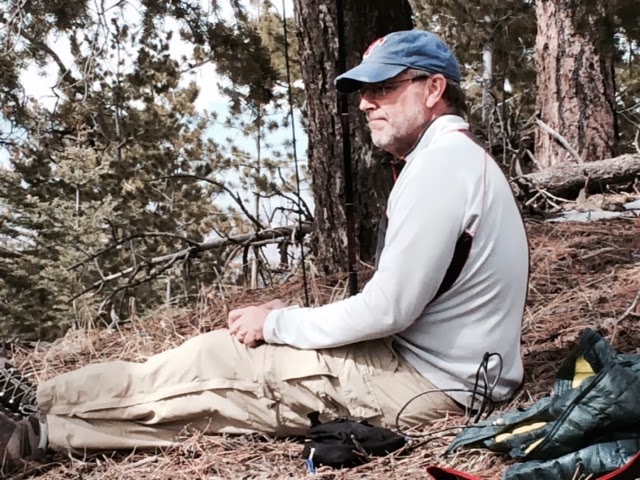
For the day, 40 QSO's and 22 SOTA points (including bonus points)
DAY 3
Day 3 would require a little driving. I was headed to Sandia Crest, W5N/SI-001. Sandi Crest is dominant peak in Albuquerque, NM. My XYL accompanied me on this trip. It is a drive up to the summit which sits at ~10,600 feet. We also wanted make the drive on HWY 14 out of Santa Fe which is a beautiful drive. In addition to the views it goes through Madrid which is where much of the Tim Allen film, "Wild Hogs" was filmed. Its a very cool little town. We didn't have time to stop, but will make a special trip next time.
At the summit it was cold. In the 30's and very windy. I would have to find a spot out of the wind. Because of the cold my wife decided to sit this one out, in the gift shop. Now this was probably a mistake on my part, because when I was done with the activation she had found several nice things to put in our house. Another way of looking at this is that it's a small price to pay for a SOTA pass:-).
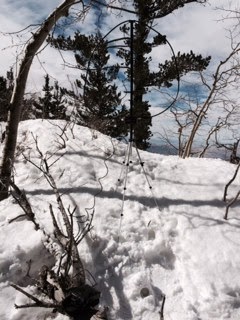
I hiked about a quarter of a mile south of the summit structures and found a place where I could sit on a log, out of the snow, be sheltered from the wind but yet give my antenna a good look at the world. The picture below is what I found. The log in the foreground was where I sat and the Alexloop, with the tripod anchored in the snow, has a nice look over the snow bank. I again used the 817.
Mike Crownover, AD5A, is a regular contributor to AmateurRadio.com and writes from Texas, USA. Contact him at [email protected].
The Minima
There are dozens of QRP rig designs and new kits that pop up each year, the majority of which are reiterations of previous designs. For the past ten years it seems we’ve been in a bit of a rut building NE602 based direct conversion and superhet rigs. But once in awhile a groundbreaking design is released, and everyone follows. Rigs like this are truly memorable, like the W7ZOI Ugly Weekender, the NEophyte, the Norcal 40, the 2N2/40, and the K2. I think the Minima, a new transceiver designed by Ashhar Farhan is one such design. The design has really impressive and innovative features:
- 1 to 30 Mhz coverage
- CW and SSB operation
- Si570 DDS local oscillator
- 20 Mhz IF
- KISS Mixer
- Arduino controlled, with open source software
- Other than a few ICs, most of the active components are general purpose NPN and PNP transistors
- A relatively simple and reproducible design
Looking at the schematic, you can see immediately how unique it is starting at the front end. From the antenna jack, you go into a high pass or low pass filter and then hit a mixer with two FETs. After that is an IF amplifier constructed from bipolar transistors, a BFO mixer and then the audio chain, again built from bipolar transistors. The transmitter chain works essentially the same, in reverse, with the mixer as the final active stage and providing a one watt output.

I’ve been eager to build something ugly style on a sheet of copper clad PC board, and this is just the ticket. And it’s Arduino controlled which is icing on the cake!

Anthony, K3NG, is a regular contributor to AmateurRadio.com.
Worst snow winter since 1958 and an indoor Yagi antenna

Norway has had its fair share of precipitation this winter. Along the coast most of it has been in the form of rain. But that is different in the mountains. Our cabin at 800 m above sea level is now about to disappear in the snow and we can hardly see out of the windows anymore. This is a result of having had to shovel the snow off the roof three times so far this winter. And there is yet more to come.
They say that one has to go back to the winter of 1958 for more snow than we have had this winter, and we are still only in February. The snow has also given us an unexpected problem. Our digital TV signal is now gone. The TV transmitter is at Mount Gaustadtoppen at 1883 m ASL which is about 10 km to the North and with almost free line of sight. It used to be possible to receive the signals from the national TV provider (Riks-TV) with just a simple indoor dipole, i.e. two wires each of length 13-14 cm connected to a coaxial cable. But not so anymore after all the snow has accumulated outside the windows.
Therefore I had to find a good Yagi-antenna calculator and make a better antenna. I put it on a cardboard of length 45 cm and used the antenna calculator of K7MEM (Martin Meserve). It is a little hard to figure out the exact frequency as there are 5 multiplexes in the TV system and for that particular transmitter they range from 506 to 620 MHz (http://www.finnsenderen.no/finnsender). I therefore just designed the antenna for the multiplex in the middle, 563 MHz. The wavelength is 53.3 cm and typical antenna element length is half of that.

The antenna calculator gave me a design with one reflector behind the receiver element, and four directors in front of it. In the picture, the reflector is to the left and the antenna points to the transmitter to the right.
I made the elements from thick wire, and just taped them to the cardboard. The connector to the coaxial cable is under the cardboard and attached to the center of element two from the left – the one which is split into two.
The Yagi antenna was first described by H. Yagi in the paper “Beam Transmission of Ultra Short Waves“, (Proceedings of the Institute of Radio Engineers, 1928). But as the contribution from his colleague Uda was at least as great as Yagi’s, the antenna should really be called the Yagi-Uda antenna. I seem to remember that Uda could not write English (both of them were Japanese), so the article was written in the name of Yagi only.
But what about my Yagi, eh Yagi-Uda antenna, did it work? Yes, actually it did! With digital signals there is a threshold effect and above a certain signal level the signal quality quickly goes to 100% with a low BER (bit error rate) and with this antenna I came above that threshold. The gain of this antenna is in the order of 8 dB or about 6 dB more than the old single element antenna. Luckily, that was enough to compensate for the attenuation through the snow pile. And as you can see, one doesn’t need aluminium to make a working TV antenna.
[In Norwegian: Verste snøvinter i manns minne og en innendørs TV-antenne]
Sverre Holm, LA3ZA, is a regular contributor to AmateurRadio.com and writes from Norway. Contact him at [email protected].
Amateur Radio Newsline Report 1906 February 21 2014
- A ham in the United Kingdom hears China’s lunar rover
- US public is invited to comment on FCC Process Reform
- Canadian hams get permanent access to a very low frequency band
- ZS hams told that they must use 12.5 kHz spacing for 2 meter repeaters
- Two teens bring a dormant AMSAT net back to life
- A trip back in time and space to the beginnings of the universe
Between a rock and a hard place
That’s where I found myself tonight, as one of the two Foxes in the 40 Meter QRP Fox Hunt. As a Fox, you try to find a relatively clear frequency, where you can work the Hounds rather easily. And that’s precisely what I thought I did tonight. I found a frequency, called “QRL?”, and hearing no response in the negative, I began working Hounds. For the first few minutes, things were going great. Then I found myself giving the Fox exchange to stations who weren’t coming back to me.
After that sinking-in-the-pit-of-my-stomach “uh oh” feeling quickly passed by, I snuck a peak at the Cluster, to realize that I was being encroached by one of the W1AW/X pileups! A lot of those stations had no interest in me, and probably couldn’t even hear me, for that matter.
So I quickly QSYed to calmer waters and decided to operate simplex instead of split. Even though there was a lot of QRM and the band was treating me to a lot of QSB, a very quick after-the-event count shows that I handed out close to 60 pelts.
A post-hunt e-mail from Todd N9NE informed me that I had managed to position myself right in between W1AW/8 and W1AW/4. I’m glad I didn’t know that! Some things you’re better off not knowing, and I think that is one of them.
My ears hurt a little bit from trying to pull out some weaker call signs from among the loud QRM, but I am pretty satisfied by my effort. I wanted to work at least 60 stations going in, and I made that a goal for myself. Looks like I just made it.
72 de Larry W2LJ
QRP – When you care to send the very least!
Larry Makoski, W2LJ, is a regular contributor to AmateurRadio.com and writes from New Jersey, USA. Contact him at [email protected].
Great 29MHz conditions
For the second time in a few days, I had a 29MHz QSO through the KQ2H repeater on 29.620 (input on 29.520) on the way home from the station. With the days lengthening, the propagation is lasting a little longer too and KQ2H has been a really great signal even at 1830z.
Last Friday I worked M0CGL through the box and then this evening it was nice to have a QSO with Terry G0VHS in Weymouth.
Gear is the Anytone AT5555 at around 20W into the Sirio whip on the car.
The band has been quiet in the morning, although I’ve tried a few CQs on 29.600 at around 0715z – I’m sure it’s open somewhere. Judging by the Russian taxi controllers on 27MHz – it’s good out in that direction!
Good to hear some people making 29MHz AM QSOs today as well – though the AM segment was quiet by the time I got back to the car.
Tim Kirby, G4VXE, is a regular contributor to AmateurRadio.com and writes from Oxfordshire, England. Contact him at [email protected].
Location, location, location
I might not be in the best location for the QRP Fox hunts, but I do have to admit that I am blessed when it came to achieving QRP DXCC. Those of us in the Northeast definitely do not have the edge in Fox hunting that our fellow Hounds from the Midwest have. When you look at the Hound’s scores, the guys “who get ’em all” are usually, if not exclusively, from the middle of the US. But those of us in the Northeast, and on the East coast in general have the edge when working Europe and the Caribbean. I believe that Jim W4QO in Georgia posted that he worked over 100 different DXCC entities just this past weekend. That’s nothing to sneeze at and is a great accomplishment!
But if your a new QRPer you may be saying to yourself, “That’s all well and good, but I’m just starting out and I don’t have a tower and a beam or a fancy antenna farm.” I’m not saying that those wouldn’t be helpful, but you can achieve a lot with simple antennas. I posted yesterday that I worked about half a DXCC award this past weekend. I did it with a Butternut HF9V antenna and a home brewed 88′ Extended Double Zepp antenna. These antennas are surely within the reach of beginner QRPers (HOAs notwithstanding). With 5 Watts, I worked (in no particular order):
Estonia
Norway
France
Czech Republic
Belgium
Columbia
Italy
Slovenia
Bulgaria
Poland
Spain
Bahamas
Puerto Rico
The Ukraine
European Russia
The Azores
Mexico
Brazil
Chile
Morocco
The Turks & Caicos
The Cayman Islands
Alaska
Madeira Island
Portugal
US Virgin Islands
Sweden
Nicaragua
French Guiana
Lithiuania
Aruba
Curacao
Anguilla
Finland
Atigua & Barbuda
England
Scotland
The Balearic Islands
Germany
Jamaica
Belize
The Canary Islands
Bonaire
Belarus
Denmark
That’s 45 DXCC entities in just around four hours of operating. So I don’t want to hear about how QRP DXCC is hard or impossible. I’ve done it and believe me, if a ham and egger like me can work 100 different countries using 5 Watts, then you can do better! And when you come down to it, my performance this past weekend was really nothing to crow about. If you want to read a great story, then make sure to read Phil AK2MA’s recount of his ARRL DX Contest effort – 150 QSOs and 57 countries worked with an INDOOR Buddipole on just one band (15 Meters)! THAT my friends is an achievement!
There is a price to pay, however, and that is you’re going to have to work on your Morse Code. Life is not a dish of assorted fancy cashews. QRP DXing and CW go together like hand and glove. Some of these contest stations were sending so fast that it took me 7 or 8 listens to get their calls right. Normally I am comfortable copying up to 25-28 WPM; and on a good day, I can stretch that to 35 WPM if the code being sent well and the exchange is short (like a contest exchange). Some of these guys were sending around the 40 WPM stratosphere and I had to just pass them by. But with dedication and practice you can get to the “mere human neighborhood” of 25 WPM without going crazy.
And that’s part of what this is all about, too. Constantly improving your station, your antennas, and yourself!
72 de Larry W2LJ
QRP – When you care to send the very least!
Larry Makoski, W2LJ, is a regular contributor to AmateurRadio.com and writes from New Jersey, USA. Contact him at [email protected].
 Ham Radio Deluxe |
 W5SWL Electronics |
 Ham Radio Prep |
 KB3IFH QSL Cards  Hip Ham Shirts  HamRadioAuctions HamRadioAuctions Reliance Antennas Reliance Antennas Enigma Shop Enigma Shop |  morseDX  Ni4L Antennas  R&L Electronics R&L Electronics antennas.us antennas.us QRV QRV |
- Matt W1MST, Managing Editor
