 |
 Ham radio “ZERO” doing everything but radio “TEN”
 15 March 2014 | by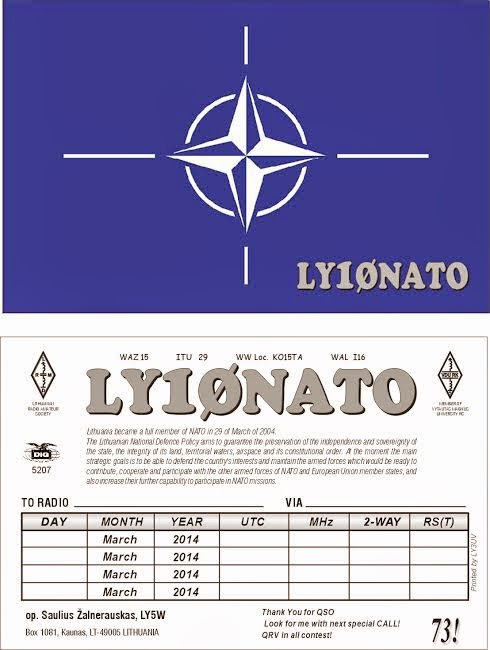
So things are up and running and on Friday I was able to make a fast contact with LY10NATO. This as you guessed it is a special activity call pertaining to NATO. The contact was made with 5 watts and my MFJ 1788 antenna. The weather here is still a winter wonderland with 15cm of snow on Wednesday, then it was temps of plus 9C on Friday and now this evening a cold weather alert has been issued! Anytime this winter wants to exit…… all the better.
Mike Weir, VE9KK, is a regular contributor to AmateurRadio.com and writes from New Brunswick, Canada. Contact him at [email protected].
A bit of ISS packet radio
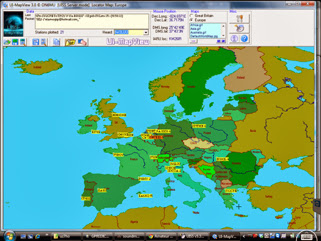
I hadn’t put the receiver on 145.825 and monitored the packet transmissions from the ISS digipeater for a while. Nice to do so over the last couple of days and see plenty of stations plotted on the map.
I haven’t been in shack at the right time to press the transmit button – but it’s just interesting to see what’s been heard
Gear is the FT8900 / V2000 vertical – UZ7HO soundcard modem software/UISS software
Tim Kirby, G4VXE, is a regular contributor to AmateurRadio.com and writes from Oxfordshire, England. Contact him at [email protected].
Intermediate is go

We have started another intermediate class both in class and distance learning. This course is primarily run on Edmodo. We have run a couple of classes on Edmodo and we think we have the concept correct now. So we have our weekly quizzes set and our 3 week homework assignments all loaded and ready to go.
In class students are also welcomed to join the distance learning students so missing a lesson is no longer such an issue.
Over the coming weeks I will be creating some companion videos showcasing the practical elements of our in lesson activities.
So far we have 5 in class and around 30 distance learning joining us for the next 10 weeks.
Dan Trudgian, MØTGN, is a regular contributor to AmateurRadio.com and writes from Wiltshire, England. He's a radio nut, IT guru, general good guy and an all round good egg. Contact him him here.
Step-up converter
It’s always easy to point a finger at others when you encounter noise while scanning the bands. More than often it is yourself who has to take the blame. In my case the switching power supply from my shack laptop is producing a lot of noise and artifacts, especially below 7 MHz. For a long time I had the plan to operate the laptop from my linear power supply and recently I got serious about it. A DC-DC step-up converter was bought for a mere US$7 and the following video shows initial results are very encouraging. The unit runs very cool so I am going to box it up and see if it can handle long operating periods.
Next up: isolating the USB connection. Stay tuned.
Hans "Fong" van den Boogert, BX2ABT, is a regular contributor to AmateurRadio.com and writes from Taiwan. Contact him at [email protected].
Amateur Radio Newsline Report 1909 March 14 2014
- Ham radio is called to play a part in the Malaysian Airlines mystery
- The DARC says the number of German ham radio operators is declining
- GPS system forces the closure of a pair of amateur television repeaters
- Steps 1 and 2 of the commissioning of the new ISS Ham Video a success
- Lots happening on the FCC regulatory enforcement scene
- FEMA introduces a new wireles alert frequently asked questions web page
Taking ‘pot’ shots at grow light RF interference
Earlier this week the Wall Street Journal published an article about the growing prevalence of RFI from unlikely sources. They quoted Tom Thompson, WØIVJ, of Boulder, Colorado:
Radio hobbyist Tom Thompson of Boulder, Colo., last year tracked a signal using a homemade contraption. After knocking on the suspect’s door, he traced it to ballasts on marijuana grow-room lights. He says he built a filter that the grower agreed to use.
Tom, a retired NOAA electronic engineer, created an entire web page devoted to the grow light ballast filters. According to his page, these ballasts are switching power supplies for high-pressure sodium or metal-halide lamps.
He goes on to describe the problem in good detail:
Typically the light fixture is removed from the ballast by about 25 to 30 feet. Since this length is about a 1/4 wavelength on 40 meters, it makes a good “antenna” for 40 meters so the RFI may be strongest on 40. I have heard radiations from these systems up to about 1/2 mile away. Also, since the “antenna” is so low to the ground, the RFI is mostly vertically polarized which is important when tracking it down.
Check out his page to see how he built a filter that he says reduces the RFI by about 30dB. That’s some good ol’ ham ingenuity!
Matt Thomas, W1MST, is the managing editor of AmateurRadio.com. Contact him at [email protected].
Circle of Life
I've also changed up my QRO line-up. I have the FT-5000DX which is a wonderful radio. It does however take up a fair amount of real estate on my, not-so-big, desk. Along with VL-1000 amp, I don't have much room left over. So, I am sending the FT-5000 to my ranch station and replacing it at the home shack with a K3. Not a bad trade. I just received the K3 and am getting comfortable with it. Having owned a KX3 for while, the learning curve is not too steep. There is another agenda here and that is I want to be able to remote into my home station when away and Elecraft has an elegant solution for that. They build a K3/0 which looks just like the K3 but without the TX and RX circuitry. So when remote, you have the same front end to play with. Plug in your key, link up, spin the knobs and away you go. At least that's the theory. I will be setting this up soon and I will report on the progress.
So the circle of life is always with us, which makes life interesting.
Mike Crownover, AD5A, is a regular contributor to AmateurRadio.com and writes from Texas, USA. Contact him at [email protected].
 Ham Radio Deluxe |
 W5SWL Electronics |
 Ham Radio Prep |
 KB3IFH QSL Cards  Hip Ham Shirts  HamRadioAuctions HamRadioAuctions Reliance Antennas Reliance Antennas Enigma Shop Enigma Shop |  morseDX  Ni4L Antennas  R&L Electronics R&L Electronics antennas.us antennas.us QRV QRV |
- Matt W1MST, Managing Editor
