 |
 Looks like I am in deep trouble
 3 April 2014 | by
 From the KX3 e-mail reflector:
We’ll be showing a major new product — a KX3 external accessory — at the Visalia DX Convention. You can test-drive one at our booth.
(By the way, I’m not referring to the 2-meter module. But that option will also be the subject of an announcement in the next week or two.)
73,
Wayne, N6KR
Larry Makoski, W2LJ, is a regular contributor to AmateurRadio.com and writes from New Jersey, USA. Contact him at [email protected].
Lunchtime QRP has still been good – and some announcements
The weather lately has been very early Springlike. Cooler than I would like, but suitable for QRP in the car without being uncomfortable. AND, the upper bands are still very active, which is nice to see. I thought I read somewhere yesterday that there was a massive solar flare headed our way. If that was the case, you wouldn’t have known it from 10 Meters this afternoon. I worked SV1CQN, LI8OM, and UY6IM all on 10 Meters.Tuning around the bands, 12 and 15 Meters seemed to be jumping too.
A couple of things for this weekend. First from my friend Greg N4GKL:
Are you ready for a exciting amateur radio challenge? Deploy as a portable station make five contacts walk one kilometer deploy again and make five contacts. Continue for the four hour period. You could do the same moving three kilometers via car, motorcycle, bicycle or other vehicle. You have entered the world of Rapid Deployment Amateur Radio aka RaDAR. You will enjoy making tradeoffs in radio, antennas, and choice of operating frequencies. The four hour period puts you under a little stress to manage all the factors in real time. Hams worldwide practice RaDAR any time they can but there is the four hour RaDAR contest the first Saturday of April and November. The next RaDAR Contest is April 5th 1400 UTC to 1800 UTC.

In addition to on foot and vehicle categories, there are also portable and at home categories. Each category has a multiplier. Power is your choice QRP and up with multipliers. All amateur bands, besides the WARC bands, are allowed including cross band contacts via amateur radio satellites. Modes – CW, SSB, AM, FM or any digital mode. QSOs via terrestrial repeaters will NOT be allowed. Call sign, Name, RS(T) Report, QTH and grid locator at least 6 characters and 10 preferred. There is a bonus for your first satellite or digital mode QSO. Also there is a bonus for your first RaDAR to RaDAR intercontinental QSO.
There are two contest managers: Eddie Leighton ZS6BNE for IARU 1 – see http://zs6bne.wordpress.com/2014/03/04/radar-the-new-contest-april-2014/ and Marcus Kessler NX5MK for RaDAR America see http://radar-america.blogspot.com/2014/02/radar-america-contest-april-2014.html You will find the contest details at those links.
RaDAR originated in South Africa headed up by Eddie ZS6BNE. It has spread to the Americas with the efforts of Marcus NX5MK. There is a growing worldwide participation with the RaDAR Community on Google+. See https://plus.google.com/u/0/communities/109283065808971118728
Here’s another link that Greg provided: http://www.n4kgl.info/2014/03/april-5th-rapid-deployment-amateur.html
And, secondly from Karel OK1CF:
Hello!
I’m the HF manager of Czech Radioclub (ČRK). Let me tell you to announced that the first OK-OM DX SSB Contest 2014 will be held second weekend in April (12-13.04.2014) http://www.crk.cz/FILES/CZECH_DX_SSB_CONTEST.pdf
http://okomdx.crk.cz/index.php?page=englis
Thank you – I look forward to hearing from you!
73,Karel OK1CF HF Manager of CRK
72 de Larry W2LJ
QRP – When you care to send the very least!
Larry Makoski, W2LJ, is a regular contributor to AmateurRadio.com and writes from New Jersey, USA. Contact him at [email protected].
Fun with a Zoom H1
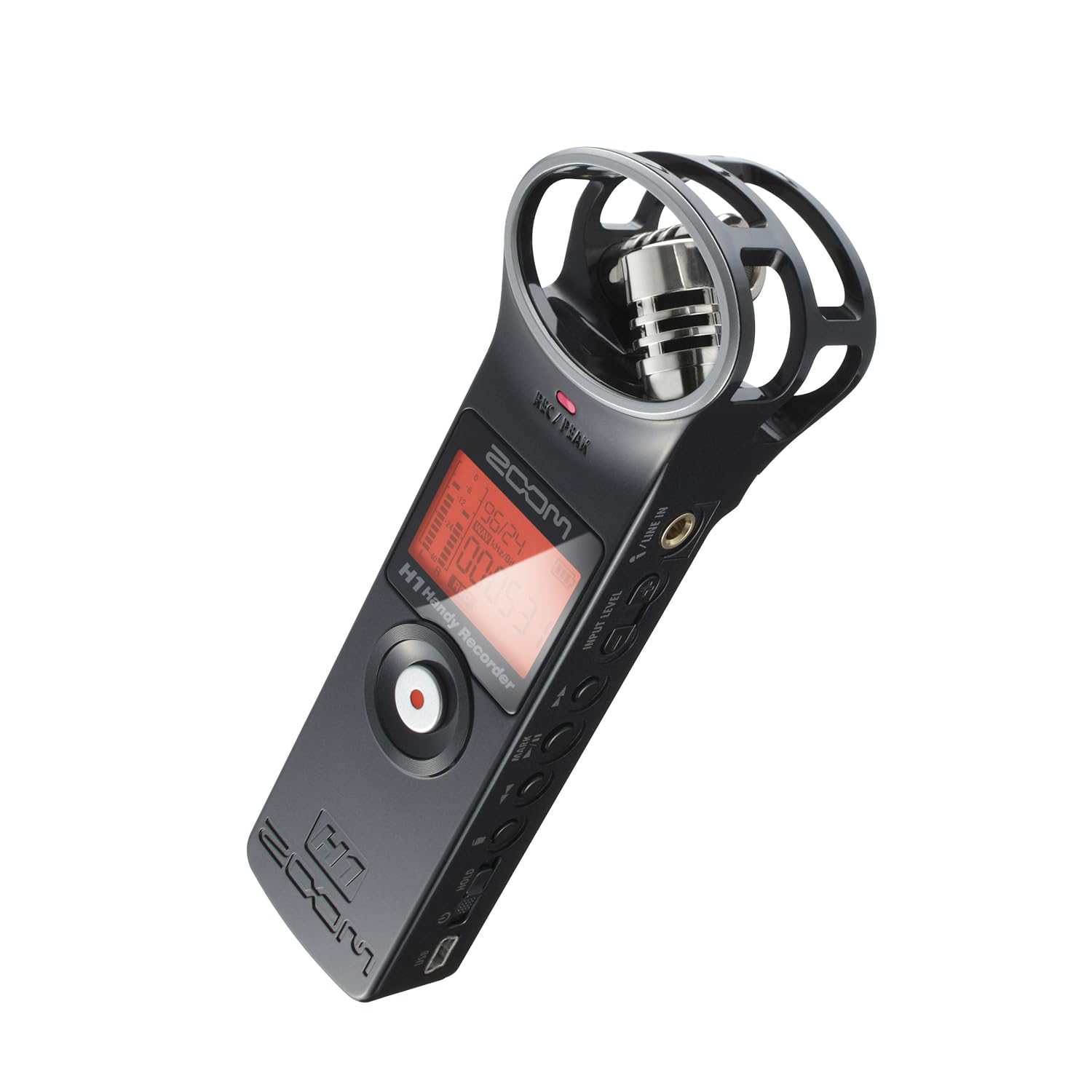
I recently purchased a Zoom H1 for outside audio recording. Ive noticed that the microphone on the
Camcorder is pretty poor when filming in slightly breezy conditions or even when i am not facing the camera. So to address this a separate Mic / handheld recorder that allows the addition of plug in microphones and being completely separate from the camera is a bonus.
Dan Trudgian, MØTGN, is a regular contributor to AmateurRadio.com and writes from Wiltshire, England. He's a radio nut, IT guru, general good guy and an all round good egg. Contact him him here.
More 28MHz mobile fun: PSK and TX6G
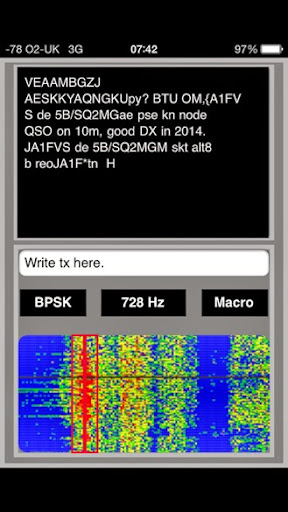
This morning, 28MHz seemed pretty quiet as I drove to the station this morning – very little on SSB. When I got to the station, I tried CW which was just as quiet. As I spun up the band to the beacon area, I noticed some PSK on 28.120.
Some months ago, I downloaded the Multimode application for my iPhone which decodes PSK and RTTY. I just fired up the app, held the phone reasonably close to the rig and saw PSK signals appear on the display. To tune the signal in, you just drag the centre of the bar to the centre of the required signal and with any luck it displays.
This morning, it was fun to see 5B4/SQ2MQM working a JA station. And this evening when I got back to the car, LW5ER was coming through nicely.
Obviously you can’t have all this going whilst you’re actually driving. That would be dangerous! So, I tuned up the band to the SSB segment and the very first signal I heard was TX6G coming through – really great signals. In a perfect world, the next sentence would be that I cracked the enormous pileup running 10W to the whip.
Sadly no! The Anytone can’t deal with split frequency operation, so it was just a case of enjoying listening to the signals coming through from the other side of the world. I did stop in a lay-by and text Justin, G4TSH, who’s there, that they had a great signal to the mobile.
Tim Kirby, G4VXE, is a regular contributor to AmateurRadio.com and writes from Oxfordshire, England. Contact him at [email protected].
More new toys
For as long as I first heard about SDR i wanted to get involved. Unfortunately children and jobs got in the way of significant investment. Until now that is. I received an email from a local ham who had an Angelia board that he no longer wanted.
‘Did I want to buy it off him?’
‘Yes’ said I before even mentioning it to the domestic CFO / xyl.
Long discussion ensued and eventually I have come away with this….

Needless to say some of the domestic staff were not amused. As a consequence I have an FT817 and a VX8-GE for sale. Any takers?
Alex Hill, G7KSE, is a regular contributor to AmateurRadio.com and writes from Cumbria, UK. Contact him at [email protected].
PLC
Friday I did hear JA4FKX/QRP on 14060 KHz. Very good signal here, but no takers. I tried to call him but he could not hear me, even with 5 watts, I know Dick F8WBD worked him twice with 2 watts.
Paul Stam, PC4T, is a regular contributor to AmateurRadio.com and writes from the Netherlands. Contact him at [email protected].
First Quarter in the books
My quest for a QSO a Day in 2014 is going well. The first quarter is complete and by far March was my best month in the shack. I also continued my streak of adding at least one new DX entity to my logbook each month with March receiving two. During the CQ WPX contest I managed to add Ceuta & Melilla and Balearic Is. I’ll be honest…I had to look both of these up on the map. But that’s the fun of amateur radio.
I’ve started April off on the right foot with getting W1AW/1 (Vermont) and W1AW/0 (Iowa) in the logbook. I must also admit that I’m slightly behind on the ARRL Centennial QSO Party. I’m currently sitting at four worked including Texas, Georgia, Iowa and Vermont. Just 46 more to go…..

The QSO breakdown for March is as follows:
Mode
Number QSO’s
JT65
63
JT9
1
SSB
40
PSK31
5
2m FM
0
Additional notes of interest:
DX Stations Worked in March – 22
New DX Entities in March – 2
Total QSO’s for March – 109
Total QSO’s for 2014 – 219
Total consecutive QSO days – 90
Days left in 2014 – 331
Until next time…
73 de KD0BIK (Jerry)
Jerry Taylor, KD0BIK, is a regular contributor to AmateurRadio.com and writes from Colorado, USA. He is the host of the Practical Amateur Radio Podcast. Contact him at [email protected].
 Ham Radio Deluxe |
 W5SWL Electronics |
 Ham Radio Prep |
 KB3IFH QSL Cards  Hip Ham Shirts  HamRadioAuctions HamRadioAuctions Reliance Antennas Reliance Antennas Enigma Shop Enigma Shop |  morseDX  Ni4L Antennas  R&L Electronics R&L Electronics antennas.us antennas.us QRV QRV |
- Matt W1MST, Managing Editor
