 |
 Some fast 20m contacts…..doing the happy dance!!
 4 August 2014 | by
Mike Weir, VE9KK, is a regular contributor to AmateurRadio.com and writes from New Brunswick, Canada. Contact him at [email protected].
Your LF Station’s Best Friend – The Scopematch PT. I
 If you're planning to get on Canada's newest ham band (630m), or are in the U.S. A. and building for when that day arrives, then you'll probably be interested in today's chatter.
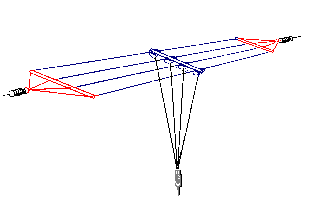
Several years ago, when I first set up my 2200m (136KHz) station under Industry Canada's Amateur Experimental Licensing Program, I utilized a fairly simple method shown in the LF Handbook, of attempting to tune and load my antenna. I had built a small top-loaded wire vertical consisting of a two-wire 50' flattop at the top end of a 30' vertical wire. A large loading coil of about 3 mH at the base of the antenna took care of getting the system close to resonance. As shown below, a variometer was used to fine-tune the system to resonance while the antenna impedance was matched to 50 ohms by tapping up from the base of the loading coil.
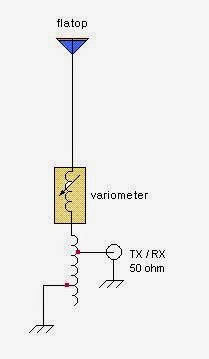
A 2A RF ammeter was used to monitor antenna current, with the plan being to tune and tap for maximum antenna current. It was the first time I had done any LF antenna work like this so it was a true 'learn as you go' project. It sounded fairly simple in theory but actual implementation was more challenging than I thought. What I also should have had was an LF SWR meter in the 50 ohm line as tuning and tapping for maximum antenna current did not guarantee that my system was indeed resonant or impedance matched. As you can imagine, there was much interaction between the two adjustments and I often found myself chasing my tail.
There were some tuning combinations that would peg the RF ammeter, indicating more current than my system was even capable of producing into a 50 ohm load. No doubt my settings were sufficiently 'off track' to create some diabolical impedance / off-resonance combination. I eventually settled on something that looked close but I was never really sure. Several weeks later I built the 'Scopematch' (designed by Jim Moritz -'MØBMU) and have not had a problem tuning and matching ever since.
Of all the devices in my LF toolbox, the most valuable by far is my Scopematch. Basically, it is a coupling device that allows you to monitor the tuning parameters of your LF antenna system. In real time, you are able to see both the impedance condition and the resonance tuning condition by observing the antenna current and voltage waveforms on a dual-trace oscilloscope. It is immediately apparent if your system is impedance matched (or not) and how close to resonance the system is. It will even tell you if your antenna is capacitive and requires more inductance to lower the frequency or if it is inductive and requires less loading inductance to bring it up in frequency.
Besides the dual-trace scope, the Scopematch requires only three parts and is fairly non-frequency critical. I am able to use it on both 2200m and 600m without any changes. More details to follow.
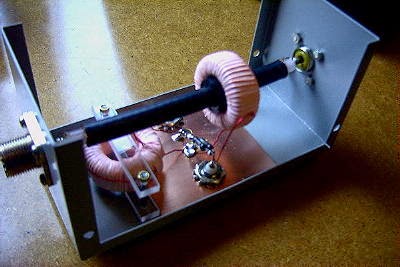 |
| My homebrew Scopematch |
Steve McDonald, VE7SL, is a regular contributor to AmateurRadio.com and writes from British Columbia, Canada. Contact him at [email protected].
Hughes PRC-104 Manpack Radio
I finally picked up a Hughes PRC-104 military manpack radio in excellent working condition with a bunch of extras. I have searched for a military unit for a long time now. Having been with the Naval Reserves and 736th Communication Squadron in Thunder Bay, and being a communicator in both, along with my passion for old gear and portable operations I could not pass this one up.
I have searched for a long time for a rig like this. There are many in the UK being sold but the exchange rate and shipping, plus all the extras needed to buy to get portable just made it not worth it for me. As you have read in past posts portable operation for me are a pleasure. With all my travels up North I find I am always taking my YouKits HB1B MKII with me now and setting up at my locations.
The PRC-104 came with battery pack and charger for the LiPo batteries, loud speaker, speaker/microphone combination, handset, PRC-271 antenna and full Alice Pack with frame and belts. It also came with extra mounting hardware for the pack frame if you wish to take the pack off. I ordered an empty battery case ($16.00) and will make a second 28v pack for the radio. I have also ordered a spare U-229 pigtail connector which will work for my cw/digital connector.
This radio goes back to 1976 and runs about 20 watts on a fresh new battery pack. The receiver is quite good as I was hearing things on the whip antenna outside that I could hear inside on the windom in terrible band conditions this past weekend. I was able to check into our local 80 meter Northwestern Ontario ARES Net on 3.750 Sunday night with my NVIS antenna and got a great audio report and was told I was over the noise level as well. The tuner in this radio seems to tune quite well and is very quick.
I have collected numerous amounts of military gear in the past and old shortwave gear, but portable rigs for me are still what I enjoy, I like being outside in operating conditions versus sitting in the shack. I am awaiting the arrival of the X108 and the TJ5A as well to test these units out for portability. I do not think they come close to the HB1B MKII for a self contained unit. The battery pack in that rig last a very long time when I am up North on my trips and makes contacts quite well on the cw bands. CW is my niche, and the mode I enjoy operating, so once I get the cable I will operate the PRC-104 on cw and hopefully shoot a small video of it in action.

Cheers
Fred
VE3FAL/P
Fred Lesnick, VE3FAL, is a regular contributor to AmateurRadio.com and writes from Thunder Bay Ontario, Canada. Contact him at [email protected].
WiFi issues with a MacBook & BT Home Hub 5
Okay so not exactly a ham radio blog entry here but its Wi-Fi related, so in a tenuous link its sort of radio related right ?
Recently I upgraded my home broadband to BT Infinity 2. It has been fantastic except for one little annoying thing. Every time I try to reconnect to the Wi-Fi my MacBook will not reconnect and insists the password is invalid.
This has only happened since the BT Home Hub 5 came about and I genuinely thought I had a broken hub. The issue seems to fix itself after a reboot of the hub, but within a day or so its annoying habit of throwing you off comes back.
So what’s the issue here – and more importantly the fix.
MacBook’s seem to have a hard time switching between Wi-Fi or 2.4Ghz and 5Ghz. Why this is the case god knows. But the solution is very simple and easy to do.
- Login to your hub usually 192.186.1.254
- Click on Advanced Settings – Log in using your admin details, and click Continue to Advanced Settings
- Click Wireless on menu at the top
You will now see options for 2.4Ghz 5Ghz and WPS. We are going to change the way 5Ghz works.
- Click on 5Ghz
- Make sure Sync with 2.4Ghz is NO
- Choose a name for a new wireless ID – I chose Lumber-5Ghz (My Wireless at home is called LUMBER – so it makes sense)
- Make sure the interface type is selected “Up to 150 Mb/s)
- I’ve selected Channel 64 – you may not need to change channel unless you have some interference
- Choose a new password for you to join the new network.
- Hit Apply
While you wait for the router to save the settings, I’ll explain what you have done.
You have separated the Wifi Networks into 2. You now have a 2.4Ghz and 5Ghz Network. Soon (leave it a minute) you will see your new 5Ghz network pop up in your Wi-Fi network list. Join it and you will be connected to your 5Ghz network. If your Mac cannot connect it will default back to your 2.4Ghz Wi-Fi network and stop that annoying “Invalid password” issue from reappearing.
Since doing this all the MacBook’s, Mac Minis and iMacs in my household have not has this issue reappear so it seems to be the fix.
I hope this does help anyone else who is having this issue.
Dan Trudgian, MØTGN, is a regular contributor to AmateurRadio.com and writes from Wiltshire, England. He's a radio nut, IT guru, general good guy and an all round good egg. Contact him him here.
WiFi issues with a MacBook & BT Home Hub 5
Okay so not exactly a ham radio blog entry here but its Wi-Fi related, so in a tenuous link its sort of radio related right ?
Recently I upgraded my home broadband to BT Infinity 2. It has been fantastic except for one little annoying thing. Every time I try to reconnect to the Wi-Fi my MacBook will not reconnect and insists the password is invalid.
This has only happened since the BT Home Hub 5 came about and I genuinely thought I had a broken hub. The issue seems to fix itself after a reboot of the hub, but within a day or so its annoying habit of throwing you off comes back.
So what’s the issue here – and more importantly the fix.
MacBook’s seem to have a hard time switching between Wi-Fi or 2.4Ghz and 5Ghz. Why this is the case god knows. But the solution is very simple and easy to do.
- Login to your hub usually 192.186.1.254
- Click on Advanced Settings – Log in using your admin details, and click Continue to Advanced Settings
- Click Wireless on menu at the top
You will now see options for 2.4Ghz 5Ghz and WPS. We are going to change the way 5Ghz works.
- Click on 5Ghz
- Make sure Sync with 2.4Ghz is NO
- Choose a name for a new wireless ID – I chose Lumber-5Ghz (My Wireless at home is called LUMBER – so it makes sense)
- Make sure the interface type is selected “Up to 150 Mb/s)
- I’ve selected Channel 64 – you may not need to change channel unless you have some interference
- Choose a new password for you to join the new network.
- Hit Apply
While you wait for the router to save the settings, I’ll explain what you have done.
You have separated the Wifi Networks into 2. You now have a 2.4Ghz and 5Ghz Network. Soon (leave it a minute) you will see your new 5Ghz network pop up in your Wi-Fi network list. Join it and you will be connected to your 5Ghz network. If your Mac cannot connect it will default back to your 2.4Ghz Wi-Fi network and stop that annoying “Invalid password” issue from reappearing.
Since doing this all the MacBook’s, Mac Minis and iMacs in my household have not has this issue reappear so it seems to be the fix.
I hope this does help anyone else who is having this issue.
Dan Trudgian, MØTGN, is a regular contributor to AmateurRadio.com and writes from Wiltshire, England. He's a radio nut, IT guru, general good guy and an all round good egg. Contact him him here.
That happened only once before.
I was in the pileup to work W1AW/0 in South Dakota today. I already have them in the log, but I can’t seem to resist a good pileup these days. Anyway, after I worked them, instead of the normal “TU 73”, I got “W2LJ QRP?”
I answered “YES QRP 73 DE W2LJ” and I got a dit dit in reply.
I guess it was somebody who knows of me. The only other time that happened was when I worked W1AW/1 in New Hampshire, but I knew going in that Dave N1IX was the operator. Dave is a superb op and fellow Fox hunter.
It would be interesting to know who was behind the key. It sure makes you do a double take when you work a station and the operator is familiar with you, but yet you have no idea as to whom you may have worked.
72 de Larry W2LJ
QRP – When you care to send the very least.
Larry Makoski, W2LJ, is a regular contributor to AmateurRadio.com and writes from New Jersey, USA. Contact him at [email protected].
Time for some shack cleaning and putting items up for sale.
1. Balun designs balun model 1110cu it's called a QRP balun but is rated at 300 watts. It's a 1:1 isolation balun I did use them at my old place to make sure not unwanted RF was radiating from the coax. Since I only have one antenna now I no long require one.
The price is 25.00 including shipping within North America.

2. Elecraft N-Gen this is a kit that I put together myself and works great. It is very good for many RF and IF alignment tasks. The price including shipping is 50.00.

3. LDG AT200pro antenna tuner I am no longer in need of a tuner as my K3 and KX3 all have on board ATU's this unit works and looks great. Price is 150.00 shipping included.

4 Hendricks 41dB step attenuator, I put this unit together myself and works great. Price is 50.00 including shipping.
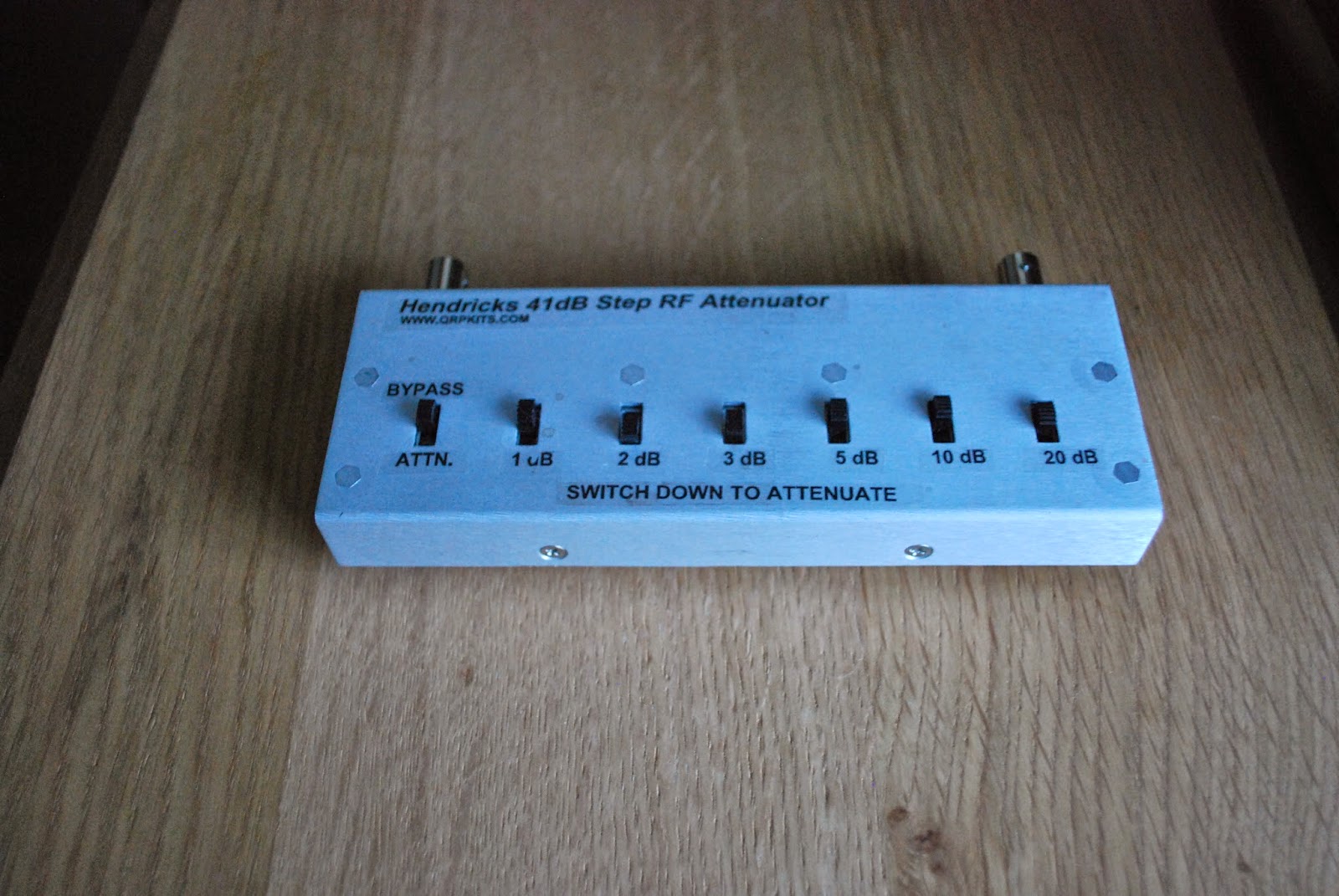
The selling of these items will both clean up the shack and give me some ham bucks to clutter things up again!
Mike Weir, VE9KK, is a regular contributor to AmateurRadio.com and writes from New Brunswick, Canada. Contact him at [email protected].
 Ham Radio Deluxe |
 W5SWL Electronics |
 Ham Radio Prep |
 KB3IFH QSL Cards  Hip Ham Shirts  HamRadioAuctions HamRadioAuctions Reliance Antennas Reliance Antennas Enigma Shop Enigma Shop |  morseDX  Ni4L Antennas  R&L Electronics R&L Electronics antennas.us antennas.us QRV QRV |
- Matt W1MST, Managing Editor
