 |
 ARRL Bulletin 25
 25 August 2015 | by
 ARLB025 FCC Universal Licensing System, Other Applications to be Down for Maintenance
ZCZC AG25
QST de W1AW
ARRL Bulletin 25 ARLB025
From ARRL Headquarters - Newington CT August 25, 2015
To all radio amateurs
SB QST ARL ARLB025
ARLB025 FCC Universal Licensing System, Other Applications to be Down for Maintenance
FCC website maintenance in early September will make the Universal Licensing System (ULS), the Electronic Comment Filing System (ECFS), the Electronic Document Management System (EDOCS) and other public applications unavailable for more than 5 days. The Commission said the outage will begin at 2200 UTC on Wednesday, September 2, and continue through the Labor Day weekend. The maintenance work should be completed by 1200 UTC on Tuesday, September 8. During the ULS outage, it will not be possible to file any Amateur Radio applications.
"[M]ost Commission resources normally accessible through the Commission's website, including access to all electronic filing systems and electronic dockets, will be inaccessible for the same period, with the exception of the Network Outage Reporting System (NORS), the Consumer Help Center (CHC), and the Disaster Information Reporting System (DIRS), which will remain available," an FCC Public Notice said on August 20. "The Commission's website will remain available, but with reduced content and limited search capabilities." According to the Public Notice, the FCC will follow its normal schedule of operation during the maintenance period, but voicemail will be offline, and most Commission staffers will not have access to e-mail. Static content webpages on the fcc.gov domain, such as the FCC consumer guides, should remain available during the outage.
The FCC will extend filing deadlines for all regulatory and enforcement filings that fall during the maintenance period. Filings due on September 2, 3, 4, or 8 now will be due on Wednesday, September 9. "Except for the due dates specified herein, we are not automatically extending the deadlines for any other comment or filing periods that will be running during this time period, but requests for extension of time will be considered consistent with the Commission's normal practice," the FCC Public Notice said. "To the extent the due dates for filings to which reply or responsive pleadings are allowed are affected by this Public Notice, the due dates for reply or responsive pleadings shall be extended by the same number of days."
In a blog, "Modernizing the FCC's IT," FCC CIO David Bray said that with the world and the technology we use are changing rapidly, "the information technology used by the Federal Communications Commission must change as well." Bray said the FCC has "made significant progress to upgrade and modernize our infrastructure, and we continue to work on modernizing the FCC's legacy IT systems with the resources we have available."
"We understand that this temporary downtime before and during the Labor Day Weekend may be inconvenient for some FCC stakeholders," Bray added.
NNNN /EX
72 de Larry W2LJ
QRP - When you care to send the very least!
Larry Makoski, W2LJ, is a regular contributor to AmateurRadio.com and writes from New Jersey, USA. Contact him at [email protected].
CLE197 Results
 It seems that our medium-frequency NDB CLE's (Co-ordinated Listening Event) go hand-in-hand with solar disturbances and wacky geomagnetic conditions. If you want to know when the next big geomagnetic upset will be, just check the date of the next CLE!
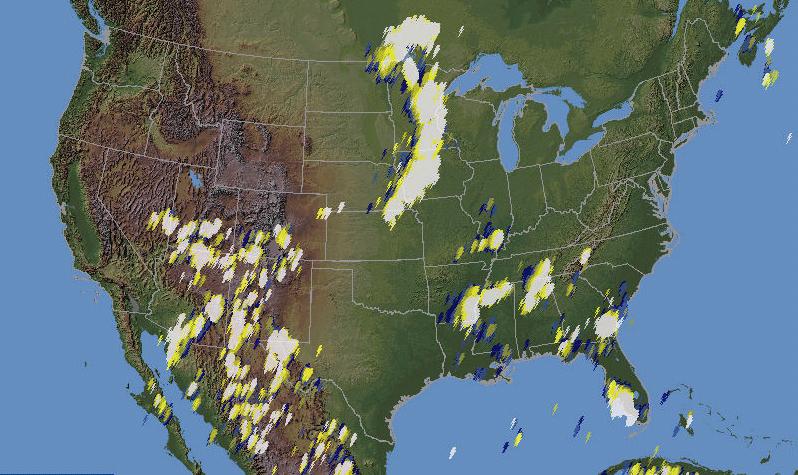
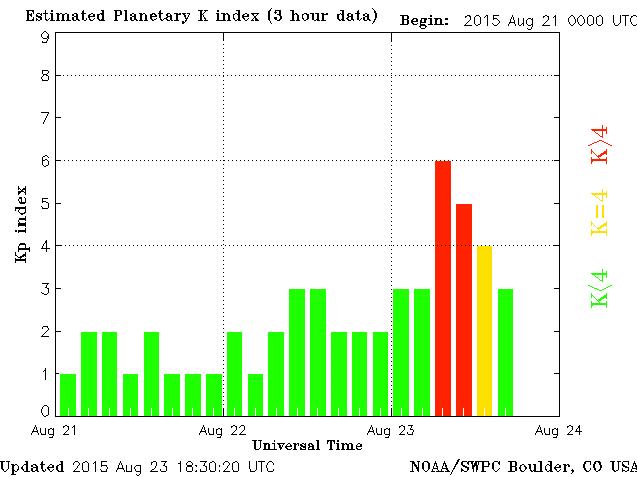
Along with a half dozen M-flares and auroral-producing 'K' indexes of 5-6, most of North America was blanketed with severe thunderstorm activity, always typical of this time of the year. In spite of the poor conditions, several signals did manage to find their way into my log. Sunday night provided the best conditions, with far less thunderstorm activity and a slight improvement in propagation. Saturday night's lightning map looked like this:
 |
| courtesy: http://thunderstorm.vaisala.com/explorer.html |
 |
| courtesy: http://www.noaa.gov/ |
Loggings in RED where made on Friday night, GREEN on Saturday night and BLUE on Sunday night.
All stations were heard on the Perseus SDR while using my LF 'inverted-L' resonated at 300KHz.
LOG:
DD UTC kHz Call mi Location
---------------------------------------------------------------------------
22 06:00 240 BVS 48 Burlington, WA, USA
22 10:00 241 YLL 648 Lloydminster Municipal Apt, AB, CAN
22 12:30 242 ZT 223 Port Hardy, BC, CAN
22 10:00 242 XC 342 Cranbrook, BC, CAN
22 10:00 244 TH 1166 Thompson, MB, CAN
23 07:00 245 YZE 1890 Gore Bay, ON, CAN
22 12:00 245 HNS 865 Haines, ALS
24 09:00 245 FS 1311 ROKKY - Sioux Falls, SD, USA
22 10:00 245 CRR 821 Circle Town County Apt, MT, USA
24 05:00 245 CB 1528 Cambridge Bay, NU, CAN
23 12:00 245 AVQ 1298 Marana Regional Apt, AZ, USA
22 09:00 246 ZXJ 517 Y'Taylor' Fort St. John, BC, CAN
22 09:00 248 ZZP 486 Dead Tree - Queen Charlotte Is, BC, CAN
22 09:00 248 QL 471 Lethbridge, AB, CAN
22 09:00 248 QH 811 Watson Lake, YT, CAN
22 09:00 250 FO 1002 Flin Flon Municipal Apt, MB, CAN
22 12:30 250 2J 220 Grand Forks Municipal Apt, BC, CAN
22 09:00 251 YCD 32 Nanaimo, BC, CAN
22 09:00 251 PWD 850 Plentywood, MT, USA
22 12:30 251 OSE 1708 Oscarville - Bethel Apt, ALS
23 11:30 251 AM 1445 PANDE - Amarillo, TX, USA
24 08:00 253 GB 1324 'Garno' Marshall, MN, USA
22 09:00 254 ZYC 441 Calgary, AB, CAN
22 09:00 254 SM 891 Fort Smith, AB, CAN
24 11:30 256 TQK 1322 Scott City Municipal Apt, KS, USA
22 12:30 256 LSO 188 Kelso - Rocky Point - Kelso, WA, USA
22 12:00 256 EB 537 Namao - CFB Edmonton, AB, CAN
22 09:00 257 XE 757 Saskatoon, SK, CAN
24 09:00 257 SAZ 1329 Staples, MN, USA
22 09:00 257 LW 192 Kelowna - Wood Lake, BC, CAN
22 09:00 258 ZSJ 1324 Sandy Lake Apt, ON, CAN
23 08:00 420 FQ 1422 MONTZ - East Chain, MN, USA
24 09:00 428 POH 1433 Pocahontas Municipal Apt, IA, USA
22 12:00 429 BTS 1571 Wood River - Dillingham, ALS
24 09:00 434 SLB 1410 Storm Lake Municipal Apt, IA, USA
------------------------------------------------------------------------------------
Thankfully, by this time next month and into October, quieter nights and better propagation will prevail ... fall often produces the best propagation of the year and has always been my favorite time of the year, outdoors and at the dials.
Steve McDonald, VE7SL, is a regular contributor to AmateurRadio.com and writes from British Columbia, Canada. Contact him at [email protected].
2015 Skeeter Hunt Results
Congratulations to all of you who participated (you're all winners in my book!), but special congratulations to the "Top Five":
N3AQC - The North American QRP CW Club - First Place Overall - Top finish in PA by a multi-multi station - 14,380 points
KX0R - George Fuller - Second Place Overall - Top finish in CO - Top finish by a single op station - 13,652 points
N0SS - Mid-Missouri Amateur Radio Club - Third Place Overall - Top finish in MO - Top finish by a multi op - single TX station - 7,276 points
N3CU - Ken McIntire - Fourth Place Overall - Top finish in PA by a single op station - 6,148 points
K4YA - Myron Cherry - Fifth Place Overall - Top finish in TN - 6,084 points
The entire scoreboard can be viewed at: https://docs.google.com/spreadsheets/d/1lcRvpNb2jwgyJsqruCdecNiWXNpi6yz2l4vvJucp0UE/edit#gid=307219926
We didn't do too badly this year. 170 Hams signed up for Skeeter numbers (a record) and we had 60 log summaries submitted. That's about a 35% return rate.
As promised, the soapbox page will come shortly and I will announce when it's ready for viewing. Most nights this week will be busy as I will be volunteering with my CERT team for crowd control duties, as the Barclay Golf Tournament is being played out at the Plainfield Country Club, which is about 1/4 mile from my house. Look for the soapbox announcement some time next week.
Thank you to all of you who sign up and those who participate, and those who help me get the word out about the NJQRP Skeeter Hunt. I'm already looking forward to 2016's event! And as always, if any of you have any suggestions as to how this event can be improved, I'm always willing to listen. Changes were made this year due to someone's input from last year and there was a good suggestion made to me after this year's event which will result in a small change in the way QSO points are calculated next year. I'm all ears, guys!
72 de Larry W2LJ
QRP - When you care to send the very least!
Larry Makoski, W2LJ, is a regular contributor to AmateurRadio.com and writes from New Jersey, USA. Contact him at [email protected].
Busy weekend!
The weekend was busy chore-wise. And normally, I wouldn't consider that such a great thing. The HF bands have been so crappy, though, that at least I've been too busy to bang my head against that ionospheric brick wall. The few times I did turn the KX3 on for a few minutes, I thought both my antennas had disappeared, with one exception I will talk about later.
I spent Saturday mowing the lawns, front & back, as well as completing all the trimming in the backyard. It's kind of amazing how much lawn I've reclaimed by beating off and cutting back all my neighbors' flora overhang from my two side fences. Not only does the backyard look bigger now, but mowing the lawn will be easier. Each time I got near the fence on each side of the yard, I was being treated to whaps in the face by low hanging bush branches encroaching from their yards. Not a problem now!
On Sunday, I had the great honor and immense pleasure to be interviewed by Eric Guth 4Z1UG for an upcoming installment of his "QSO Today" podcast. I have no idea when it will actually be released, but someday soon you'll be able to hear my voice and you'll suddenly realize why I've stayed a CW guy all these years!
All kidding aside, it was a fantastic experience. Eric is a warm and friendly person who immediately puts you at ease. It was just like having a QSO with a dear, old friend. The interview lasted for close to an hour, but it felt more like five minutes. Eric has done a lot of really cool podcast interviews with a lot of deserving and interesting Amateur radio ops, so why he selected me is anyone's guess. But you should do yourself a favor and follow the link I provided and listen to some of them. He's performing a great service to the Amateur Radio community by providing fascinating conversations for us to listen to. This series kind of reminds me of the old Edward R. Murrow "Person to Person" TV show, but on an Amateur Radio basis.
After I finished up with Eric, I dove into cleaning up the shack. I'm not proud to admit that over the past few months, it became a dumping ground and a pig sty (however, I am Flying Pig #612, so maybe that's appropriate?). I ended up spending about three hours, cleaning, organizing and pitching "stuff". I ended up filling four of those large 30 gallon green trash bags with stuff I should have tossed a long time ago, but never did.
As a bonus, I "found" a few items that I have been looking for and had misplaced. For instance, last Winter, I had ordered a few kite winders that I wanted to use for storing the radiator wires for my EFHW antennas. As QRPTTF and FOBB approached, I knew I had them, but I couldn't locate them. I had put them down in the shack, and just couldn't figure out where - exactly. I found them yesterday and they are now safely in my portable ops backpack. Of course, it's as we approach the end of the outdoor QRP contest season - but I have them. Yay!
I actually have room to move around and breath in there now! Don't get me wrong .... it's by no means an immaculate shack. I still need to dust and I want to re-hang my DXCC, WPX and QRP-ARCI awards on the main shack wall before I will consider the job done. However, I can now bring a visitor into the shack without fear that they'll be swallowed up like one of those hoarders you see on TV.
I finished up the evening, by returning to the shack after dinner to see how 80 Meters was behaving itself. It sounded relatively quiet, so I guess that's another depressing sign that Autumn is on the way. (My regular readers know that I'm a Spring/Summer kind of guy and that Autumn bums me out because I know that Winter is not far behind.) I plunked down around 3.561 MHz and tried calling CQ for a bit. For my efforts (no real big effort!) I was rewarded with a QSO from Lee K4ISW in Chartlottesville, VA. Lee just recently acquired a K3S and I was one of his first week's worth of QSOs on the new rig. Lee's K3S sounded great and Lee sounded happy - so I'm thinking a win/win situation is occurring at the K4ISW shack.
80 Meters sounded great after a Spring and Summer filled with static crashes and loud background QRN. The return of 80 and 160 Meters into useful Amateur Radio bands is the ONLY good thing about Fall and Winter, in yours truly's humble opinion.
Take care guys/gals - QRP and CW on!
72 de Larry W2LJ
QRP - When you care to send the very least!
Larry Makoski, W2LJ, is a regular contributor to AmateurRadio.com and writes from New Jersey, USA. Contact him at [email protected].
ALTV’s 10th Anniversary Contest
Your friends at AmateurLogic are proud to announce our 10th Anniversary Contest.
Someone is going to win a complete HF base station thanks to Icom and MFJ.
Get the complete details and rules at www.amateurlogic.tv/contest
George Thomas, W5JDX, is co-host of AmateurLogic.TV, an original amateur radio video program hosted by George Thomas (W5JDX), Tommy Martin (N5ZNO), Peter Berrett (VK3PB), and Emile Diodene (KE5QKR). Contact him at [email protected].
Converting the HP ESP120 Power Supply
Quick notes on converting the HP ES120 2950-watt blade server power supply to run “48-volt” amateur radio amplifiers. The power supply I have has a slightly different in configuration from the one described by W8ZN on the K8GP site.
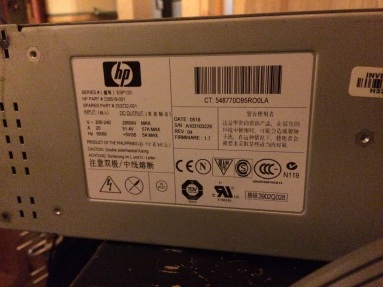
I picked up the power supply on good terms at Dayton some years ago and finally managed to get around to hooking it up after I put two 240-volt, 20-amp circuits in my shack this spring/summer. I used a molded air conditioner extension cord with the female end cut off to attach it to the wall. Hot-ground-hot is the wiring on the AC input side. On the output, there is a jumper block and two pairs of blade connectors, with one pair being positive and the other negative, strapped together. In the middle of the output there is a jumper block.
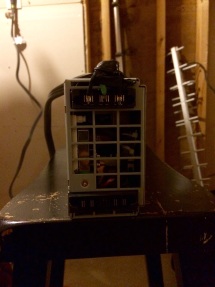
Here is where the steps differ from the W8ZN steps: instead of shorting two pairs of pins together, this power supply requires three in a line to be shorted together. It’s visible in the photo below, I think. The center row.
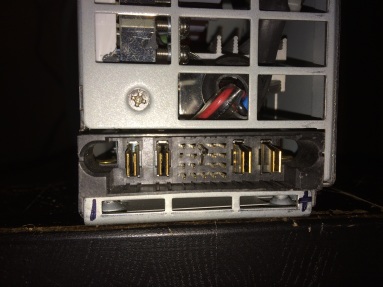
I’m getting 51.4 volts unloaded. Load will be described in the future as it comes to be…
Ethan Miller, K8GU, is a regular contributor to AmateurRadio.com and writes from Maryland, USA. Contact him at [email protected].
Another VE3KCL Balloon Adventure
 |
| courtesy: http://qrp-labs.com/ and https://www.google.ca/maps/ |
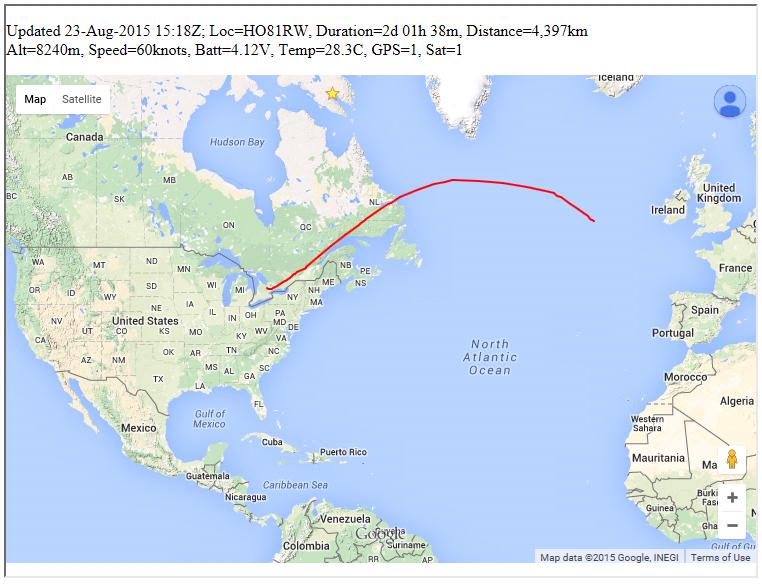
Like earlier flights, 'S-4' also uses a special U3 firmware version on an Arduino Nano board, with a QRP Labs Synthesiser, along with two hydrogen-filled party balloons with HF antennas hung between them. You can read all about Dave's previous flights here and keep up on the balloon's track here.
The balloon is transmitting data regularly on the following schedule:
0:00 CW ID, and 22wpm CW on 30m, 20m and 17m bands
0:01 JT9 on 10,140,450: "#CS#AT" (callsign, altitude)
0:02 JT9 on 10,140,450: "#LT#A0" (latitude, temperature on analogue A0)
0:03 JT9 on 10,140,450: "#LN#A3" (longitude, battery on analogue A3)
0:04 JT9 on 10,140,450: "#M6#GS" (6-char Maidenhead locator, groundspeed)
0:05 JT9 on 14,078,450: "#CS_#M6" (callsign, 6-char Maidenhead locator)
0:06 WSPR on 10,140,250 (standard WSPR transmission)
0:08 WSPR on 10,140,250 with special data telemetry encoding
0:10 22wpm CW on 15m, 10m and 6m bands
0:11 Calibration
0:12 Repeat...
Frequencies to listen on are:
Minute Mode Tag Frequency (Notes)
00:00 CWID. 10.140450 (GPS off)
00:12 CW 05 10.139150
00:27 CW 05 14.100550
00:42 CW 05 18.109150
01:00 JT9 00 10.140450
02:00 JT9 03 10.140450
03:00 JT9 04 10.140450
04:00 JT9 01 10.140450
05:00 JT9 02 14.078450
06:00 WSPR. 10.140250 (normal WSPR)
08:00 WSPR. 10.140250 (encoded WSPR)
09:50 CW 05 21.150150 (GPS on)
10:05 CW 05 28.205150
10:20 CW 05 50.070150
10:35 QRSS. 10.140450 (continuous 'space')
10:55 calibration
12:00 restart the sequence
Let's wish Dave luck and hope that this one makes a successful circumnavigation. It would be the first by a Canadian amateur I believe.
Steve McDonald, VE7SL, is a regular contributor to AmateurRadio.com and writes from British Columbia, Canada. Contact him at [email protected].
 Ham Radio Deluxe |
 W5SWL Electronics |
 Ham Radio Prep |
 KB3IFH QSL Cards  Hip Ham Shirts  HamRadioAuctions HamRadioAuctions Reliance Antennas Reliance Antennas Enigma Shop Enigma Shop |  morseDX  Ni4L Antennas  R&L Electronics R&L Electronics antennas.us antennas.us QRV QRV |
- Matt W1MST, Managing Editor
