 |
 Hunting For NDBs In CLE 197
 19 August 2015 | by
 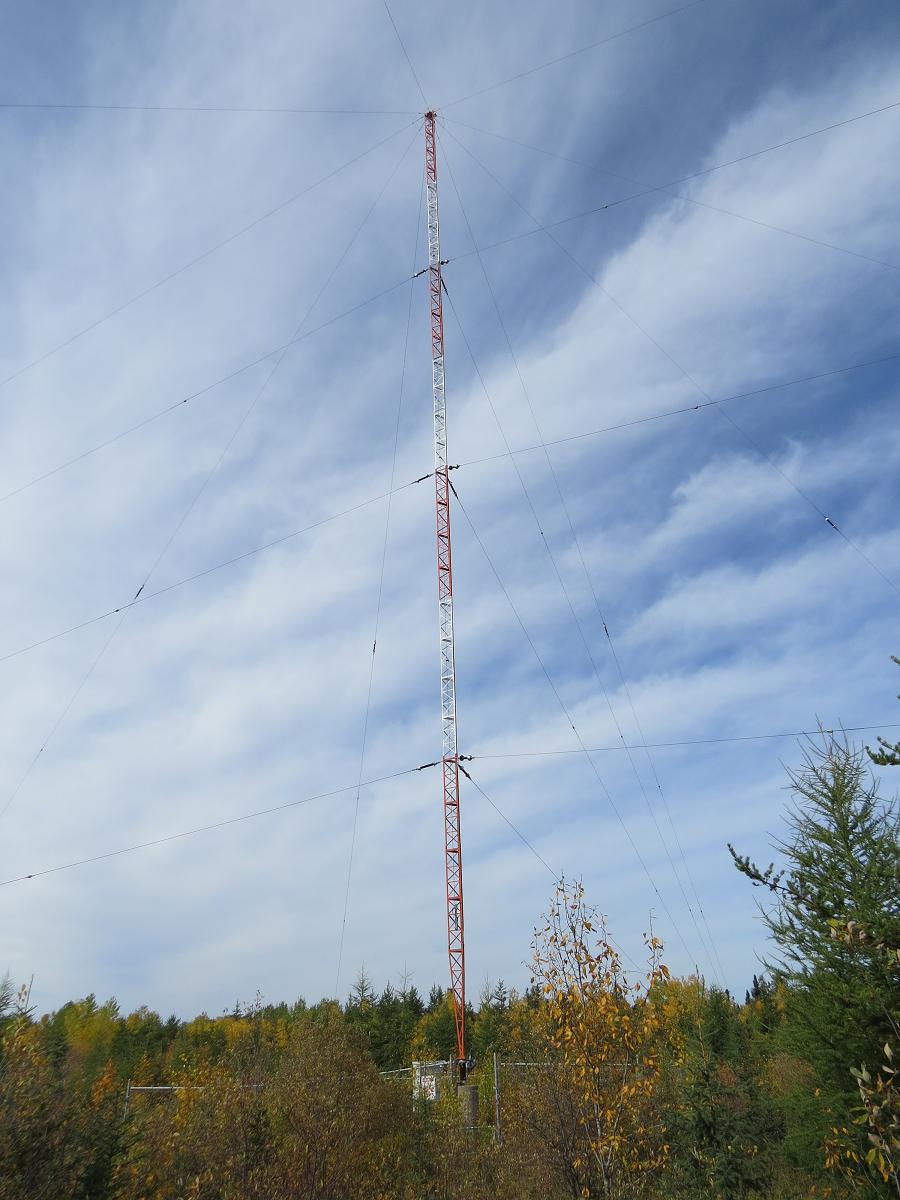 |
| 'ZSJ-258' Sandy Lake, ON |
A list of all of the North American targets in this range can be found in the RNA database, while targets for European DXers will be found here... specify the frequency range wanted and check 'show all results'.
An excellent target for this CLE is 'ZSJ', the Sandy Lake, Ontario NDB (258KHz) shown here. Its 500W signal and big antenna get out very well ... it has been heard in Europe as well as in Hawaii.
From CLE coordinator Brian Keyte (G3SIA) comes the following reminder:
Here are the final details for our 197th co-ordinated listening event this
weekend. First timer logs too? Yes, please!
Days: Friday 21 August to Monday 24 August
(that's a week earlier than usual)
Times: Start and end at midday, your LOCAL TIME
Range: 240.0 - 259.9 kHz plus 420.0 - 439.9 kHz
(BOTH ranges are for ALL listeners)
Please log NDBs that you can positively identify in the ranges, plus any
UNIDs that you come across there.
Send your CLE log to the List, if possible as a plain text email and
not in an attachment, with CLE197 at the start of its title.
Show on EVERY LINE of your log:
# The Date (or day 'dd') and UTC (the day changes at 00:00 UTC).
# kHz - the beacon's nominal published frequency (if you know it).
# The Call Ident.
Please show those main items FIRST on each line, then any optional details
such as Location, Offsets, Distance, etc.
If you send interim logs, do make sure that you also send a 'Final' log
containing all your loggings. As always, please make your log useful and
interesting to everyone by including your own location and brief details
of your receiver, aerial(s) and any recording equipment that you used.
I will send the usual 'Any More Logs?' email at about 17:00 UTC on
Tuesday so that you can check that your Final log has been found OK.
Do make sure that your log has arrived on the List at the very latest by
08:00 UTC on Wednesday 26th August.
I hope to complete the combined results later on that day.
You can find CLE-related information from the CLE page,
http://www.ndblist.info/cle.htm , including access to the seeklists
that have been made for the event from REU/RNA/RWW.
(NB: To also see a MAP of the seeklist NDBs around you, just change
'List' to 'Map', select 'All Results' and uncheck 'Clustering')
Good listening
Brian
----------------------------------------------------------
From: Brian Keyte G3SIA ndbcle'at'gmail.com
Location: Surrey, SE England (CLE co-ordinator)
----------------------------------------------------------
(Reminder: You could use any one remote receiver for your loggings,
stating its location and owner - with their permission if required.
A remote listener may NOT also use another receiver, whether local or
remote, to obtain further loggings for the same CLE).
These listening events serve several purposes. They:
- determine, worldwide, which beacons are actually in service and on-the-air so the online database can be kept up-to-date
- determine, worldwide, which beacons are out-of-service or have gone silent since the last CLE covering this range
- will indicate the state of propagation conditions at the various participant locations
- will give you an indication of how well your LF/MF receiving system is working
- give participants a fun yet challenging activity to keep their listening skills honed
Final details can be found at the NDB List website, and worldwide results, for every participant, will be posted there a few days after the event. If you are a member of the ndblist Group, results will also be e-mailed and posted there.
The very active Yahoo ndblist Group is a great place to learn more about the 'Art of NDB DXing' or to meet other listeners in your region. There is a lot of good information available there and new members are always very welcome.
If you are contemplating getting started on 630m, listening for NDBs is an excellent way to test out your receive capabilities as there are several NDBs located near this part of the spectrum.
You need not be an ndblist member to participate in the CLEs and all reports, no matter how small, are of much value to the organizers. 'First-time' logs are always VERY welcome!
Reports may be sent to the ndblist or e-mailed to either myself or CLE co-ordinator, Brian Keyte (G3SIA), whose address appears above.
Please...do give the CLE a try....then let us know what NDB's can be heard from your location! Your report can then be added to the worldwide database to help keep it up-to-date.
Steve McDonald, VE7SL, is a regular contributor to AmateurRadio.com and writes from British Columbia, Canada. Contact him at [email protected].
Build a $2 USB Radio Programming Cable
| Frustrated with that generic programming cable? This $2 solution might just be your ticket to sanity. | |||||||||
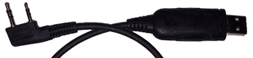 | |||||||||
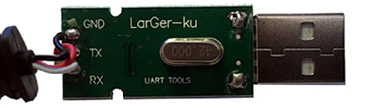
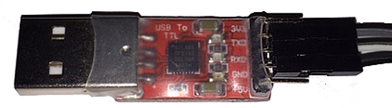
| Let’s See…You purchased a radio and programming cable, loaded the software, and that’s as far as you’ve gotten. You’re fighting with error messages: – Radio did not respond – Could not open COM port – Run Time Error and Windows (TM) 10 keeps changing your drivers.Now you do what many owners do. Put the radio in the drawer to be worked on later. This is like buying a rollaway treadmill and putting it in the closet until the next time you want to exercise. (NOT gonna happen)But wait, yours has the company name and logo right on the cable. – It doesn’t matter. Keep reading.There are a few options available, such as an FTDI cable. It’s truly Plug ‘n Play, and costs about $20.But here’s a project that just might solve the issue for around $2. All you need is a small flat blade screwdriver, a soldering pencil, and a CP2102 board. CP2102 The CP2102 is a USB to TTL UART chip. What? CP2102 boards can be found on eBay for around $2 and on Amazon. Here’s How Let’s start with that original cable.
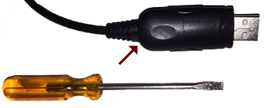
Take a small screw driver and pry the open the case from the back where the cable enters.
It should only be snapped together.
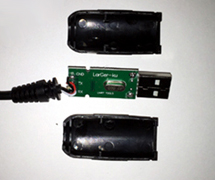
Unsolder the 3 wires connected to the board.
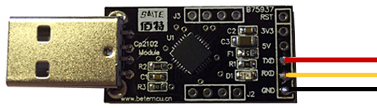
Solder the 3 wires to the corresponding terminals on the new board. Note 1: Some boards may have the TxD and RxD reversed. If it doesn’t work the first time, reverse the two wires. No damage has been done. Note 2: Some boards have pins on the back requiring small connectors. You can either remove the pins, solder to them, or use the connectors. Whatever floats your boat.
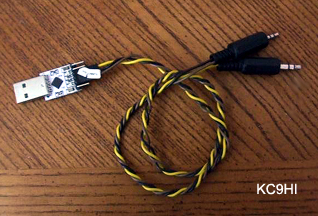
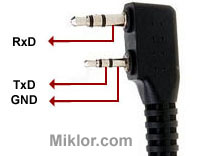
Driver If the driver is labeled CH340 instead of CP210x in Device Manager, that’s not a problem. Both chips are designed to do the same thing. But I don’t have a Cable If you don’t have a generic cable, you can use 2.5 and 3.5mm stereo jacks. Here are the pin outs, and what Jim’s (KC9HI) cable looks like.
Cosmetics If you are adventurous, try retrofitting the new board inside the original plastic housing. This will require a Dremel tool, X-Acto knife, Glue, and some patience, but it can be done. If the board only has 5 terminals instead of 6, it’s not an issue. You only need GND, TX and RX. Some come protected with a piece of clear heat shrink over the board so you can see the cool blinking lights. Note 3: If you are trying to retrofit the board inside an existing shell, the red board below is a bit shorter and easier to fit.
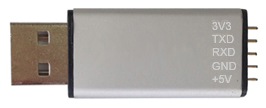
For a dollar or so more, you can find the same boards in a metal case.
What’s the Advantage – First and Foremost, it works. Take the radio out of the drawer, program it and have some fun. – Next, it only cost around $2 to save the generic cable from the trash. – Very Important – Bragging Rights. Now, when you go to a club meeting and someone says they can’t get their cable to work, tell them they can build their own, just as you did. I hope you had fun with this project. It’s super simple and very rewarding. I’ve made several and never had a failure. Say goodbye to driver issues.
|
John 'Miklor', K3NXU, is a special contributor to AmateurRadio.com and writes from Pennsylvania, USA. Contact him at [email protected].
Shack photo
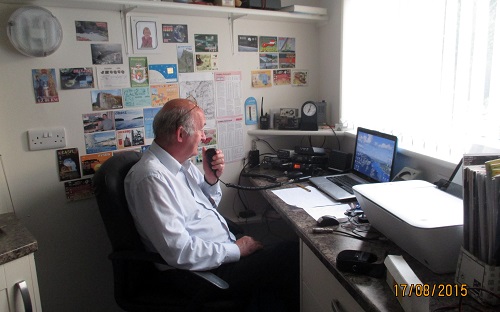
This was me on the 2m FM net in East Cambridgeshire last night. There were only 3 of us on last night. These days I tend to use WSPR quite a bit as my voice is still pretty poor. We meet on 144.575MHz FM at 8pm local time most Mondays. Note, this is in the all-mode section. Newcomers are always welcome to join us. QSOs are never more than 1 hour and frequently much less.

Roger Lapthorn, G3XBM, is a regular contributor to AmateurRadio.com and writes from Cambridge, England.
630m Trans-Pacific Path Alive

In spite of the recent high levels of geomagnetic disturbance (or maybe because of it), just as it did last year at this time, the path between North America and Australia has sprung to life once again. Last night saw the reception of both WH2XND (NI7J), in Phoenix and WG2XXM (K5DNL), near Oklahoma City, by VK2XGJ in New South Wales, Australia. Not to be left out, VK2DDI, also in NSW, copied WG2XXM as well. Some of K5DNL's 630m gear can be seen here.
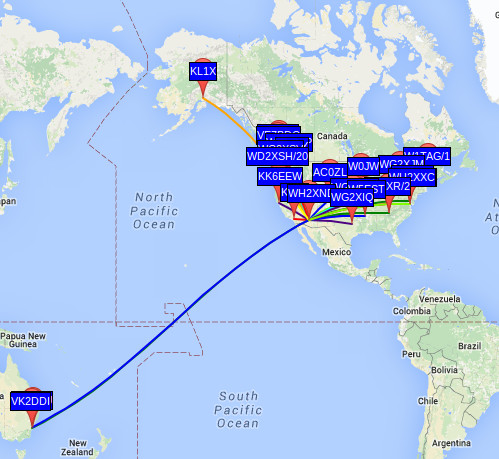 |
| courtesy: John Langridge (WG2XIQ / KB5NJD) |
The American beacons were operating in the WSPR mode, which has become very popular amongst 630m experimenters as well as those just interested in listening-in. WSPR is not a QSO mode but strictly a one-way 'beacon' mode. Although two stations may each spot each other, it is not considered to be a valid two-way QSO. A check of evening WSPR activity will often reveal dozens of stations actively spotting what they are hearing.
VK2DDI runs the Berry Mountain Grabber, providing other VK and ZL experimenters a handy way of checking their system progress or propagation conditions but during good T-P nights, it can be a good place for U.S. stations to watch for their signals as well.
If you have been doing any WSPR work on HF, you might be surprised at what you can hear down on 630m, even without a dedicated antenna for that band. Surprisingly good results can often be had with a non-resonant antenna as the signal to noise ratio can often be better even though signals may sound weaker. Give it a try and spot what you hear!
If you are interested in learning how to receive WSPR, here is a nice tutorial by ZS6SGM.
Should you be interested in knowing more about obtaining a Part 5 licence to transmit on 630m, John, KB5NJD / WG2XIQ, has a wonderful 630m resource page here, as well as more details about the recent down-under receptions. While there, be sure to check out his up-to-date 630m links page. He can be contacted via email or you can find him hanging-out most nights on the ON4KST kHz (2000-630m) chat page.
To keep on top of what is happening or who is on-the-air, most LF'ers rely on three sources:
- the RSGB LF Group reflector
- the Lowfer list
- the LWCA Message Board
Radio amateurs in Canada have had 630m as an amateur band since May of last year but unfortunately are not allowed to contact any of the experimental stations. Hopefully the U.S. will also obtain 630m as a ham band some time soon. In the meantime, a Part 5 licence for any U.S. amateurs would be a good way to be all set when that day eventually comes!
Steve McDonald, VE7SL, is a regular contributor to AmateurRadio.com and writes from British Columbia, Canada. Contact him at [email protected].
Frog Transceiver
You will have doubtlessly heard about the super cheap Pixie QRP TXRX. Well for those feeling a little flush there is a (and always has been) a real high powered alternative knocking about on eBay. The Frog Transceiver is around the £8 mark at the moment and will give you about 1.5w on 40m and an evenings worth of fun putting it together.
 I’m off work this week for my summer hols and in between kayaking on the sea, being eaten alive in Ennerdale by voracious midges (my own fault for going there when there was no wind and not taking any insect repellent) I’d planned on assembling this little friend to add to my growing collection (along with the Pixie).
The PCB is as one would expect, not bad but not brilliant, components are fit for purpose but the packaging was a little shabby with everything just thrown in a bag, not much protection for the IC’s. So I’m getting my excuses in early….this might not work!
Still £8 is less than an evening at the pub, less than a trip to the cinema (for one) but more than a Pixie 
Alex Hill, G7KSE, is a regular contributor to AmateurRadio.com and writes from Cumbria, UK. Contact him at [email protected].
The 10 Essentials for Hiking (and SOTA Activations)
 Most backcountry hikers are familiar with the Ten Essentials that you should take with you whenever you head into the wilderness. Over the past few years, I noticed that I was getting a bit sloppy with regard to what is actually in my pack when I head out on the trail. This hit home one day when my GPS battery went dead. I fumbled around to find my compass which was supposed to be in my pack. Well, it was in my pack, the other one that I left at home.
This caused me to review the list of ten essentials to make sure I had the right stuff in my kit. A search on the internet revealed that the classic list of ten has been modified and augmented by various people to make it better. (Innovation runs rampant on the interwebz, you know.) One of the better resources I found was this page on the REI web site, which explains how the Classic Ten Essentials have been updated to the Ten Essential Systems:
- Navigation (map and compass)
- Sun protection (sunglasses and sunscreen)
- Insulation (extra clothing)
- Illumination (headlamp/flashlight)
- First-aid supplies
- Fire (waterproof matches/lighter/candles)
- Repair kit and tools
- Nutrition (extra food)
- Hydration (extra water)
- Emergency shelter
Read through the REI web page to get the fine points of this system approach. I won’t repeat that information here. They also include a Beyond the Top Ten list which calls out the need for:
Communication device: Two-way radios, a cell phone or a satellite telephone can add a measure of safety in many situations.
Of course, what they really mean is an amateur radio transceiver and antenna but they probably can’t say that in print due to licensing issues. (Not everyone in the backcountry has an FCC ham license. I know, they all should have an amateur license but many don’t…very hard to understand.)
So how are you doing with your Ten Essentials list? Are you consistent in taking along the right stuff in your pack? Any tips to share with hiking hams?
73, Bob K0NR
The post The 10 Essentials for Hiking (and SOTA Activations) appeared first on The KØNR Radio Site.
Bob Witte, KØNR, is a regular contributor to AmateurRadio.com and writes from Colorado, USA. Contact him at [email protected].
On a scale of 1 to 10
The day started sunny and bright. As soon as I walked outside at 7:00 AM, it was easy to tell it was going to be a hot one. Summer! I love it!
I set out one of my 12 Volt SLA batteries on a patio chair in the backyard and hooked up one of my small solar panels to get it charged up. I had used the battery as a power source so I could program the Juentai VHF/UHF radio in the house, as well as to do some test transmissions. At 20 Watts out, I depleted the battery rather quickly, so I took the opportunity to use sunny days both yesterday and today to get it back up to full capacity.
I had gone to Mass on Saturday evening, so I used the quiet time (and "cool" morning) to install the Jeuntai into the Jeep. I mounted it "sideways" to the front console in the Patriot, where the transmission gear shift stick is. This is a really lousy photo, but it will show you what I mean:

I had to go to Home Depot to get some shorter sheet metal screws. The ones that came with the unit were about 3/4" long. I put my hand up and in behind the housing/fairing and could not feel anything vital behind my proposed mounting area, but I still wanted shorter screws. I got some 3/8" ones that did the job magnificently. The unit will sit a few inches from my right knee, but it is completely out of the way and non-interfering with the operation of the car. Not that I use it that much, bit it's great to have VHF/UHF in the car again.
Shortly after, I went down the basement shack to see if I could work any lighthouses during International Lighthouse and Lightship Weekend. The bands were terrible! I managed to hear and work one - W8F, the Fort Gratiot lighthouse at Port Huron. Michigan. QSB was terrible, but I gave Stan a 579 and he gave me the same.
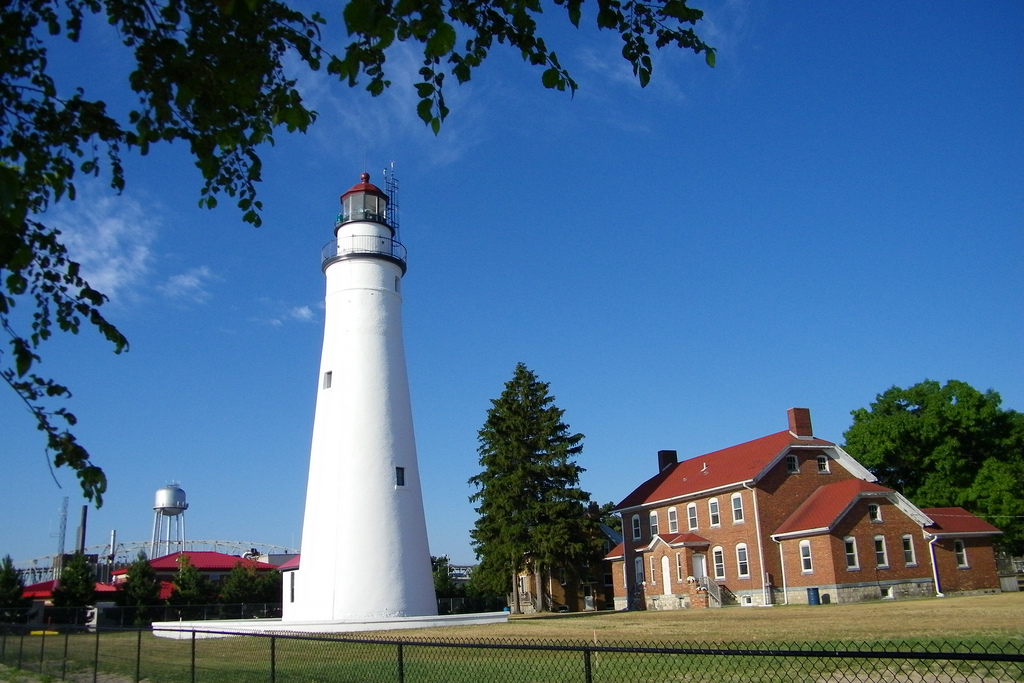
Then at 1:30 PM, I left to take a short drive over to Dave KD2FSI's house. Dave was hosting the South Plainfield Amateur Radio Club's Digital Rookie Roundup effort. He had his two Yaesu's hooked up and raring to go. He also had on display a Heathkit transciever that he recently bought at the Sussex County Amateur Radio Club Hamfest in July. Talk about pristine! Dave "lifted the hood" and let us take a look inside - it looked like it was built yesterday. It is immaculate, and looks like brand spanking new. And on the table next to it was an HW-8.
The bands were as terrible at Dave's house as they were at mine (surprise!). There wasn't a lot of Rookie RTTY activity, so Dave graced us with demos of PSK31 and the other digi modes and we had a great time shooting the breeze. Marv K2VHW and Drew W2OU were there in addition to a couple of Dave's neighborhood friends. I think between Dave, Marv, Drew and I, we gave his friends a good enough rundown on Amateur Radio that they could have passed the Tech test had we given it to them!
I had to leave at around 3:30 PM as I had promised my son Joey and my wife Marianne that I would accompany them to the community pool this afternoon. They've made use of the pool a lot this summer, and I haven't - so I promised I would go today. As I was leaving Dave's house and saying my good-byes, Dave says to me, "Make sure you don't leave without your radio." All I could do was shoot him a "?????" look. "The HW-8 ..... it's yours."
I was speechless. He had said that he had read somewhere (guess where?) that the HW-8 was my first QRP rig and that I had very much regretted parting with it years back. He had his son scour eBay for a good deal and acquired it for me. I was still speechless. I managed to croak out a "Thanks, Dave - you shouldn't have". But that is soooooooo inadequate. Dave has a heart of gold and as much as that HW-8 means to me, Dave's frienship means even more. I can't ever re-pay his generosity, but that sure doesn't mean that I'm not going to try - somehow, someway, someday.

As you can see, the rig is in pristine condition, besides the writing on the power supply, there's not a mark or scratch on it. Whoever had it made one modification that I can tell, they traded out the original RCA connector that was used for the antenna connection with an SO-239 - so that's perfect! This baby is going to get a lot of use. Yes, it's a HW-8, but I now have one back in my hands, and it's also a testament to the generosity of a great Ham and better yet, a great friend.
I did go to the pool with Marianne and Joey and even went in the water. I stayed at the shallow 3 foot end as I never learned how to swim as a kid. Even so, Marianne, Joey and I stayed there for about two hours, enjoying the cool water and we played a game of catch with this "Wubba" pool ball (small, soft, floats, unsinkable) that Joey had purchased when we were up at Lake George.
The evening was rounded out with a delicious dinner of grilled Teriyaki chicken, baked taters and corn, all consumed while leisurely sitting around the patio table in the back yard. We were able to enjoy the cooler evening air and each other's company.
So, yeah, on a scale of 1 to 10, today was about a 30 - heck, maybe even a 50!
72 de Larry W2LJ
QRP - When you care to send the very least!
Larry Makoski, W2LJ, is a regular contributor to AmateurRadio.com and writes from New Jersey, USA. Contact him at [email protected].
 Ham Radio Deluxe |
 W5SWL Electronics |
 Ham Radio Prep |
 KB3IFH QSL Cards  Hip Ham Shirts  HamRadioAuctions HamRadioAuctions Reliance Antennas Reliance Antennas Enigma Shop Enigma Shop |  morseDX  Ni4L Antennas  R&L Electronics R&L Electronics antennas.us antennas.us QRV QRV |
- Matt W1MST, Managing Editor
