 |
 Ham College 57
 28 September 2019 | by
 Ham College episode 57 is now available for download.
General Amateur Radio Exam part 28. Alternative Power and Electrical Safety.
01:28:27
George Thomas, W5JDX, is co-host of AmateurLogic.TV, an original amateur radio video program hosted by George Thomas (W5JDX), Tommy Martin (N5ZNO), Peter Berrett (VK3PB), and Emile Diodene (KE5QKR). Contact him at [email protected].
This Spewed Out of the Internet #36
 It has been quite a while since I’ve done an “internet spew” post, so here’s a bunch of exciting stuff flowing forth from the interwebz.
Mt Herman is the Most Radio Active (SOTA) Mountain in Colorado. I noticed there wasn’t a good writeup with how to hike and activate it, so I wrote this one up: Hiking Mt Herman for SOTA.
Broken Callsign
I keep an alert on my smartphone for whenever I get spotted on the ham bands. Mostly, this is a way to confirm that I get spotted when activating a SOTA summit. The other day, I was spotted on 20m CW, when I haven’t worked that band/mode in over a decade.
 These spots came from the Reverse Beacon Network (RBN), so I pulled the spot data from RBN for that day (483,362 spots). A little bit of searching revealed there were spots for K0NF on almost the same frequency a few minutes off in time going 37 to 40 wpm. Miss one dit and you get K0NR. Mystery solved.
Marconi Station
Last week, I visited the site of the Marconi station on Cape Cod that made the first transatlantic two-way wireless contact. There is not much there…just a stone marker. Yes, I understand Marconi was not real active on VHF.

Legos and Ham Radio
I came across this video of a clever Lego project with a ham radio theme:
ICQ Podcast Interviews the ARRL CEO
This ICQ podcast includes Frank Howell (K4FMH) interveiwing the ARRL CEO and Secretary Howard Michel (WB2ITX), who provides an update from the recent ARRL committee meeting. I like Howard’s style and appreciate his willingness to engage with radio hams.
Regulation By Bandwidth
Dan/KB6NU writes that the ARRL renewed its request to the FCC to replace the symbol rate rule on digital transmissions and move to regulating by bandwidth. On the surface, this seems like a no-brainer thing to do: regulating by symbol rate is archaic and limits the use of new, more efficient modulation techniques. But drill in deeper and you’ll find there are legitimate concerns about protecting narrowband emissions (e.g., CW) and not allowing automated stations to dominate the ham bands. Still, it seems like a reasonable approach can be found. Stay tuned on this one.
73 Bob K0NR
The post This Spewed Out of the Internet #36 appeared first on The KØNR Radio Site.
Bob Witte, KØNR, is a regular contributor to AmateurRadio.com and writes from Colorado, USA. Contact him at [email protected].
LHS Episode #304: Cloudlog Deep Dive
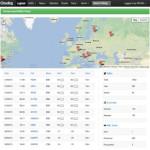
Hello and welcome to the 304th installment of Linux in the Ham Shack. In this episode, the hosts take an in-depth look at the Cloudlog amateur radio logger. Leveraging Web server technology with PHP, hamlib for rig access and connectivity to the major online logging services like LoTW and eQSL, Cloudlog creates a distributed logging infrastructure for keeping all your QSLs properly organized. Join us as we explore the past, present and future of Cloudlog.
73 de The LHS Crew
Russ Woodman, K5TUX, co-hosts the Linux in the Ham Shack podcast which is available for download in both MP3 and OGG audio format. Contact him at [email protected].
Recent BCB Loop DX / Upcoming CLE248
I’ve had my 10' x 20' loop and Perseus SDR combination running a few overnight recordings on the AM broadcast band ... two mornings pointing at Asia and two overnights looking for domestic signals from the east.
The Asian signals have often been very strong, with many signals reaching S9 or higher. I’ve chosen some of the better ones below. Unlike those situated right on the west coast, my location here on Mayne Island gives me a nice shot towards Japan albeit not directly over the ocean, but close enough, as the path crosses islands to my north and then over northern Vancouver Island.
Looking towards eastern North America is a different story, with an unobstructed ocean view from due north to the south east.
As is often the case with overnight recordings, I did not get nearly enough time to thoroughly check them out but one catch caught my attention. It was from WPTX in Lexington Park, Maryland, on 1690kHz. This station supposedly runs 1kW at night and 10kW during the day but on this night (Sept 16), I heard their top-of-hour ID for three consecutive hours! I wonder if someone ‘forgot’ to switch to nightime power or if conditions were just really good? I have heard them again since with two TOH IDs but much weaker and sounding more like a 1kW station should sound!
JOAK - 594kHz in Shobu, Japan (13:30 UTC Sept 20)
JOUB - 774kHz in Akita, Japan (14:00 UTC Sept 20)
(with English lessons)
HLAZ - 1566kHz in Cheju, South Korea (13:30 UTC Sept 20)
(broadcasting in Japanese in this time slot)
Voice of America (VOA) - 1575kHz in Ban Phachi, Thailand (13:30 UTC Sept 20)
(listen for "This is the Voice of America" ID and then into "Yankee-Doodle-Dandy")
************************
Hunting For NDBs In CLE248
Yes! Another month has passed and it's CLE time once again.
This time the hunting grounds will be: 275 kHz - 425 kHz.
For those unfamiliar with this monthly activity, a 'CLE' is a 'Co-ordinated Listening Event', as NDB DXers around the world focus their listening time on one small slice of the NDB spectrum.
If you've been meaning to participate in CLE, then maybe this weekend is a fine time to try! Lately, we've had a lot of first time submissions so you won't be alone!
As well, if you're trying to learn CW, copying NDBs is perfect practice, as the identifier speed is generally slow and the letters are repeated again every few seconds!
At this time of the season, summer lightning storms should be starting to wane and propagation can often be as good as mid-winter if the lightning cooperates.
When tuning for NDBs, put your receiver in the CW mode and listen for the NDB's CW identifier, repeated every few seconds. Listen for U.S. NDB identifiers approximately 1 kHz higher or lower than the published transmitted frequency since these beacons are modulated with a 1020 Hz tone approximately.
For example, 'AA' near Fargo, ND, transmits on 365 kHz and its upper sideband CW identifier is tuned at 366.025 kHz while its lower sideband CW ident can be tuned at 363.946 kHz. Its USB tone is actually 1025 Hz while its LSB tone is 1054 Hz.
Often, one sideband will be much stronger than the other so if you don't hear the first one, try listening on the other sideband.
Canadian NDBs normally have an USB tone only, usually very close to 400 Hz. They also have a long dash (keydown) following the CW identifier.
All NDBs heard in North America will be listed in the RNA database (updated daily) while those heard in Europe may be found in the REU database. Beacons heard outside of these regions will be found in the RWW database.
From CLE organizer Brian Keyte, G3SIA, comes the details:
Hi all
Our 248th Listening Event just squeezes into the last weekend of this month.
Worth waiting for because it is a 'Special', our fifth 'Channels Challenge'.
It's a simple idea, but one that we always seem to enjoy:
Days: Friday 27 September - Monday 30 September
Times: Start and end at midday, your LOCAL time
Range: 275 kHz - 425 kHz (see below)
Target: Try to log ANY ONE NDB in each channel
The 'channel' means the NDB's nominal (published) frequency.
EITHER 321.0 OR 321.5 kHz would be OK for channel 321, etc.
So it means a possible maximum of 151 loggings in all, though that would
probably be miraculous, even for the best placed of us!
All the NDBs must be 'normal' ones (no DGPS, Amateur, etc.) and
no UNIDs in your main list. Yes, it does include those more
challenging frequencies in the DGPS range.
If you want to add extra interest you could also choose to:
Maximise the number of radio countries you hear or
Maximise the total distance to the NDBs you hear or
Maximise the number of 'midday' loggings - i.e. NDBs logged
within 2 hours of midday by your local winter clock time.
It will be extra tough for North American listeners, with their many 'empty'
channels. Southern Hemisphere and Europe listeners should be more lucky.
Our last 'Channels Challenge' was CLE231 in April 2018.
Please look out for the 'Final Details' a few days before the start.
73
Brian
-------------------------------------------------------------------------
From: Brian Keyte G3SIA (CLE coordinator)
ndbcle'at'gmail.com
-------------------------------------------------------------------------
These listening events serve several purposes. They:
- determine, worldwide, which beacons are actually in service and on-the-air so the online database can be kept up-to-date
- determine, worldwide, which beacons are out-of-service or have gone silent since the last CLE covering this range
- will indicate the state of propagation conditions at the various participant locations
- will give you an indication of how well your LF/MF receiving system is working
- give participants a fun yet challenging activity to keep their listening skills honed
The NDB List Group is a great place to learn more about the 'Art of NDB DXing' or to meet other listeners in your region. There is a lot of good information available there and new members are always very welcome. As well, you can follow the results of other CLE participants from night to night as propagation is always an active topic of discussion.
You need not be an NDB List member to participate in the CLEs and all reports, no matter how small, are of much value to the organizers.
Remember - 'First-time' logs are always VERY welcome!
Reports may be sent to the NDB List Group or e-mailed to CLE co-ordinator, Brian Keyte (G3SIA), whose address appears above. If you are a member of the group, all final results will also be e-mailed and posted there.
Please ... give the CLE a try ... then let us know what NDB's can be heard from your location! Your report can then be added to the worldwide database to help keep it up-to-date.
Have fun and good hunting!
Steve McDonald, VE7SL, is a regular contributor to AmateurRadio.com and writes from British Columbia, Canada. Contact him at [email protected].
Weekly Propagation Summary – 2019 Sep 23 16:10 UTC
Here is this week’s space weather and geophysical report, issued 2019 Sep 23 0156 UTC.
Highlights of Solar and Geomagnetic Activity 16 – 22 September 2019
Solar activity was at very low levels. No sunspots were observed on the visible disk. An approximately 20 degree filament erupted near S35W02 around 19/2200 UTC which produced a narrow, slow-moving CME signature near the Sun-Earth line. Modeling of the event suggested most of the ejecta was oriented south and eastward of Earth's orbit; however, Earth may still observe weak influence from the periphery of the CME.
No proton events were observed at geosynchronous orbit.
The greater than 2 MeV electron flux at geosynchronous orbit was at normal to moderate levels from 16-21 Sep and dropped to just normal levels through 22 Sep.
Geomagnetic field activity was quiet to active conditions. Elevated wind speeds from a waning positive polarity CH HSS produced isolated active conditions on 16 Sep. Variable phi angle on 17 Sep suggested influence from a SSBC, cause a period of isolated active conditions. Quiet to unsettled levels on 18 Sep decreased to just quiet levels on 19-20 Sep. A brief period of southward Bz produced a single period of unsettled on 21 Sep. The remainder of the summary period was quiet.
Forecast of Solar and Geomagnetic Activity 23 September – 19 October 2019
Solar activity is expected to be at very low levels over the outlook period.
No proton events are expected at geosynchronous orbit.
The greater than 2 MeV electron flux at geosynchronous orbit is expected to range from normal to high levels. High levels are expected on 28 Sep – 12 Oct and 14 Oct; moderate levels are expected on 24-27 Sep, 13 Oct, and 15-18 Oct. The remainder of the outlook period is expected to be at normal levels. All enhancements in electron flux are in anticipation of multiple, recurrent CH HSSs.
Geomagnetic field activity is expected to be at quiet to G2 (Moderate) geomagnetic storm levels. G2 levels are expected on 28 Sep followed by G1 (Minor) geomagnetic levels on 29 Sep. Active conditions are expected on 23-25 Sep, 30 Sep and 06 Oct. Unsettled conditions are expected on 26-27 Sep, 01-03 Oct, 10 Oct and 12-15 Oct. The remainder of the outlook period is expected to be at quiet levels. All enhancements in geomagnetic activity are in anticipation of multiple, recurrent CH HSSs.
Don’t forget to visit our live space weather and radio propagation web site, at: http://SunSpotWatch.com/
Live Aurora mapping is at http://aurora.sunspotwatch.com/
If you are on Twitter, please follow these two users: 1. https://Twitter.com/NW7US 2. https://Twitter.com/hfradiospacewx
– – – – – – – – – – – – –
Be sure to subscribe to our space weather and propagation email group, on Groups.io
https://groups.io/g/propagation-and-space-weather
Spread the word!
– – – – – – – – – – – – –
Links of interest:
+ Amazon space weather books: http://g.nw7us.us/fbssw-aSWSC
+ https://Twitter.com/NW7US
+ https://Twitter.com/hfradiospacewx
Space Weather and Ham Radio YouTube Channel News:
I am working on launching a YouTube channel overhaul, that includes series of videos about space weather, radio signal propagation, and more.
Additionally, I am working on improving the educational efforts via the email, Facebook, YouTube, Tumblr, and other activities.
You can help!
Please consider becoming a Patron of these space weather and radio communications services, beginning with the YouTube channel:
https://www.patreon.com/NW7US
The YouTube channel:
https://YouTube.com/NW7US
..
Visit, subscribe: NW7US Radio Communications and Propagation YouTube Channel
LHS Episode #303: The Weekender XXXIV

It's time once again for The Weekender. This is our bi-weekly departure into the world of amateur radio contests, open source conventions, special events, listener challenges, hedonism and just plain fun. Thanks for listening and, if you happen to get a chance, feel free to call us or e-mail and send us some feedback. Tell us how we're doing. We'd love to hear from you.
73 de The LHS Crew
Russ Woodman, K5TUX, co-hosts the Linux in the Ham Shack podcast which is available for download in both MP3 and OGG audio format. Contact him at [email protected].
New excellent links added.
One person that always inspires me with his enthusiasm for Real HF Mobile radio, is Dave G4AKC.

Dave often takes off to the front of Blackpool promenade, on either his bike, or his recent electric trike towing a trailer load of equipment behind him, that puts most shack's to shame. His late night shift on the cold sea front, or early mornings well wrapped up, quite often produces some long path and rare DX surprises that you wouldn't get from the home QTH, due to a good signal bounce off the sea water and lower noise being out in the open making reception far easier.
The G4AKC website https://www.g4akc.co.uk/ where you can learn more about his exploits has now been added to my Blog right hand panel "Sites that do it for me links".
Another good Blog link EI7GL for Ireland has also been updated in "My Blog List" link again on the right hand panel.
Steve, G1KQH, is a regular contributor to AmateurRadio.com and writes from England. Contact him at [email protected].
 Ham Radio Deluxe |
 W5SWL Electronics |
 Ham Radio Prep |
 KB3IFH QSL Cards  Hip Ham Shirts  HamRadioAuctions HamRadioAuctions Reliance Antennas Reliance Antennas Enigma Shop Enigma Shop |  morseDX  Ni4L Antennas  R&L Electronics R&L Electronics antennas.us antennas.us QRV QRV |
- Matt W1MST, Managing Editor
