 |
 Death of 20m incorrectly reported
 9 December 2010 | by
 It’s a good job I looked at the beacon reports this morning or I wouldn’t have noticed that there were no reception reports for the 20m band. The problem was that I had visited 20m yesterday and put the K3 into data mode. An annoying feature of the K3 is that when you change bands it restores the mode you last used on that band. It does that even if the band change is being made under software control, even if the mode it is restoring is inappropriate for the frequency you are changing to under the band plan. This is totally bonkers logic because no computer program worth its salt should make assumptions about the state of the radio so when changing the frequency it should also set the mode. Unfortunately if it sets the mode too quickly, or before the frequency change is sent, the K3 “feature” overrides the mode set by the software. Consequently the option in Faros to “force CW mode” doesn’t work on the K3 and you are left in the mode you last used on that band.
Faros is not alone in experiencing this problem. Complaints have been frequent on the Elecraft reflector that when clicking on DX cluster spots in various programs the radio changes to the right frequency but is in the wrong mode. One of the reasons I wrote KComm specifically for the Elecraft radios was that I could make it work the way the radios work instead of being stuck with some generic logic. But there is nothing I can do about programs I didn’t write. I wish that more ham radio applications were open source so you could fix problems like this yourself instead of having to ask a developer to make the necessary changes (and very often getting nowhere.)

Julian Moss, G4ILO, is a regular contributor to AmateurRadio.com and writes from Cumbria, England. Contact him at [email protected].
My first QSO with V4 mode
This was on 80m, running 25W to the bent 80plus2 dipole in the attic. I also copied snatches from WD4KPD and KC2DMC. I have never worked across the Atlantic on 80m on any mode, so this new mode seems quite promising.

Julian Moss, G4ILO, is a regular contributor to AmateurRadio.com and writes from Cumbria, England. Contact him at [email protected].
Handiham World for 08 December 2010
Welcome to Handiham World!
How do you learn to operate a new radio? Or look up something about a radio you’ve already owned for years?
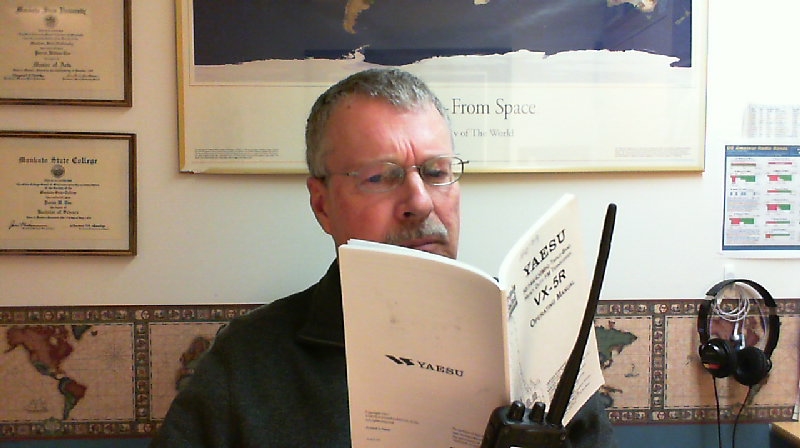
One of the most popular services that the Handiham System used to offer was audio tape versions of equipment manuals on cassette tape. We have a few of the old manuals still available in that aging format, but let’s face it – most people would rather forget how awful finding anything in an audio tape reference book can be. Sometimes the manuals were long, and that meant multiple tapes. Which one had the part about setting the memories? And even then, which track would it be on?
We now take the approach of recruiting a blind user who can teach the radio from a blind perspective. An audio file (or series of files) can be a lot more helpful to another blind user, since learning from a blind teacher pretty much eliminates all the usual dumb mistakes sighted people like me make when we are trying to get a point across.
Thankfully, the radio manufacturers are making equipment support documents like instruction manuals available in accessible PDF via website downloads. The accessible PDF isn’t perfect, but it does contain embedded text that can be searched. This puts the blind (or sighted) operator in the driver’s seat when it comes to finding the part of the manual that one wants.
The next frontier is to figure out how to make these manuals into a somewhat easier to navigate DAISY format. As we contemplate what our blind and sighted Handiham members really want, I thought it would make the most sense to simply ask:
So here’s my question to you: How do you use equipment manuals, and what can be done to make learning about a radio easier? Let me know so that we can figure out where to go with this next new frontier.

Pat Tice, WA0TDA, is the manager of HANDI-HAM and a regular contributor to AmateurRadio.com. Contact him at [email protected].
December 2010 Giveaway Winner

We are very pleased to announce the winner of
1,000 Photo QSL Cards
from KB3IFH
Thanks to Randy for sponsoring this month’s drawing.
We had over 700 entries!
We’re giving away more great prizes soon.
Stay tuned and get ready to enter.
OK, onto what you’ve all been waiting for!
The winner of our December 2010 prize giveaway is…
Matt Thomas, W1MST, is the managing editor of AmateurRadio.com. Contact him at [email protected].
Yet Another Digital Mode
Windows PC users now have the option to try yet another weak signal digital mode. Called V4, it is described as “a robust, easy to use, keyboard sound card mode that would fit into the narrow digital segments of our HF bands.” The mode is 200Hz wide and capable of sending text at 40 – 60 words per minute.

Do we need yet another keyboard digital mode? Although PSK31 is very popular and very narrow, performance deteriorates under conditions of multipath reception (such as in NVIS propagation) or when the ionosphere is disturbed (polar paths during periods of auroral activity) while RTTY, though also popular, is archaic, inefficient and successful only by brute force methods (a big amplifier and a beam.) More robust FSK modes such as MFSK, Olivia, Thor and DominoEX perform better but are much wider which can be a barrier to use. V4 uses the same robust modulation scheme as WINMOR but has been optimized for use as a keyboard chat mode. A detailed protocol description can be found here and the software can be obtained after joining the V4 Protocol Yahoo Group.
I have only just been admitted to the group so I have some reading to catch up on and it will be a few days before I can find the time to try V4 for myself. However I am quite interested in this mode which seems to have been developed by licensed hams keeping in mind the need for responsible band use (so no 2.2kHz wide signals!) and with all the details being published and open. The software modem has been implemented as a standalone TNC that can be interfaced with other applications such as my own program KComm which is also interesting to me. So I think you can expect to hear more about the V4 Protocol in this blog in the weeks to come.

Julian Moss, G4ILO, is a regular contributor to AmateurRadio.com and writes from Cumbria, England. Contact him at [email protected].
Beacon monitoring with Faros
Alex, G7KSE wrote recently about monitoring the International Beacon Project beacons on 20, 17, 15, 12 and 10 metres, which gave me the idea to try it again for myself. I did try the Faros beacon monitoring software by VE3NEA a few years ago but being a tightwad I never registered it so the trial came to an end after 30 days. I was also less than enthusiastic about leaving the computer and radio running every day 24/7. Work out the power consumption and it can add a significant amount to the quarterly bill which is unlikely to go unnoticed by the chancellor of the exchequer (the XYL.)
These days the computer is usually running from when I get up (or after breakfast) until when I go to bed in order to run my HF and VHF APRS gateways so it is no extra trouble to do some beacon monitoring as well. I don’t have a spare radio or antenna so I will have to use my main radio (my K3) and antenna for the beacon monitor. This means that if I want to go on the air the beacon monitoring will stop. Currently my enthusiasm for actually making contacts is at a very low ebb so this is not much of a problem. I shall still shut down at night and restart in the morning, at least during the winter months when there is no night time propagation on 20m and up. Apart from the pointless waste of joules, the loud click from the K3 each time Faros changes bands will be a disturbance as the shack is only just across the landing from our bedroom.
The antenna I am using is the short multiband 80plus2 dipole bent to fit into the roof space, with additional 10m and 6m elements. It works fine on 20, 15, 12 and 10m. On 17m I can get a good SWR with the aid of the K3’s built-in tuner (which is the source of the loud clicks) but performance is noticeably down on the magnetic loop. However, the magnetic loop is used by my K2 for the HF APRS gateway so it is not available.
VE3SUN has written a very good article explaining how to set up a system to display the beacon reception charts created by Faros on a web page. It looked easy so I went ahead and set up an IBP Beacon Reception page on G4ILO’s Shack. I found that the WinSCP software that VE3SUN recommends to automate the uploading of the reception charts to the website popped up annoying windows whenever it updates so I used SyncBack SE instead. Unlike WinSCP it isn’t free, but I had purchased a license a few years ago and the code still worked with the latest version.
I converted the JavaScript in VE3SUN’s example page to PHP. This means that I can test for the existence of the beacon monitor graphics and display a friendly message rather than have the browser display a “missing picture” graphic if the monitor has not been running and that day’s GIF image doesn’t exist.
I have added to the page a short list of currently active beacon monitors to make it easy to compare my reception reports with other people’s. It would be nice if, instead of each beacon monitor having his own results on his own web site, there was a central site that collated all the IBP reception reports and displayed them on a map, like WSPR does. Perhaps that would rejuvenate interest in the IBP which seems to have been overshadowed in recent years by WSPR and reverse beacons.

Julian Moss, G4ILO, is a regular contributor to AmateurRadio.com and writes from Cumbria, England. Contact him at [email protected].
Balancing Act

When Work Gets in the Way of Ham Radio
Every now and then we hit one of those seasons of life where our work gets in the way of our hobby. For the past month, seems like work has overtaken the time and my radios have sat idle for WAY TOO LONG.
Thankfully, this weekend brings some relief and our Central Florida QRP group will take to the outdoors for our monthly outing. No one will be able to complain about the weather being too hot either, as the northland has sent us a reminder of why we moved to Florida. When it gets below 55F we get cranky and it looks like it will barely go above that temperature this weekend.
So look out for us this Saturday, 11 December 2010 about 1500-2000 UTC on the QRP watering holes on 40m, 30m, 20m and who knows where else. We’ll be out there with rusty fists on the keys once again. YAHOO!
72,
Kelly K4UPG PB #173
Kelly McClelland, K4UPG, is a regular contributor to AmateurRadio.com and writes from Florida, USA. Contact him at [email protected].
 Ham Radio Deluxe |
 W5SWL Electronics |
 Ham Radio Prep |
 KB3IFH QSL Cards  Hip Ham Shirts  HamRadioAuctions HamRadioAuctions Reliance Antennas Reliance Antennas Enigma Shop Enigma Shop |  morseDX  Ni4L Antennas  R&L Electronics R&L Electronics antennas.us antennas.us QRV QRV |
- Matt W1MST, Managing Editor
