 |
 QRP kits retirement plan
 20 December 2010 | by
 Quite frankly I can’t think of anything worse than choosing QRP Kits to ‘lay down’ as an investment, rather than build. Mind you it doesn’t look like they need to be put in the cellar for very long!
Stephen Rapley, VK2RH, is a regular contributor to AmateurRadio.com and writes from New South Wales, Australia. Contact him at [email protected].
Long distance QSO with the Warbler

Screenshot of Warbler contact to Alabama
Last night I used the Warbler I finished a few months ago and had a very nice 40 minute QSO on 80m with Ken, KI3N, in Oxford Alabama. First, it great that conditions were good enough for us to chat for 40 minutes using PSK31, but when you consider that the distance between us was about 970 miles then that made it quite an achievement given the band. I was using the Warbler, putting out 3W now after some slight changes, and the 88ft doublet tuned with the homebrew ATU. Ken was using 40W from an Icom IC-756 Pro into an 80m dipole. The screenshot above shows what I was receiving.
Even though the Warbler is rockbound and uses a direct conversion receiver its performance is very good and makes it fun to use. This was the furthest contact I have made so far with that transceiver.


Alan Steele, VA3STL, is a regular contributor to AmateurRadio.com and writes from Ottawa, Ontario. Contact him at [email protected].
Useful RFI
I apologize for being even more grumpy than normal but I haven’t had much sleep. Olga and I were woken up at around 1 in the morning by a lot of noise outside. It was a group of young people who had apparently been having a party in the house opposite. Despite the fact that the temperature was heading for -7C and the girls, according to Olga who was looking out of the window, were none too warmly clad, they were not simply saying goodbye but continuing an animated conversation. Someone decided the party must be carrying on outside so they switched on a car’s headlamps and turned on the stereo very loud. Because of the way the houses are crammed together here with virtually no front gardens this was taking place right below our bedroom window. After ten minutes we were both getting very angry. It isn’t often that Olga uses the f word about people.
I felt like calling the police, but the chances of them actually making an appearance before the miscreants had slept off their hangovers was pretty remote so we discarded that idea. Olga went downstairs and turned on the lights to try and make it obvious that we had been disturbed. I went into the shack, switched on the K2 and sent a 10W dit on 30m, which switched on the security lights of the nearby neighbours that have them. This did appear to have the effect of making the tiny minds think “gosh, other people live around here and oh my, it’s after 1 in the morning, perhaps they are trying to sleep and our noise has disturbed them!” because shortly afterwards the group dispersed and peace and quiet resumed. But neither of us are good sleepers and it took a while before we calmed down enough to sleep again. Hence the foul mood this morning.
It has sometimes been a bit annoying that I can’t go on any band except 80m after dark because of the problem with security lights. But on this occasion it turned out to be useful. If only I knew that the thoughtless young people had touch sensitive lamps by their bedside I might even have been tempted to try a bit of all-night WSPR!

Julian Moss, G4ILO, is a regular contributor to AmateurRadio.com and writes from Cumbria, England. Contact him at [email protected].
ICQ Podcast Series Three Episode Twenty-Six – Bob Burns Heathkit
Series Three Episode Twenty-Six of the ICQ Amateur / Ham Radio Podcast. News Stories include:
- Long-Delay Radio Echos heard on 7 MHz
- Radio Amateurs Angered
- International Short Wave League's 65th anniversary
- Five amateurs in UK Family
- Solar-powered GB2RS broadcast
- ARRL strengthens the case for mandatory BPL notching
- 8.970 kHz - DK7FC's latest tests
- Straight Key Night on OSCAR 2011
- Midland Amateur Radio Society anniversary
- French concerns over 1.2 GHz band
- IRTS Outgoing QSL Service
- British Young Ladies Amateur Radio Association
- New amateur radio bands for Spain
Your feedback and Martin (M1MRB) meets Bob Burns (G3OOU) and discusses Heathkit.
Colin Butler, M6BOY, is the host of the ICQ Podcast, a weekly radio show about Amateur Radio. Contact him at [email protected].
ICQ Podcast Series Three Episode Twenty-Six – Bob Burns Heathkit
Series Three Episode Twenty-Six of the ICQ Amateur / Ham Radio Podcast. News Stories include:
- Long-Delay Radio Echos heard on 7 MHz
- Radio Amateurs Angered
- International Short Wave League's 65th anniversary
- Five amateurs in UK Family
- Solar-powered GB2RS broadcast
- ARRL strengthens the case for mandatory BPL notching
- 8.970 kHz - DK7FC's latest tests
- Straight Key Night on OSCAR 2011
- Midland Amateur Radio Society anniversary
- French concerns over 1.2 GHz band
- IRTS Outgoing QSL Service
- British Young Ladies Amateur Radio Association
- New amateur radio bands for Spain
Your feedback and Martin (M1MRB) meets Bob Burns (G3OOU) and discusses Heathkit.
Colin Butler, M6BOY, is the host of the ICQ Podcast, a weekly radio show about Amateur Radio. Contact him at [email protected].
An APRS Gateway
Yesterday I spent a couple of hours trying out aprsg – an APRS iGate that runs on both Linux and Windows which has been developed by Tapio, OH2GVE and Antti, OH3HMI and released under the GNU GPL.
The program has no user interface. Under Windows it displays a G icon in the system tray. All configuration is done by editing an INI file, in examples of which all the documentation is contained! Despite its relative simplicity there are a few unanswered questions about how things work, so some trial and error is necessary.
The unique feature of aprsg – as far as I know – is that it lets you specify filters to control what is gated from the internet to RF. You can gate packets addressed to specific callsigns or callsign blocks (using a mask) and this can be ANDed or ORed with area based filters (either a box or a circle centered on a point.) It was wonderful in this relative APRS desert to see local stations and objects appearing on RF and being displayed on my TH-D72 and VX-8GR. It was like being back in Prague again! This is not something you would want to do in an area where there is other APRS activity but for someone who lives out of range of any digipeater or gateway aprsg could make APRS usable and fun.
The program supports multiple RF ports and can do cross-band gating using the same rules. I didn’t try this, and did not understand how to set different call-ssids to the different RF ports. It appeared to me that the gateway and everything connected to it uses the same call-ssid, though this may be my misunderstanding.
A significant limitation is that aprsg only supports KISS TNCs (and AX.25 on Linux) but does not provide any way to send a script to TNCs that need a couple of commands to get them into KISS mode. It doesn’t support AGW Packet Engine, but those who don’t have TNCs might be able to connect it to a TrueTTY virtual TNC for sound card operation.
Aprsg provides no support for digipeating – a pity, the possibility of filter-based digipeating would be most interesting. It also doesn’t provide a local APRS-IS server for users to connect graphical APRS clients like APRSISCE/32. So you would need to connect your GUI client separately to APRS-IS using a different call-ssid to your gateway.
These limitations apart, aprsg is a potentially useful program for anyone wanting to set up an APRS internet gateway. It’s quite easy to get going and has a very low resource usage.

Julian Moss, G4ILO, is a regular contributor to AmateurRadio.com and writes from Cumbria, England. Contact him at [email protected].
Handiham World for 15 December 2010
Welcome to Handiham World!
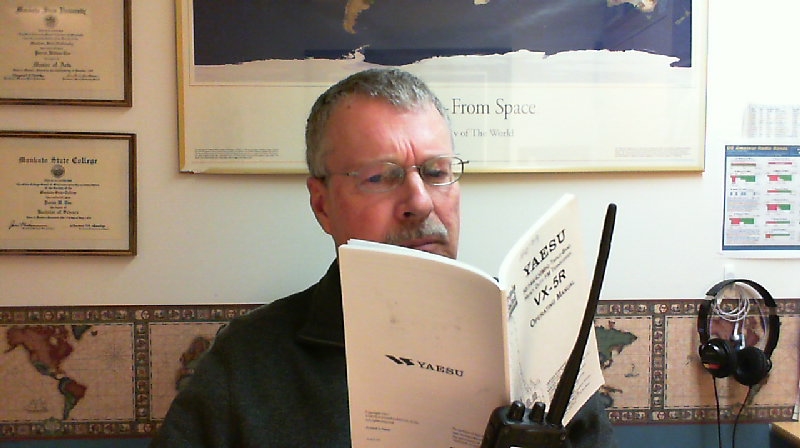
Last week we asked: How do you use equipment manuals, and what can be done to make learning about a radio easier? Let me know so that we can figure out where to go with this next new frontier.
As you might expect, we got some interesting and insightful responses. I will condense the main ideas down to just two different methods of making a manual accessible.
- A popular suggestion was to create the manual in HTML with links from topics listed in the contents directly to the relevant section of the manual. So, for example, if you wanted to read about how to set a memory channel, you would find “setting memory channels” in the contents, then follow that link directly to the part of the manual main text that has the instruction on setting memories. One example of why HTML is good was sent by Gerry, WB6IVF. He said: ” I think that HTML is the best because you can create links that are accessible by the tab key, and you can use the arrows to move with in a line and spell something or transcribe something to Braille character by character. So in other words, if a document looked to a blind person like a web page, I think we would find it easy to get around. Daisy is good, but it isn’t easy for everyone to use yet.”
Another writer favored HTML, but added that a special description of the front and rear panels of the radio should be written so that blind readers would not have to ask someone sighted to map out the location of controls for them from the print diagrams.
- Some of you have Kurzweil scanners and are able to scan the print manual, or alternatively to download the manual from a company website and use the embedded text in the PDF version. Getting the information into the linear system used by screenreaders is still somewhat problematic as some items like sidebars and captions can get out of context. However, the availability of embedded text PDF manuals is still a great advancement from the paper-only days! A description of the panels is still needed, however.
I was surprised at this request for HTML functionality, but it really does make a lot of sense. While DAISY does provide for at least a similar way to navigate through a book, it is still a learning process that is new to many users. DAISY is built upon XML, and as such is similar to web-based documents. The question in coming months and perhaps years is whether the standard for DAISY will be so well-accepted that it will be preferable to website-like manuals designed in plain old HTML. We could try converting a text to HTML and give it a test run, but the question will then be what to do with users who do not have computers but who have the government-issued NLS DAISY players.
Time will tell, of course. I am going to put on my prognosticator’s hat and predict that cassette tapes will really take a hit in 2011. I’ve always hated the way it’s so hard to find a particular part of an audio instruction manual in a tape. Another problem was the way adequate control layouts were not always added by the volunteers who read the manuals. This year Sony discontinued the venerable Walkman portable cassette player, and of course the National Library Service discontinued support for the old 4-track production system. RFB&D also moved forward, leaving cassette tapes behind. At Handihams, we still get a few requests for tapes, but in 2011 these will all be “special order”, as they are no longer in stock and have to be produced on an as-needed basis.
The new methods of producing manuals will be HTML and DAISY. We hope that these can be augmented with users teaching via audio how to find one’s way around the radio and adjust the settings, as well as to use the radio’s basic functions. Actual users with experience doing these “quick start” guides can really be helpful, not as a substitute for the manuals, but as an added reference.

Pat Tice, WA0TDA, is the manager of HANDI-HAM and a regular contributor to AmateurRadio.com. Contact him at [email protected].
 Ham Radio Deluxe |
 W5SWL Electronics |
 Ham Radio Prep |
 KB3IFH QSL Cards  Hip Ham Shirts  HamRadioAuctions HamRadioAuctions Reliance Antennas Reliance Antennas Enigma Shop Enigma Shop |  morseDX  Ni4L Antennas  R&L Electronics R&L Electronics antennas.us antennas.us QRV QRV |
- Matt W1MST, Managing Editor
