 |
 Learning electronics with the aid of the Internet
 3 February 2011 | by
You have to learn electronics by building circuits. However, it can be very intimidating to get started and once you have some familiarity you may need further guidance, especially in the art of circuit design. Last week I watched three excellent tutorial videos which show there are some who are putting excellent material on the Web to help others further their learning of electronics. Here are the three.
First video covers some basic, but necessary understanding of multimeters and their use. Essential knowledge for beginners. This is by Colin Cunningham of Makezine.com and part of his ongoing electronics video posts at Make magazine’s website.

The next one steps it up quite a lot in detail but it is Dave Jones of the EEVblog showing how a component can be selected by a designer for a circuit, in this case for a DC-DC booster. It a long video, but shows how to use online catalogues, conduct parametric searches as well as the essential examination of component datasheets. Well worth watching carefully.
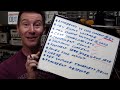
FInally, what looks like a new video podcast series from component supplier Element 14 and Jeri Ellsworth. In this video Jeri designs a circuit for some music playing installation art, that is triggered by motion detected by a PIR. This is a great tutorial video and I look forward to seeing more of these. The link to the video is here.
The latest good news seems to be that today it was announced that Jeri is joining Element14′s “Ask an Expert” panel.


Alan Steele, VA3STL, is a regular contributor to AmateurRadio.com and writes from Ottawa, Ontario. Contact him at [email protected].
Handiham World for 2 February 2011
Welcome to Handiham World!
Squawk! Polly want a cracker!

That’s what a parrot says, at least in the cartoons, right? Parrots are great imitators when it comes to hearing something and quickly learning to repeat it. That’s why we say someone is “parroting” when they simply repeat what they have heard. Believe me, if someone is accused of parroting when they are speaking, it is not a compliment. It means that the speaker is repeating what was heard without really thinking about what they are saying.
I hear plenty of parroting on the air. My pet peeve is one I heard again this week: “Of course EchoLink isn’t real ham radio.”
Excuse me? Do the people who keep repeating this over and over again like parrots really know what they are saying? Have they thought it through? I submit that they haven’t, and would like to back up the bus a bit here and ask them to answer these simple questions:
 | Is an amateur radio license required for the legal use of EchoLink? |
| Could you get into trouble because you violated FCC rules when using EchoLink? |
| Does a voice transmission on EchoLink use the public airwaves? |
Yes, yes, and yes.
Oh, sure, it is possible to have a computer to computer conversation on EchoLink, but it can quickly segue into an on the air conversation when another station joins on a connected repeater or simplex node. But those are the easy questions. Now, here’s a hard one that I want to ask the “EchoLink isn’t real ham radio” parrots:
| Why isn’t EchoLink “real” ham radio? |
Take your time, EchoLink detractors. Think about it. I’m pretty sure there isn’t a really simple answer to parrot back to THAT one.
If the answer is that you don’t actually go on the air with EchoLink, well, that’s not true. You can, and do. If it’s because a computer is involved, does that mean that SSTV and RTTY are not real radio? Those modes use computers as integral parts of the station. If it’s because EchoLink doesn’t fit a narrow, preconceived notion of what constitutes ham radio, well, THAT I would believe. Which brings me to the next question, also not an easy one:
| So what IS “real” ham radio? |
This is not easy to answer. If you say that it is only about sitting in front of an HF radio connected to a beam antenna and working DX without using a computer or the Internet, you are going to get objections from operators who control their radios with Ham Radio Deluxe and who check that application’s built-in DX spotting feature. If you try to limit real ham radio to a particular mode, you will certainly hear from others who have enjoyed radio for years and who never used that mode. Anyone who operates a radio at a distant location by the use of an Internet remote base control point would also beg to differ.
The way I look at it, ham radio is like a big tent where there is room for lots of different interests and ways to have fun. In fact, I would suggest that even builders and experimenters who prefer designing and building their own gear are “real” radio amateurs even if they seldom get on the air. There is really no point in telling someone else who enjoys a different activity that what they like doing is somehow less valid or real than what someone else does. That’s why I try really, really hard to think about what I say before I say it. Remember, once it goes out over the air, it is impossible to keep others from hearing it!
Besides, thinking before you speak could actually make you seem pretty wise. I think I’ll leave the mindless repetition to the parrots and just get on the air and encourage others to enjoy ham radio in its many different facets. Get on, have fun.
Patrick Tice, WA0TDA
Handiham System Manager
[email protected]
Skype study hall
Last week we mentioned that we have an ongoing need for some kind of forum in which technical assistance or study assistance can be offered to our members. One idea that crossed my mind was to run a Skype conference with up to 10 participants. This would allow a number of people to discuss some topic of interest in a small group setting in a more private forum than one could find on EchoLink, for example.
I have completed a page in the members only section of the Handiham website to guide users. It is found by going to the member section, then the “Audio this week” link, and then the “Handiham Skype Conference” link.
Running out of entertaining club projects?

Did you drive your mom nuts when you were a kid and the weather outside was rotten and you were bored?
“MOM, there’s NOTHING to do.”
Yeah, me too. It might have been a rainy day or maybe the snow was piling up outside but it was too windy or cold to actually go out to play in it. Good old Mom could always think of something to distract us brats. Games and projects were high on her list.
Well, one great idea that my local ham radio club is trying this week is a group activity where participants diagnose malfunctioning amateur radio gear. On the “test bench” (which will really just be a table in the public library meeting room) will be not one, but two – TWO – malfunctioning manual antenna tuners. There will be a few small hand tools and test instruments available to help diagnose and (hopefully) repair the two “patients”.
This kind of activity would really be fun at Radio Camp this summer, wouldn’t it? I would love to get this kind of activity set up in a small group environment so that we could put our heads together and try to figure out some basic fixes for radios or accessories. Meanwhile, a great big “way to go” to the Stillwater, Minnesota Amateur Radio Association for coming up with this mid-winter project to keep us kiddies from being bored!

Pat Tice, WA0TDA, is the manager of HANDI-HAM and a regular contributor to AmateurRadio.com. Contact him at [email protected].
Handiham World for 2 February 2011
Welcome to Handiham World!
Squawk! Polly want a cracker!
That’s what a parrot says, at least in the cartoons, right? Parrots are great imitators when it comes to hearing something and quickly learning to repeat it. That’s why we say someone is “parroting” when they simply repeat what they have heard. Believe me, if someone is accused of parroting when they are speaking, it is not a compliment. It means that the speaker is repeating what was heard without really thinking about what they are saying.
I hear plenty of parroting on the air. My pet peeve is one I heard again this week: “Of course EchoLink isn’t real ham radio.”
Excuse me? Do the people who keep repeating this over and over again like parrots really know what they are saying? Have they thought it through? I submit that they haven’t, and would like to back up the bus a bit here and ask them to answer these simple questions:
| Is an amateur radio license required for the legal use of EchoLink? |
| Could you get into trouble because you violated FCC rules when using EchoLink? |
| Does a voice transmission on EchoLink use the public airwaves? |
Yes, yes, and yes.
Oh, sure, it is possible to have a computer to computer conversation on EchoLink, but it can quickly segue into an on the air conversation when another station joins on a connected repeater or simplex node. But those are the easy questions. Now, here’s a hard one that I want to ask the “EchoLink isn’t real ham radio” parrots:
| Why isn’t EchoLink “real” ham radio? |
Take your time, EchoLink detractors. Think about it. I’m pretty sure there isn’t a really simple answer to parrot back to THAT one.
If the answer is that you don’t actually go on the air with EchoLink, well, that’s not true. You can, and do. If it’s because a computer is involved, does that mean that SSTV and RTTY are not real radio? Those modes use computers as integral parts of the station. If it’s because EchoLink doesn’t fit a narrow, preconceived notion of what constitutes ham radio, well, THAT I would believe. Which brings me to the next question, also not an easy one:
| So what IS “real” ham radio? |
This is not easy to answer. If you say that it is only about sitting in front of an HF radio connected to a beam antenna and working DX without using a computer or the Internet, you are going to get objections from operators who control their radios with Ham Radio Deluxe and who check that application’s built-in DX spotting feature. If you try to limit real ham radio to a particular mode, you will certainly hear from others who have enjoyed radio for years and who never used that mode. Anyone who operates a radio at a distant location by the use of an Internet remote base control point would also beg to differ.
The way I look at it, ham radio is like a big tent where there is room for lots of different interests and ways to have fun. In fact, I would suggest that even builders and experimenters who prefer designing and building their own gear are “real” radio amateurs even if they seldom get on the air. There is really no point in telling someone else who enjoys a different activity that what they like doing is somehow less valid or real than what someone else does. That’s why I try really, really hard to think about what I say before I say it. Remember, once it goes out over the air, it is impossible to keep others from hearing it!
Besides, thinking before you speak could actually make you seem pretty wise. I think I’ll leave the mindless repetition to the parrots and just get on the air and encourage others to enjoy ham radio in its many different facets. Get on, have fun.
Patrick Tice, WA0TDA Handiham System Manager [email protected]
Skype study hall
Last week we mentioned that we have an ongoing need for some kind of forum in which technical assistance or study assistance can be offered to our members. One idea that crossed my mind was to run a Skype conference with up to 10 participants. This would allow a number of people to discuss some topic of interest in a small group setting in a more private forum than one could find on EchoLink, for example.
I have completed a page in the members only section of the Handiham website to guide users. It is found by going to the member section, then the “Audio this week” link, and then the “Handiham Skype Conference” link.
Running out of entertaining club projects?
Did you drive your mom nuts when you were a kid and the weather outside was rotten and you were bored?
“MOM, there’s NOTHING to do.”
Yeah, me too. It might have been a rainy day or maybe the snow was piling up outside but it was too windy or cold to actually go out to play in it. Good old Mom could always think of something to distract us brats. Games and projects were high on her list.
Well, one great idea that my local ham radio club is trying this week is a group activity where participants diagnose malfunctioning amateur radio gear. On the “test bench” (which will really just be a table in the public library meeting room) will be not one, but two – TWO – malfunctioning manual antenna tuners. There will be a few small hand tools and test instruments available to help diagnose and (hopefully) repair the two “patients”.
This kind of activity would really be fun at Radio Camp this summer, wouldn’t it? I would love to get this kind of activity set up in a small group environment so that we could put our heads together and try to figure out some basic fixes for radios or accessories. Meanwhile, a great big “way to go” to the Stillwater, Minnesota Amateur Radio Association for coming up with this mid-winter project to keep us kiddies from being bored!
Pat Tice, WA0TDA, is the manager of HANDI-HAM and a regular contributor to AmateurRadio.com. Contact him at [email protected].
A fun few hours on VHF
I know some of my “HF only” friends have a slight disregard for VHF and particularly for FM. That’s fine – it’s up to each of us how we choose to enjoy our hobby. But I defy anyone who’s enthralled by the ‘magic of radio’ not to be excited by the following circumstances…
On Monday evening, I was driving home from the station and as usual, had the FT8900 scanning on one of the VFOs. It very quickly became apparent there was some VHF tropo ducting around. 145.750 seemed particularly lively. I could hear the F5ZBH repeater in North-Eastern France very strongly and then to the west, I could hear the GB3BC repeater in South Wales. It made fascinating listening!
When I got home and found a few moments to look at the Hepburn tropo website and found that we were on the edge of a tropo duct, stretching up from western France, along the English Channel across the Netherlands and into northern Germany. I found I couldn’t hear anything along the duct, although I did work F8BRK (IN99) quickly. He was working Dutch, German and even some Polish stations along the duct.
Later on in the evening, I noticed the Swiss beacon, HB9HB coming through steadily on 144MHz. Despite a number of CQ calls in that direction on both 144 and 432MHz, I didn’t work anything, but having said that, I have noticed before that hearing HB9HB is not necessarily an indicator of working F and HB9 stations, as the beacon is so high, it may be that the ducting is going over the heads of the stations that might be available to work.
Next morning, I checked HB9HB before going to work, but it had faded. I had the rig on scan in the car as I drove to the station, looking for any tropo. To my surprise, I heard a loud FM signal with an Italian accent come up. It proved to me on 145.800MHz which meant only one thing – the International Space Station. For around 5 or 6 minutes, I was fascinated to listen to IR0ISS, one of the astronauts aboard the ISS answering questions from schoolchildren at a school near Lyon in France (of course, I could only hear one side of the conversation!).
Truly a varied and magical few hours on VHF! Oh, and by the way, by the look of the Hepburn tropo forecast maps, there could be some propagation from the southern/south-western UK towards Spain and the Canaries this coming weekend! Let’s see!

Tim Kirby, G4VXE, is a regular contributor to AmateurRadio.com and writes from Oxfordshire, England. Contact him at [email protected].
PIC16F88 TNC
I have mentioned before that when I’m not in the shack I like to run a little program called aprsg to gate all the local APRS activity to a UHF frequency so I can see what is going on in the local APRS world using an APRS-capable HT. I have set up a system using sound card software, a USB sound device and my FT-817ND to do this. But I would like to make a standalone box for this. The first step in this project is to find a simple, cheap TNC.
There are products that would fit the bill from Byonics and Argent Data. Unfortunately they are not available in the UK and the cost of importing these kits from the US makes them less than cheap. I looked at the Fox Delta Mini TNC. But that is not a KISS TNC, as was confirmed by an email to Dinesh, the proprietor of Fox Delta.
Whilst searching around for possible solutions I came across a design for a TNC using a PIC16F88 microcontroller by WB8WGA that was originally published several years ago as an article in the ARRL experimenter magazine QEX. It has been modified by DJ7OO and ZL3AME, who had developed a stripboard layout for it. I had all the bits apart from the microcontroller and the clock crystal, which were quickly sourced on eBay. So I thought it would be an interesting project to build and experiment with.
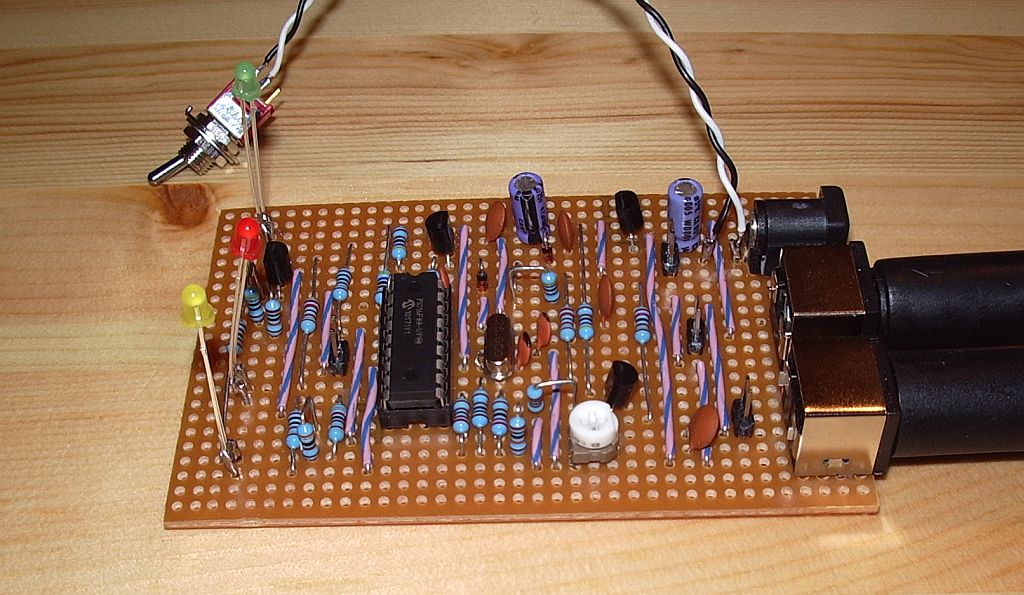
ZL3AME’s stripboard layout results in some quite lengthy signal paths. Despite this, the TNC worked first time, with just a minor glitch caused by my mis-wiring the PTT connection on the transceiver connector. (I have a standardized interface that I use on all my projects, with an 8-pin mini-DIN connector for audio and PTT to the transceiver, and a 6-pin mini-DIN connector for serial and GPS connections. I can then have a standard set of cables to hook the projects up to any radio, connect to the computer or a GPS, etc.)
With all the bits of APRS kit I have it was easy to generate some test signals and I soon had packets being decoded on the terminal screen. I wondered how sensitive the TNC would be as it uses the PIC16F88 to do the decoding instead of a modem chip like the MX614. I have not seen any DX packets decoded yet, but it does seem that decoding success is dependent on the audio level into the TNC. All of my APRS generators were decoded with the exception of my weather station, which has rather low deviation. When using the old Kenwood TH-205E as a receiver I could increase the volume so the weather station was decoded, at the expense of reliable decoding of the other radios. That was not even an option when using the DATA output of a radio, which has a fixed level. I suspect that performance could be improved if you could add an audio ALC on the input.
The TNC can also send APRS beacons and work as a fill-in digipeater. To send a fixed position you can simply encode the position co-ordinates into the beacon text. There are also a couple of jumpers that allow you to connect a GPS to the serial port, which would allow the TNC to work as a standalone tracker. I haven’t tried that, since I already have a standalone tracker. There are no Connect or Disconnect commands so it cannot be used as it stands for packet radio.
This is not a KISS TNC, so it can’t be used with APRSIS32 or aprsg or any of the software I use. I installed UI-View which apparently has the ability to use a TNC for APRS in Converse mode, but it doesn’t work with that either. I think that is due to the fact that the TNC expects CR/LF at the end of each command instead of just CR, so fixing that will be the task of my first attempt at modifying the firmware. Other things I would like to try are making it work at 300baud (for HF packet) instead of 1200baud, and implementing KISS mode. In KISS mode the PC software provides the complete packet and the TNC just has to add a CRC and send it. So in theory it should be simpler to implement than the existing code which has to construct an AX.25 packet from the information entered plus parameters previously set in the configuration. We shall see. The TNC source code is written in assembler, and trying to understand assembler code is to me like not being able to see the wood for the trees. But it will be a good incentive for me to look “under the hood” at how APRS, packet and AX.25 really work.
Many of the links to original information about this project seem now to be dead and I had to do quite a lot of searching to collect the information I have. For the benefit of anyone else who would like to try building one of these TNCs I have assembled all the files and information I found into a zip file which you can download here.

Julian Moss, G4ILO, is a regular contributor to AmateurRadio.com and writes from Cumbria, England. Contact him at [email protected].
Egypt old tech

Another question for the Sphinx?
The people power demonstrations in Egypt over the last week were probably fueled just that bit more by the government’s decision on 27 January to cut mobile phones and the internet. The deteriorating situation in Egypt is currently sharing top news position here in Australia with the monstrous tropical cyclone Yasi due to hit major population centres of far north Queensland in hours!
There’ve been reports of how protesters have turned to ‘old technology’ – fax machines, dial-up modems and even ham radio(!) – to restore communications with each other and the outside world. The BBC report Old technology finds role in Egyptian protests describes how dial-up modems have been used to contact international ISPs.
IDG News journalist Nancy Gohring wrote a piece in PC World explaining how Ham Radio is Not a Viable Option for Egypt. She quotes ARRL’s Allen Pitts stating there are no confirmed transmissions from Egypt yet.
The WeRebuild wiki details frequency bands on 40m and 20m being monitored including 7080.8kHz for CW signals. The wiki page does include transcripts of some messages received – but none since 29 Jan. And it would be a challenge to verify their authenticity.
WeRebuild have even set up an IRC channel for ham operators monitoring these frequencies. The Huffington Post quotes some of the messages.
As I write this there are 91 posts in a discussion thread on QRZ.com debating the use of ham radio by the protesters and overseas operators. Amongst the majority counselling caution and “Keep Ham Radio out of politics – if you don’t, Politics will shut Ham Radio down (in Egypt and in other places, too)”, a minority of posts take an alternate view such as this contributor:
“Freedom is not free. To advocate “staying out of it” on the grounds of damaging ham radio is the same as our founding fathers telling the militiamen on the green at Lexington to stay home, lest the British come take their guns too. The only legitimate reason for staying out of it is the decision of which side you are on — and yes, when it comes to liberty we all have an obligation to investigate the issues and take sides.”
This is a passionate and interesting discussion of what constitutes emergency
communciation and how hams should respond to calls for assistance such as “health and welfare traffic” etc.
Meanwhile closer to home (and across the US as well) people brace themselves for some of the most extreme and destructive weather which is sure to cut power and communications for extended periods. And hams will be there to help.
Cyclone Yasi Update: VK amateurs are maintaining a listening watch on the WICEN frequency 7075kHz. Full details of relevant HF nets and local north Queensland repeaters have been published by the WIA. Tomorrow morning’s 6am Gnarly Net should make for interesting listening on 3600kHz.
The national broadcaster, the ABC is heavily promoting two shortwave frequencies on its 24 hours TV news channel, in anticipation of its local AM and FM towers being damaged by the cyclone. The special rolling coverage of the cyclone can be heard online and on 9710kHz by day and 6080kHz by night.
Stephen Rapley, VK2RH, is a regular contributor to AmateurRadio.com and writes from New South Wales, Australia. Contact him at [email protected].
Packet lives!
I thought packet radio was all but dead. Yesterday I heard Richard MM1BHO mention that there was a packet node in Scotland on 70cm at the same location as the GB3LA repeater which is a monstrous signal here. I asked Richard to tell me the frequency so I could have a listen. I wasn’t optimistic about hearing anything as 70cm has always seemed a bit of a dead loss for me. I had to wait a while to hear anything, and when I did, I found the packet signal was 20dB over S9 which is the strongest signal I’ve ever heard on 70!
I then spent a couple of hours trying to sort out a way of receiving the packet. TrueTTY seemed like a good choice. It decoded the packets and displayed them on its screen. But I couldn’t find any software that would work with its virtual TNC.
I also tried AGW Packet Engine in sound card mode. That, too, decoded packets, so I got the AGW Terminal software as well. But I could not transmit. The software keyed the PTT when it was supposed to, but there was no audio modulation.
Finally I bit the bullet, shut down the APRS gateway and put the Kenwood D710 into packet mode. I then set up AGWPE to talk with the Kenwood’s TNC. That worked, and I was able to connect to the node whose call is GB7WD. I was wondering what to do next when Clive GM4FZH connected to me and I had my first chat over packet radio since the mid-1980s!

I’m afraid after all that time I have forgotten just about anything I knew about packet radio so I’m still pretty clueless as to what to do. I don’t know how to set up a mailbox, or even where to set one up. There seems to be a shortage of material on the interweb aimed at packet newbies (or oldies like me where the onset of Alzheimer’s has erased any memory of what we once knew!)
I think packet radio is something I will enjoy playing with again. I went back to AGWPE soundcard mode and found that the reason I was not getting any audio was because although the software says it uses the left channel which online references claim is the tip of the stereo jack, it was actually present on the ring. After resoldering the connector on the audio cable I was able to transmit packets as well as receive them, and G4ILO is now listening on the GB7WD frequency on the A side of my TM-D710 while my 2m APRS gateway is using the B side. There are just so many things to do in this hobby!

Julian Moss, G4ILO, is a regular contributor to AmateurRadio.com and writes from Cumbria, England. Contact him at [email protected].
 Ham Radio Deluxe |
 W5SWL Electronics |
 Ham Radio Prep |
 KB3IFH QSL Cards  Hip Ham Shirts  HamRadioAuctions HamRadioAuctions Reliance Antennas Reliance Antennas Enigma Shop Enigma Shop |  morseDX  Ni4L Antennas  R&L Electronics R&L Electronics antennas.us antennas.us QRV QRV |
- Matt W1MST, Managing Editor
