 |
 Beacon failure
 16 February 2011 | by
 ChangeDetection.com once again alerted me to a change in the NCDXF/IARU International Beacon Project status page so that I can manually update the beacon status file for VOAProp. I think it is worth a comment on the fact that 7 out of the 18 beacons appear currently to be off the air. This is the most I can recall being off at the same time. Some have been off for months. If you rely on the beacons to see whether a band is open, you may think conditions are worse than they really are. I hope all the beacons are soon restored to full operation.

Julian Moss, G4ILO, is a regular contributor to AmateurRadio.com and writes from Cumbria, England. Contact him at [email protected].
Is technology good for ham radio?
Several ham radio blogs have linked to the Wired article Why Ham Radio Endures in a World of Tweets. “What is it about a simple microphone, a transmitter-receiver and the seductive freedom of the open radio spectrum that’s turned a low-tech anachronism into an enduring and deeply engaging global hobby?” the author asks. He goes on to describe the thrill of establishing a direct, person to person long distance contact and exchanging QSL cards, which he contrasts with “a world of taken-for-granted torrents of e-mails, instant messages and Skype video-chats.” It’s a point of view that QRP enthusiasts and many others will identify with.
In the comments to the article many have been keen to say that ham radio is not low tech, citing “VoIP Radio” and digital techniques as examples. They may be true, but I’m afraid the commenters miss the point. The more high-tech ham radio becomes, the less magic there is. Developments like D-Star are about as far from the concept of a simple transceiver and the freedom of the open radio spectrum as it is possible to get. It isn’t simple, it isn’t free (since it depends on a network controlled by someone else) and it isn’t open. Which is why it is anathema to many of us.
There is a danger that the pursuit of technology could turn ham radio into a poor copy of existing communications networks. Ham radio has endured because it has held on to its traditions involving relatively simple technology that most hams can understand and even build for themselves. If we ever lose sight of that the hobby is as good as dead.

Julian Moss, G4ILO, is a regular contributor to AmateurRadio.com and writes from Cumbria, England. Contact him at [email protected].
Simple Sideband Transceiver for 10m
Roger G3XBM has started a new project: a simple sideband transceiver for the 10m band. Roger’s projects are always interesting so this page will be one to keep an eye on. If it can be made small enough to fit into a hand held case this could make a great portable radio capable of DX contacts during the sporadic-E conditions during the summer.
Regular readers will know that last year I worked the Czech Republic using a hand-held Intek H-520 FM transceiver with a telescopic whip. The Intek, despite being a nice looking radio, is actually a horrible piece of kit with a PA that sucks the power out of the rig’s batteries, especially if the antenna presents anything other than a perfect SWR. And the trouble with 10m FM in the summer is that too many people are trying to use too few frequencies so there is terrible QRM and the “capture effect” means that only the strongest station is heard.
A little double-sideband rig, even with only a couple of watts output, ought to work much better. I shall be following Roger’s project with interest and intend to make this my next radio project too.

Julian Moss, G4ILO, is a regular contributor to AmateurRadio.com and writes from Cumbria, England. Contact him at [email protected].
ICQ Podcast Series Four Episode Four – G0KYA, Propagation, Antennas and More (13 February 2011)
Series Four Episode Four of the ICQ Amateur / Ham Radio Podcast. News Stories include:
- Reduced Height Antennas
- UK Space Agency announcement
- Amateur wanted for UK Space Agency
- Technical clinics at Kempton Rally
- Hams broadcast info out of Egypt
- Why ham radio endures in a world of tweets
- ISS releasing Ham Satellite
- UK Propagation charts for February 2011
- Balloon launch opportunity
- 1st CASHOTA activation of Blackrock Castle
- Voice of Russia on 7200 kHz
- Icom America releases radio transceiver
Steve Nicholls (G0KYA) Propagation Report , and Martin (M1MRB) discusses propagation, antennas and more with Steve Nicholls.
Colin Butler, M6BOY, is the host of the ICQ Podcast, a weekly radio show about Amateur Radio. Contact him at [email protected].
A New Old Project & The Silent Annniversary
I’ve decided to take on a “new old” project and port my PIC keyer code to the Arduino platform. I use the word “port” loosely as the Arduino offers many higher level features and libraries, and I will be programming in C rather than the PIC’s native assembly code. I know I’m about two years late to the start of the “Arduino party”, but from what I’ve read it looks like the party is still going strong with new people joining the fun everyday.
I started writing the PIC keyer about 10 years ago, first starting with PICBasic. It quickly became apparently that PICBasic, while easy to get started with, produced much too bulky to pack in the features I was looking for. This is often the case with high level languages. I went on to assembly and ended up making a full blown keyer with memories, straight key and bug modes, variable weighting, code practice mode, a frequency counter, and several other features. I look back at the code and can’t believe some of the stuff I did. I think my two biggest accomplishments were writing and debugging the frequency counter code and making the variable frequency sidetone output while simultaneously doing other functions without the benefit of interrupts and multitasking. Some of this code is just pure magic and trying to figure it out today I find myself cursing the younger me who was more clever and diligent than the older me today.
The PIC will always be my first love, but I’m ready to move on. Despite having written very modular and readable code with lots of comments, it’s a major undertaking adding new functionality to this assembly code, especially when I don’t look at the code for months at a time. Also, I was often having to deal with memory limitations, and when porting the code to bigger chips with more memory I had to deal with memory page issues. While I could spend the money to get a C compiler for the PIC, it just doesn’t make sense with the popularity of the Arduino platform. And with all the modules you can get for functionality like memory cards, Ethernet interfacing and wireless networking, there’s just much more potential for growth, doing cool stuff, and reaching a larger user audience. These days I would rather spend my time making a chip talk over TCP/IP than figuring out how to stuff more assembly code into 500 bytes of remaining memory just to do something like blink an LED.
I expect porting the main CW keyer functionality over to the Arduino will be much easier than the initial PIC development was due to the Arduino’s interrupt capabilities. Also, the Arduino library has a sound generation library that appears to operate “in the background” while the main code is running. This is heaven compared with what I had to go through to get sidetone output to work while not missing a beat with CW element timing on the PIC.
I’m awaiting an Arduino board to arrive in the mail; hopefully the fun will begin later this week. I’ll be posting my progress here.
And on a somewhat related note, it never seems to get reported by “mainstream” amateur radio media, but Sunday, February 13th will be the four year anniversary of the elimination of code test in the US. Please turn on your rig, start at the lower edge of your favorite HF band, run the VFO up through the band, and listen to all the CW (OK, ignore the RTTY this weekend). If the spirit moves you, why not have a CW QSO? Remember – CW is alive and well because of us, not a test.


Braap analysis
One problem I have noticed with the PIC TNC I recently built is that it is less tolerant of different packet signals than any of my radios. It decodes my two Kenwood transceivers just fine but it will only decode the VX-8G at a specific audio level that is impossible to set when using the fixed output of many radios. And it won’t decode my WX-1 weather station at all.
My Kenwood TH-D72 won’t decode the weather station either. However it is the VX-8GR I am more concerned about. With the volume of the packet channel turned up, it’s braaps sound a bit thin and weedy compared to those of the Kenwoods and other radios I hear over the air. I thought that I would try to analyze the signals to see if this would give me an idea of what was causing the problem.
I used Spectran, the only free software I know that will do audio spectrum analysis. The receiver was the old Kenwood TH-205E, which being over 25 years old had IF filtering wide enough not to cause any deviation limiting. Each capture was made at the same volume level so the signal levels shown should represent the relative signal deviation.
Because packet bursts are fleeting it took a few attempts to capture the screen at just the right moment. But eventually I obtained plots for each of four radios, including the weather station. Incidentally I am puzzled that the spectrograms show a comb of frequencies. I thought 1200 baud packet was FSK using two frequencies, 1200Hz and 2200Hz. I have seen this before when using sound card decoder software for packet but I have always been puzzled by it.

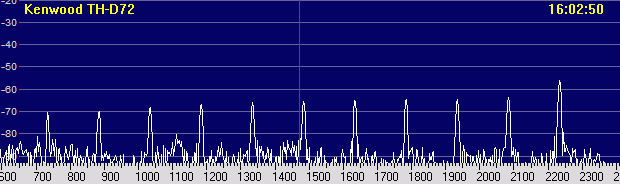
The top two plots are for the two Kenwood radios. They look pretty near identical. In the absence of any test equipment to actually measure the deviation levels I have to assume that these two radios were correctly set up at the factory and represent the ideal signal to aim for. It is interesting that the highest frequency which I would have assumed to be 2200Hz actually peaks at about 2235Hz. The peak closest to the lower frequency of 1200Hz is actually 1185Hz. But there are six peaks at intervals of about 150Hz between the two and some spaced the same distance going below the lower frequency. I’m sure there’s a reason for it.
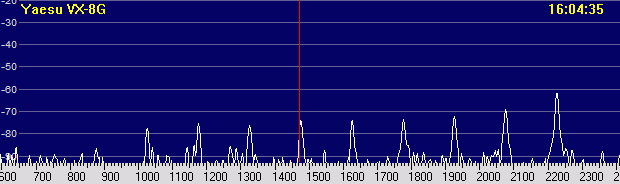
If you look at the plot for the VX-8G the top peak is at about 2230Hz and 5dB weaker than the corresponding peak of the Kenwood traces. The other peaks are lower still with the one at about 1180Hz around 8dB lower than that from the Kenwood. Some VX-8 users have complained about low packet deviation of the radio but have been told by Yaesu that it is within specification. As far as I know there is no adjustment to increase it. You would have thought from this that I would need to increase the audio level to get reliable decoding of the VX-8 compared to the Kenwoods. In fact, I have usually had to reduce it a little. As previously stated, the volume setting at which the PIC TNC will decode the VX-8G is quite critical, whereas the Kenwood signals would decode over quite a wide range of audio input levels.
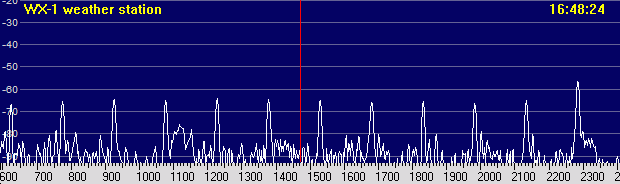
When you look at the signal from my WX-1 weather station, which is modulating a Radiometrix VHF transmitter module, the peak signal levels are close to that of the Kenwoods. The lower frequency components are in fact a couple of dB stronger. However, it’s clear that the frequencies are too high. The top peak, which should be 2200Hz, is about 2290Hz. And the one closest to 1200Hz is about 1230Hz. When setting up my FoxTrak APRS tracker I had to set the frequencies using the PIC calibration routine as low as they would go before my TH-D710 would decide it, so clearly it is the frequency offset that is responsible for the packets not being decoded. The WX-1 firmware unfortunately does not have a calibration procedure. Either the PIC clock crystal needs to be slowed down a bit or I need to make a change in the source code to shift the frequencies and recompile the firmware.
But it’s the VX-8G that most bothers me most. I wish there was a way to boost the level of its packet modulation and make it more like the Kenwoods.

Julian Moss, G4ILO, is a regular contributor to AmateurRadio.com and writes from Cumbria, England. Contact him at [email protected].
Handiham World for 9 February 2011
Welcome to Handiham World!

We’re all familiar with cartoons showing evolution with a sea creature crawling up onto the land and evolving into a succession of higher creatures, finally ending up with a guy talking on a cell phone or some such silly thing. Books go through an evolutionary process, as is shown in the accompanying photo. I lined up three editions of the ARRL Handbook, one from 1944, when World War 2 was still a year from winding down, another from 1989, when my son Will, KC0LJL, was born, and the very newest one, the 2011edition. I thought it would be fun to take a look at how this long-standing, highly respected reference book evolved through the post- WW2 era. Of course with only three samples, this is anything but a scholarly assessment. Still, it will be fun to compare these three books, so let’s get started.
How they look
For those of you listening on the podcast, the 1944 edition is titled “The radio amateur’s handbook”. It’s a paperback edition with a red cover and a large blue ARRL diamond logo. It stands out from the other two books immediately because of its much smaller dimensions. It’s probably just over one half the dimensional size of the others, and has far fewer pages, under 500. The edition year, 1944, is featured in white letters on the red background. Below that is the real shocker, the $1 price.
The 1989 “ARRL Handbook”, renamed to make the title simpler and showcase the ARRL, is a bigger hardcover book, blue at the top and fading down to green at the bottom. A montage of color cover pictures tell the story of amateur radio’s many different facets, including Field Day operation, VHF/UHF, a circuit board with integrated circuits, a rocket taking off, satellite tracking software, and on the air operation. The familiar ARRL logo is still there, but smaller. I’m going to guess that there are probably 1200+ pages. The price in the upper right corner says $21.
The 2011 “ARRL Handbook” looks to be about the same size as the 1989 model, but has in excess of 1400 pages, perhaps on slightly thinner but higher quality paper. It’s a sedate monochrome blue hard cover but has a flashy, attractive full-color jacket with a montage of a high-power transmitting tube, what looks like a construction project for a small rig, a guy climbing a tower while silhouetted against a fiery sunset, an SWR meter construction project, and a picture of the CD that is enclosed. More about that later. The ARRL logo is still there, up near the top. The price? $49.95. It’s no longer on the front, but found in small type on the back along with the ISBN and bar code. For bookstore browsers, there’s a handy simplified table of contents right on the back cover of the jacket.
Inside
1944: Microscopic print size is arranged into two columns per page. There are line drawings and schematics sprinkled throughout, along with black and white photos. The text describing the figures is in a font that’s even smaller than the text in the body of each section. They must have had better eyes back in 1944 to see that fine print! (I wouldn’t know, since I wasn’t even born yet.) One standout feature of the older handbooks is the pages of vacuum tube diagrams near the back of the book. This edition also includes many pages of ads for various radios and components of the day. If there is interest, I can take a look at some of those another time. One theme that seems to hold in every Handbook edition is the construction articles. They are always practical, well-written, and useful. Of course they are all vacuum tube projects, where point to point wiring was very common, as opposed to the circuit boards we use today. The construction article authors didn’t do too much hand-holding. You had to know how to read the schematics and were left to your devices as to the final circuit layout and enclosure, though the photos offered ideas.
1989: We are now clearly into the era of solid state electronics. At least the typeface is a little more readable. Like the 1944 book, this one features black and white line drawing and photos. Both the tube diagrams and the advertising section have disappeared from the back of the book. There are some templates that might be used in various construction projects – always a mainstay of the Handbook. Although the projects are as exciting and useful as ever, many still require a fair amount of builder savvy. It’s not like putting a kit together!
2011: The very newest, most current Handbook doesn’t disappoint! As big dimensionally as the 1989 version, it runs in excess of 1,400 pages and has black and white line drawings, schematics, and photos throughout. The print quality is excellent probably because the paper has a smoother finish. This makes the photos sharper and the line drawings and graphs stand out. The typeface is still on the smallish side, but the comments that accompany the figures are in a bold Arial-family font that is easily read. The cover is a subdued blue, but the paper jacket is a full-color glossy montage of a high-power transmitting tube, the “2011” in huge letters, a couple of construction projects, and a delightful photo of a guy on a tower with stacked beams, silhouetted against a fiery sunset. The ARRL diamond is there, too, as well as the phrase ” The Comprehensive RF Engineering Reference”, which is a clue to the excellent selection of need to have available material inside. It also proclaims, “Expanded and Revised Edition!” Notice the exclamation point, because it really is the best, most useful (and accessible) version of the ARRL Handbook ever. This book is for those of us who want to know how things work. Sure, you can skip past the manufacturer’s specs when you shop for a transceiver and just look at the knobs and buttons on the front panel, but if you would like to learn more about what those specs mean, the Handbook will help you out. The many construction projects include some that are pretty easy, and others that will keep you busy all winter long. Best of all, everything in the book is included on a searchable compact disk that is in a disk envelope at the back of the book. The file format is PDF, but since the entire text is searchable, that means that the embedded text should be available for reading with accessibility tools like screen readers. At Radio Camp this summer we will put this disk to the test, as we will have several really experienced JAWS users, and perhaps some Window-Eyes users as well. A folder on the CD even includes companion software.
It is interesting to follow the evolution of the Handbook, because it is a mainstay of amateur radio and can be used as a mirror into which we look to see ourselves! The amateur operator of 2011 operates more modes and uses new technologies, but still has the same spirit of friendship, communication, public service, and fun!
Patrick Tice, WA0TDA
Handiham System Manager
[email protected]
New block on Handiham.org
What is a “new block”, anyway? Well, the Handiham website uses the open-source content management system called “Drupal”, which was recommended a few years ago by Phil Temples, K9HI. Among Phil’s volunteer duties is helping with our website maintenance. Drupal has proven to be a very good system, since I can place stories online from any computer that has an internet connection. One of the features of the Drupal system is that a “block” containing special website features or information can be placed on the site and remain independent of the regular website content. The “members only” log in is a block, as is the “Tek Talk Audio” block. A sighted user will find these blocks on the left or right sidebar, with the main news content of the site down the center. Mobile users will not see all of this sidebar content, but will see the callsign lookup block.
The new block we have added is called “Remote Base Status”, and it appears in the right sidebar at the top. It is designed to provide a quick link to the current posted status of the two Handiham remote base internet stations, W0EQO and W0ZSW. If you checked early this morning, you would find out that W0ZSW is offline, while W0EQO is working normally. The block also includes HTML that I have written to “Report a problem” in case you find that one of the stations is not working. Clicking that link will open your email program and start an empty email addressed to me at [email protected] with “Remote Base Problem Report” already filled in as the subject. Since I only check the systems once or twice a day, I may not know when there has been a failure, so I appreciate your help in letting us know when something is not working right.
The remote base status page is located at node 1005. Drupal keeps web stories in a database and each story has a node number.
Beneath the Drupal system, we also maintain a static website that is optimized for our blind users. I edit it with Microsoft Expression Web and FrontPage. The index, or starting page, on this members site also has a remote base status report, but it may not be updated as frequently because it must be done from my main computer, where I maintain copies of the files that I edit each week.

Getting to the members section requires logging in on the Drupal website, and there is another “block” called “Members Only Section”, where you will find a place for your username and password if you are a Handiham member. This is a member service and is set up by staff only for our members with disabilities. It is not possible to create your own username and password as can be done on some other websites. Once a Handiham member logs in, the Members Only Section block will display links to the Book & Tape List, Daisy Materials (which has just been added to this block), Manuals, and the Members Only Website. This block appears to sighted users in the upper part of the left sidebar. Mobile users will see it near the top of the page. Some blind users prefer the mobile version of the Handiham website for its ease of navigation. It works great on an iPod or iPhone, where you can use the VoiceOver screenreader.
As we work to keep our website accessible, I would like to hear how things are working for our users. Please email me anytime at [email protected] with suggestions. I will put them in a folder and Phil and I can then try to figure out how we can make things even better.
Troubleshooting 101: Coax

One of my many faults is forgetting how newcomers to ham radio might not know even the most basic of practical troubleshooting skills. Since I’ve been a ham since 1967, I’ve pretty well run into enough problems to build up at least basic troubleshooting skills. In fact, most “seasoned” ops know this stuff and we tend to just assume that everyone else should know it, too.
Of course that is wrong. Everyone needs to learn new things, and we have to understand that what is old hat to us might be brand-new to someone else. It is with that thought in mind that I am going to take a minute to explain how to check a piece of coaxial cable for continuity.
To run this test, you need:
 | a piece of coaxial cable |
| a multimeter with a continuity buzzer or ohmmeter |
| a short clip lead with an alligator clip on each end |
It is always suspicious when your SWR readings jump up and down or change radically when you haven’t changed frequencies. Perhaps you are listening on a frequency and the signal cuts out and then comes back in as if a switch were being turned off and on. These symptoms could mean that you have a feedline problem. Troubleshooting a piece of coaxial cable, the most common feedline used by radio amateurs, is easy, but you have to know how to do it. You can practice on a short piece of coax, perhaps a jumper cable that you have in your junk drawer.
Start by making sure you have a working multimeter (with an audible continuity buzzer if you are blind) and a clip lead. Both can be found at Radio Shack. Before you test the coax, you are going to test the multimeter and the clip lead! Select the “continuity” or ohms setting on the multimeter and make sure it is turned on if your meter has an on/off switch. Then take the clip lead and connect one clip to the positive lead on the meter and the other to the negative lead. You should hear the familiar tone or buzz that indicates that there is a short between the meter leads. If you don’t hear the tone (or see the needle swing to indicate a low-resistance short), check to make sure that the meter is working by touching the positive and negative probes together. If there is still no sound, check the settings on the meter and the condition of the meter’s internal battery. If the meter works but there is no continuity between the clips on the clip lead, find another clip lead.
Once you are satisfied that the meter and clip lead are good to go, take your test piece of coax, which should not be connected to anything on either end, and touch one meter probe to the center conductor pin on one end of the coax and the other meter probe to the outer shield of the body of the connector. You should hear nothing and the connection should be open. If there is a sound and the meter indicates a short, try again and make sure you did not accidentally short the two meter probe to each other while trying to touch one to the center pin and the other to the outside of the coax connector. If there is still a sound and the meter indicates a short, then the coax is shorted. Usually this happens when a PL-259 connector is installed improperly and a thread of coax braid shorts to the center conductor inside the plug’s housing. The connector may need replacement.
But let’s say that your coax passes this first test and you have no short between the coax center conductor and the shield. Your next step is to take the clip lead and short the coax on one end by connecting it between the center conductor of the PL-259 to the outer shield. Once that is secure, test again on the other end of the coax by using the multimeter. Connect one probe to the center conductor and the other to the shield. You should hear the buzzer and see the meter indicates a short. If there is no short, this indicates that the coax is open somewhere along its length, or else you have not connected the clip leads securely or made a good contact with the probes. Check both of these and try again just to be sure. If you still have no short in this test, then the coax has an open circuit. Perhaps the center conductor broke, but more likely the problem is in or near one of the two PL-259 connectors. These are the typical spots where a connection either shorts or opens because that is where we handle the connectors when connecting and disconnecting the cable and that is where most of the stress and flexing of the cable is likely to take place.
If your test cable passed both tests, you are not quite home free yet. Sometimes cables are intermittent, and may short or open when you flex them. If you can perform both tests while flexing the coax, you may be able to determine if the cable is intermittent.
Now that you have learned the basic procedure, there are some things to know about before you test feedlines that are in daily use in your ham shack.
| Always eliminate shock hazards by disconnecting all equipment from the AC power mains by unplugging it from the wall outlet before starting. The reason is that if there is an equipment defect, you can get shocked when you place one hand on an antenna connector and the other on equipment that is plugged into the AC outlet or otherwise connected to some accessory that is also plugged in. Remember that the shield side of an antenna system’s feedline may be grounded, and leaving equipment plugged in can place you between ground and AC voltage, which could be very dangerous. |
| If you are testing an antenna feedline, think about what is connected on the far end, at the antenna. Remember that a balun will show up as a short when you do the multimeter test. Some antenna matching schemes also show up as a DC short. If you place the test probes across a feedline connected to a balun on the other end, you can expect to find a short. If there is an open circuit instead, you can then start checking to find out where it is. However, you cannot be sure the coax isn’t shorted somewhere other than where it should be at the balun. |
| To complete the test, the coax may need to be disconnected from the antenna. Once that is done, the test can proceed as you performed it with the test piece that we first used to practice. |
Most failures occur at the ends of the cable, near the plugs, as we already said. But failures where cables run outdoors can also happen when rabbits or rodents decide to nibble on your feedline for lunch. Other failures can happen when the constant flexing of the cable in the wind breaks the connection to the antenna or balun.
Once you finish troubleshooting and have made the necessary repairs, the coax should be connected to the radio equipment and then the equipment should be plugged back into the AC plug as a final step.
Of course coax can fail in other more subtle and hard to diagnose ways. Water entering the coax from a broken seal can be harder to detect with the multimeter method. Careful inspection may be required to look for the distinctive corrosion and deterioration of the copper braid that is associated with moisture inside the coax jacket. The coax may have also just deteriorated over time, especially if it has been exposed to the weather over many years. Telltale signs of oxidation or cracking of the jacket indicate that it’s time to replace your feedline, even though it may pass the multimeter test. Remember that you are basically just testing a DC connection with your multimeter. When the feedline carries RF energy it will behave differently, especially if it has deteriorated due to age and weather.
You will be surprised at how much basic troubleshooting can be done with simple tools like a multimeter and a clip lead!

Pat Tice, WA0TDA, is the manager of HANDI-HAM and a regular contributor to AmateurRadio.com. Contact him at [email protected].
 Ham Radio Deluxe |
 W5SWL Electronics |
 Ham Radio Prep |
 KB3IFH QSL Cards  Hip Ham Shirts  HamRadioAuctions HamRadioAuctions Reliance Antennas Reliance Antennas Enigma Shop Enigma Shop |  morseDX  Ni4L Antennas  R&L Electronics R&L Electronics antennas.us antennas.us QRV QRV |
- Matt W1MST, Managing Editor
