 |
 Handiham World for 23 March 2011
 23 March 2011 | by
 Welcome to Handiham World!
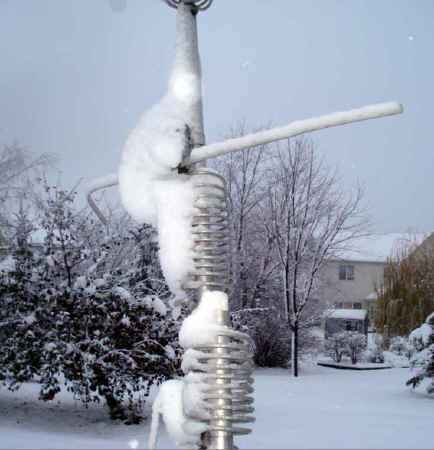
The power of ice combined with wind is evident once again! As those of us whose antennas have had to weather many winters can tell you, there is little worse for an antenna system than ice combined with wind. I was reminded of this earlier today when I opened my email and found a message from AA9BB in Lacrosse, Wisconsin. It had a link to a story about the 2,000 foot WEAU TV transmitting tower that collapsed near Fairchild, WI during the ice and wind storm that moved through last night. We are still having a pretty terrible Spring blizzard from the same weather system here in the Twin Cities. Fortunately no one was hurt in the tower collapse, which was only discovered when the station engineer paid a call to the transmitter site to determine why the station had gone off the air. While there will obviously need to be an investigation into exactly why this tall tower fell, my money would be on the wind and ice combination causing the design limits to be exceeded.
When the wind blows, most amateur radio antennas will not be damaged. Wire antennas have little wind loading area, and beam antennas are made to flex in the wind. The problem comes when weather conditions are just exactly right to allow freezing rain to fall and turn to ice upon hitting the ground or your ham radio antenna. The extra weight of the ice can be several times the weight of the antenna itself, putting considerable strain on the supporting system components like insulators, guy wires, masts, and towers. This is bad enough, but then suppose that the wind picks up. As storm fronts move through, the weather conditions will change. There can be periods of regular rain followed by freezing rain as the temperature plummets, and then the wind can shift and pick up as the freezing rain picks up or turns to snow. Imagine the terrible wind load and strain on the supports as the antenna whips in the wind, pushed all the more by the greater wind loading due to the coating of ice. When the design limits are reached, the antenna or its supporting structure will fail.
What can you do about ice and wind? My feeling is that moving to someplace with a better climate might be the only sure-fire answer. Some places are more prone to ice storms than others, though, and about all you can do is build your wire antennas to withstand greater loads by using compression-style insulators instead of the “dog bone” style. Compression insulators are much less likely to break because more pull on the wires actually compresses the insulators instead of pulling them apart. Better quality wire can help, too, as can good, heavy-duty hardware at all supporting points. Antenna towers that telescope down during high wind conditions can help protect your antenna investment. At least the antenna will be closer to the ground where the wind may be less, and the entire structure presents less of a wind load when telescoped in the down position.
My wire antennas are not that great. One is a commercial Windom about 125 feet long and the other is an end-fed wire, also about 125 feet. Neither one was mounted with heavy-duty hardware, so if they come down in an ice storm with lots of wind, I wouldn’t be surprised. What I am doing is sort of playing the odds, since we don’t get those conditions together too often here. My Butternut vertical can pretty much take care of itself because it has almost no horizontal surfaces to collect heavy ice. Flexing in the wind just breaks the ice off and it falls harmlessly to the ground around the base. It is really the horizontal surfaces that you have to protect the most from icing. How much is an airline ticket to Florida? Can’t afford that? Try getting some compression insulators – they’re a lot cheaper.
Patrick Tice, WA0TDA Handiham System Manager [email protected]

Pat Tice, WA0TDA, is the manager of HANDI-HAM and a regular contributor to AmateurRadio.com. Contact him at [email protected].
APRS supports radiation monitors

Bob Bruninga, WB4APR, has updated the APRS specifications to allow amateur radiation monitoring stations to report readings over APRS.
- A new APRS symbol for a radiation monitor has been defined using the characters RH. Although this is an H symbol with an R overlay, Bob suggests that there is no reason why APRS clients cannot give this symbol a distinctive icon.
- A new weather field X has been defined for reporting nuclear radiation levels. The format is Xxxx where the first two digits are the precision and the last is the order of magnitude in nanosieverts. So 123 is 12 * 10^3 nanosieverts or 12 microsieverts.
There are already websites that report radiation levels using proprietary software, for example Radiation Network (which only covers the USA.) But the ability to report this information using the APRS network using the infrastructure that has already been developed for reporting weather observations is an exciting development that will no doubt lead to some interesting constructional projects.

Julian Moss, G4ILO, is a regular contributor to AmateurRadio.com and writes from Cumbria, England. Contact him at [email protected].
Monitoring Odyssey Dawn
One of the most memorable DX programs was Radio Nederland’s Media Network presented by the energetic and innovative Jonathan Marks. Both the program and the presenter live on in different guises.
I remember being astounded to hear intercepted military signals from the early hours of the Falklands War being broadcast on the program. Long before crowdsourcing or the internet, Jonathan Marks had a network of highly skilled shortwave enthusiasts and gave them a destination – a tape recorder linked 24/7 to a phone number – where they could leave recordings they had made along with relevant details like time, frequency and identifying callsigns etc. From memory he had sounds of commands being issued by the Argentine Navy to the Belgrano.
After almost 20 years on air the last Media Network was broadcast in 2000. The program morphed into a weblog in the northern spring of 2003 as war broke out in Iraq.
I was reminded of Jonathan Marks’ ingenuity by reports this week of another radio enthusiast based in Holland and how his monitoring activities revealed a US Psyops broadcast as part of the current ‘Odyssey Dawn’ operation in Libya. It was heard on 6877kHz at 0900Z Sunday 20 March.
In fact Jonathan Marks may have been one of the sources of this latest story! It appeared on his Critical Distance blog the day before.
Now in place of Media Network’s phone and cassette recordings, we have blogs, twitter and audioboo! And a torrent of information.
The Milcom Monitoring Post blog is pulling material together including mp3 clips. But the action and spots are moving very fast. The most appropriate tools appears to be twitter feeds. The source of the psyops recording is @FMCNL. Other monitoring tweets come from @MilcomMP and @QSLRptMT, occasionally using hashtags such as #odysseydawn or #libya.

An AV-8B Harrier jump jet returns to USS Kearsarge for fuel and ammunition resupply while conducting air strikes in support of Joint Task Force Odyssey Dawn, March 20, 2011. (USMC/Flickr)
@cencio4 David Cenciotti is an aviation writer and he’s published comprehensively detailed daily ‘debriefings’ of Operation Odyssey Dawn. His writing is clear and military acronyms are de-coded and explained. The posts on his blog reveal an deeply informed understanding of strategy and a profound knowledge of the aviation industry. His analysis shows how even in the heat of battle there’s some high powered marketing going on!
Here are some of the frequencies that were being monitored in the early stages of the campaign:
4196.0 Naval Military style CWC tracking net USB (American English accents). AGI (3/21 @ 2150 UTC). Early on in Operation Odyssey Dawn that was used as a NATO AWACS tracking net USB: Callsign Magic ##/NATO ##
5725.0 UK Royal Navy CWC-style net USB.
6688.0 French Strategic Air Force Net – Commandement Des Forces Aériennes Stratégiques (CFAS) USB: Callsign Capitol
6712.0 French Air Force Commandement De La Force Aérienne De Projection (CFAP) USB: Callsign: Circus Verte
6733.0 RAF TASCOMM YL weather traffic to Solex 11 a Sentry AEW1 with TAF weather for LCRA RAF
Akrotiri. QSYed to 9019.0 and 9031.0 kHz USB
6761.0 USAF Global refueling Operations USB
6877.0 USAF Psyop transmissions against Libyan Navy + jamming
9019.0 UK RAF TASCOMM USB TAF weather traffic.
9031.0 UK RAF TASCOMM USB Operational Messages + TAF weather traffic
10315.0 DHN 66 NATO Geilenkirchen GER E-3 AWACS/Magic to DHN66 Link USB
12311.0 French Air Force Centre De Conduite Des Opérations Aériennes (CCOA) USB: Callsign Veilleur/AWACS callsign Cyrano.
16160.0 French Air Force up with voice and RATT on 16160 kHz USB.
Libyan GMMRA HF ALE network was still active as of 3/21/2011 on 5368.0 6884.0 8200.0 9375.0 10125.0 10404.0.
Seems like a good time to sign up for and account with www.globaltuners.com to get my radio ears a little closer to the action. If you follow any of the twitter accounts mentioned above you will have no shortage of up to the minute details of air (and radio) traffic to follow.
Stephen Rapley, VK2RH, is a regular contributor to AmateurRadio.com and writes from New South Wales, Australia. Contact him at [email protected].
Microsoft Arrogance
I had seen rumblings in various forums that the new Internet Explorer 9 caused problems for some websites so I thought that I had better install it for myself in order to check mine. The installation process itself was alarming. A window came up to say that various programs that included system functions were in use and had to be closed. I agreed, while making a mental promise to myself that if this f***s up my computer then I’m switching to Linux for good!
I also saw my security software disabling itself. If any other program from any other source did that I would bail out quick. It really is sheer arrogance on the part of Microsoft to expect users to allow an installer to do things that security common sense says it shouldn’t, just because the software came from Microsoft. I wonder how long it will be before the malware guys set up fake IE9 downloads which exploit the knowledge that the setup disables security to load bad stuff on a computer?
After the install was finished the computer had to be restarted. Windows just loves being restarted. I wonder how many millions of hours of productivity are lost every year waiting for Windows to restart after an update? But I was now ready to try Internet Explorer 9.
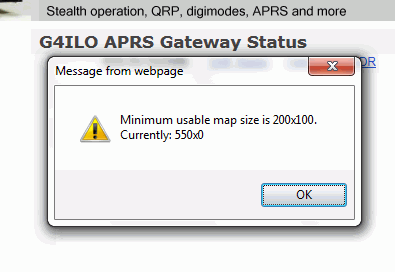
The first thing I spotted is that the embedded APRS maps from aprs.fi on my website and also the WOTA website no longer work. Instead of the expected map you get a message box that says: “Minimum usable map size is 200×100. Currently: 550×0.” This is something that has worked on every single browser on every computer platform until now. It is another example of Microsoft arrogance to release a browser that is incompatible with everything that went before, knowing that because so many people use their lousy browser website developers will have to change their sites to make them work with Internet Explorer.
On my QTH Information page where I had an embedded map from Google Maps showing an aerial view of the neighbourhood centered on my house, the map is replaced by a # and a pop-up panel appears at the foot of the page to say “Internet Explorer has modified this page to help prevent cross-site scripting.” I have no idea what that’s all about. I guess I’ll just have to dump the maps.
I gave up writing software except for my own use because Microsoft made it impossible for self-taught amateurs like myself to write programs that work on all the different versions of Windows. Now it seems they are trying to make it impossible for self-taught amateurs to create web pages. Why can’t they keep things simple, and if something worked why did they have to break it? Perhaps it’s time to reinvent those little badges that people used to put on websites in the 1990s, only this time the badge would say: “This website works best in anything other than Microsoft Internet Explorer.”

Julian Moss, G4ILO, is a regular contributor to AmateurRadio.com and writes from Cumbria, England. Contact him at [email protected].
LHS Episode #058: Nothing But Edits
 I have to say this was probably the hardest episode to put together so far. I managed to not record the first 20 minutes of my side of the episode. Then there were bits from Episode #057 that needed to be put in. I recorded secondary items that didn’t match up with the original first take. And somehow I think I managed to get it all put together and make it make sense.
Hopefully we will see everyone at Indiana Linux Fest this weekend in Indianapolis. If you can’t make it, be with us in spirit. Thank you to our listeners for all your support. Please continue to help us get to Dayton if you can, and remember to tell a few of your friends about us.
73 de The LHS Guys
Russ Woodman, K5TUX, co-hosts the Linux in the Ham Shack podcast which is available for download in both MP3 and OGG audio format. Contact him at [email protected].
Changing the 30m bandplan
I have never had a JT65A contact on 30m. This is surprising. The 30m band is the most popular band for the WSPR mode which has demonstrated that it provides good propagation 24 hours a day. The trouble is that there is nowhere for JT65A to operate. The JT65-HF software frequency menu offers two choices for VFO frequencies: 10.139MHz and 10.147MHz. But the former will cause interference to WSPR and have you fighting it out with a phalanx of PSK signals and the latter conflicts with the frequencies used by APRS packet and other digital networks.
To those who wonder why you can’t just find a clear frequency and operate I would point out that this doesn’t work with weak signal digital modes. Not only will users of other modes not know you’re there and call on top of you, but the DX you hope to work won’t be able to find you either. So it’s important to have a frequency of operation that has a good chance of being clear, where other users know to listen.
From recent discussions it appears that the two previously mentioned 30m frequencies were chosen in a desire to find a place to operate that fits in with the IARU Region 1 and Region 3 bandplans. In the USA (which is Region 2) narrow band digital modes can use 10.130-10.140MHz but in the rest of the world the area up to 10.140MHz is allocated to CW.
I have long believed (and have probably written before in this blog) that it is absurd to have different bandplans and different rules for different parts of the world because radio waves don’t stop at national boundaries. I suspect that the allocation of just 10kHz for digital modes was made back in 1979 when the 30m was first allocated to amateurs, when the only digital mode was RTTY. Since then, and especially in the last ten years or so, there has been an explosion in the number of digital mode users (due to the increasing use of computers) as well as a proliferation of different digital modes. It is time the band plans were updated to reflect that.
I think the bandplan for 30m in the rest of the world should be brought into line with that in the USA. I have nothing against the CW mode but if 30kHz is enough for US amateurs to get by with then the rest of the world can also manage with 30kHz.

Julian Moss, G4ILO, is a regular contributor to AmateurRadio.com and writes from Cumbria, England. Contact him at [email protected].
Great Idea: Light Painting WiFi
Saw this in my Google Reader at work and had to post. Apply to work, ham radio, …? It’s clearly an artist’s take and not an engineer’s.
Ethan Miller, K8GU, is a regular contributor to AmateurRadio.com and writes from Maryland, USA. Contact him at [email protected].
 Ham Radio Deluxe |
 W5SWL Electronics |
 Ham Radio Prep |
 KB3IFH QSL Cards  Hip Ham Shirts  HamRadioAuctions HamRadioAuctions Reliance Antennas Reliance Antennas Enigma Shop Enigma Shop |  morseDX  Ni4L Antennas  R&L Electronics R&L Electronics antennas.us antennas.us QRV QRV |
- Matt W1MST, Managing Editor
