 |
 Handiham World for 01 June 2011
 31 May 2011 | by
 Welcome to Handiham World!

Last week’s e-letter delivery was a mess, for which we apologize. For reasons still unknown, the Internet hiccupped last Wednesday and the Freelists.org website was unreachable. I am not sure what caused the outage, but I did notice that some other websites were unreachable as well, and that seems to point to some problem with a domain name server, which could be anywhere. Although I had opened the Freelists admin page, everything had quit functioning and the situation did not change for the rest of the day. We decided to extract the email addresses from the web page HTML, which was by then the only option. My son Will, KC0LJL, wrote a small program to do the extraction from a command line, and we set up a new Handiham World mailing list on our own Handiham server. I did run into a glitch, though – it did not seem to be delivering to all of the addresses on the list. Since that problem has not been resolved to date, we are returning this week to the now-functioning Freelists mail server.
Of course when the e-letter does not go out, I start to hear from subscribers. One thing to remember is that announcements about service will be posted on Handiham.org as soon as it is possible to do so. Reading the updates there will be faster than trying to get through to me since the weekly e-letter is always published on the website prior to its release via email. The audio podcast was available on time as usual and was not affected.
Anyway, we hope the Freelists site stays up and running – it has been really reliable, so this past week’s outage was quite unusual – and we will be able to publish according to our usual schedule. Remember, if something does not seem to be working, check the website for possible news. If you do have to report a problem, please email me instead of using the phone. That will help me organize my messages and make sure I get back to you effectively, since I can mark the messages as “tasks” to be completed in Outlook.
And a special note to Avery, K0HLA: Maybe if we offered the e-letter via Morse code, it would get through these adverse Internet conditions!
Patrick Tice
[email protected]
Handiham Manager
Help us win the Dr. Dave Challenge!
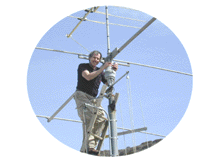
Money is tight these days and we desperately need your support. Now, thanks to a generous challenge grant by Dr. Dave Justis, KN0S, we have a chance to help fill the budget gap. Dr. Dave will donate $5,000 to the Handiham System if we can raise a matching amount. That means we need to really put the fund-raising into high gear! If you can help, designate a donation to Handihams, stating that it is for the “Dr. Dave Challenge”. We will keep you posted in our weekly e-letter as to the progress of the fund.
Nancy can take credit card donations via the toll-free number, 1-866-426-3442, or accept checks sent to our Courage Center Handiham address:
Courage Handiham System
3915 Golden Valley Road
Golden Valley, MN 55422
Be sure to put a note saying “Dr. Dave Challenge” somewhere in the envelope or on the note line of the check.
Thank you so much for your support!
Troubleshooting 101: Station list but no connect in Echolink.
It’s happened to virtually all Echolink users when trying to set up the application on a computer for the first time. You get the Echolink application downloaded and installed, you have your log in credentials all squared away with the Echolink administrators, and you are excited to get Echolink logged on for the first time. Up comes the station list, and you are all set to go!
Or are you?
Well, maybe not. Let’s take a look at a typical screenshot. Here we see that Echolink has opened the station list in index view, which is a typical first screen. At this point, we have a station list, and we want to try connecting to one of them to check to see if everything is working.

Now it is time to open the “Find” dialog and search for ECHOTEST. There will be several stations in conference with the test server, so keep repeating your search until you find ECHOTEST on its own line, where it is not shown to be in conference. The keyboard command to open the find dialog is CTRL-F. A complete list of Echolink keyboard commands is listed on the Handiham website:
http://www.handiham.org/node/286

Highlight the ECHOTEST line and press the ENTER key. Echolink will connect to the test server and you will hear a voice welcome and you will be invited to record an audio test. That way you can check your levels and make sure your audio is good before making an actual contact. We won’t go into all of that, because what we want to do is follow through on what happens when ECHOTEST does not connect and instead times out.
One option is to run a test using the Tools menu in Echolink. Open Tools, then go to “Firewall/Router Tester”. Select and run the test, which will probably show something like this “fail” message. It will almost always indicate a UDP test failure. The problem is generally traceable to the firewall in your home network’s router. It will be necessary to go into the administration pages of the router and forward the ports, the instructions for which may be found on the Echolink.org website. The menus and procedures vary from model to model and brand to brand, so the Echolink site will point you to Portforward.com, which has an extensive list of configuration instructions by brand and model.

But, as the Echolink site points out, it may not be possible to access the router. Either you do not have administrator credentials or you do not have the computer skills to make these configuration changes. This is a common problem when using a public WI-FI network. In that case, you should know how to use a public proxy.
Our first step is to open the setup menu with ALT-E or by clicking the little crossed tools icon with the mouse. Here you see my System setup screen.

Use the mouse or your screenreader skills to choose the “Proxy” tab. Here you see that I am connected via “Direct Connect” to the Echolink system and not through a proxy:

I want to try a public proxy, so I will click the “Choose Public Proxy” radio button:

Next, find and press the “Refresh List” button. Once that is done, the pull down menu is used to reveal a list of available public proxies. Choose one by highlighting it and find and press the “Ok” button.

The application will then reload the station list.

Next, find and try connecting to ECHOTEST as before:
If you have connected to a public proxy correctly, the connection to ECHOTEST will now succeed and you can test your audio:

Once you have completed any audio adjustments, you may disconnect from ECHOTEST and begin making real contacts:

Of course we would like to hear you on the Handiham daily Echolink net. Our preferred conference server is HANDIHAM, which you can find with the search function the same way you found ECHOTEST.
Here are some things to know about using public proxies:
 | Just because you connected successfully to a public proxy one day does not mean that it will be available the next day. Another station may have grabbed it before you, or the proxy operator may have taken the proxy down for some reason. That means that you may need to go though the proxy setup each time you get on, but it will be pretty obvious when the Echolink application fails to load the station list. If the proxy you used yesterday is available today, Echolink will connect and load the station list. If it is not available, you will get an error message and you can try a different proxy. I have had times when the same proxy worked several days in a row, and other times when I had to try two or three different ones just to get one that worked. |
| Some proxy owners time-limit connections. After all, this is a public service and it would not be good for one user to hog the proxy all day long. Good operating practice is to use the public proxy only as long as you need it so that another station can have a chance. |
| A public proxy is like a seat on a city bus. You might have a favorite seat if you ride the bus to work every day, but it should not be too surprising if sometimes when you get on the bus “your” seat is already taken! |
| Like the seat on the bus, only one station can use a public proxy at a time. When the station using the proxy disconnects, the proxy is then available for another user. |
| A public proxy bypasses firewalls and is easy to use once you figure out the simple procedure for finding and selecting a new proxy. |
I hope to hear you on the Handiham net soon!
Send your ideas about troubleshooting to [email protected] for possible inclusion in next week’s edition of your weekly e-letter.
Free iBlink Radio application for Android puts radio stations and audio at your fingertips – and it is super-easy!

There is nothing more frustrating than a hard to use mobile application. Some of the “do-everything” audio players have pretty steep learning curves precisely because they try to do everything. Since those applications are designed for the general public, they have to have attractive interfaces – and that can further confuse the user. Wouldn’t it be nice if someone would release an easy to navigate audio application designed for blind and low vision users, or for anyone who might have problems navigating the small touch screen on a mobile device?
Well, they have! It’s from the most excellent folks at Serotek, who make the free SA Mobile application called “iBlink Radio” available on the Android Market. Downloading and installation is a breeze, and the screens come up in easy to read and intuitively navigable plain text links. The default is bold white text on a black background, which is good for reading and saves battery power.
“But”, you say sadly, “I have an iPhone® and not an Android phone, so I must be out of luck!”
No, you are not out of luck! In fact, you can just go to the iTunes App Store and search for iBlink Radio, which is also available for your iPod Touch®, iPhone®, and iPad®! It is also a free app, and please do not confuse it with the “iBlink” app, which is NOT the same as the iBlink Radio app.

The content is designed to be of interest to blind and low vision users, so you will find easy links to ACB Radio and blindness related podcasts, but there is still some time for fun with old time radio. Give it a try, and let our friends at Serotek know how much you like it.

Pat Tice, WA0TDA, is the manager of HANDI-HAM and a regular contributor to AmateurRadio.com. Contact him at [email protected].
Give a Hoot? How NOT to Avoid Mosquito Bites!!
The Hoot Owl Sprint sponsored by the QRP-ARCI requires one to operate from 2000-2359 local time. The objective (?) is to test our ability to operate QRP Portable in the night hours, portable if possible. I chose a secret location with TALL pine trees next to an alligator occupied lake in the SE suburbs of Orlando for my site. Knowing the place is prone to giant mosquitos, I planned to use my screen house enclosure. Weather was HOT and WINDY with gusts of over 25mph so that killed option to hide from the critters inside my screen house. SHUCKS. But, the good news was the wind also blew the mosquitos out of the air so I settled in for operating from my portable table in the middle of the tall trees.
Wind did blow Ole’ Murphy in and added a couple hours to getting my 88 ft doublet up into the pines as my 1 oz sinkers hung in mid-air. The tension on the line with all that wind equaled the weight of the sinker and once it got up over the 60 ft limb it merely hung in space and didn’t descend no matter how many things I tried. Very frustrating! Eventually my Scottish and Irish nature won out over nature and I settled for a 45 ft high perch for my antenna in a slight horizontal vee config favoring NNW direction. From FL this is not a bad direction to point as it covers the better part of the USA! So with my jeans and a light jacket to break the wind, I began my contest effort, missing the first hour due to delay in getting the antenna up, so it was really dark by the time I made my first contact which was my good friend and fellow Polar Bear QRP group member the Hill Billy Bear, AF4O in Tennessee.
What a mess, I had just turned the rig on and had not even setup my BLT+ tuner but heard a quick CQ from AF4O and wanted to make the contact. I didn’t notice until afterwards that I was still in SWR position and not in operate, so the contact I made with him was thru the LED SWR Bridge which must have reduced my 2+ watt output to the lowish milliwatt range. How’s that for QRPp? Amazing that we even connected and my keying was so poor as the wind was blowing so hard the tuner was getting airborne during our brief exchange! Finally settled down and taped it to the table for the rest of the evening. Thanks for hanging in there with me Chuck! Operating in a strange place, in the middle of nowhere in the dark was a bit unsettling I was to learn.
The night effort was fun and I got to work several Polar Bear friends, Larry W2LJ, Hank WQ8RP using his club call, and Martin VA3SIE/VE2/P (what fun to send that call each time, eh?) Sure worth the effort to get out and experience the wierd band conditions. 20m was open until midnite but was pipelining to various parts of the country with STRONG sigs until it shifted to another region without much warning. It was either good or bad like that all evening but much more reliable than 40m here in the FL area.

Achilles HEAD shot
The lesson of the night was an itchy one. I was well covered from potential mosquitos and the wind was in my favor. BUT, they found my Achilles heel (or should I say Achilles HEAD?) They managed to bite my head without my noticing in the upside down U-shaped area where the cap adjuster is in the back. I am sporting about a dozen (almost the same as my 3 hr QSO total of 13) bites that itch like crazy in that small area that was not well covered by clothing or insect repellent. So next time I go out contesting in the night, I’ll be prepared… Look out, I’m ready for ya skeeters. Grrrrrrrr!
Kelly McClelland, K4UPG, is a regular contributor to AmateurRadio.com and writes from Florida, USA. Contact him at [email protected].
Now that’s service
Saturday afternoon I was going through my QSO logs in preparation for a long-overdue bureau mailing. One of the things I do prior to doing a mailing is that I validate that I still need the card (sometimes I’ll get a confirmation for that band/mode from another operator, or sometimes it’ll get confirmed via Logbook of The World [LoTW] since I initially flagged it) and I also check to make sure that I’m not sending to a bureau that doesn’t exist, or sending via the bureau when I could send direct to a US manager.
In going through the log, I discovered that I had an unconfirmed QSO with Joel, V44KAI on 6m from 2009. That was my only contact with V4 on 6m so I definitely wanted to confirm it. I noticed that I had two other contacts with him (on different bands) which had been confirmed via LoTW, but not the 6m contact. Joel’s qrz.com page explain that because he sometimes encounters QRM/QRN that it’s a good idea to contact him before asking his manager, W5TFW. I emailed Joel who replied that some of his older logs were on paper and hadn’t been put into electronic form so that they could be uploaded to LoTW.
On Sunday morning I got another email from Joel who told me that he found the (valid) QSO in his logs and had emailed his manager to give him the details so that it could be uploaded to LoTW. I checked and probably within 10 minutes of my seeing that email I found that the matching QSL record was in the LoTW system, confirming V4 on 6m for me.
The reason that I wrote this is because to me this exemplifies the ham radio spirit. Joel is clearly an active ham (try a search for V44KAI on the DX-Summit search page and you’ll see what I mean) and as Joel says on his qrz.com page, his manager obviously keeps busy keeping the records up to date. The fact that both of these guys took the time to quickly respond to my question and do the work necessary to provide me with the confirmation I needed helps remind me that despite some of the less-altruistic hams floating around, there are still plenty of good guys. Thanks to both of them for that reminder.
Edit: I was asked what a “manager” is, so by way of explanation:
A manager is a person who handles someone else’s QSLing duties for them. There are all kinds of reasons to have managers, including having the manager in a country with a better mail system to reduce mail theft, or simple because the DX station handles a large volume of cards and can’t keep up with it themselves.
Old dog (very old!), new tricks
I’ve been slow to adopt digital communications for a very practical reason: between the day job and writing books, I spend ten to twelve hours a day on a computer keyboard. When I get on the air, I prefer my keyer paddle or microphone when I reach out and touch. But friends kept evangelizing about the wonderment of PSK31, and I kept seeing rare DX entities that I covet being spotted on PSK31 and RTTY, so I finally bit the bullet. Well, sir, I have seen the light! I am officially converted!
I was on the verge of doing a quick and dirty hookup just to get a feel for the stuff but I had an order I was submitting to DX Engineering anyway so I included a SignaLink USB in the shopping cart. Of course, I managed to order the wrong interface cable for my Kenwood TS-2000…it would have worked but I would have had to plug and unplug the microphone…but DXE handled the swap seamlessly. And in no time, I was PSKing with the best of ’em. Downloading and setting up my software
of choice took most of the time. The SignaLink only required setting some jumpers internally for my radio. The manual and an extra sheet were well-written, though I did have to go to the Internet to get some tips on working with Microsoft Vista. That should make it into the standard manual soon, I would hope.
I confess I did quite a bit of RTTY back in the ’70s, when we used old, noisy, oil-and-sprocket-slinging surplus teletype machines and boxes of fan-fold paper. I recall that back then, unless you were blessed with pretty decent power, and with constant duty that required a hefty amp and power supply, the mode was susceptible to QRM as well as drifting, and more. I did enjoy it, despite these drawbacks.
But I’ve quickly learned there is no comparison with PSK31. I have not even tried RTTY yet due to my fascination with this narrow, narrow mode. Friends told me, but I didn’t believe them. When I was ready to go and tuned the receiver to 14.070 and heard that caterwauling bunch of cats in heat, I smirked and said to myself, “Self, there is no way you can pull any intelligence out of all that screeching!”
But there on the waterfall (I use Ham Radio Deluxe Digital Master 780 software) were a good dozen clearly defined traces. I could copy any one of them. I tried a couple of them so dim I could hardly see them in the clutter and got almost solid print on them, too. Finally, I clicked on one and saw it was a UA9. When he finished his QSO and called CQ, I answered, making sure to keep the power level low…about 20 watts…as advised. He came right back and we proceeded to have a nice chat. I’ve had a bunch since, all over Europe, the US, and South and Central America, mostly on 20 and 17.
Just the other night, I gave UX1IW a call and, as I have grown accustomed to, he came right back. We were chatting away (he gave me an RSQ of 599) when I noticed each of my wattmeters were barely moving off the peg. Huh? Oh. I had been using the amp on CW earlier in the evening and had left the RF out on the TS-2000 on 35 watts. With the audio out from my sound card set as usual, I was barely running 5 watts!
So, I’m evangelized. I do wish there was a little less reliance on the canned macros, one of the other things I did not like so much in the old RTTY days. But all in all, I am darned impressed with this PSK31 stuff.
Moral of the story is that we can always learn something new. And it is always surprising how something as simple as trying a new band or mode can reinvigorate our interest in this wonderful hobby.
As if I need reinvigorating!
73,
Don Keith N4KC
www.n4kc.com
www.donkeith.com
http://n4kc.blogspot.com
Don Keith, N4KC, is a regular contributor to AmateurRadio.com and writes from Alabama, USA. Contact him at [email protected].
Been travelling

View when flying from Vancouver, BC to Seattle, WA
I have spent this week in Seattle, WA on business. Did not have much time for radio but I have been using the DVAP dongle and been linking into the repeater back in Ottawa either directly or via REF016B.
The DVAP works well whilst travelling. I even used it to link through to talk to the students at the Carleton University Amateur Radio Club. I could then chat to them as they were working on building a PSK31 interface for the FT817. I have also chatted with the locals, some of whom commented that I sound like I am local. I will continue packing the DVAP with the IC-91AD in future. By the way, there was no trouble taking the HT in my hand luggage on the plane, no questions at Ottawa or going through customs US Customs at Vancouver. (For those not familiar flying from Canada to the US it is not unusual to pass through US immigration/customs in a Canadian airport so you land as a ‘domestic’ flight in the US).
Today I had a little time to visit a hardware store called Hardwicks that was close to the hotel. This reminded me of the old ironmongers store that was in the village I grew-up in, in Lancashire, UK. however, Hardwicks was about 5 times bigger. Great to wander around and look at the range of tools and hardware.
I also visited a RadioShack store (in Canada now called the Source) and was pleased to see some drawers with components in. At least you can still get a voltage regulator on the high street!
Travelling back today.


Alan Steele, VA3STL, is a regular contributor to AmateurRadio.com and writes from Ottawa, Ontario. Contact him at [email protected].
Handiham World for 25 May 2011
Welcome to Handiham World!

Photo: Larry Huggins, KA0LSG, Handiham volunteer. Hap Holly, KC9RP, is in the background since our Handiham booth and the RAIN Report booth were neighbors.

Photo: Volunteer John Pedley, N0IPO, hangs the banner at the back of the booth because he is the tallest of our crew and can reach the hooks.

Photo: Larry, KA0LSG, John, N0BFJ, and Ken, KB3LLA, on booth duty.
Thanks to all who stopped by to visit us at Hamvention® 2011 and to volunteers John Hoenshell, N0BFJ, Larry Huggins, KA0LSG, John Pedley, N0IPO, and Ken Silberman, KB3LLA, Handiham Radio Club President, for staffing the booth. We’ll have a full report later, but I also wanted to thank DARA for their generous support in awarding the Handiham System a check for $500 and to John Hoenshell, N0BFJ, for his financial support of the Hamvention trip that enables us to be there.
The ARRL Youth Forum, conducted by Carole Perry, WB2MGP, was a must-see, because our young people are the future of amateur radio – we all know that – but I like listening to the poised young folks telling us about the aspects of ham radio that they have mastered. And do you know what? I feel positively uplifted by their energy and enthusiasm for science and technology, as well as for public service. I know the world will be better off with people like them in our future.
We are giving a special shout out to 10 year old Amanda Lee, KD0JAY, for her excellent presentation about “People with Disabilities and Ham Radio” and Handihams at the Youth Forum! Hopefully a video of her presentation will be available on YouTube soon. Amanda told us that she was inspired by Gerry, WB6IVF, who had been mentioned in our past columns as the owner of the “Unseen Bean” coffee roasting business.

Photo: Shirley Roberts, N8LX, and Lynn Roberts, N8LXK, at the Handiham booth.
Shirley Roberts, N8LX, is a celebrity this year, because she won the Dayton Hamvention® Amateur of the Year award. She and her husband Lee, N8LXK, stopped by and paid us an extended visit at the Handiham booth. Shirley and her many accomplishments in amateur radio public service are featured in the Richard Fisher, KI6SN, Public Service column in the May 2011 CQ Magazine. Shirley is active in many ham radio organizations, including the ACB radio club, QCWA, Handihams, ARRL, and, of course, SKYWARN® as a liaison.
Speaking of CQ, when I stopped by the CQ/Worldradio booth to visit with publisher Rich Moseson, W2VU, he pointed out a giant reproduction of the Worldradio June 2011 cover, and there I was, right on the front. The photo was taken by Avery Finn, K0HLA, and shows a smiling Pat Tice wielding that familiar Handiham coffee mug. The photo accompanies a story about how I have completed 20 years with the Courage Center Handiham System in May, 2011. Be sure to read it! Bob Zeida, N1BLF, writes that he should have the audio version ready in time for the Friday Handiham Audio Digest, available to our blind members.

Wandering around is always fun. The main arena section has a very high roof and hosts some familiar manufacturers like Kenwood, Icom, and MFJ. In this photo taken from the stands, we look down at the MFJ booth with its many tall vertical antennas.

I make no secret of the fact that I like my own Icom IC-7200. Imagine my surprise to see it dressed up in a camo paint job at the Icom booth! We have mentioned in the past that the IC-7200 comes with speech frequency readout installed. Kudos to Icom for including this accessibility feature instead of making it an option.
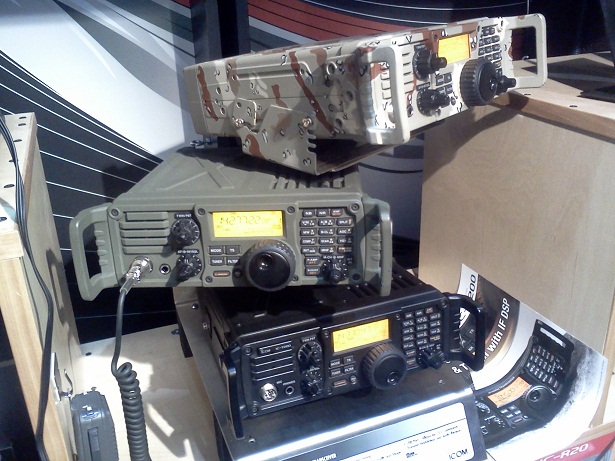
Photo: Stack of three IC-7200 transceivers, one in plain black, one in army green, and one in camo paint.
What a great show it was again this year! Now that we are all jazzed up from all the new ham radio stuff we saw at Dayton, it’s time to roll up our sleeves and get busy with the summer antenna work and ARRL Field Day!
Patrick Tice
[email protected]
Handiham Manager
Read more or find the audio podcast on handiham.org.

Pat Tice, WA0TDA, is the manager of HANDI-HAM and a regular contributor to AmateurRadio.com. Contact him at [email protected].
Handiham World for 25 May 2011
Welcome to Handiham World!
Photo: Larry Huggins, KA0LSG, Handiham volunteer. Hap Holly, KC9RP, is in the background since our Handiham booth and the RAIN Report booth were neighbors.
Photo: Volunteer John Pedley, N0IPO, hangs the banner at the back of the booth because he is the tallest of our crew and can reach the hooks.
Photo: Larry, KA0LSG, John, N0BFJ, and Ken, KB3LLA, on booth duty.
Thanks to all who stopped by to visit us at Hamvention® 2011 and to volunteers John Hoenshell, N0BFJ, Larry Huggins, KA0LSG, John Pedley, N0IPO, and Ken Silberman, KB3LLA, Handiham Radio Club President, for staffing the booth. We’ll have a full report later, but I also wanted to thank DARA for their generous support in awarding the Handiham System a check for $500 and to John Hoenshell, N0BFJ, for his financial support of the Hamvention trip that enables us to be there.
The ARRL Youth Forum, conducted by Carole Perry, WB2MGP, was a must-see, because our young people are the future of amateur radio – we all know that – but I like listening to the poised young folks telling us about the aspects of ham radio that they have mastered. And do you know what? I feel positively uplifted by their energy and enthusiasm for science and technology, as well as for public service. I know the world will be better off with people like them in our future.
We are giving a special shout out to 10 year old Amanda Lee, KD0JAY, for her excellent presentation about “People with Disabilities and Ham Radio” and Handihams at the Youth Forum! Hopefully a video of her presentation will be available on YouTube soon. Amanda told us that she was inspired by Gerry, WB6IVF, who had been mentioned in our past columns as the owner of the “Unseen Bean” coffee roasting business.
Photo: Shirley Roberts, N8LX, and Lynn Roberts, N8LXK, at the Handiham booth.
Shirley Roberts, N8LX, is a celebrity this year, because she won the Dayton Hamvention® Amateur of the Year award. She and her husband Lee, N8LXK, stopped by and paid us an extended visit at the Handiham booth. Shirley and her many accomplishments in amateur radio public service are featured in the Richard Fisher, KI6SN, Public Service column in the May 2011 CQ Magazine. Shirley is active in many ham radio organizations, including the ACB radio club, QCWA, Handihams, ARRL, and, of course, SKYWARN® as a liaison.
Speaking of CQ, when I stopped by the CQ/Worldradio booth to visit with publisher Rich Moseson, W2VU, he pointed out a giant reproduction of the Worldradio June 2011 cover, and there I was, right on the front. The photo was taken by Avery Finn, K0HLA, and shows a smiling Pat Tice wielding that familiar Handiham coffee mug. The photo accompanies a story about how I have completed 20 years with the Courage Center Handiham System in May, 2011. Be sure to read it! Bob Zeida, N1BLF, writes that he should have the audio version ready in time for the Friday Handiham Audio Digest, available to our blind members.
Wandering around is always fun. The main arena section has a very high roof and hosts some familiar manufacturers like Kenwood, Icom, and MFJ. In this photo taken from the stands, we look down at the MFJ booth with its many tall vertical antennas.
I make no secret of the fact that I like my own Icom IC-7200. Imagine my surprise to see it dressed up in a camo paint job at the Icom booth! We have mentioned in the past that the IC-7200 comes with speech frequency readout installed. Kudos to Icom for including this accessibility feature instead of making it an option.
Photo: Stack of three IC-7200 transceivers, one in plain black, one in army green, and one in camo paint.
What a great show it was again this year! Now that we are all jazzed up from all the new ham radio stuff we saw at Dayton, it’s time to roll up our sleeves and get busy with the summer antenna work and ARRL Field Day!
Patrick Tice [email protected] Handiham Manager
Read more or find the audio podcast on handiham.org.
Pat Tice, WA0TDA, is the manager of HANDI-HAM and a regular contributor to AmateurRadio.com. Contact him at [email protected].
 Ham Radio Deluxe |
 W5SWL Electronics |
 Ham Radio Prep |
 KB3IFH QSL Cards  Hip Ham Shirts  HamRadioAuctions HamRadioAuctions Reliance Antennas Reliance Antennas Enigma Shop Enigma Shop |  morseDX  Ni4L Antennas  R&L Electronics R&L Electronics antennas.us antennas.us QRV QRV |
- Matt W1MST, Managing Editor
