 |
 Ham Nation 12
 10 August 2011 | by
 Leo shows off his shiny new call sign, Don explains amateur radio television, George shows us the proper tools that every person needs, and more.
Guests: Don Hill, KE6BXT and George Thomas, W5JDX
Download or subscribe to this show at http://twit.tv/hn.
We invite you to read, add to, and amend our show notes at wiki.twit.tv.
Thanks to Joe Walsh who wrote and plays the Ham Nation theme.
Thanks to Cachefly for the bandwidth for this show.
http://dts.podtrac.com/redirect.mp4/twit.cachefly.net/video/hn/hn0012/hn0012_h264b_864x480_500.mp4
http://dts.podtrac.com/redirect.mp4/twit.cachefly.net/video/hn/hn0012/hn0012_h264b_640x368_256.mp4
http://www.podtrac.com/pts/redirect.mp3/twit.cachefly.net/hn0012.mp3
Dr. Bob Heil, K9EID, is the founder of Heil Sound and host of TWiT.tv's Ham Nation which streams live each Tuesday at 6:00pm PT (9:00pm ET) at http://live.twit.tv. Contact him at [email protected].
APRS iGate on a smartphone
Not that many will have noticed its absence, but the Cockermouth APRS internet gateway G4ILO is back on the air using APRSISCE running on a SIM-less HTC Touch Pro smartphone.

I had wished for a long time that I could run the gateway without having the shack PC on all the time running up the electricity bill. But when I looked at the documentation for things like aprs4r it looked too difficult. After I got my Android smartphone I was wondering what to do with the Windows Mobile I used previously and it occurred to me that I could use this for the gateway, since the Windows CE version of APRSISCE contains more or less the same functionality as its full-blown Windows counterpart. (Personally, most of the time I don’t consider that to be an advantage, and I had often wished that Lynn would release a cut-down version for mobile users with simplified menus, but that’s another story.)
In order to use the phone as a gateway I would have to set up a Bluetooth connection to the Kenwood TM-D710 TNC as the Touch Pro doesn’t have a serial port. Achieving this was one of those things that I wish I had never started, entailing hours of wasted time, failure and frustration. It also brought upon the first bad headache I have had since my brain operation. This is probably not helpful to the state of my health, so I have vowed from now on to give up the technical stuff and use the computer only for non-stressful activities like writing and web surfing. Life is, for me, literally too short to spend fighting with computers.
My first attempt at a Bluetooth connection involved using a Pico Plug. I bought two of these a couple of years ago when I saw them cheap on eBay (where they are still available, though not as cheaply) but I had never actually used them. However this first attempt got nowhere. My netbook – the only PC that had Bluetooth on it – would only see the Pico Plug as a modem and would only allow me to try connecting to the Internet through it. The smartphone saw the device but could find no services offered by it. So that idea went nowhere.
My next thought was to try one of the cheap Bluetooth serial modules being sold on eBay, as something similar had been mentioned in a thread in the APRSISCE Yahoo group. The one I ordered was described as a small size Bluetooth TTL UART full duplex data transmission module Class 2 10 meter range(30ft), 35mm by 15mm excluding pins length nicely sleeved in transparent nylon sheath supplied with 4 wire header cable. The module is based on the BT0417C chip and has a regulator to run off 3.3 – 5V. It arrived the next day by first class post and was quickly attached to a DB9 connector and power.
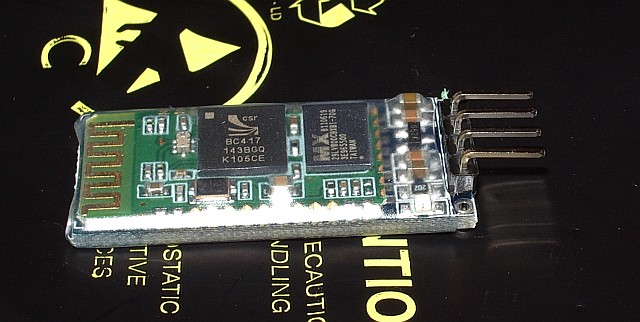
The BT0417C module was seen by the computers and advertised a serial port service. But whenever the Kenwood TNC sent any data what appeared in the terminal program was garbage. It was the same garbage for the same data, which made me think that the baud rate was wrong, though the default settings for the module were supposed to be 9600,8,N,1 just the same as the Kenwood. Try as I might – and I tried for a long time – I could not get the thing to display the proper data.
Eventually it dawned on me that changing the baud rate of the terminal program might not actually alter the baud rate used by the module to communicate with the device. I found some instructions that were supposed to describe how you could change the module’s baud rate by sending an AT command to it. This didn’t work either, after which I grasped that you were supposed to send the command by direct connection to the module, not over Bluetooth! To do this I needed to disconnect a serial cable from the back of the shack PC in order to free a gender changer that would enable me to connect a USB to serial cable to the BT module. When I disconnected the cable, one of the standoffs that the cable plug screws into decided to come off with the plug instead of stay on the PC and a nut dropped down inside the computer. So I had to disconnect the shack PC – not a simple task as it has 4 serial ports and 3 sound cards attached as well as the usual paraphernalia – in order to retrieve and replace the errant nut. Then we couldn’t get the backplane of the serial board seated back in the PC. I couldn’t see what I was doing properly so Olga had a go, and it took her half an hour of fiddling.
After all that I still couldn’t change the baud rate or get the data to be displayed correctly. I even tried connecting my Elecraft K3 to the module to see if I could send or receive commands from that, but I still got garbage at any of the K3’s available baud rates. I then wondered if I had damaged the module by doing that as I vaguely recall that the K3’s I/O module uses proper +/-12V RS232 signalling levels and the BT is a TTL module. I don’t know what the Kenwood’s serial output is either. At this point I decided to abandon the entire idea. Net result: a wasted day and a splitting headache – though at least we had taken the opportunity to vacuum all the dust out of the inside of the shack computer!
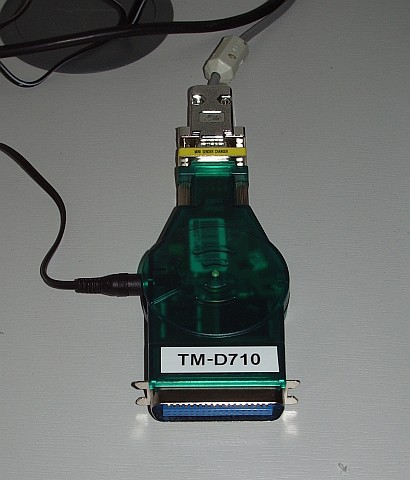
This morning, feeling a little calmer, I decided to have one last try with the Pico Plug. It suddenly occurred to me that perhaps there was some newer software or firmware for it. Sure enough, there was, though not a lot newer. I upgraded the firmware in the Plug, then installed the newer configuration utility. The result: still no advertised serial port service. 🙁
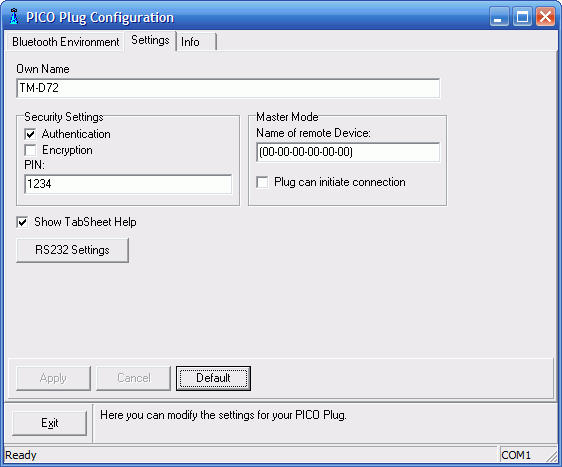
However, the new configuration utility had a few more options. By trying them at random I finally got a serial port to appear in Bluetooth on the smartphone! I connected to it with Pocket Putty, and the whoop of joy when the Kenwood packet TNC sign-on message appeared could probably have been heard five miles away. I quickly created an RF port in APRSISCE using the Kenwood(D710) APRS configuration and it put the radio into APRS mode just as it was supposed to. Stations started appearing on the display as “heard over RF.” So, finally, I was on the way to running an APRS iGate on my smartphone!
In case it is helpful to anyone else who wants to use a Pico Plug to connect a Kenwood APRS radio to another device using Bluetooth, here is a screenshot of the configuration utility showing the settings that worked. (Yes, I know, I set the device name to TM-D72 instead of TM-D710 as I intended. Believe me, by this point I was tired!)
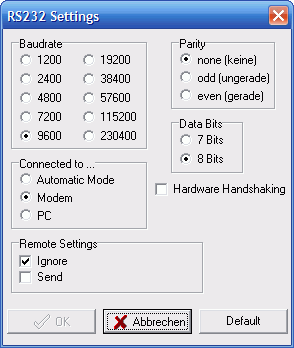
Here is one showing the RS232 settings. The important bit seems to be to set it as a Modem.
If you know what to do then that’s all there is to it. But my goodness what a frustrating nightmarish day or so it took getting there. I hate computers – and it would seem that the feeling is mutual!

Julian Moss, G4ILO, is a regular contributor to AmateurRadio.com and writes from Cumbria, England. Contact him at [email protected].
ARISSat-1 the Easy Way [VIDEO]
If you’re like me and have been wanting to receive signals from ARISSat-1, it is pretty easy. Here’s is a simple way that you can do it in the field, with just something to record audio and a receiver that can hear the satellite on 145.950MHz.
73.
Rich also writes a Tech blog and posts stories every Tuesday and Thursday on Q103, The Rock of Albany’s website, as well as Amateur Radio stories every Monday thru Friday here on AmiZed Studios.
Rich Gattie, KB2MOB, is a regular contributor to AmateurRadio.com and writes from New York, USA. Contact him at [email protected].
Bicycle mobile
I’ve always been a bit of an armchair traveller, and also an armchair cyclist. I like to read accounts of people’s travels through foreign lands, particularly if they are travelling by bike. The slower pace and need to stop and talk to more people means that they are able to convey more of a feel for the place than you get from reading grossly overrated travel writers like Bill Bryson. So having just come across the blog of Raf, ON5RZ, who is currently cycling through the USA and Canada with an FT-817 and wire antennas, I have some reading to catch up on. Perhaps you’ll enjoy reading it, too.

Julian Moss, G4ILO, is a regular contributor to AmateurRadio.com and writes from Cumbria, England. Contact him at [email protected].
KC2RA Special Event for September 11th
It’s hard to believe it’s been 10 years since that tragic day. But as we all know, life will go on and we will remember. Where we all were, what we were all doing and those feelings of seeing what happened.

KCRA Logo
The King’s County Repeater Association will be honoring September 11th with an on the air station on September 10th, from 1300-2100z. Here are the frequencies for the event.
20m – 14.295 USB
KC2RA repeater: 146.430 MHz ( 1.0) PL 136.5
40m – 7.250 LSB Echo link: KC2RA-R
EchoLink node # 132967 (KC2LEB-R)
Frequencies will vary based on band usage and conditions, and all frequencies will not be on at the same time. The station is a part of the events for the 911 activities at Conference House on Staten Island.
The KCRA will send QSL cards honoring the event via self addressed stamped envelope to: KCRA 911 Memorial Event, PO Box 280288, Brooklyn, NY 11228-0288.
73.
Rich also writes a Tech blog and posts stories every Tuesday and Thursday on Q103, The Rock of Albany’s website, as well as Amateur Radio stories every Monday thru Friday here on AmiZed Studios.
Rich Gattie, KB2MOB, is a regular contributor to AmateurRadio.com and writes from New York, USA. Contact him at [email protected].
Another CW contest in the books…….
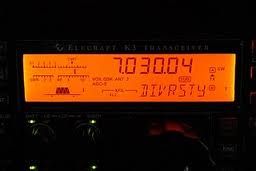

Mike Weir, VE9KK, is a regular contributor to AmateurRadio.com and writes from New Brunswick, Canada. Contact him at [email protected].
LHS Episode #063: South of the Border
 Hello, new and faithful listeners. Welcome to the sixty-first-eth installment of Linux in the Ham Shack. If anyone has been paying attention lately, a lot of podcasters are packing up their gear and moving on to other things. Many more have moved into much more irregular release cycles. We on the other hand are coming back stronger than ever. New releases are on the way. We’ll be back to every two weeks starting with Episode #062 and we’re hitting our stride again. We may not be the best or most listened to podcast out there but at least we still are a podcast. So thanks for tuning in, as always, and please let your ham radio and Linux enthusiast friends know about us. Linux in the Ham Shack lives on. ¡Vámonos!
Russ Woodman, K5TUX, co-hosts the Linux in the Ham Shack podcast which is available for download in both MP3 and OGG audio format. Contact him at [email protected].
 Ham Radio Deluxe |
 W5SWL Electronics |
 Ham Radio Prep |
 KB3IFH QSL Cards  Hip Ham Shirts  HamRadioAuctions HamRadioAuctions Reliance Antennas Reliance Antennas Enigma Shop Enigma Shop |  morseDX  Ni4L Antennas  R&L Electronics R&L Electronics antennas.us antennas.us QRV QRV |
- Matt W1MST, Managing Editor
