 |
 ICQ Podcast S04 E26 – Books (Review) for Christmas (04 December 2011)
 4 December 2011 | by
 Series Four Episode Twenty-Six of the ICQ Podcast has been released. News Stories include :-
- New spectrum challenge
- Unlicensed radio communicators in Australia
- 30 Years of UK CB
- Android to FT817 App
- Planners ground ‘flying bedstead’
- Record numbers at Radio Club licensing session Mars Rover launch live on web
- AO-51 Lost
- ARRL to inspire Hackers and Innovators
- Hackers take Amateur Radio course
Your feedback and Martin (M1MRB) reviews Books for Christmas.
Colin Butler, M6BOY, is the host of the ICQ Podcast, a weekly radio show about Amateur Radio. Contact him at [email protected].
ICQ Podcast S04 E26 – Books (Review) for Christmas (04 December 2011)
Series Four Episode Twenty-Six of the ICQ Podcast has been released. News Stories include :-
- New spectrum challenge
- Unlicensed radio communicators in Australia
- 30 Years of UK CB
- Android to FT817 App
- Planners ground ‘flying bedstead’
- Record numbers at Radio Club licensing session Mars Rover launch live on web
- AO-51 Lost
- ARRL to inspire Hackers and Innovators
- Hackers take Amateur Radio course
Your feedback and Martin (M1MRB) reviews Books for Christmas.
Colin Butler, M6BOY, is the host of the ICQ Podcast, a weekly radio show about Amateur Radio. Contact him at [email protected].
War of the Worlds, CW Edition
 For some time now I’ve been nibbling away at H. G. Wells’book, War of the Worlds — in CW! It is available along with several other books at the SKCC CW Learning Page. What a blast! It’s an effective way to improve your code speed, and it is so captivating that you want to keep coming back to it to find out what happens next. Somehow the story is all the more gripping as it unfolds slowly, letter by letter, giving you ample time to imagine the scenes that Wells describes.
Each chapter is one word-per-minute faster than the last one. So while it starts at a mere 10 WPM, if you finish the book you’ll be copying 36 WPM!
 A couple other features are helpful, too. For one thing it has punctuation marks that I’ve never learned before. It’s not everyday that you hear hyphens on the air, and the first time you hear an apostrophe or quotation-mark it will throw you for a loop. But you learn them quickly enough.
Another thing I like is that Wells uses some expressions that are a bit antiquated. This helps keep you on your toes. On the air, it can be a help to anticipate the next word, but it can also be a hindrance — if you don’t hear what you expect to hear, it can take just enough milliseconds to get over the surprise that the whole word “rushes by like a freight train” (as my friend Keith describes code when it suddenly becomes opaque). By listening to War of the Worlds on CW, with its occasionally unfamiliar turns of phrase, you learn to temper your expectation so that you’re not thrown off.
All in all it’s a great way to hone your skills, and it’s way more enjoyable than the dry practice tapes I listened to ‘way back when!
Thank you to SKCC and especially to John Dunlap, KF7BYU, for making this book available!
Update: One ham has asked me for help on this. Currently the only way to listen to the files at http://www.skccgroup.com/learn/learn.php is to click on them one at a time, either listening to them one at a time online or right-clicking each one and saving them one at a time to put together in a playlist on your computer (That’s what I did, and it was a bit tedious.). If you would like to download a zipped file of the whole book, send me an email at [email protected] and I’ll give you the link for as long as I can spare the disk space to keep the zipped file online.


Todd Mitchell, NØIP, is a regular contributor to AmateurRadio.com and writes from Minnesota, USA. He can be contacted at [email protected].
Elecraft P3 pan adapter
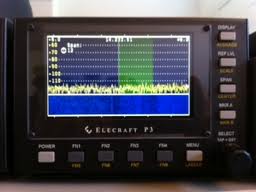
Well I have sold some unused "stuff" here at VE3WDM so the funds are there. I contacted Lisa at Elecraft and I was told that in a few months there is a board coming out to put the P3 video up onto your monitor along with other goodies that it can do as well. For example decode on the monitor CW, RTTY and PSK31 to name a few. So
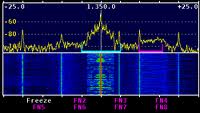

Mike Weir, VE9KK, is a regular contributor to AmateurRadio.com and writes from New Brunswick, Canada. Contact him at [email protected].
Win a Wouxun KG-UV6D Dual-Band HT

AmateurRadio.com is offering a free prize drawing!
With the help of our generous sponsor,
Import Communications (formerly Wouxun.us),
we’re holding a giveaway for a
Wouxun KG-UV6D Dual-Band HT
(KG-UV6D 144/440 version)
This is a US$175 value.
Enter now to win!
All licensed hams in the U.S. are eligible to enter
Matt Thomas, W1MST, is the managing editor of AmateurRadio.com. Contact him at [email protected].
Welcome to the future
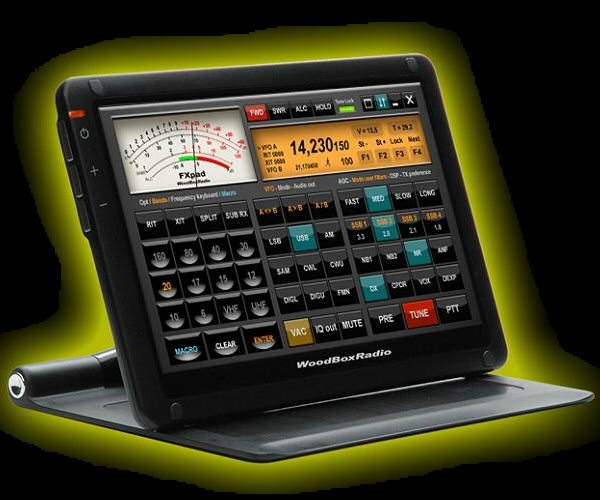
Casey TI2/NA7U recently wrote in his blog about the Elecraft KX3 which has a rather outdated look. Of course that’s just a opinion. Others will tell that it has just what they search for in a radio. But…I would rather have a flexible design were I can design my own front and knobs instead of being dependable of what the designer has in mind. With the technology of today it should not be that difficult. So, I was thinking and searching on the internet for pictures and found the site of WoodBoxRadio which already invented and sell part of my idea, the FXpad. It’s basically a Ipad for your SDR (Flexradio system) or of course any other radio. Now, you think that probabely costs a lot of money. Well just look around at that site. FXpad is just software. The pad itself only costs 179 euro, that’s not too expensive if you compare it with for example a Ipad or similair. I remind you it’s only a touchscreen, not a computer! I certainly want to have a screen like this in my new shack! Anyway, to get back to a idea for a new (QRP) radio with such a configurable touchscreen instead of knobs buttons and a display. What about a radio that is for example just as thick as a Elecraft KX3 but then with a configurable touchscreen. Software/hardware options like a internal keyer, digital modem, build in wireless LAN, progammable voiceprocessing, software updates for new features. There are endless possebilities. Just for example if you want it to look like a old Argonaut radio or just the KX3 if you like, you just change the display and it’s features to what you like. Another idea I would like is a self learning mike connection, a kind of USB plug for your mike. Just plug in any brand of mike and the radiocomputer learns the connections itself. That should be on the radio of the future….any other ideas? You’re welcome to write it as a comment on this post.
Bas, PE4BAS, is a regular contributor to AmateurRadio.com and writes from Groningen, Netherlands. Contact him at [email protected].
How To Use An Antenna Tuner
It’s always good to review the basics now and again. I know I could use some brushing upon a few things from time to time. Tyler, N7TFP, has made a video on how to tune an antenna. If your building your first station or studying for your exam, then this video is something I suggest you watch. Even if you’re a seasoned “Pro from Dover”, it’s good to watch. So here’s Tyler…
73.
Rich Gattie, KB2MOB, is a regular contributor to AmateurRadio.com and writes from New York, USA. Contact him at [email protected].
 Ham Radio Deluxe |
 W5SWL Electronics |
 Ham Radio Prep |
 KB3IFH QSL Cards  Hip Ham Shirts  HamRadioAuctions HamRadioAuctions Reliance Antennas Reliance Antennas Enigma Shop Enigma Shop |  morseDX  Ni4L Antennas  R&L Electronics R&L Electronics antennas.us antennas.us QRV QRV |
- Matt W1MST, Managing Editor
