 |
 Snow!
Snow!
 16 December 2011 | by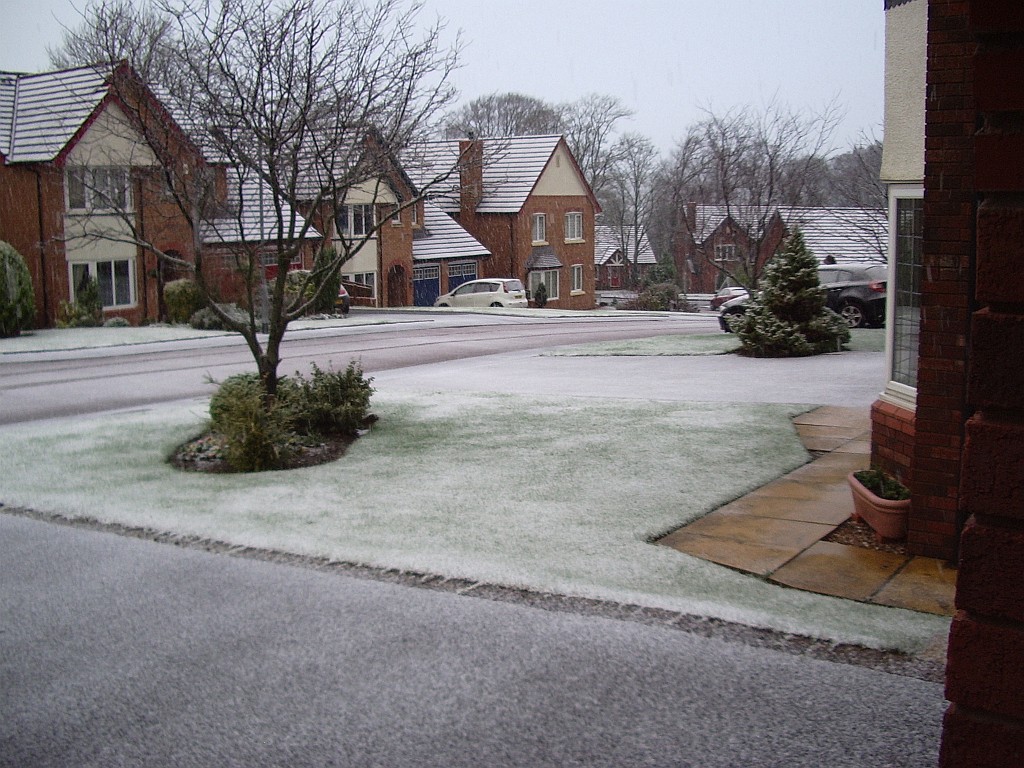
This was the scene that greeted me when I looked outside this morning! Nothing to what folks in the USA get, of course. But considering that it used to be unusual to have any snow at all during the winter here in West Cumbria it’s still noteworthy.
I hope we don’t get any more, though. Apart from the hassle factor of slushy slippery pavements, a thick layer of snow on the roof won’t help my attic antennas to get out.

Julian Moss, G4ILO, is a regular contributor to AmateurRadio.com and writes from Cumbria, England. Contact him at [email protected].
Converting WSPR data to ADIF
- Windows notepad (or another text editor)
- adif2xlsadif.xls and of course Excel
- Log Converter
- Any logger that can import ADIF format
I hope this is helpfull for some of you…
Bas, PE4BAS, is a regular contributor to AmateurRadio.com and writes from Groningen, Netherlands. Contact him at [email protected].
More 100mW on 10m WSPR results
Although the sunspot number was not promising today I decided to give it another 100mW go. And was not dissapointed. Still no VK, but have been received at Reunion Isl. today. Although I thought this 5mW from VU2SWS was amazing I observed her reports today and think that she did not set the power correct in the WSPR program. Probabely she was using 5W, there was a connection with the internet but she reported only 5W WSPR stations. Below my results today. I can now make decent cards with mapper through HRD V4. I will post a step-by step manual tomorrow about converting WSPR data to ADIF.
 |
| WSPR TX with 100mW WSPR RX Worldwide WSPR RX USA East |
Bas, PE4BAS, is a regular contributor to AmateurRadio.com and writes from Groningen, Netherlands. Contact him at [email protected].
Amazing ears…

Just spotted this on 10m:
2011-12-15 13:24 VU2SWS 28.126033 -13 0 MK68gn 0.005 PE4BAS JO33jk 6762 322
That’s amazing this 5mW signal has go into my antenna over a distance of 6762 Km with a again amazing signal of -13dB. It’s hard to believe as I didn’t see my own 0,1W signal spotted by her station, but that can be a lack of internetconnection of course. That brings me to another puzzle at the radiohobby. Signals or propagation seem not always be reciproke. At least not at my station. Overall I receive more then I can transmit even with 100W. This is the case especially on 10m. It happened to me again last ARRL 10m contest. I knew some amateurs (PD1RP) were on a little DXpedition on Texel Isl. using a 2 element moxon in the contest. I could clearly copy them over a distance I think from about 100km. But whatever I tried, they could not hear me. This happens to me once and a while and I don’t know who to blame? Have they got a bad receiver, attenuation on, QRM or QRN? It’s hard to believe but I sometimes think I must have a exceptional quiet QTH as I do not have any QRN/QRM on 10m and a very low noise floor. On the Icom I always have the preamplifier on at this band as I can pull out a lot more stations that way.
Bas, PE4BAS, is a regular contributor to AmateurRadio.com and writes from Groningen, Netherlands. Contact him at [email protected].
VOAProp and WWV
A couple of days ago I received an email from Mirek, OK1DUB, to let me know that, due to a small change in the format of the Geophysical Alert from WWV (http://www.swpc.noaa.gov/ftpdir/latest/wwv.txt) VOAProp is no longer able to process it, reporting that the format is invalid.
Mirek has written a PHP script to run on his server (http://ok1dub.cz/ham/) which reads the original WWV file every 5 minutes and creates a new version using the old format. This file can be accessed at http://ok1dub.cz/wwv/wwv.txt . When I first tried it, the server was very slow to respond and I was afraid that it might not be able to handle the hundreds of daily requests made by the tens of thousands of copies of VOAProp that are out there. But this was apparently only a temporary problem. I have tried the file again today and it loads quickly. Mirek says he is happy to allow public usage.
A page explaining what Mirek has done (and disclaiming responsibility for any error) is here.
What you need to do is:
- In VOAProp, click the Solar Data button to open the window that displays the WWV file.
- In the Data URL field, enter the address of the replacement file which is http://ok1dub.cz/wwv/wwv.txt .
I am grateful to Mirek for providing this solution and hope that other VOAProp users will be too. To those who emailed and did not receive a reply (or received a rather tetchy one) instead of checking the Troubleshooting help page that I updated to point to this post, sorry, but this issue has put me on the receiving end of an unwanted email pile-up.

Julian Moss, G4ILO, is a regular contributor to AmateurRadio.com and writes from Cumbria, England. Contact him at [email protected].
Accurate LC Meter Kit
Update (3/7/12): Yesterday I prompted [email protected] for a reply, mentioning the number of pageviews this post has received. I received a prompt and polite response. I learned that I was mistaken in expecting the meter to read capacitors 1 uF or higher, since the published range of the meter is only 0.1pF-900nF. There was no explanation of why I am having problems with inductors that are within the published range of the meter. However, I was quite favorably impressed by an offer to test and fix the kit at no extra charge! I shall take them up on this offer and keep you updated.
Update (2/8/12): I am having trouble with this LC Meter. It gives me the same reading for all capacitors 1 uF or higher, and the same reading for all inductors higher than about 70 mH (this last value is just a guess): 838.8 nF and 83.88 mH, respectively. As you can see the digits are the same. It seems to work for really small capacitors and inductors, but anything bigger and these are the only readings I get. I emailed [email protected] on 1/8/12 about this, but as of 2/8/12 I have received no reply. Unless and until I learn the problem is due to some error of my own in constructing this kit, I recommend against purchasing it.
 Yesterday evening I finished building the “Special Edition Accurate LC Meter Kit with Blue Backlight LCD”, available from Electronics-DIY.com for $69.95. I have no experience with such devices; a more experienced fellow told me he was impressed by its specifications, so I ordered the kit. Soldering it up was a snap. The main printed circuit-board is all through-hole construction, and the LCD-board that mounts over the top of it requires nothing but a connector.
If you want to build one of these you may want to order this version of the kit instead of the one I purchased: Accurate LC Meter Kit with Green Backlight LCD, for $59.95. My kit’s “Blue Backlight LCD” turned out to be green anyway, and I think the two kits have the same circuit, save an adjustable potentiometer on mine that controls the contrast of the LCD (which I just set to maximum anyway). Certainly the cheap case that comes with the kit I ordered is not worth the extra $10 — to use it you have to carve out a bunch of stuff (to make room for the circuit-boards), including two of the four stanchions that attach to the lid. After going to all that trouble (I used a Dremel tool) you are left with a case that requires adhesive tape to hold down one side of the lid!
The instructions that came with the kit were pretty sketchy, mostly limited to how you need to carve up the case (by the way, the measurements were wrong, so ignore them). The only thing that got me into trouble was the voltage regulator, which gets in the way of the LCD-board (and protrudes too high to seat the lid of the supplied case) if you solder it in the way you normally would (which I did!). By bending the voltage regulator out at angle I managed to get the LCD-board mounted, but the lid still won’t seat properly. Learn from my mistake, and bend the leads of the voltage regulator into a Z so that they lay flat on the board and allow the voltage regulator to sit just off the edge of the board. (Of course, this only matters if you try to use the case provided.)
You’ll need to supply your own power to this unit. There isn’t enough room in the case for a 9V battery, so I purchased a DC socket. You’ll also need to supply your own connectors for testing inductors and capacitors; the photograph on the Electronics-DIY.com website shows them in the case, but they aren’t supplied. I used banana-plug sockets. You’ll also need to supply your own pin-connectors if you use the supplied pins on the circuit-board, and you’ll need your own stand-offs if you want to support the LCD-board (only two of the four screw-holes match up with the lower PCB, but that’s probably good enough).
There is no way to select the units displayed on the screen, e.g. pF vs. nF. But the dearth of selector switches is actually one of the nice things about this unit. There is no need to select a range of capacitances or inductances. The only thing you have to do is plug it in, hit the reset button whenever you want to calibrate it, and stick in a capacitor to get a reading. If you want to test an inductor, you simply press one button to select inductance-mode, then attach your inductor. It just works — and it works with precision.
Here is a slideshow of some snapshots that I took with my cell-phone. They didn’t turn out very well, but they’re good enough to give you an idea of what it looks like. Notice that I used black electrical tape to mask the edges around the LCD. That’s because the opening I made was downright ugly. Next time I’ll try using a cutting wheel on my Dremel tool instead of a grinding tip!


Todd Mitchell, NØIP, is a regular contributor to AmateurRadio.com and writes from Minnesota, USA. He can be contacted at [email protected].
Ham Nation 29

Hosts: Bob Heil (K9EID), Gordon West (WB6NOA), and George Thomas (W5JDX)
Dan (N6PEQ) and Kristin (K6PEQ) Dankert’s super shack, need another connection to your 12v power supply, Happy Holiday wishes, and more.
Guest: Cheryl Lasek (K9BIK)
Download or subscribe to this show at http://twit.tv/hn.
We invite you to read, add to, and amend our show notes at wiki.twit.tv.
Thanks to Joe Walsh who wrote and plays the Ham Nation theme.
Thanks to Cachefly for the bandwidth for this show.
http://dts.podtrac.com/redirect.mp4/twit.cachefly.net/video/hn/hn0029/hn0029_h264b_864x480_500.mp4
http://dts.podtrac.com/redirect.mp4/twit.cachefly.net/video/hn/hn0029/hn0029_h264b_640x368_256.mp4
http://www.podtrac.com/pts/redirect.mp3/twit.cachefly.net/hn0029.mp3
Dr. Bob Heil, K9EID, is the founder of Heil Sound and host of TWiT.tv's Ham Nation which streams live each Tuesday at 6:00pm PT (9:00pm ET) at http://live.twit.tv. Contact him at [email protected].
 Ham Radio Deluxe |
 W5SWL Electronics |
 Ham Radio Prep |
 KB3IFH QSL Cards  Hip Ham Shirts  HamRadioAuctions HamRadioAuctions Reliance Antennas Reliance Antennas Enigma Shop Enigma Shop |  morseDX  Ni4L Antennas  R&L Electronics R&L Electronics antennas.us antennas.us QRV QRV |
- Matt W1MST, Managing Editor
