 |
 VOAProp and WWV
 15 December 2011 | by
 A couple of days ago I received an email from Mirek, OK1DUB, to let me know that, due to a small change in the format of the Geophysical Alert from WWV (http://www.swpc.noaa.gov/ftpdir/latest/wwv.txt) VOAProp is no longer able to process it, reporting that the format is invalid.
Mirek has written a PHP script to run on his server (http://ok1dub.cz/ham/) which reads the original WWV file every 5 minutes and creates a new version using the old format. This file can be accessed at http://ok1dub.cz/wwv/wwv.txt . When I first tried it, the server was very slow to respond and I was afraid that it might not be able to handle the hundreds of daily requests made by the tens of thousands of copies of VOAProp that are out there. But this was apparently only a temporary problem. I have tried the file again today and it loads quickly. Mirek says he is happy to allow public usage.
A page explaining what Mirek has done (and disclaiming responsibility for any error) is here.
What you need to do is:
- In VOAProp, click the Solar Data button to open the window that displays the WWV file.
- In the Data URL field, enter the address of the replacement file which is http://ok1dub.cz/wwv/wwv.txt .
I am grateful to Mirek for providing this solution and hope that other VOAProp users will be too. To those who emailed and did not receive a reply (or received a rather tetchy one) instead of checking the Troubleshooting help page that I updated to point to this post, sorry, but this issue has put me on the receiving end of an unwanted email pile-up.

Julian Moss, G4ILO, is a regular contributor to AmateurRadio.com and writes from Cumbria, England. Contact him at [email protected].
Accurate LC Meter Kit
Update (3/7/12): Yesterday I prompted [email protected] for a reply, mentioning the number of pageviews this post has received. I received a prompt and polite response. I learned that I was mistaken in expecting the meter to read capacitors 1 uF or higher, since the published range of the meter is only 0.1pF-900nF. There was no explanation of why I am having problems with inductors that are within the published range of the meter. However, I was quite favorably impressed by an offer to test and fix the kit at no extra charge! I shall take them up on this offer and keep you updated.
Update (2/8/12): I am having trouble with this LC Meter. It gives me the same reading for all capacitors 1 uF or higher, and the same reading for all inductors higher than about 70 mH (this last value is just a guess): 838.8 nF and 83.88 mH, respectively. As you can see the digits are the same. It seems to work for really small capacitors and inductors, but anything bigger and these are the only readings I get. I emailed [email protected] on 1/8/12 about this, but as of 2/8/12 I have received no reply. Unless and until I learn the problem is due to some error of my own in constructing this kit, I recommend against purchasing it.
 Yesterday evening I finished building the “Special Edition Accurate LC Meter Kit with Blue Backlight LCD”, available from Electronics-DIY.com for $69.95. I have no experience with such devices; a more experienced fellow told me he was impressed by its specifications, so I ordered the kit. Soldering it up was a snap. The main printed circuit-board is all through-hole construction, and the LCD-board that mounts over the top of it requires nothing but a connector.
If you want to build one of these you may want to order this version of the kit instead of the one I purchased: Accurate LC Meter Kit with Green Backlight LCD, for $59.95. My kit’s “Blue Backlight LCD” turned out to be green anyway, and I think the two kits have the same circuit, save an adjustable potentiometer on mine that controls the contrast of the LCD (which I just set to maximum anyway). Certainly the cheap case that comes with the kit I ordered is not worth the extra $10 — to use it you have to carve out a bunch of stuff (to make room for the circuit-boards), including two of the four stanchions that attach to the lid. After going to all that trouble (I used a Dremel tool) you are left with a case that requires adhesive tape to hold down one side of the lid!
The instructions that came with the kit were pretty sketchy, mostly limited to how you need to carve up the case (by the way, the measurements were wrong, so ignore them). The only thing that got me into trouble was the voltage regulator, which gets in the way of the LCD-board (and protrudes too high to seat the lid of the supplied case) if you solder it in the way you normally would (which I did!). By bending the voltage regulator out at angle I managed to get the LCD-board mounted, but the lid still won’t seat properly. Learn from my mistake, and bend the leads of the voltage regulator into a Z so that they lay flat on the board and allow the voltage regulator to sit just off the edge of the board. (Of course, this only matters if you try to use the case provided.)
You’ll need to supply your own power to this unit. There isn’t enough room in the case for a 9V battery, so I purchased a DC socket. You’ll also need to supply your own connectors for testing inductors and capacitors; the photograph on the Electronics-DIY.com website shows them in the case, but they aren’t supplied. I used banana-plug sockets. You’ll also need to supply your own pin-connectors if you use the supplied pins on the circuit-board, and you’ll need your own stand-offs if you want to support the LCD-board (only two of the four screw-holes match up with the lower PCB, but that’s probably good enough).
There is no way to select the units displayed on the screen, e.g. pF vs. nF. But the dearth of selector switches is actually one of the nice things about this unit. There is no need to select a range of capacitances or inductances. The only thing you have to do is plug it in, hit the reset button whenever you want to calibrate it, and stick in a capacitor to get a reading. If you want to test an inductor, you simply press one button to select inductance-mode, then attach your inductor. It just works — and it works with precision.
Here is a slideshow of some snapshots that I took with my cell-phone. They didn’t turn out very well, but they’re good enough to give you an idea of what it looks like. Notice that I used black electrical tape to mask the edges around the LCD. That’s because the opening I made was downright ugly. Next time I’ll try using a cutting wheel on my Dremel tool instead of a grinding tip!


Todd Mitchell, NØIP, is a regular contributor to AmateurRadio.com and writes from Minnesota, USA. He can be contacted at [email protected].
Ham Nation 29

Hosts: Bob Heil (K9EID), Gordon West (WB6NOA), and George Thomas (W5JDX)
Dan (N6PEQ) and Kristin (K6PEQ) Dankert’s super shack, need another connection to your 12v power supply, Happy Holiday wishes, and more.
Guest: Cheryl Lasek (K9BIK)
Download or subscribe to this show at http://twit.tv/hn.
We invite you to read, add to, and amend our show notes at wiki.twit.tv.
Thanks to Joe Walsh who wrote and plays the Ham Nation theme.
Thanks to Cachefly for the bandwidth for this show.
http://dts.podtrac.com/redirect.mp4/twit.cachefly.net/video/hn/hn0029/hn0029_h264b_864x480_500.mp4
http://dts.podtrac.com/redirect.mp4/twit.cachefly.net/video/hn/hn0029/hn0029_h264b_640x368_256.mp4
http://www.podtrac.com/pts/redirect.mp3/twit.cachefly.net/hn0029.mp3
Dr. Bob Heil, K9EID, is the founder of Heil Sound and host of TWiT.tv's Ham Nation which streams live each Tuesday at 6:00pm PT (9:00pm ET) at http://live.twit.tv. Contact him at [email protected].
Handiham World for 14 December 2011
Welcome to Handiham World!
[email protected]
Handiham Manager

Pat Tice, WA0TDA, is the manager of HANDI-HAM and a regular contributor to AmateurRadio.com. Contact him at [email protected].
WSPR 100mW 10m results today

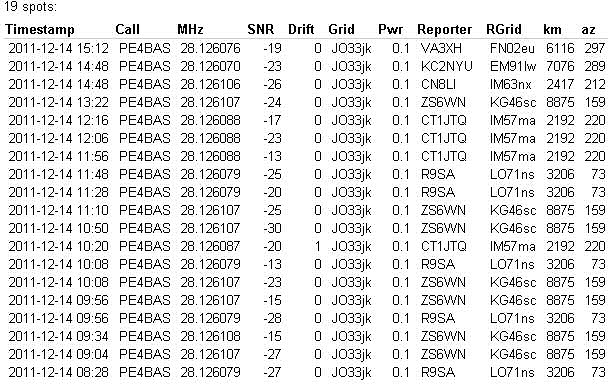
A picture says more then 1000 words. I finally found a way to import the WSPR data from the database output on the WSPRnet.org website. It is rather complicated but will try to get back to that later. Interesting is that I can now finally do what I want with the data. I mean the things I like. Like a worldmap, a earthglobe and DXCC counting.

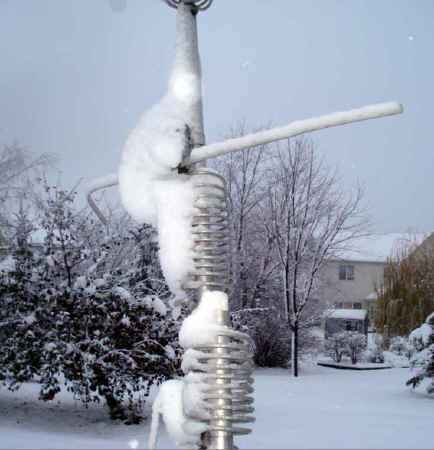
The globe is made through HRD V4 with google earth. The results were not shocking today. But for 100mW in my Alu-tape antenna not that bad.
I will try to reproduce everything tomorrow and write kind of a manual how to get the WSPR data converted to ADIF and then import it in your favorite logger.
Below all the spots that were made of my 100mW transmission today.
Bas, PE4BAS, is a regular contributor to AmateurRadio.com and writes from Groningen, Netherlands. Contact him at [email protected].
SDR Radio
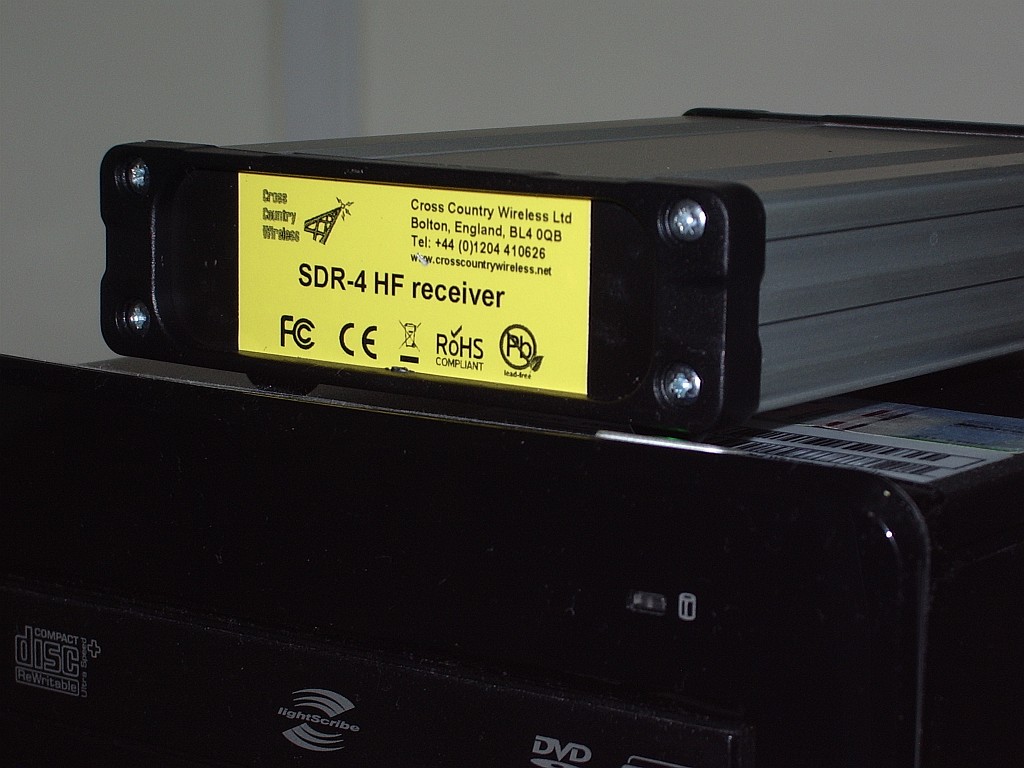
An early Christmas present to myself is this SDR-4 HF receiver from Cross Country Wireless. Actually, it wasn’t intended to be a Christmas present. I decided to get one a couple of months ago when I first found out about it.
I think the SDR-4 is the lowest cost ready built HF bands software defined radio on the market (£150 or about $250 US). Unless you know different, of course. However it seems that a lot of other people thought so too, as there is a waiting list – people are ordering them faster than the designer Chris G4HYG can make them!
The SDR-4 works with the usual free SDR applications. But it also works with the free version of Simon Brown HB9DRV’s SDR-Radio.com application. This is the best SDR software by a mile, though due to all the treatment and medication I am receiving for my brain tumour my mind is a bit slow at the moment and I find figuring out how to do what I want with it a bit challenging.
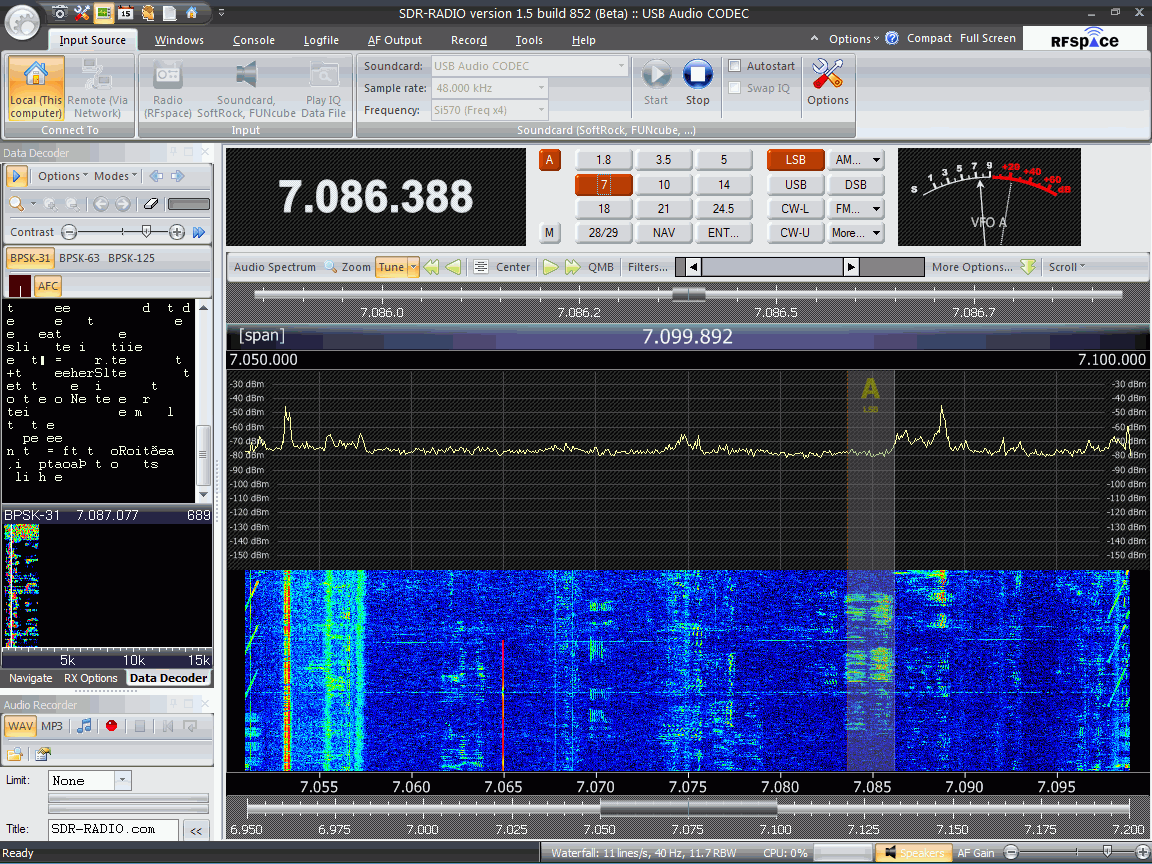
As you might expect from the author of Ham Radio Deluxe, SDR-Radio.com has built-in support for decoding digital modes. Unfortunately I haven’t managed to work out yet how to get the digital decoder waterfall to be a reasonable size: At the moment it’s a small window on the left hand side which is trying to display 15kHz worth of spectrum and although I’m hearing PSK31 I can’t find a trace to click on! I’m also still trying to discover if there is a PSK Browser in the program that sends reports to the PSK Reporter reverse beacon site. Hopefully someone will enlighten me.
I’m sure I’ll be writing more about the SDR-4 receiver and SDR-Radio.com in due course, but in the meantime if you want more information or to ask questions about the receiver there is a Cross Country Wireless Yahoo! group. You can even try an SDR-4 out over the Internet if you follow the instructions posted by Chris. I did and it worked perfectly – and it was so nice to hear the amateur bands without the awful frying noise I have to endure here.
Yahoo! is also the place to go for information and support of SDR-Radio.com (the software.) I look forward to seeing some comments and experiences of any of my readers who are tempted into trying this software defined radio.

Julian Moss, G4ILO, is a regular contributor to AmateurRadio.com and writes from Cumbria, England. Contact him at [email protected].
I’m no contest(er)
So with my PSU fixed I thought I would try my luck in the ARRL 10-meter contest. I have never participated in a contest before, but with 10 meters so hot nowadays I’d thought I’d give it a try. Murphy reared its head, so with the wife and kids all sick there was lots of housework to do and too little time behind the set. But I did sneak in an hour or four over two days. My goal: to practise my CW skills. My thought was that doing many short exchanges would give me enough practice to get a little more fluent with the key. So I started out on Saturday morning answering CQs, but nobody came back to me. Fiddled with my side tone, checked my signal with another receiver, no problems found. After four tries I gave up and went up to the SSB portion. Great fun: one Brazilian after another and my first Argentinian on 10 meters. Great to have the comfort of 100 Watts – makes life a lot easier.
Sunday morning the sunspots were lower, but I did manage a couple of State side stations. But it irked me that I hadn’t logged one CW QSO, so I tried again in the afternoon. Found a strong enough signal from Japan and after the second try it worked. Europe was okay and I did log one Dutch station: PI4TUE, the station of the University of Eindhoven, very close to my place of birth.
I had to stop there, but when I came back I switched to SSB again. Worked some Europeans and then, all of a sudden, CX2DDP. via long path. These kind of QSOs are fun though short and I guess Hector Rubens was as surprised as I was. After 75 QSOs I called it a day, which that was right when the band was closing. I’m not in for the numbers, so I am already happy with so many QSOs. I worked 32 different entities in SSB and six in CW, so a grant total of 38 multiplier points. Indeed, no contest for die-hard contesting hams and I doubt that I will often enter other contests.
But the best thing about this contest was that I got my private language student to do a QSO. He is a 16 year old, very shy boy, whom I teach English on Saturday afternoons. He just graduated from high school and he now goes to polytech, which give us a common interest: electronics. Every week I show him some radio related stuff, so this week it was how a QSO is being done. After showing him the ropes and teaching him the NATO alphabet I let him answer CQs with my call sign. He soon found out that you have to open your mouth and speak slowly, clearly and – when using SSB – loudly. Unfortunately these are traits that most Asians don’t possess. But he found it very “cool” that you could call all the way to Europe so he made an effort and in the end he managed a QSO on his own with JA7BEW. He will soon know more about electronics than I, so the exam for a radio licence will be a piece of cake then. Another ham in the making. Who says contests have no use?
Hans "Fong" van den Boogert, BX2ABT, is a regular contributor to AmateurRadio.com and writes from Taiwan. Contact him at [email protected].
 Ham Radio Deluxe |
 W5SWL Electronics |
 Ham Radio Prep |
 KB3IFH QSL Cards  Hip Ham Shirts  HamRadioAuctions HamRadioAuctions Reliance Antennas Reliance Antennas Enigma Shop Enigma Shop |  morseDX  Ni4L Antennas  R&L Electronics R&L Electronics antennas.us antennas.us QRV QRV |
- Matt W1MST, Managing Editor
