 |
 Ham Nation 59
 9 August 2012 | by
http://dts.podtrac.com/redirect.mp4/twit.cachefly.net/video/hn/hn0059/hn0059_h264m_1280x720_1872.mp4
http://dts.podtrac.com/redirect.mp4/twit.cachefly.net/video/hn/hn0059/hn0059_h264m_864x480_500.mp4
http://dts.podtrac.com/redirect.mp4/twit.cachefly.net/video/hn/hn0059/hn0059_h264b_640x368_256.mp4
http://www.podtrac.com/pts/redirect.mp3/twit.cachefly.net/hn0059.mp3
Hosts: Bob Heil (K9EID), Gordon West (WB6NOA), and George Thomas (W5JDX)
How Bill (K5LN) keeps the Nets goin’, 10Ghz antenna testing, capacitors explained, and more.
Guests: Don Wilbanks (AE5DW), Ray Novack and Cheryl Lasek (K9BIK).
Download or subscribe to this show at http://twit.tv/hn.
Submit your own video to Ham Nation! See the Video Guidelines, http://www.frozen-in-time.com/guide/
We invite you to read, add to, and amend our show notes at wiki.twit.tv.
Thanks to Joe Walsh who wrote and plays the Ham Nation theme.
Thanks to Cachefly for the bandwidth for this show.
Running time: 1:11:02
Dr. Bob Heil, K9EID, is the founder of Heil Sound and host of TWiT.tv's Ham Nation which streams live each Tuesday at 6:00pm PT (9:00pm ET) at http://live.twit.tv. Contact him at [email protected].
“Sending Radio Messages” – 1943
Here’s an interesting piece of radio history.
Jonathan Hardy, KB1KIX, is a regular contributor to AmateurRadio.com and writes from Connecticut, USA. Contact him at [email protected].
KH6 – Hawaii Bound
 My current assignment at Fort Leavenworth has me traveling quite a bit. My intent has been to bring a rig with me and have some casual QSOs while on the road. My success has been mixed. I would mostly attribute this to either a lack of planning on my part or being in a stuck in a hotel room with zero antenna opportunities.
One of the most inspiring ham radio blogs I ever ran across was the 100 Pound Dxpedition. I enjoyed how Scott, NE1RD, covered his adventures of conducting portable operations… documenting what worked and what did not. His last post on that paticular blog was back in 2007, but I still use the site as a reference. Scott’s praise for the Buddipole led me in using the Buddipole during my recent tour in Korea. Another tip from Scott I am going to try out is using a hardside golf bag case to transport my Buddipole to Hawaii.
 Now for a rig… I think the Elecraft KX3 would be ideal for a Hawaii trip. With 10 watts output and an internal battery, I can’t think of better rig to take to the beach. But the wait time for the KX3 is still quite a while. I have both an Elecraft KX1 and a Yaesu FT-817ND. The KX1 would be great due to its small size and ease of use. But it is limited to only CW and I would like to do some PSK in addition to CW.
I pulled out my FT-817 and conducted an inventory:
- – West Mountain Radio RIGblaster Plug n Play connects directly to the DIN socket on the back of the rig.
– CAT cable that connects from the RIGblaster to the rig’s ACC socket which enables rig control.
– PowerPole 12v adapter.
– Palm Paddle.
– Elecraft T1 Auto-tuner.
– Nifty manual for the FT-817.
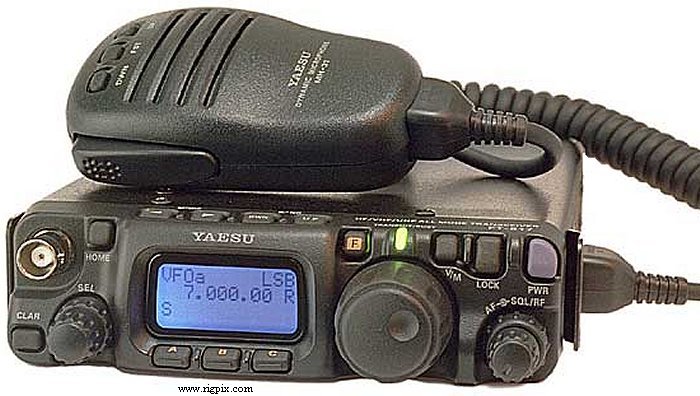
My FT-817 has quite a few of the optional bells and whistles from W4RT:
- – DSP module
– Kranker Knob – probably the most useful of any of the options
– One Board Filter (300 Hz)
– Speech compressor built into the MH-31 handmike
– Why all the options? The FT-817 was the center piece of my 2009 Field Day setup and I was attempting to get the most I could out of the pint-sized rig.
I also splurged on two recent upgrades:
- – Peg Leg tilt stand – I think this will be helpful as one of my significant dislikes of the FT-817 is the small display which is hard to see.
– Magnets for the Palm Paddle – this is critically important as the Palm Paddle by itself is not heavy enough. The magnets allow the Palm Paddles to firmly stick to the top of the FT-817.
For PSK, rig control, and logging I have my Dell Mini netbook. I had not used the netbook in a while, so I started it up to see how it was working. I initally purchased it back in 2009 baselined with Ubuntu and have kept Ubuntu installed on it since then. After booting it up. I updated the distribution to 10.04 LTS and installed fldigi. The RIGblaster easily interfaced with the netbook via a USB connection and the headphone/microphone jacks.
I configured fldigi to work with the RIGblaster to include rig control using Hamlib:
- – Audio: PortAudio using the netbook’s hardware soundcard for both Capture and Playback
– Rig: Hamlib; Device /dev/ttyUSB0; Baud rate 38400; Stopbits 2; PTT via Hamlib command checked
… clicked on the Initialize button and I was good to go.
Setting up the macros on flidigi is pretty straightforward with the default macros only needing slight tweaking for my personal preferemces.
Once I fired everything up all I had to do was switch to 14.070 MHz, switch the mode to DIG, and drop the input level a bit. With the narrow yellow PSK streams cascading down the waterfall, I picked one that was calling CQ and answered. Transmit worked and my home antenna provided a nice low SWR, no need for the tuner. My macros worked and the QSO was concluded successfully. All with 5 watts.
I plugged in the Palm Paddle, switched to 7.115 MHz, listened and heard nothing, then used the paddles to send QRL? a few times. SWR still looked decent. After a few CQ calls, I got an answer followed by a short QSO. Great – both PSK and CW were working FB.
Now the question is: do I want to bring my small Tokyo Hy-Power HL-100B amplifier that will raise the output to 100 watts? If I bring the amp, I will have to bring a power supply and a different tuner. I am thinking I need to be able to use two different configurations:
- (A) Beach and Buddipole: using the barefoot FT-817, running everything on batteries.
(B) Lanai Portable: used from the hotel room, with amp and assoicated power supply.
Now it is time to go through my Buddipole bags and figure out what I need to pack.
Looks like I will be there during the Hawaii QSO Party!

Scott Hedberg, NØZB, is a regular contributor to AmateurRadio.com and writes from Kansas, USA. Contact him at [email protected].
Handiham World for 08 August 2012
Welcome to Handiham World.
What should you have to know to operate a club station?
Radio clubs usually do not have dedicated meeting space and extra room for a complete club station, but some do. Many clubs do have temporary “club stations” for the duration of club events or Field Day. What all of these club stations have in common is that they are shared resources that can be operated by many club members. For those amateur radio operators who cannot put up antennas at their homes, the club station is a great way to get on the HF bands or to have fun with VHF weak signal operation.
But here’s the problem: The typical home station will be configured by the owner to be exactly what that operator wants. It will have the brand of radio equipment and the accessories preferred by that person, and everything will be laid out in a customized fashion. The club station will be used by many different operators. It may have different equipment than what you are used to, and be configured differently. With all of these different operators, each with different station layouts at home, the club station presents a learning challenge!
Let’s consider some basic skills that might be expected of each club station user. These might be part of a “check ride”, similar to that given to a licensed pilot when being checked out in an airplane for the first time. Although a person may hold a pilot’s license, it is by no means certain that the pilot knows everything about every airplane! The same is true about licensed amateur radio operators and radios. To begin this discussion, I have identified six basic knowledge areas, but you may be able to think of some others:
- License and identification: To operate an amateur radio station, you need a license, so a new user should expect to present his or her license along with some supporting identification (if requested) so that the club’s station manager can determine if the licensee is current and what the operating privileges might be.
- Safety and convenience: Since the club station will be unfamiliar territory to the new user, it is important to go over basic safety topics. These include the emergency power shut off, the location of fire extinguishers and other emergency equipment such as an AED, the location of exits, a telephone, and restrooms, and how to call for emergency help.
- Ergonomics, accessories, and policies: This topic area covers your comfort and safety while operating the station. It will cover how to switch the lighting on and off, where writing materials, a frequency chart, and other commonly used desktop materials are found, seating adjustments, station layout, the ham shack computer (if there is one), and policies related to the use of the station. For example, a policy might include switching the equipment on and off in a certain sequence, no beverages on the operating desk, returning antennas and extendible towers to their nested positions at the end of a session, logging all contacts, using the club callsign, and so on.
- Radio orientation and operation: This will show the new operator what each piece of equipment does and how it operates. It will include all the basics, such as the power switch, tuning, modes, antenna switching and rotor control and use of various accessories such as amplifiers.
- Record-keeping: There may be a sign in/out sheet for users of the station. If logging of contacts is done, there may be a need to explain the procedure, whether it is by computer or in a paper logbook. There may also be a QSL policy and procedure. If a piece of equipment is not working or if a part is broken or missing there is usually a place to make note of it so that the club can remedy the problem.
- Securing at shutdown: After the operating session, the station must be shut down and secured. In some cases, this may include disconnecting the equipment from the power mains and antennas to prevent lightning damage. It is also considered good practice to leave the radio in a more or less “normal” mode of operation, so that the next user will not sit down to a radio that has been left in split frequency mode with the RF gain at zero and every button pressed and knob twisted! If desk accessories are used during the operating session, they should be returned to wherever they were stored so that the operating desk is clear of clutter. The lights should be turned off and the room should be secured in whatever way is described by club policy.
A club station is an excellent resource for all club members, but because it is shared among many users it is wise to have some clear rules about its use and to include an orientation (“check ride”) for each new user.
Email me at [email protected] with your questions & comments.
Patrick Tice, WA0TDA
Handiham Manager
Handiham remote base station report
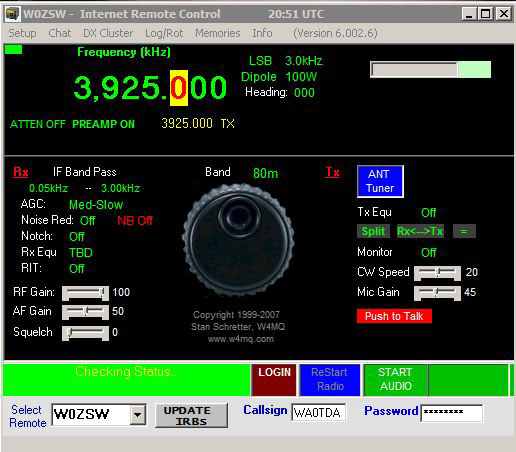
W0EQO at Courage North is in service. W0ZSW is in service.
Pat Tice, WA0TDA, is the manager of HANDI-HAM and a regular contributor to AmateurRadio.com. Contact him at [email protected].
Baofeng bother
I like my cute little Baofeng UV-3R+ though I find myself using its slightly bigger brother the UV-5R more often. Unfortunately the UV-3R+ has begun acting up with a fault that is difficult to fathom.
Quite often the UV-3R refuses to switch on. At first I thought that I had accidentally left the radio on and had depleted the battery, because I often do things like that. But the radio comes back to life if you remove and replace the battery or if you drop it into the charger for a few seconds. When I did this today the screen immediately showed a battery voltage of 4.0V which was expected given that it had been charged only a day earlier.
So the radio is failing to turn on even though there is plenty of juice in the battery. Like most HTs it has a “live” power switch and should turn on at the press of a button. The UV-5R on the other hand has a good old-fashioned rotary on/off volume control. Which, I now recall, was the thing that failed on my old Jingtong radio. Ho hum.

Julian Moss, G4ILO, is a regular contributor to AmateurRadio.com and writes from Cumbria, England. Contact him at [email protected].
Statistics
Just before our trip to the Netherlands I got an e-mail from Deborah of the NCC (the Taiwanese version of the FCC). “Why I hadn’t come in for my my fixed station licence yet?” Good question! The answer: because I was ignoring the matter, hoping that it would go away. But there is no going around it, rules are rules. So on Tuesday I went there and got the papers in order. I needed a copy of my landlady’s ID and house ownership certificate, but luckily she was very cooperative. We share the same Chinese family name, maybe that is why.
In Taiwan – like a number of other East Asian countries – you can’t set up a station right away. First you pass the operators exam and get a licence to operate a station. Then you apply for a station licence, which comes in two forms, a portable and a fixed one. The portable licence is easy because it covers any HT or other equipment below 50 Watts. You bring your transceiver to the NCC office, they test it, you get a laminated card in return. The fixed station licence is more troublesome. Unless you own your house you need permission and signatures from anyone and everyone living around you. That is, unless you put your antenna on the balcony of your apartment, then it is easy. Unless the HOA of your gated community or apartment building objects, then you’re in big trouble. Confused already? Welcome to Taiwan. Whatever situation, once you get it done it will cost you US$50 for a five year licence, but then you can legally transmit from your home.
With this background information the following statistics are now easier to understand. They are fresh from the NCC and go up to June 2012.
Amateur Radio Operator ——-> Number of Licenses
Class 1 —————————–> 871
Class 2 —————————–> 73
Class 3 —————————–> 42,330
First up the number of licensed amateur radio operators. Class 3 operators (VHF/UHF only) are in a large majority. That comes as no surprise as most are ex-CBers (or “ex-sausages”) who now use 2 meters as their Chicken Band together together with the remainder of the sausages who can’t memorize 360 questions and answers – and score 25 of them right – and thus occupy 2 meters illegally.
I am one of the 73 Class 2 operators and there are 871 Class 1 operators. So there are only 944 Taiwanese operators (with either a BU, BV or BX prefix) who you can potentially meet on HF. That is not a lot considering there are 21 million people in Taiwan. But together with the Class 3 operators there are a whopping 43.274 hams in Taiwan and that is a quite considerable number.
But not everyone has set up a station. Here are those statistics:
Fixed Amateur Station ——-> Total Number of Licenses
Class 1 —————————-> 586
Class 2 —————————-> 4
Class 3 —————————-> 1,924
Mobile Amateur Station 23,876
So out of the 43.274 hams in Taiwan, only 26,390 have bothered to set up a station, either fixed or portable, or both. So your chances of running into a Taiwanese ham on HF are actually reduced to a little less than 600 and my estimate is that probably only around 100 of them are active.
If you wonder why so many people with an operating licence haven’t set up a station then there is an easy explanation. At a lot of tech colleges you can score credit points if you take the the Class 3 operators exam. It’s easy enough if you memorise the answers and the Taiwanese are good at this. After five years the licence expires automatically, so one less operator in the statistics. It’s not a bad way to gain new hams, though. While I was at the NCC some time ago there was a group of six students taking the exam. Five were just bored with it and passed with the minimum score. The sixth student had genuinely studied the material and was interested in things like call signs, Q-codes, etc. He passed with flying colours. There is no guarantee, but I do hope he pursued in getting a station on air.
Hans "Fong" van den Boogert, BX2ABT, is a regular contributor to AmateurRadio.com and writes from Taiwan. Contact him at [email protected].
Trail Radio
Ham radio and trail hiking have been a natural pair. There are a few hams (that I know of) who have stood out over the last few years in hitting the trails with their amateur radio gear.
 The first is Ed, WA3WSJ. He has been out on the Appalachian Trail (or AT) numerous times and has brought along a minimalist setup to get on HF and make some contacts. Chances are that you have heard of the Appalachian Trail – it streches from Georgia to Maine and allows an individual to hike from start to finish.
 Ed’s an advocate of pedestrian mobile (WA3WSJ/pm) and has published a few books that tells of his experiences and offers advice for those interested in following his footsteps. He also has established the Great Outdoor Radio Club, which offers resources to avid and aspiring radio trail men.
Another amateur radio hiker is Dennis, K1YPP. He actually completed the Apalachain Trail and also wrote a book on his expierences. Hiking from one end to the other involves reducing the backpack weight as much as possible. Dennis successfully used QRP rigs during his time on the trail.
Here is a podcast of two hams who discuss hiking the Appalacian Trail, including the use of amateur radio (ham radio) and QRP (low power, less than 5 watts) along the way. From the series at Atlanticon 2006 in Timonium, MD.
The APRS folks also are involved in activities on the Appalachian Trail (check out here and here).
 Heading west, the next major trail is the Continential Divide Trail. The trail goes from Mexico to Canada and spends a good portion of its time following the Rocky Mountains. Although not a dedicated Continential Divide Trail hiker – Steve, WG0AT, has spent plenty of time in the Rocky Mountains making amateur radio contacts. Steve’s take on hiking is a bit different as he brings two goats with him that help carry the equipment. If you have not seen his Youtube videos, then you are missing out.
Bob, K0NR, is also active in the Rockies… having most recently participated in a unique ham radio event – The 14er. Paul, W0RW, is an pedestrian mobile ham who has taken to the mountains to log contacts. However, I do not think either Steve, Bob, or Paul have actively hiked the Continental Divide Trail along with their rigs.
 Further west is the Pacific Crest Trail. I was curious to find that not many hams head to the Pacific Crest Trail for hiking and QRP work either. There is a repeater guide by Bill, AA6J – but I am not sure how much of the trail he has hiked or if he brought any HF gear. The only ham I can find that has attempted the hike was Bruce, N7RR. It also looks like he did not make it all the way. Being a Californian, I am surprised that more west coast hams have not hit the trail along with their HF radio gear.
Have you had a QSO with a ham on the Appalachian Trail, Continental Divide Trail, or Pacific Crest Trail?

How do you feel about the idea of packing up a rig and heading for the mountains?
Scott Hedberg, NØZB, is a regular contributor to AmateurRadio.com and writes from Kansas, USA. Contact him at [email protected].
 Ham Radio Deluxe |
 W5SWL Electronics |
 Ham Radio Prep |
 KB3IFH QSL Cards  Hip Ham Shirts  HamRadioAuctions HamRadioAuctions Reliance Antennas Reliance Antennas Enigma Shop Enigma Shop |  morseDX  Ni4L Antennas  R&L Electronics R&L Electronics antennas.us antennas.us QRV QRV |
- Matt W1MST, Managing Editor
