 |
 RadioSport Resource | North American QSO Party Database
 3 January 2013 | by
  |
| Database Contributors KL7RA, K5TR, KM3T, and N5KO |
 |
| Measuring Continuous Improvement With Help From W6SL |
Good morning from my Shell Beach shack with enough radiant solar energy outside to power at least one linear amplifier for a year. I was reading over at Explorersweb an article about 5 ways to get outdoors in 2013 and came across this quote, “what gets measured gets done.”
My goals are still fresh and keeping them sticky through the year is a small objective that leads to ultimate success.
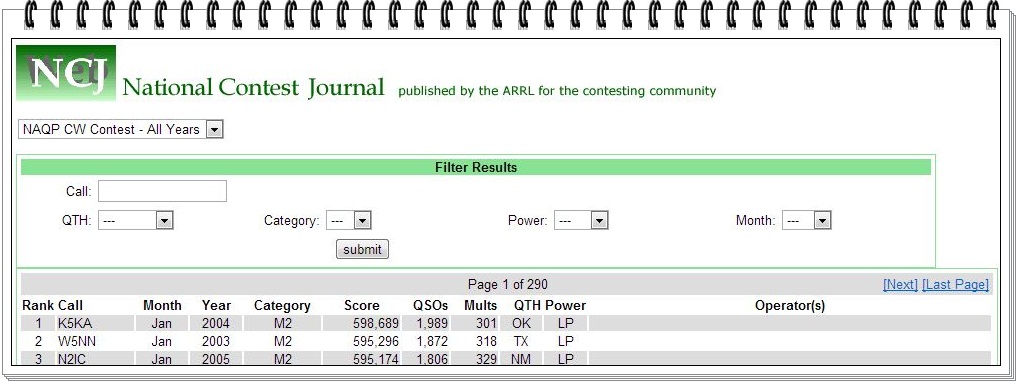
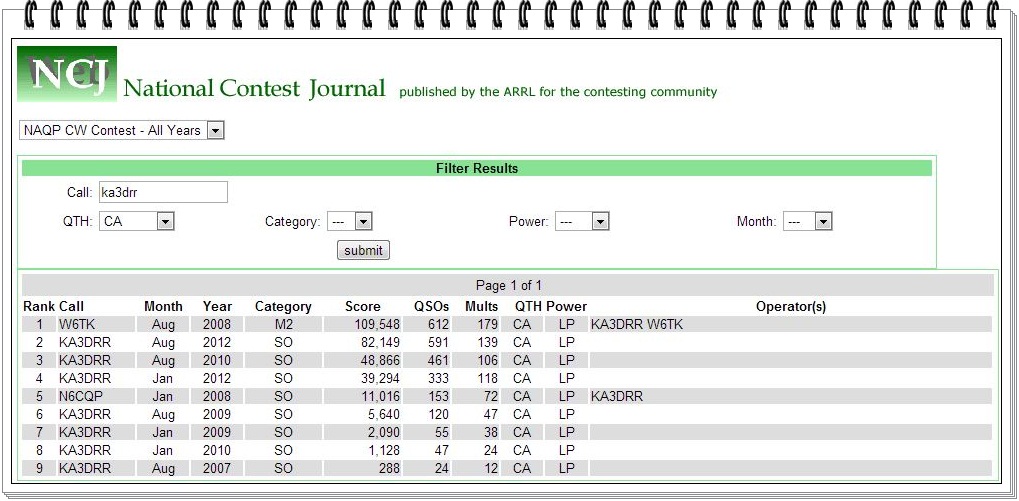
In the meantime, the crew over at the National Contest Journal developed the North American QSO Party (NAQP) database and I can take a ‘big picture’ snapshot in addition to comparing month statistics.
The data suggests that my Q production is up in January and down in August. Is this related to seasonal propagation with skip going long earlier toward the East coast and with solar production on the decrease does this mean moving to the low bands earlier this winter?
Does the data further suggest activity is seasonal with an uptick in operators inside our warm shacks during the winter months in comparison to the summer?
I’ll have to answer my question next weekend when the NAQP CW swell livens up wireless wavelengths on a national scale.
73 from my Shell Beach shack.
Show Notes #097
Introduction:
- Welcome to another episode of Linux in the Hamshackedness, where the Chocolate Shake Fairy visits Richard.
Announcements:
- LHS now accepts micropayment donations via Flattr. It’s been successful for the Linux Outlaws guys, so we’re giving it a try here.
- We now have a countdown timer on the Web site that shows the time remaining until the next live recording. Of course, now that we’re recording on Wednesdays, we’ve decided to move back to Tuesdays. That will happen in January. Keep an eye on the web site for the dates. (Tuesday, January 8, 2013, as of this moment.)
- We also have a Google Community for Linux in the Ham Shack. It’s a great method for leaving feedback, show suggestions, questions, hate mail or anything else.
- The Dayton Hamvention 2013 will be coming up soon, so we’ve added the donation thermometer to the website. Please make a donation and help send LHS to Dayton again in 2013.
- Sign up for the LHS mailing list, too.
- Gnorman has a bio on the LHS About Us page.
Topics:
- Raspberry Pi in the Ham Shack
- Russ has been working on getting an Echolink node running on his Raspberry Pi.
- He’s chosen Raspbian as the operating system, which is based on Debian Wheezy.
- Installation consists of downloading the iso, using dd to copy it to a secure digital card (SD flash memory card), booting the Raspberry Pi with the SD card, and following the prompts to install.
- VK2MEV has posted instructions for configuring a Raspberry Pi as an Echolink node.
- So far, Russ has Raspbian installed, as well as svxlink and qtel, but has not yet connected it to the usb sound card or attached it to his Rascal GLX interface to control the radio. Another option would be to use the Pi’s GPIO bus to control the radio instead of a digital mode interface.
- VK2MEV also has a page describing WSPR on a Raspberry Pi. (Another page is VK2MEV’s blog on WSPRnet.)
- Ted, WA0EIR, says he thinks some folks have his PSK31LX program running on a Raspberry Pi.
- Russ mentions that there is a Slackware build for the Raspberry Pi.
Feedback:
- Cory, KD0QEA, asks if there are any “hangout” radio frequencies for LHS hosts and listeners. Well, Cory, there are none due to lack of time for the hosts to get on the radio. However, perhaps our listeners would like to establish an LHS net. Email your suggestions for bands, frequencies and times and we’ll announce them on the podcast. When Russ gets his Echolink node/Raspberry Pi running, he’ll be there more often. The node number will be 54711 (LHS11 on the telephone pad).
- Doug, N6LMX, left a voice mail about the Raspberry Pi. He has one and wonders which ham radio apps can be used on the Pi. He’s also using Raspbian as the operating system. Doug will be attempting to create a media center with his, as well as ham radio applications. Russ suggests running the Pi headless and using ssh from a smartphone or tablet to access it. That would avoid having to carry a monitor and keyboard around with the Pi. It’s likely that most of the popular Linux ham applications, such as fldigi, would work fine with the Pi, though you may need to compile them yourself. As for the media server idea, the Pi may not be quite powerful enough. Raspbmc is based on XBMC, and might be the best option. Ted, WA0EIR, has several Linux ham radio applications that should work quite well on the Pi. Richard also wonders if there are folks running APRS on the Pi, and there’s at least one. Thanks for the voice mail, Doug. We appreciate it.
- Dave, M0DCM, has been catching up on the show, and responds to episodes 95 and 96. He uses 75-ohm coax as a feedline with a 1:1 balun to horizontal and vertical dipoles, and is able to bypass his tuner on 21 and 24MHz. He goes on to describe his Linux and radio activities. Thanks, Dave.
- Thanks to everyone who sent happy birthday messages to Russ.
- Gorkon, aka Joel, says there may have been a problem with the ogg version of episode 96. Russ will take care of it if he finds the problem.
- Mike, from Sugarland, TX, has been trying to use N3FJP’s Amateur Contact Log (ACLog) program for logging, presumably under WINE, but it crashes and he wonders if anyone else has had any experience with this. If any of our listeners have tried ACLog under Linux, let us know, or respond on the Google+ LHS community. Russ suggests forcing WINE into 16-bit compatibility mode.
Contact Info:
- Contact Richard at [email protected], Russ at [email protected], or both at the same time at [email protected].
- Listen to the live stream every other Tuesday at 8:00pm Central time. Check the LHS web site for dates.
- Leave us a voice mail at 1-909-LHS-SHOW (1-909-547-7469), or record an introduction to the podcast.
- Sign up for the LHS mailing list.
- Sign up for the MAGNetcon mailing list.
- LHS merchandise is available at the Merch link on Web site. Check out the Badgerwear or buy one of the other LHS-branded items at PrintFection.com/lhs or Cafe Press. Thanks!
- Thanks to Dave from Gamma Leonis for the theme music.
Music:
- None this episode.
Russ Woodman, K5TUX, co-hosts the Linux in the Ham Shack podcast which is available for download in both MP3 and OGG audio format. Contact him at [email protected].
LHS Episode #097: Sheer Hamshackedness
 Welcome once again to the Wonderful World of Linux in the Ham Shack. As indicated in the title, this episode is full of Sheer Hamshackedness. If you’re unsure what that is, we encourage you to pour yourself a nice glass of dark beer or a 100-proof spirit of your choice, put on your headphones and immerse yourself in the pure hedonism that is LHS. And if you believe any of that, we have a large vehicular conveyance over the East River in New York City up for sale as well. Anyway, we talk a little bit about Raspberry Pi computing, APRS, WSPR, Echolink, svxlink, Qtel and a bunch of other stuff in this episode. Hope you enjoy, as always.
73 de The LHS Guys
Russ Woodman, K5TUX, co-hosts the Linux in the Ham Shack podcast which is available for download in both MP3 and OGG audio format. Contact him at [email protected].
Antennas for portable QRP ops
I seem to get requests from time to time, to bring up this topic on the blog. I can only speak for what has worked well for me. There are as many number of solutions to this as there are QRPers who like to go out into the field, and I have only tried a relatively minor few.
The first thing to consider is what kind of portable operator are you? Some of us are “Time is precious! Let’s get on the air and operate!” If you’re one of these (like me!) then you are interested in ease and quickness of deployment. The faster up, the faster I can get on the air. Although antenna efficiency is important to you, it is not your primary concern. You don’t want to be pumping RF into a string of wet pasta; but you want to spend your day outdoors operating – not finagling with antennas.
For this type of operator (and I belong to this species) I have two recommendations:
1 – EFHW antennas. Basically, a piece of wire that is a half wavelength of the band you intend to operate. A matching device or counterpoise is needed. There are oodles of articles on EFHW antennas. The best seem to be treatises by Steve Yates AA5TB and Joe Everhardt N2CX. Google “EFHW” along with their call signs and you will get there. If rolling your own doesn’t appeal to you, you can also purchase commercial versions. LNR Precision markets perhaps the best known models, the PAR ENDFEDZ series.
http://www.aa5tb.com/efha.html
http://www.njqrp.org/n2cxantennas/halfer/halfer.html
http://www.parelectronics.com/end-fedz.php
The name says it all – “End fed” – meaning needing only one support. Basically, you throw a bottle (or some other weighted object) into a tree to get a hoist line over a branch, attach one end of the wire to the hoist line and pull it up. The other end connects to the matching device or your radio and you are good to go. It’s simple, uncomplicated, and works well. If you read any of Jim W1PID’s blog posts on AmateurRadio.com, you will see the resounding success that this type of antenna can provide.
Personally, I use the PAR ENDFEDZ 10/20/40, which will allow me to operate on those three bands without changing radiators. If you want to operate on a different band, you can change the radiator wire. The PAR comes with a chart that tells you, for each band, how long a piece of wire to use with their match box
2 – Compact verticals. What do you do if there are no supports? A Buddistick or a PAC12 antenna could be the solution for you. Both of these are basically the same idea. A compact vertical which uses a tapped coil to make up for the fact that you are not deploying a full sized vertical. You will have to bring a ground spike or small tripod or some other self improvised arrangement to deploy one of these. You will need to use either radials (as recommended for the PAC12) or a counterpoise wire (as provided with the Buddistick). This is not a true counterpoise, per se, but is more the “other half” of the vertical dipole that you are using.
Set up is relatively quick; but not as quick as the EFHW, especially if you are good in tossing bottles over tree branches! It takes time to deploy the radials in the case of the PAC12 and the amount of “counterpoise wire” used with the Buddistick is critical. The length will affect the SWR of your installation. For both of these, it is handy to bring along a small antenna analyzer along (such as one of the Auteks) to help you tune the antenna rather quickly.
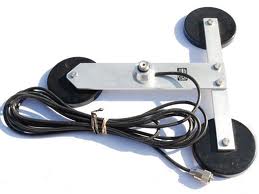
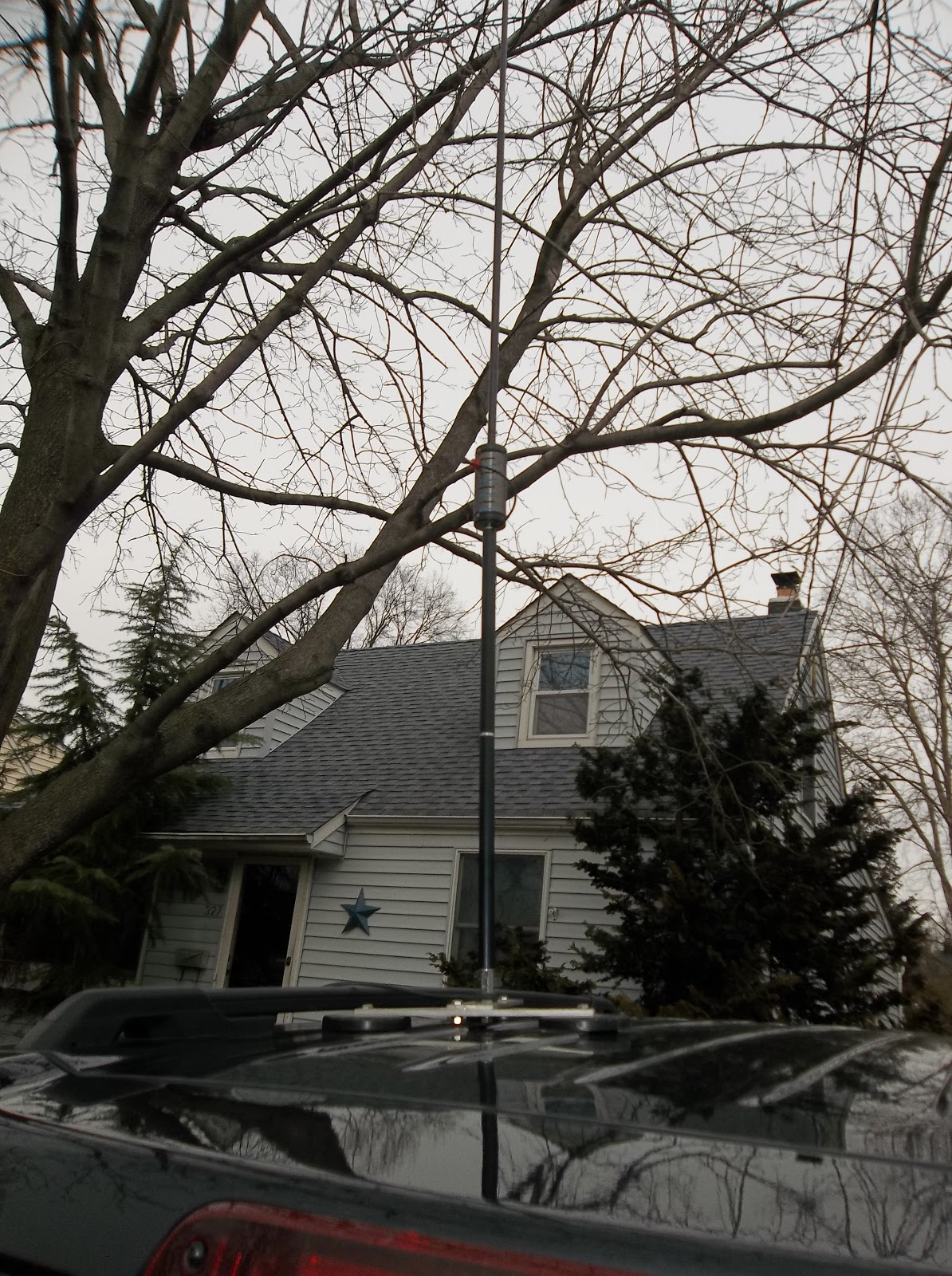
There is another way to deploy one of these compact verticals, which was brought to my attention by Bob W3BBO. It worked well for him when he was living in an apartment for a while, and I used it and in turn, discovered that it worked well for me, too. Instead of using a tripod, painter’s pole, ground spike, or whatever as a support for these compact verticals, you can instead attach the vertical to some kind of mount and attach it to your car. I use one of those Lakeview tri-mag mounts. Attach the vertical to that, pop it on the top of the car and go to town. Yes, you have to find the best place to tap the coil, but the car acts as a great groundplane and there’s no need to fuss with counterpoises or radials. It has worked well enough to garner DXCC and WAS for W3BBO while he was apartment living. I have used this arrangement during outdoor QRP sprints and while on vacation and have had surprisingly good results. This is NOT to be used while your vehicle is in motion however – strictly stationery mobile!
As a side note, I have used Hamsticks which are kind of related to this. They are quicker to deploy than either a Buddistick or PAC12 plunked on your car. However, you have to have a different radiator for each band that you intend to operate on. And my feeling (and I have no empirical proof to back this claim up, so take it with a grain of salt) is that Hamsticks are less efficient and even more of a compromise than a Buddistick or PAC12.
Now if you have a lot of time to operate, or if maximum efficiency is a concern to you, you have other solutions that you can pick from. In instances like these, you might want to use a dipole or doublet, made from lighter weight materials. Say you’re going camping for a week and there are plenty of tall trees available – why not? Even if you decide to use one of these as a sloper, you’ll need to keep the low end roughly six feet off the ground for safety reasons. You don’t want any unaware pedestrians walking into your wires! So you will need TWO supports – if you use heavier materials – then maybe even three.
I have made 44 and 88 foot versions of the Norcal Doublet. I have made them both out of ribbon cable and speaker wire. The ribbon cable is way lighter; but the speaker wire seems hardier. I have used the speaker wire just like the ribbon cable – that is, as feeder and radiator all-in-one. What can I tell you? They work well. Not as efficient as a dipole fed by open line wire or coax; but well enough for temporary operations. The only thing is that you need two trees, ideally, and you need to get the wire up as high as you can. Other than that, they will get you one the air.
http://www.norcalqrp.org/norcaldoublet.htm
There’s a good series on YouTube, by GB Hoyt on deploying W3EDP antennas. I have one of these as one of my permanent station antennas. There’s absolutely no reason that one can’t be made from light weight materials and taken out in the field. It is a great multiband antenna and requires a balun and a tuner; but it is an option.
http://www.youtube.com/watch?v=FGYqRJCNmuY&list=PL4131B8B79AA5C84F
This is by no means an exhaustive or authoritative list. I am sure there are many, many more options available to you – limited perhaps, only by your imagination. But what I have listed here is what I have tried and they have worked well for me.
Here is a good resource:
http://home.frognet.net/~mcfadden/wd8rif/field-antennas.htm
72 de Larry W2LJ
QRP – When you care to send the very least!
Larry Makoski, W2LJ, is a regular contributor to AmateurRadio.com and writes from New Jersey, USA. Contact him at [email protected].
Handiham World Weekly E-Letter for the week of Wednesday, 02 January 2013
Pat Tice, WA0TDA, is the manager of HANDI-HAM and a regular contributor to AmateurRadio.com. Contact him at [email protected].
Tecsun PL-360
 |
| Tecsun PL-360 |
The only item of radio equipment in my Christmas stocking this year was a Tecsun PL-360 FM/MW/SW DSP receiver. These smartly-styled radios in black or silver are widely available on eBay for less than £30 including postage from China. The radio looks and feels a much better quality item than you might expect at that price.
The PL-360 covers medium wave, Band 2 FM (with stereo decoder) and 13 short wave bands from 2300 to 21950 kHz. Unlike most cheap short wave radios that have a frequency counter displaying the frequency of an analogue VFO, the Tecsun PL-360 is a true digital radio having a fully synthesized PLL VFO.
The Tecsun is also a digital radio in that it is DSP based not the usual superhet. The benefits are immediately apparent when you listen to the radio – it has that clear, open sound characteristic of DSP receivers. The internal speaker does not deliver much bass but you really hear the difference, especially listening to FM stereo, when using earphones, of which a Walkman-style pair are included.
For AM use Tecsun supplies a rotatable ferrite rod antenna that plugs in to the top of the radio. This can be used over a frequency range of 150 to 1710 kHZ, though note well that this radio does not have a long wave band. The 7-section telescopic whip antenna is 38cm (15in) long and is used on the short wave and FM bands.
 |
| Showing the rotatable MW antenna |
The tuning control is a click-stopped rotary encoder which tunes the radio in 1 kHz steps on short wave and 9 or 10 kHz steps on medium wave. The radio can be tuned outside the broadcast bands but this is rather a tedious exercise due to the 1 kHz steps – there is no provision for direct frequency entry using a keypad. The Tecsun PL-360 does not demodulate CW or SSB so there is not much point in tuning into the amateur HF bands – a pity, though that is not unexpected at this price level.
For tuning the Tecsun has a neat trick inherited from TV receivers. Called Easy Tuning Mode (ETM) the radio first tunes the entire MW, SW or FM frequency range and stores all the frequencies on which a signal was heard in memory. You can then tune from one signal to the next using the click-stopped tuning control. This makes short wave listening really easy and pleasurable. Doing an ETM scan of the short wave bands takes a few minutes. The feature is a useful tool for checking out HF propagation, though it’s a pity the tuning range stops at 22 MHz.
Power is provided by 3 x AA cells which may be standard alkaline or NiMH rechargeable (not supplied.). A charging circuit is built-in and power may be applied using a mini-USB socket on the side, so you can charge the batteries from a PC (using an appropriate USB cable) or a mobile phone charger. A charger is not included, but you do get a long wire antenna that clips on to the top of the telescopic whip for improved short wave reception, and a nice faux-leather case.
As an alternative to the Easy Tuning Mode the receiver may be tuned manually and frequencies entered into memories, but as mentioned earlier this is quite tedious. There is no programming software that would enable memories to be set up using a computer. There is a built-in clock which is quite accurate and includes an alarm function. The radio also has a temperature sensor and displays both temperature and time even when switched off.
To sum up, the Tecsun PL-360 is a portable radio of surprisingly good quality and performance for the money. Its Easy Tuning Mode makes casual listening a pleasure, the audio quality is excellent and the provision for rechargeable batteries is welcome. At less than £30 it is a real bargain.
Julian Moss, G4ILO, is a regular contributor to AmateurRadio.com and writes from Cumbria, England. Contact him at [email protected].
Today was a lot of fun
Well, actually last night AND today were a lot of fun! And there’s more to go tonight as the 40 Meter QRP Fox hunts start up again tonight.
I ended up working only three stations last night. First, I had a quick 2X QRP QSO with Dave NE5DL down in Texas on 20 Meters to start SKN off. That was followed by two rag chews. The first was on 40 Meters with N4LZY, Jerry in Tennessee and was followed by a chew with K3OWZ, John in PA. John was using a Heathkit Apache and a National NC303 receiver. Good stuff!
I was on the air off and on for a good portion of today. I worked Dan SM5IMO in Sweden, and had a nice chat with John VE1BA in Nova Scotia. John was running three Watts and had a killer signal into NJ. That was followed up by a nice chat with another John – K4BAI in Georgia. John and I meet up in the QRP sprints and the Fox hunts. John is a “Ham’s Ham” and a gentleman to boot. It’s always extremely nice hooking up with K4BAI.
I worked Dave K3Y/2 on 40 Meters. LOUD signal into New Jersey from New York state.
The I had an experience that was unique. I was working Stan AEØSL on 20 Meters when the band kicked out on us and we both faded away into the QSB. From there, I jumped on up to 17 Meters and worked VP2MRV in Montserrat. After finishing up with Nao, I began to tune around 17 Meters and whom should my wandering ears hear calling CQ? None other than Stan AEØSL, who I had just worked only minutes before on 20 Meters. He was much, much louder on 17 Meters and we were able to finish up our busted QSO. Now how many times has that happened to you? Dare I say – not many?
I then finished up my afternoon by busting a small pileup to work K1GI/VP9 in Bermuda. A pileup for Bermuda you ask? Well, yes. There were hardly ANY signals on 17 Meters, so in this instance, even Bermuda was like chum to a shark.
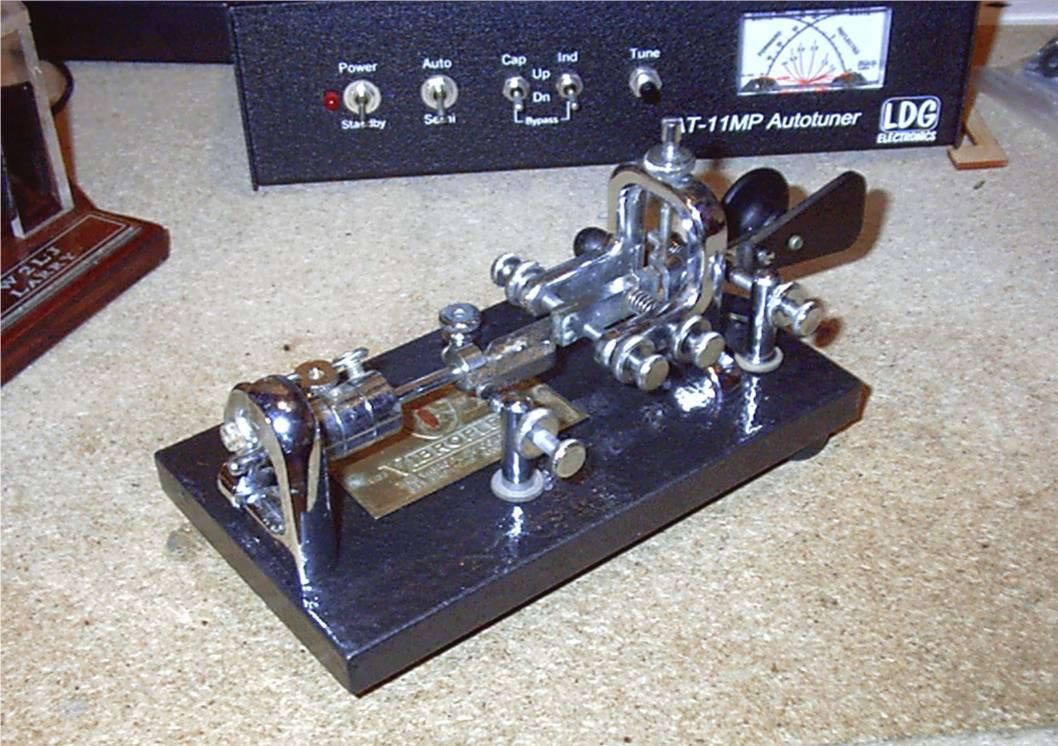
Last night and today, the majority of my Morse was sent with my Vibroplex Original that I restored a few years back. I was surprised how quickly I was able to send decent presentable code. It’s like the old adage about riding a bicycle – that once you learn, you never forget. I didn’t sound atrocious to the point that I was embarrassed to be using it; because believe me, if I was that bad I would not have subjected anyone’s ears to a bad cacophony of dits and dahs. Also, the Reverse Beacon Network was picking up my CQs, so the skimmers were able to decode my sending. And if the computers were able to figure it out, then a real live Ham should have had even less trouble.
It’s been a long time since I’ve had the opportunity to spend so much of a day in the shack, behind the radio. I thoroughly enjoyed it and could get quite used to it, given the chance.
72 de Larry W2LJ
QRP – When you care to send the very least!
Larry Makoski, W2LJ, is a regular contributor to AmateurRadio.com and writes from New Jersey, USA. Contact him at [email protected].
 Ham Radio Deluxe |
 W5SWL Electronics |
 Ham Radio Prep |
 KB3IFH QSL Cards  Hip Ham Shirts  HamRadioAuctions HamRadioAuctions Reliance Antennas Reliance Antennas Enigma Shop Enigma Shop |  morseDX  Ni4L Antennas  R&L Electronics R&L Electronics antennas.us antennas.us QRV QRV |
- Matt W1MST, Managing Editor
