 |
 First signals received on 472khz
 26 January 2013 | by
 This morning, whilst I popped out for an hour, I set things up correctly and when an came back, I was delighted to see that I had copied M1GEO in JO01 square. It turns out that George has a very nice station on 472khz, detailed here on his Wiki
Later on in the day, I also copied G3ZJO from IO92 and then during the evening I received some nice signals from PA3ABK in JO21.
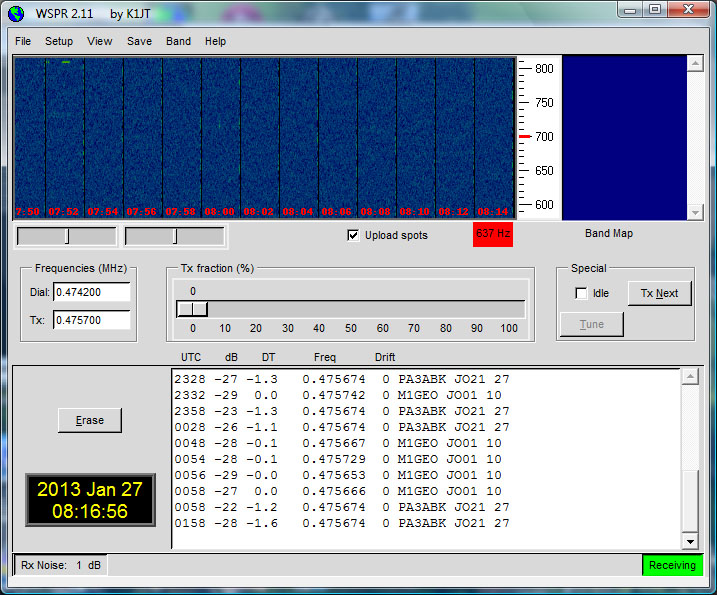
Clearly there is much that can be done to try and improve the receive performance, but it is encouraging to have received some signals without having to modify any equipment.
Tim Kirby, G4VXE, is a regular contributor to AmateurRadio.com and writes from Oxfordshire, England. Contact him at [email protected].
Who was Irving Vermilya?
Randy Dorman, KB3IFH (of KB3IFH QSL Cards) sent me an e-mail last night about a QSL card that he found listed for sale on eBay:

Randy contacted the current owner of the call, Bruce Randall, W1ZE, who shared an amazing bio of the original owner written by Donna Halper, Ph.D. I contacted Dr. Halper and asked if she’d allow me to share it. She replied that it needed some updating, but very graciously allowed me to reprint the original version from 1996 below. I’m sure you will enjoy it… and if you get a chance, check out her book, Boston Radio: 1920-2010, available on Amazon!
Irving Vermilya—America’s #1 Amateur
by Donna Halper, PhD
 If you were alive during the formative years of amateur radio, you knew Irving Vermilya. From the time he was 12 and he traveled with his dad and his family’s minister to Canada to hear Marconi speak, amateur radio was his first love, and he was a life-long ambassador for it. (The story goes that after the talk, which was mainly attended by adults, Marconi came over to the young lad and encouraged him in his interest in wireless. He even gave young Irving a piece of equipment, which became Irv’s first receiving set.)
Born in June of 1890, Vermilya grew up in Mt. Vernon, New York, where he built that first rather primitive set in December of 1901, after returning from his trip to see Marconi (as he later recalled, it looked strange, but it worked). Other more advanced (and more professional-looking) sets followed, and his dedication to wireless increased. His spark transmissions were so frequently heard that he was offered jobs on ships that needed a wireless operator. He became a member of the newly formed Radio Club of America in 1911, using the calls VN. (Later, he would use 1HAA, but he was best known as W1-ZE). In late 1912, the government began to require that all wireless operators be licensed. Irv hurried to the Brooklyn Navy Yard to take the test, and was given Certificate of Skill #1. For the rest of his life, he would be known as America’s Number 1 Amateur—which he truly was.
Irv Vermilya’s involvement with radio continued; at the age of 16, he did in fact go to sea as a wireless operator; a few years later, he was given the important job of running the Marconi Wireless Station, WCC, on Cape Cod. During World War I, he served in the Navy, and then returned to Massachusetts to run the RCA wireless station at Marion. His engineering and wireless skills brought him into contact with such legendary figures as David Sarnoff, Lee DeForest, and Edwin Howard Armstrong.
By 1921, professional radio stations were springing up, and Irv was interested in this new technology too. Using his newly acquired license for a land station, 1ZE, he began doing radio broadcasts in late April (according to the Boston Traveller‘s ham radio column, he got special permission to be on even before he received the official license in May); his plan for 1ZE was to both promote amateur radio and to entertain his neighbours in and around New Bedford and upper Cape Cod with concerts and local information. His work came to the immediate attention of the Slocum and Kilburn Company, which was planning to open a station at their mill (the mill was similar to what we would call a “general store”, since it also sold electrical equipment, tools, and building supplies; the station would be located in the radio department). They hired Irv to build it and run it, and the station went on the air officially the last week of May 1922 as WDAU. (A “cousin” of WDAU still exists, although today, it is known as WNBH; these initials stand for New Bedford Hotel, where its studios once were located. Interestingly, thanks to the consistent link of Irving Vermilya as owner or engineer, WNBH claims to be the 11th station in the US, tracing itself back to 1ZE in mid 1921 and then to WDAU. However, the evidence seems to suggest that while Irv worked at 1ZE, WDAU, amd WBBG, the first two never directly evolved into WNBH. 1ZE remained on the air, in fact, long after he was hired to build WDAU. 1ZE was renamed by the government as W1-ZE, but Irv still owned and operated this well-respected ham station for over 40 years. Slocum & Kilburn kept WDAU on the air briefly even after Irv left to put WBBG on. It was WBBG that really evolved into WNBH; the station first began to broadcast under those calls in early November of 1925. But being the 11th station in the US makes a great story, and it has been repeatedly stated as a fact both by WNBH and by the New Bedford media. Given Irving Vermilya’s many achievements, it doesn’t surprise me that he receives credit for one that may not totally be accurate.)
When financial problems beset Slocum and Kilburn in late 1923, Irving acquired the station’s equipment and moved it to his house (imagine his wife’s surprise) in January of 1924. He began to operate it under the call letters WBBG until mid-1925. (His was one of many small stations that suffered when ASCAP required all stations, no matter what their size, to pay large fees to play ASCAP music; such fees almost drove Irv’s little station off the air, but it made him even more determined to find some financial backers so that he could keep the station operating.) He was finally able, with business partner and fellow ham radio operator, Armand J. Lopez, to move his radio station back to New Bedford in November of 1925, requesting the aforementioned WNBH call letters. It was common in radio’s early days for stations to have studios at hotels, since this provided a studio audience as well as a house dance band, and it certainly gave WNBH a good community image to have the hotel as its location. Irv continued to play a major role in WNBH’s operation, serving as its General Manager, as well as helping to hire the talent and getting the station publicity. His ability as an engineer was well-known, and he frequently kept the station up and running during winter storms or other weather-related problems. In May of 1934, he sold WNBH to the owners of the New Bedford Standard-Times newspaper, but he continued to work there, first as station manager and later as the chief engineer until he retired in 1955.
While Irv Vermilya’s career in professional radio earned him considerable praise, he never stopped being involved with ham radio. In 1921, he was named the New England Manager of the ARRL. He was the mentor to Eunice Randall, the district’s first woman amateur, and at a time when women were not expected to know anything about radio, Irv was totally supportive of Eunice and encouraged other men to give her a chance—Irv and Eunice were friends for many years, participating in various conventions together, and of course, keeping in touch via their ham sets. Irv wrote columns on ham radio for QST and for various newspapers, and won virtually every award a ham could win—it was impossible to read any magazine about ham radio without seeing another country or continent that W1-ZE had received or been received by. (In the early 1920s, amateur ‘tests’ were often held to see how far a transmission could go, and Irv was one of the few whose messages were received as far away as Europe.) And as you might expect, he also put a mobile transmitter in his car, and in the early 1930s, he set up the first police radio station for the New Bedford Police department (WPFN). In fact, whenever he could put his radio skills to a positive use, Irv was right there to volunteer, whether it was relaying messages during a hurricane or attracting some publicity for ham radio by engaging in a “foot-sending” contest with Eunice Randall (Eunice usually won). Years later, he was one of the founding members of the Old Old Timers Club, and served on its board. He was also the first American citizen ever given a permit to operate his mobile station in Canada.
I would like to tell you that such a distinguished career and such a highly respected man lived to a ripe old age, but not every story has a Hollywood ending. Depressed by the death of his wife, in failing health, and perhaps feeling the radio industry no longer had a place for him, in late January 1964, Irv Vermilya committed suicide. His death came as a shock to the many people who had admired him; even the Standard-Times editorialized about what a fine human being he was, and how much he had contributed to broadcasting.
Irving Vermilya elevated the status of ham radio, and was an able spokesperson and emissary, whose outgoing personality made friends wherever he went. If it were not for him, New Bedford and large parts of Cape Cod would not have had a professional radio station until the 1930s, and thousands of people who met him via ham radio would not have known what fun this hobby could be. He was a strong believer in community involvement, and whatever station he ran, be it amateur or profession, it would always do its part to help the community. Perhaps he never invented something major the way Marconi did, perhaps his name is not as famous as Sarnoff’s, but it is radio’s early pioneers who paved the way for the fledgeling industry to grow and succeed. Irving Vermilya devoted his life to radio, and he deserves our thanks for that dedication and his many years of service to the industry he loved so much.
Donna L. Halper is an associate professor of Communication at Lesley University, Cambridge, Mass., and received her Ph.D. in Communication from the University of Massachusetts/Amherst.
Matt Thomas, W1MST, is the managing editor of AmateurRadio.com. Contact him at [email protected].
Waxing nostalgaic
I posted the other day about the Novice sub bands and how a lot of us got our feet wet there and paid our dues there. There is a really great Website about the history of the Novice license. You can find it at the Novice Historical Society.
The Novice Class license was issued for a period of almost 50 years, from 1951 until 2000. There are a lot of good stories and photographs in there, and I’m sure if you entered the ranks as a Novice, you will enjoy what you see there. It will bring back a lot of memories, perhaps summed up the best by the following line (not sure right now which Ham said it):
“We didn’t know any better and we were having the time of our lives!”
A lot of names and calls of some prominent QRPers show up in the list there.
If you didn’t become a Ham as a Novice, you should go take a look see and read some really good stories to get a feel of what it was like.
On the other hand, if you WERE a Novice and you haven’t posted your Novice story – please consider doing so! The stories make for great reading and this truly was an era of Amateur Radio which will never be duplicated. It deserves to be preserved for posterity.
Oh, and while I’m talking about nostalgia, I got a link through K6MM’s Website – television commercials from the 1950s and 1960s. Take a look and see how many you can remember – I was able to recall quite a few!
72 de Larry W2LJ
QRP – When you care to send the very least!
Larry Makoski, W2LJ, is a regular contributor to AmateurRadio.com and writes from New Jersey, USA. Contact him at [email protected].
A new antenna coming soon………
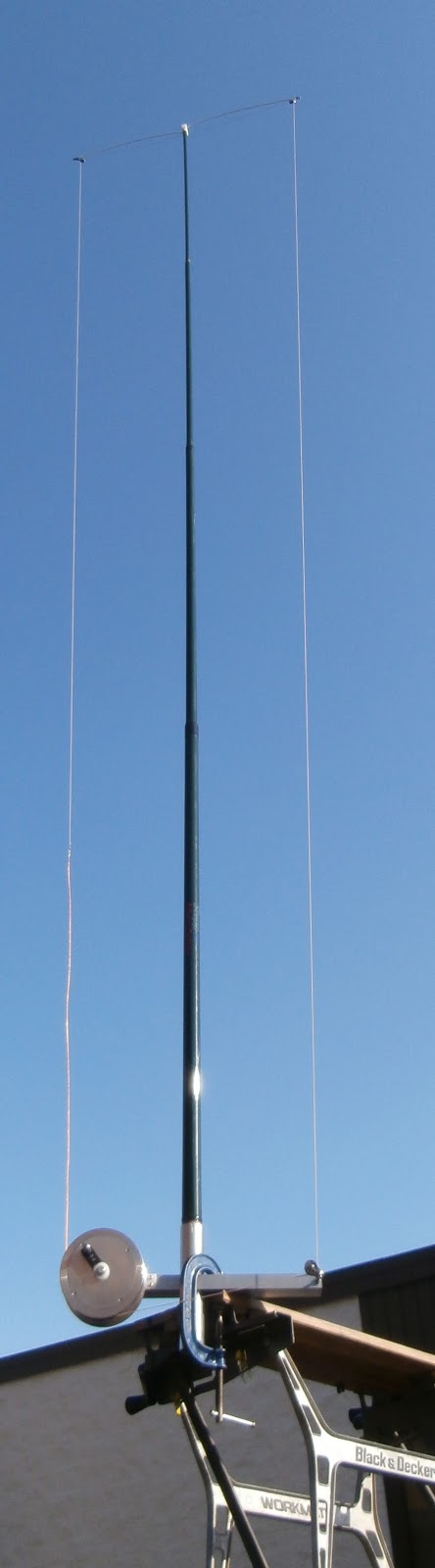 |
| Mounted on bench |
So lets look at the nitty gritty of the antenna first off it's made by SteppIR who has a GREAT reputation and has been the choice of many DXpeditions. The 20m version extends to 9 feet and when folded up is only 26 inches. The 40m version is 18 feet and reduces to 30 inches. As far as I am concerned both sizes are very manageable for transporting. I am not gong to high light evey detail as there is a link on this post to the SteppIR CrankIR page with limited info but more to come!! This antenna is due to make its purchase date in the spring of this year. I did send an email to SteppIR with some questions about the antenna and Bart was very prompt to get back to me.
My Questions were........
1. I did not notice any radials are there any? (I asked this because for portable ops sometime radials can become a pain especially if you are in a park where the public is.)
Bart's answer was.....
The antenna will be designed to work with a single, elevated, tuned radial (included)
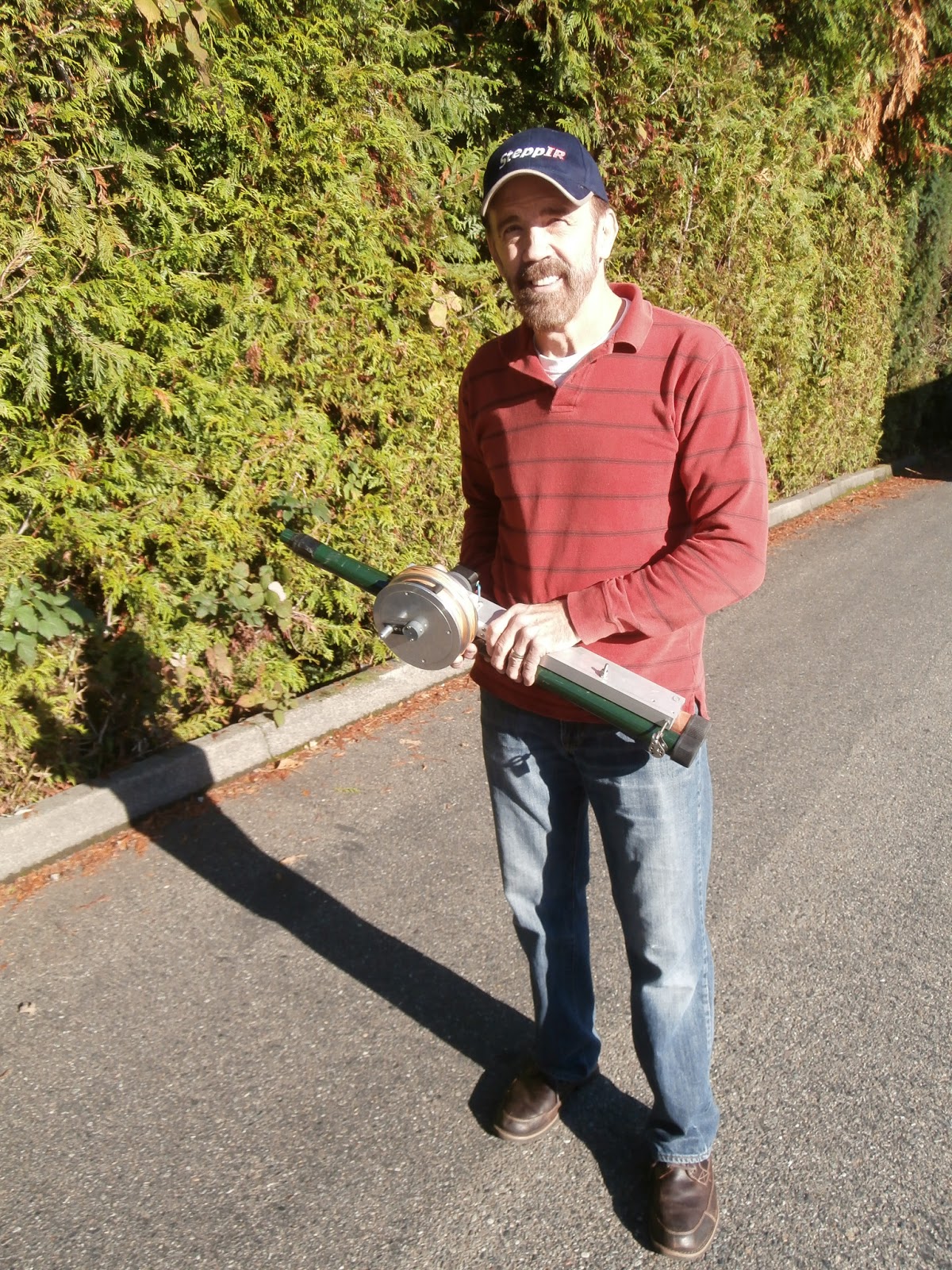 |
| The 40 to 2m retracted |
Mike Weir, VE9KK, is a regular contributor to AmateurRadio.com and writes from New Brunswick, Canada. Contact him at [email protected].
Review: Hamshop.cz Open Keyer
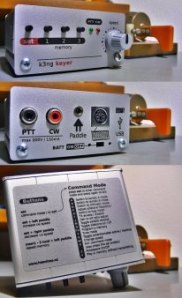
The Hamshop.cz Open Keyer is a cute little keyer kit that is Arduino based and runs my open source keyer software. It features a menu button, three memory buttons, a speed control, a PS2 keyboard connector, and a USB port. The unit can be powered either through the USB connector or an internal 3 AAA battery pack. A 1/8″ (3.5 mm) stereo jack is provided to connect your paddle and two phono connectors are for keying your transmitter key and PTT lines.
The brains inside the box is an Atmel ATMega chip running the Arduino bootloader, along with a USB chip. Essentially it’s an Arduino and the normal Arduino development IDE can talk to it and program it. As mentioned before it’s intended to run my open source keyer code, but it can be used with any Arduino code including your own keyer implementation. If you don’t need a PTT line for your transmitter, you can easily modify the source code to use the PTT port and a second transmitter keying port.
Most of the circuit is surface mount technology (SMT). I hadn’t soldered SMT components for several years. Last year I got my first set of reading glasses, and I found myself cursing the little parts, which in my more youthful years I’d have no problem working with. This is no fault of Hamshop, just me whining about my age. Luckily Hamshop pre-installs the ATMega and USB chips, so the most difficult components are taken care of for you. The enclosure is a very simple but effective extruded aluminum two-piece clamshell or channel with two end pieces for the front and back. Vinyl decals are provided for the front and back, and an instruction decal is provided for the top. (Although my callsign is on the front of the unit, note that I did not design the hardware or kit.)
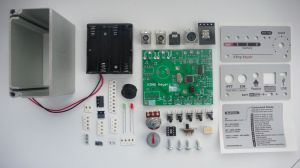
The unit performs well, though I accidentally left it on battery power for a few days and totally drained the batteries. This prompted me to add a sleep mode feature to my code which is in beta testing and should solve this problem. One minor issue with the Open Keyer kit is the front speed knob. On my unit it does not fit well, with not enough of the potentiometer shaft exposed for the knob to grab on to. Ondra, OK1CDJ, at Hamshop tells me that they’re adjusting the alignment of the potentiometer in the next revision to address this problem.
I won’t review the actual keyer software as the documentation for this is here, and naturally I’m a bit biased about it, but it does about anything a CW aficionado would want to do. All in all the Hamshop Open Keyer is a nice little kit that can be assembled in an evening or two, and is reasonably priced.
(Full disclosure / disclaimer: I do not have a financial interest in Hamshop, and I can’t provide support for this keyer hardware. Support for the open source code is available on the Radio Artisan discussion group.)

Anthony, K3NG, is a regular contributor to AmateurRadio.com.
We apologize for the delay….

Greetings AmateurRadio.com readers! I have not written in quite awhile, so I feel the need to catch up a bit. I’ve had so much going on lately that I just had to prioritize what time I have left at the end of the day. I hope to be posting again on a more regular basis.
First of all, I want to mention that KD2CHE and I tied the knot back in October, on a cliff overlooking Lake Tahoe, on a beautiful (and warm thankfully) day in Incline Village, NV. We were quite literally a stones throw from California. The rest of our trip out west was great, including visits to two Silicon Valley surplus shops: Weird Stuff Warehouse, and Halted Supply Company (HSC), as well as HRO in Sunnyvale. We even had a special tour of LucasFilms/Arts/ILG courtesy of some great friends with connections. On the plane, on the way back, while leafing through a copy of Monitoring Times I purchased at HRO, I noticed that in an article about Ham Radio Kit Building, Kirk Kleinschmidt mentioned my Amateur Radio Kit Roundup as the source for info on kit building. While it was a nice surprise, it also got me thinking that I needed to make the guide more accessible. I will still post the changes here, but as a link to the guide’s new URL: RadioKitGuide.com. For now it’s just a link to the page at my blog, but will evolve into a full wiki-style site in the near future.
My trusty HTX-10 has been busy these couple of months, logging calls to Alaska, Namibia, Croatia, New Mexico, Colorado, and California to name a few. Mostly from the Crab Meadow Beach here on Long Island, but the Alaska contact was mobile! A new addition to the collection is an Atlas 210X HF rig. This was a holiday present from my better half. After a couple of months of just listening, I finally put up a 35 foot random wire, and picked up an MFJ 941-D VersaTuner so that I could try and transmit. It’s very close quarters where we live, so I’m limited in antenna choices, and have to worry about disturbing the neighbors (well, any more than they are already disturbed/disturbing). I found out earlier in the week, that the setup seems to be very functional on 20 meters, and have talked to Mexico, and Florida so far. I’m hoping for some good 10 and 15 conditions this weekend so that I can try it out up there. I’m going to add a counterpoise to the setup and see if it helps me tune up on 40. 80 is out of the question for now, as I seem to obliterate my TV speakers and KD2CHE’s computer monitor when I even try to tune up. My 5-cent 2 meter dipole has also been working well. I’ll cover that in a later post.
Transmitter hunting has been pretty good, with the XYL and I usually finding the transmitter quickly, and rarely last. What’s interesting about that is we are the only team in our hunting club that operates without a doppler. I also will write a future post on our technique, which in our last hunt, guided us to the bunny way ahead of our technologically superior friends. Unfortunately, as we arrived at the site, I assumed that we might have been wrong, due to the fact that there were no other cars from the hunters present. Next time I won’t put my assumptions before my instincts. In the end, KD2CHE was the one that actually found the box, by using her eyes, while a bunch of us wandered around the woods with our equipment.
That’s all for now. Maybe I’ll catch one of you on HF this weekend. 73’s !
–Neil, W2NDG
Neil Goldstein, W2NDG, is a regular contributor to AmateurRadio.com and writes from New York, USA. Contact him at [email protected].
160 Meter fun
Instead of chasing 80 Meter Foxes, I decided to make an effort in the NAQCC 160 Meter Sprint that was held tonight. Boy, am I glad I did!
Up until now, I really haven’t had anything that loaded up well on 160 Meters. When I had my G5RV, it would load on 160 Meters; but barely and you could sure tell the radio wasn’t happy about it.
The 88′ EDZ is about the same. It will load up on 160 Meters; but the autotuner in the K3 takes a painfully long time to achieve a match. And then, if you decide to change frequency – even just a hair, the autotuner begs to be re-tuned.
The W3EDP, however? I hit the autotune button and within what seems to be about a second and a half, I get a tiny little “BRRRRP” and a 1.1:1 match. And I can tune around quite a bit without the radio complaining. I know it’s not the ideal solution for 160 Meters; but it has allowed me to make more 160 Meter contacts in one night than I have in all my 34 years of operating combined. Seriously, before tonight, I think my total QSO count on 160 Meters was maybe 3 …. 4 – maybe 5 at most?
I made 17 contacts tonight, my best DX being North Carolina, Illinois, Indiana and Ontario. Not bad for 5 Watts to a compromise antenna, eh? OK, so the W3EDP won’t earn me WAS or DXCC on 160 Meters, but at least now I have another band I can go to when other bands seem dead.
And my good friend Charles W2SH sent me an e-mail the other day, informing me about a book soon to come out from the ARRL on 160 Meter antennas, specifically for those of us who are real estate challenged. That is a must buy for me once the NJ Hamfest season starts back up again in March.
73 de Larry W2LJ
QRP – When you care to send the very least!
Larry Makoski, W2LJ, is a regular contributor to AmateurRadio.com and writes from New Jersey, USA. Contact him at [email protected].
 Ham Radio Deluxe |
 W5SWL Electronics |
 Ham Radio Prep |
 KB3IFH QSL Cards  Hip Ham Shirts  HamRadioAuctions HamRadioAuctions Reliance Antennas Reliance Antennas Enigma Shop Enigma Shop |  morseDX  Ni4L Antennas  R&L Electronics R&L Electronics antennas.us antennas.us QRV QRV |
- Matt W1MST, Managing Editor
