 |
 X1M QRP SSB/CW Transceiver Kit
 15 March 2013 | by
X1M QRP SSB/CW Transceiver Kit
I’ve been watching this little thing for a few weeks. They showed up on the Kight Radio Store web page and after a few days, when I decided to pull the trigger, they had sold out. Today they are back in stock, and one of them is on its way to me (hopefully). Construction is described as easy assembly which I gather makes it similar to the KX3 kit. Here are the features and specs from Kight Radio:
Transceiver: X1M [v2.01]
Frequency range: 0.1 ~ 30mhz transceiver;
Modes: ssb / cw
Power output: 5 Watts (max);
Operating voltage: minimum 9.6v (dc), max 14.5v (dc);
Operating current: 0.35a (min), 1.2a (max);
Preamplifier;
Memory 100 channels ;
RIT function;
Automatic internal CW keyer
Back-light on/off
Keyboard can be locked;
Dimensions: 97 * 40 * 155 (mm)
Weight: 0.65
Receiving sensitivity: better than 0.45uV
Frequency stability: better than 0.5ppm
Frequency accuracy: better than 0.5ppm (boot 5 minutes)
An interesting additional feature says this equipment can be connected to HAM RADIO DELUXE software. The user can choose any ICOM equipment, but the IC-718 is recommended.
The text also states that the version they are shipping to the USA is set up to transmit only on the Amateur bands.
I’ll let you know how it goes.
Neil Goldstein, W2NDG, is a regular contributor to AmateurRadio.com and writes from New York, USA. Contact him at [email protected].
Scorch Your Butt Off
Yes – you’ve read it correctly. I am speaking of scorching your hind quarters off even as we haven’t officially made it through Winter yet.
Scorch Your Butt Off is the Summer time answer to Freeze Your Butt Off, a brandy new for 2013 outdoor QRP operating event. The concept is the brain child of Rem K6BBQ, of QRP portable recumbent tricycle fame. You’ve seen Rem’s videos, you know how dedicated he is.

Rem was concerned that the BUBBA contest had gone by the wayside. Being the courteous Ham that he is, Rem contacted the Arizona ScQRPions and asked if they’d mind if he organized and ran something to take its place. He didn’t want to step on anyone’s toes. So when he got the “knock yourself out” e-mail, SYBO was born.
It will take place on Saturday July 20th. Rules can be found here.
So now, all you rabid outdoor QRPers have three great “under the sun” fun events to look forward to this Summer (as if you needed an excuse to get oudoors!)- Scorch Your Butt Off, the Flight of the Bumblebees, and the NJQRP Skeeter Hunt. Three perfect opportunities to put into action all the great gear you’ve built over the Winter!
It’s a good thing Spring is coming – I can hardly wait for these!
72 de Larry W2LJ
QRP – When you care to send the very least!
Larry Makoski, W2LJ, is a regular contributor to AmateurRadio.com and writes from New Jersey, USA. Contact him at [email protected].
K1EL WKUSB keyer
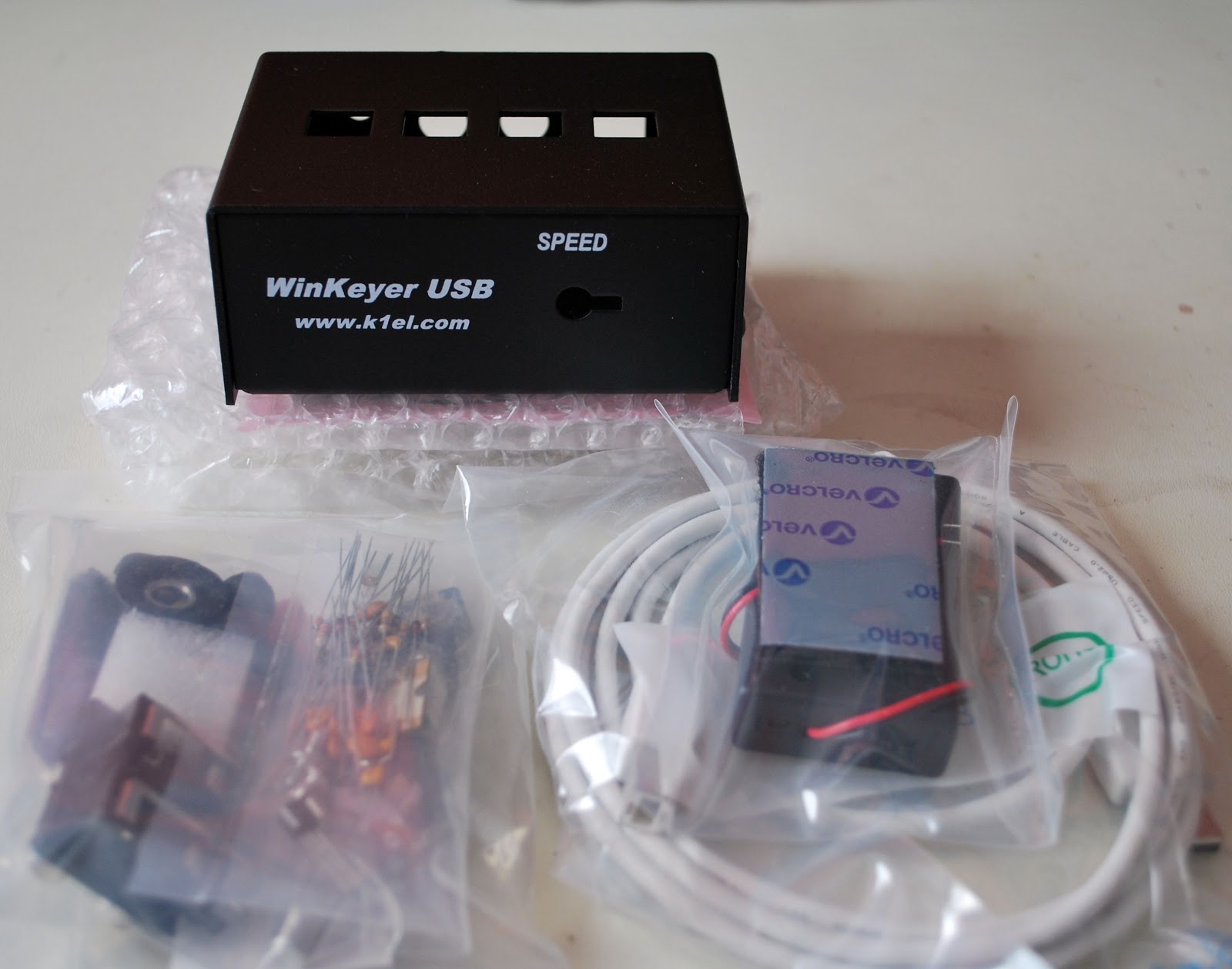
So I sold the Logikit keyer CMOS4 and Julie had purchased me the K1EL WKUSB keyer kit. I am familiar with the WKUSB keyer as some years ago I did purchase a built unit and it worked great. At the time it did seem to have some issues with my contest program N1MM. I ended up selling the unit and as they say hind sight is 20/20 and if I knew then what I do now I would still have it. This keyer has been around for some time now and improvements have been made. To hook it up to the PC is a simple USB cable along with some software and you are off to the races. To change the CW messages you open a program on your PC enter your new message then save to the key and that's it. You are able to enter four separate messages (just great for contests or DXepedtion contacts) The keyer can be connected to two rigs, my K3 and K2 can use the same unit without cable swapping. So back to the software for just one more moment.....not only can you program messages BUT there is a slew of custom settings you can enter such as spacing, weight and tone just to mention a very few extras. I hope this weekend to heat up the soldering iron and point it in the direction of this kit!!
Mike Weir, VE9KK, is a regular contributor to AmateurRadio.com and writes from New Brunswick, Canada. Contact him at [email protected].
Fix for "Gmail app unreachable" in Google Chrome
This morning when I started up Google Chrome and tried to log in to Gmail the page kept coming up “Gmail app unreachable”. Curiously, when using Firefox Gmail loaded up fine.
I found a solution to this issue that works for me. Right-click the shortcut that you use to start Google Chrome, then on the Shortcut tab in the box marked Target which contains the full path to chrome.exe, append a space followed by –ssl-version-max=tls1 (that last character is a number 1.)

I have no idea what this does but as I say, it worked for me.
Julian Moss, G4ILO, is a regular contributor to AmateurRadio.com and writes from Cumbria, England. Contact him at [email protected].
AmateurLogic.TV 51: Routing Wyong Arduinolator

AmateurLogic.TV Episode 51 is now available for download.
Tommy simplifies D-Star Callsign Routing. Peter visits the Wyong Field Day (Hamfest). Emile has some cheap analog and digital SSTV solutions. And George builds the Arduinolator (Arduino Square Wave Oscillator) and shows just how easy and fun it can be to experiment with microcontrollers.
1:00:54 of ALTV fun!
Download
View in web browser: YouTube
This episode brought to you by:
GigaParts
MFJ
Icom
George Thomas, W5JDX, is co-host of AmateurLogic.TV, an original amateur radio video program hosted by George Thomas (W5JDX), Tommy Martin (N5ZNO), Peter Berrett (VK3PB), and Emile Diodene (KE5QKR). Contact him at [email protected].
News from the shack
The end of this month see’s the end of work based madness so I’m getting a few bits and bobs sorted out.
With the demise of the trusty (read rusty…or at least corroded in the special way that aluminium does) vertical I have order a hardware kit for a Cobwebb to go outside. it may get here by the weekend. I’ve been given a rather sorry looking mast that will polish up into a rather staely looking mast once I’ve spent some time on it and a few plastic bits and pieces from Seeedstudio for some of my bits and bobs that need tidying up.
Hopefully this Saturday it won’t be freezing cold or raining, although I’m told the time I’ll be running my part of our Red Nose Day 24 hour relay it will be chucking it down, so I can assess what needs to be done to get myself back on the air on HF and get my 50Mhz yagi up and ready for the season. Looking forward to some time on the rig Excellent!
Alex Hill, G7KSE, is a regular contributor to AmateurRadio.com and writes from Cumbria, UK. Contact him at [email protected].
A Quick RoIP Experiment
RoIP stands for Radio over the Internet Protocol and you can use this technology to connect remote radios over any distance, easily.


Above: Zello VOX settings on PC and Zello GUI on Windows XP
Now I know that Ham Radio Deluxe can be established to give full remote control over my rig, but that’s for another day. This is one solution to automatically link two radios that anyone can do.
Rob Law, MW0DNK, is a regular contributor to AmateurRadio.com and writes from Anglesey, Wales. Contact him at [email protected].
 Ham Radio Deluxe |
 W5SWL Electronics |
 Ham Radio Prep |
 KB3IFH QSL Cards  Hip Ham Shirts  HamRadioAuctions HamRadioAuctions Reliance Antennas Reliance Antennas Enigma Shop Enigma Shop |  morseDX  Ni4L Antennas  R&L Electronics R&L Electronics antennas.us antennas.us QRV QRV |
- Matt W1MST, Managing Editor
