Archive for the ‘internet’ Category
 Misinformation
 July 20th, 2010 |
 Author:
The web is a great way to get information about subjects like ham radio that you might never find if you had to rely on books. Unfortunately it’s also a good way to get wrong or obsolete information. For example, people looking for advice on how to make their first contacts via amateur satellites will find many articles that explain in great detail how to work through satellites that have long been defunct – even on the Amsat website!
There are numerous websites that explain about SSIDs used for APRS. (An SSID is the numeric suffix to the call, for example G4ILO-7, which is used to distinguish an operator’s APRS devices and also to give an idea of what type of device it is.) They are all wrong! Bob Bruninga, WB4APR, the inventor and ultimate authority on APRS, released an updated set of recommendations on 9 June this year to provide more flexibility for current usage.
The new recommendations are:
-0 Your primary station, usually fixed and message capable.
-1 Additional station, digi, mobile, weather station etc.
-2 Additional station, digi, mobile, weather station etc.
-3 Additional station, digi, mobile, weather station etc.
-4 Additional station, digi, mobile, weather station etc.
-5 Network sources (smartphones etc.)
-6 Special activity, e.g. satellite operations, camping, 50MHz etc.
-7 Handheld radios and other human portables.
-8 Boats, RVs or second mobile.
-9 Primary mobile.
-10 Internet gateways, Echolink, Winlink, AVRS, APRN, etc.
-11 Balloons, aircraft, spacecraft, etc.
-12 APRStt, DTMF, RFID devices, trackers etc.
-13 Weather stations.
-14 Truckers or other full time drivers.
-15 Additional station, digi, mobile, weather station etc.
These are recommendations and not set in stone, but they are intended to help people know what type of device or application is being used, particularly in situations where someone doesn’t have a graphical map display and can’t see an icon.
Due to these recommendations I am now using G4ILO-5 for my Windows smartphone running APRSISCE. My VX-8GR remains G4ILO-7. My main 2m station is G4ILO-0 or just plain G4ILO, and my HF station is G4ILO-1.
Of course, this page could also become out of date in the future so I am including this link back to the original document in case Bob should make any further changes.

The End of the Internet
For those who don’t believe that the internet is flat.

Up the Amazon
The September issue of PC Pro (a British computer magazine) arrived today. Featured on the front cover was an article exposing the rip-off prices charged by music download sites. Madonna’s Celebration (which I presume is a popular music album) would set you back £11.18 at MSN Music or £11.99 at Spotify but would cost you only £2.98 from Amazon.
Included with the magazine was a DVD which contained a free copy of Paragon System Backup 2010. As I didn’t have any backup software for 64-bit Windows I thought this was fortuitous, so I decided to install it. But after handing over my email address in exchange for a free registration code it failed to install. The developers had used the ridiculously overpriced, overcomplicated and error-prone InstallShield (programmers will know what I mean) to create the setup wizard and only a few seconds into the install it threw up an error message about being unable to initialize the Javascript runtime and died.
I tried the obvious things like checking that Java was installed, running the installer in administrator mode, and even Googling the error message and trying the suggested remedy of registering the Javascript DLL, all to no avail. So I decided that I was not going to rely on backup software from a company that could not even produce an installer that would run on a brand-new computer, and consigned Paragon to the Recycle Bin (both literally and virtually.)
I spent a couple more hours downloading, being unimpressed by and then uninstalling a number of other free backup programs. I even discovered that there was a backup program included with Windows, but for some reason the version that comes with Windows 7 Home Premium has been hobbled by only being able to back up to writeable DVDs or removeable hard drives, not my network attached backup server. After being advised that the backup would take 6 or 7 DVDs I decided against it.
In the end I decided to stump up for a copy of Acronis, which most people seem to regard as hands-down the best backup software you can get. It can create disk images from which you can restore even if Windows won’t run and it has a continuous backup option that backs up your files while you work so you can revert back if you mess up a file. It even has a “Try and Decide” sandbox that lets you safely try out software you aren’t sure about to see if it will do anything nasty to your hard drive.
The Acronis website informed me that this paragon (small p) of backup software would cost £39.95. After checking some reviews, in my usual lazy fashion I typed “acronis trueimage” into the Google search box to find my way back to the website, and Google helpfully included three “shopping results” in its list of related sites. Included there was an offer of Acronis TrueImage Home 2010 from Amazon for £17.99.
Eh? I can buy online and pay £40 for an electronically delivered product the manufacturing and delivery costs of which are near zero, or I can have a physical product that has been mastered onto CD and put into a printed box, possibly with a manual, which has then been driven to a warehouse and stored waiting for me to buy, after which it will be put into a cardboard mailer and sent through the post to be delivered to my door, for less than half the price (with SuperSaver free delivery.) Sorry, I don’t see the logic in that, but thanks very much Google and Amazon.

Threat to APRS, Echolink, D-Star in New Zealand
Steve, GW7AAV, spotted a news item on the NZART web page which states that the authorities in New Zealand have become concerned about IRLP, D-Star, Echolink, APRS and similar modes as they do not appear to fit within the New Zealand license conditions. Their concerns include the use of unattended transmitters and unlicensed digipeaters for APRS and amateurs based overseas operating a NZ amateur station via the internet.
It’s easy to forget that other countries don’t have such liberal licensing conditions as we do in the UK, although I would point out that operating an Echolink, D-Star, IRLP or packet radio (including APRS) node is not within the standard license conditions here either – you are supposed to apply for special permission. I know there are many who feel that is a good thing, and even that internet linking is not amateur radio and should not be allowed anywhere in the world, at all, but my opinion is that prohibiting it devalues amateur radio.
This policy is probably one of the main reasons why the APRS RF network is broken for messaging as many people (myself included) who are unwilling or unable to comply with the requirements for obtaining permission avoid the problem by operating receive-only gateways. Consequently we have the situation where smartphone-based APRS using mobile internet connections are more useful than APRS over radio.
I certainly believe that the point of our hobby is to use radio wherever possible, but where the internet makes possible something that could not practically be achieved using RF alone I think that we should be permitted to use it.

Riding with Lynn
I’ve just been for a pleasant afternoon drive down to the coast with Lynn, KJ4ERJ, developer of the APRSISCE software, currently on holiday in Spain. No, I didn’t nip down on EasyJet for the day. Actually I was following him on APRS using the Google Street View feature in the beta version of aprs.fi.
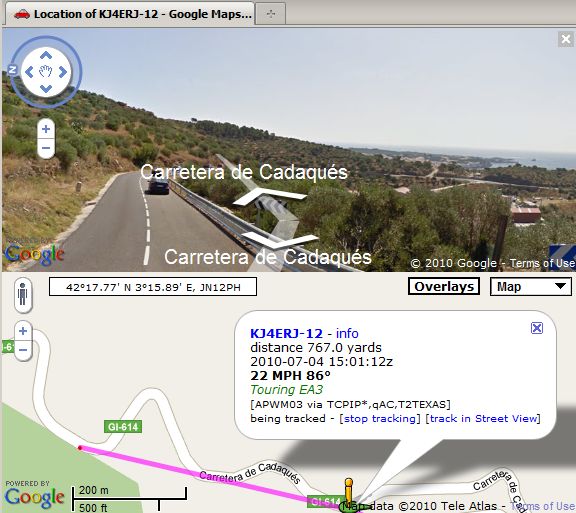 With the new software, when you click on a station you get the option to Track in Street View. If you do then the browser window splits in two, with the top half showing the view the person you are tracking sees, facing the direction he is going, and the bottom half showing the track on the map. It works pretty well. You just have to remind yourself that you are viewing images previously taken by Google, not live images!
This is beta software, so you won’t find it on the regular aprs.fi just yet. But it’s a pretty cool application, I think you’ll agree!

One Foot in the Grave
This blog is meant to be about my hobby, amateur radio. Occasionally I have given in to the temptation to blog about some other event that has affected me, or let off steam about some topic that has annoyed me. But as I discovered a few months ago when a couple of the American ham radio blogs I read decided to vent about Obama, health care and other issues that Americans care deeply about, it can be very disconcerting to encounter far off-topic subject matter in a specialist blog, especially if the opinions expressed are ones with which you profoundly disagree. So in recent months I have tried to resist the temptation of controversial posts.
Sometimes I still get the urge to write about these topics, though. So to satisfy that urge I have started a new blog. Its title is One Foot in the Grave; the subtitle is Ramblings of a real-life Victor Meldrew. British readers who have seen the BBC comedy series of the same name will know what to expect from this. Readers from other parts of the world will have to see for themselves, though perhaps much of what I will be writing about won’t be of much interest to them anyway since it is going to be mostly about the trials and tribulations of life in the UK.
Nevertheless I hope that a few of you may find it worth following One Foot in the Grave and even telling other people about it.

Cutting off your head to cure a cold
 I received an email from a German CB operator named Dieter (I presume he is a CB operator from the callsign) asking if I knew of a program to design a SuperMoxon antenna for 27 or 28MHz. I replied, as I would have done to a licensed amateur who had asked the same question, that I didn’t. The SuperMoxon was designed and made by Ron, GW3YDX. Only he knows how he designed it.
My reply to Dieter’s gmx.de email address bounced back with the message: “Sorry, your envelope sender has been denied: The recipient 550 5.1.1 does not want to receive mail from your address.”
Dieter wouldn’t have known, since he contacted me through the form on my website, that I use a Gmail email address. So if I understand correctly, the German ISP gmx.de is blocking all mail from the largest email service in the world (though I suppose it’s possible that it is only blocking email from me.)
I guess this has something to do with preventing spam, since I read recently that a lot of spam comes from fake Gmail addresses. But if gmx.de can’t distinguish spam from real email – something Gmail does extremely well, and one reason why I’ve been very happy to use this free email service – then perhaps it should stop using half measures and turn off email altogether rather than leave its customers wondering why they don’t receive replies from some of the people they contact?