Archive for the ‘ham radio’ Category
 Egypt old tech
 February 2nd, 2011 |
  Author:
Another question for the Sphinx?
The people power demonstrations in Egypt over the last week were probably fueled just that bit more by the government’s decision on 27 January to cut mobile phones and the internet. The deteriorating situation in Egypt is currently sharing top news position here in Australia with the monstrous tropical cyclone Yasi due to hit major population centres of far north Queensland in hours!
There’ve been reports of how protesters have turned to ‘old technology’ – fax machines, dial-up modems and even ham radio(!) – to restore communications with each other and the outside world. The BBC report Old technology finds role in Egyptian protests describes how dial-up modems have been used to contact international ISPs.
IDG News journalist Nancy Gohring wrote a piece in PC World explaining how Ham Radio is Not a Viable Option for Egypt. She quotes ARRL’s Allen Pitts stating there are no confirmed transmissions from Egypt yet.
The WeRebuild wiki details frequency bands on 40m and 20m being monitored including 7080.8kHz for CW signals. The wiki page does include transcripts of some messages received – but none since 29 Jan. And it would be a challenge to verify their authenticity.
WeRebuild have even set up an IRC channel for ham operators monitoring these frequencies. The Huffington Post quotes some of the messages.
As I write this there are 91 posts in a discussion thread on QRZ.com debating the use of ham radio by the protesters and overseas operators. Amongst the majority counselling caution and “Keep Ham Radio out of politics – if you don’t, Politics will shut Ham Radio down (in Egypt and in other places, too)”, a minority of posts take an alternate view such as this contributor:
“Freedom is not free. To advocate “staying out of it” on the grounds of damaging ham radio is the same as our founding fathers telling the militiamen on the green at Lexington to stay home, lest the British come take their guns too. The only legitimate reason for staying out of it is the decision of which side you are on — and yes, when it comes to liberty we all have an obligation to investigate the issues and take sides.”
This is a passionate and interesting discussion of what constitutes emergency
communciation and how hams should respond to calls for assistance such as “health and welfare traffic” etc.
Meanwhile closer to home (and across the US as well) people brace themselves for some of the most extreme and destructive weather which is sure to cut power and communications for extended periods. And hams will be there to help.
Cyclone Yasi Update: VK amateurs are maintaining a listening watch on the WICEN frequency 7075kHz. Full details of relevant HF nets and local north Queensland repeaters have been published by the WIA. Tomorrow morning’s 6am Gnarly Net should make for interesting listening on 3600kHz.
The national broadcaster, the ABC is heavily promoting two shortwave frequencies on its 24 hours TV news channel, in anticipation of its local AM and FM towers being damaged by the cyclone. The special rolling coverage of the cyclone can be heard online and on 9710kHz by day and 6080kHz by night.
Handiham World for 26 January 2011
Welcome to Handiham World!

Can ham radio help promote science education?
Last night many of us watched the proceedings from Washington, DC as Congress and the President gathered for the State of the Union address. I don’t think any of us were surprised to hear some of the comments about how the United States needs to stay competitive in a new world where science, technology, engineering, and math are more important than ever. It seems to be something that everyone can agree on. These four subjects are sometimes referred to by their acronym, “STEM”. There has been much talk lately about how to energize and motivate our young students to learn more science and math, which will ultimately lead to a better understanding of technology and perhaps more students of science and engineering later on down the road. For quite some time now the United States has been importing highly educated scientists. I live in a neighborhood that is close by a well-known Fortune 500 company that employs a lot of scientists. It is no surprise to me that some of them have come from other parts of the world.
“What”, you may ask, “does this have to do with ham radio?”
Well, if you think about it, ham radio encompasses STEM – science, technology, engineering, and math – all in one fun and interesting activity. All of us know that ham radio has many different facets. You can have an interest in public service communications and earn your Technician license in order to participate in the types of communications exercises and responses that serve the public interest. Following 9/11, many people did just that because interest in public service was so strong. That fundamental reason for the existence of the Amateur Radio Service is still there and still attracts and holds many participants.
There are, however, lots of amateur radio operators who simply like to do other things. Some may be interested in just getting on the air to make contacts and make friends in the process. Others may get on the air because they are competitive and like to participate in contests and chase awards. One traditional interest area is in engineering, which will frequently involve designing and building one’s own equipment. It is also necessary to recognize that writing software is another amateur radio activity that holds the interest of a small but important minority. All of us know that every level of the amateur radio licensing process involves learning some science and math. The Extra Class exam takes math understanding to a much higher level than what might be found in the typical population. I guess we could say that ham radio does sometimes serve as an entry point to learning about how science, technology, engineering, and math can be applied to an activity that is both fun and educational. Furthermore, the options for learning in amateur radio are virtually open-ended. I feel that I will never, ever stop learning new things in amateur radio. Because it is a technical activity by its very nature, it will always be evolving and there will always be a necessity to learn about new technologies and the science and engineering that make them possible. In ham radio, I can learn in a “hands-on” way that will reinforce the knowledge and make it more useful to me.
We saw a definite surge in the interest of the general public about amateur radio after the twin towers fell in New York City. Today we face another crisis where our students are falling behind in science and math. Perhaps amateur radio has a role to play in recruiting more people, young and not so young, to learn more about these vital subjects and in the process to make our country and our world a better place. And when you talk about making the world a better place, what could be a better way to start than by communicating via amateur radio worldwide?
One final thought: When I am asked about what I think is the most important thing that I can contribute in my local amateur radio club, my answer is always the same. Teaching. Every time our club holds classes, I volunteer to teach at least some of them. Amateur radio operators who teach in the public schools have even more opportunity than I do to position amateur radio as a fun learning activity. ARRL has long supported outreach to teachers and has many useful resources. If amateur radio can be used to help promote learning in the four STEM topics, it can be one more tool in the successful teacher’s toolbox.
Patrick Tice, WA0TDA
Handiham System Manager
[email protected]
Proposal for a Skype study hall
We have an ongoing need for some kind of forum in which technical assistance or study assistance can be offered to our members. One idea that crossed my mind was to run a Skype conference with up to 10 participants. This would allow a number of people to discuss some topic of interest in a small group setting in a more private forum than one could find on EchoLink, for example. Does anyone out there have any ideas or experience with this kind of a project? I have taken several webinars where we are all connected in a small group audio session. Generally there is also a shared computer screen operated by the presenter of the webinar. I think a Skype audio forum for a small group would work pretty well. We are mainly interested in audio because we will pretty much always have blind participants and would not want to bother showing screens. In order to make this work, participants would have to sign up for a free Skype account and share their Skype contact information with the presenter.
One use for something like this might be to get questions about the remote base stations out there into a discussion group. Participants could discuss any issues they might have and benefit by learning what others have done to get something working. The same could be said about EchoLink or any other technical topic. The thing about a conference like this that is completely different than an e-mail exchange or even two people talking on the telephone is that the conversation is spontaneous and when you put more heads together you are more likely to get a variety of useful and creative responses.
We could probably start with a scheduled conference at a particular time each week and see how it goes. If anyone is interested in this idea and is willing to get in on the ground floor while we test it out, please let me know at [email protected]. Of course we will have to work out details like whether we should start a new Skype account specifically for this purpose and if so, what we should call it. One of the things that has always been true about ham radio is that “hams helping hams” advances our hobby and makes us all feel good. A Skype conference might just be another way to do that.
Tapes reach the end of the line – sort of
This question was put out this morning on the Handiham Radio Club list, but I want to let those of you who are not members of our radio club know what we are discussing. I want to get your opinion on tape cassettes. Over the years we have offered various manuals and other audio books on tape. I’m sure all of you know that the use of cassette tape has gone down each year, and now we are at the point of filling very few member requests for anything at all on cassette tape. We still do have a small but significant number of users who get the monthly magazine digests on tape. Most of our members are able to simply download the material from our website. In fact, prices have not changed for tapes in years. Nancy and I feel that it is time to discourage the use of tape manuals by increasing the price to reflect the fact that these are special order items that must be custom made one at a time. It is no longer the old days when we had bins of instruction manuals on tape and it was simply a matter of picking one out and mailing it. A typical cassette tape manual on a single tape is priced at five dollars, which is the minimum price for a tape order. However, some are three tapes long and sell for six dollars. This amounts to giving them away, considering all of the effort that needs to go into them. (It has never really been about the cost of the tape itself. The work and mailers add most of the cost.)
Can any of you tell me what a similar book would cost from another agency or provider? While we are happy to help folks find what they need in terms of resources, it doesn’t seem fair to put a lot of effort into an old medium like cassette tapes just because a few people don’t want to change to digital.
Thank you for your thoughts on this matter. We look forward to hearing from you. Unless you are replying via the radio club list, you should send me an email. Please don’t just hit “reply” to this message. I get a lot of mail, and I will be watching for an email to [email protected] with Tapes in the subject line. When I get replies to newsletters that are sent via the distribution list, they will probably be last to be looked at, and then only to change subscription properties.

Handiham World for 26 January 2011
Welcome to Handiham World!
Can ham radio help promote science education?
Last night many of us watched the proceedings from Washington, DC as Congress and the President gathered for the State of the Union address. I don’t think any of us were surprised to hear some of the comments about how the United States needs to stay competitive in a new world where science, technology, engineering, and math are more important than ever. It seems to be something that everyone can agree on. These four subjects are sometimes referred to by their acronym, “STEM”. There has been much talk lately about how to energize and motivate our young students to learn more science and math, which will ultimately lead to a better understanding of technology and perhaps more students of science and engineering later on down the road. For quite some time now the United States has been importing highly educated scientists. I live in a neighborhood that is close by a well-known Fortune 500 company that employs a lot of scientists. It is no surprise to me that some of them have come from other parts of the world.
“What”, you may ask, “does this have to do with ham radio?”
Well, if you think about it, ham radio encompasses STEM – science, technology, engineering, and math – all in one fun and interesting activity. All of us know that ham radio has many different facets. You can have an interest in public service communications and earn your Technician license in order to participate in the types of communications exercises and responses that serve the public interest. Following 9/11, many people did just that because interest in public service was so strong. That fundamental reason for the existence of the Amateur Radio Service is still there and still attracts and holds many participants.
There are, however, lots of amateur radio operators who simply like to do other things. Some may be interested in just getting on the air to make contacts and make friends in the process. Others may get on the air because they are competitive and like to participate in contests and chase awards. One traditional interest area is in engineering, which will frequently involve designing and building one’s own equipment. It is also necessary to recognize that writing software is another amateur radio activity that holds the interest of a small but important minority. All of us know that every level of the amateur radio licensing process involves learning some science and math. The Extra Class exam takes math understanding to a much higher level than what might be found in the typical population. I guess we could say that ham radio does sometimes serve as an entry point to learning about how science, technology, engineering, and math can be applied to an activity that is both fun and educational. Furthermore, the options for learning in amateur radio are virtually open-ended. I feel that I will never, ever stop learning new things in amateur radio. Because it is a technical activity by its very nature, it will always be evolving and there will always be a necessity to learn about new technologies and the science and engineering that make them possible. In ham radio, I can learn in a “hands-on” way that will reinforce the knowledge and make it more useful to me.
We saw a definite surge in the interest of the general public about amateur radio after the twin towers fell in New York City. Today we face another crisis where our students are falling behind in science and math. Perhaps amateur radio has a role to play in recruiting more people, young and not so young, to learn more about these vital subjects and in the process to make our country and our world a better place. And when you talk about making the world a better place, what could be a better way to start than by communicating via amateur radio worldwide?
One final thought: When I am asked about what I think is the most important thing that I can contribute in my local amateur radio club, my answer is always the same. Teaching. Every time our club holds classes, I volunteer to teach at least some of them. Amateur radio operators who teach in the public schools have even more opportunity than I do to position amateur radio as a fun learning activity. ARRL has long supported outreach to teachers and has many useful resources. If amateur radio can be used to help promote learning in the four STEM topics, it can be one more tool in the successful teacher’s toolbox.
Patrick Tice, WA0TDA Handiham System Manager [email protected]
Proposal for a Skype study hall
We have an ongoing need for some kind of forum in which technical assistance or study assistance can be offered to our members. One idea that crossed my mind was to run a Skype conference with up to 10 participants. This would allow a number of people to discuss some topic of interest in a small group setting in a more private forum than one could find on EchoLink, for example. Does anyone out there have any ideas or experience with this kind of a project? I have taken several webinars where we are all connected in a small group audio session. Generally there is also a shared computer screen operated by the presenter of the webinar. I think a Skype audio forum for a small group would work pretty well. We are mainly interested in audio because we will pretty much always have blind participants and would not want to bother showing screens. In order to make this work, participants would have to sign up for a free Skype account and share their Skype contact information with the presenter.
One use for something like this might be to get questions about the remote base stations out there into a discussion group. Participants could discuss any issues they might have and benefit by learning what others have done to get something working. The same could be said about EchoLink or any other technical topic. The thing about a conference like this that is completely different than an e-mail exchange or even two people talking on the telephone is that the conversation is spontaneous and when you put more heads together you are more likely to get a variety of useful and creative responses.
We could probably start with a scheduled conference at a particular time each week and see how it goes. If anyone is interested in this idea and is willing to get in on the ground floor while we test it out, please let me know at [email protected]. Of course we will have to work out details like whether we should start a new Skype account specifically for this purpose and if so, what we should call it. One of the things that has always been true about ham radio is that “hams helping hams” advances our hobby and makes us all feel good. A Skype conference might just be another way to do that.
Tapes reach the end of the line – sort of
This question was put out this morning on the Handiham Radio Club list, but I want to let those of you who are not members of our radio club know what we are discussing. I want to get your opinion on tape cassettes. Over the years we have offered various manuals and other audio books on tape. I’m sure all of you know that the use of cassette tape has gone down each year, and now we are at the point of filling very few member requests for anything at all on cassette tape. We still do have a small but significant number of users who get the monthly magazine digests on tape. Most of our members are able to simply download the material from our website. In fact, prices have not changed for tapes in years. Nancy and I feel that it is time to discourage the use of tape manuals by increasing the price to reflect the fact that these are special order items that must be custom made one at a time. It is no longer the old days when we had bins of instruction manuals on tape and it was simply a matter of picking one out and mailing it. A typical cassette tape manual on a single tape is priced at five dollars, which is the minimum price for a tape order. However, some are three tapes long and sell for six dollars. This amounts to giving them away, considering all of the effort that needs to go into them. (It has never really been about the cost of the tape itself. The work and mailers add most of the cost.)
Can any of you tell me what a similar book would cost from another agency or provider? While we are happy to help folks find what they need in terms of resources, it doesn’t seem fair to put a lot of effort into an old medium like cassette tapes just because a few people don’t want to change to digital.
Thank you for your thoughts on this matter. We look forward to hearing from you. Unless you are replying via the radio club list, you should send me an email. Please don’t just hit “reply” to this message. I get a lot of mail, and I will be watching for an email to [email protected] with Tapes in the subject line. When I get replies to newsletters that are sent via the distribution list, they will probably be last to be looked at, and then only to change subscription properties.
Anticipation – – – HAMCATION & IDGOTAES

Tailgate action as K4UPG buys a MFJ 207
Wahoo! It is that time of year again. I am counting down the days to one of my favorite ham radio activities… Orlando Hamcation is coming on Feb 11-13.
After reading the editorial in the new issue of World Radio Online a cord was struck that resonated with this here ham. I realized that I have a common disease. The article says, “Seems there are a lot of radio amateurs suffering from IDGOTAES.” OH NO… I have it. Throughout the month of December and most all of January, I’ve been sidetracked with other priorities and without realizing it have become afflicted with IDGOTAES. ( “I Don’t Get On the Air Enough Syndrome” ) This is a bad one and only can be cured by some serious outdoor QRP activity if you are a true portable QRP op like me.
Praise the Lord, there’s some good opportunities to get on the air coming up and one cannot find a better place to stock up on goodies than the vendors, swap tables and tailgate are of HAMCATION. So kick off the winter snow-bound blues and git on down here and enjoy with me.

Feeding frenzy at the vendor area of Hamcation!

Tailgate area is HUGE!
We’ll be holding an unofficial gathering of QRP types on Saturday Feb 12, 2011 at Hamcation. Let’s meet up at noon at the QRP ARCI booth and swap stories and get to know one another. Look for the wild eyed guy in the bright yellow cap that says K4UPG on it and his very distinctively white haired partner Jim K4AHO won’t be far away! Be there and let’s get over this dreaded disease together as we plan some Central Florida QRP Group outings for the rest of the year. QNI? Ya hear?
72,
Kelly K4UPG PB #173
Handiham World for 19 January 2011
Welcome to Handiham World!
Last week we promised: I replace my Internet router and configure EchoLink port forwarding. Will I ever be on EchoLink again? Tune in and find out!
Today we begin with our “Connecting with EchoLink” segment. I see that last week has turned into “this week”, and I have kept up my schedule and replaced my old Belkin-N wireless router with a hopefully more reliable D-Link DIR-655 wireless N router. Although I liked the Belkin, it had some odd quirks like simply ending its wireless transmissions when it felt like it and refusing to bring up the access screen through the browser so I could check the settings. I decided to hang on to it for a spare since it mostly works, but isn’t really reliable enough to keep as a primary unit.
Like most households, ours has multiple Internet-enabled devices. There is a mix of wireless and wired clients on our home network, so a wireless router these days typically has at least four LAN jacks along with the usual wireless capability. You can tell that there are two ham operators interested in technology in our household, because we have all sorts of gizmos that need Internet connectivity to work. When my son Will, KC0LJL, is home from college, it is not unusual for us to host a LAN party with a few of his friends visiting us and logging in to play online games.
I’ve owned several wireless routers in the past, upgrading to allow for better wireless coverage or more robust security, or to add more custom configurability. So here we are at the latest choice, the D-Link DIR-655. After a lot of web research and reading user comments, especially those on Amazon.com, I settled on the DIR-655 because it had lots of configuration options, excellent wireless range, is compliant with the IEEE 802.11N standard for faster data transfer, and was reasonably priced at less than $75. I also like the D-Link products I already own.
The router arrived in due course, and yes, I did open the box and read the setup directions. I suspect that most manufacturers offer a CD-based automated installation system, as D-Link does. I have configured many devices, so I elected to instead connect the router via a LAN cable to a computer and do the configuration through a web browser. My reasoning was that any kind of “typical” installation that might be configured via the CD would not suffice for my special needs, like configuring EchoLink. Typically one gets into a router by opening a web browser and typing in router’s ip address, which is usually something like 192.168.0.1. This will open the main login page on the router, and you go in with the “admin” name and whatever the manufacturer says is the default password. Once, in, you will want to go through the housekeeping settings, such as setting your new password (write it down!), giving your wireless network a name, and setting the wireless security credentials. Usually the firewall settings can be left alone, but some applications, like EchoLink, will require that several ports be open. It is safe to do so, but you have to be careful to still maintain the other firewall settings. It is dangerous to turn off the firewall because it exposes your network to all sorts of bad guys with keyboards! Most routers have a “DMZ”, with is a “demilitarized zone”, that is outside the firewall. Although a computer on the network can be placed in the DMZ to avoid firewall issues, this is only a good idea for short term testing. I like to keep all of my computers and network devices behind the firewall.
Operating systems like Windows have their own firewalls. Incorrectly setting the Windows firewall to block EchoLink can also cause a problem of course, but since I knew my machine had already been working fine on EchoLink with the old router, I would not need to mess with any Windows firewall settings. It was time to head for the “Advanced” menu on the router configuration page and choose “Port Forwarding”.

In the screenshot above, I have entered the name of the application (EchoLink) for reference later on so that I know which app is dependent on which port forwarding rule. Under the “Ports to Open” column, I have entered 5200 in the TCP box and 5198,5199 in the UDP box. In the “Schedule” column I have used the pull-down menu to choose “Always” for 5200 and “Allow All” as the inbound filter setting for 5198, 5199.
So far, so good, but we are not done yet. Since the router can forward ports only to one computer on my network, I must decide which machine will be my primary EchoLink computer. Since the one I use for the ham shack applications has an IP address of 192.168.0.100, I need to enter that address in the IP Address box. I make sure the rule is active by checking the box to its left, and I then choose “Save Settings” and wait for the router to tell me that the settings have been applied. If you are wondering where I got the port numbers, all of this information about what EchoLink requires is on the EchoLink website.
Now I have to make sure that my computer will always have the same IP address when it talks with the router. Virtually all routers assume a typical user will not mind if an IP address changes from time to time. The “DHCP Server Settings” is our next stop. DHCP stands for “Dynamic Host Configuration Protocol”. That is fancy talk for the router being able to deal out IP addresses more or less at random within a range of addresses to all the various devices on the network. Each device on the network must have its own unique IP address. These can change “dynamically” as new devices enter the network, as might happen at a LAN party or when one switches on an Internet radio or iPod Touch. Since we have told the router to forward EchoLink ports to only one IP address, we now have to make sure that the single IP address our main EchoLink computer uses never changes in this dynamic system. Our setting here is to check the “Enable DHCP Server” box, and fill in the range boxes with 192.168.0.101 and 192.168.0.199. This allows the router to dish out IP addresses between and including those two numbers. Notice that I left the IP address of the EchoLink computer, which is 192.168.0.100, outside the range of dynamically assigned addresses.

Next, it is time to make reservations. No, we are not going out to dinner! We are going to the DHCP Reservations List, which allows us to tell the router that the IP address of the EchoLink computer is to be “reserved” just for that computer and no other. The “Enable” box is checked and the settings can be saved as before. It is now time to log out of the router and test EchoLink.

EchoLink can be started normally, and the “direct connect” option in setup should be enabled. The station list should come up. Locate the EchoLink Test Server and try to connect. If everything is working right, the connection should complete and you should hear the familiar, “Welcome to the EchoLink Test Server” announcement.
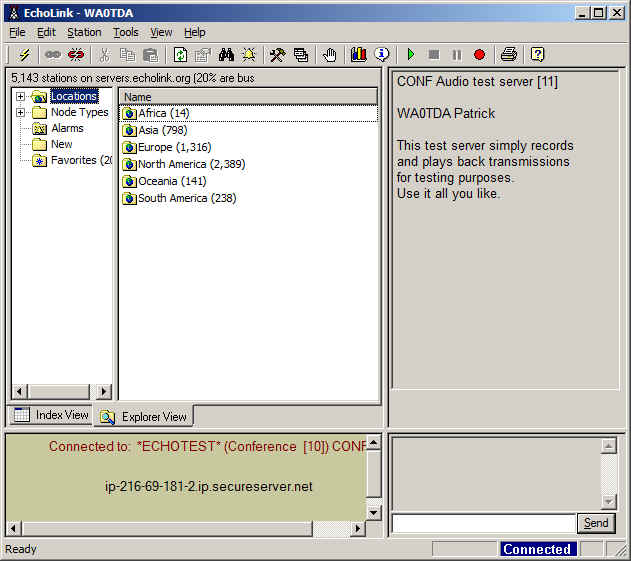
In the EchoLink screenshot, I am connected to the test server and there is confirmation text in the right side of the screen where the station list usually appears. I can toggle the spacebar to transmit and run a short audio test, in which the test server will echo what I have said back to me. This confirms that I can make connections and that my audio levels are set correctly. Since I had EchoLink working before and the router has nothing to do with the audio settings, I did not expect (nor did I find) any problems with levels.
Finally, I ran test connections with other stations and nodes. This was necessary because I have noticed that in some circumstances it is possible to connect to the test server without forwarding the ports. Connections to other nodes and stations will likely fail, however, until the ports are properly forwarded.
Resources that helped me with this setup were the very well-written support pages on the EchoLink website, the Portforward.com website, which lists a wide variety of routers and their configuration settings for EchoLink, and Lyle, K0LR, who gave me good advice about putting the static IP address outside the DHCP range. The Portforward.com website is one that is listed as a useful link within the EchoLink support pages.
What if you have a different router? That’s where the Portforward.com website will really be helpful. It gives directions that are specific to the model of router you have. What doesn’t change are the EchoLink port requirements, but making the actual settings can look quite different, depending on your router. Some, like my old Belkin, had a “Virtual Servers” page where settings were made. This sounds quite complicated, but like any complex task, it can be broken down into basic, easy to follow steps. I like the idea of learning my router’s setup, because that means that I will be able to make changes myself later on. I will feel good about being in charge of my own network, just as I know and control my amateur radio equipment. If something changes, I prefer to be able to diagnose the problem myself. It is something that, as radio amateurs, we should all try to do. Remember, you may be the only one available when a problem with your station or network needs attention!

Handiham World for 19 January 2011
Welcome to Handiham World!
Last week we promised: I replace my Internet router and configure EchoLink port forwarding. Will I ever be on EchoLink again? Tune in and find out!
Today we begin with our “Connecting with EchoLink” segment. I see that last week has turned into “this week”, and I have kept up my schedule and replaced my old Belkin-N wireless router with a hopefully more reliable D-Link DIR-655 wireless N router. Although I liked the Belkin, it had some odd quirks like simply ending its wireless transmissions when it felt like it and refusing to bring up the access screen through the browser so I could check the settings. I decided to hang on to it for a spare since it mostly works, but isn’t really reliable enough to keep as a primary unit.
Like most households, ours has multiple Internet-enabled devices. There is a mix of wireless and wired clients on our home network, so a wireless router these days typically has at least four LAN jacks along with the usual wireless capability. You can tell that there are two ham operators interested in technology in our household, because we have all sorts of gizmos that need Internet connectivity to work. When my son Will, KC0LJL, is home from college, it is not unusual for us to host a LAN party with a few of his friends visiting us and logging in to play online games.
I’ve owned several wireless routers in the past, upgrading to allow for better wireless coverage or more robust security, or to add more custom configurability. So here we are at the latest choice, the D-Link DIR-655. After a lot of web research and reading user comments, especially those on Amazon.com, I settled on the DIR-655 because it had lots of configuration options, excellent wireless range, is compliant with the IEEE 802.11N standard for faster data transfer, and was reasonably priced at less than $75. I also like the D-Link products I already own.
The router arrived in due course, and yes, I did open the box and read the setup directions. I suspect that most manufacturers offer a CD-based automated installation system, as D-Link does. I have configured many devices, so I elected to instead connect the router via a LAN cable to a computer and do the configuration through a web browser. My reasoning was that any kind of “typical” installation that might be configured via the CD would not suffice for my special needs, like configuring EchoLink. Typically one gets into a router by opening a web browser and typing in router’s ip address, which is usually something like 192.168.0.1. This will open the main login page on the router, and you go in with the “admin” name and whatever the manufacturer says is the default password. Once, in, you will want to go through the housekeeping settings, such as setting your new password (write it down!), giving your wireless network a name, and setting the wireless security credentials. Usually the firewall settings can be left alone, but some applications, like EchoLink, will require that several ports be open. It is safe to do so, but you have to be careful to still maintain the other firewall settings. It is dangerous to turn off the firewall because it exposes your network to all sorts of bad guys with keyboards! Most routers have a “DMZ”, with is a “demilitarized zone”, that is outside the firewall. Although a computer on the network can be placed in the DMZ to avoid firewall issues, this is only a good idea for short term testing. I like to keep all of my computers and network devices behind the firewall.
Operating systems like Windows have their own firewalls. Incorrectly setting the Windows firewall to block EchoLink can also cause a problem of course, but since I knew my machine had already been working fine on EchoLink with the old router, I would not need to mess with any Windows firewall settings. It was time to head for the “Advanced” menu on the router configuration page and choose “Port Forwarding”.
In the screenshot above, I have entered the name of the application (EchoLink) for reference later on so that I know which app is dependent on which port forwarding rule. Under the “Ports to Open” column, I have entered 5200 in the TCP box and 5198,5199 in the UDP box. In the “Schedule” column I have used the pull-down menu to choose “Always” for 5200 and “Allow All” as the inbound filter setting for 5198, 5199.
So far, so good, but we are not done yet. Since the router can forward ports only to one computer on my network, I must decide which machine will be my primary EchoLink computer. Since the one I use for the ham shack applications has an IP address of 192.168.0.100, I need to enter that address in the IP Address box. I make sure the rule is active by checking the box to its left, and I then choose “Save Settings” and wait for the router to tell me that the settings have been applied. If you are wondering where I got the port numbers, all of this information about what EchoLink requires is on the EchoLink website.
Now I have to make sure that my computer will always have the same IP address when it talks with the router. Virtually all routers assume a typical user will not mind if an IP address changes from time to time. The “DHCP Server Settings” is our next stop. DHCP stands for “Dynamic Host Configuration Protocol”. That is fancy talk for the router being able to deal out IP addresses more or less at random within a range of addresses to all the various devices on the network. Each device on the network must have its own unique IP address. These can change “dynamically” as new devices enter the network, as might happen at a LAN party or when one switches on an Internet radio or iPod Touch. Since we have told the router to forward EchoLink ports to only one IP address, we now have to make sure that the single IP address our main EchoLink computer uses never changes in this dynamic system. Our setting here is to check the “Enable DHCP Server” box, and fill in the range boxes with 192.168.0.101 and 192.168.0.199. This allows the router to dish out IP addresses between and including those two numbers. Notice that I left the IP address of the EchoLink computer, which is 192.168.0.100, outside the range of dynamically assigned addresses.
Next, it is time to make reservations. No, we are not going out to dinner! We are going to the DHCP Reservations List, which allows us to tell the router that the IP address of the EchoLink computer is to be “reserved” just for that computer and no other. The “Enable” box is checked and the settings can be saved as before. It is now time to log out of the router and test EchoLink.
EchoLink can be started normally, and the “direct connect” option in setup should be enabled. The station list should come up. Locate the EchoLink Test Server and try to connect. If everything is working right, the connection should complete and you should hear the familiar, “Welcome to the EchoLink Test Server” announcement.
In the EchoLink screenshot, I am connected to the test server and there is confirmation text in the right side of the screen where the station list usually appears. I can toggle the spacebar to transmit and run a short audio test, in which the test server will echo what I have said back to me. This confirms that I can make connections and that my audio levels are set correctly. Since I had EchoLink working before and the router has nothing to do with the audio settings, I did not expect (nor did I find) any problems with levels.
Finally, I ran test connections with other stations and nodes. This was necessary because I have noticed that in some circumstances it is possible to connect to the test server without forwarding the ports. Connections to other nodes and stations will likely fail, however, until the ports are properly forwarded.
Resources that helped me with this setup were the very well-written support pages on the EchoLink website, the Portforward.com website, which lists a wide variety of routers and their configuration settings for EchoLink, and Lyle, K0LR, who gave me good advice about putting the static IP address outside the DHCP range. The Portforward.com website is one that is listed as a useful link within the EchoLink support pages.
What if you have a different router? That’s where the Portforward.com website will really be helpful. It gives directions that are specific to the model of router you have. What doesn’t change are the EchoLink port requirements, but making the actual settings can look quite different, depending on your router. Some, like my old Belkin, had a “Virtual Servers” page where settings were made. This sounds quite complicated, but like any complex task, it can be broken down into basic, easy to follow steps. I like the idea of learning my router’s setup, because that means that I will be able to make changes myself later on. I will feel good about being in charge of my own network, just as I know and control my amateur radio equipment. If something changes, I prefer to be able to diagnose the problem myself. It is something that, as radio amateurs, we should all try to do. Remember, you may be the only one available when a problem with your station or network needs attention!
Handiham World for 12 January 2011
Welcome to Handiham World!
Today it is time for adventures in “troubleshooting”.
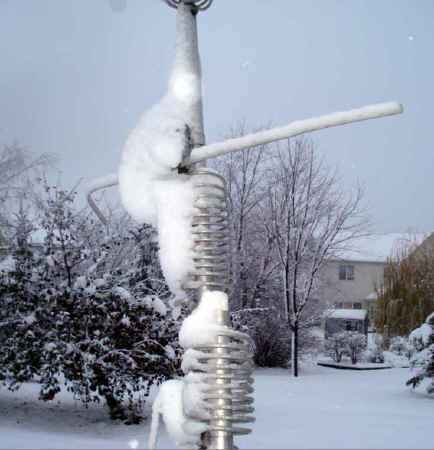
Learning how to troubleshoot problems in your amateur radio station is one of the most important skills you will ever develop. The reason is that most of the time you are going to be the only person available to do anything about a problem that crops up. After all, you are the owner and operator of the station and are likely to be the one who discovers the problem in the first place. Amateur radio is a technical activity, and it has always been my feeling that a healthy curiosity about what makes things work contributes to our ability to learn how to troubleshoot problems logically. Of course fixing a problem is different, since you may not have the necessary parts at hand, be able to climb a tower yourself, or be able to replace a part that you cannot see or reach inside a piece of equipment. Still, there is a great deal of satisfaction to be had in knowing how things work and being able to figure out why they are not working at the moment.
For example, the day before yesterday I noticed in a routine check of my HF antennas that the end-fed wire and the Windom were both delivering plenty of signals, but the ground-mounted Butternut vertical out in the backyard was dead silent. There was not even a trace of the usual noise or static. I know from experience that when an antenna returns this kind of result, there is usually a break somewhere between the transceiver and the antenna, usually a connector or feed line problem.
So, how does one proceed with this kind of a problem? A consideration is whether or not any changes have been made recently in the configuration of the equipment in the ham shack. In other words, if you have recently installed a new antenna tuner or replaced a switch or some other component in the antenna and feed line system, you might want to consider the possibility that things were either not connected correctly or that a connecting cable in the shack is intermittent. Frankly, the first thing to consider (for me, anyway) is some kind of operator error. Did I disconnect something to run a test and then forget about it? Did I forget to flip a switch? Am I sure I pressed the right button on the automatic antenna tuner? I tend to like to eliminate “indoor” problems like these before pulling on my boots and winter gear and trudging out into the backyard, which happens to be full of snow this time of year.
Since I have made no changes to my equipment configuration here in the ham shack, and have triple-checked that I am operating the automatic antenna tuner and rig correctly, I guess there is nothing for it but to make an expedition out to the backyard. I know from experience that most of my antenna problems in the past have been weather-related in one form or another. After all, the antennas and their components are outdoors and can be damaged by ice, moisture intrusion, wind, and ultraviolet exposure. Since this particular symptom of the vertical antenna suddenly going completely silent is not something that happened gradually, I am going to be looking for a break in the feed line, and my prime suspect is going to be at the feed point near the base of the vertical.
A check of what can be seen at the feedpoint shows the connection to be intact. Next, it is time for a continuity check, so out comes my 30+ year old clunker Radio Shack VOM. This thing has been on more troubleshooting trips than I can remember, including trips up towers and many Field Days! The way the vertical’s feedpoint is configured is going to result in a dead short at DC. This is normal, because there is a copper coil across the feedpoint between the center conductor of the coax and ground. Thus, the “normal” condition is for the ohm meter to read a DC short when connected between the center of the coax and the braid. I pulled the coax off the back of the LDG tuner and checked for the expected DC short. The coax was open! This indicates a most unfortunate problem, a break somewhere in the feed line system between the feed point and the ham shack. Further troubleshooting will have to wait until the ground is clear of snow and thawed because the feed line is buried underground and in January in Minnesota the ground is like concrete.
Sometimes troubleshooting is like that. What you have to do is logically narrow down the possibilities so that you can focus your efforts on the part of the system where the fault most likely lies. In some cases, circumstances or conditions will not permit you to troubleshoot to a final conclusion or make repairs until those conditions or circumstances change. So I guess I am without my vertical antenna unless I run a second feed line over the snow and out to the antenna. A better bet is probably just to switch all of my operations to the remaining two wire antennas and to make use of the two Handiham remote base stations from time to time.
Although this story will be continued once the snow melts and the ground thaws out, it does put me in mind of an exceptional job of troubleshooting done by one of the members of my college ham radio club decades ago. If I remember correctly, a Johnson Viking Ranger transmitter was not working properly. Several attempts by various club members to figure out what was going on were unsuccessful. Finally one of the members decided to really devote some serious time to the problem and trace it down once and for all. Believe it or not, the fault was a broken wire underneath the chassis. In those days point to point wiring between tube sockets was common. Vacuum tube equipment was failure prone, and the most likely culprit was always the tubes themselves. In this case, a wire had broken inside the insulation, making the problem difficult to spot. Perhaps this short length of insulated wire was defective when it was manufactured and repeated heating and cooling of the transmitter as it was turned on and turned off ultimately caused the wire to open up inside the insulating jacket. The point of this story is that things like this sometimes happen, even to some of the most seemingly reliable and simple components in a system. I always admire the way engineers and technicians at NASA troubleshoot their way through complicated systems and come up with elegant and effective solutions to problems no one ever expected.
Next week: I replace my Internet router and configure EchoLink port forwarding. Will I ever be on EchoLink again? Tune in and find out!














