Archive for the ‘ham radio’ Category
 Handiham World for 04 May 2011
 May 4th, 2011 |
  Author:
 Welcome to Handiham World!
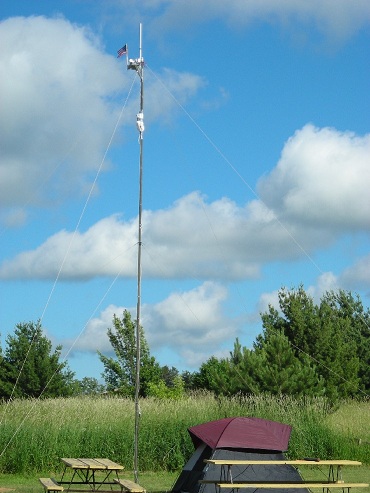
It’s May, and for many amateur radio clubs, the end of the regular meeting schedule. The summertime months are filled with other activities, and ham radio meetings are not really right up there on our list of priorities. When the weather finally gets nice, we want to head outdoors and forget about meetings.
That said, it does not mean that amateur radio disappears in the summertime. Consider the following ham radio highlights:
 | May and June are the traditional months when the six meter band perks up and band openings make it a lot easier to collect 6 meter QSOs toward “WAS”, or “Worked All States”. Listen on 50.125 MHz USB. Wikipedia tells us more: The 6-meter band is a portion of the VHF radio spectrum allocated to amateur radio use. Although located in the lower portion of the VHF band, it nonetheless occasionally displays propagation mechanisms characteristic of the HF bands. This normally occurs close to sunspot maximum, when solar activity increases ionization levels in the upper atmosphere. During the last sunspot peak of 2005, worldwide 6-meter propagation occurred making 6-meter communications as good as or in some instances and locations, better than HF frequencies. The prevalence of HF characteristics on this VHF band has inspired amateur operators to dub it the “magic band”. In the northern hemisphere, activity peaks from May through early August, when regular sporadic E propagation enables long-distance contacts spanning up to 2,500 kilometers (1,600 mi) for single-hop propagation. Multiple-hop sporadic E propagation allows intercontinental communications at distances of up to 10,000 kilometers (6,200 mi). In the southern hemisphere, sporadic E propagation is most common from November through early February. Read the entire article on Wikipedia; just search for “6-meter band”. |
| Dayton Hamvention® is in May, and will attract tens of thousands. Get details on Hamvention.org. This year’s show is May 20-22. The summer may bring other shows and fests, or perhaps ham radio flea markets near you! |
| ARRL Field Day is the last full weekend in June, which turns out to be the 25th and 26th this year. There will be many clubs, small groups, and individuals participating. Find a club or group with Field Day goals that fit your own idea of having fun, and go for it! You can always run your own single op station if you have an independent streak. |
| Ducting and Sporadic E propagation can come and go all summer long, and are usually surprising when they pop up unexpectedly. You may hear a two meter repeater from hundreds of miles away, or even farther. Communications beyond the line of sight are possible. |
| Public service events like parades and races are common in the summer months. They may provide opportunities for you and your radio club to provide volunteer communications. |
| Summer ham radio events like hidden transmitter hunts can combine being out of doors with ham radio direction finding fun. |
| Radio Camp! It’s August 8 through 23. Even if you can’t attend camp yourself, you can work us on the air and get a QSL card. |
| Vacation time? Take ham radio along. If you are taking a road trip, learn to use the tone search feature in your radio so that you will be able to find the repeater subaudible tones. The ARRL Repeater Directory is a must, too. |
| Skywarn! ARES®! The hot, humid summer days bring those dew points into the danger range and severe weather is a real possibility. Generally the severe weather season begins in the southern United States in the Spring and migrates northward, reaching the northern states in late Spring and early summer. Severe weather or other emergency situations can happen anytime, though. Amateur radio operators can make the difference in providing vital communications services. |
| Antenna projects: The best time is in the summer, not during a sleet storm in November or a blizzard in January. Get those antenna projects out of the way when the gettin’ is easy! |
| Back indoors… Yes, there will be some days when it is hot and humid outdoors, or raining buckets. Might as well get the ham shack cleaned up or work on a kit or other building project. |
| Those lazy days on the deck or patio? Spend at least part of them studying for your license upgrade. You folks studying for General will have to test using the old pool before July 1. |

With all the potential ham radio stuff going on in the summertime, who needs radio club meetings? Take some notes on the things you do all summer and you can give a report at your September radio club meeting: “What I did on my summer vacation.”
For Handiham World, I’m…
Pat Tice[email protected]
Troubleshooting 101: Technology and obsolete media – some further thoughts.
 Last week we posed this dilemma:
Help! My old computer died – and it really wasn’t that much of a surprise, since it was nearly 10 years old and didn’t really owe me anything. I love my new, faster replacement machine, but recently I decided that I needed to set up the memories in my trusty HT, and two things were pretty much deal-killers:
- My rig software was installed on the old machine, which is now dead, and the original installation disk is a 3.5″ floppy. My new machine doesn’t have a floppy drive!
- The interface cable that came with the rig uses a DB-9 serial interface, but my new machine doesn’t have one of those, either.
What can I do?
Several of you wrote to remind us that USB sticks are really coming down in price and going up in storage capacity. They make good substitutes for old media like floppy discs and can easily substitute for compact discs or DVDs when you are using netbook computers that don’t have DVD/CD drives. In addition, you can buy USB extension cables and “hubs” that add multiple USB jacks in case you have more USB devices than jacks to plug them into. USB stands for “universal serial bus”, and this type of serial port has overtaken the less-versatile DB-9 serial jack on many new machines. Universal means that there are technical standards applied across a broad range of uses for USB cables. You can get USB to DB-9 converters.
Our readers are correct – those little USB storage sticks are a substitute for traditional disc media. But there are some potential “gotchas”:
| Easy to lose because of small size, which can result in data loss with possible security and privacy implications. |
| Hard to label because of small size. |
| Because they stick out of the side of a laptop computer, they are easily bumped and that can result in the computer’s USB jack being damaged. |
| Prone to damage (such as going through the washing machine because of being forgotten in a pocket.) |
| The computer will attempt to reinstall drivers for the USB storage device if you plug it into different USB ports. This isn’t a big deal, but it can be annoying. |

Handiham World for 04 May 2011
Welcome to Handiham World!
It’s May, and for many amateur radio clubs, the end of the regular meeting schedule. The summertime months are filled with other activities, and ham radio meetings are not really right up there on our list of priorities. When the weather finally gets nice, we want to head outdoors and forget about meetings.
That said, it does not mean that amateur radio disappears in the summertime. Consider the following ham radio highlights:
| May and June are the traditional months when the six meter band perks up and band openings make it a lot easier to collect 6 meter QSOs toward “WAS”, or “Worked All States”. Listen on 50.125 MHz USB. Wikipedia tells us more: The 6-meter band is a portion of the VHF radio spectrum allocated to amateur radio use. Although located in the lower portion of the VHF band, it nonetheless occasionally displays propagation mechanisms characteristic of the HF bands. This normally occurs close to sunspot maximum, when solar activity increases ionization levels in the upper atmosphere. During the last sunspot peak of 2005, worldwide 6-meter propagation occurred making 6-meter communications as good as or in some instances and locations, better than HF frequencies. The prevalence of HF characteristics on this VHF band has inspired amateur operators to dub it the “magic band”. In the northern hemisphere, activity peaks from May through early August, when regular sporadic E propagation enables long-distance contacts spanning up to 2,500 kilometers (1,600 mi) for single-hop propagation. Multiple-hop sporadic E propagation allows intercontinental communications at distances of up to 10,000 kilometers (6,200 mi). In the southern hemisphere, sporadic E propagation is most common from November through early February. Read the entire article on Wikipedia; just search for “6-meter band”. |
| Dayton Hamvention® is in May, and will attract tens of thousands. Get details on Hamvention.org. This year’s show is May 20-22. The summer may bring other shows and fests, or perhaps ham radio flea markets near you! |
| ARRL Field Day is the last full weekend in June, which turns out to be the 25th and 26th this year. There will be many clubs, small groups, and individuals participating. Find a club or group with Field Day goals that fit your own idea of having fun, and go for it! You can always run your own single op station if you have an independent streak. |
| Ducting and Sporadic E propagation can come and go all summer long, and are usually surprising when they pop up unexpectedly. You may hear a two meter repeater from hundreds of miles away, or even farther. Communications beyond the line of sight are possible. |
| Public service events like parades and races are common in the summer months. They may provide opportunities for you and your radio club to provide volunteer communications. |
| Summer ham radio events like hidden transmitter hunts can combine being out of doors with ham radio direction finding fun. |
| Radio Camp! It’s August 8 through 23. Even if you can’t attend camp yourself, you can work us on the air and get a QSL card. |
| Vacation time? Take ham radio along. If you are taking a road trip, learn to use the tone search feature in your radio so that you will be able to find the repeater subaudible tones. The ARRL Repeater Directory is a must, too. |
| Skywarn! ARES®! The hot, humid summer days bring those dew points into the danger range and severe weather is a real possibility. Generally the severe weather season begins in the southern United States in the Spring and migrates northward, reaching the northern states in late Spring and early summer. Severe weather or other emergency situations can happen anytime, though. Amateur radio operators can make the difference in providing vital communications services. |
| Antenna projects: The best time is in the summer, not during a sleet storm in November or a blizzard in January. Get those antenna projects out of the way when the gettin’ is easy! |
| Back indoors… Yes, there will be some days when it is hot and humid outdoors, or raining buckets. Might as well get the ham shack cleaned up or work on a kit or other building project. |
| Those lazy days on the deck or patio? Spend at least part of them studying for your license upgrade. You folks studying for General will have to test using the old pool before July 1. |
With all the potential ham radio stuff going on in the summertime, who needs radio club meetings? Take some notes on the things you do all summer and you can give a report at your September radio club meeting: “What I did on my summer vacation.”
For Handiham World, I’m…
Pat Tice
[email protected]
Troubleshooting 101: Technology and obsolete media – some further thoughts.
Last week we posed this dilemma:
Help! My old computer died – and it really wasn’t that much of a surprise, since it was nearly 10 years old and didn’t really owe me anything. I love my new, faster replacement machine, but recently I decided that I needed to set up the memories in my trusty HT, and two things were pretty much deal-killers:
- My rig software was installed on the old machine, which is now dead, and the original installation disk is a 3.5″ floppy. My new machine doesn’t have a floppy drive!
- The interface cable that came with the rig uses a DB-9 serial interface, but my new machine doesn’t have one of those, either.
What can I do?
Several of you wrote to remind us that USB sticks are really coming down in price and going up in storage capacity. They make good substitutes for old media like floppy discs and can easily substitute for compact discs or DVDs when you are using netbook computers that don’t have DVD/CD drives. In addition, you can buy USB extension cables and “hubs” that add multiple USB jacks in case you have more USB devices than jacks to plug them into. USB stands for “universal serial bus”, and this type of serial port has overtaken the less-versatile DB-9 serial jack on many new machines. Universal means that there are technical standards applied across a broad range of uses for USB cables. You can get USB to DB-9 converters.
Our readers are correct – those little USB storage sticks are a substitute for traditional disc media. But there are some potential “gotchas”:
| Easy to lose because of small size, which can result in data loss with possible security and privacy implications. |
| Hard to label because of small size. |
| Because they stick out of the side of a laptop computer, they are easily bumped and that can result in the computer’s USB jack being damaged. |
| Prone to damage (such as going through the washing machine because of being forgotten in a pocket.) |
| The computer will attempt to reinstall drivers for the USB storage device if you plug it into different USB ports. This isn’t a big deal, but it can be annoying. |
QRP in the Park – Lakeland, Florida
QRP In the Park–Lakeland is your chance to show the rest of us how you do it!

Lots of ways to do QRP!
For the past several months we have considered traveling to nearby communities in Central Florida to help QRP operators connect with one another. We’ve gotten a good response from hams in Lakeland and Port Orange areas, and we hear of active groups in the Melbourne and Daytona Beach areas. Lakeland has an advocate, Ren KG4BAS who contacted us about getting together and a possible Central Florida QRP Group in Lakeland. WAHOO!
We’re excited to see the interest and look forward to our first meet up Saturday 14 May, 2011 at Lake Parker Park in Lakeland at 0900. Here’s directions from Ren:
I-4 West to exit 32.
Make left onto 98S and go .4 miles to Griffin Rd.
Make left and go .7miles to the end of Griffin Rd.
Make right onto Lakeland Hills Blvd and go .3 miles to Granada.
Make left onto Granada and go .2 miles to Gate 2 entrance of Lake Parker on left.
Hope you can join us. Bring something to drink and snack on, your QRP gear, operate, show n tell, get ideas for your portable ops and enjoy the outdoors.
Questions? Contact Ren or Kelly K4UPG. See ya in the park!
72,
Kelly K4UPG, Jim K4AHO, Ren KG4BAS and the Central FL QRP Group!
Handiham World for 27 April 2011
Welcome to Handiham World!
And welcome to our special occasional computers-drive-me-crazy edition! Since the personal computer has become such a mainstay in the ham shack, every so often we devote an edition to the blessings and curses these machines visit upon us, and this is that edition.
If you are anything like the typical computer user, you use your computer to do a variety of plain vanilla tasks like web browsing and email. These functions are so mainstream that even grandma and grandpa have become comfortable with them. I know from my experience with amateur radio and amateur radio operators that most of us will go way beyond asking our computers to do those basic things. The typical ham shack is full of equipment that is just begging to play “tag, you’re it” with your computer. There is a specialty software for everything from antenna modeling to rig control, and of course VoIP software like EchoLink. Ham radio operators are often interested in other activities like astronomy, photography, aviation… The list seems to be just about endless. Personal computers can host software applications to make all of those other hobby activities even more fun. With all of these different applications installed on the ham shack computer there is potential for conflicts and – dare we say it – computer problems.
Who among us hasn’t had their personal computer drive them crazy on a semi-regular basis? Whether it is just one application that simply refuses to work even though it worked perfectly the day before or the whole computer being overtaken by malware or perhaps some kind of hardware failure, we have all experienced the frustration of dealing with this machine that has become pretty much essential in our daily activities. Why do we keep it around? Well, because it’s so doggone handy! I know I would hate to go back to the bad old days of typing on a typewriter. I’ve always been a terrible typist and make oodles of mistakes that used to require gallons of white correction fluid. When I type something on a typewriter, it is more efficient to use a paint roller to apply the correction fluid to the page than that little brush that comes in each bottle of “Type White”. In fact, I am typing this using voice input computing, Dragon NaturallySpeaking to be specific. I know my blind friends would hate to go back to the days before personal computers and modern screen readers opened up so many pathways to accessibility. And in the ham shack my radios are controlled by software, Ham Radio Deluxe, and I’m afraid I’ve gotten pretty spoiled with how easy this software makes keeping my amateur radio logbook up-to-date. Although the computer may be a pain in the posterior more often than I think it should be, I would never go back to the bad old days of pre-computer ham radio.
So today let’s take a look at some ongoing issues with computers in the ham shack and computers in general as well as some new stuff that has been suggested to us by Handiham members.
For Handiham World, I’m…
Pat Tice [email protected]

Handiham World for 27 April 2011
Welcome to Handiham World!
And welcome to our special occasional computers-drive-me-crazy edition! Since the personal computer has become such a mainstay in the ham shack, every so often we devote an edition to the blessings and curses these machines visit upon us, and this is that edition.
If you are anything like the typical computer user, you use your computer to do a variety of plain vanilla tasks like web browsing and email. These functions are so mainstream that even grandma and grandpa have become comfortable with them. I know from my experience with amateur radio and amateur radio operators that most of us will go way beyond asking our computers to do those basic things. The typical ham shack is full of equipment that is just begging to play “tag, you’re it” with your computer. There is a specialty software for everything from antenna modeling to rig control, and of course VoIP software like EchoLink. Ham radio operators are often interested in other activities like astronomy, photography, aviation… The list seems to be just about endless. Personal computers can host software applications to make all of those other hobby activities even more fun. With all of these different applications installed on the ham shack computer there is potential for conflicts and – dare we say it – computer problems.
Who among us hasn’t had their personal computer drive them crazy on a semi-regular basis? Whether it is just one application that simply refuses to work even though it worked perfectly the day before or the whole computer being overtaken by malware or perhaps some kind of hardware failure, we have all experienced the frustration of dealing with this machine that has become pretty much essential in our daily activities. Why do we keep it around? Well, because it’s so doggone handy! I know I would hate to go back to the bad old days of typing on a typewriter. I’ve always been a terrible typist and make oodles of mistakes that used to require gallons of white correction fluid. When I type something on a typewriter, it is more efficient to use a paint roller to apply the correction fluid to the page than that little brush that comes in each bottle of “Type White”. In fact, I am typing this using voice input computing, Dragon NaturallySpeaking to be specific. I know my blind friends would hate to go back to the days before personal computers and modern screen readers opened up so many pathways to accessibility. And in the ham shack my radios are controlled by software, Ham Radio Deluxe, and I’m afraid I’ve gotten pretty spoiled with how easy this software makes keeping my amateur radio logbook up-to-date. Although the computer may be a pain in the posterior more often than I think it should be, I would never go back to the bad old days of pre-computer ham radio.
So today let’s take a look at some ongoing issues with computers in the ham shack and computers in general as well as some new stuff that has been suggested to us by Handiham members.
For Handiham World, I’m…
Pat Tice
[email protected]
Why Do We Do It?
Another QRP To The Field is in the books. Some may wonder why we do it…why spend the time and energy to take our rigs outdoors and operate? Guess if you have never done it, you will never know! The weather made things tough for many parts of the country, but it was sure sweet to live in Florida for this one. Sunny and a warm 87F with a bit of breeze down by the lake made my day a very special one.

K4UPG QRP TTF Lake Fredrica 2011
The bands were fair to poor, but who cared? I was enjoying my hobby, making a few contacts, giving out points to the more serious contesters and spending time in the outdoors. It is a bunch of fun to make contacts with 2 watts and change, use a straight key and launch an antenna up about 35-40 feet in the pine trees.
Between QSO’s the ospreys provided some entertainment as they swooped down into the lake to snag a fish for their dinner while 4 guys on jet skis raced around our little lake. Not a bad way to spend a Saturday afternoon. That’s why I do it! How about you?
Handiham World for 20 April 2011
Welcome to Handiham World!
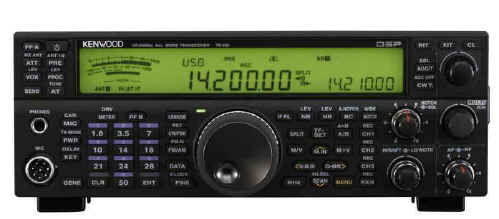
My May 2011 QST magazine arrived last week, and I was pleasantly surprised to see an excellent review of the new Kenwood TS-590S 160 through 6 meter transceiver. This radio is of special interest to us at Handihams because it uses the optional VGS-1 voice chip that gives excellent access to the menu system and the frequency display for blind users. Some listed features are:• 100 W heavy-duty design• Built-in automatic antenna tuner ( 6 ~ 160 meters )• USB & Serial DB-9 ports for PC connectivity• Kenwood ARCP-590 Control Software• Kenwood ARHP-590 Radio Host Program for VOIP• CW Auto Tune• Beat Cancel
Although the QST article does not assess the TS-590S from the standpoint of a blind user, it is an excellent overview of the radio and is well worth the read. The article has been read for our blind members and is available in the members only section of Handiham.org.
Lyle, K0LR, and I have both taken a quick look at the ARCP-590 Control Software and we think it will be blind-accessible. Of course neither of us has that rig, so we are hoping a Handiham member who owns one will do some experimenting with the various accessibility features of the radio itself and the software, and then write up the results for us to share with our readers and podcast listeners.
For another take on the TS-590S, check out the eHam reviews. These reviews are all written by users, and if you find the post by K3UL from April 19, you will be able to read what a satisfied blind ham thinks. I’ll give you some useful links at the end of this story.
I’m going to just add a few words of my own to the discussion, because I’ve noticed that some potentially helpful information is not necessarily part of the usual review process. I know that my blind friends will be interested in what the front panel of the radio looks like. Anyone familiar with radios like the TS-440SAT and the TS-570SAT will feel right at home (almost) with the front panel of the new 590. Unlike the vastly different layouts of the TS-480SAT or TS-2000, this radio is the familiar rectangular shape with the big main tuning knob near the bottom center. Just to the left is the keypad for direct frequency entry or band selection. The keypad follows the expected 3 by 4 arrangement. Buttons for the antenna tuner, power, and attenuator (among others) are in a familiar location at the upper left of the front panel. Below them are the headphone and microphone jacks. I’m beginning to think at this point that I would have to look at the model number to make sure I wasn’t sitting in front of the venerable TS-570! On the lower right corner, easy to find, is the audio gain control. The outside concentric control is RF gain, as one would expect. The upper right corner is home to the XIT/CL control, another oft-used adjustment. Between these controls and to the right of the main tuning knob are the adjustments having to do with filtering, such as the notch control, noise blanker and IF filter. Immediately to the right of the main tuning knob are the split and M/V buttons. To the lower left of the main knob is the usual frequency lock button, which doubles as the fine tuning toggle. Other familiar buttons to the immediate left of the main tuning knob are the various mode selections. This doesn’t cover everything, but it should be enough to let you know that as a blind user, you will be in somewhat familiar territory if you have already familiarized yourself with the TS-570, or to a lesser extent with the TS-440.
In a sense, radios are like other technologies in that switching between models and brands can be a problem. Imagine, for example, what would happen if the main controls in cars were not standardized. If turning the steering wheel clockwise made the car turn right in one model, but left in another, or if the brake were a pedal in one but a button on the steering wheel in another, you can imagine the disastrous consequences for anyone trying to switch between cars! So one unspoken and really significant feature in the TS-590S is this familiar feel and standardization. I’m just putting it out there as one more reason Kenwood has hit a home run with this model!
For Handiham World, I’m…
Pat Tice[email protected]
Now, here are the links I promised: (See Handiham.org.)














