Author Archive
 In the air
 August 7th, 2010 |
  Author:
 I haven’t had time since I got back from holiday to read every post of every blog that I follow, but I was glad that I caught the post about HFDL in Adam, M6RDP’s blog.

HFDL stands for High Frequency Data Link. It is also known as HF ACARS, which gives the game away as to what it is about, for ACARS stands for Aircraft Communications Addressing and Reporting System. In other words, it’s like APRS but for aircraft.
HFDL uses a proprietary protocol. Transmissions use USB with a symbol speed of 1800 baud. The modulation is 2-PSK, 4-PSK or 8-PSK with effective bit rates of 300, 600, 1200 or 1800 bits/sec. Aircraft log on to a ground station, of which there are currently 17 located around the world, each of which receives on several different and unique frequencies. The ground station assigns the aircraft a sequence ID number which is used in subsequent communications with it. HFDL is used by over 1200 aircraft operated by more than 60 airlines and allows pilots to always be able to communicate with the ground, no matter where they are located.
I downloaded the PC-HFDL software from the author G4GUO’s web page which unfortunately contains no information about the program itself. I also downloaded and installed Google Earth which is used to display the positions of the aircraft. I tuned my receiver to the frequency 6532kHz mentioned by Adam, which is one of the frequencies used by the ground station at Shannon. After a minute or so I received a loud signal that was obviously a burst of quite rapidly modulated data.
After a few minutes of head scratching when the program did not decode anything I found that it apparently sets the input level from the sound card to zero at start-up. PC-HFDL is “shareware” and this is presumably one of the annoyances authors of such programs put in to encourage users to pay up. It is more likely to encourage me to uninstall the software, but that’s another subject.
Once the program is receiving the audio from the radio, each burst results in a decoded message being displayed by the PC-HFDL program, while the aircraft position is plotted on Google Earth. You can see the results of about 10 minutes of listening on the 6532kHz frequency in the screen grab.
After 10 minutes or so of receiving the program shuts down, another limitation of using it without purchasing a registration. But 10 minutes is probably enough for most people to realize that, whilst the technology is interesting, as a pastime it would quickly get boring. Perhaps it would be possible to receive signals from more distant aircraft, but that’s about it. There’s a lot more happening on HF APRS, plus as a licensed amateur you can actively participate.
It doesn’t appear to be possible to submit position reports from PC-HFDL to a site like flightradar24.com (which I discovered from a comment to Adam’s post) which aggregates aircraft positions received by amateur enthusiasts to display a real-time radar map of all the commercial aircraft in Europe. Those position reports are sent using ADS-B (Automatic Dependent Surveillance – Broadcast) which uses a frequency of 978MHz and requires a dedicated receiver costing around £500.

The most valuable ham homepage?
Dan, KB6NU, often claims that he has the #1 ham radio blog because it tops the Google search results for “ham radio blog”. Today he posted a review of the top ham radio blogs according to Google. I was disappointed to find that mine wasn’t even mentioned.
I ran the search myself and found that Dan’s blog came third, while G4ILO’s Shack came right after it. I guess Dan didn’t mention it because the result wasn’t a blog. Curiously, my actual blog doesn’t appear as a search result in its own right at all, at least I hadn’t seen it by the time I got bored paging through the results. Google moves in mysterious ways. I wish I understood it, especially as my entire living depends on the fact that I own a website that ranks #1 for several quite profitable key phrases. The fact that this is completely out of my control gives me sleepless nights sometimes.
While I was trying various searches to see if my blog appeared I stumbled across a site called Biznut, which values G4ILO’s Shack at £23,517.27 – considerably more than the value of the contents of my actual shack! I don’t know how Biznut comes to that conclusion, but if anyone wants to pay me that they are welcome to the site. I’ll even knock off the £17.27!

VX-8GR in Prague
As regular readers will have realized from my previous post, I have been on holiday in Prague, capital of the Czech Republic. I won’t bore you with details of where I went or what I did, though I have made a few comments about the holiday over on my other blog. So I will just describe my ham radio experiences over there.
 Prague is quite a hilly city. The picture above was taken from the Botanical Gardens to the north of the city, looking towards the famous Zizkov TV Tower. This building, looking from a distance like an Atlas rocket waiting to take an Apollo mission to the Moon, is widely regarded as the ugliest building in Prague. But from a radio point of view it would be a good QTH. I quite like it. Apparently you can go up it to see the view, but that is something we have yet to do.
I took with me on my travels my Yaesu VX-8GR dual band APRS hand-held. Due to the language difficulty (I don’t speak Czech) I didn’t anticipate having many contacts with locals but I could see from aprs.fi that there was quite a lot of APRS activity in the city and I was interested to experience it first hand. I was not disappointed.
From the moment the VX-8GR was first switched on the APRS channel on 144.800MHz began receiving packets. The station list, able to hold the 50 most recently received APRS packets, filled up in about ten minutes. I was receiving position reports from fixed stations and mobiles, not only in the Czech Republic but also sometimes from Germany, Poland and Austria. I also received local weather reports, including the position of lightning strikes over a more than 300km radius and weather bulletins sent out by OK1COM. Coming from West Cumbria where you can often go a whole day without receiving anything on VHF it was quite a revelation.
I sent a greeting using APRS to Colin, 2E0XSD. By checking aprs.fi I discovered that he received it, but I didn’t receive any of the acks his client sent back, nor his reply. It appears that no-one sets up their gateways to gate messages and acks for locally heard stations from the internet to RF, so the much-vaunted APRS messaging capability is essentially useless except between stations in direct radio contact.
Later in my stay I did have a messaging QSO with OK1RQ on foot in Prague with a Kenwood hand-held. Unfortunately he was busy so I never got to meet him or any other local hams. I also received greetings via APRS from a couple of other local stations.
We needed to make some local phone calls so I purchased a pre-paid SIM card from O2 for my smartphone. This included 3G data so I was able to try the APRSISCE client from Prague. I had several messaging conversations over the internet with Lynn, KJ4ERJ, the program’s author. We also had our first voice QSO via OK0BNA, the Prague repeater, which Lynn was able to access through Echolink as it is connected to OK1OGA-L. I monitored OK0BNA on many evenings and heard only two other contacts take place on it. I did not hear any other FM contacts on either 2m or 70cm the whole time I was in Prague.
APRS works well in Prague because there is a network of several digipeaters and gateways within a radius of a few kilometres of the centre. The apartment where we were staying was just a few hundred metres from the QTH of OK1ALX who runs a digipeater and Igate, so most of the APRS signals I heard on my VX-8GR inside the apartment with the stock rubber duck were S9+.
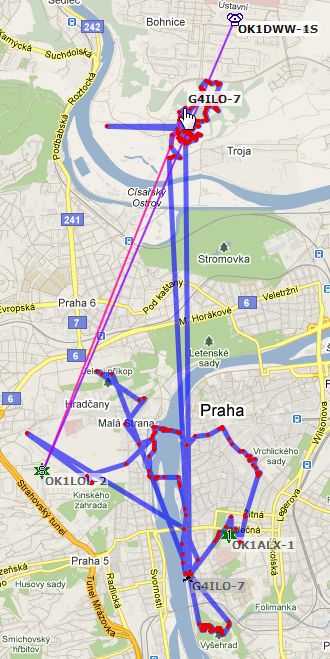 The map on the right shows the tracks of some of our outings in the seven days before our return, tracked using the VX-8GR. Although aprs.fi reportedly stores position reports for a year, it doesn’t appear to be possible to display tracks for specific periods retrospectively, and as I didn’t have a computer with me (this was supposed to be a holiday) I couldn’t capture my tracks at the time. But you can see at the top one day’s walk in the Botanical Gardens, at the bottom a walk around Vysehrad, and in the middle a circular walk we made into the city centre and back along the river one evening.
Tracking an outing from start to finish wasn’t very convenient, or even possible, because the GPS wouldn’t pick up a fix inside the apartment and I couldn’t be bothered to stand around for 3 or 4 minutes on the street outside waiting for it to get a fix before we started. Hence the big jumps from where we were staying to where we started walking.
We were on foot or using public transport and you would lose a fix whenever you got on the metro or a tram or went inside a building, and then have to wait to regain a fix when you came out. It was too much hassle. But when we were planning to just walk, it was interesting to see where my beacons were picked up, both from higher ground and from street level within the city.
I didn’t use the Windows Mobile client for tracking much at all (apart for one short evening stroll along by the river) because using the GPS reduced the phone’s battery life to an unacceptable couple of hours. However I was impressed by the battery endurance of the VX-8GR. After reducing the beacon frequency to no more than one every two minutes and using the 2.5W power setting, it lasted all day with enough power left for a couple of hours receiving in the evening. This is particularly noteworthy considering that the power saver was disabled (as it needs to be for APRS usage) and the receiver was constantly receiving and displaying APRS data. If only the GPS was quicker at finding its position after switch-on it would be just about perfect.
 Like most hams, I guess, I always keep an eye open for antennas wherever I’m travelling. Antenna-spotting in Prague is quite difficult as every building has comprehensive lightning protection consisting of tall lightning conductors looking like VHF collinears, usually connected together along the ridge of the roof. I have never seen this anywhere else.
Close to where we were staying, in a street called Vysehradska, I noticed a shop window displaying a few old radios, some vacuum tubes, what looked like a tube tester and some other electronic bits and pieces. On the roof of the building next door I spotted an MFJ multiband HF vertical antenna. I was sure that the owner of the shop must be a ham, so we decided to go in and introduce ourselves.
Inside, the place looked more like somebody’s untidy workshop than a shop. There were three elderly gentlemen, one of whom was presumably the owner. Another was leafing through a dog-eared book while the third was inspecting a vintage broadcast radio he had taken down from a shelf. They looked at us expectantly. I said “ham radio?”, anticipating that someone would understand at least that English phrase, but was met with blank stares and something we couldn’t understand in Czech.
Older people in the Czech Republic speak Russian, a legacy of the Russian occupation, so Olga then explained in Russian that I was a ham radio enthusiast and was interested in what they had in the shop. No-one introduced themselves as a licensed amateur, however. Instead, they told us that it was not a ham radio shop, but that there was one a few blocks away. Unfortunately Czech street names are confusing to non-native speakers, even to Olga. We didn’t find it. Perhaps we will on our next visit.

Misinformation
The web is a great way to get information about subjects like ham radio that you might never find if you had to rely on books. Unfortunately it’s also a good way to get wrong or obsolete information. For example, people looking for advice on how to make their first contacts via amateur satellites will find many articles that explain in great detail how to work through satellites that have long been defunct – even on the Amsat website!
There are numerous websites that explain about SSIDs used for APRS. (An SSID is the numeric suffix to the call, for example G4ILO-7, which is used to distinguish an operator’s APRS devices and also to give an idea of what type of device it is.) They are all wrong! Bob Bruninga, WB4APR, the inventor and ultimate authority on APRS, released an updated set of recommendations on 9 June this year to provide more flexibility for current usage.
The new recommendations are:
-0 Your primary station, usually fixed and message capable.
-1 Additional station, digi, mobile, weather station etc.
-2 Additional station, digi, mobile, weather station etc.
-3 Additional station, digi, mobile, weather station etc.
-4 Additional station, digi, mobile, weather station etc.
-5 Network sources (smartphones etc.)
-6 Special activity, e.g. satellite operations, camping, 50MHz etc.
-7 Handheld radios and other human portables.
-8 Boats, RVs or second mobile.
-9 Primary mobile.
-10 Internet gateways, Echolink, Winlink, AVRS, APRN, etc.
-11 Balloons, aircraft, spacecraft, etc.
-12 APRStt, DTMF, RFID devices, trackers etc.
-13 Weather stations.
-14 Truckers or other full time drivers.
-15 Additional station, digi, mobile, weather station etc.
These are recommendations and not set in stone, but they are intended to help people know what type of device or application is being used, particularly in situations where someone doesn’t have a graphical map display and can’t see an icon.
Due to these recommendations I am now using G4ILO-5 for my Windows smartphone running APRSISCE. My VX-8GR remains G4ILO-7. My main 2m station is G4ILO-0 or just plain G4ILO, and my HF station is G4ILO-1.
Of course, this page could also become out of date in the future so I am including this link back to the original document in case Bob should make any further changes.

Bill in VK
Regular readers of my blog may have detected a loss of interest in HF band operating over the last few months. I have got tired of listening to signals through the harsh noise that it is never possible completely to eliminate, I got bored with the sameness of contacts using PSK31 and I got angry at having to battle with the renegade ROS mode if I wanted to use Olivia or other digital modes. My hopes were set on Sporadic E on the VHF bands but this year’s season has been disappointing with no major openings on 144MHz extending this far north as far as I am aware.
Most of my radio activity in recent weeks has been focussed on APRS, first on establishing a VHF gateway and in the last few days getting going on HF. As I haven’t felt much like actually sitting at the radio making contacts this has proved to be a good way to make some use of my HF equipment, a mode of operation that doesn’t constantly remind me of the limitations of using attic antennas from a poor and noisy location.
I recently set up my private Echolink node again. I now have a Kenwood TM-D710 transceiver, a dual band 2m/70cm rig with dual receivers, a built-in APRS TNC and support for Echolink. However I’m still using the FT-817 on low power into a dummy load for my Echolink node for now. Before I could run a public Echolink node I would need to buy a proper dual band antenna instead of the 2m Slim Jim I’m currently using and apply for a permit from Ofcom. I’d then lose the use of the Kenwood for local 2m contacts and WOTA chasing, while the number of stations that could actually access the node due to my poor location could be counted on the fingers of one hand. So despite its built-in support it doesn’t seem worth using the Kenwood for Echolink.
The node was on yesterday afternoon and I was sitting downstairs in the conservatory with the TH-F7E having a contact with John G4LRS from near Sheffield. After I finished with John I was called by VK6FSBB (if I remember it correctly) a Foundation licensee from Australia called Bill. Bill called because he had heard that my home location was Cockermouth. He was originally from the Workington area (Maryport in fact, though he had lived in Flimby, Seaton and various other places in West Cumbria) but had moved to Australia 45 years ago. He had held a ham radio license for only eight months and I was the first contact he had ever made into this area.
Bill had played rugby for various local amateur teams and mentioned various employers he had worked for, though as an incomer to the area I didn’t know any of them. When I tried to explain where exactly I lived, I realized that the town must have changed beyond recognition from the days when Bill knew it. Things like the A66 bypass simply weren’t there.
I could have talked for longer, but dinner was nearly ready and Bill’s hand-held was only just making it into whatever repeater he was using to access the Echolink network in Australia so sometimes he dropped out after a lot of loud hissing like an old analogue mobile phone call. It may not have been a direct contact on HF and it wouldn’t count for any awards, but to be Bill’s first contact back to the place of his birth after 45 years made this VK contact a special one by any standards, one to remember long after I’ve forgotten many humdrum HF QSOs.

Rubbishing the RigBlaster
The West Mountain Radio RigBlaster has always seemed to me to be evidence that most ham radio enthusiasts have more money than sense. Why spend all that when you could easily manage using a couple of cables?
 Even if you wanted switching and level controls like you get with a RigBlaster, a sound card interface is not exactly rocket science to build, nor should it be expensive to manufacture. It’s hard to see how the cost is justified, given that the RigBlaster doesn’t contain an actual sound card.
You would think that someone forking over $200 or more for an interface would expect it to contain a sound card so as to preserve the one in the computer for normal use. But no! West Mountain Radio actually try to make a virtue out of this lack. Under the heading “Why RIGblasters don’t have built in sound chips” they state:
We designed RIGblasters to leave your computer’s sound fully functional as it was before. Plugging in any external audio device with Windows automatically disables the computers built in sound system. There is a work around’s to restore your computer’s normal function but this leaves most of the Amateur Radio sound card programs non functional. Re-configuring the few programs that can be re-configured is a chore that is not necessary with any present RIGblaster.
We do not use sound chip VOX circuits either; as any sound generated by a computer will go out over the air whether you want it to or not. We don’t want illegal transmissions of Windows melodies or “You have mail”!
Since every Amateur Radio sound card program, without exception, has provision for positive PTT control via a RS232 serial port we provide a software controlled PTT circuit in every RIGblaster, via USB, instead unpredictable VOX PTT operation.
Also the majority of Amateur Radio sound card programs work perfectly with any sound card! The only programs that require anything special are those written for transmit speech processing or digital audio over HF, and those only require a standard full duplex sound card, which is what most computers have anyway. Using transmit speech processing and digital audio is only possible with one interface on the market: the RIGblaster Pro!
What utter nonsense! The first paragraph is completely untrue, while the risk of unwanted announcements being broadcast if you use VOX is only present if you use the computer’s one and only sound card which the RigBlaster’s lack of one encourages you to do. An interface with its own sound card that you could dedicate to radio use would eliminate the risk entirely.
Whilst PTT control using a serial port is technically better than audio derived VOX, the fact that the majority of digital modes work quite happily with VOX combined with the fact that most computers don’t have serial ports make the VOX based solution by far the most convenient. And convenience is presumably what you are paying for.
What’s more, the lack of VOX forced many people who used RigBlasters to use TWO serial ports, one for the CAT control and one for the PTT, because the RTS and DTR lines, though unused by the CAT interface, were inaccessible to the RigBlaster.
At the other extreme, there are several ham websites that state that the quality of the built-in sound cards in computers is so poor that they cannot be used to operate digital modes satisfactorily. The only answer is to buy another plug-in board or use a SignalLink external sound card. I have never used a SignalLink, but the quality of all the low-cost USB sound cards I have tried has been demonstrably too poor to work with most digital modes. I have never had a problem using the built-in sound hardware, usually based on a Realtek chip. Another example of the nonsense talked about sound cards. The only problem is, each computer contains only one, which isn’t enough if you want to interface two or more radios or retain the ability to hear the sound from online video and audio.
Modern sound cards are getting very expensive due to the fact that they must perform as home cinema systems with surround sound, special effects and so on. There is a real need for more reasonably priced ham radio dedicated interfaces that include plain and simple sound cards. Currently the only products that I know of that do this are the SignalLink and the RigExpert interfaces. It’s time the RigBlaster started living up to its name and becoming a complete radio to computer interface instead of an expensive fancy alternative to a couple of home made cables.

It’s all down to your ears
There was a lot of excitement on the Elecraft email reflector over the fact that the majority of participants in the World Radio Team Championship 2010 (WRTC 2010) were using Elecraft K3s. There was even more glee when it was discovered that Scott Robbins W4PA, former Ten-Tec product manager, and Tim Duffy K3LR of Team Icom had taken K3s. This was like the President of Coca Cola serving Pepsi at his anniversary party!
 There have not been many comments now the results are out, which show that the top two teams, from Russia and Estonia respectively, were using FT-1000MPs. The USA team of N6MJ and KL9A in third place used K3s, as did K5ZD and W2SC who came fifth, but the fourth placed S50A and S57AW again used FT-1000MPs as did the Lithuanian entry in seventh place.
So let’s get this straight: the winning stations and several others in the top ten used a now obsolete radio that was introduced in 1996 which has frequently been criticized as inferior to the K3? I suspect the fact that many international competitors took K3s may have more to do with the fact that the Elecraft radio is small enough and light enough to be taken on an aircraft as hand baggage. And I suspect that the reason for the success of the stations using FT-1000MPs is that there is more to winning a contest than having a receiver with the best performance numbers.
Anyone want to swap an Elecraft K3 for an FT-1000MP? (Only joking.)














