 |
 Getting comfortable
 27 December 2025 | by

Mike Weir, VE9KK, is a regular contributor to AmateurRadio.com and writes from New Brunswick, Canada. Contact him at [email protected].
Amateur Radio Weekly – Issue 401

The Top Links of 2025
At the end of each year, I take a look back at all the previous issues of Amateur Radio Weekly, count up all the clicks, and see which links were most popular among Amateur Radio Weekly readers. It’s a fun way to look back at 2025 and I hope you enjoy!
73 K4HCK
10. You’ve been warned
When the speed reached 90 words per minute there was just me and one other guy left.
KE9V
9. Exploring the Caged Hen Delta Antenna
Derived from the Hentenna, it is a very quiet, very broadband, horizontally polarized antenna with a low take-off angle excellent for DX.
AE0EN
8. Morse Maven
Master Morse code at your own pace with simulated QSOs and decoding tools using both audio and light.
Morse Maven
7. A tragic reminder: Safety must come first in the field
A tragic accident that took the life of fellow Ham Radio operator and POTA enthusiast, Tripp Owens (N4NTO).
QRPer
6. SteppIR to stop selling antennas to the Radio Amateur market
While this type of antenna was somewhat unique say a decade ago, other manufacturers now use a similar concept.
EI7GL
5. Ham community frets in “Delete, Delete” comments
Many commenters worry about the future of Ham Radio under the FCC’s deregulatory effort.
Radio World
4. The case of the shrinking Technicians
The Technician class is concerning with a 7.2% cumulative decline starting in June 2021.
K0NR
3. The U.S. Ham Radio market: Is it dying?
The short answer is no. But it is changing.
K4FMH
2. SCAMP digital mode available in Fldigi
Simple Conversational Amateur Message Protocol (SCAMP) is a weak signal digital mode developed by Dr. Daniel Marks (KW4TI).
Amatuer Radio Daily
1. Bandplan Generator
Allows completely customizable frequency ranges and segments generating a well-designed plan for screen or print.
LY1JA
Get Amateur Radio Weekly in your inbox.
Sign-up here
Amateur Radio Weekly is curated by Cale Mooth K4HCK. Sign up free to receive ham radio's most relevant news, projects, technology and events by e-mail each week at http://www.hamweekly.com.
CQ Worked All Zones
I always have an operating goal in sight to motivate me to get on the air. On the HF bands, I followed the typical progression of getting Worked All States (WAS), Worked All Continents (WAC), and DX Century Club (DXCC). It seems that DXCC receives all the glory and attention, with many DXers pursuing the goals of working all countries, I mean entities.
Worked All Zones
 The Worked All Zones (WAZ) award is another well-known HF DX award, organized by geography. WAZ recognizes operators for establishing confirmed two-way radio contacts with stations in all 40 geographic zones defined by CQ’s official zone map. These zones divide the world into areas based on continents, regions, and specific entities (see the map below).
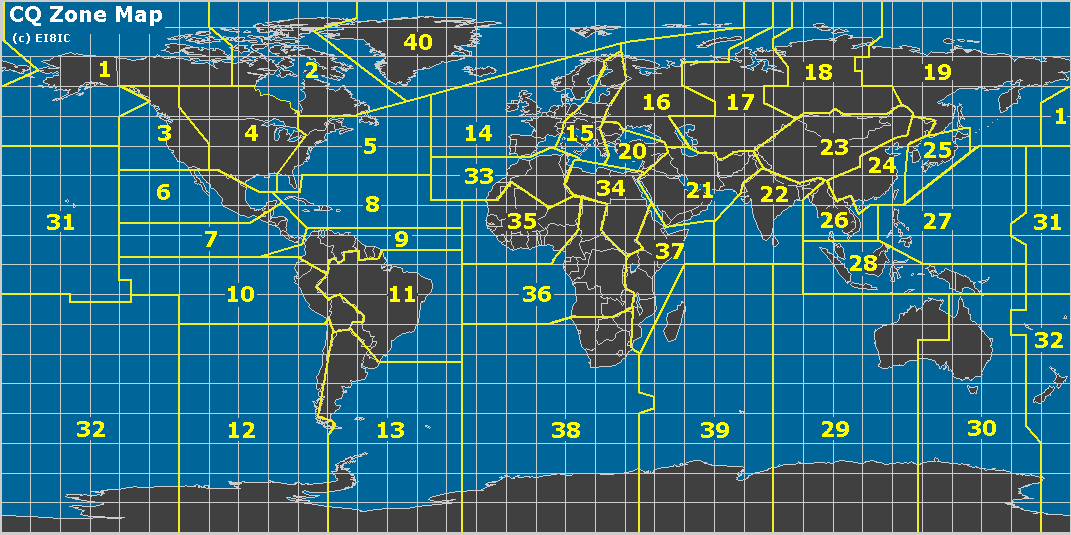
 This zone-based structure emphasizes propagation challenges and global coverage, often making certain zones (e.g., remote Asian or polar areas) particularly difficult depending on the operator’s location. If the goal is to recognize “working the world,” this approach seems much more logical to me than the DXCC award. For DXCC, the initial award is for 100 countries/entities, which may or may not be spread worldwide. DXCC recognizes political boundaries, which result in many different entities clustered in small geographic areas. For example, the Caribbean is filled with many small countries that are easily accessible from the US. Europe is also dense with countries. The WAZ award requires you to work stations all over the world.
My Journey
I had not paid too much attention to working all zones until recently. I began tracking them and making a point to chase the ones I needed. Of course, working DX already produced contacts with many zones around the world. I have a mixture of SSB, CW, and digital (FT8) contacts, so I was focused on the Mixed award. My HF station is modest, running 100 watts to an end-fed wire antenna. Towards the end, I was missing two zones: Zone 22 – Southern Zone of Asia (India, Bangladesh, etc.) and Zone 34 – Northeastern Zone of Africa (Sudan, South Sudan, Egypt, etc.).
I used FT8 to work these last two zones, working VU3RGB (Zone 22) in August. Then I finally worked Z81D (Zone 34) on 30m yesterday. I was pleased to get him in the log, and I quickly submitted the contact to Logbook of The World. The confirmation came through the same day. Very nice! Similarly, I submitted the confirmed contacts via LoTW to the WAZ awards manager (Jose/N4BAA), and the certificate arrived via email almost immediately. (I paid $8 to LoTW to transfer the confirmations and $12 to WAZ to process the award.)
This leads to the question of “what’s next?” in terms of operating goals.
73 Bob K0NR
The post CQ Worked All Zones appeared first on The KØNR Radio Site.
Bob Witte, KØNR, is a regular contributor to AmateurRadio.com and writes from Colorado, USA. Contact him at [email protected].
AI Analysis of Logs for Antenna Directionality
Where is this dang thing pointing?

I have made a lot of contacts when portable but I paper log those and they rarely make it back into my electronic logs, so nearly all of these logs are from my station operation and 95% of those have been on the 80m OCF.
Gemini provided me with this evaluation
- 80m: Broad "figure-8" pattern with maximum radiation broadside to the wire at 55° (NE) and 235° (SW).
- 40m: A "four-leaf clover" pattern. Your strongest performance is at 45° and 315°, perfectly hitting Europe and the US Midwest.
- 20m: Four sharp lobes that pull closer to the wire axis. Your log shows high-gain "spikes" at 35° (Europe) and 330° (West Coast).
- 10m: Eight or more very narrow lobes. Your 10m contacts are extremely directional, primarily clustering at 50° and 130°.
- 80m, Broad Figure-8, Strongly Biased NE/SW: Contacts cluster at 55° and 235°. Coverage is broad but noticeably stronger toward the Northeast US/Canada. High: Matches the broadside radiation of a dipole.
- 40m, 4-Leaf Clover, 4 Strong Peaks: Contacts are highly concentrated at 45°, 135°, 225°, and 315°. You are successfully hitting Europe and the US West Coast via these distinct lobes. Very High: Confirms the 2nd harmonic pattern.
- 30m, Distorted 6-Lobe, NW Dominant: You have a massive cluster toward the Northwest (330°). This band is notoriously asymmetrical on an OCF antenna, and your log shows you've "found" the dominant lobe. Moderate: The theoretical pattern is messy; your data simplifies it.
- 20m, 4 Long, Sharp Lobes, Sharp Spikes: Contacts are extremely localized at 35° (Northern Europe) and 330° (Washington/Oregon). This matches the narrowing of lobes as frequency increases. High: Matches the "tilting" of lobes toward the wire axis.
- 17m, 6 Very Sharp Lobes , Strategic Clusters: Contacts cluster at 13° (New York/New England) and 225° (Mexico). The narrowness of these clusters indicates you are operating within high-gain "fingers" of radiation. High: Confirms the 5th harmonic pattern.
- 10m, 8+ Needle-Thin Lobes, Pinpoint DX: You have specific, isolated successes at 50° and 130°. Many other directions show "nulls" where no contacts were made. Moderate: High-QSB (fading) makes this band less predictable.
Conclusions
I did look at some tools for evaluating directionality based on logs such as https://qsomap.org but the ones I found are visual and require manually evaluating the graphics. There are likely other tools that would do what the AI is doing but I'm not aware of them yet. Please leave a comment if there are log analysis tools that you use for this purpose.
Richard Carpenter, AA4OO, is a regular contributor to AmateurRadio.com and writes from North Carolina, USA. Contact him at [email protected].
AmateurLogic 212: Christmas 2025
AmateurLogic.TV Episode 212 is now available for download.
N5ZNO’ First POTA Activation. 2.5 Gbps Fiber to The Shack. New and Classic Christmas Fails.
The video is a “Christmas edition” of AmateurLogic.TV, featuring hosts George, Tommy, Emile, and Mike discussing various amateur radio-related topics and personal updates.
Here’s a summary of the key segments:
Introductions and Personal Updates (0:26-4:25): The hosts greet viewers for the Christmas episode. Tommy shares he’s on vacation until January 2nd and is enjoying more radio time (1:11-1:40). Emile discusses building his radio shack, including installing a fiberglass mast and planning internet connectivity (2:03-2:34). Mike talks about recent heavy snowfall and preparing for Christmas (2:53-3:22). George mentions being on vacation for the rest of the year (3:55-4:14).
AI’s Impact on Tech Prices (4:27-5:23): Mike shares a CNET article about how AI is driving up the prices of computer components, particularly RAM, reminiscent of past memory price spikes due to factory fires.
Tommy Gun Antenna Launcher (5:39-6:10): The hosts showcase the “Tommy Gun,” an antenna launcher designed to quickly deploy wire dipole or windom antennas using combustible ammunition like black powder or WD40.
N5ZNO’s First POTA Activation (6:18-13:50): Tommy (N5ZNO) recounts his first “Parks on the Air” (POTA) activation. He set up his MFJ 1898 antenna and Icom 705 radio in his truck due to cold weather, making 20 contacts in about 25 minutes. He also explains his paper logging process and how he uploaded his logs to QRZ.com and Parks on the Air (POTA) database (14:37-16:42).
FCC Allocates 60 Meter Worldwide Amateur Band (18:47-20:00): News is shared about the FCC allocating a new amateur radio spectrum in the 60-meter band for worldwide use on a secondary basis, approved at WRC15. This band is available to general class license holders and above, with a maximum bandwidth of 2.8 kHz.
Grandpa Rap (20:02-20:52): The hosts briefly play a “grandpa rap” song related to amateur radio, humorously suggesting they should stick to their day jobs.
2.5 Gbps Fiber to the Shack (21:04-35:10): Emile provides an update on his shack build, detailing his network upgrade to 2.5 Gbps internal LAN speeds with 10 Gbps fiber uplinks using Ubiquiti’s Flex 8 series switches (21:47-26:50). He also shows the internal wiring for power outlets and discusses plans for external lighting, security, and various antenna setups, including a 500ft sky loop antenna and a hitch mount for a 36-foot mast (27:00-34:50).
Christmas Fails Compilation (38:49-41:30): A compilation of humorous Christmas-themed fails.
Tim Tam Cookies (43:08-43:51): A brief mention of Tim Tams cookies, bringing back memories for the hosts.
Christmas Gift Ideas for YLs (43:54-50:00): A humorous segment where Emil suggests various Icom amateur radio equipment as “gifts” for spouses, often with comical misunderstandings of what the spouse might actually want. Mike presents some unique gift ideas.
George Thomas, W5JDX, is co-host of AmateurLogic.TV, an original amateur radio video program hosted by George Thomas (W5JDX), Tommy Martin (N5ZNO), Peter Berrett (VK3PB), and Emile Diodene (KE5QKR). Contact him at [email protected].
RAC Winter contest was a bust!!

Mike Weir, VE9KK, is a regular contributor to AmateurRadio.com and writes from New Brunswick, Canada. Contact him at [email protected].
RAC Winter contest was a bust!!
Mike Weir, VE9KK, is a regular contributor to AmateurRadio.com and writes from New Brunswick, Canada. Contact him at [email protected].
 Ham Radio Deluxe |
 W5SWL Electronics |
 Ham Radio Prep |
 KB3IFH QSL Cards  Hip Ham Shirts  HamRadioAuctions HamRadioAuctions Reliance Antennas Reliance Antennas Enigma Shop Enigma Shop |  morseDX  Ni4L Antennas  R&L Electronics R&L Electronics antennas.us antennas.us Ears to Our World Ears to Our World |
- Matt W1MST, Managing Editor
